View Attack Path Rules
Every attack path comes from a rule. The Rules view tells you why an attack path exists and what you can do about it, so one fix can close many attack paths at once.
Navigate to: Risk Management > Attack Path (Beta) > Rules
Who writes the rules: The Qualys Threat Research team.
How Rules and Attack Paths Relate
A rule is a set of conditions on assets and findings. When your assets and findings match a rule, ETM creates an attack path for each match.
- Rule: The Qualys Threat Research team writes conditions on assets and findings.
- Match: ETM checks your account data, and your assets meet the conditions.
- Result: ETM creates one attack path for each match. One rule can have many attack paths.
The Rules view shows only the rules that have detected at least one attack path in your account. The number of rules reflects your environment, not the full set of rules.
Tour of the Rules List
Click Rules next to Attack Paths to open the list. The numbers in the screenshot match the list below.
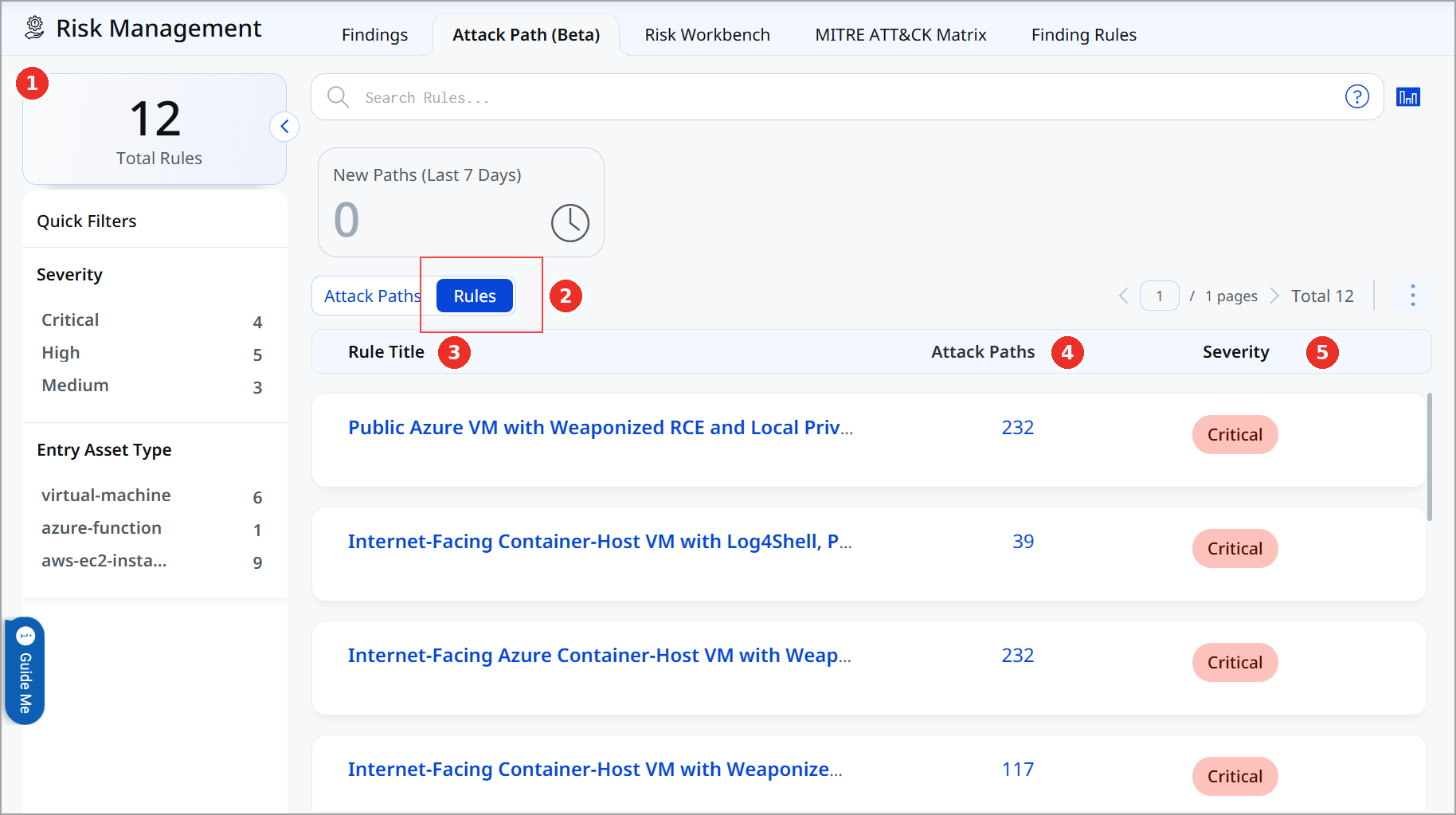
- Total Rules: The number of rules detected in your account. Use Quick Filters below it to narrow the list by Severity and Entry Asset Type.
- Rules: Switches the page to the list of rules.
- Rule Title: The name of the rule. Click it to open the rule details.
- Attack Paths: The number of attack paths this rule found. Click the number to open those attack paths.
- Severity: How serious the rule is: Critical, High, or Medium.
You can also use the search bar to find rules with QQL, for example, by rule title, severity, or contributing factor.
View Rule Details
Click a rule title to open its details. Each section answers a question:
| Section | Question it answers | What you see |
|---|---|---|
| Description | What does this rule detect? | A summary of the risk the rule looks for. |
| Contributing Factors | What makes it risky? | The types of risk that meet the rule, such as Credential Theft, Data Exfiltration, Lateral Movement Potential, and Remote Code Execution. |
| Rule Overview | How big is the problem? | The scope of the rule and its impact. |
| Mitigation | What should I do? | The actions we recommend to reduce the risk. |
| Attack paths | Where does it happen? | The attack paths this rule found in your account. Click one to open its graph. |
Sort your work by rule, not by path. Read the Mitigation section first: one fix can often break many attack paths found by the same rule.