Getting Started with TruConfirm
TruConfirm is an automated exposure-validation layer integrated within the Qualys Enterprise TruRisk Management (ETM) platform that safely confirms whether prioritized exposures are actually exploitable in production. TruConfirm:
- Validates real-world exploitability on live production assets using safety-first, benign techniques
- Converts scanner findings into decision-grade evidence: exploitable now vs not exploitable/ blocked.
- Operationalizes the result as a native experience inside Qualys ETM.
TruConfirm is available as a separate tab within the ETM user interface. To access it, connect with your Technical Account Manager (TAM) or Qualys support.
Prerequisites
Before deploying TruConfirm, confirm the following prerequisites are in place:
- An active Qualys ETM subscription with VMDR enabled.
- For third-party scanner findings, configured connectors for Tenable (io/sc), Rapid7 InsightVM, or Microsoft Defender for Endpoint within ETM.
- TruConfirm requires network reachability from the ETM validation engine to the target assets on the relevant service ports.
- Out-of-Band validation: Target assets must be able to initiate outbound DNS queries and HTTP requests to the Qualys-hosted listener infrastructure. If egress filtering is in place, work with your network team to permit callbacks to the designated Qualys listener endpoints.
- TruConfirm operates in an agentless mode for network-reachable services.
- An Option Profile is created in VM.
TruConfirm maintains a continuously updated payload library. Not every CVE in the VMDR catalog has a corresponding validation payload. The ETM interface indicates per-finding validation support. CVEs without a payload remain at their original TruRisk™ score and are unaffected by TruConfirm processing.
Understand TruConfirm Validation
Understanding the four-stage loop before you run your first validation will help you interpret the result correctly.
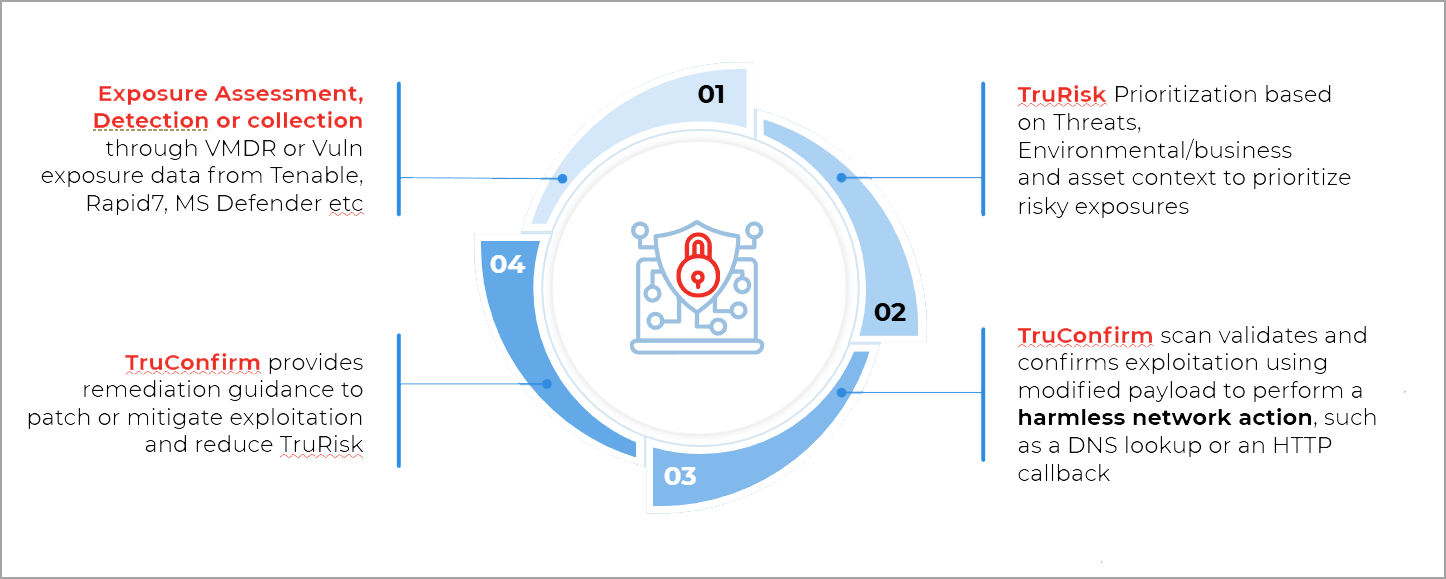
TruConfirm selects the appropriate validation method: Direct Response, Cryptographic Verification, or Out-of-Band, based on the CVE's characteristics and how the target is expected to respond. You do not need to select a method manually.
For more information, refer to the TruConfirm Validation Workflow section.
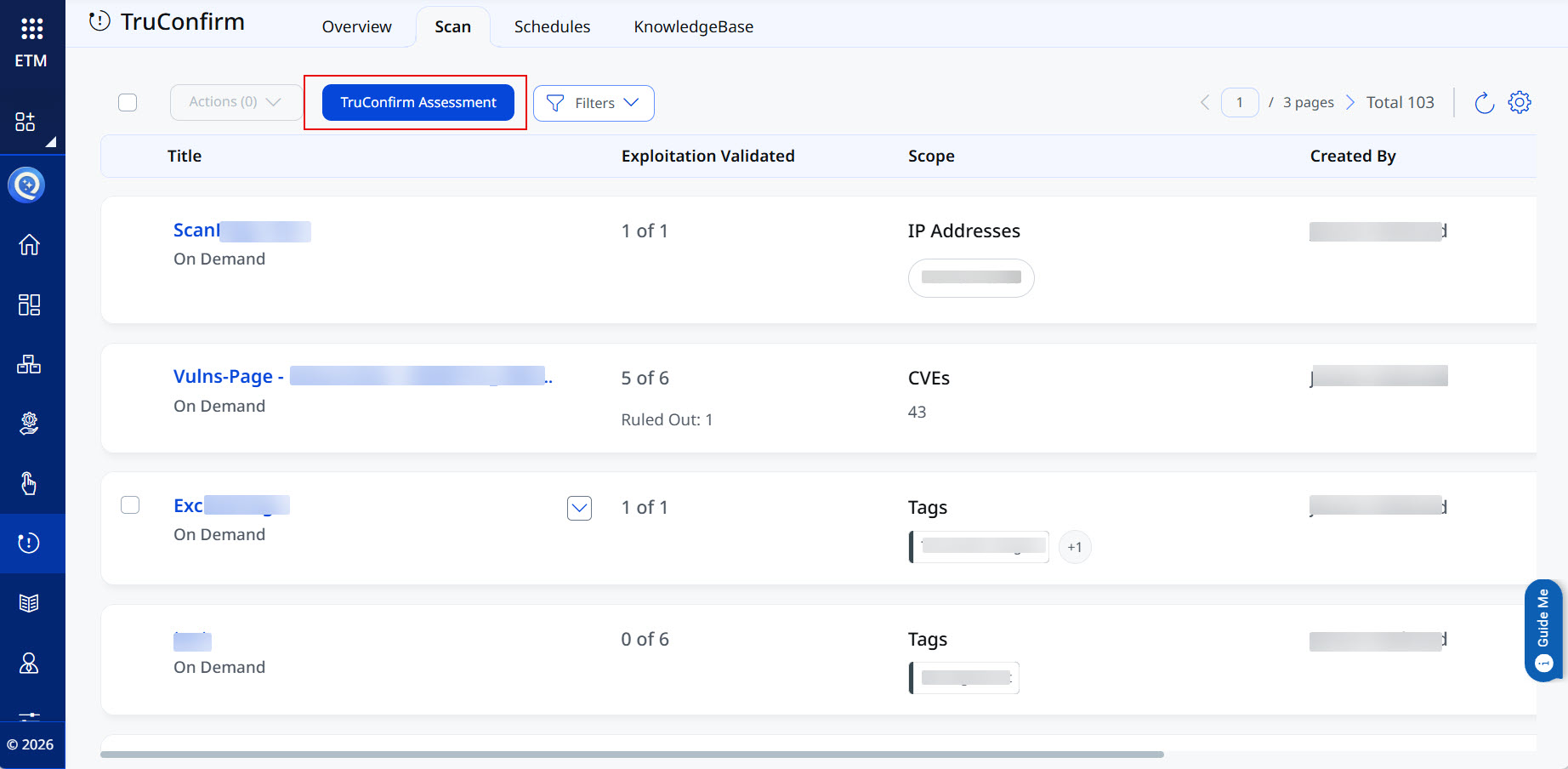
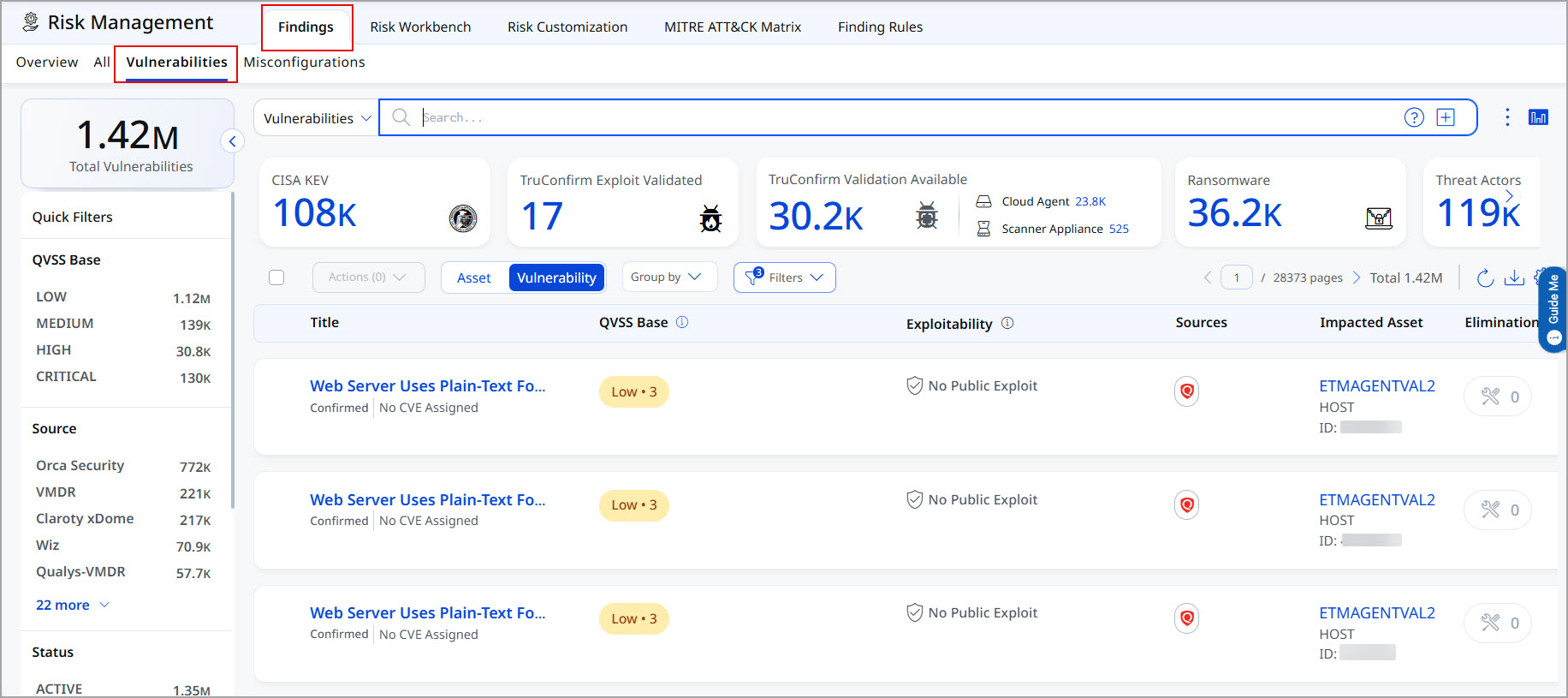
Where Can You Launch TruConfirm Scans From
- From the left-navigation panel, go to TruConfirm tab > Scan tab:
- From the left-navigation panel, go to the Risk Management tab > Findings > Vulnerabilities tab.
How TruConfirm Validation Works
The Qualys TruConfirm validation process operates through a structured, three-phase detection architecture that is specifically designed to safely test live production environments without destabilizing them.
Here are the three stages of the process:
- Phase 1: Pre-Check (Target Verification / Pre-Query Verification) Before any active exploit payload is generated or transmitted, TruConfirm performs a mandatory "Pre-Check" to confirm that the vulnerable service or configuration is actually present.
- How it works: The scanner actively fingerprints the target using benign, non-intrusive identification techniques, such as banner grabbing or HTTP fingerprinting. For example, if it is testing for a vulnerability in Mockoon, it will look for the specific (?)(mockoon) signature in the HTTP response headers.
- The Safety Factor: This step prevents "spray and pray" tactics. If the Pre-Check fails to positively identify the expected software, the validation is immediately aborted and no payload is ever sent, minimizing unnecessary network noise.
- Phase 2: TruConfirm Check (Safe Payload Injection) Once the target environment is successfully verified, TruConfirm injects a precise, non-destructive payload to validate whether the vulnerability is exploitable.
- Benign Engineering: These payloads are modified versions of real exploits engineered by the Qualys Threat Research Unit (TRU). Instead of executing a malicious "warhead" (like deleting files or deploying ransomware), the payload requests a harmless, observable operation, such as a DNS lookup or an HTTP callback.
- Zero Footprint: All checks are strictly read-only and ephemeral, meaning no files are created or modified, and no residual artifacts or processes are left behind.
- Phase 3: Analysis & Confirmation In the final phase, the scanner determines whether the exploit was successful by looking for deterministic proof of execution through two main paths:
- In-Band Validation (Direct Response): The scanner parses the immediate HTTP responses to look for specific command outputs (like uid=0(root)) or verifies a pre-computed cryptographic hash to mathematically prove the code executed successfully.
- Out-of-Band Confirmation (OAST via Silent Verifier): For "blind" vulnerabilities that do not return visible output, the scanner relies on capturing an asynchronous network callback. If the target system initiates a controlled outbound connection back to an ephemeral Qualys listening port, it provides definitive proof that the command executed and that egress traffic was permitted.
TruConfirm selects the most appropriate validation method based on the specific CVE characteristics and the environment's expected response behavior. Following are the three methods, each designed for a distinct class of vulnerability:
What are Modified Benign Payloads?
The term Modified Benign Payload refers to a purpose-built interaction, not a traditional exploit. Traditional exploit code is engineered to gain unauthorized access, elevate privileges, or exfiltrate data. A Modified Benign Payload is engineered exclusively to elicit a vulnerability-specific, observable response that confirms or denies a reachable execution path.
TruConfirm End-to-End Validation Workflow
TruConfirm is positioned after initial detection and before active remediation, acting as the final verification filter that determines actual exploitability. The workflow proceeds in four stages:
Stage 1. Multi-Source Ingestion
TruConfirm is vendor-agnostic within the ETM ecosystem. It ingests exposure data and validates vulnerabilities discovered by Qualys VMDR, Tenable.io / Tenable.sc, Rapid7 InsightVM, and Microsoft Defender for Endpoint.
Stage 2. Exploitability validation
TruConfirm runs modified benign payloads against each unvalidated detection using the appropriate validation method (Direct Response, Cryptographic Verification, or OOB/Silent). Payloads are selected based on the CVE characteristics and the target's expected response behavior. This stage produces a definitive validation status. The following statuses are getting displayed:
- Validation Available - TruConfirm has the CVE within its database and can run a modified benign payload to confirm the vulnerability on the asset under the scope of the scan.
- Exploit Validated - TruConfirm Scan has run on the required asset(s), and it has been found that the vulnerability actually exists on the asset(s).
- Exploit Ruled out - TruConfirm scan has returned a negative result for the existence of the vulnerability.
- Exploit Inconclusive - Due to a technical reason, TruConfirm is unable to return whether a related vulnerability/exploit is present or absent.
Stage 3. QVSS Score Update
The QVSS score is adjusted based on the exploit validation outcome.
- If a vulnerability is validated, the QVSS score is elevated, indicating a higher risk and the need for prioritized remediation.
- If the vulnerability is ruled out, the QVSS score remains unchanged at its original level.
Stage 4. ETM Remediation Guidance
ETM provides remediation guidance to patch or mitigation exploitation.
QVSS Score Changes Before and After TruConfirm Scans
The Qualitative Vulnerability Scoring System (QVSS) gives each vulnerability a score that reflects its risk to your environment. Before a TruConfirm scan, that score relies on theory alone. After a TruConfirm scan, it reflects what is actually happening in your systems.
This document explains how a QVSS score behaves at each stage. It covers what the score represents before a scan, how TruConfirm adds real-world exploitability evidence, and how the score may change once that evidence is applied.
QVSS Score Before a TruConfirm Scan
Before TruConfirm runs, a QVSS score is built on the vulnerability's base CVSS score alone. A base CVSS score tells you how severe a vulnerability could be in theory. It is a useful starting point, but it carries some limits:
- The score is the same whether or not the vulnerability can be exploited in your specific systems.
- It does not change based on live threat activity or your existing controls.
- A high base score may overstate risk, and a lower base score may understate it.
At this stage, the QVSS score represents theoretical severity. It tells your team what a vulnerability could do, not what it is likely to do in your environment.
How TruConfirm Scans Add Real-World Evidence
A TruConfirm scan tests whether a vulnerability is genuinely exploitable in your environment. Rather than relying on severity alone, it gathers evidence about the actual exploit path an attacker would use.
TruConfirm introduces this evidence into the scoring process in three ways:
- It validates exploitability.
It checks whether the vulnerability can be exploited as deployed, not just whether the affected software is present. - It accounts for your controls.
It considers compensating controls and configurations that may block or limit an exploit. - It produces actionable context.
It turns a theoretical severity rating into an evidence-based view of real risk.
The result is a QVSS score that moves closer to your true exposure. This sharpens prioritization and helps your team direct remediation where it matters most.
How the QVSS Score May Change After a Scan
Once TruConfirm applies its evidence, the QVSS score settles into one of three outcomes. Each reflects what the scan found.
- Exploited: Score Increases
When TruConfirm confirms that a vulnerability is exploitable in your environment, the QVSS score increases.
- The vulnerability is more dangerous than its base score suggested.
- It moves up in priority for remediation.
- Your team gains clear justification for urgent action.
- Ruled Out: Score Decreases
When TruConfirm determines that a vulnerability is not realistically exploitable, the QVSS score decreases.
- Compensating controls, configurations, or other environmental factors reduce the practical risk.
- The vulnerability remains real, but its urgency in your environment is lower.
- Your team can safely defer it and focus effort elsewhere.
- Inconclusive: Score Unchanged
When TruConfirm cannot confirm or rule out exploitability, the QVSS score remains unchanged.
- The evidence is not strong enough to justify a change.
- The score holds at its base value until clearer evidence is available.
- The vulnerability remains visible for future assessment.
Factors Behind the Risk Calculation
Our risk calculation depends on factors like:
- Threat intelligence signals: Current indicators of whether a vulnerability is being actively exploited in the wild.
- Environment-specific exploitability evidence: Insight into whether the vulnerability can realistically be exploited given your existing controls, configurations, and deployment.
- Signal strength and confidence: The reliability and weight of the evidence, which determines how much the score should shift.
When more than one signal is available for the same vulnerability, the system gives precedence to the strongest evidence. Confirmation of active exploitation always takes priority over signals that suggest lower risk. This safety-first approach ensures genuine threats are never overlooked because one source was inconclusive.
Summary
TruConfirm transforms a QVSS score from a theoretical rating into an evidence-based measure of real risk.
- Before a scan: The score reflects theoretical severity based on the base CVSS score alone.
- After a scan: The score reflects validated, environment-specific exploitability evidence.
This shift helps your team:
- Identify vulnerabilities that pose genuine, immediate risk.
- Deprioritize vulnerabilities that are not realistically exploitable in your environment.
- Maintain a clear, evidence-based view of your true risk posture.
The result is more efficient prioritization, faster response to real threats, and a stronger overall security posture.