File Integrity Monitoring Release 4.9.5
October 19, 2026
This release adds hourly scheduling for correlation rules, daily updates to failure reasons for FIMC Stopped assets, start and end dates to scheduled event reports, new container search tokens, and a correlation rule fix.
Enhancement
Hourly Scheduling for Automated Incidents
What Changed For You
You can now schedule a correlation rule every hour, so you can track and investigate FIM events related to incidents closer to real time.
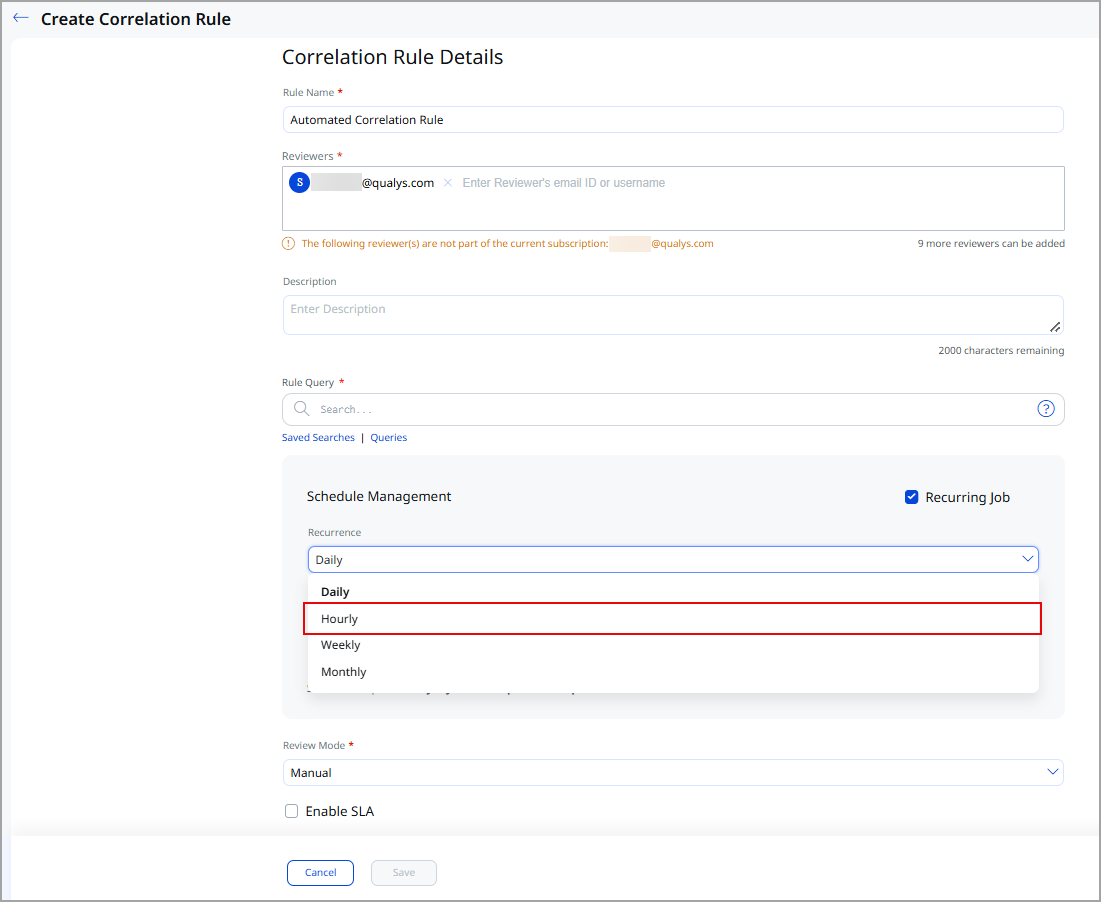
Previously, you could schedule a recurring correlation rule only on a daily, weekly, or monthly basis. The recurring schedule now includes an Hourly option, and the rule repeats every hour from the start date and time you specify.
The Hourly option is available in the Schedule Management section of the Incidents > Correlation Rules > Create Correlation Rule page when you select Recurring Job.
For more information, refer to the FIM Online Help.
Enhancement
Faster Troubleshooting with Daily Failure Reason Updates
What Changed For You
You can now view the latest failure reasons for assets with the FIMC Stopped agent status every day, so you can troubleshoot and resume file integrity monitoring on those assets sooner.
Previously, FIM ran the Custom Assessment and Remediation (CAR) script, which identified these failure reasons every Saturday. FIM now runs the script daily, so the Failure Reasons column on the Assets > Real Time Assets tab shows updated failure reasons every day.
For more information, refer to the FIM Online Help.
Enhancement
Start and End Dates in Scheduled Event Reports
What Changed For You
You can now see the exact period that a scheduled event report covers, so you and your auditors can verify the reporting period for audit and compliance purposes.
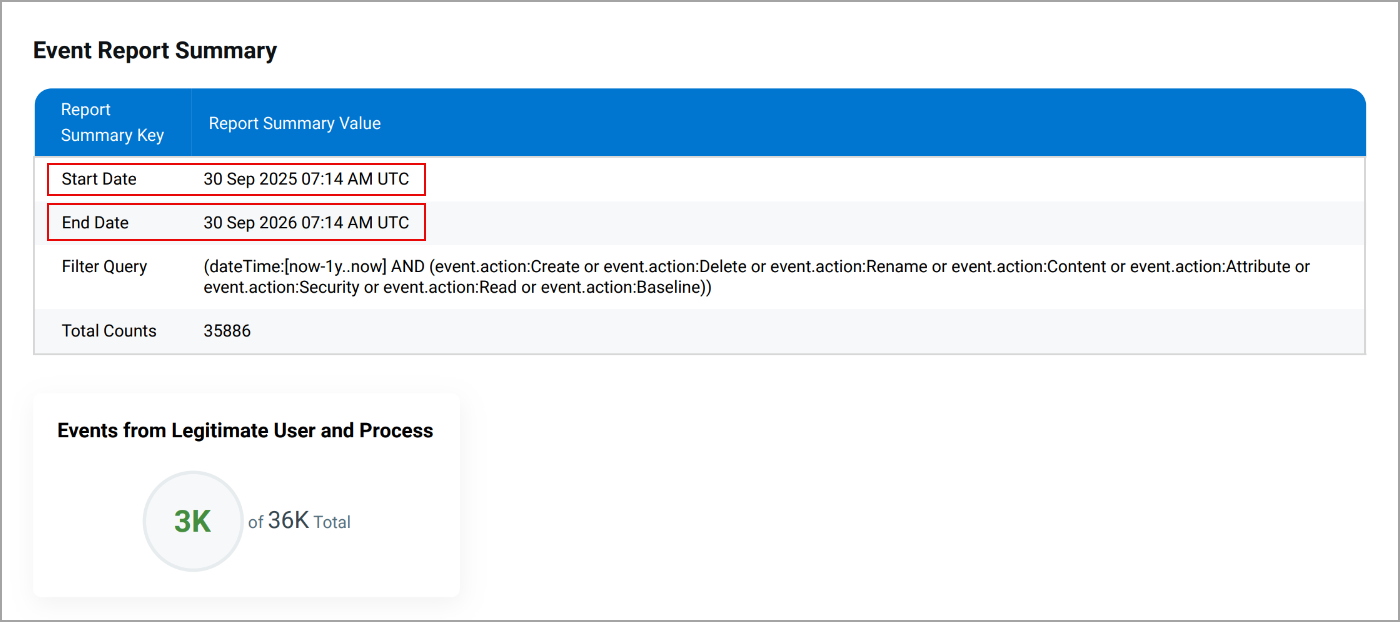
Previously, scheduled event reports displayed the report generation date and the filter query, but not the start and end dates of the events included in the report. Scheduled event reports now display Start Date and End Date in the report summary, along with Filter Query and Total Counts. FIM derives these dates from the date range in the report's filter query and displays them in UTC.
The Start Date and End Date fields are available in the PDF, CSV, and HTML formats for event reports you schedule from Reports > Report Rules > Create Report Rule, with Events as the report source.
The Start Date and End Date fields are not available for Assets as the report source.
For more information, refer to the FIM Online Help.
Token
New Tokens in FIM
| Token | Tab | Description |
|---|---|---|
|
container.cluster.name |
Events > All Events Events > Ignore Events Events > Event Review |
Search for container-based events by the name of the cluster from which the event originated. Example:
|
|
container.cluster.namespace.name |
Events > All Events Events > Ignore Events Events > Event Review |
Search for container-based events by the name of the namespace from which the event originated. Example:
|
For more information, refer to the FIM Online Help.
Fix
Fixes
The following reported and notable customer issues are fixed in this release:
| Component/Category | Description |
|---|---|
| FIM - Correlation Rules |
We fixed an issue where reusing the query for a saved correlation rule caused a validation error. This issue occurred because FIM saved the actor.actualUsername and actor.auditUsername tokens as actor.auditUserName, which query validation did not recognize. Saved correlation rules now display the actor.actualUsername token, and you can reuse their queries without errors. |