Manage Your Data Inputs
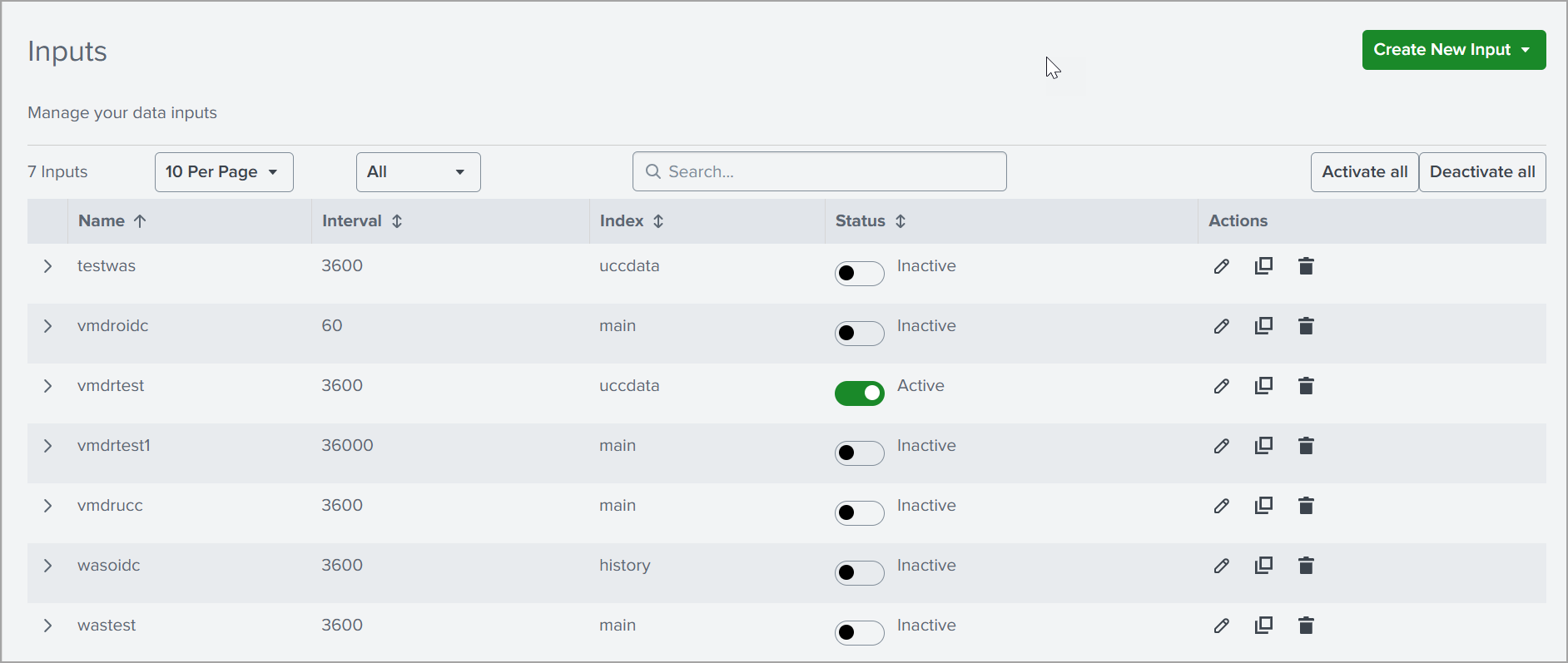
The Inputs page helps you configure and manage how Qualys data is collected and sent to Splunk. You can control collection frequency, storage location (index), and turn data ingestion on or off as needed.
On this page, you can view all the available inputs configured to collect data from Qualys.
-
Create New Input: Allows you to create a new input configuration.
-
Records per page: Helps you filter, search, and control how inputs are displayed.
-
Activate all / Deactivate all: Enables or disables all inputs at once.
-
Name: Shows the name of each input.
-
Interval: Indicates how frequently data is collected.
-
Index: Specifies where the data is stored in Splunk.
-
Status: Shows whether the input is active or inactive, with a toggle to change it.
-
Actions: Provides options to edit, clone, or delete inputs.
You can create inputs for the following apps: