Configure Environment Variables
To configure the environment variables on the GitLab Console, perform the following steps:
- On the GitLab console, go to Project/Repository settings > CI/CD > Variables.
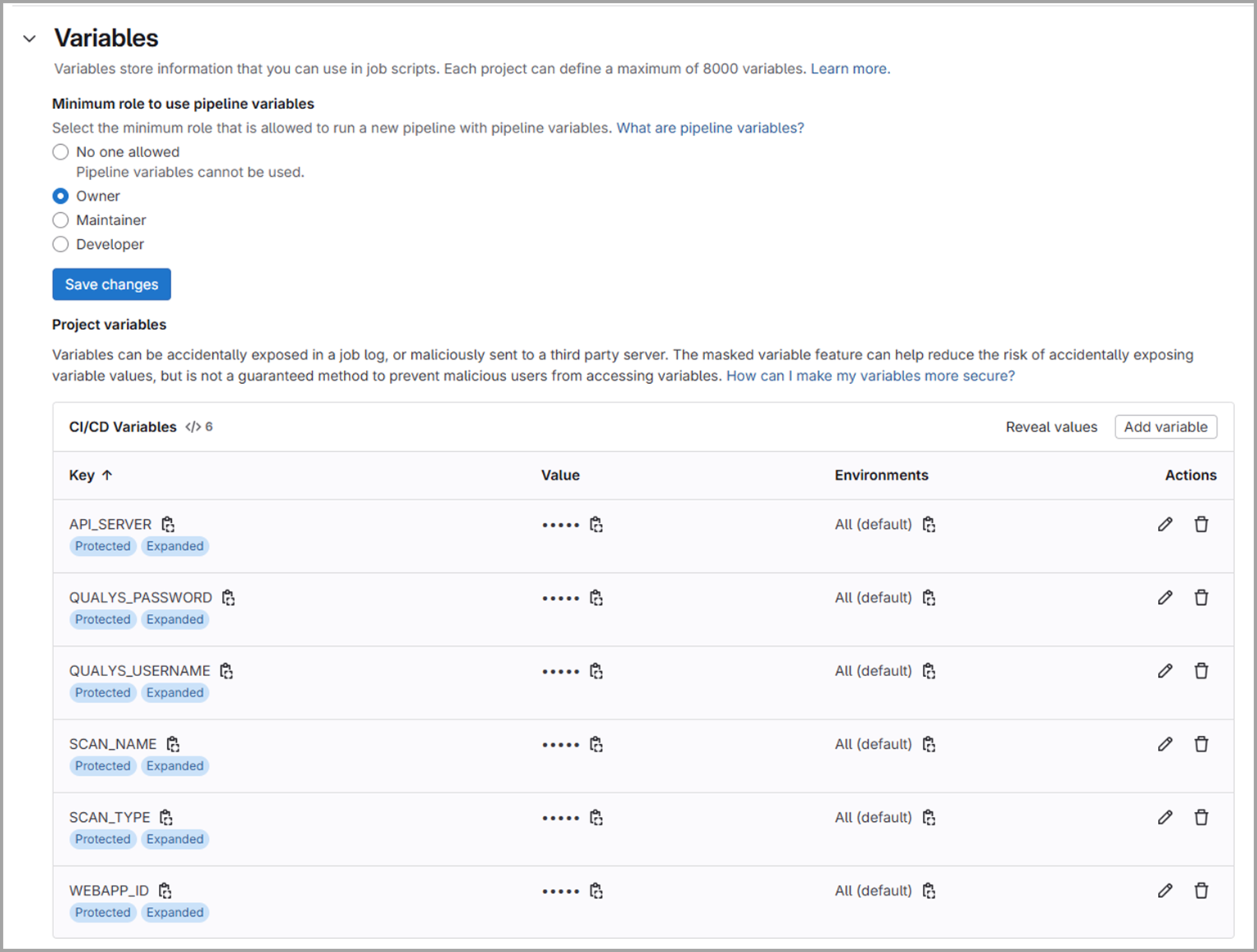
-
Provide the required details for environment variables.
-
All the parameter values given in the following table are case-sensitive.
-
To create a user-level client, see Set up Token-based Authentication from UI.
Parameter Name
Mandatory/ Optional
Parameter Type
Description
PLATFORM
Mandatory
String
This parameter specifies the qualys platform.
Enter platform name. For example - US1
To identify your platform, refer to Identify your Qualys platform page.
AUTH_TYPE
Mandatory
String
Use this parameter to specify the authentication type. BASIC, OAUTH, or IDP are supported. QUALYS_USERNAME
Conditional Mandatory (Mandatory when AUTH_TYPE=BASIC, otherwise Optional) String
Use this parameter to specify the Qualys username for BASIC authentication. QUALYS_PASSWORD
Conditional Mandatory (Mandatory when AUTH_TYPE=BASIC, otherwise Optional) String
Use this parameter to specify the Qualys password for BASIC authentication.
CLIENT_ID
Conditional Mandatory (Mandatory when AUTH_TYPE=OAUTH or AUTH_TYPE=IDP, otherwise Optional) String
Use this parameter to specify the client ID for OAuth authentication.
CLIENT_SECRET Conditional Mandatory (Mandatory when AUTH_TYPE=OAUTH or AUTH_TYPE=IDP, otherwise Optional) String
Use this parameter to specify the client secret for OAUTH authentication.
WEBAPP_ID
Mandatory
Integer
Use the web application ID that you want to scan.
SCAN_NAME
Mandatory
String
Enter a name for the scan. The timestamp gets appended automatically.
SCAN_TYPE
Mandatory
Text
Specify the scan type -VULNERABILITY or DISCOVERY.
AUTH_RECORD
Mandatory Text
Specifies the authentication method to use for the Web application scan.
Use one of the following values:
useDefault: If you choose this value, the default authentication record is used for the web application login in the WAS application.
other: If you choose this value, a specific value for AUTH_RECORD_ID is used.
none: If you choose this value, the scan runs without authentication. But the scanner cannot log in to the application where authentication is required.It is the default value.
AUTH_RECORD_ID
Conditional Mandatory (Mandatory when AUTH_RECORD=other) Integer
Use AUTH_RECORD_ID to authenticate the web application scanning.
If you are using this parameter, then you must set the AUTH_RECORD parameter value to other.
OPTION_PROFILE
Mandatory Text
Use one of the following values:
useDefault: If you choose this value, the default Option Profile is used in the WAS application. It is the default value for the parameter.
other: If you choose this value, a specific OPTION_PROFILE_ID is used for web application scanning.OPTION_PROFILE_ID
Conditional Mandatory (Mandatory when OPTION_PROFILE=other) Integer
Use the option profile ID of your choice.
You must set the OPTION_PROFILE parameter value to other to use this parameter.
CANCEL_OPTION
Optional Boolean
Use one of the following:
true: Set the parameter value to true to specify the scan end time.
false: The scan runs until it is completed. This is the default value.CANCEL_HOURS
Conditional Mandatory (Mandatory when CANCEL_OPTION=true) Integer
Use a numeric value to specify scan duration in hours.
If the scan duration exceeds the set hours, it gets terminated.You must set the CANCEL_OPTION parameter value to true to use this parameter.
SEVERITY_CHECK
Optional Boolean
Use one of the following values:
true: This checks the SEVERITY_LEVEL of a vulnerability during a scan.
false: The SEVERITY_LEVEL is not checked.SEVERITY_LEVEL
Conditional Mandatory (Mandatory when SEVERITY_CHECK=true) Integer
Specify the severity level of the vulnerability. You can use any values between 1-5. A severity level of 1 is considered the least harmful, and a severity level of 5 is considered the most harmful.
You can enter only one value for severity level as a scan parameter during a scan. The scan job fails if it detects a vulnerability of a specified severity level or greater.
For example, if you set the severity level to 3, the scan fails if a vulnerability of severity level greater than or equal to 3 is found during the scan.FAIL_ON_SCAN_ERROR
Optional
Boolean
Use true or false as the parameter value.
true: When the GitLab plugin initiates the scan and the value for this parameter is set to true, but the WAS application cannot complete the scan, then the scan fails.
false: If you set the parameter value to false, the scan job does not fail due to an incomplete scan. The default value for this parameter is false.WAIT_FOR_RESULT
Optional
Boolean
Use one of the following values:
true: The plugin waits for the scan results. The default value for this parameter is true.
false: The plugin does not wait for the scan results.INTERVAL
Optional
Integer
Use a numeric value to set the polling interval in minutes to collect the scan data, such as 5.
By default, it is 5 minutes.TIMEOUT
Optional
Input Parameter
Use a numeric value (in minutes) to set the timeout duration for checking scan results. The default value for TIMEOUT is 350 minutes.
By default, the project timeout is set to 1 hour. You can modify this value in your project settings.When both a project timeout and a runner timeout are set, the lower value takes precedence.
EXCLUDE
Optional
Integer
Use the QIDs separated by a comma to exclude them from the scan.
For example: 1234, 1345. These QIDs are excluded based on vulnerability severity level failure conditions.
FILE_TYPE
Optional Text Specify the file format for the scan report. For example. PDF. TOKEN_URL Conditional Mandatory (Mandatory when AUTH_TYPE=IDP, otherwise Optional) Variable The token endpoint URL of your Identity Provider. Required when AUTH_TYPE is IDP. IDP_SCOPE Optional Variable Specifies the scope to request from the IDP token endpoint.
IDP_AUDIENCE Optional Variable
Specifies the audience to request from the IDP token endpoint. -
Authentication Type
WAS Integration with GitLab supports the following three authentication types. You need to enter the authentication type in the AUTH_TYPE variable.
The fields displayed below depend on the selected authentication type.
Basic Authentication
Enter Basic Authentication Details (If Selected)
Provide the following details:
- Username – Enter the Qualys username.
- Password – Enter the corresponding password.
OAuth Authentication
Provide the following details:
- Client ID – Enter the OAuth client ID.
- Client Secret – Enter the OAuth client secret.
API authentication is supported using Qualys-managed tokens via a user-level client. To create a user-level client, see Set up Token-based Authentication from UI.
Identity Provider (IDP) Authentication
Enter Identity Provider (IDP) Details (If Selected)
Provide the following details:
- Client ID – Enter the IDP client ID.
- Client Secret – Enter the IDP client secret.
- Token URL – Enter the URL of your Identity Provider (IDP) token endpoint.
- Scope – Enter the scope to request from your Identity Provider.
- Audience – Enter the audience value configured for your Identity Provider.
To generate an IDP-based authentication token, see API Authentication using IdP Provider Token.