Vulnerability Remediation for Linux
You can create a remediation job for the Linux patches. The vulnerabilities identified on assets are remediated by deploying a job that includes missing patches.
You can remediate or fix such vulnerabilities by creating a remediation job from the Eliminations tab or adding the vulnerabilities to a new or existing patch job in the Vulnerability Management, Detection and Response (VMDR) application.
You can select the vulnerabilities from the VMDR Vulnerabilities tab or the VMDR Prioritization tab.
Using VMDR Vulnerabilities tab
In the VMDR application, navigate to the Vulnerabilities tab, select the required Linux vulnerabilities, and from the Actions menu, click View Risk Elimination.
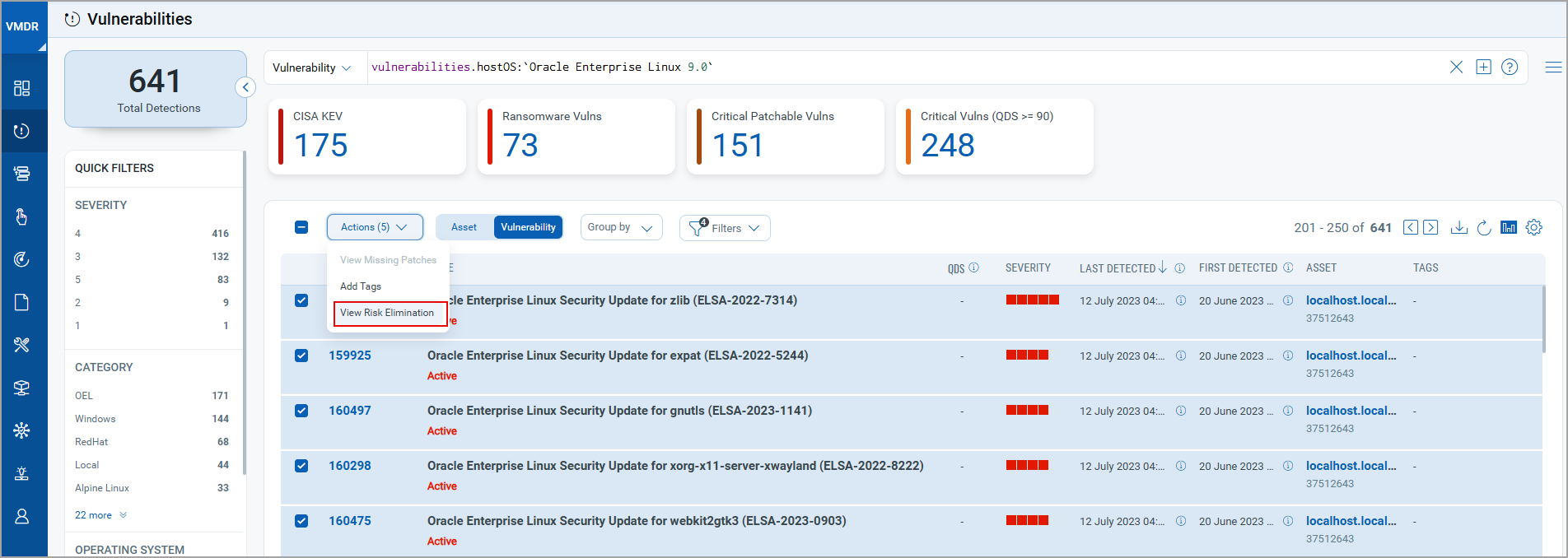
On the Eliminations tab, select the vulnerabilities and click Remediate Now. The Create Linux Deployment page will be displayed.

To complete the steps for job creation, refer to Creating Patch Job for Linux Assets.
Using VMDR Prioritization tab
You can create the remediation job by following either of the following two methods:
- Navigate to the VMDR > Prioritization tab. On the Reports tab, start prioritization, select at least one asset tag, and click Prioritize Now. Select the required Linux vulnerabilities and from the Actions menu, click View Risk Elimination. You are navigated to the Eliminations tab.
On the Eliminations tab, select the vulnerabilities and click Remediate Now.

- On the VMDR Prioritization tab, you can also select the vulnerabilities and directly click Patch Now, or from the Quick Actions menu, select Add to New Job or Add to Existing Job. The Create Linux Deployment page will be displayed.

To complete the steps for job creation, refer to Creating Patch Job for Linux Assets.