Scanner Appliance Communication
As an extension of the Qualys Cloud Platform, a Qualys Scanner Appliance must be able to communicate with the Qualys Cloud Platform that manages it to operate. This management contact occurs via an outbound call from the scanner appliance to the Qualys Cloud Platform, using an encrypted HTTPS connection on port 443. Typically, the scanner must contact five Platform service URLs. This communications requirement applies to Qualys Scanner Appliances (physical) and Qualys Virtual Scanner Appliances.
By default, this management contact occurs every three minutes (though this is configurable), as the scanner appliance calls home to provide health updates/heartbeats to the Platform; to request any available software or signature updates from the Platform; to learn if any work (that is, scan jobs) has been requested of it; and to upload scan result data, if applicable.
Successful communication between an appliance and the Platform requires that your network services and controls are configured properly to allow for this communication. This includes:
-
Network interface physical (or virtual) connection
-
Appropriate IP address configuration for the scanner (static or DHCP)
-
DNS name resolution of the QualysGuard platform resources
-
Routing
-
ACLs and firewall rules
-
Proxy settings, possibly including authentication/authorization
All of these must be properly configured throughout the entire path to ensure the success of this management communication.
Scanner Management Service URLs
The specific services on the Qualys Cloud Platform that must be reachable by your appliance(s) differ depending on which Platform your Qualys subscription is provisioned on.
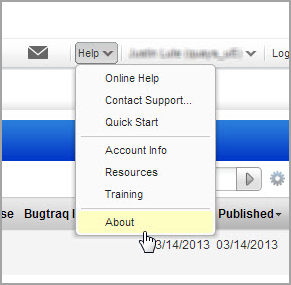
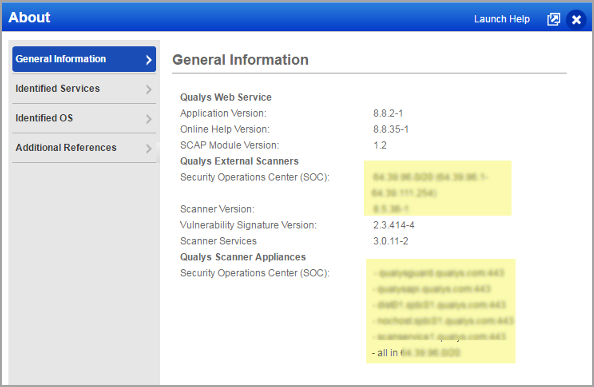
The specific Platform URLs and IP target range that the scanner must be able to reach are available in the UI for your Qualys subscription by selecting Help > About.
On the General Information tab, you'll see a section called Qualys Scanner Appliances. This tells you the service URLs and IP range(s) that your appliances must be able to reach
Good to Know
A scanner appliance may be configured with a single NIC, in which case that NIC is responsible for both management communications with the Platform and scanning target systems. Alternatively, a scanner may be configured in a dual-NIC split networking configuration, where the ethO or LAN interface is responsible for scanning target systems, while the ethl or WAN interface is responsible for the management connection to the Platform.
For more details on this split networking configuration and for other scanner troubleshooting assistance, please see Scanner Appliance Troubleshooting and FAQs.