Qualys Scanner Overview
Explore the highlights and workflow of Qualys scanners to understand how they seamlessly integrate into your environment, perform comprehensive assessments, and deliver continuous visibility into your security posture.
Using a Scanner Appliance allows organizations to:
-
Proactively identify and address vulnerabilities within their internal and external networks.
-
Comply with industry regulations and security standards.
-
Enhance their overall cybersecurity posture.
Basic End-to-End Workflow of Qualys Scanners
The following image shows the end-to-end workflow of Qualys Scanners:
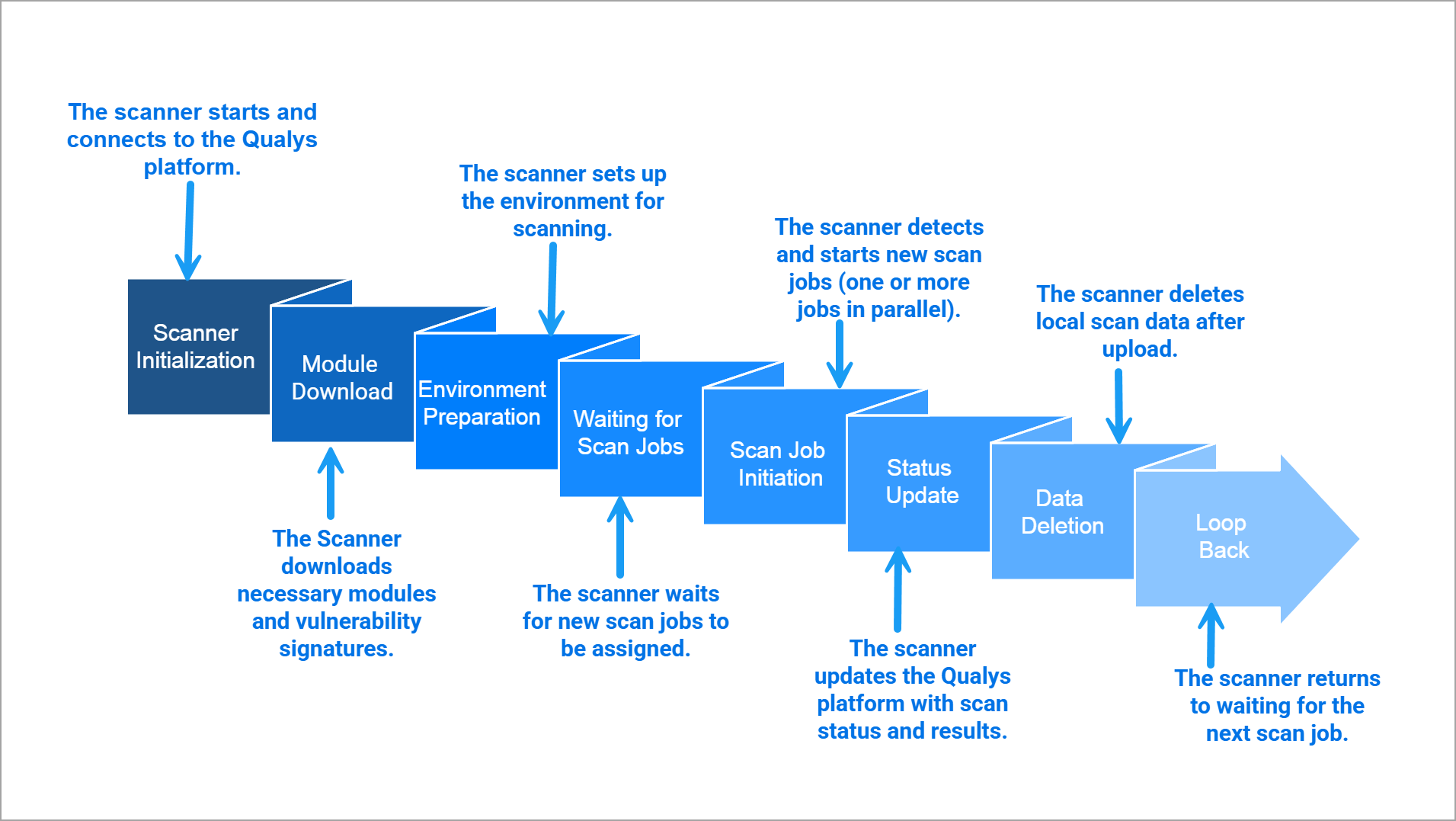
Basic Scanning Workflow of Qualys Scanners
The following image shows the basic scanning workflow of Qualys Scanners:
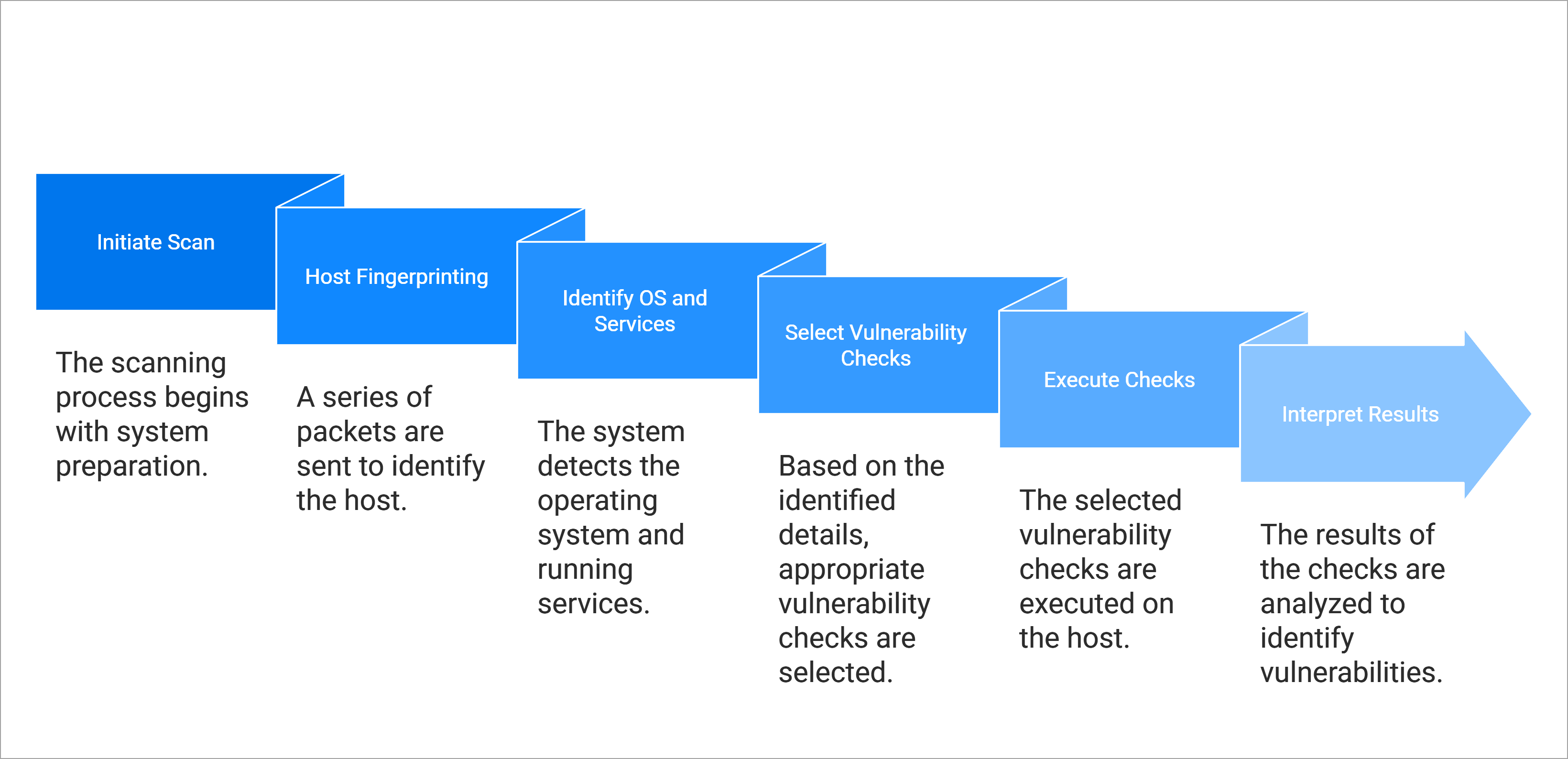
Key Features
The following are the standard features of Qualys Scanners:
- Security
- Highly secure. No listening ports or services. All ports are closed.
- Qualys Scanner communicates over HTTPS with designated and authorized Qualys platform endpoints only. It makes outbound connections only to preconfigured Qualys platform endpoints. There are no inbound connections allowed to the scanners.
- All scan data is always protected inside an LUSK2 encrypted filesystem and cleaned up after scan completion.
- Communication and data upload to Qualys platforms over a secure and encrypted HTTPS connection using TLS up to version 1.3.
- Scanners continuously maintain security based on their environment by applying security updates from virtualization, cloud, and Linux vendors, ensuring they remain supported and secure.
-
-
IP-based scans are supported regardless of the type and location of the scan target, whether it is on-premises, in the cloud, or in a data center.
-
Support is available for any asset with an IP address, including physical, standard virtual, or cloud targets, databases, IP phones, and IoT devices. All scanner types support scanning of these asset types.
-
IPv6 support is provided for IPv6-enabled environments. This includes scanning of IPv6 enabled assets and connectivity of scanners in IPv6 network environment to Qualys platform endpoints over IPv6
-
Multiple Vaults are supported, including Secret Server, Lieberman, Arcon, Wallix, Hitachi, CyberARK (PIM/AIM), CA Access Control, CA PAM, Quest, and Azure Key Vault.
-
Support is available for Thales HSM, HashiCorp, and BeyondTrust PBPS.
-
-
Type of Scans Supported on Scanners
Qualys supports the following types of scans:
Scan Type Description VM (Vulnerability Management) Identifies and assesses vulnerabilities across assets. PC (Policy Compliance) Evaluates systems for compliance with internal policies and external regulations. WAS (Web Application Scanning) Scans web applications for security vulnerabilities. MAP (Asset Discovery and Network Mapping) Discovers and maps devices across the network. PCI (Payment Card Industry Compliance) Performs scans required for PCI DSS compliance validation. - Understanding Scanner Capacity, Scan Weight and Capacity Consumption per Scan Type, per IP
(Scan Units × Number of IPs) × Number of parallel scan jobs/slices should always be less than the scanner's available capacity to ensure optimal performance.
Scan Type Weight and Capacity Consumption per IP VM (Vulnerability Management) 2 capacity units per IP.
Total required cost to the scanner per job = 2 x number of IPs per job.
PC (Policy Compliance) 4 capacity units per IP.
Total required cost to the scanner = 4 x number of IPs per job.
MAP (Network Mapping) 100 capacity units fixed per job WAS (Web Application Scanning) 70 capacity units fixed per job PCI (Payment Card Industry Compliance) 2 capacity units per IP.
Total required cost to the scanner per job = 2 x number of IPs per job.
- Types of Scanning
- Internal or Intranet Scanning
- Scanning of assets deployed in the internal LAN and VLAN within the organization.
- This scanner is intended for targets with internal IPs, allowing visibility into risks inside the network perimeter.
- Perimeter or External Scanning
- This scanner is deployed in DMZs and data centers to scan the infrastructure from the outside with an attacker's perspective.
- Intended for targets with external or public-facing IPs. For example, the public-facing login page of a web application.
- Internal or Intranet Scanning
-
Adaptability
-
The scanners are designed to be adaptable to any environment, ranging from physical appliances to virtual appliances, including cloud and containerization.
-
Across various form factors, scanner appliances adapt to your needs from a small business to a large enterprise.
-
-
Scanner Sizing and Performance
- Recent scanner versions, whether physical or virtual, are equipped with 16 GB of swap space, ensuring high performance during heavy workloads.
- The size of the latest virtual scanner versions can be increased to up to 32 total CPU cores, 64 GB RAM, and 2TB disk space to meet any scanning capacity requirements.
-
Latest Physical Scanner Specifications:
Component Configuration Options CPU Cores 12 cores, 16 cores RAM 32 GB, 64 GB Power Supply Single, Dual Storage 500 GB SSD Performance Focus Fast processing and high performance - Virtual scanners can be expanded to match the performance of physical scanners.
- When creating a virtual scanner, regardless of the virtualization platform, the ratio of CPU(vCPU for virtualized environment) and Memory must be 1:2 or 1:3.
- Scanners are capable of regulating and controlling the workload during intense scanning scenarios to maintain stability and performance.
- Scanners can conduct prolonged scans for several days with minimal impact on performance.
- Scanners can simultaneously scan 400+ IPs without encountering any failures.
Related Topic