Network Settings in IPv6-only Mode
When in IPv6-only mode, configure the scanner network interface either with manual or automatic IPv6 network configuration. Automatic IPv6 is used by default.
Configure the Scanner with Automatic IPv6
Automatic IPv6 is the default network configuration for a scanner in IPv6-only mode. When using automatic IPv6, we assign IPv6 addresses through router advertisement.
Even with automatic IPv6 configuration, you have the option to configure manual DNS resolvers for your scanner. If configured manually, IPv6 DNS1 and IPv6 DNS2 resolvers take precedence over the DNS resolvers acquired from DHCPv6 and RADVD.
Configure the Scanner with Manual IPv6
If automatic IPv6 address assignment is not available on your network, you must enable the scanner with a manual IPv6 address. One of these configurations is required.
For a valid network configuration, you should configure at least one IPv6 DNS resolver.
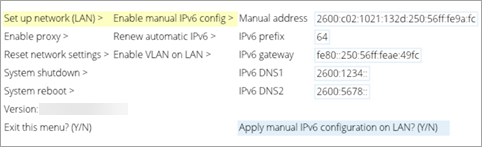
Perform the following steps to configure the scanner with manual IPV6:
- Access the Scanner Console.
- Navigate to Set up network (LAN), and then Enable manual IPv6 config.
- Press the Right arrow and enter the following settings: Manual address, IPv6 prefix, IPv6 gateway, IPv6 DNS1 and IPv6 DNS2.
- When you are done entering settings, select Apply the manual IPv6 configuration on LAN?
- Type Y to confirm (or N to cancel).