Authentication - Web Application
On this page, select the type of authentication and credentials to be used to authenticate against a web application. You can select the either Form Record or OAuth2 Record.
Type - Form Record
Select Form Record.
Record Information
Select the form authentication type.
For choosing a form authentication type, see Type of Authentication.
Standard Login: Enter one set of credentials for standard login form authentication.
Custom: Enter fields other than the standard login credentials, for example, customerID.
For the Standard Login and Custom authentication, enter the Login URL to specify the page that needs authentication. This prevents unnecessary crawling and helps with faster login request submission. The Login URL must be within the defined crawl scope. URLs that are outside the crawl scope are not used during authentication. You can enter a maximum of 2048 characters.
Send authentication over SSL only: For the Standard Login and Custom authentication, select this check box if you want us to attempt authentication only when the login form is submitted over SSL, that is, through a link that uses https://.
User Name: For the Standard Login authentication, enter the user name used to sign in through the standard login form of the application. You can enter a maximum of 256 characters.
Password: Enter and confirm the password for the user name.
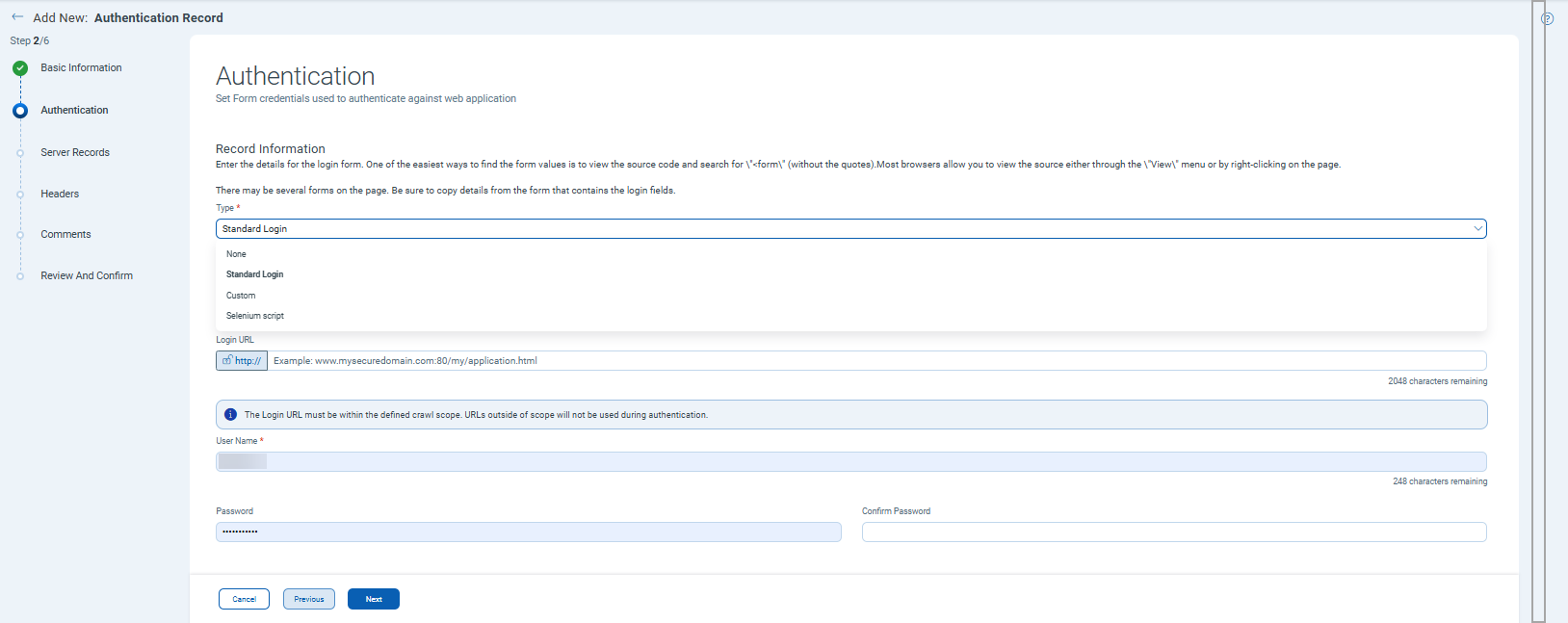
Selenium Script: If you want our service to attempt authentication using a Selenium IDE script. You must upload a valid Selenium script. Click Browse to upload a script from your local file system, or drag and drop the file into the Add selenium scripts window.
You can quickly update the username and password for a login form in the authentication record itself. We support parameters for username and password in the Selenium script. Just add @@authusername@@ and @@authpassword@@ in the selenium script and then upload it in the Qualys WAS Authentication Record.
Select the Add credentials to Selenium Script check box and provide the username and password. During the scan, we will replace @@authusername@@ and @@authpassword@@ with this username and password. For more information, see Use Selenium Script.