Search Lists
A search list is a customized group of vulnerabilities and QIDs that you can use in TAS.
You can add a search list to the option profile to define a search criteria for scanning web applications. Using the search list, you can include or exclude specific vulnerabilities from the a scan.
You can also add a search list to a Report Template to help prioritize which vulnerabilities should be addressed first. For example, you can build a report containing only XSS vulnerabilities or only the most severe vulnerabilities.
The Search Lists tab under Configuration manages all the search lists to which you have access.
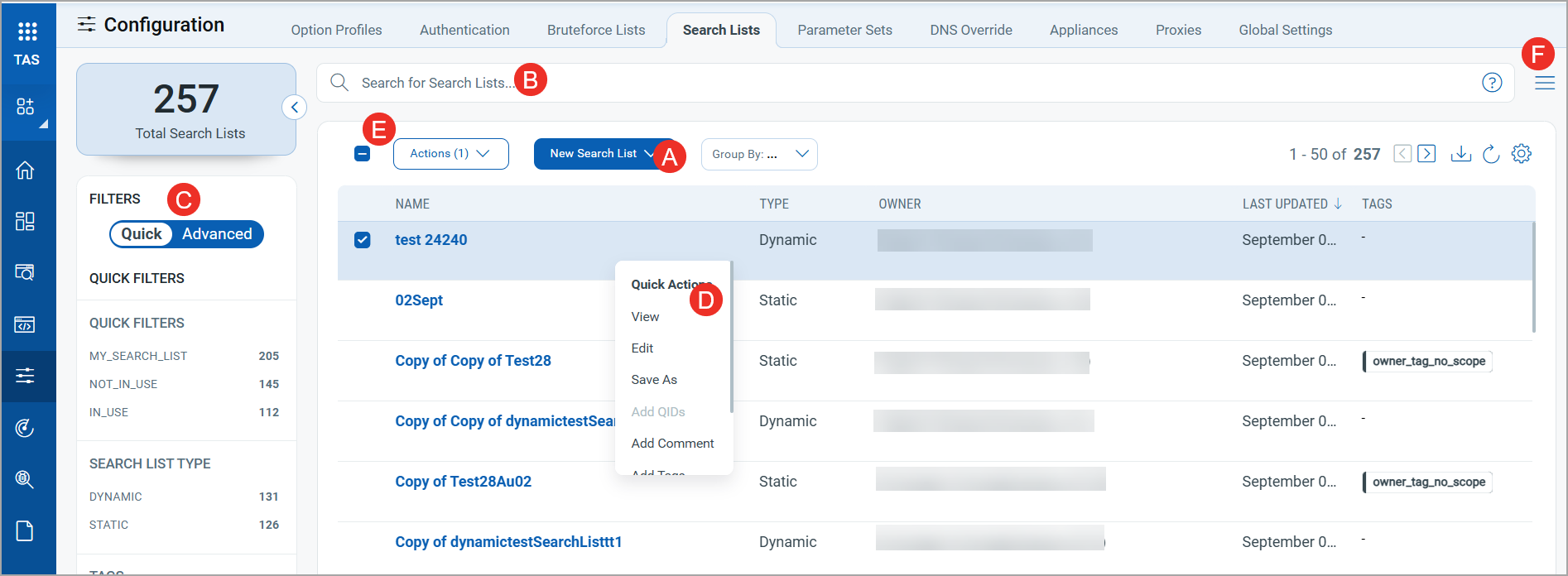
The tab displays the search list name, type of search list, owner of the search list, and the tags added for a search list.
From the Search Lists tab, you can:
- Create a new search list by using the New Search List button.
- To create a static search list, see Create a Static Search List.
- To create a dynamic search list, see Create a Dynamic Search List.
- Search for search lists using QQL (Qualys Query Language) queries. For details, see Search Tokens for Search List.
- Use filters in the left pane to search for search lists by quick filters, type of search list, and tags added to the search list. For details, see Search List - Use Filters.
- Use Quick Actions to perform the following actions on an individual search list:
- Use the Actions menu to take following actions on multiple search lists:
-
Use the Search Actions menu to view the recent searches, save search queries added in the search box, and manage saved searches.
PCI Search List
The PCI Search List is a dynamic search list provided with your subscription for scanning against Payment Card Industry (PCI) requirements. It includes the QIDs flagged for PCI compliance together with all Information Gathered QIDs published for Web Application Scanning and API Security. Because the list is dynamic, QIDs published later are included automatically.
The PCI Search List is read-only. You can use it in your scans and reports, but you cannot edit or delete it. It is already included in the PCI Option Profile. See Option Profile.
Related topics