TotalAppSec Release 2.7 | Web Application Scanning Release 1.27
March 20, 2026
On some platforms, TotalAppSec will be upgraded directly from 2.5 to 2.7, and Web Application Scanning (WAS) will be upgraded from 1.25 to 1.27.
In such cases, TotalAppSec 2.7 includes all changes from 2.6, and WAS 1.27 includes all changes from 1.26, in addition to the updates introduced in the respective releases.
For details about the changes in TotalAppSec 2.6 and Web Application Scanning 1.26, refer to the TotalAppSec Release 2.6 | Web Application Scanning Release 1.26.
 TotalAppSec
OpenAPI Compliance Terminology Updates
We have updated terminology related to API compliance to improve consistency and reflect the adoption of OpenAPI specifications.
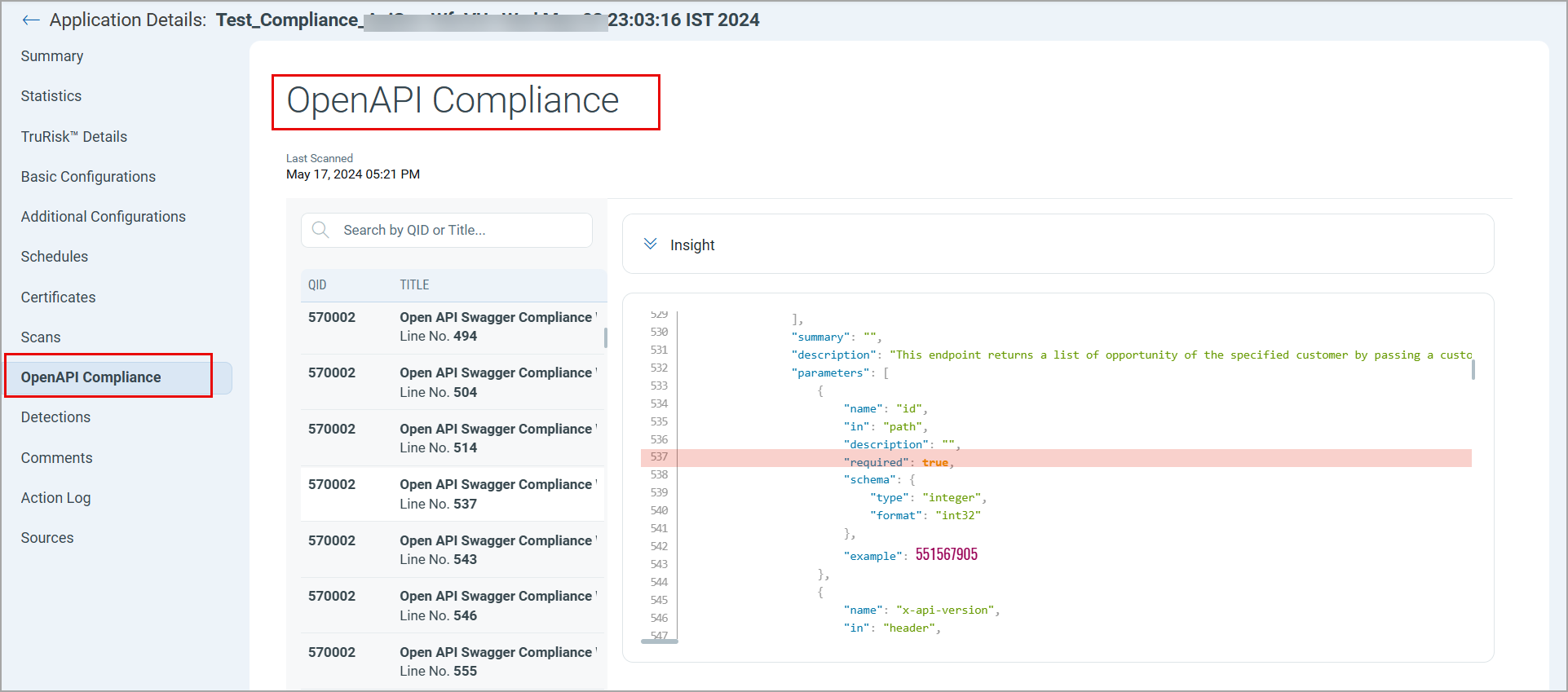
In the Application Details window for API assets, the API Compliance tab is renamed to OpenAPI Compliance. The page header now displays OpenAPI Compliance.
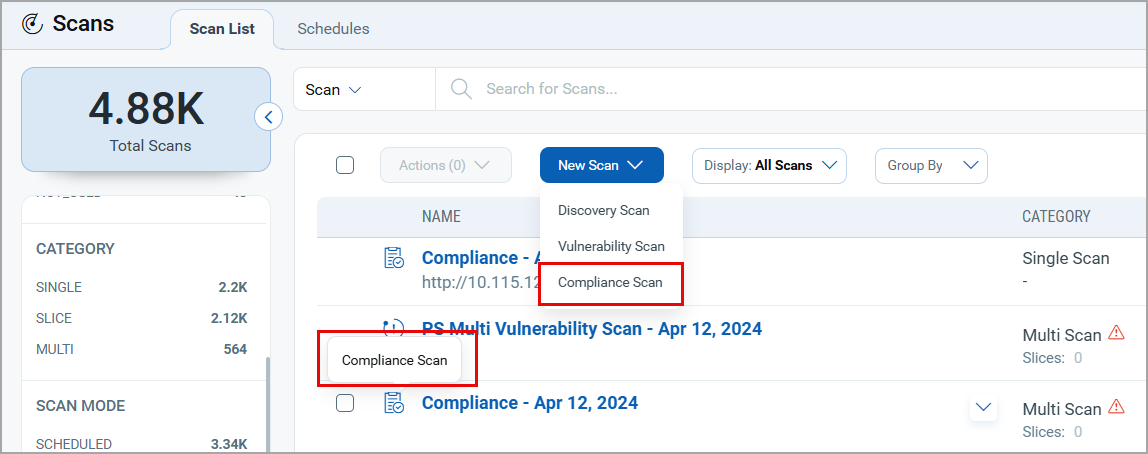
Additionally, the terminology on the Scan List screen is updated for consistency. Previously, the scan launch flow was referred to as Compliance Scan, while the scan list hover-over text displayed API Compliance. The hover-over text is now updated to Compliance Scan to align with the naming used during scan launch.
 TotalAppSec and Web Application Scanning
QDS Information Added to Knowledge Base
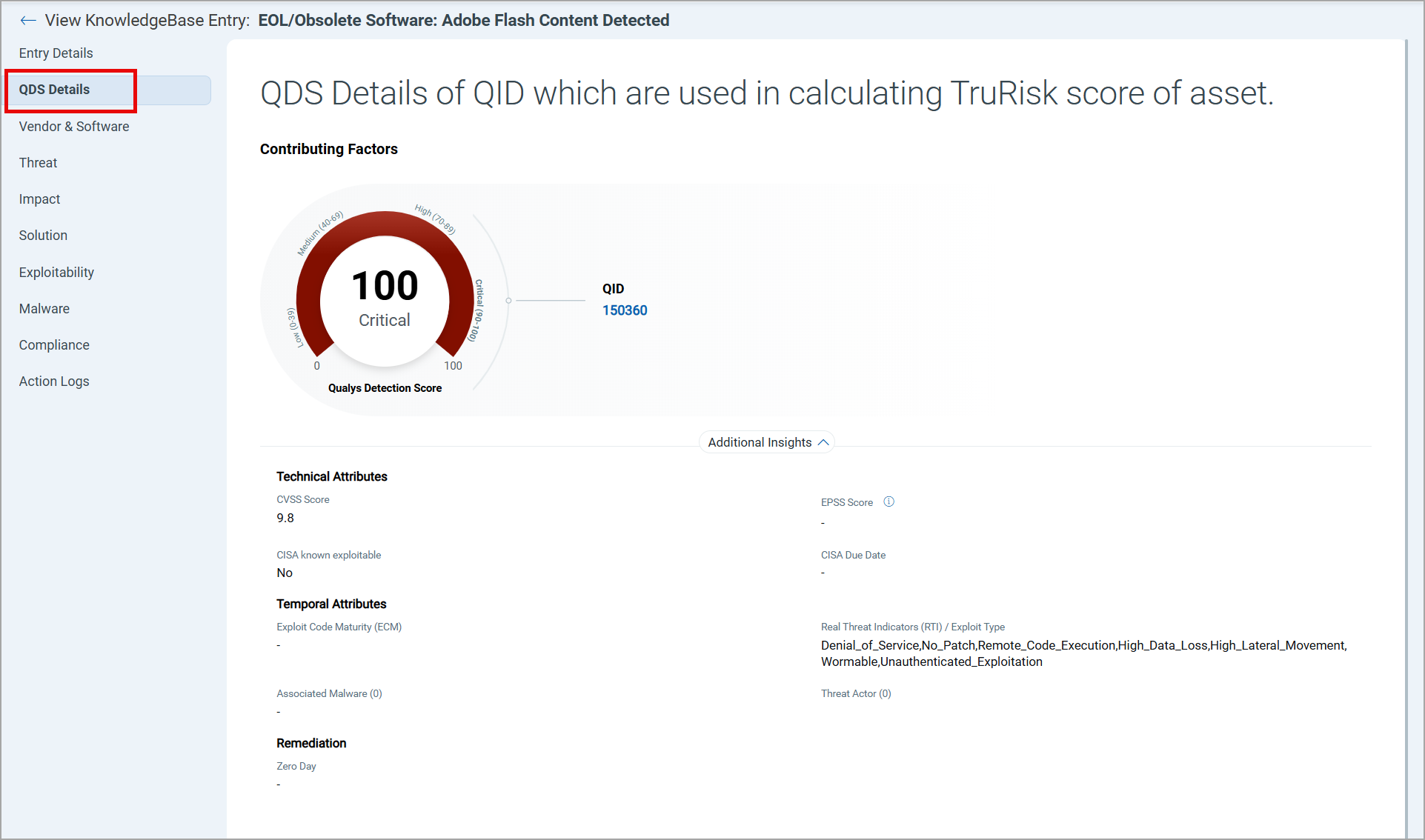
With this enhancement, the Knowledge Base now displays Qualys Detection Score (QDS) information directly for relevant QIDs.
Previously, you could access QDS details only on the Detection Details page. The QDS Details tab in the View KnowledgeBase Entry now displays QDS information directly when accessing QIDs in the Knowledge Base. This improves QDS visibility and delivers consistent user experience.
QDS information is available in the Knowledge Base only for QIDs associated with vulnerabilities and sensitive content.
Filter Findings by Detection Reason Using QQL
You can now search and analyze detections by reason using a new QQL token finding.reason. This token is available in the Detections, Web Applications, and APIs tabs. The APIs tab is available only with TotalAppSec.
You can search for findings based on why a finding was detected, not detected, or not tested. For example, when authentication was required, a URL was not found, or a scan time limit was reached. This helps analyze findings faster and improves reporting clarity, with consistent experience across search and dashboards.
For example, the following image displays the findings:
- that could not be tested, as the URL could not be found -
finding.reason:FINDING_NOT_TESTED_URL_NOT_FOUND. - for the applications containing web app as part of the name -
asset.name:"web app".
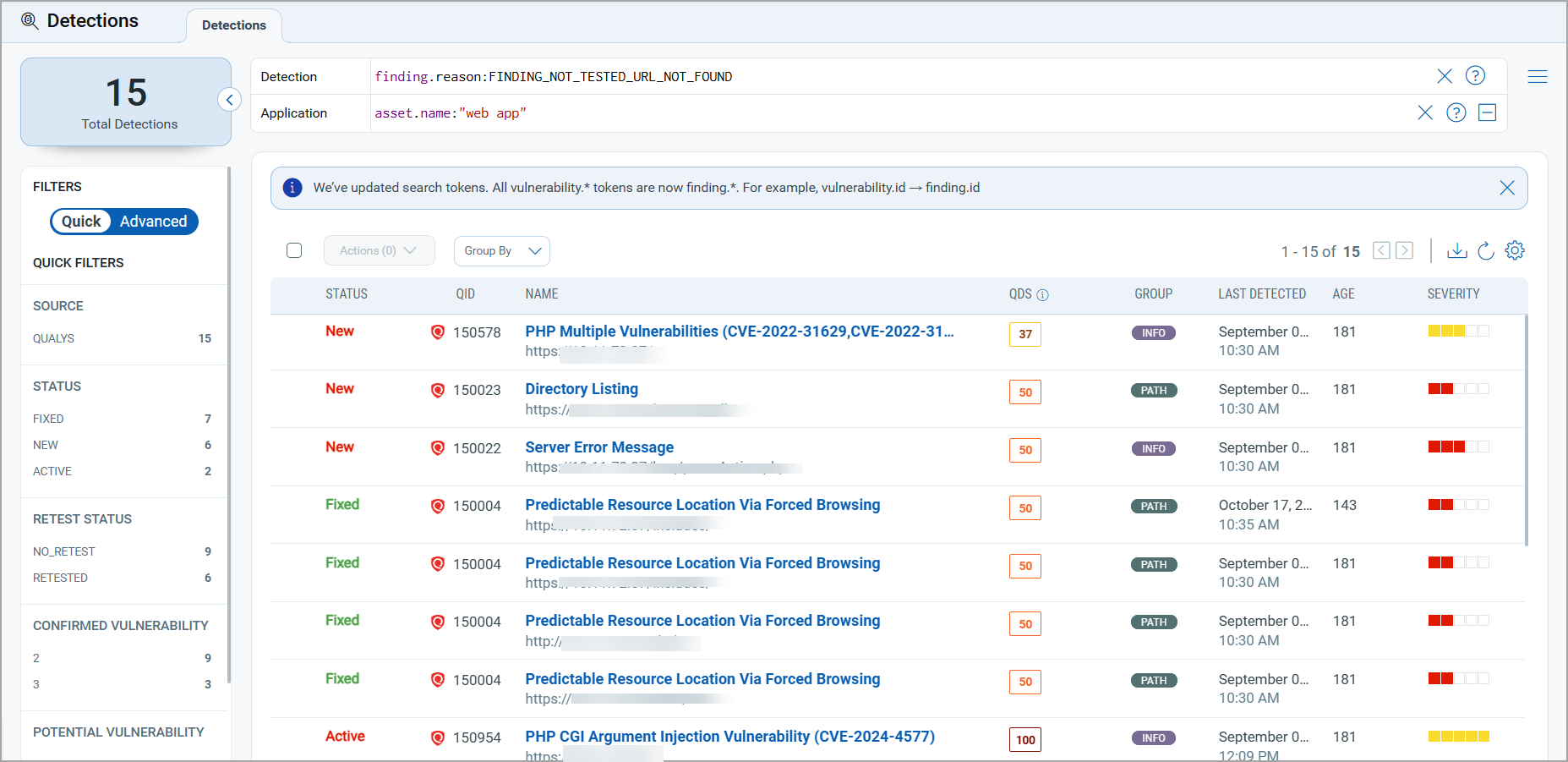
The following table presents the token values and the corresponding descriptions in the Finding Status column in the Detection Details > History & Comments tab.
| Token Value | Reason Description in Detection Details |
|---|---|
FINDING_DETECTED |
Finding was confirmed |
FINDING_NOT_DETECTED |
Finding cannot be detected anymore |
FINDING_NOT_TESTED_AUTHENTICATION_REQUIRED |
Authentication required for detecting this finding failed |
FINDING_NOT_TESTED_URL_NOT_FOUND |
Vulnerable URL cannot be found anymore |
FINDING_NOT_TESTED_SCAN_TIME_LIMIT_REACHED |
Finding could not be tested in the scan time limit |
FINDING_NOT_TESTED_QID_NOT_INCLUDED |
QID was not included in scan configuration |
FINDING_NOT_TESTED_URL_BLACKLISTED |
Vulnerable URL was blacklisted in this scan |
FINDING_NOT_TESTED_PROGRESSIVE_SCANNING_DISABLED |
Progressive scanning was not enabled |
FINDING_NOT_TESTED_SCAN_CANCELED_WITH_RESULTS |
Scan was canceled before it finished |
FINDING_NOT_TESTED_SERVICE_ERRORS_DETECTED |
Service errors detected |
FINDING_NOT_TESTED_MAX_LINKS_CRAWLED |
Finding could not be tested as max links are crawled |
Search Scans by Progression Count QQL Token
A new QQL token, scan.progressionNumber, is now available in the Scan List tab to help identify scans based on their progression count.
Previously, you could not filter scans by progression count, which required manual review of each application and increased investigation time. With this enhancement, you can now use the scan.progressionNumber token in the search scans with higher progression counts, making it easier to identify and investigate scans that may be running longer than expected.
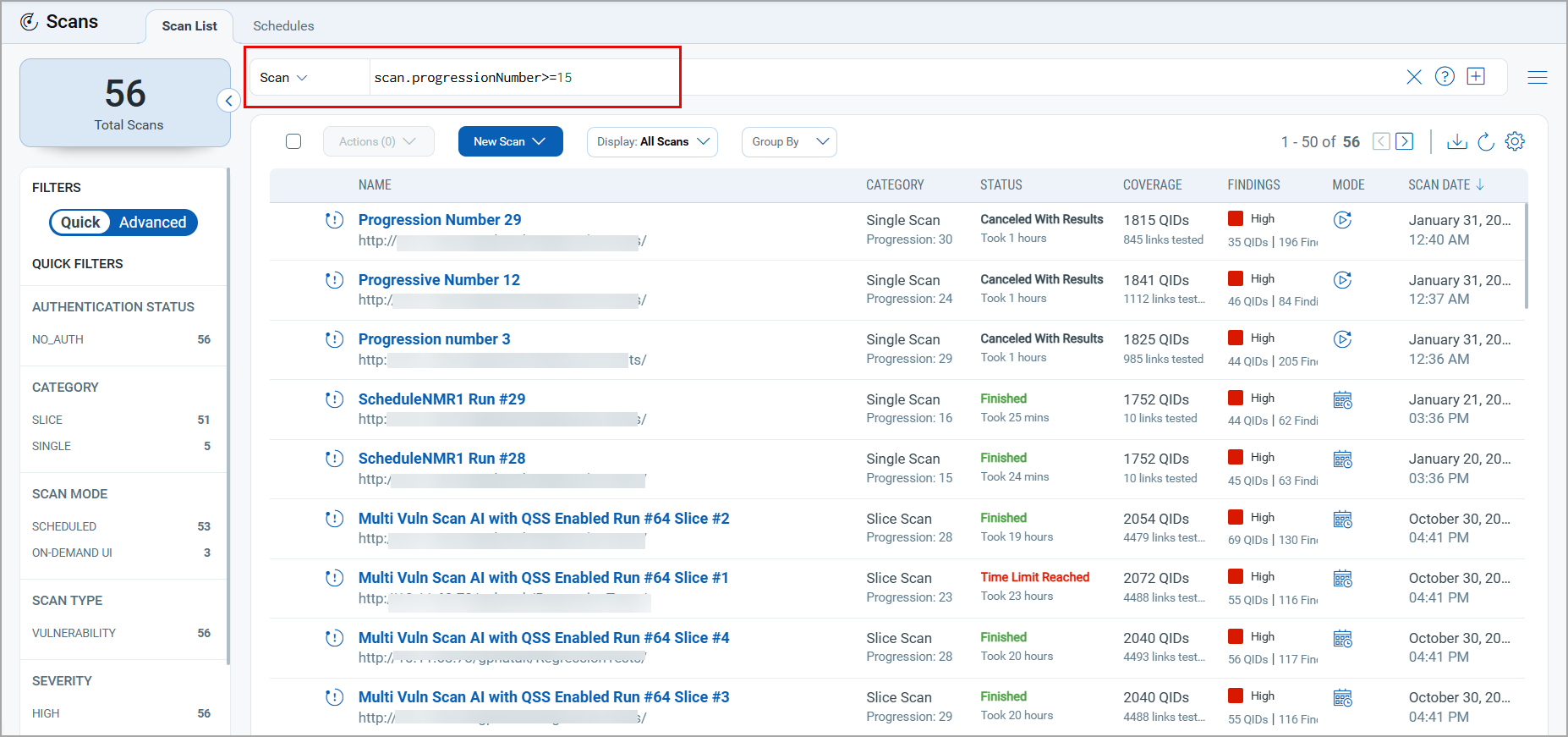
You can use the operators - greater than (>), less than (<), greater than or equal to (>=), and less than or equal to (<=) to locate scans with the required progression count. For example, the following image presents scans with a progression count greater than or equal to 15.
Enhanced Scan Duration Display
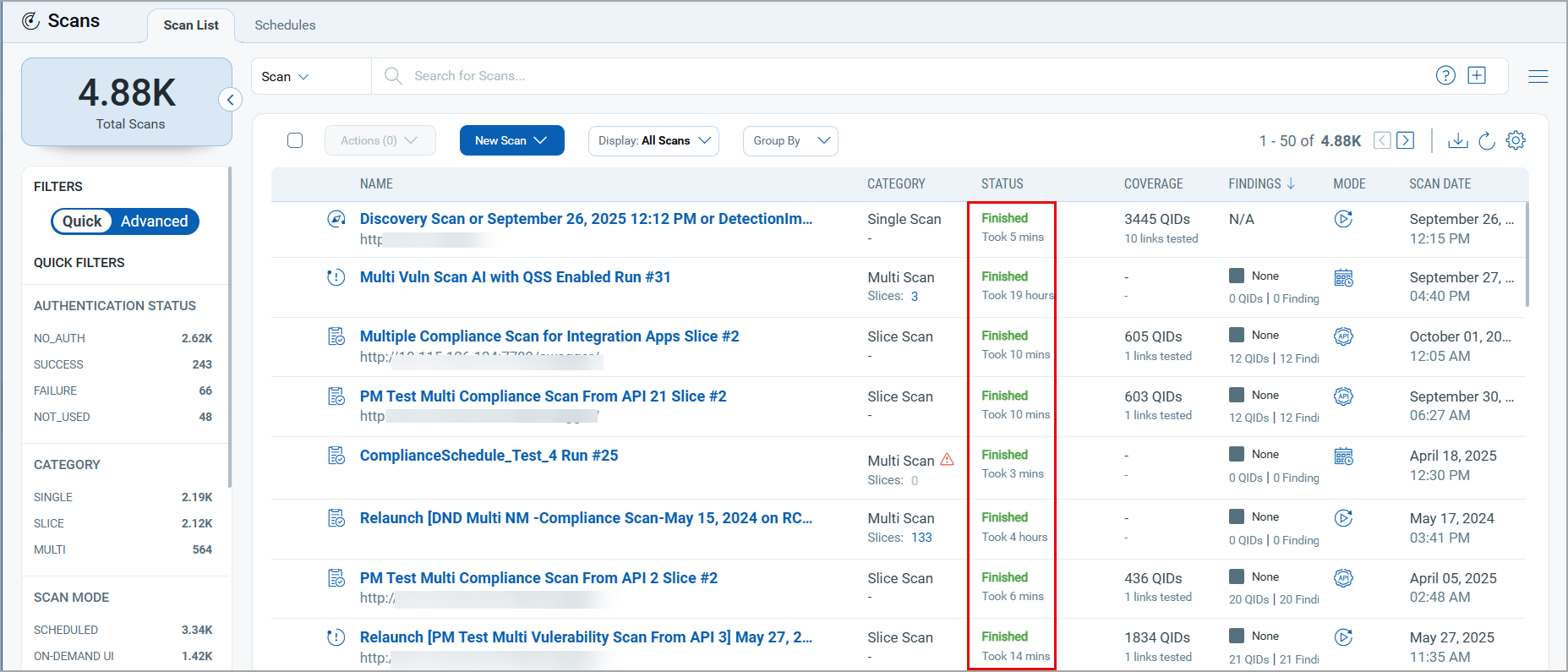
We updated the scan duration format in the Scan List tab. Previously, for scans that ran for less than one hour, the Status column in the Scan List displayed Took 0 hours, which did not reflect the actual scan time.
With this update:
- Scans running less than one hour display the duration in minutes.
- Scans running longer than one hour display the duration in hours and minutes, for example, 1 hr 20 min.
Report Ignored Findings to ETM for TruRisk™ Calculation
With this enhancement, TotalAppSec now reports ignored findings to Enterprise TruRisk™ Management (ETM), enabling more accurate TruRisk™ score calculation.
| Required Application Version | Enterprise TruRisk™ Management 1.7.0 |
Issues Addressed
The following reported and notable customer issues are fixed in this release.
| Application | Category/Component | Description |
|---|---|---|
|
TAS and WAS |
Proxy Configuration
|
The user encountered a syntax error while adding an exception during proxy creation and edit workflow. The issue occurred because of the new validation rules. The issue is resolved, and the user can add an exception in the proxy record while creating or editing a proxy. |
|
TAS and WAS |
Web application creation and editing - Crawling scripts |
When the user added or updated Selenium scripts in the Crawl Links section while creating or editing web applications, the following error message is displayed: The issue is resolved. Now the user can add or update the crawling scripts and save the web application. |
|
TAS and WAS |
Ignore, Activate, and Purge Findings |
The user encountered an error while attempting to ignore the finding, activate the ignored finding, and purge the finding. The issue is resolved. Now the user can successfully ignore, activate, and purge findings. The findings associated with the deprecated QIDs are not displayed. |
|
TAS and WAS |
Knowledge Base |
The Knowledge Base information displayed empty Vendor and Product information for the following QIDs:
The issue is resolved, and the vendor and product information are available in the Knowledge Base for the specified QIDs. |
|
TAS and WAS |
Authentication Records |
We fixed an issue where users could not view data in multiple tabs due to longer-than-expected tab loading times. |
|
TAS and WAS |
Scan Schedules |
In the Scans > Schedules tab, valid and active scan schedules were listed when the user searched with the The issue is fixed. In the scan schedules, where tags are added as Scan Target, the schedule remains valid even after one of the tags is deleted from the Target. The schedule is considered invalid only when all tags are deleted from the Scan Target. |
|
TAS and WAS |
Dynamic Search List |
When the user selected the Discovery Method in the Search Criteria while creating or updating a dynamic search list, the associated QIDs were not displayed. The issue is resolved. Now, the user can view all QIDs associated with the selected discovery method in the dynamic search list under Search Criteria. |
|
TAS and WAS |
Detection Details |
In the Detection Details window > History & Comments tab, the text in the Finding Status column was truncated, leading to confusion about why the QID was not detected or tested. The issue is fixed. Now the user can hover over the text to view the complete message in the Finding Status column. |
|
TAS and WAS |
Scan Schedule |
When the user removed and purged an application from the scheduled scan because the web application was not available on the Internet, the scheduled scan failed. The issue is fixed. The scheduled scan is performed even after removing and purging an application from the Scan Target. |
|
TAS and WAS |
Community Subscription |
In the Qualys Community subscription, the Schedules tab under the Scans and Reports, and the option profile creation were enabled. However, the option profile creation was not permitted. To align with the product guidelines for Community subscription, the following updates are implemented:
These changes ensure compliance with the Community Edition restrictions. |
|
TAS and WAS |
Scans |
We fixed an issue where the scans were stuck in the Processing status for several days. |
|
TAS and WAS |
Test Authentication |
When launching the test authentication, the Name of the authentication test did not follow the default Scan Title Format defined in Global Settings. The issue is fixed. The scan name for the authentication test is now set to the default Scan Title Format, similar to the vulnerability and discovery scans. |
|
TAS and WAS |
Scans |
We fixed an issue where scan details were not displayed if a scan was launched using a Scanner Tag that was later deleted. The View Scan Details page now displays all scan details, even when the associated Scanner Tag has been removed. |
|
TAS and WAS |
Scans |
We fixed an issue where multiple scans failed with the error SCAN_RESULTS_INVALID. Now, the scans are completed, scan results are processed, and reports are generated. |
|
TAS and WAS |
Web Applications |
We fixed an issue where no web applications were displayed in the Web Applications tab, even though the scans were visible in the Scan List tab. This occurred when a static tag associated with web applications was updated to a dynamic tag using a custom script. The web applications datalist now loads correctly after the tag update. |