TotalCloud Release 2.24
April 29, 2026
TotalCloud Release 2.24 introduces support for FedRAMP High, expansion of TruRisk™ Insights for Azure, enhancements to cloud inventory tagging, support for OCI exceptions, CDR enhancements, and extensive updates to AWS and Azure compliance controls.
FedRAMP High Support for TotalCloud and CDR
Applicable for: 


With this release, we are excited to announce that TotalCloud now supports FedRAMP High, significantly expanding our capabilities for U.S. federal agencies and organizations with the most stringent security and compliance requirements.
By becoming FedRAMP High compliant, TotalCloud meets rigorous compliance requirements to securely handle highly sensitive data that demands the highest level of protection.
In addition, CDR now supports FedRAMP High for AWS environments, enabling customers operating in AWS GovCloud or FedRAMP High–authorized AWS regions to benefit from elevated security and assurance. Support for FedRAMP High on other cloud providers for CDR will be added in future releases.
Benefits:
- Ability to migrate and operate sensitive workloads with confidence
- Meets requirements for high-impact data and mission-critical systems
- Ensures alignment with federal security guidelines
This feature is available for the FEDRAMP HIGH Cloud Platform (https://qualysguard.gov1.qualys.us) to ensure the highest level of data security practices is adopted.
- This update does not affect existing configurations or workflows.
- Support for additional cloud providers for CDR will be delivered in upcoming releases.
Extended TruRisk™ Insights Coverage for Microsoft Azure
Applicable for:
This release expands coverage of TruRisk™ Insights for Azure. Azure support is now included in the following TruRisk™ insights.
| Insight CID | Title |
|---|---|
| 5003 | Successful SSH brute-forcing on a public VM with critical/high vulnerabilities |
| 5004 | Malware detection on a public VM with misconfigurations and vulnerabilities |
| 5006 | Misconfigured VM with active port scan |
| 5007 | Resource infected with critical/high-severity malware |
| 5008 | DNS exfiltration or tunneling on public VM |
| 5010 | C2 DNS detected on VM with a critical exploitable vulnerability |
| 5011 | C2 HTTP/HTTPS detected on VM with a critical exploitable vulnerability |
| 5012 | Successful RDP brute-forcing on Windows VM with critical/high vulnerability |
| 5013 | RDP hot account scan on Windows workload with critical vulnerability |
| 5159 | Remote Code Execution (RCE) risk due to publicly exposed Azure Virtual Machine with Probllama vulnerability |
| 5160 | Command Injection risk due to publicly exposed Azure Virtual Machine with PyTorch vulnerability |
| 5161 | Remote code execution risk due to publicly exposed Azure Virtual Machine instance with regreSSHion vulnerability |
| 5162 | Remote Code Execution (Unauthenticated) risk due to publicly exposed and vulnerable Azure Virtual Machine |
| 5163 | Authentication bypass exploitation attempt on Azure VM with known exploitable vulnerability |
| 5164 | Directory Traversal risk due to publicly exposed and vulnerable Azure Virtual Machine |
Expanded Cloud Tag Support for AWS Cloud Inventory
Applicable for:
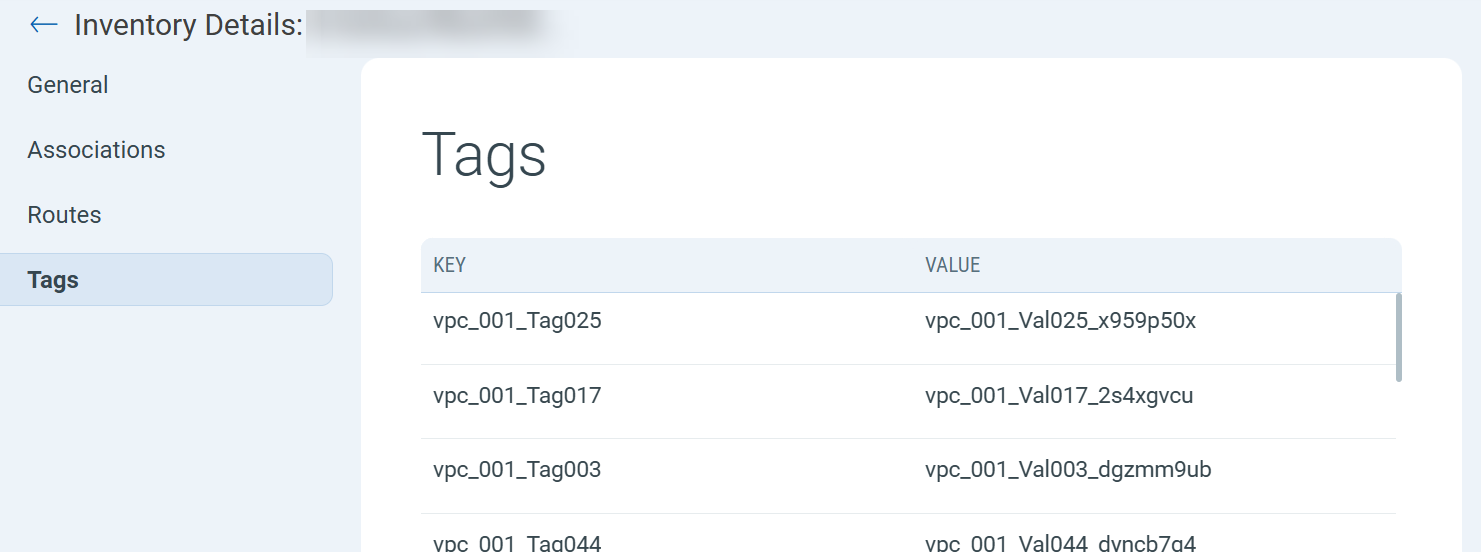
This release introduces support for cloud tags across all AWS cloud inventory types. Tags are now available through QQL and APIs, and for resources with detailed inventory support, tag information is also displayed in the UI.
This makes it easier to perform:
- Tag-based resource grouping
- Policy evaluations
- Inventory queries
- Compliance reporting
To view the assigned Cloud Tags, click on any resource of any inventory type and select Tags on the left navigation menu.
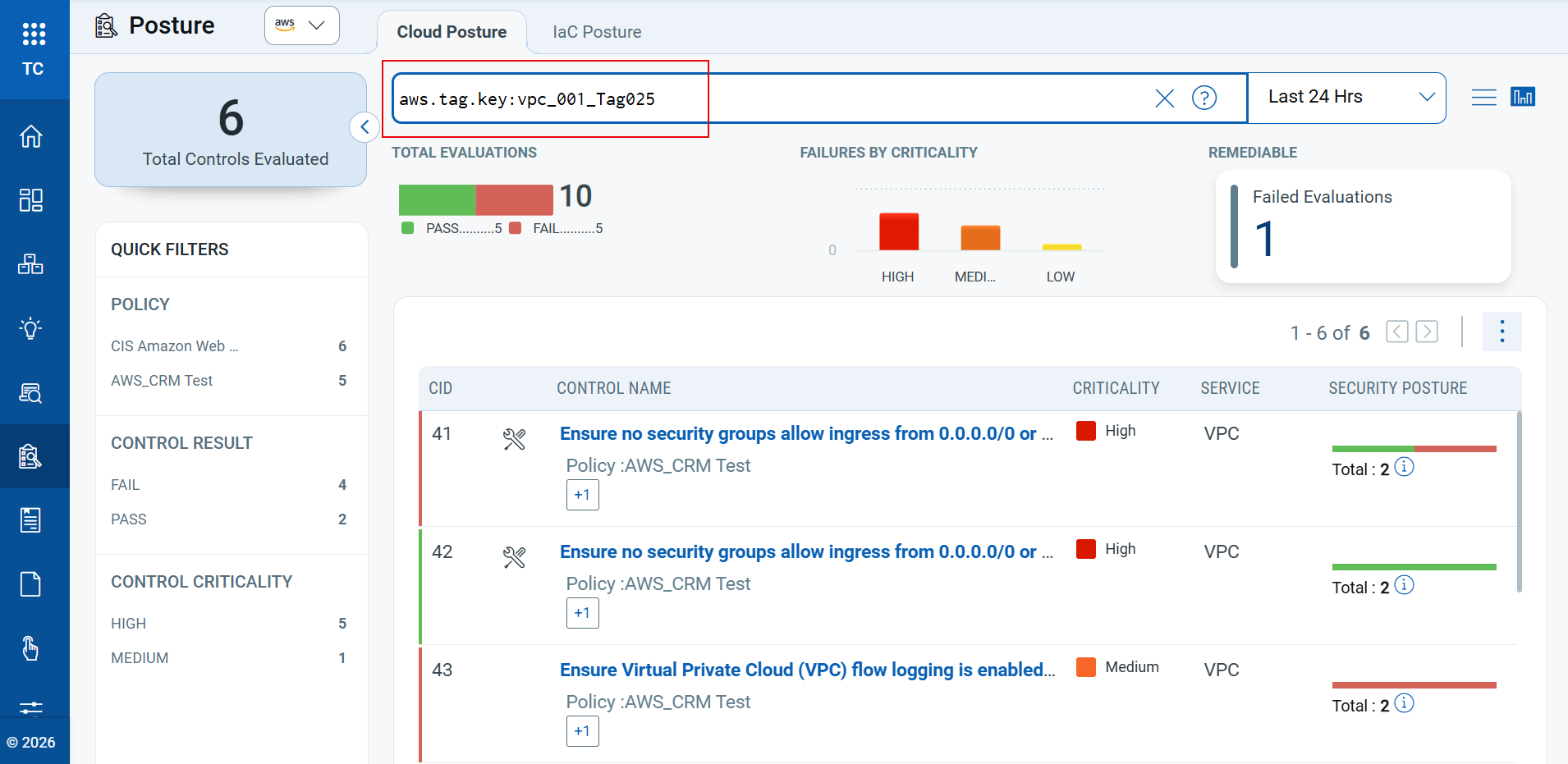
You can also check the Posture status and Inventory of any resource, using the tokens aws.tag.key or aws.tag.value.
Default Cloud Provider Preferences Across UI
Applicable for:
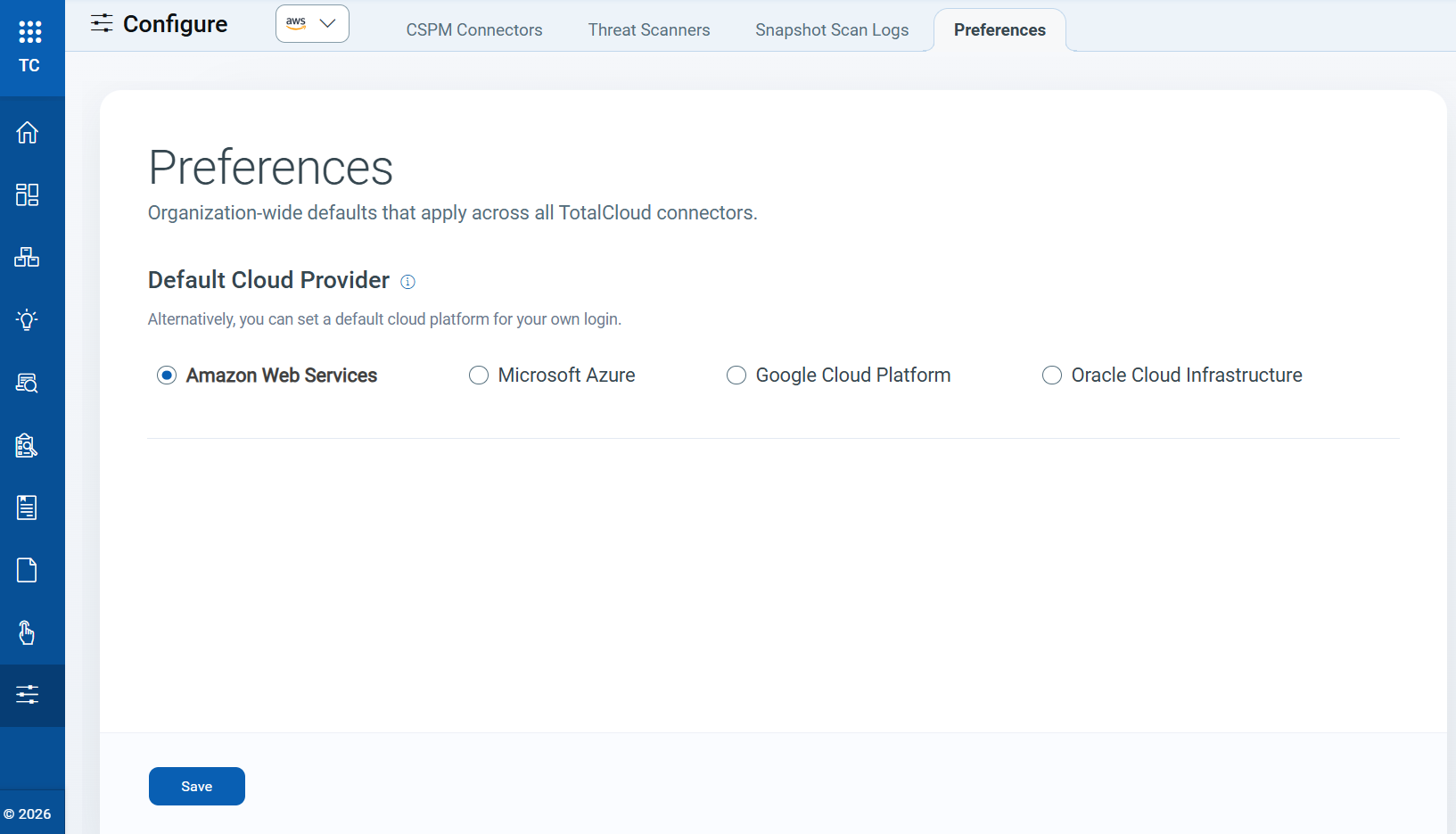
You can now set a default Cloud Provider view for the Inventory, Posture, and Responses section. This setting automatically loads your preferred cloud provider when you access these sections, eliminating the need to select it each time.
For example, if you set Azure as your default cloud provider, the Inventory, Posture, and Response pages in the TotalCloud module open with Azure data.
To support this update, we have introduced a new Preferences tab. To view and manage your default cloud provider, navigate to Configure → Preferences.
Manage/Create Exceptions in Oracle Cloud Infrastructure (OCI)
Applicable for:
This release adds exception support for OCI. You can now create connector-level and resource-level exceptions for OCI controls, using the same workflow available for AWS, Azure, and GCP.
Benefits
You can now create exceptions directly from failed controls or affected resources, without switching between control and resource views.
- You can suppress known or accepted OCI control violations without compromising overall security.
- You can mark approved violations as exceptions to focus only on actionable issues.
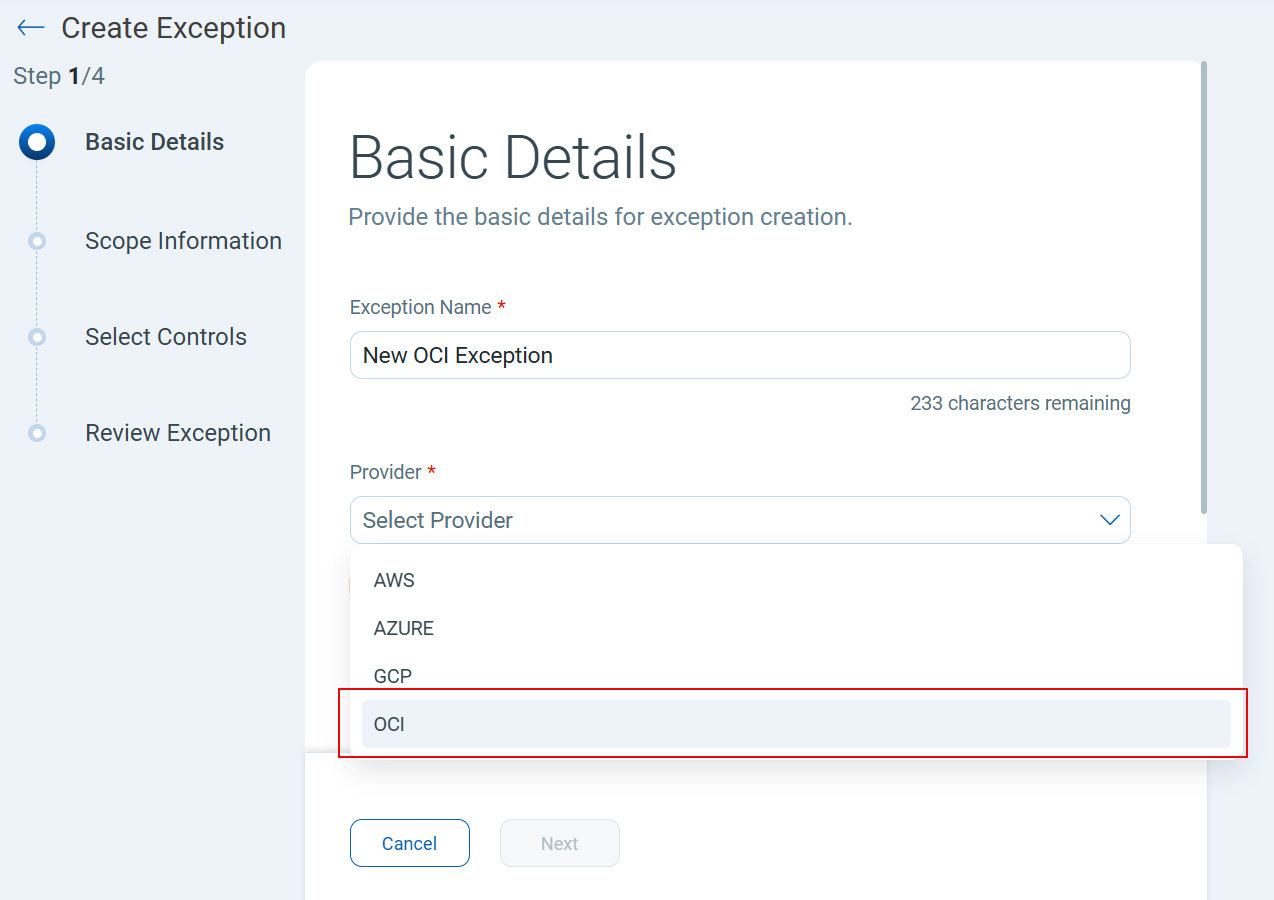
To create a new exception for OC, navigate to Policy → Exceptions → New → Basic Details → Provider → OCI. For more details on how to create exceptions, refer to the TotalCloud online help.
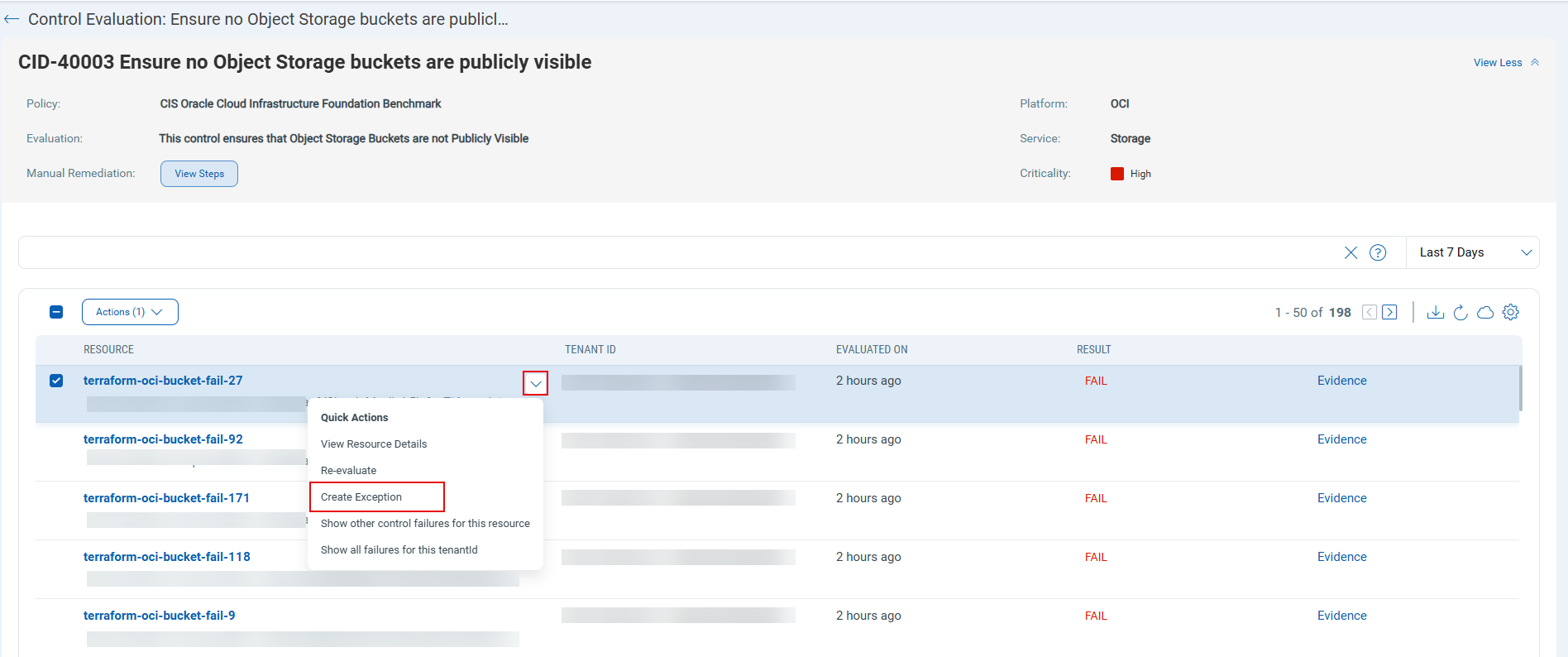
You can also create an exception for any resource that failed evaluation directly from the Posture section. Navigate to Posture → Select a Control with failed resources → select Quick Actions for the resource → Create Exception.
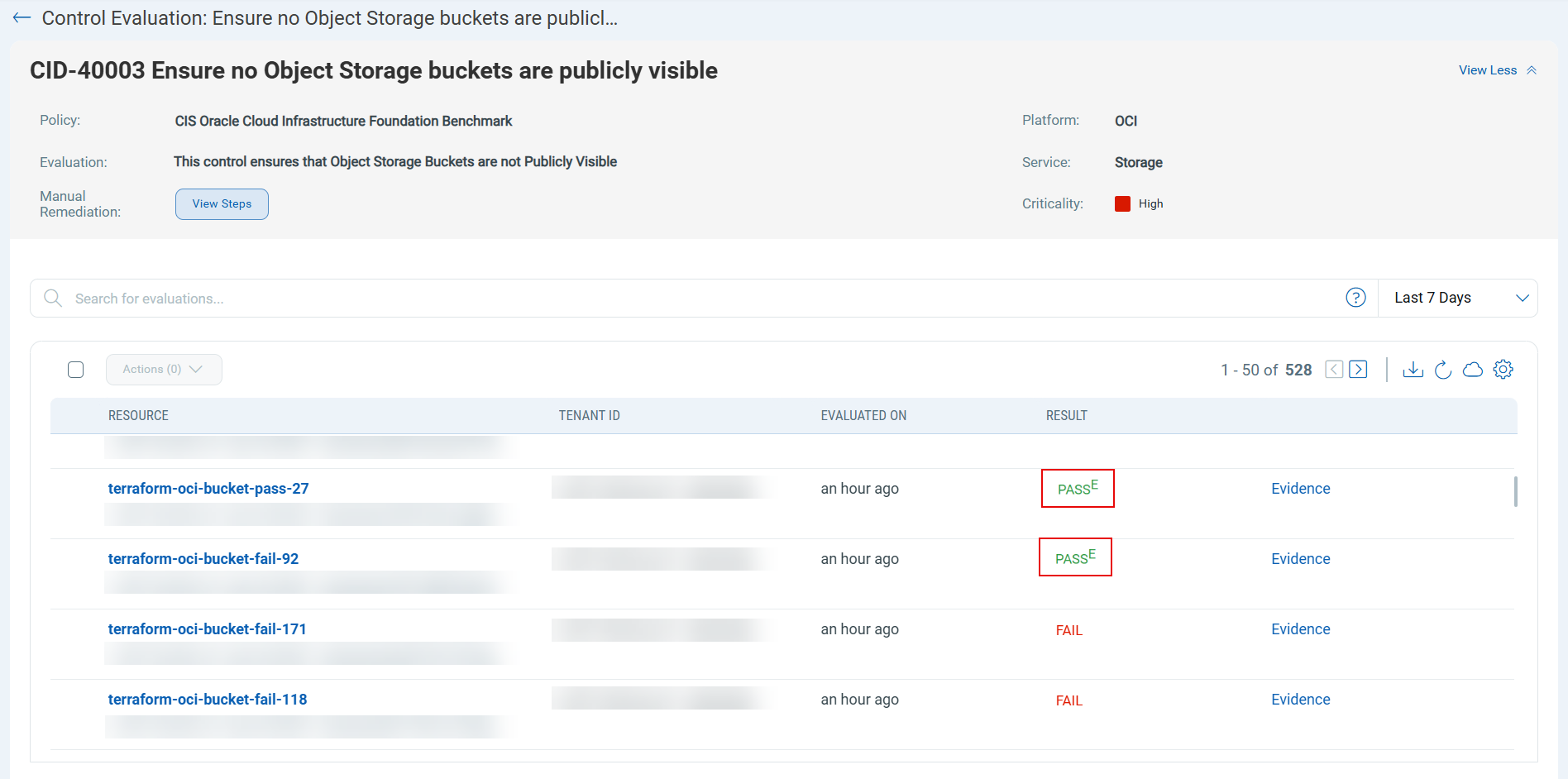
After you set an exception, resources that passed with exceptions will appear with PASSE status.
Currently, OCI supports only connector-level and resource-level exceptions and does not support tag‑based exceptions.
AWS Connector Permissions Validation and Visibility
Applicable for:
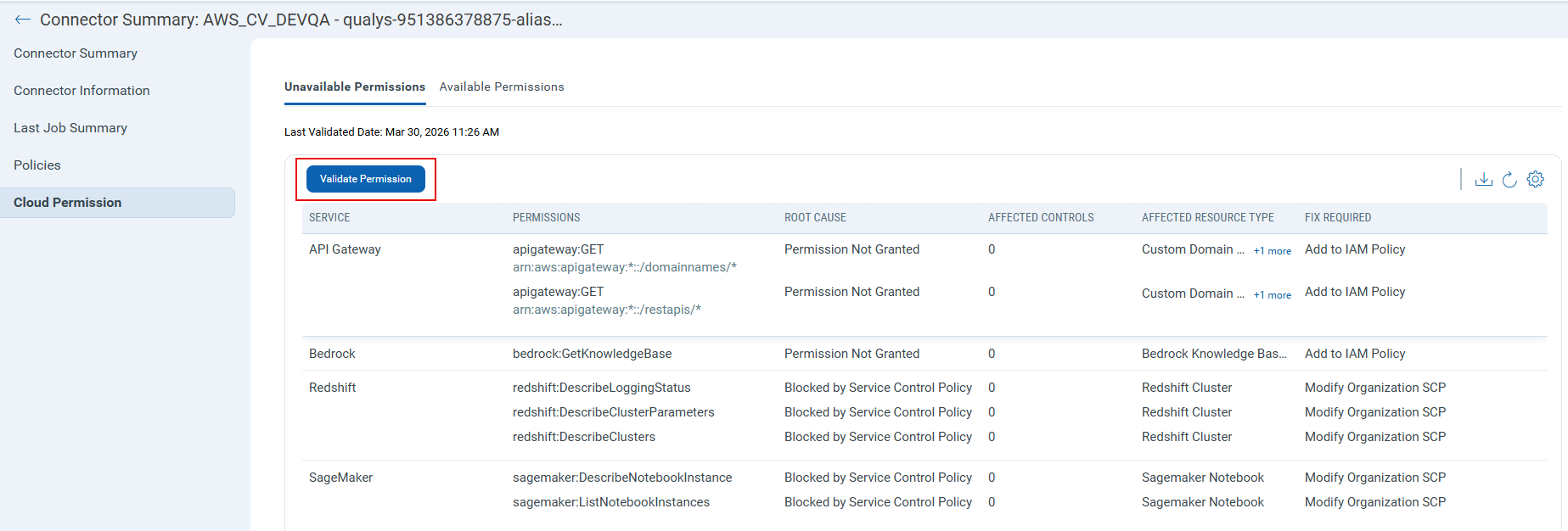
This release introduces a new "Cloud Permissions" tab for CSPM connectors in TotalCloud's configuration section. You can now easily identify and address missing AWS permissions required for CSPM assessments, including control and inventory permissions.
To view the permissions, navigate to Configure → Select a connector → Connector Summary → Cloud Permissions.
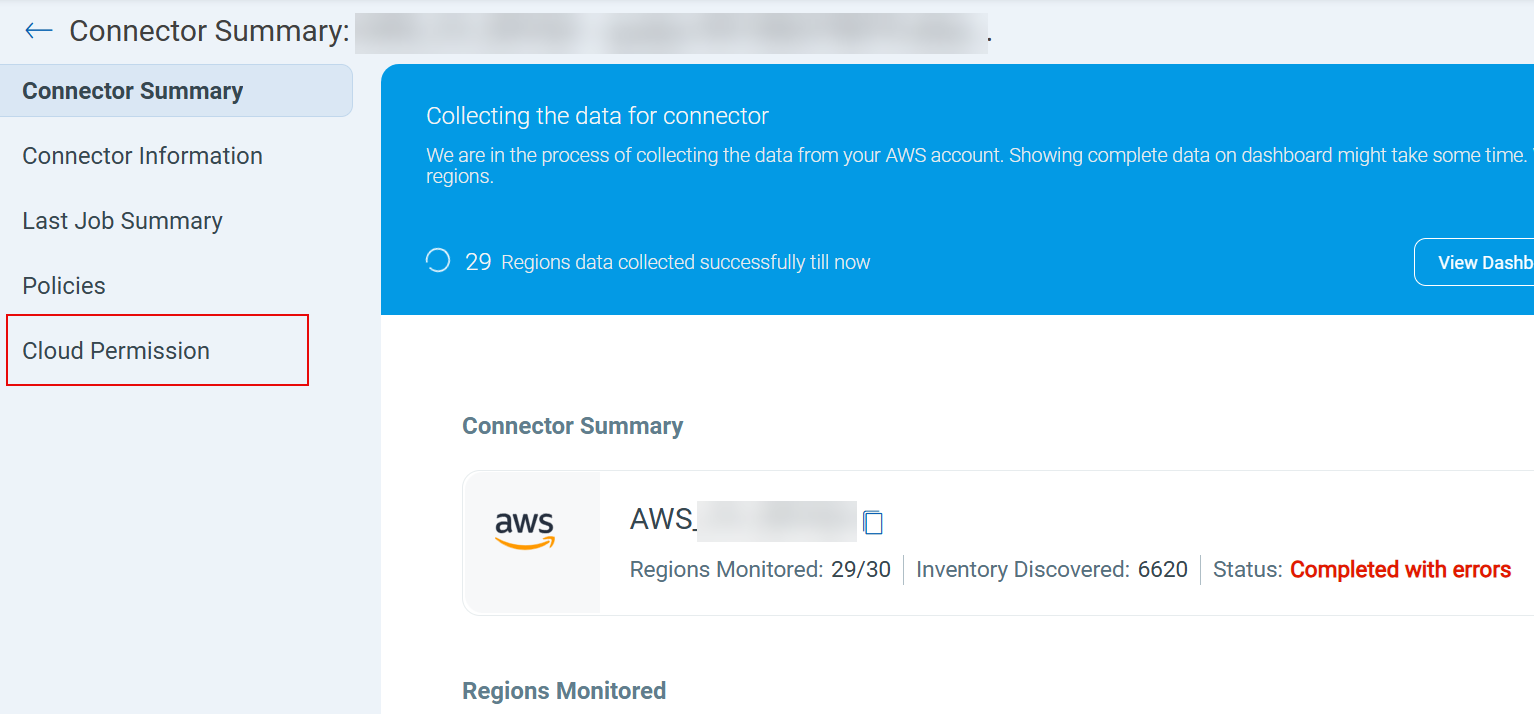
The new cloud permission tab provides deeper visibility into permission-related issues, including:
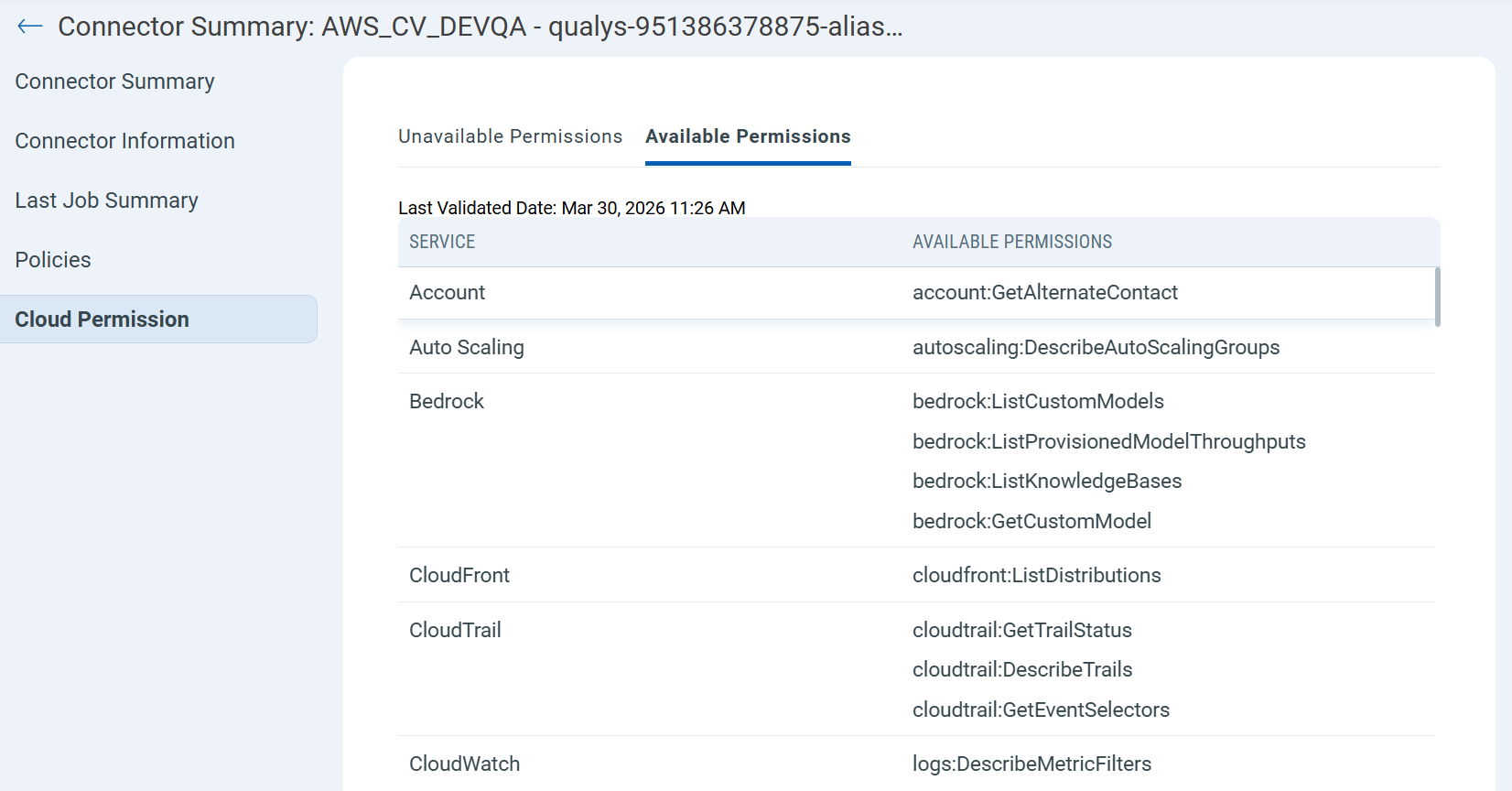
- Available Permissions – Lists permissions that AWS IAM policy has granted.
- Unavailable Permissions - Displays missing permissions with the root cause, the number of affected controls, impacted resource types, and recommended remediation steps. It also includes a Validate Permissions button that you can use to trigger a new validation at any time to verify that AWS console updates are reflected immediately.
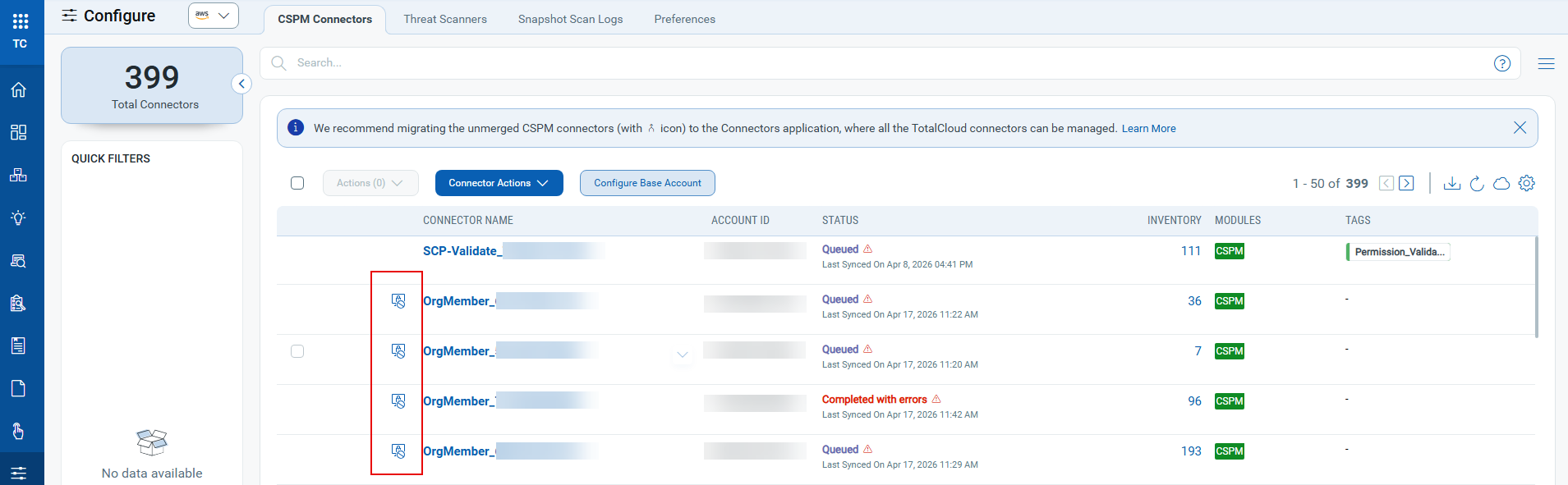
A visual indicator ( ) is also displayed before the connector name to show missing permissions, helping you identify them easily without checking each connector individually.
Enhanced Visibility for Azure Virtual Machine Scale Sets
Applicable for:
Azure Virtual Machine Scale Sets (VMSS) and their instances are now more clearly represented in the inventory. You can easily identify and differentiate scale sets and their associated virtual machines, with clear indicators for deployment modes and improved navigation between related resources.
The key features of this enhancement include:
- Dedicated Inventory Classification
Virtual Machine Scale Set Instances now serve as a dedicated inventory type designed specifically for VMSS instances deployed using the Uniform orchestration mode.
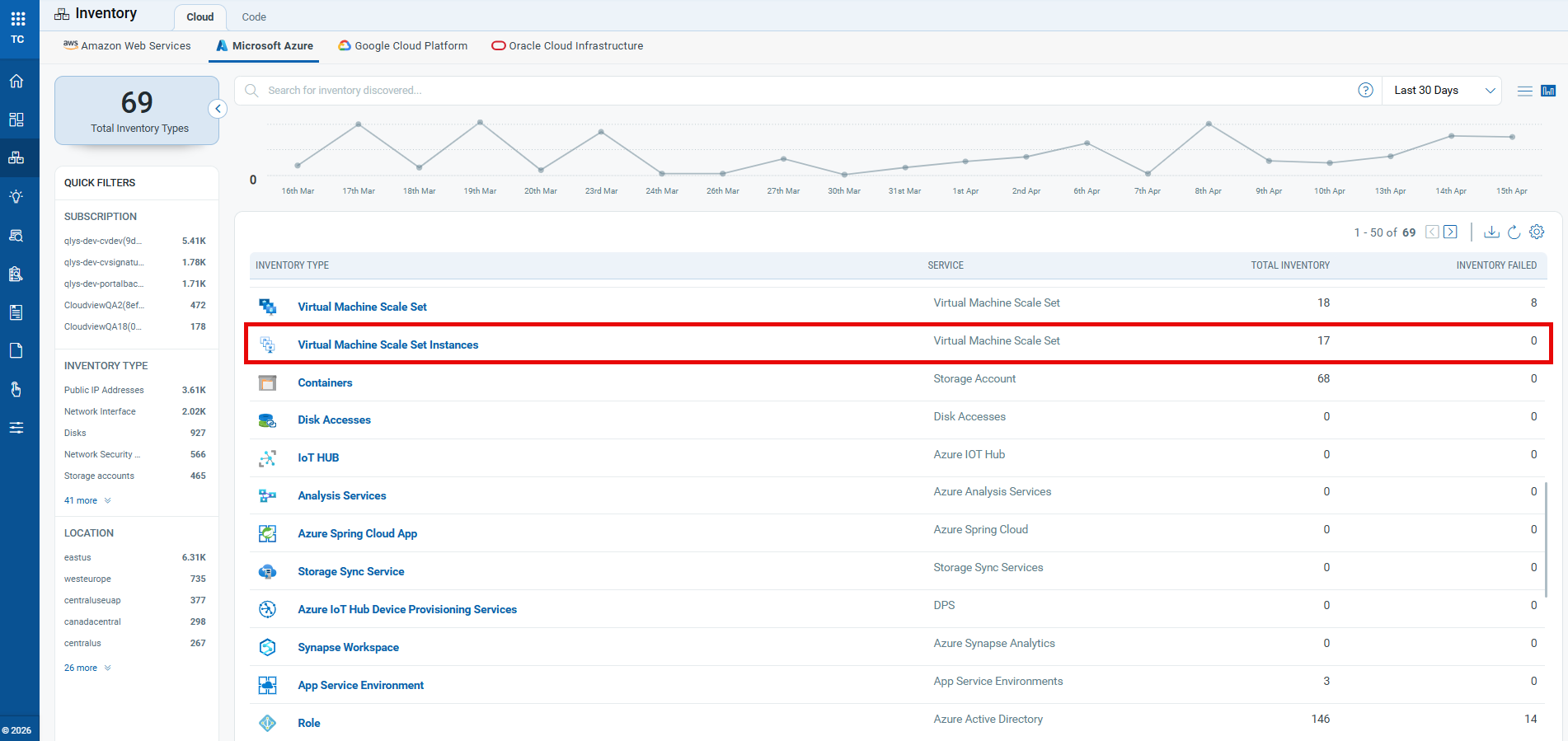
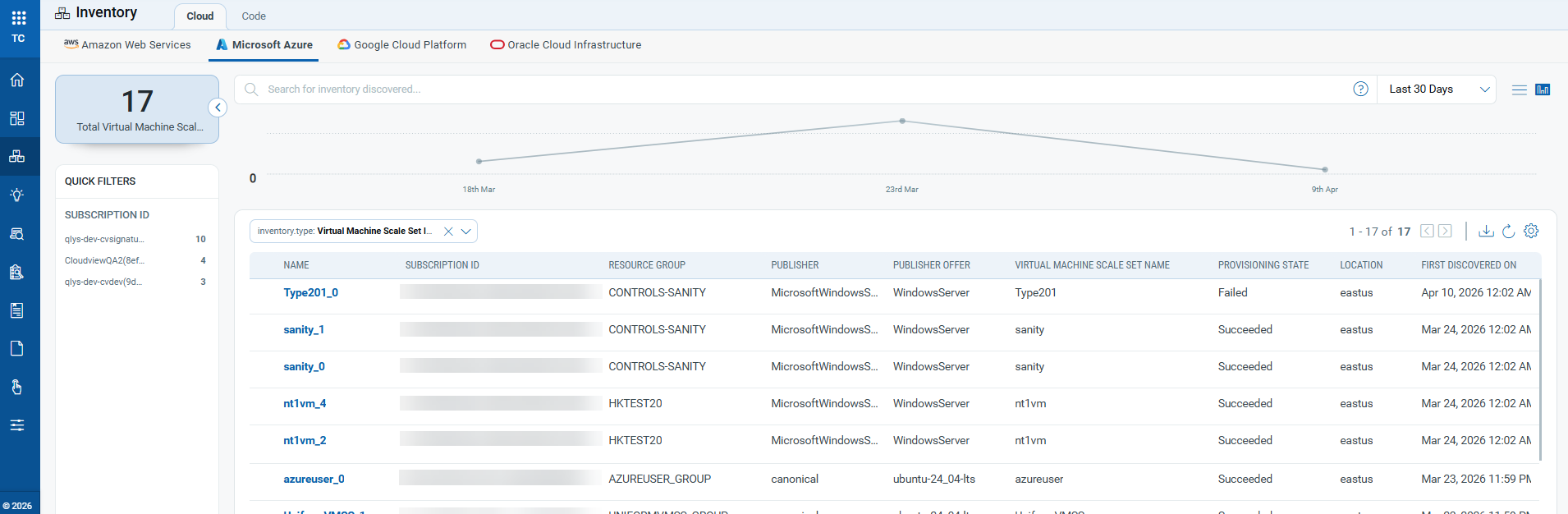
You can view all deployed uniform virtual machines (VMs) listed under this inventory type.
- Improved Instance Identification
VMSS instances with flexible orchestration mode remain in the Virtual Machines inventory, now with a visual indicator ( ) for easier identification.
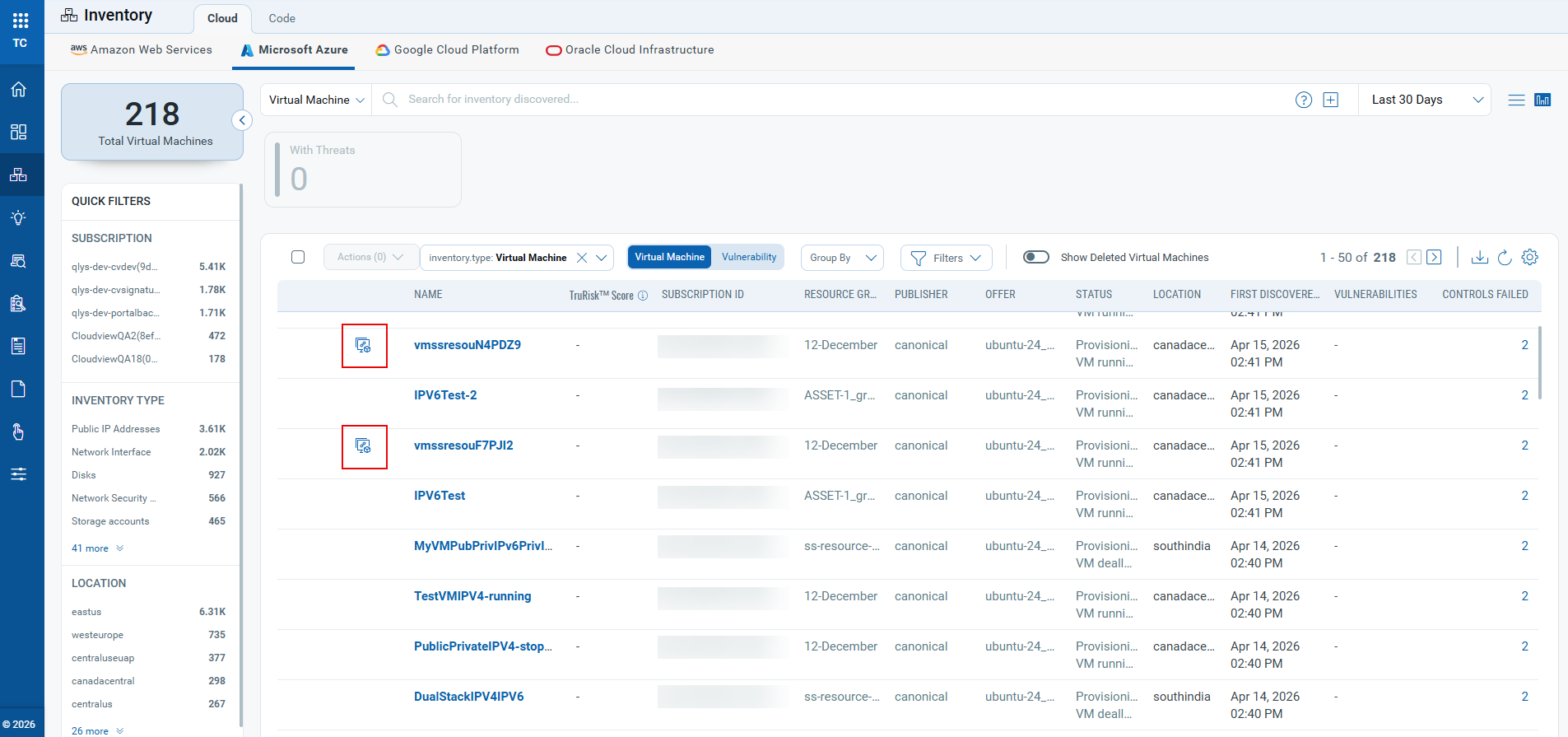
- Clear Deployment Mode Visibility
For existing Virtual Machine Scale Set (VMSS) resources, each now displays its Name, Resource Group, Orchestration mode (Flexible or Uniform), and operating system for quick reference and understanding of resource configuration.
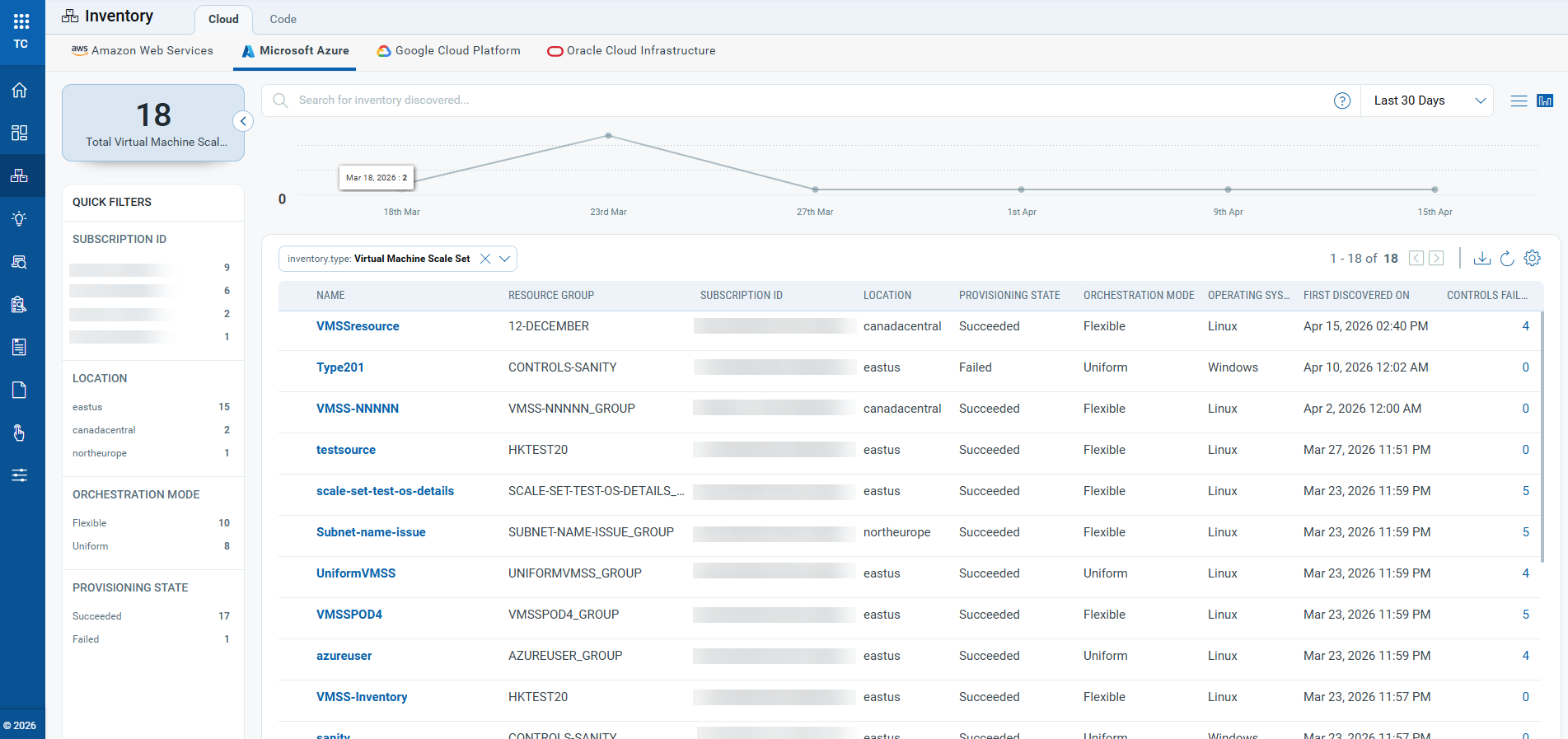
- Enhanced navigation, richer resource details and associations
Inventory item names under VMSS are now clickable, allowing direct access to detailed information.
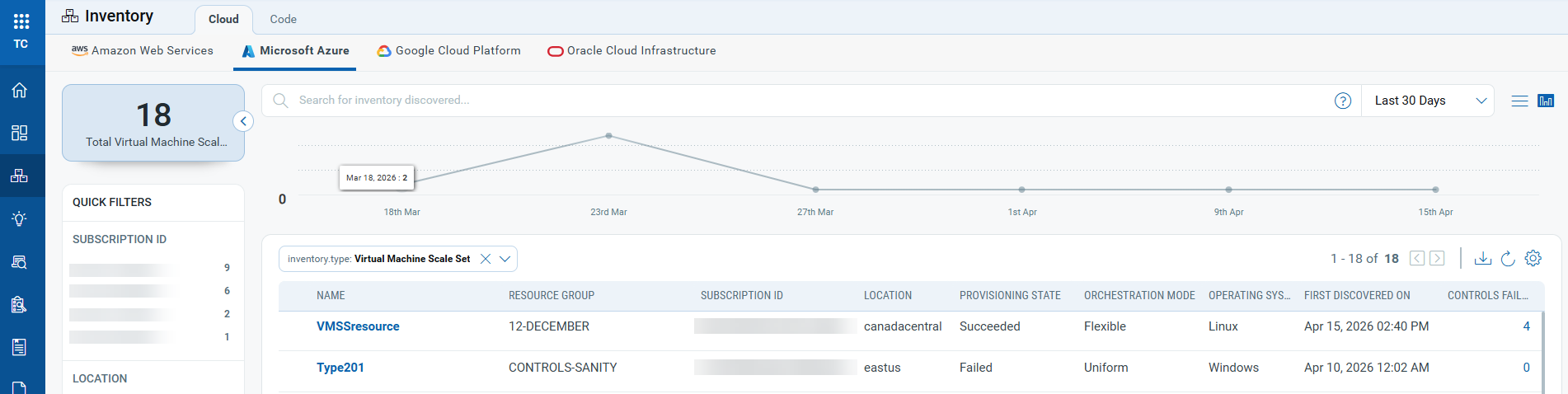
The detailed view includes summary information, tags, evaluated controls, and associated resources such as network security groups and virtual networks.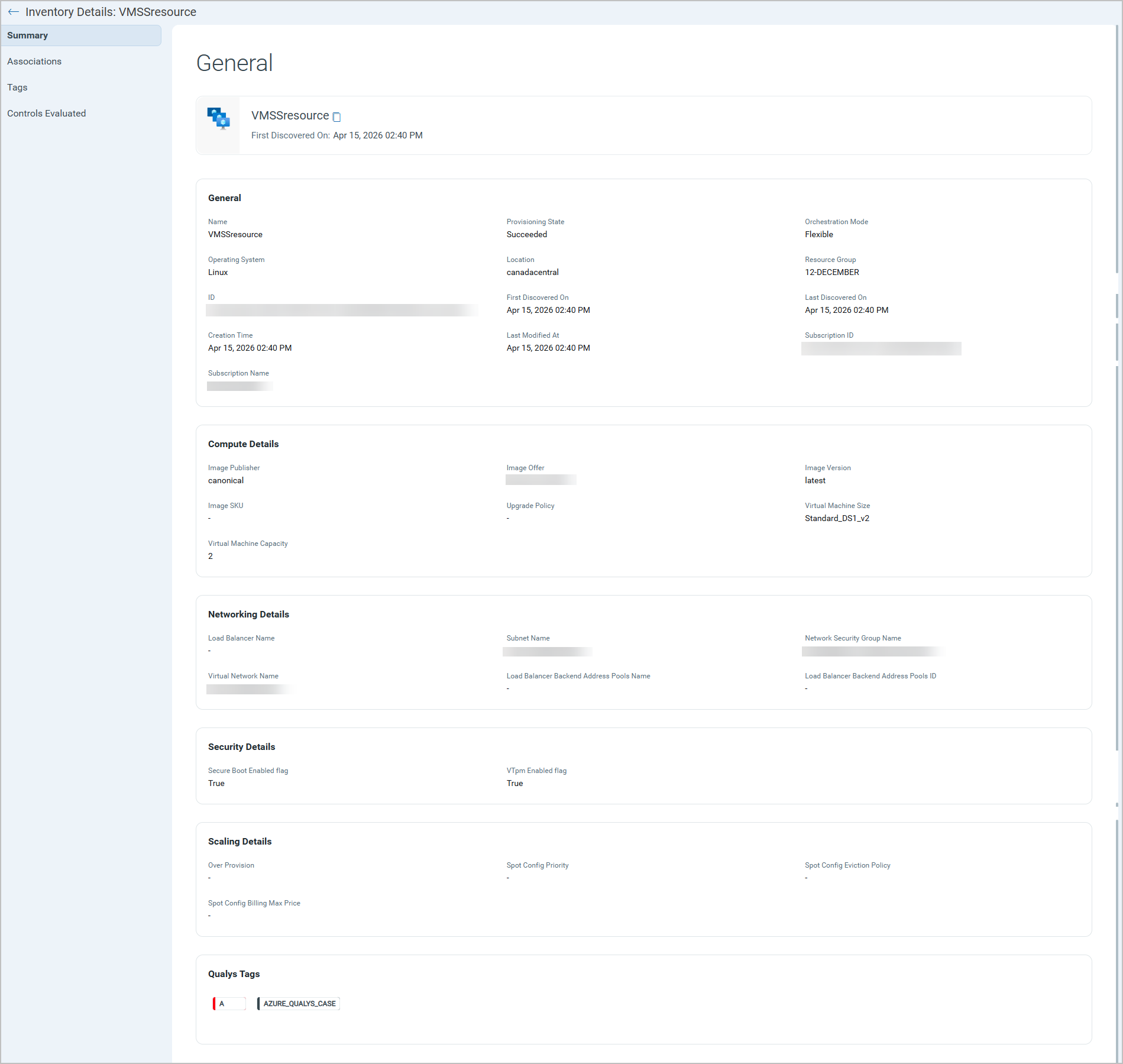
- Enhanced filter options
Five new QQL tokens are introduced to help you filter and identify VMSS resources and instances.azure.vmss.orchestrationModeazure.vmss.provisioningStateazure.vmss_instances.vmssNameazure.vmss_instances.provisioningStateazure.vm.isVmssVM
- Improved API Support
Support for these new inventory types and resources is added to the Get Resources API for Azure. You can use this API to retrieve details of VMSS resources. For more information, refer to the TotalCloud API User Guide.
Enhanced AWS WorkSpaces Inventory
Applicable for:
This release enhances the AWS WorkSpaces inventory experience by refining how WorkSpaces and directory resources are displayed. Now, only directories associated with WorkSpaces appear in the WorkSpaces inventory, while standalone AWS Directory Service directories are listed separately. Inventory names and categories have also been updated to make it easier for you to discover, filter, and report on resources across the user interface and APIs.
The key features of this enhancement include:
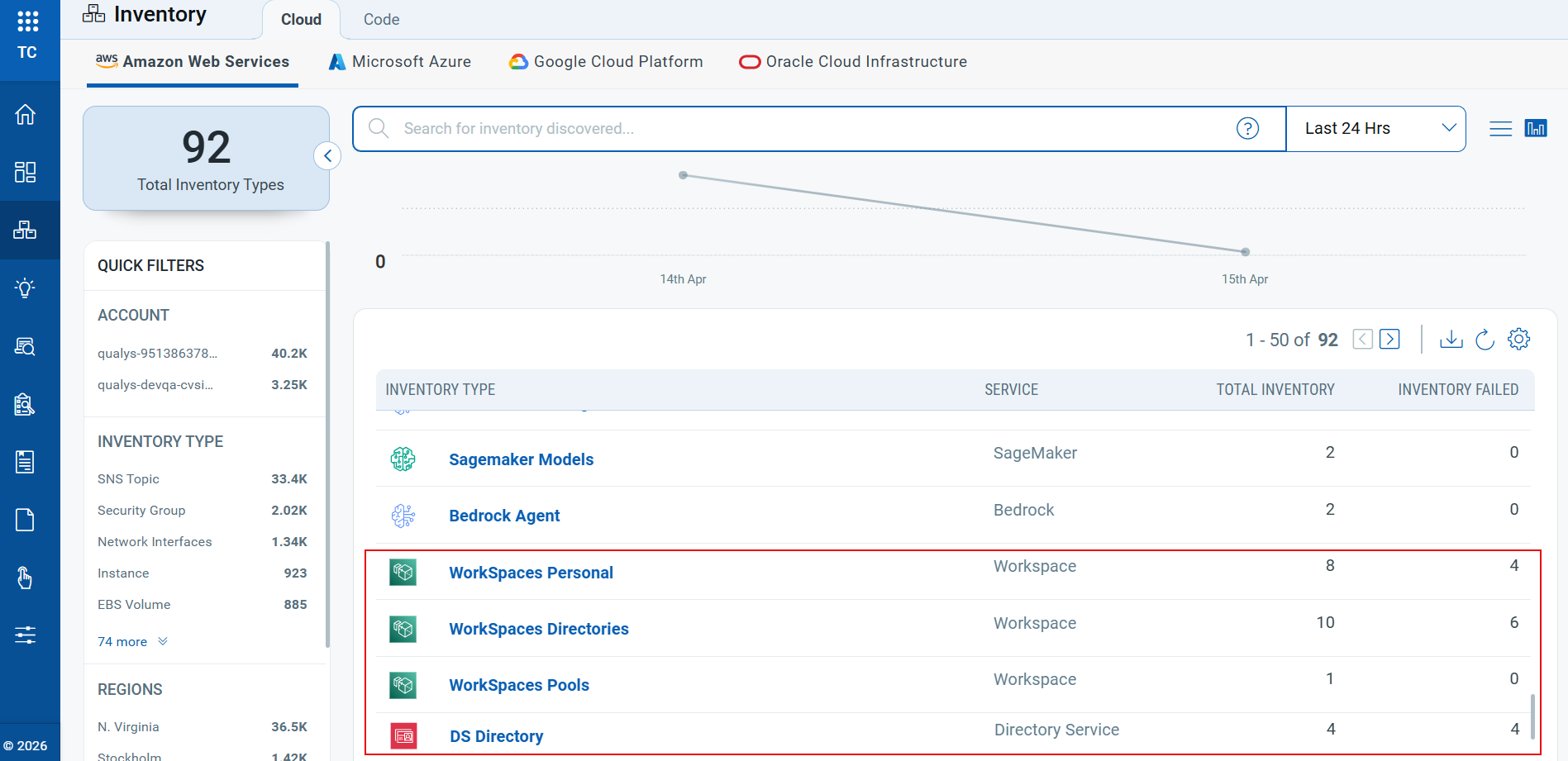
- Improved WorkSpaces Inventory organization: AWS WorkSpaces resources now appear in three clear segments:
- Workspace Personal (previously known as Workspace)– For Individual user WorkSpaces.
- Workspace Directories (previously known as Directories) – For Directories actively associated with WorkSpaces.
- Workspace Pools – New Inventory for Shared or pooled WorkSpaces.
- DS Directory - New Inventory for AWS Directory Service directories.
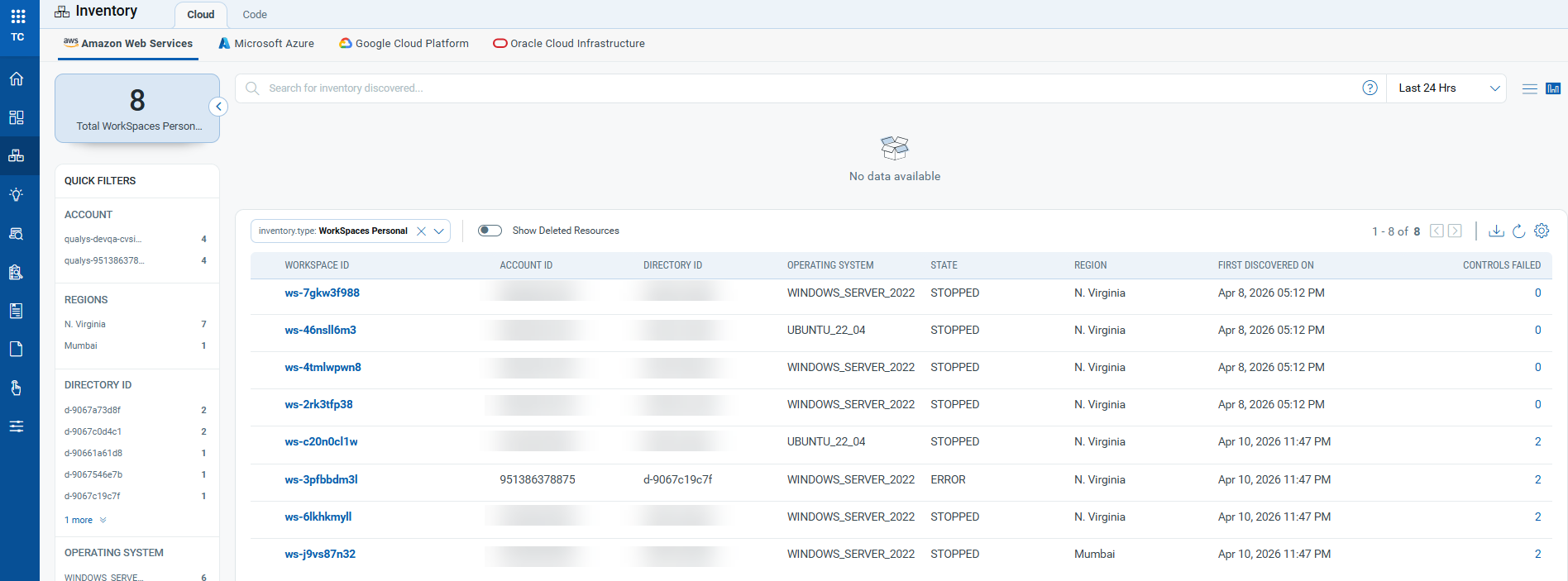
- Enhanced Workspace Personal Inventory: Workspace Personal inventory now provides essential details about each workspace, including Workspace ID, AWS Account ID, associated directory, operating system, workspace state, AWS Region, and the first-discovered timestamp.
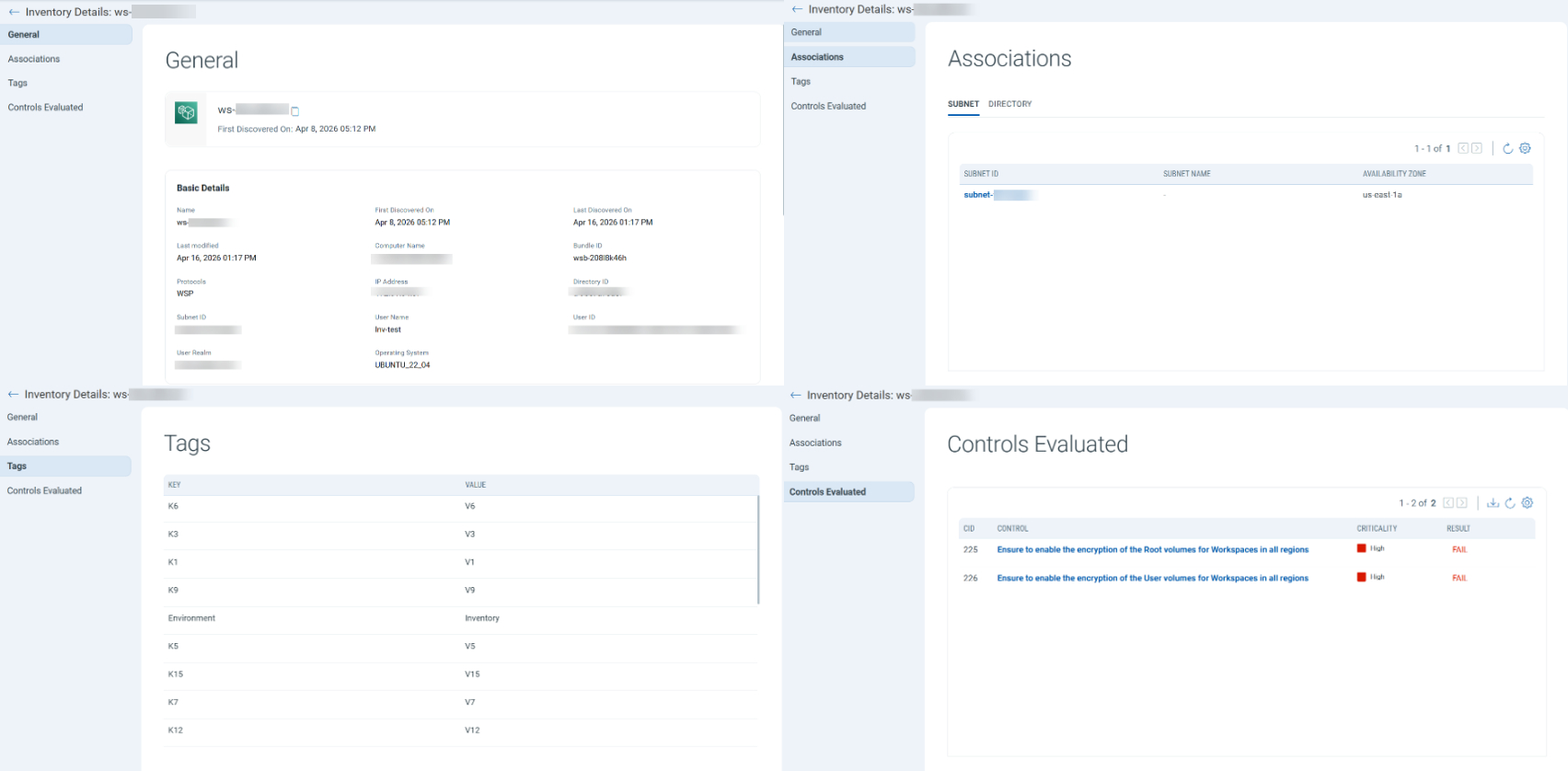
When you select a personal workspace resource, a summary page opens to provide additional details, including associated subnets and directories, tags, and the evaluated controls.
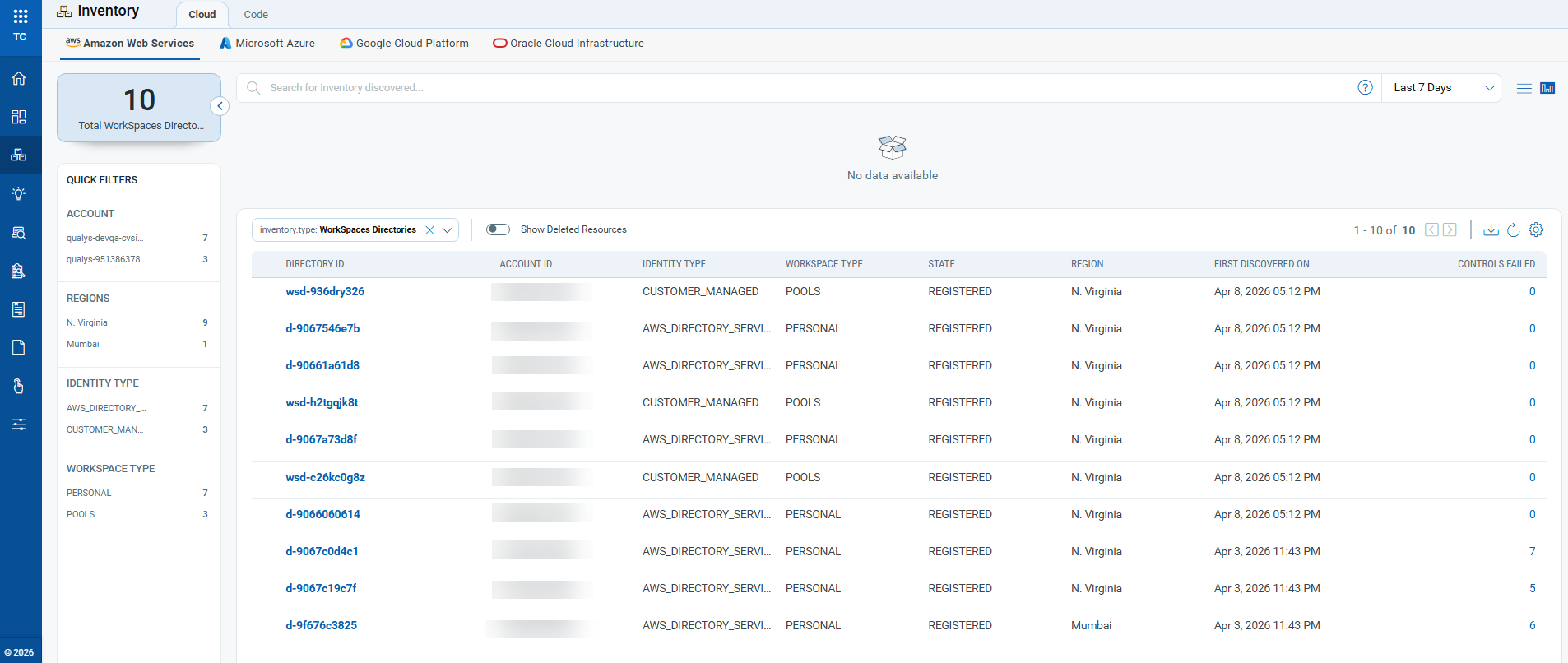
- Enhanced Workspace Directories Inventory: Workspace Directory inventory now provides essential details about each directory, including Directory ID, AWS Account ID, identity Type, workspace type, AWS Region, first-discovered timestamp, and evaluated controls.
When you select a workspace directory item, a summary page opens to provide additional details, including associated pools, subnets and security groups, tags, and the evaluated controls. - New Workspaces Pools Inventory: This inventory provides details of Shared or Pooled WorkSpaces, including Pool Name, AWS Account ID, Pool ID, Running mode, Pool state, AWS Region, and the first-discovered timestamp.
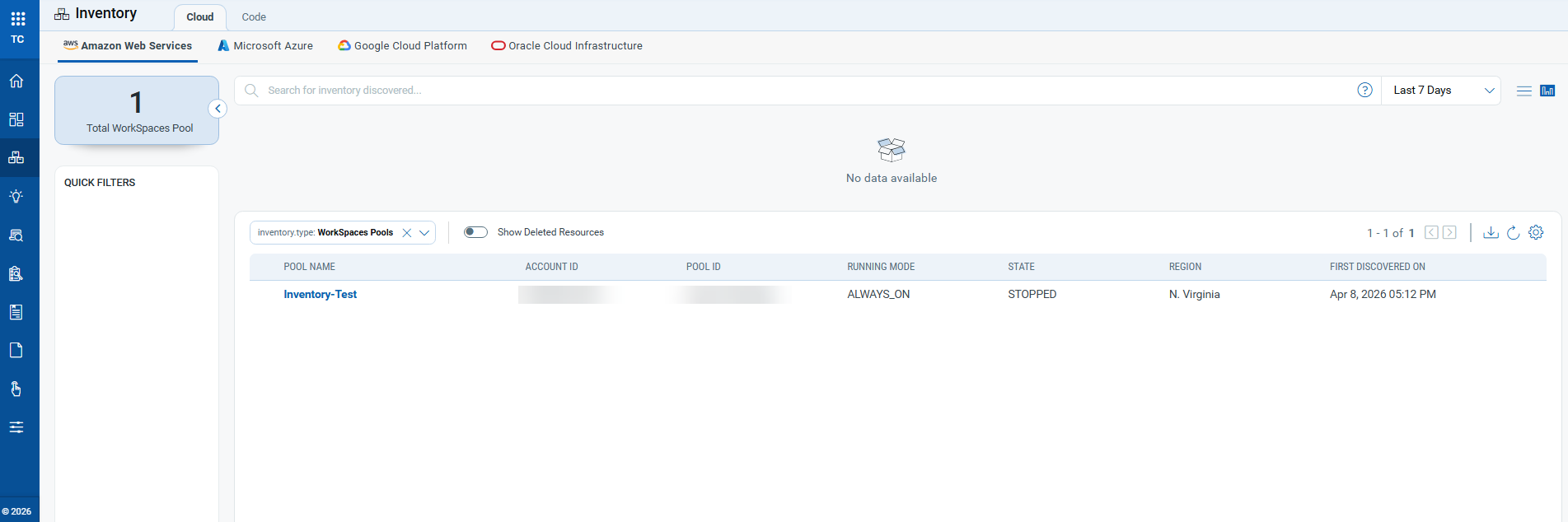
When you select a workspace pool, a summary page opens to provide additional details, including general information, the associated directory, and tags. - New DS Directory Inventory: The new DS Directory Inventory now displays only directories that are not linked to any Amazon WorkSpaces. This change helps ensure that directory resources are accurately categorized and easily manageable.
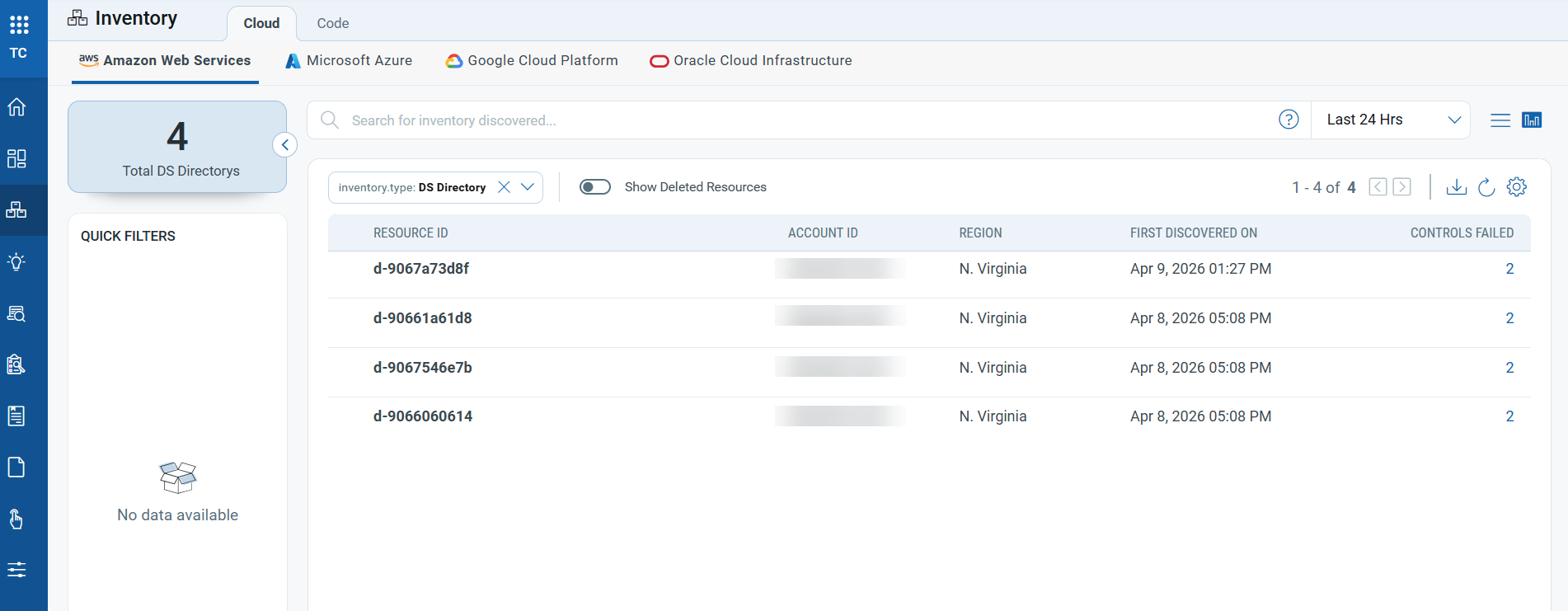
- Enhanced Filter Options: You can now use nine new QQL tokens to filter and identify WorkSpaces and directory resources more precisely:
aws.workspacepersonal.directoryIdaws.workspacepersonal.operatingSystemaws.workspacepersonal.stateaws.directory.identityTypeaws.directory.stateaws.directory.workspaceTypeaws.workspacepools.poolIdaws.workspacepools.directoryIdaws.workspacepools.state
- Improved API Support
Support for these new inventory types and repositories is added to the Get Resources API for AWS. You can use this API to retrieve details of workspace resources and directories. For more information, refer to the TotalCloud API User Guide.
New Tokens
The following section describes the new tokens introduced as part of TotalCloud 2.24.0
Inventory Tokens
Applicable for:
The following section describes the new tokens introduced for TotalCloud Inventory as part of this release.
| Platform | Resource Type | Name | Description | Example |
|---|---|---|---|---|
| AWS | Workspaces Personal | aws.workspacepersonal.directoryId | Use this to find personal WorkSpaces by directory ID. | aws.workspacepersonal.directoryId: |
| AWS | Workspaces Personal | aws.workspacepersonal.operatingSystem | Use this to find personal WorkSpaces by operating system. | aws.workspacepersonal.operatingSystem: |
| AWS | Workspaces Personal | aws.workspacepersonal.state | Use this to find personal WorkSpaces by state. | aws.workspacepersonal.state: |
| AWS | Workspaces Directory | aws.directory.identityType | Use this to find directories by identity type. | aws.directory.identityType: |
| AWS | Workspaces Directory | aws.directory.state | Use this to find directories by their state. | aws.directory.state: |
| AWS | Workspaces Directory | aws.directory.workspaceType | Use this to find directories by WorkSpace type. Accepted values are Personal and Pools. |
aws.directory.workspaceType: |
| AWS | Workspaces Pool | aws.workspacepools.poolId | Use this to find WorkSpace pools by pool ID. | aws.workspacepools.poolId: |
| AWS | Workspaces Pool | aws.workspacepools.directoryId | Use this to find WorkSpace pools by directory ID. | aws.workspacepools.directoryId: |
| AWS | Workspaces Pool | aws.workspacepools.state | Use this to find WorkSpace pools by their state. | aws.workspacepools.state: |
| Azure | Virtual Machine | azure.vm.isVmssVM | Use a true or false value to find virtual machines based on whether they belong to a virtual machine scale set. | azure.vm.isVmssVM: |
| Azure | Virtual Machine Scale Set | azure.vmss.orchestrationMode | Use this to find virtual machine scale sets by orchestration mode. Accepted values are Flexible or Uniform |
azure.vmss.orchestrationMode: |
| Azure | Virtual Machine Scale Set | azure.vmss.provisioningState | Use this to find virtual machine scale sets by provisioning state. Accepted values are Succeeded or Failed |
azure.vmss.provisioningState: |
| Azure | Virtual Machine Scale Set Instances | azure.vmss_instances.provisioningState | Use this to find virtual machine scale set instances by provisioning state. Accepted values are Succeeded or Failed |
azure.vmss_instances.provisioningState: |
| Azure | Virtual Machine Scale Set Instances | azure.vmss_instances.vmssName | Use this token to find virtual machine scale set instances by VM scale set name. | azure.vmss_instances.vmssName: |
Control Updates
New IAC Build Time Controls in AWS
Applicable for:
| Platform | CID | Title | Service | Resource | Criticality | Policy |
|---|---|---|---|---|---|---|
| AWS | 618 | Ensure MQ Broker should have the Latest Version | MQ | MQ Broker | MEDIUM | AWS Infrastructure as Code Security Best Practices Policy |
| AWS | 619 | Ensure MQ Configuration should have the Latest Version | MQ | MQ Configuration | MEDIUM | AWS Infrastructure as Code Security Best Practices Policy |
| AWS | 620 | Ensure Privileged Property is Not Enabled in AWS Batch Job Definitions | Batch | Batch Job Definition | HIGH | AWS Infrastructure as Code Security Best Practices Policy |
| AWS | 621 | Ensure RDS Instances use latest CA Certificate | RDS | RDS | HIGH | AWS Infrastructure as Code Security Best Practices Policy |
| AWS | 622 | Ensure DMS replication instance is encrypted by KMS using a customer managed Key (CMK) | DMS | DMS Replication | HIGH | AWS Infrastructure as Code Security Best Practices Policy |
| AWS | 623 | Ensure ELB Policy uses only secure protocols | EC2 | Load Balancer | HIGH | AWS Infrastructure as Code Security Best Practices Policy |
| AWS | 624 | Ensure AppSync API Cache is encrypted at rest | AppSync | AppSync API | HIGH | AWS Infrastructure as Code Security Best Practices Policy |
| AWS | 625 | Ensure AppSync API Cache is encrypted in transit | AppSync | AppSync API | HIGH | AWS Infrastructure as Code Security Best Practices Policy |
| AWS | 626 | Ensure CloudFront Distribution Is Enabled | CloudFront | CloudFront Distribution | HIGH | AWS Infrastructure as Code Security Best Practices Policy |
| AWS | 628 | Enforce Resource Creation Before Deletion in API Gateway Deployments | API Gateway | API Gateway | MEDIUM | AWS Infrastructure as Code Security Best Practices Policy |
| AWS | 629 | Ensure that CloudSearch is using latest TLS version | Cloud Search | Cloud Search Domains | HIGH | AWS Infrastructure as Code Security Best Practices Policy |
| AWS | 630 | Ensure CodePipeline Artifacts Are Encrypted with Customer-Managed KMS Keys | Code Pipeline | Code Pipelines | HIGH | AWS Infrastructure as Code Security Best Practices Policy |
| AWS | 631 | Enforce HTTPS on CloudSearch Domains | Cloud Search | Cloud Search Domains | HIGH | AWS Infrastructure as Code Security Best Practices Policy |
| AWS | 632 | Ensure CodeArtifact Domain is Encrypted with Customer-Managed KMS Keys | Cloud Artifact | Cloud Artifact Domains | HIGH | AWS Infrastructure as Code Security Best Practices Policy |
| AWS | 633 | Ensure ECS Cluster logging is enabled and client to container communication uses CMK | ECS | ECS Cluster | HIGH | AWS Infrastructure as Code Security Best Practices Policy |
| AWS | 639 | Ensure OpenSearch domain is using an up to date TLS policy | Elastisearch Service | ES Domain | HIGH | AWS Infrastructure as Code Security Best Practices Policy |
| AWS | 640 | Ensure no NACL allow ingress from 0.0.0.0/0 or ::/0 to port 21 | VPC | Network ACL | HIGH | AWS Infrastructure as Code Security Best Practices Policy |
| AWS | 641 | Ensure no NACL allow ingress from 0.0.0.0/0 or ::/0 to port 20 | VPC | Network ACL | HIGH | AWS Infrastructure as Code Security Best Practices Policy |
| AWS | 642 | Ensure Create before Destroy is enabled for ACM certificate | ACM | ACM Certificate | MEDIUM | AWS Infrastructure as Code Security Best Practices Policy |
| AWS | 643 | Ensure logging preference is enabled for ACM certificate | ACM | ACM Certificate | MEDIUM | AWS Infrastructure as Code Security Best Practices Policy |
| AWS | 644 | Ensure AMI copy is encrypted | EC2 | EC2 Images | HIGH | AWS Infrastructure as Code Security Best Practices Policy |
| AWS | 645 | Ensure AMI copy is encrypted using a customer managed key | EC2 | EC2 Images | HIGH | AWS Infrastructure as Code Security Best Practices Policy |
| AWS | 646 | Ensure Create before Destroy is enabled for API Gateway Deployments | API Gateway | API Gateway | MEDIUM | AWS Infrastructure as Code Security Best Practices Policy |
| AWS | 647 | Ensure KMS key is enabled | KMS | KMS | HIGH | AWS Infrastructure as Code Security Best Practices Policy |
New RUN Time Controls in AWS
Applicable for:
| Platform | CID | Title | Service | Resource | Criticality | Policy |
|---|---|---|---|---|---|---|
| AWS | 582 | Ensure CIFS access is restricted to trusted networks | VPC | VPC Security Group | HIGH | CIS Amazon Web Services Foundations Benchmark Policy v6.0.0 |
New Controls for AWS Without Policy Attachment
Applicable for:
| Platform | CID | Title | Service | Resource | Criticality |
|---|---|---|---|---|---|
| AWS | 552 | Ensure AWS ElastiCache replication groups should be encrypted at rest | ElastiCache | REDIS | HIGH |
New Controls in CIS Microsoft Azure Compute Services Benchmark
Applicable for:
| Platform | CID | Title | Service | Resource | Criticality | Policy |
|---|---|---|---|---|---|---|
| Azure | 50572 | Ensure basic authentication publishing credentials are disabled for Deployment slots of Web Apps | App Service | Web App | HIGH | CIS Microsoft Azure Compute Services Benchmark v2.0.0 |
| Azure | 50573 | Ensure basic authentication publishing credentials are disabled for Deployment slots of API Apps | App Service | API App | HIGH | CIS Microsoft Azure Compute Services Benchmark v2.0.0 |
| Azure | 50574 | Ensure basic authentication publishing credentials are disabled for Deployment slots of Standard Logic Apps | Logic App | Logic App | HIGH | CIS Microsoft Azure Compute Services Benchmark v2.0.0 |
| Azure | 50575 | Ensure basic authentication publishing credentials are disabled for Deployment slots of Function Apps | App Service | Function App | HIGH | CIS Microsoft Azure Compute Services Benchmark v2.0.0 |
| Azure | 50576 | Ensure FTP state is set to FTPS only or Disabled for Deployment slots of Web Apps | App Service | Web App | HIGH | CIS Microsoft Azure Compute Services Benchmark v2.0.0 |
| Azure | 50577 | Ensure FTP state is set to FTPS only or Disabled for Deployment slots of API Apps | App Service | API App | HIGH | CIS Microsoft Azure Compute Services Benchmark v2.0.0 |
| Azure | 50578 | Ensure FTP state is set to FTPS only or Disabled for Deployment slots of Standard Logic Apps | Logic App | Logic App | MEDIUM | CIS Microsoft Azure Compute Services Benchmark v2.0.0 |
| Azure | 50579 | Ensure FTP state is set to FTPS only or Disabled for Deployment slots of Function Apps | App Service | Function App | HIGH | CIS Microsoft Azure Compute Services Benchmark v2.0.0 |
| Azure | 50580 | Ensure HTTP version is set to 2.0 for Deployment slots of Web Apps | App Service | Web App | MEDIUM | CIS Microsoft Azure Compute Services Benchmark v2.0.0 |
| Azure | 50581 | Ensure HTTP version is set to 2.0 for Deployment slots of API Apps | App Service | API App | MEDIUM | CIS Microsoft Azure Compute Services Benchmark v2.0.0 |
| Azure | 50582 | Ensure HTTP version is set to 2.0 for Deployment slots of Standard Logic Apps | Logic App | Logic App | LOW | CIS Microsoft Azure Compute Services Benchmark v2.0.0 |
| Azure | 50583 | Ensure HTTP version is set to 2.0 for Deployment slots of Function Apps | App Service | Function App | MEDIUM | CIS Microsoft Azure Compute Services Benchmark v2.0.0 |
| Azure | 50584 | Ensure HTTPS Only is set to On for Deployment slots of Web Apps | App Service | Web App | HIGH | CIS Microsoft Azure Compute Services Benchmark v2.0.0 |
| Azure | 50585 | Ensure HTTPS Only is set to On for Deployment slots of API Apps | App Service | API App | HIGH | CIS Microsoft Azure Compute Services Benchmark v2.0.0 |
| Azure | 50586 | Ensure HTTPS Only is set to On for Deployment slots of Standard Logic Apps | Logic App | Logic App | HIGH | CIS Microsoft Azure Compute Services Benchmark v2.0.0 |
| Azure | 50587 | Ensure HTTPS Only is set to On for Deployment slots of Function Apps | App Service | Function App | HIGH | CIS Microsoft Azure Compute Services Benchmark v2.0.0 |
| Azure | 50588 | Ensure minimum inbound TLS version is set to 1.2 or higher for Deployment slots of Web Apps | App Service | Web App | HIGH | CIS Microsoft Azure Compute Services Benchmark v2.0.0 |
| Azure | 50589 | Ensure minimum inbound TLS version is set to 1.2 or higher for Deployment slots of API Apps | App Service | API App | HIGH | CIS Microsoft Azure Compute Services Benchmark v2.0.0 |
| Azure | 50590 | Ensure minimum inbound TLS version is set to 1.2 or higher for Deployment slots of Standard Logic Apps | Logic App | Logic App | MEDIUM | CIS Microsoft Azure Compute Services Benchmark v2.0.0 |
| Azure | 50591 | Ensure minimum inbound TLS version is set to 1.2 or higher for Deployment slots of Function Apps | App Service | Function App | HIGH | CIS Microsoft Azure Compute Services Benchmark v2.0.0 |
| Azure | 50592 | Ensure end-to-end TLS encryption is enabled for Deployment slots of Web Apps | App Service | Web App | HIGH | CIS Microsoft Azure Compute Services Benchmark v2.0.0 |
| Azure | 50593 | Ensure end-to-end TLS encryption is enabled for Deployment slots of API Apps | App Service | API App | HIGH | CIS Microsoft Azure Compute Services Benchmark v2.0.0 |
| Azure | 50594 | Ensure end-to-end TLS encryption is enabled for Deployment slots of Standard Logic Apps | Logic App | Logic App | HIGH | CIS Microsoft Azure Compute Services Benchmark v2.0.0 |
| Azure | 50595 | Ensure end-to-end TLS encryption is enabled for Deployment slots of Function Apps | App Service | Function App | HIGH | CIS Microsoft Azure Compute Services Benchmark v2.0.0 |
| Azure | 50596 | Ensure App Service Environment is deployed with an internal load balancer | App Service Environment | App Service Environment | HIGH | CIS Microsoft Azure Compute Services Benchmark v2.0.0 |
| Azure | 50597 | Ensure App Service Environment is provisioned with v3 or higher | App Service Environment | App Service Environment | MEDIUM | CIS Microsoft Azure Compute Services Benchmark v2.0.0 |
| Azure | 50598 | Ensure App Service Environment has internal encryption enabled | App Service Environment | App Service Environment | HIGH | CIS Microsoft Azure Compute Services Benchmark v2.0.0 |
| Azure | 50599 | Ensure App Service Environment has TLS 1.0 and 1.1 disabled | App Service Environment | App Service Environment | HIGH | CIS Microsoft Azure Compute Services Benchmark v2.0.0 |
| Azure | 50600 | Ensure Remote debugging is set to Off for Deployment slots of Web Apps | App Service | Web App | HIGH | CIS Microsoft Azure Compute Services Benchmark v2.0.0 |
| Azure | 50601 | Ensure Remote debugging is set to Off for Deployment slots of Function Apps | App Service | Function App | HIGH | CIS Microsoft Azure Compute Services Benchmark v2.0.0 |
| Azure | 50602 | Ensure Client Certificates (Incoming client certificates) set to On for Deployment slots of Web Apps | App Service | Web App | HIGH | CIS Microsoft Azure Compute Services Benchmark v2.0.0 |
| Azure | 50603 | Ensure Client Certificates (Incoming client certificates) set to On for Deployment slots of Function Apps | App Service | Function App | HIGH | CIS Microsoft Azure Compute Services Benchmark v2.0.0 |
| Azure | 50604 | Ensure managed identities are configured for Deployment slots of Web Apps | App Service | Web App | HIGH | CIS Microsoft Azure Compute Services Benchmark v2.0.0 |
| Azure | 50605 | Ensure managed identities are configured for Deployment slots of Function Apps | App Service | Function App | HIGH | CIS Microsoft Azure Compute Services Benchmark v2.0.0 |
| Azure | 50606 | Ensure public network access is disabled for Deployment slots of Web Apps | App Service | Web App | MEDIUM | CIS Microsoft Azure Compute Services Benchmark v2.0.0 |
| Azure | 50607 | Ensure public network access is disabled for Deployment slots of Function Apps | App Service | Function App | MEDIUM | CIS Microsoft Azure Compute Services Benchmark v2.0.0 |
| Azure | 50608 | Ensure virtual network integration for Deployment slots of Web Apps | App Service | Web App | MEDIUM | CIS Microsoft Azure Compute Services Benchmark v2.0.0 |
| Azure | 50609 | Ensure virtual network integration for Deployment slots of Function Apps | App Service | Function App | MEDIUM | CIS Microsoft Azure Compute Services Benchmark v2.0.0 |
| Azure | 50610 | Ensure configuration is routed through the virtual network integration for Deployment slots of Web Apps | App Service | Web App | HIGH | CIS Microsoft Azure Compute Services Benchmark v2.0.0 |
| Azure | 50611 | Ensure configuration is routed through the virtual network integration for Deployment slots of Function Apps | App Service | Function App | HIGH | CIS Microsoft Azure Compute Services Benchmark v2.0.0 |
| Azure | 50612 | Ensure all traffic is routed through the virtual network for Deployment slots of Web Apps | App Service | Web App | HIGH | CIS Microsoft Azure Compute Services Benchmark v2.0.0 |
| Azure | 50613 | Ensure all traffic is routed through the virtual network for Deployment slots of Function Apps | App Service | Function App | HIGH | CIS Microsoft Azure Compute Services Benchmark v2.0.0 |
| Azure | 50614 | Ensure cross-origin resource sharing does not allow all origins for Deployment slots of Web Apps | App Service | Web App | MEDIUM | CIS Microsoft Azure Compute Services Benchmark v2.0.0 |
| Azure | 50615 | Ensure cross-origin resource sharing does not allow all origins for Deployment slots of Function Apps | App Service | Function App | MEDIUM | CIS Microsoft Azure Compute Services Benchmark v2.0.0 |
| Azure | 50616 | Ensure configuration is routed through the virtual network integration for Web Apps | App Service | Web App | HIGH | CIS Microsoft Azure Compute Services Benchmark v2.0.0 |
| Azure | 50617 | Ensure configuration is routed through the virtual network integration for Function Apps | App Service | Function App | HIGH | CIS Microsoft Azure Compute Services Benchmark v2.0.0 |
| Azure | 50618 | Ensure App Service Environment has TLS cipher suite ordering configured | App Service Environment | App Service Environment | MEDIUM | CIS Microsoft Azure Compute Services Benchmark v2.0.0 |
Controls added to CIS Microsoft Azure Compute Services Benchmark
Applicable for:
| Platform | CID | Title | New Policy |
|---|---|---|---|
| Azure | 50500 | Ensure that CORS does not allow every resource to access the API Apps | CIS Microsoft Azure Compute Services Benchmark |
| Azure | 50501 | Ensure that CORS does not allow every resource to access the Standard Logic Apps | CIS Microsoft Azure Compute Services Benchmark |
| Azure | 50514 | Ensure that Managed Identity used in Logic Apps | CIS Microsoft Azure Compute Services Benchmark |
| Azure | 50518 | Ensure that IP restriction rules are configured for Function App | CIS Microsoft Azure Compute Services Benchmark |
| Azure | 50519 | Ensure that IP restriction rules are configured for API App | CIS Microsoft Azure Compute Services Benchmark |
| Azure | 50520 | Ensure that IP restriction rules are configured for Standard Logic App | CIS Microsoft Azure Compute Services Benchmark |
| Azure | 50532 | Ensure that Remote debugging is Off for Standard Logic App | CIS Microsoft Azure Compute Services Benchmark |
| Azure | 50533 | Ensure that Remote debugging is Off for API App | CIS Microsoft Azure Compute Services Benchmark |
| Azure | 50552 | Ensure Basic Authentication Publishing Credentials are Disabled for Web apps | CIS Microsoft Azure Compute Services Benchmark |
| Azure | 50553 | Ensure Basic Authentication Publishing Credentials are Disabled for Function apps | CIS Microsoft Azure Compute Services Benchmark |
| Azure | 50554 | Ensure Basic Authentication Publishing Credentials are Disabled for API apps | CIS Microsoft Azure Compute Services Benchmark |
| Azure | 50555 | Ensure Basic Authentication Publishing Credentials are Disabled for Standard Logic apps | CIS Microsoft Azure Compute Services Benchmark |
| Azure | 50556 | Ensure end-to-end TLS encryption is enabled for Web Apps | CIS Microsoft Azure Compute Services Benchmark |
| Azure | 50557 | Ensure end-to-end TLS encryption is enabled for API Apps | CIS Microsoft Azure Compute Services Benchmark |
| Azure | 50558 | Ensure end-to-end TLS encryption is enabled for Function Apps | CIS Microsoft Azure Compute Services Benchmark |
| Azure | 50560 | Ensure private endpoints are used to access Web Apps | CIS Microsoft Azure Compute Services Benchmark |
| Azure | 50561 | Ensure private endpoints are used to access API Apps | CIS Microsoft Azure Compute Services Benchmark |
| Azure | 50562 | Ensure private endpoints are used to access Standard Logic Apps | CIS Microsoft Azure Compute Services Benchmark |
| Azure | 50563 | Ensure private endpoints are used to access Function Apps | CIS Microsoft Azure Compute Services Benchmark |
| Azure | 50564 | Ensure Web Apps is integrated with a virtual network | CIS Microsoft Azure Compute Services Benchmark |
| Azure | 50565 | Ensure API Apps is integrated with a virtual network | CIS Microsoft Azure Compute Services Benchmark |
| Azure | 50566 | Ensure Standard Logic Apps is integrated with a virtual network | CIS Microsoft Azure Compute Services Benchmark |
| Azure | 50567 | Ensure Function Apps is integrated with a virtual network | CIS Microsoft Azure Compute Services Benchmark |
| Azure | 50568 | Ensure all traffic is routed through the virtual network for Web Apps | CIS Microsoft Azure Compute Services Benchmark |
| Azure | 50569 | Ensure all traffic is routed through the virtual network for API Apps | CIS Microsoft Azure Compute Services Benchmark |
| Azure | 50570 | Ensure all traffic is routed through the virtual network for Standard Logic Apps | CIS Microsoft Azure Compute Services Benchmark |
| Azure | 50571 | Ensure all traffic is routed through the virtual network for Function Apps | CIS Microsoft Azure Compute Services Benchmark |
Azure Controls Policy-to-Policy Migration
Applicable for:
| Platform | CID | Title | Old Policy | New Policy |
|---|---|---|---|---|
| Azure | 50037 | Ensure to enable Virtual machines with end-to-end encryption using encryption at host | Azure Best Practices Policy | CIS Microsoft Azure Compute Services Benchmark |
| Azure | 50143 | Ensure that CORS does not allow every resource to access the Function Apps | Azure Function App Best Practices Policy | CIS Microsoft Azure Compute Services Benchmark |
| Azure | 50144 | Ensure that CORS does not allow every resource to access the Web apps | Azure Best Practices Policy | CIS Microsoft Azure Compute Services Benchmark |
| Azure | 50147 | Ensure that Managed identity is used in Function apps | Azure Function App Best Practices Policy | CIS Microsoft Azure Compute Services Benchmark |
| Azure | 50148 | Ensure that Managed identity is used in Web apps | Azure Best Practices Policy | CIS Microsoft Azure Compute Services Benchmark |
| Azure | 50149 | Ensure that Remote debugging is turned off for Function apps | Azure Function App Best Practices Policy | CIS Microsoft Azure Compute Services Benchmark |
| Azure | 50150 | Ensure that Remote debugging is turned off for Web apps | Azure Best Practices Policy | CIS Microsoft Azure Compute Services Benchmark |
| Azure | 50156 | Ensure that public network access is disabled in Managed Disks | Azure Best Practices Policy | CIS Microsoft Azure Compute Services Benchmark |
| Azure | 50203 | Ensure that Managed Identity is used in API Apps | Azure Best Practices Policy | CIS Microsoft Azure Compute Services Benchmark |
| Azure | 50290 | Ensure that Azure Batch pools have disk encryption enabled | Azure Best Practices Policy | CIS Microsoft Azure Compute Services Benchmark |
| Azure | 50291 | Ensure that Azure Batch accounts have local authentication methods disabled | Azure Best Practices Policy | CIS Microsoft Azure Compute Services Benchmark |
| Azure | 50293 | Ensure that Batch accounts have private endpoint connections enabled | Azure Best Practices Policy | CIS Microsoft Azure Compute Services Benchmark |
| Azure | 50294 | Ensure that public network access is disabled for Batch accounts | Azure Best Practices Policy | CIS Microsoft Azure Compute Services Benchmark |
| Azure | 50295 | Ensure that Resource logs are enabled in Batch accounts | Azure Best Practices Policy | CIS Microsoft Azure Compute Services Benchmark |
| Azure | 50314 | Ensure Trusted Launch is enabled on Virtual Machines | Azure Best Practices Policy | CIS Microsoft Azure Compute Services Benchmark |
| Azure | 50344 | Ensure IP Restriction Rules are configured on Web App | Azure Best Practices Policy | CIS Microsoft Azure Compute Services Benchmark |
| Azure | 50478 | Ensure that 'Enable Data Access Authentication Mode' is 'Checked' for Disks | Azure Best Practices Policy | CIS Microsoft Azure Compute Services Benchmark |
Control Resource Type Updates
Applicable for:
| Platform | CID | Title | Old Resource Type | New Resource Type |
|---|---|---|---|---|
| AWS | 179 | Ensure multi-factor authentication (MFA) is enabled in Directory Service | Directory | DS Directory |
| AWS | 181 | Ensure proper protocol is configured for Radius server in AWS Directory | Directory | DS Directory |
| AWS | 198 | Ensure Workspace directory must have a vpc endpoint so that the API traffic associated with the management of workspaces stays within the vpc | Workspace | Directory |
Controls Deprecated
Applicable for:
| Platform | CID | Description | Control Type | Policy |
|---|---|---|---|---|
| AWS | 508 | Ensure AWS EBS Volume has a corresponding AWS EBS Snapshot | Build Run Time | AWS Best Practices Policy AWS Infrastructure as Code Security Best Practices Policy |
Control Enhancements
Applicable for:
| Platform | CID | Title | Description | Criticality |
|---|---|---|---|---|
| AWS | 55 | Ensure Auto Minor Version Upgrade feature is Enabled for Relational Database Service (RDS) Instances | Build time control updated to verify against both db_instance as well as rds_cluster_instance | MEDIUM |
| AWS | 159 | Ensure Amazon OpenSearch Service domains are using the latest version of OpenSearch engine | OpenSearch service updated to latest version 3.5 | MEDIUM |
| AWS | 161 | Ensure no Network ACLs allow ingress from 0.0.0.0/0 or ::/0 to port 22 | Build time control logic updated to verify against both aws_network_acl and aws_network_acl_rule | HIGH |
| AWS | 170 | Ensure no Network ACLs allow ingress from 0.0.0.0/0 or ::/0 to port 3389 | Build time control logic updated to verify against both aws_network_acl and aws_network_acl_rule | HIGH |
| AWS | 494 | Ensure customer owned KMS key is used for encrypting AWS MQ Brokers | Build-time control logic is enhanced to enforce KMS usage. The control will now fail if no KMS key is configured. | HIGH |
| Azure | 50142 | Ensure Diagnostic Setting captures appropriate categories | Control logic enhanced to check for specific log types and added necessary evidences | HIGH |
Issues Addressed
Applicable for:
We fixed the following important and notable issue in this release.
| Category/Component | Issue |
|---|---|
| Controls | CID 24: Ensure S3 bucket access logging is enabled on the CloudTrail S3 bucket The control logic is updated to skip evaluations for org cloudtrails created in a different account than the one used to create the connector. |
| TotalCloud-UI | We fixed an issue in which the tag.name and tags.name QQL filters caused discrepancies in subscription data and inconsistent Posture results. |
| CV-Reports | We fixed the issue where removing a connector from an existing or newly created on‑screen report unexpectedly removed all connectors from the connectors list is now resolved. |
| CV-Monitor | We fixed the issue that led to inconsistent AWS Control evaluations, in which the AWS account ID intermittently failed to appear in the Posture tab. |
| AV-GCP | We fixed the issue where asset tags from the GCP Org Connector were not correctly applied to associated assets. |
| CV-GCP Connector | We fixed the issue where the GCP Org Connector failed and recurring Cloud Perimeter Scan job creation was blocked due to start date validation errors. Date selection now works correctly across all available years. |