TotalCloud Release 2.26
July 20, 2026
Qualys TotalCloud 2.26.0 raises the bar for multi-cloud security - delivering unified visibility, identity-aware risk intelligence, and broader cloud coverage across AWS, Azure, GCP, and OCI. This release is built for security teams who need to move faster, see further, and govern smarter across an ever-expanding cloud estate.
Multi-Cloud Inventory Overview
Applicable for: 


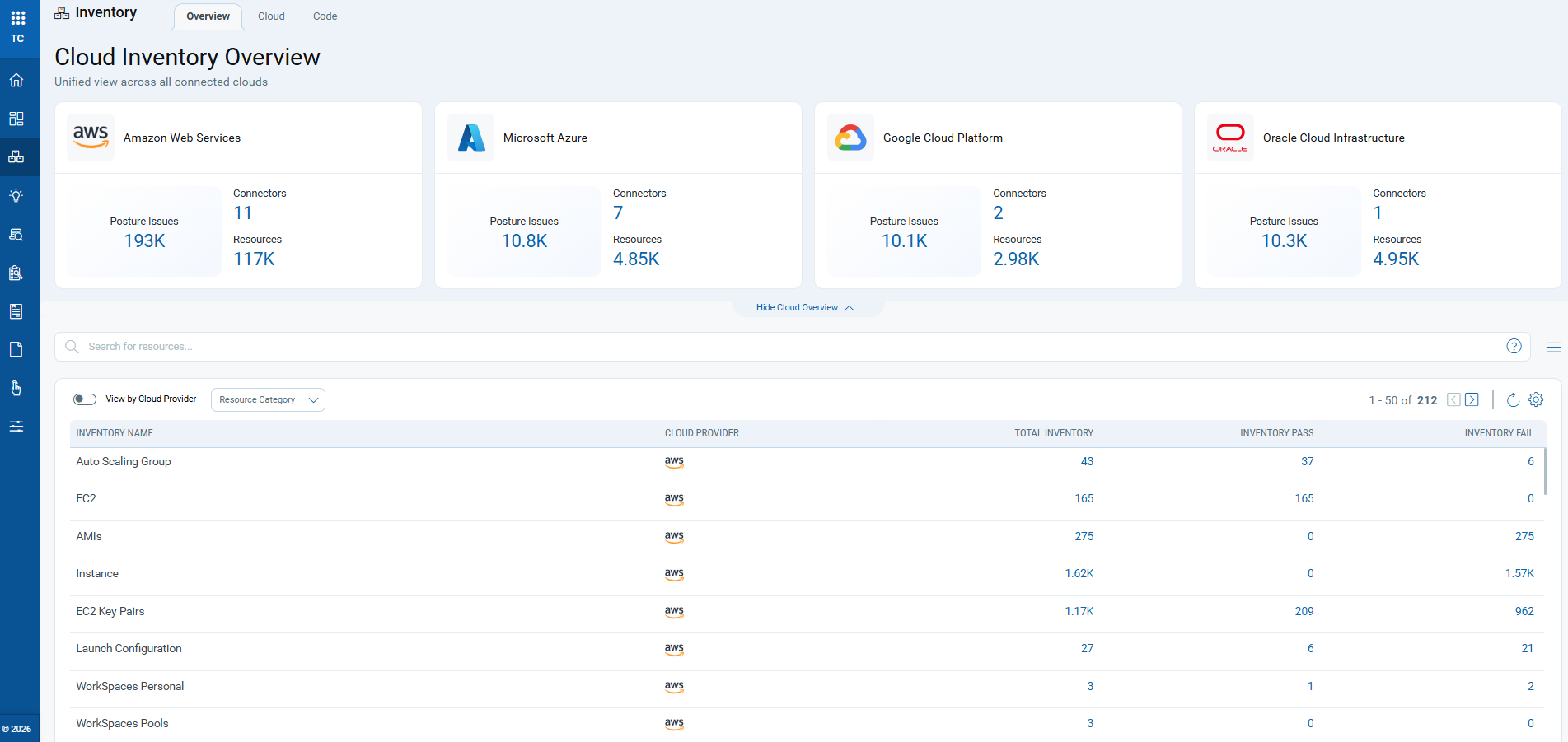
The Multi-Cloud Inventory enhances the existing inventory experience by providing a consolidated view of resources across all connected cloud providers. The enhanced Cloud Inventory Overview page aggregates inventory data from Amazon Web Services (AWS), Microsoft Azure, Google Cloud Platform (GCP), and Oracle Cloud Infrastructure (OCI), giving you unified visibility into your multi-cloud environment.
Benefits
- Single Pane of Glass: Provides consolidated inventory visibility across multiple cloud environments from a single dashboard.
- Improved Posture Visibility: View resource counts alongside posture status to quickly identify regions, accounts, and services requiring attention.
- Faster Investigation: Navigate directly from inventory statistics to detailed inventory and posture records through clickable metrics.
- Unified Data Model: The multi-cloud inventory architecture provides consistent reporting across cloud providers, simplifying inventory management and reporting.
The enhanced dashboard offers a centralized overview of inventory data across supported cloud providers. Each provider is shown through a dedicated summary card that displays:
- Total number of cloud connectors
- Total resources discovered
- Total posture issues (failed controls)
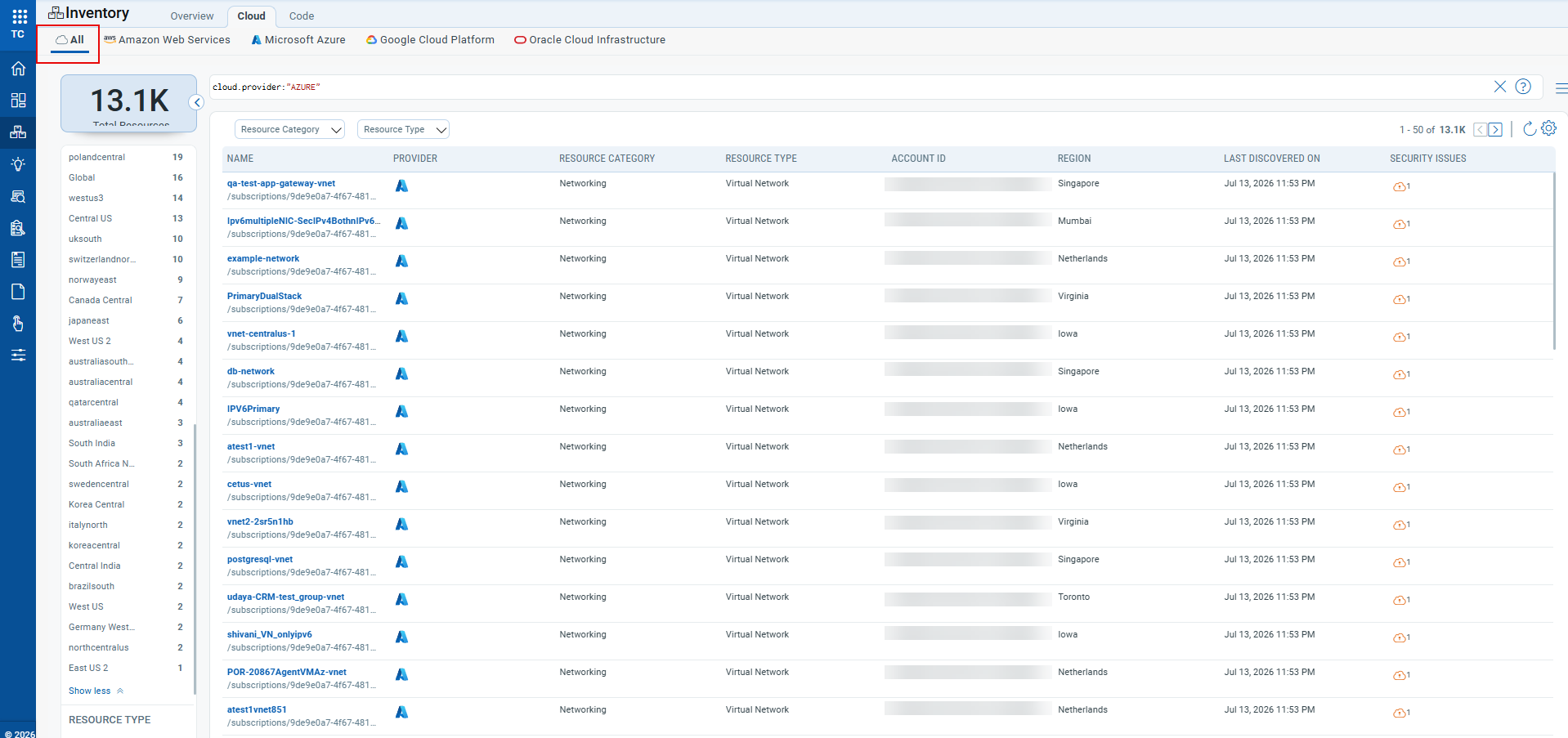
Additionally, you also get a unified resource view when you navigate to Inventory > Cloud > All.
Sensitive Data Scanning for GCP
Applicable for:
Qualys TotalCloud now extends sensitive data detection capabilities to Google Cloud Platform (GCP) instances. This enhancement enables security teams to identify exposed sensitive data, such as credentials, API keys, and tokens, across multi-cloud environments from a single, unified platform.
Key Features and Benefits
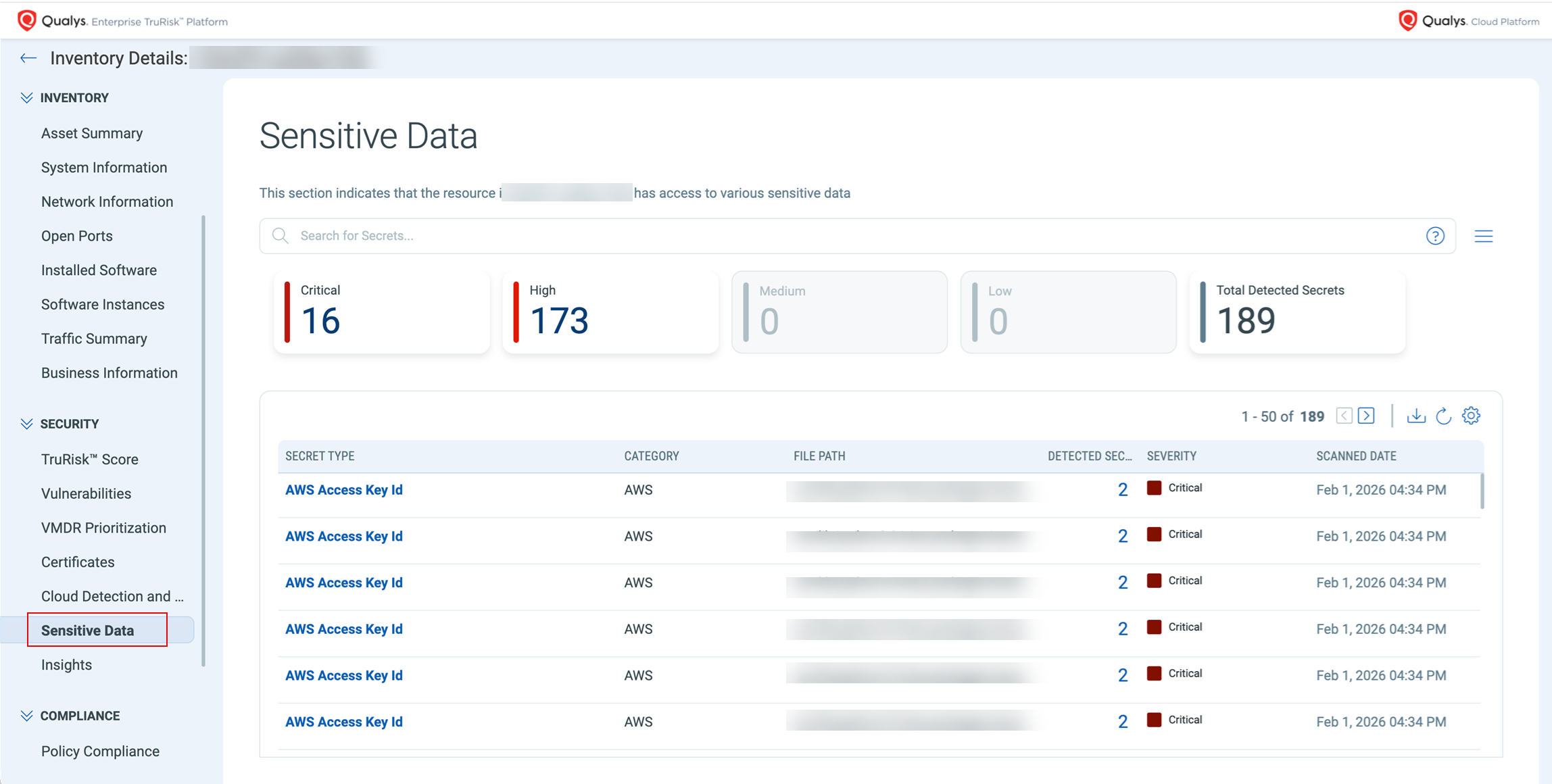
- Sensitive data visible in TotalCloud Inventory: Detected sensitive data surface within the TotalCloud module under Security > Sensitive Data on individual instance detail pages.
Prerequisites
- GCP connector configured within Qualys TotalCloud.
- Target instances must be Linux-based. Currently, Windows instances are not supported.
- Zero-Touch Snapshot-Based Scan for GCP must be configured.
Navigate to TotalCloud > Inventory > [Select a GCP Instance] > Security > Sensitive Data tab to view secret detection findings for GCP.
TruRisk™ Insights Catalog
Applicable for:
The TruRisk™ Insights Catalog gives you complete visibility into all available TotalCloud Insights, not just the ones currently detected in your environment. This helps you better understand the full range of risks TotalCloud can identify, along with clear descriptions and supporting details for each insight.
Benefits
- Improved visibility into the complete TotalCloud Insights library
- Better understanding of how insights are defined and triggered
- Explore insights proactively to strengthen your security posture
- Easy access to insight details and remediation guidance
Key Features
- Explore All Insights in One Place:
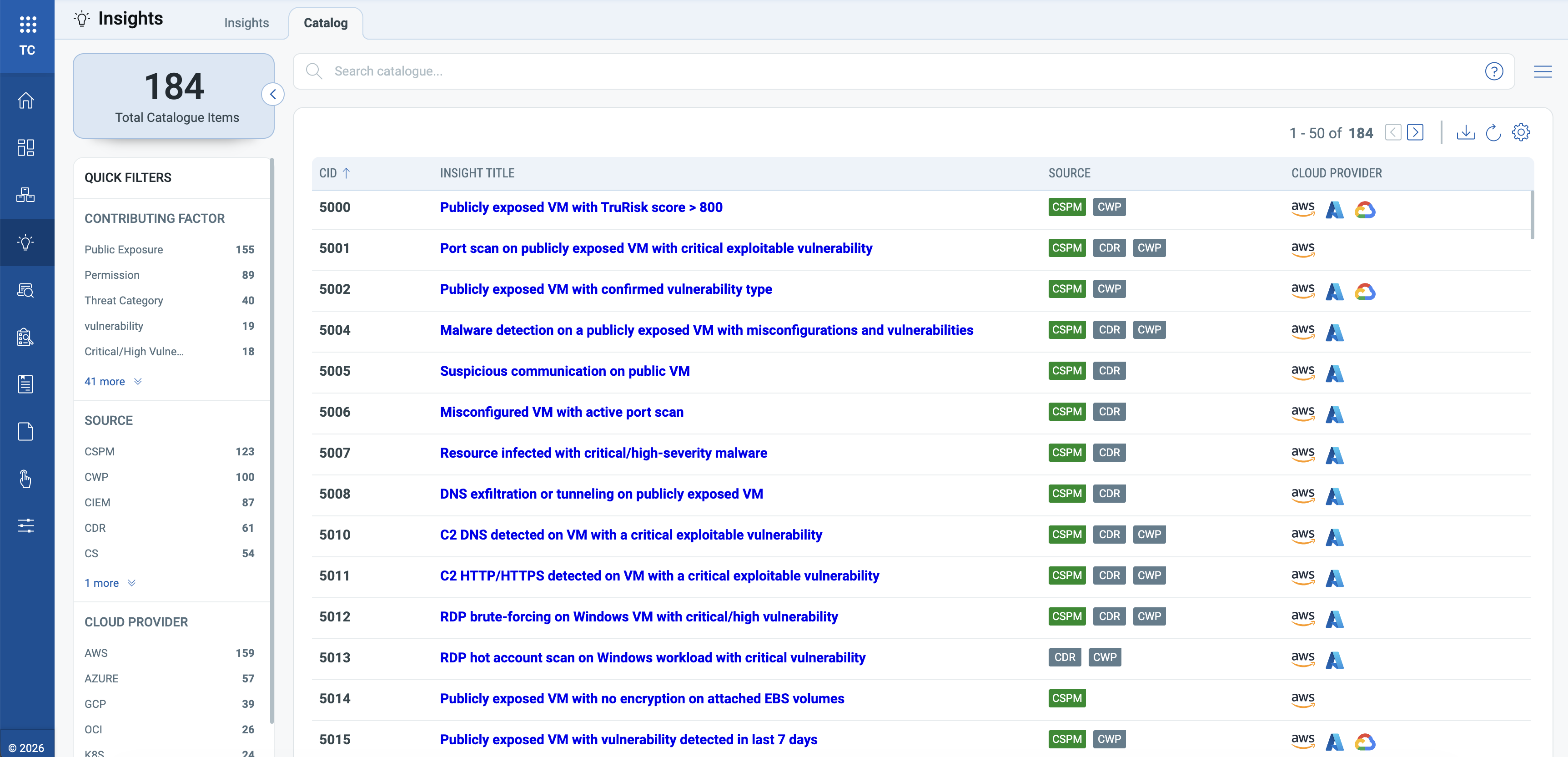
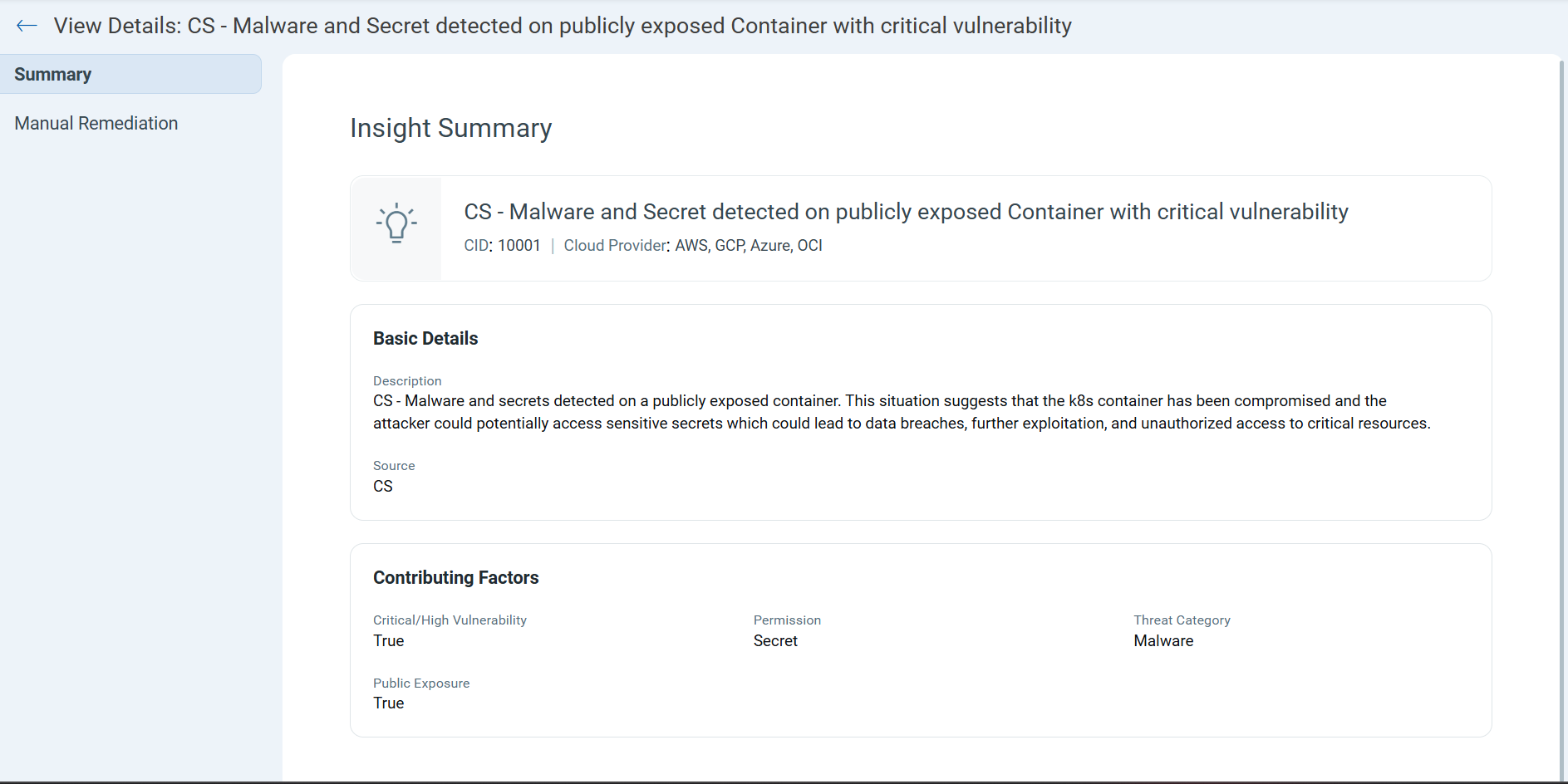
Browse a complete, searchable catalog of all TotalCloud Insights, including details such as source, cloud coverage, and categories, to easily find and understand relevant risks. Navigate to TotalCloud > Insights > Catalog to explore all insights.
- Understand Each Insight in Detail:
Select any insight to view a comprehensive summary, including its description, contributing factors, and supported environments, giving you full clarity on what the insight represents.
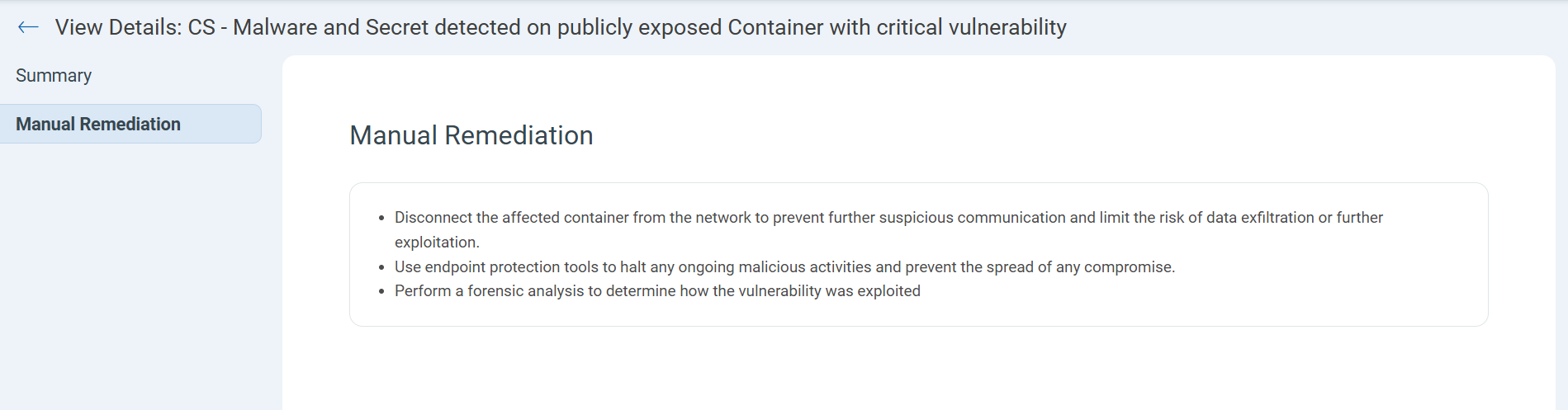
- Act with Confidence using Remediation Guidance:
The Manual Remediation tab provides step-by-step manual remediation recommendations, so you know how to respond when an insight is triggered in your environment.
Investigate Cloud Configurations
Applicable for:
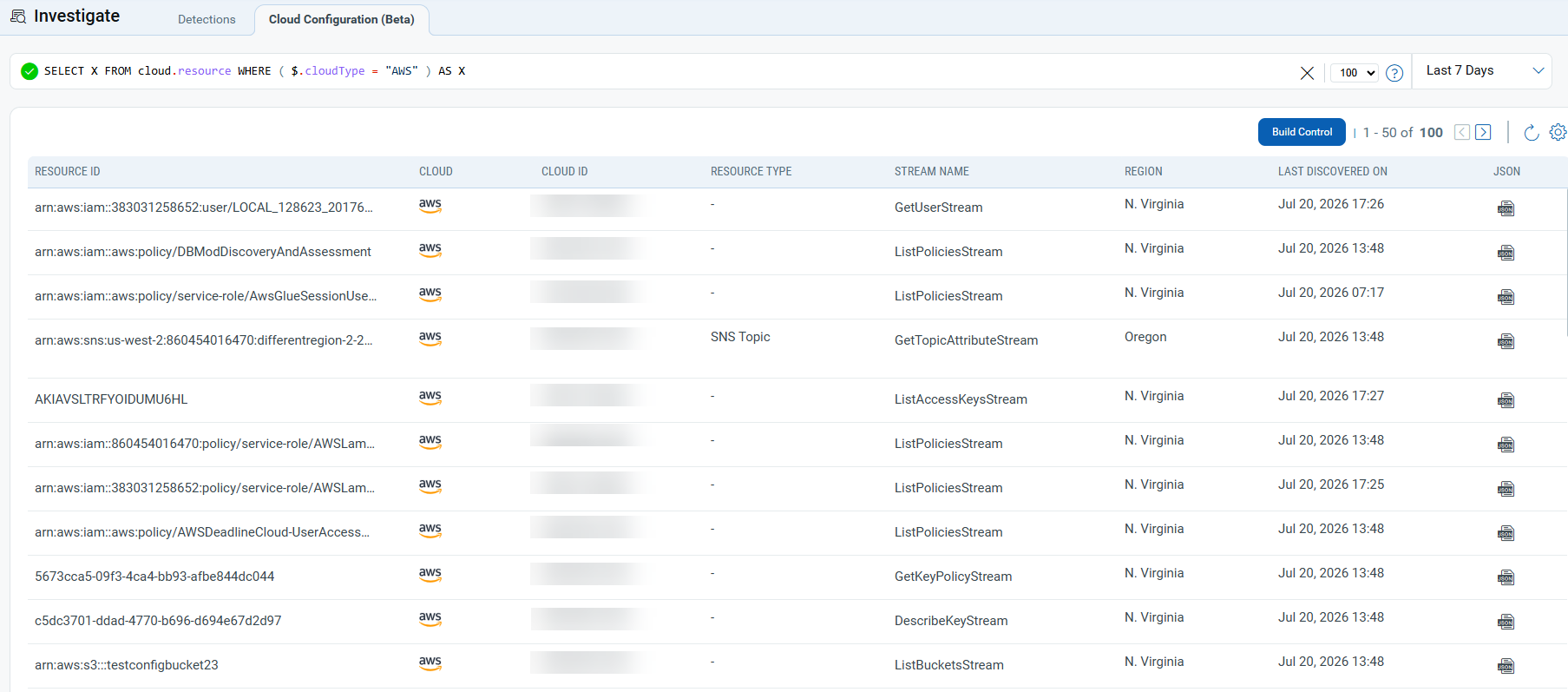
Qualys TotalCloud introduces a new capability that enables you to investigate cloud environments through a metadata-driven query interface. This allows you to search and analyze resources using details such as properties, tags, identities, networking configurations, and compliance-related attributes, all from a single place, without using scripts or command-line tools.
After you validate a query, you can convert it into a reusable custom control using JSON Query Language (JQL). This helps you continuously monitor your environment for specific conditions, rather than running the same investigation repeatedly.
Benefits:
- Search and analyze cloud resources using metadata
- Build and run queries without writing scripts
- Convert queries into reusable controls for ongoing monitoring
Navigate to TotalCloud > Investigate > Cloud Configuration, then enter a JSON query to view the resources.
This feature is currently available as a BETA release. Contact your Technical Account Manager (TAM) or Qualys Support to get access.
Extended AWS, Azure, and OCI Inventory Coverage
Applicable for:
We have expanded our cloud security coverage by adding support for additional AWS, Azure, and OCI resource types in Cloud Inventory, enabling discovery, inventory, and security posture assessment across a broader range of cloud services.
The resources are as follows:
| Platform | Resource Type |
|---|---|
| AWS | Amazon Open Search Domain Direct Connect Connections DMS Replication Document DB Clusters Document DB Snapshots Elasticache replication group IAM Password Policy Identity Pool KMS Launch Configuration MSK Clusters RDS Cluster RDS Cluster Snapshot VPC Peering Connections |
| Azure | API App API App Deployment Slots API Management Service API App Service Environment Azure Databricks Workspace Function App Deployment Slots Logic App Deployment Slots Logic Apps Machine Learning Route Tables SQL Managed Instance Virtual Network Peering Virtual Network Subnet Web App Deployment Slots Workspaces |
| OCI | Autonomous Databases Big Data Service Clusters Block Volume Block Volume Backups Boot Volume Container Registry Data Flow Applications DB Systems File Storage Mount Targets File System Key Secret |
Comprehensive Findings for Azure Virtual Machines
Applicable for:
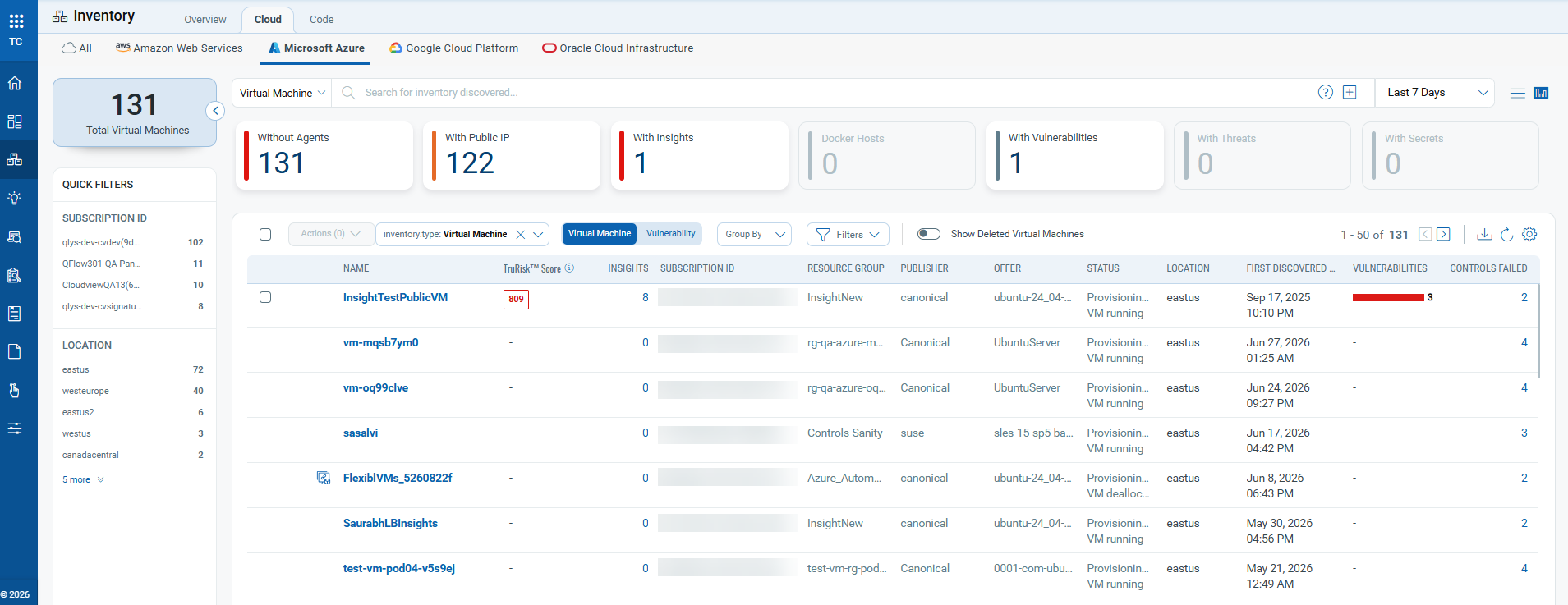
The Azure Virtual Machine Inventory page now features interactive summary cards that offer an instant view of key security and configuration categories. Clicking a card automatically filters the inventory to show the corresponding set of virtual machines.
Benefits
- Gain at-a-glance visibility into your Azure VM inventory.
- Quickly identify VMs without agents, exposed via public IPs, and vulnerable to threats and more.
- Eliminate the need to manually create or enter QQL filters.
Available Summary Cards
- Without Agents: Virtual machines that do not have the Qualys agent installed.
- With Public IP: Virtual machines exposed through a public IP address.
- Docker Hosts: Virtual machines identified as Docker hosts.
- With Vulnerabilities: Virtual machines with detected vulnerabilities.
- With Threats: Virtual machines with detected threats.
- With Insights: Virtual machines with available security insights.
Selecting a card automatically applies the associated filter to the inventory list.
Enhanced Azure CIEM Entitlements
Applicable for:
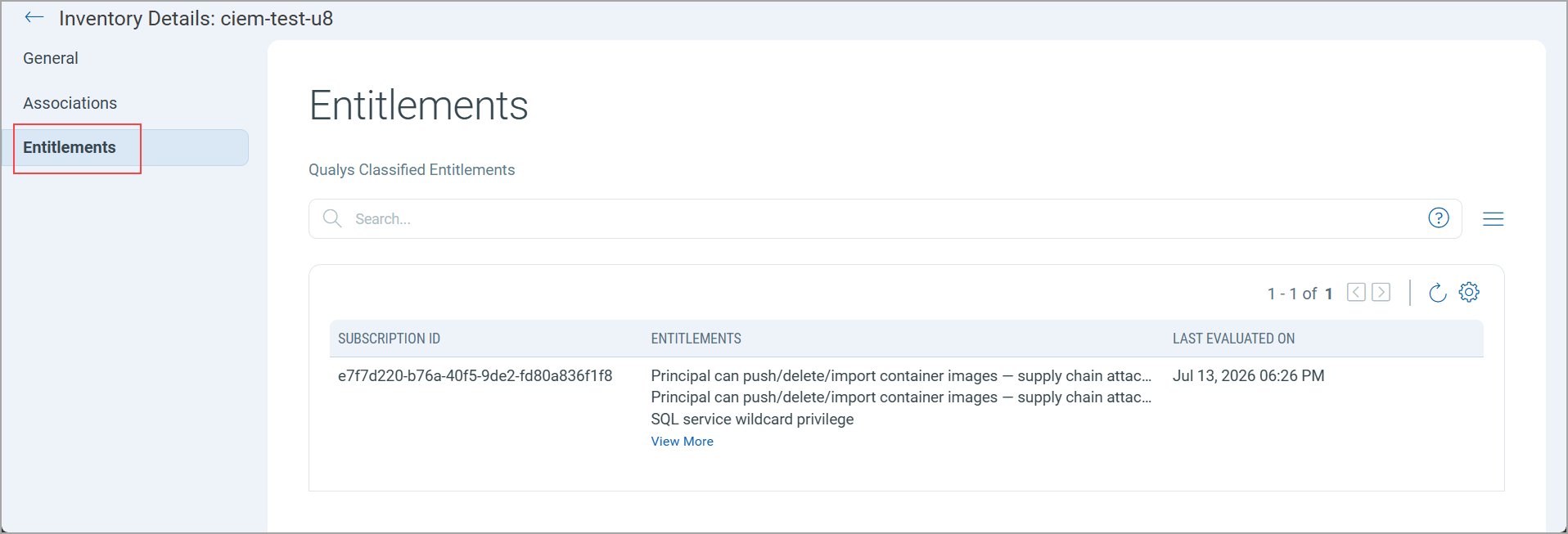
TotalCloud now provides Cloud Infrastructure Entitlement Management (CIEM) entitlements for Azure resources. This feature helps you identify over-privileged identities, analyze permission usage patterns, and reduce identity-related security risks across your Azure environment.
To view entitlements, select a supported Azure resource and click Entitlements on the Inventory Details page.
You can view CIEM entitlements for the following Azure resource types:
- User
- Group
- App Registration
- Service Principal
- Managed Identity
- Virtual Machine (VM)
Tenant Connector configuration is required for this feature. If a Tenant Connector is not configured, the Azure CIEM Policy Analyzer will not be triggered, and policy analysis will not be performed.
Enhanced Alert Messages to include Connector context
Applicable for:
Posture alert notifications now include connector metadata, providing additional cloud context to help you quickly identify the connector and cloud resources associated with an alert.
The following connector metadata is now included in alert notifications:
AWS: Account Alias and Resource Tag
Azure: Subscription Name and Resource Group
Azure Resource Tag Support
Applicable for:
You can now use Azure tokens across the Posture, Dashboard, Reports, Inventory and Alert Rules. This allows you to filter data on these tabs using the following tokens: azure.tag.key and azure.tag.value.
You can use these tokens on the following tabs:
- Inventory and Posture: Filter resources by Azure tag key or value.
- Dashboard: View data for resources with specific Azure tags.
- Reports: Generate reports for resources with specific Azure tags.
- Alert Rules: Create alerts for resources with specific Azure tags.
Vertex AI - Resource Name Updated
Applicable for:
We’ve updated the GCP Vertex AI inventory name to align with Google Cloud’s latest branding. It is now called Gemini Enterprise Agent Platform.
New Tokens
The following section describes the new tokens introduced as part of TotalCloud 2.26.0
Inventory Tokens
Applicable for:
The following new tokens are added for resource types: User, Group, App Registration, Service Principal, Managed Identity, and Virtual Machine
| Name | Description | Example |
|---|---|---|
| azure.iam.permission.subscriptionId | Use this to find Azure IAM permissions by Azure subscription ID | azure.iam.permission |
| azure.iam.permission.classification | Use this to find Azure IAM permissions by entitlement classification. | azure.iam.permission |
Control Updates
New AWS IaC Build-Time Controls
Applicable for:
| Platform | CID | Title | Service Type | Resource Type | Criticality | Policy |
|---|---|---|---|---|---|---|
| AWS | 723 | Ensure Kendra index Server side encryption uses CMK | KENDRA | KENDRA INDEX | Medium | AWS Infrastructure as Code Security Best Practices Policy |
| AWS | 724 | Ensure AppFlow flow uses CMK | APPFLOW | APPFLOW FLOWS | Medium | AWS Infrastructure as Code Security Best Practices Policy |
| AWS | 725 | Ensure AppFlow connector profile uses CMK | APPFLOW | APPFLOW FLOWS | Medium | AWS Infrastructure as Code Security Best Practices Policy |
| AWS | 726 | Ensure Keyspaces Table uses CMK | KEYSPACE | KEYSPACE TABLE | Medium | AWS Infrastructure as Code Security Best Practices Policy |
| AWS | 727 | Ensure DB Snapshot copy uses CMK | RDS | RDS SNAPSHOT | Medium | AWS Infrastructure as Code Security Best Practices Policy |
| AWS | 728 | Ensure that Comprehend Entity Recognizer's model is encrypted by KMS using a customer managed Key (CMK) | COMPREHEND | COMPREHEND ENTITY RECOGNIZER MODEL | Medium | AWS Infrastructure as Code Security Best Practices Policy |
| AWS | 729 | Ensure that Comprehend Entity Recognizer's volume is encrypted by KMS using a customer managed Key (CMK) | COMPREHEND | COMPREHEND ENTITY RECOGNIZER MODEL | Medium | AWS Infrastructure as Code Security Best Practices Policy |
| AWS | 730 | Ensure Connect Instance Kinesis Video Stream Storage Config uses CMK | CONNECT | CONNECT | Medium | AWS Infrastructure as Code Security Best Practices Policy |
| AWS | 731 | Ensure Connect Instance S3 Storage Config uses CMK | CONNECT | CONNECT | Medium | AWS Infrastructure as Code Security Best Practices Policy |
| AWS | 732 | Ensure DynamoDB table replica KMS encryption uses CMK | DYNAMO_DB | DYNAMO DB TABLE | Medium | AWS Infrastructure as Code Security Best Practices Policy |
| AWS | 733 | Ensure AWS Lambda function is configured to validate code-signing | LAMBDA | LAMBDA | High | AWS Infrastructure as Code Security Best Practices Policy |
| AWS | 734 | Ensure access is controlled through SSO and not AWS IAM defined users | IAM | IAM USER | High | AWS Infrastructure as Code Security Best Practices Policy |
| AWS | 735 | Ensure aws_iam_role does not have managed_policy_arns set to the AWS AdministratorAccess policy | IAM | IAM ROLE | High | AWS Infrastructure as Code Security Best Practices Policy |
| AWS | 736 | Ensure aws_iam_policy_attachment does not have policy_arn set to the AWS AdministratorAccess policy | IAM | IAM POLICY | High | AWS Infrastructure as Code Security Best Practices Policy |
| AWS | 737 | Ensure aws_iam_group_policy _attachment does not have policy_arn set to the AWS AdministratorAccess policy |
IAM | IAM GROUPS | High | AWS Infrastructure as Code Security Best Practices Policy |
| AWS | 738 | Ensure aws_ssoadmin_managed _policy_attachment does not have managed_policy_arn set to the AWS AdministratorAccess policy |
IAM | IAM POLICY | High | AWS Infrastructure as Code Security Best Practices Policy |
| AWS | 739 | Ensure aws_iam_role_policy _attachment does not have policy_arn set to the AWS AdministratorAccess policy |
IAM | IAM ROLE | High | AWS Infrastructure as Code Security Best Practices Policy |
| AWS | 740 | Disallow policies from using the AWS AdministratorAccess policy | IAM | IAM POLICY | High | AWS Infrastructure as Code Security Best Practices Policy |
New AWS Controls (Available for Custom Policy Attachment)
Applicable for:
| Platform | CID | Title | Service | Resource | Criticality |
|---|---|---|---|---|---|
| AWS | 700 | Ensure Network Firewall policies have a user-defined stateless default action for fragmented packets | VPC | NETWORK FIREWALL POLICY |
Medium |
| AWS | 701 | Ensure Network Firewall policies have a stateless default action of drop or forward for full packets | VPC | NETWORK FIREWALL POLICY |
Medium |
| AWS | 702 | Ensure Stateless Network Firewall Rule Groups contain rules | VPC | NETWORK FIREWALL RULE GROUPS | Medium |
| AWS | 703 | Ensure AWS VPC gateway endpoint policy does not contain wildcard(*) without a condition statement | VPC | VPC | High |
| AWS | 704 | Ensure Relational Database Service (RDS) for PostgreSQL instances use SCRAM as the password encryption and authentication method | RDS | RDS | High |
| AWS | 705 | Ensure no Virtual Private Cloud (VPC) Network Access Control List (NACL) allows all protocols | VPC | NETWORK ACL | High |
| AWS | 706 | Ensure that VPC has an AWS KMS VPC endpoint configured | VPC | VPC | High |
| AWS | 707 | Ensure that VPC has an AWS CloudWatch Logs VPC endpoint configured | VPC | VPC | Medium |
| AWS | 708 | Ensure that VPC has an AWS CloudWatch Monitoring VPC endpoint configured | VPC | VPC | Low |
| AWS | 709 | Ensure that VPC has an AWS Lambda VPC endpoint configured | VPC | VPC | Medium |
| AWS | 710 | Ensure that VPC has an AWS API Gateway VPC endpoint configured | VPC | VPC | Medium |
| AWS | 711 | Ensure that VPC has an AWS EC2 VPC endpoint configured | VPC | VPC | Medium |
| AWS | 712 | Ensure that VPC has an AWS Secrets Manager VPC endpoint configured | VPC | VPC | High |
| AWS | 713 | Ensure that VPC has an AWS CloudFormation VPC endpoint configured | VPC | VPC | Medium |
| AWS | 714 | Ensure that VPC has an AWS S3 VPC endpoint configured | VPC | VPC | High |
| AWS | 715 | Ensure no IAM user is configured with console login credentials and active access keys simultaneously | IAM | IAM USER | Medium |
| AWS | 716 | Ensure Relational Database Service (RDS) MariaDB and MySQL instances enforces encryption in transit | RDS | RDS | High |
| AWS | 717 | Ensure Relational Database Service (RDS) IBM Db2 instances enforces encryption in transit | RDS | RDS | High |
| AWS | 718 | Ensure Auto Scaling group launch template should not have a metadata response hop limit greater than 1 | EC2 | LAUNCH TEMPLATE | Medium |
| AWS | 719 | Ensure that VPC security groups do not allow unrestricted access on all ports | VPC | VPC | High |
| AWS | 720 | Ensure AWS Network Firewall policy has Intrusion Prevention System (IPS) enabled via stateful rule groups with drop actions | NETWORK FIREWALL | NETWORK FIREWALL POLICY | Medium |
| AWS | 721 | Ensure that all EIP addresses allocated to a VPC are only attached to NAT Gateways | EC2 | EC2 | Medium |
| AWS | 722 | Ensure EC2 instances launched using Auto Scaling group launch Configurations must not have Public IP addresses | EC2 | LAUNCH CONFIGURATION | Medium |
New Controls for Azure (Available for Custom Policy Attachment)
Applicable for:
| Platform | CID | Title | Service | Resource | Criticality |
|---|---|---|---|---|---|
| Azure | 50645 | Ensure that Azure API Management APIs use only HTTPS or WSS protocols | API MANAGEMENT SERVICES | API MANAGEMENT SERVICES | High |
| Azure | 50646 | Ensure that Azure Machine Learning Workspaces disable public network access | MACHINE LEARNING | MACHINE LEARNING | High |
| Azure | 50647 | Ensure that Azure Database for MySQL flexible server does not allow 0.0.0.0 firewall rule | AZURE MYSQL FLEXIBLE SERVER | AZURE MYSQL FLEXIBLE SERVER | High |
| Azure | 50648 | Ensure that Azure SQL Managed Instance has public data endpoint access disabled | AZURE SQL | SQL MANAGED INSTANCE | High |
| Azure | 50649 | Ensure that Azure SQL servers must use private endpoints | SQL SERVER | SQL SERVER | High |
| Azure | 50650 | Ensure that Azure Virtual Machine Scale Set instances do not have public IP addresses | VIRTUAL MACHINE SCALE SETS | VIRTUAL MACHINE SCALE SET | High |
| Azure | 50651 | Ensure that Azure Service Bus namespace does not use insecure TLS version | SERVICE BUS | SERVICE BUS NAMESPACE | Medium |
| Azure | 50652 | Ensure that Azure SQL Managed Instance does not use insecure TLS version | AZURE SQL | SQL MANAGED INSTANCE | Medium |
| Azure | 50653 | Ensure that Azure Cosmos DB account does not use insecure TLS version | COSMOS DB | COSMOS DB | Medium |
| Azure | 50654 | Ensure that Azure Application Gateway does not use insecure TLS version | APPLICATION GATEWAYS | APPLICATION GATEWAYS | Medium |
New controls for OCI
Applicable for:
| Platform | CID | Title | Service | Resource | Policy | Criticality |
|---|---|---|---|---|---|---|
| OCI | 40104 | Ensure VCN flow logging is enabled for all subnets | VCN | SUBNET | CIS Oracle Cloud Infrastructure Foundation Benchmark | High |
| OCI | 40103 | Ensure OCI IAM credentials unused for 45 days or more are disabled | IAM | IAM USER | CIS Oracle Cloud Infrastructure Foundation Benchmark | High |
Control Title Changes
Applicable for:
| Platform | CID | Old Title | New Title |
|---|---|---|---|
| AWS | 295 | Ensure Cloudfront distribution ViewerProtocolPolicy is set to HTTPS | Ensure Viewer Protocol Policy enforces HTTPS and Minimum TLS Version is set to TLS 1.2 or higher in CloudFront distributions |
| AWS | 503 | Ensure TLS 1.2 is configured for API Gateway custom domain | Ensure TLS security policy is using 1.2 or higher version for the custom domains |
Controls Deprecated
Applicable for:
| Platform | CID | Description | Control Type | Policy Name | Reason for Deprecation |
|---|---|---|---|---|---|
| AWS | 400 | Ensure an IAM User does not have access to the console | BUILD RUN TIME | AWS Identity Access Management Best Practices Policy AWS Infrastructure as Code Security Best Practices Policy |
New improved control (CID 715) has been introduced that covers the check of deprecated control. |
Control Enhancements
Applicable for:
| Platform | CID | Title | Description |
|---|---|---|---|
| AWS | 203 | Ensure EBS Volume is encrypted by KMS using a customer managed Key (CMK) | Fixed EBS volume evaluation logic to process all applicable volumes within an AWS account, ensuring accurate resource counts, complete assessment coverage, and reliable compliance reporting. |
| AWS | 294 | Ensure Customer managed KMS key policy does not contain wildcard (*) principal | Enhanced AWS KMS key policy evaluation to correctly interpret Condition statements, improving compliance accuracy by distinguishing restricted wildcard principals from genuinely open policies. |
| AWS | 295 | Ensure Viewer Protocol Policy enforces HTTPS and Minimum TLS Version is set to TLS 1.2 or higher in CloudFront distributions | Update Control Title and Predicate and also moved control from Get call to List call. Enhanced CloudFront distribution evaluation by validating both DefaultCacheBehavior and additional CacheBehaviors, while also verifying MinimumProtocolVersion, improving assessment coverage and compliance accuracy. |
| AWS | 503 | Ensure TLS security policy is using 1.2 or higher version for the custom domains | Updated control title and predicate logic. Enhanced TLS version compliance evaluation by updating the predicate logic to recognize all supported compliant TLS versions instead of only TLS_1_2, ensuring more accurate compliance assessments. |
| Azure | 50002 | Ensure no SQL Servers allow ingress from Internet (ANY IP) | Updated predicate logic to cover all the test cases related to publicNetworkAccess and also verify endIpAddress |
| Azure | 50124 | Ensure that Azure CosmosDB does not allow access from all networks | Updated predicate logic to cover all the test cases related to publicNetworkAccess |
| Azure | 50156 | Ensure that public network access is disabled in Managed Disks | Updated predicate logic to cover all the test cases related to publicNetworkAccess |
| Azure | 50476 | Ensure Allow public access from any Azure service within Azure to this server for PostgreSQL flexible server is disabled | Updated predicate logic to cover all the test cases related to publicNetworkAccess |
Issues Addressed
We fixed the following important and notable issue in this release.
| Category/Component | Issue |
|---|---|
| CV - EC2 Connector | Resolved an issue where terminated AWS EC2 instances continued to appear as “Running” in the AssetView/Global AssetView UI. The issue occurred due to incorrect handling of connector ARN values (NULL ARN for CSA identifier), which caused failures during stale asset processing and prevented proper status updates. Users previously saw terminated assets incorrectly listed as active. The issue is now resolved and terminated EC2 instances are correctly marked in the UI.
Resolved an issue where users encountered a 500 Internal Server Error while merging connectors in the TotalCloud module. The issue occurred due to improper request handling during connector merge operations. Users previously could not merge connectors and received errors. The issue is now resolved and connector merge works correctly. |
| CV - Reports | Resolved an issue where users encountered an error while creating CSPM reports when selecting the“last” option for monthly scheduling. The issue occurred due to incorrect recurrence handling logic. Users previously experienced report generation failures for this option while other options worked correctly. The issue is now resolved and report scheduling works correctly for all monthly recurrence options. |
| CV - API | Resolved an issue in the API endpoint /evaluation/applyTags where applying tags using a regex pattern failed with“No resources/evaluations found” or NOT_FOUND errors. The issue occurred due to limitations in handling large datasets and failures during Elasticsearch query processing. Users previously could not apply tags using regex across multiple resources. The issue is now resolved and regex-based tagging works correctly as expected.
Addressed the use of a deprecated Azure Management API version (api-version=2014-04-01). The issue occurred due to outdated API usage in integration calls, which triggered Microsoft deprecation alerts. Users previously received warnings about potential impact. The issue is now resolved and supported API versions are used. |
| CV - False Positive | Resolved a false positive issue where encrypted EBS volumes were incorrectly flagged as non-compliant for CID-203 (KMS encryption check). The issue occurred due to incorrect validation of encryption and KMS key details. Users previously saw compliant resources marked as failed. The issue is now resolved and compliance evaluation correctly reflects actual encryption status. |