TotalCloud Release 2.27
August 21, 2026
Qualys TotalCloud 2.27.0 introduces tag and permission-based access control for Policies, Controls, and Exceptions. This release also extends event-driven connector processing to Azure via EventGrid, surfaces Attack Path insights directly at the instance level, and adds wildcard tag search, one-click policy cloning, and a searchable query Function Catalog. Cloud inventory coverage expands with 40 new resource types across AWS, Azure, GCP, and OCI.
Granular Access Control for Policies and Controls
Applicable for: 


TotalCloud now supports granular, action-level permissions (view / create-clone / edit / delete) for Policy, Control, and Exception management, as well as tag-based scope, which extends scoping to Policies and Controls. Today, scope is derived from connectors only; going forward, you can choose to derive scope from connectors only (connector-based scope) or from connectors + policy (connectors + policy-based scope).
Benefit
Sub-users can be shown only the Policies and Controls relevant to their area of work, instead of the full set. Evaluations are filtered to the same scope, so a sub-user's view stays consistent across Posture, Exceptions, and Evaluations.
Prerequisites
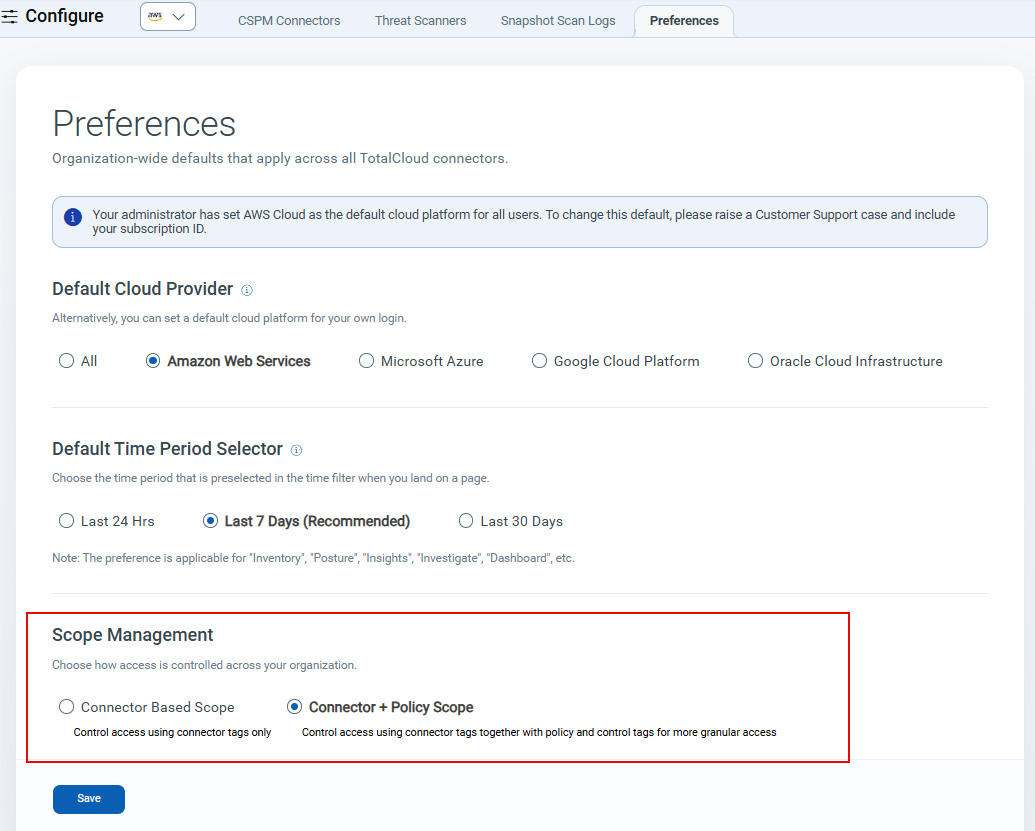
To scope the posture visibility based on policy scope, a Manager user must select the new mode on the Preferences tab (visible only to Manager users). If you don't opt in, you see no change in behavior.
Key Features
- New granular permissions, replacing the legacy Manage Custom Control permission
- 2 new predefined roles: TotalCloud Policy Admin and TotalCloud Policy Reader
- Tag-based scoping for Policy and Control visibility, including a
GLB_POLICY_READtag for read-only sharing with sub-users - Interface updates across Posture, Policy, Response, Reports, Inventory, Attack Path, and Investigate, based on the permissions a role holds
Navigate to Configure > Preferences, and then select Connector + Policy Scope under Scope Management to control access using connectors, policy, and control tags together.
For scope modes, the GLB_POLICY_READ tag, scoped vs. unscoped user behavior, and the override options, see the Tag-based Scope on Policy, Control and Exceptions help page.
Event-Driven Connector processing via Azure EventGrid
Applicable for:
You can now use Azure EventGrid to enable event-driven processing for Azure cloud connectors. Like AWS EventBridge, Azure EventGrid processes only the resources affected by detected changes, rather than performing full scans for every connector run, reducing unnecessary API calls and improving processing efficiency.
Key Features
- Supports event-driven processing for standalone Azure Cloud Connectors configured with the Global Subscription type.
- Detects and processes only changed resources while continuing scheduled connector runs.
- Performs periodic full inventory scans to ensure inventory consistency.
- Provides real-time exception handling and resource deletion processing.
Deleted Resource Visibility
- EventGrid-enabled users can use the token
cloud.resource.isDeleted:true/falseto view deleted Azure resources.
Benefits
- Reduces Azure API calls and connector processing overhead.
- Helps keep Inventory and Posture data synchronized with changes in your Azure environment.
Attack Path Visibility at the Instance Level
Applicable for:
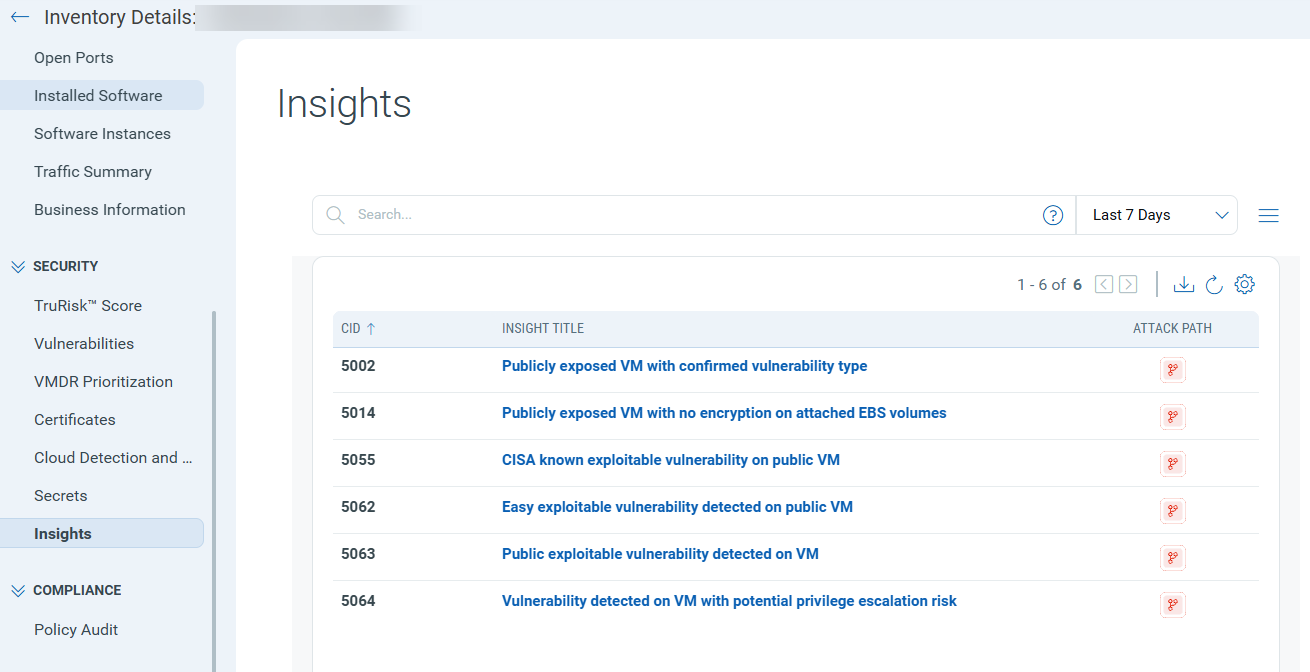
TotalCloud now surfaces Attack Path insights directly at the instance level, so you no longer need to leave the instance view to understand a resource's risk exposure. Previously, attack paths were visible only on the Insights tab, with no way to search or filter for them elsewhere. With this release, VMs and other assets across AWS, Azure, and GCP display attack path context directly on the instance listing page.
Benefits:
- See risk at a glance: An Insights count is now displayed directly on the TotalCloud Instances Listing Page.
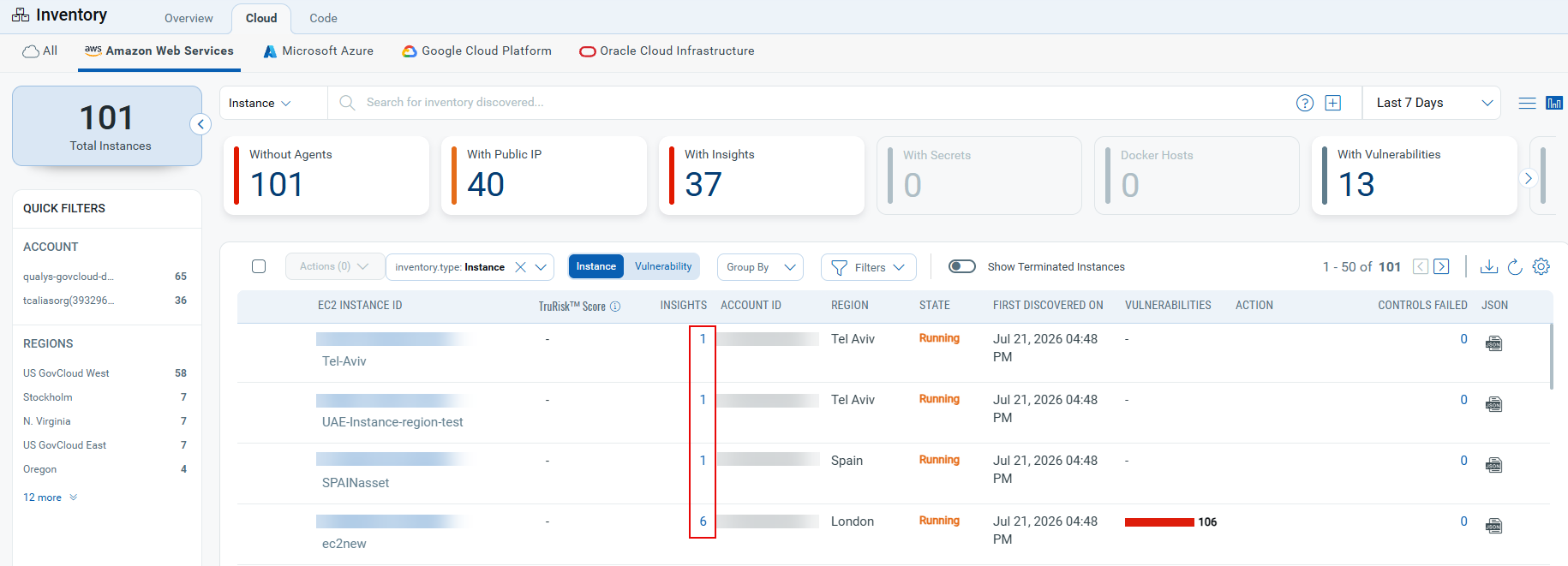
- One-click drill-down: Clicking the Insights count navigates directly to the Insights tab, pre-filtered for that instance.
Wildcard (*) Support for Tag-Based Search
Applicable for:
You can now use the wildcard character (*) in tag searches to match tags by pattern rather than exact text across the Posture, Inventory, and Connectors pages, as well as other pages that support tag-based search.
Supported patterns:
| Pattern | Example | Matches | Examples |
|---|---|---|---|
| Starts with | tags:"prod_*" |
Any tag beginning with "prod_*" | prod_1 or prod_new |
| Ends with | tags:"*_legacy" |
Any tag ending with "_legacy" | 10_legacy or new_legacy |
| Contains | tags:"*finance*" |
Any tag containing "finance" | 1_finance_x or newfinance1 |
This improves search flexibility for organizations using consistent tag naming conventions (prefixes, suffixes, or keywords) across accounts and environments.
Tag search is case-sensitive, the text you enter must match the case of the tag exactly. Only the wildcard (*) portion is flexible.
Copy and Create new Policy from an existing one
Applicable for:
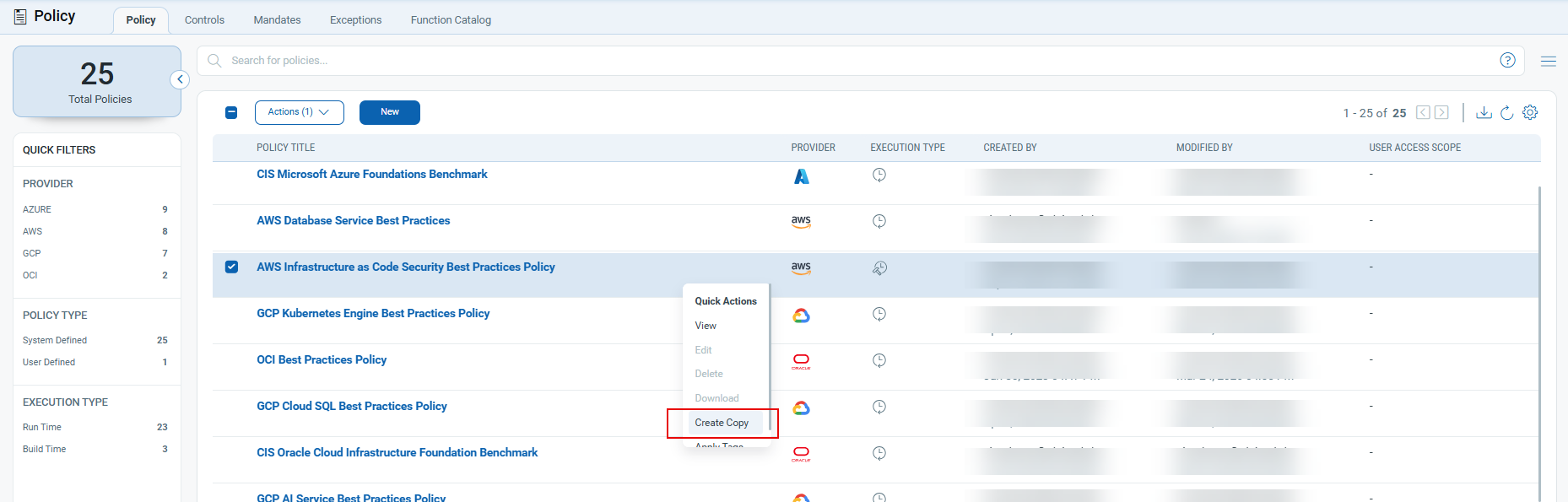
You can now create a new policy by copying an existing one, system-defined or user-defined, right from the Policy listing page.
Select Create Copy on any policy to carry its description, execution type, controls, and connectors into a new policy, then:
- Give the copy a new, unique name before saving.
- Add or remove controls to fit the new policy's purpose.
- Assign scope tags for the new policy.
Look up Query Functions
Applicable for:
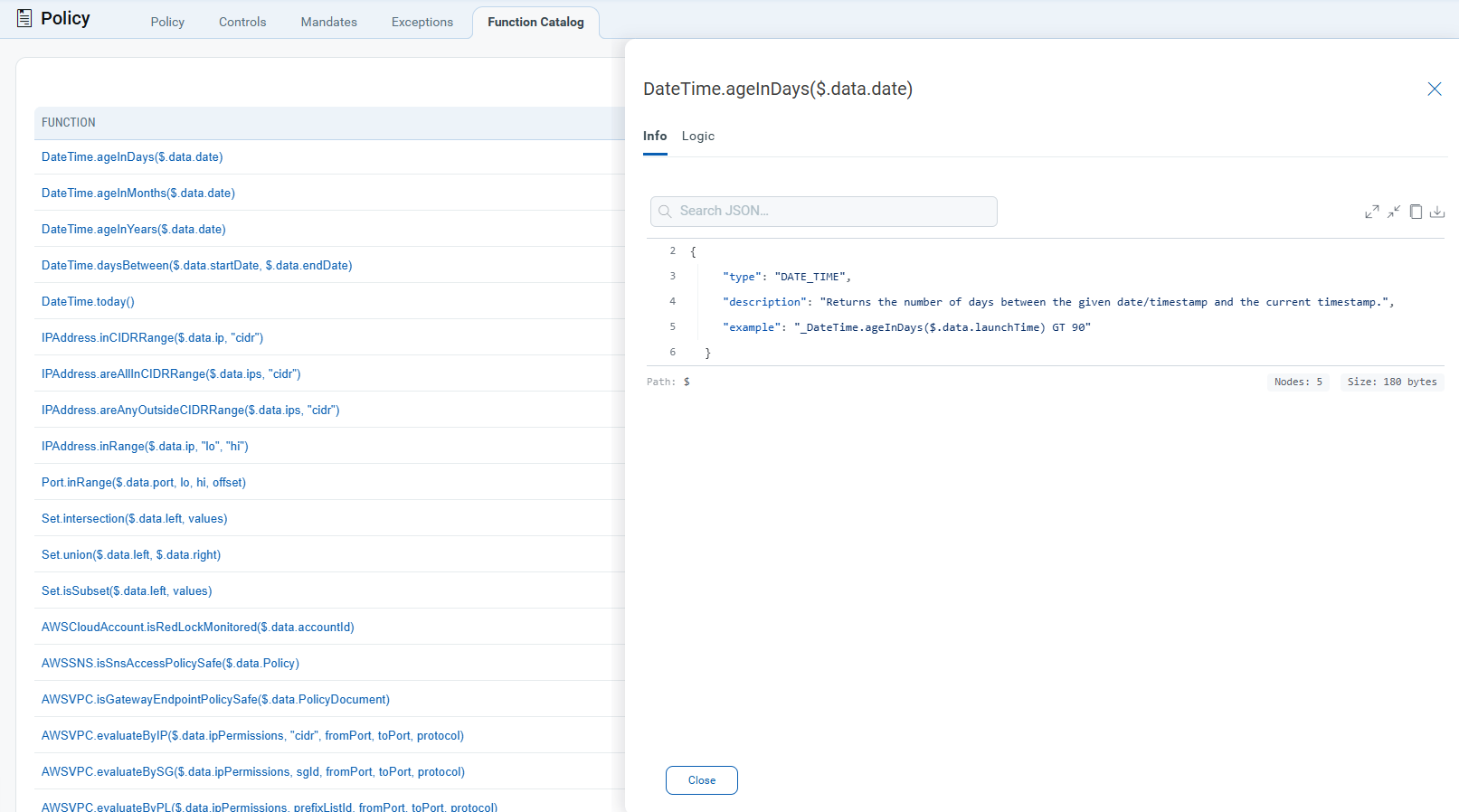
The Policy menu now includes a Function Catalog tab, providing direct in-product visibility into the functions used in custom investigation queries and controls.
Key Features
- New "Function Catalog" tab under Policy, alongside Policy, Controls, Mandates, and Exceptions.
- Listing of 23 supported functions (Function + Type), across 9 categories: Date & Time, IP Address, Port, Set Algebra, AWS Cloud Account, AWS SNS, AWS VPC, AWS (Policy), and AWS S3.
Click a function to open a detail panel with Info and Logic tabs, a searchable JSON view of its type, description, and usage example, and node-path controls for the JSON.
Extended Inventory Coverage
Applicable for:
We have expanded our cloud security coverage by adding support for additional AWS, Azure, GCP and OCI resource types in Cloud Inventory, enabling discovery, inventory, and security posture assessment across a broader range of cloud services.
The resources are as follows:
| Platform | Resource | Permissions |
|---|---|---|
| AWS | ACM Certificate | acm:ListCertificates |
| Amazon Athena Workgroup | athena:GetWorkGroup athena:ListWorkGroups |
|
| Amazon Network Firewall Policy | network-firewall:ListFirewallPolicies network-firewall:DescribeFirewallPolicy |
|
| AWS CodeBuild Project | codebuild:ListProjects codebuild:BatchGetProjects |
|
| AWS IAM Server Certificate | iam:ListServerCertificates iam:GetServerCertificate |
|
| AWS SSM Document | ssm:ListDocuments ssm:DescribeDocumentPermission |
|
| Backup Plan (AWS Backup) | backup:ListBackupPlans backup:GetBackupPlan |
|
| CloudTrail Trail | s3:ListAllMyBuckets s3:GetBucketLocation cloudtrail:DescribeTrails cloudtrail:GetTrailStatus cloudtrail:GetEventSelectors |
|
| Data Stream (Kinesis) | kinesis:ListStreams kinesis:DescribeStreamSummary |
|
| DynamoDB Table | dynamodb:ListTables dynamodb:DescribeTable |
|
| EC2 Transit Gateway | ec2:DescribeTransitGateways | |
| EC2 Transit Gateway Attachment | ec2:DescribeTransitGatewayAttachments | |
| EventBridge Rule | events:ListRules events:DescribeRule |
|
| Glue Connection | glue:GetConnections | |
| Network Firewall | network-firewall:ListFirewalls network-firewall:DescribeFirewall |
|
| RDS Database Snapshot | rds:DescribeDBSnapshots | |
| Recovery Point (AWS Backup) | backup:ListRecoveryPointsByBackupVault | |
| Azure | Activity Log Alert | Microsoft.Insights/activityLogAlerts/read |
| API Management APIs Workspace | Microsoft.ApiManagement/service/workspaces/read | |
| Azure Policy Assignment | Microsoft.Authorization/policyAssignments/read | |
| Azure SignalR Service | Microsoft.SignalRService/SignalR/read | |
| Backup Vault (Azure Data Protection Backup Vaults) | Microsoft.DataProtection/backupVaults/backupPolicies/read | |
| Backup Vault Policy (Azure Data Protection Backup Policies) | Microsoft.DataProtection/backupVaults/read | |
| Bastion Host | Microsoft.Network/bastionHosts/read | |
| CDN endpoint | Microsoft.Cdn/profiles/endpoints/read | |
| CDN profile | Microsoft.Cdn/profiles/read | |
| Diagnostic Settings | Microsoft.Insights/diagnosticSettings/read | |
| Front Door | Microsoft.Cdn/profiles/read | |
| Key Vault Managed Hsms | Microsoft.KeyVault/managedHSMs/read | |
| Logic App Workflow | Microsoft.Logic/workflows/read | |
| Recovery Service Vault | Microsoft.RecoveryServices/Vaults/read Microsoft.Insights/diagnosticSettings/read |
|
| Recovery Service Vault Backup Policy | Microsoft.RecoveryServices/Vaults/backupPolicies/read | |
| Security Center Settings | Microsoft.Security/pricings/read | |
| Streaming Jobs (Azure Stream Analytics Jobs) | Microsoft.StreamAnalytics/streamingjobs/read | |
| Subscriptions | Microsoft.Resources/subscriptions/read | |
| Web PubSub | Microsoft.SignalRService/WebPubSub/read | |
| GCP | Agent Registry | agentregistry.agents.list |
| OCI | Generative AI Agents | |
| Generative AI Agent Endpoints | ||
| Subnet |
Additionally, we have improved the following Azure resources to include more details:
- Event Hub Namespace: Added details for Diagnostic Settings.
- Storage Accounts: Included Blob Service Properties detail.
Navigate to Azure Cloud directly from Posture
Applicable for:
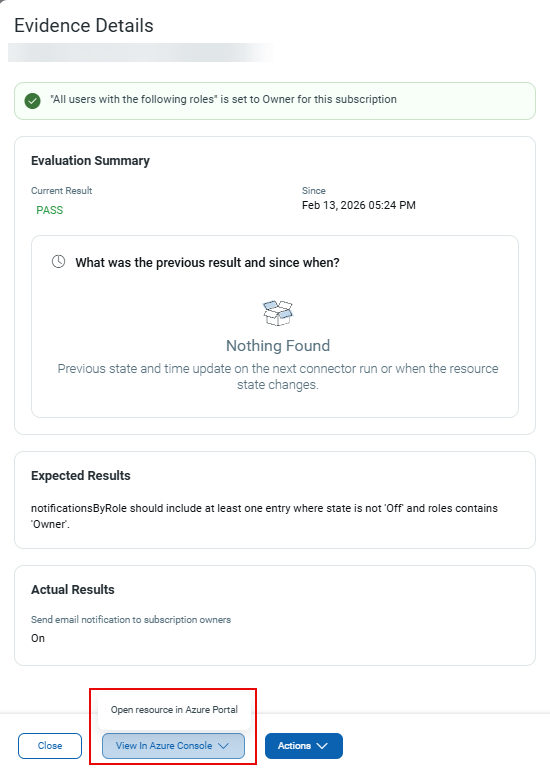
You can now directly access impacted Azure resources from the Evidence Details section using View in Azure Console. This enhancement enables faster investigation and remediation of resources flagged during control evaluations.
Previously, you had to manually go to the Azure Console, and search the resource to get the details.
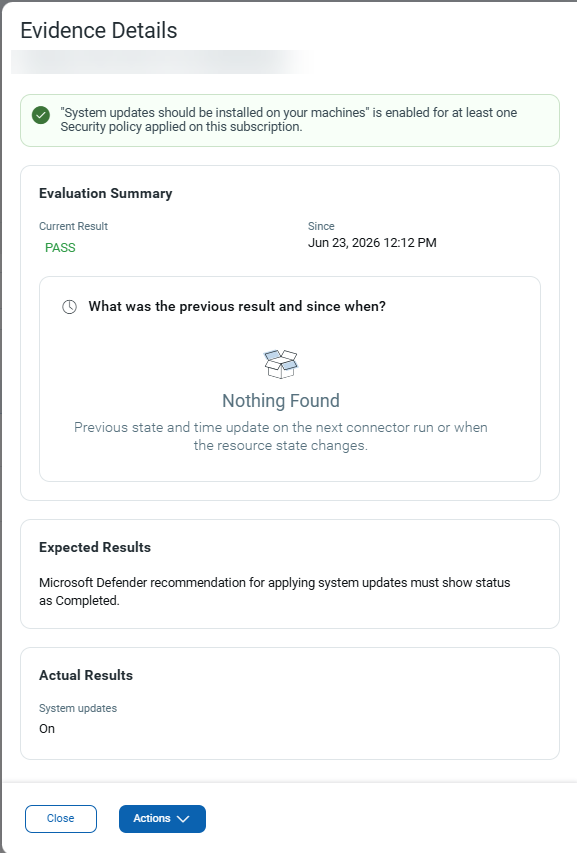
Now, you can navigate directly from Evidence details to the respective resource section in your Azure Console, when you select the option "View in Azure Console".
Date Range Filtering for All Inventory
Applicable for:
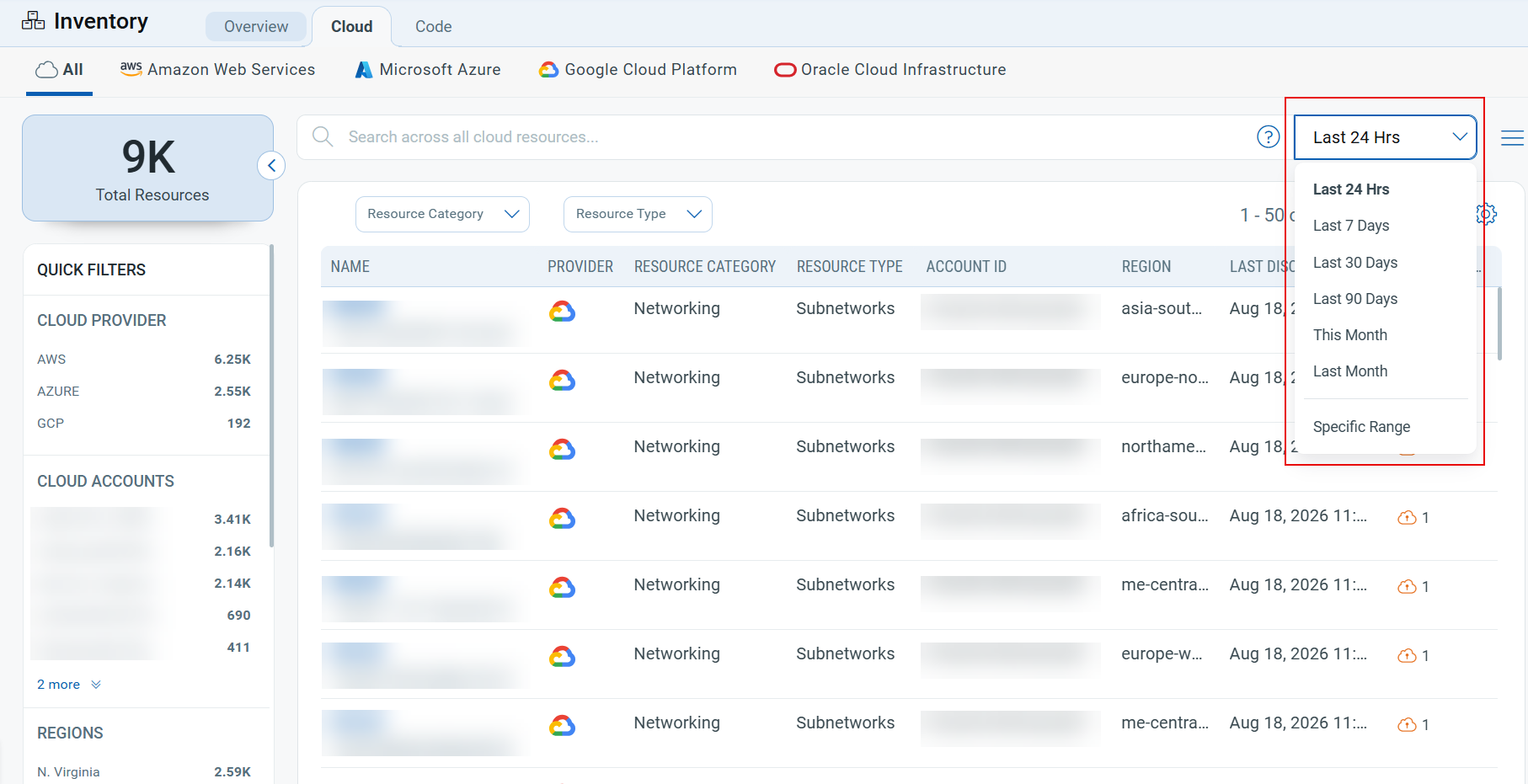
You can now filter results on the All Inventory page by date range. This makes it easier to narrow your asset view to a specific time window, which is useful for investigating recently discovered or updated assets and for more targeted inventory analysis.
Key Features
- New date range selector added to the top of the All Inventory page (next to the search bar)
- Choose from preset ranges: Last 24 Hrs, Last 7 Days, Last 30 Days, Last 90 Days, This Month, Last Month
- Or select Specific Range to define a custom start and end date
- Filters the inventory list by Last Discovered date
Benefits
- Quickly focus on recently discovered assets (e.g., last 24 hrs) for real-time monitoring
- Use custom ranges for audits, investigations, or period-specific reporting
- Reduces manual scanning through the full resource list to find assets from a relevant time period
Smarter Inventory Filter Dropdown
Applicable for:
On the Inventory page, the inventory type filter dropdown now lists the most commonly used resource types at the top of the list for each cloud provider. Previously, all resource types were listed together, making it harder to quickly locate the right one, given that naming conventions differ across providers. For example, an Instance in AWS is a Virtual Machine in Azure, a VM Instance in GCP, and a Compute Instance in OCI.
Benefits
- Faster Resource Selection: Frequently used resource types are pinned to the top of the dropdown, reducing time spent searching or scrolling.
- Consistent Experience Across Providers: Each cloud provider's most relevant resource types are surfaced using that provider's native naming conventions.
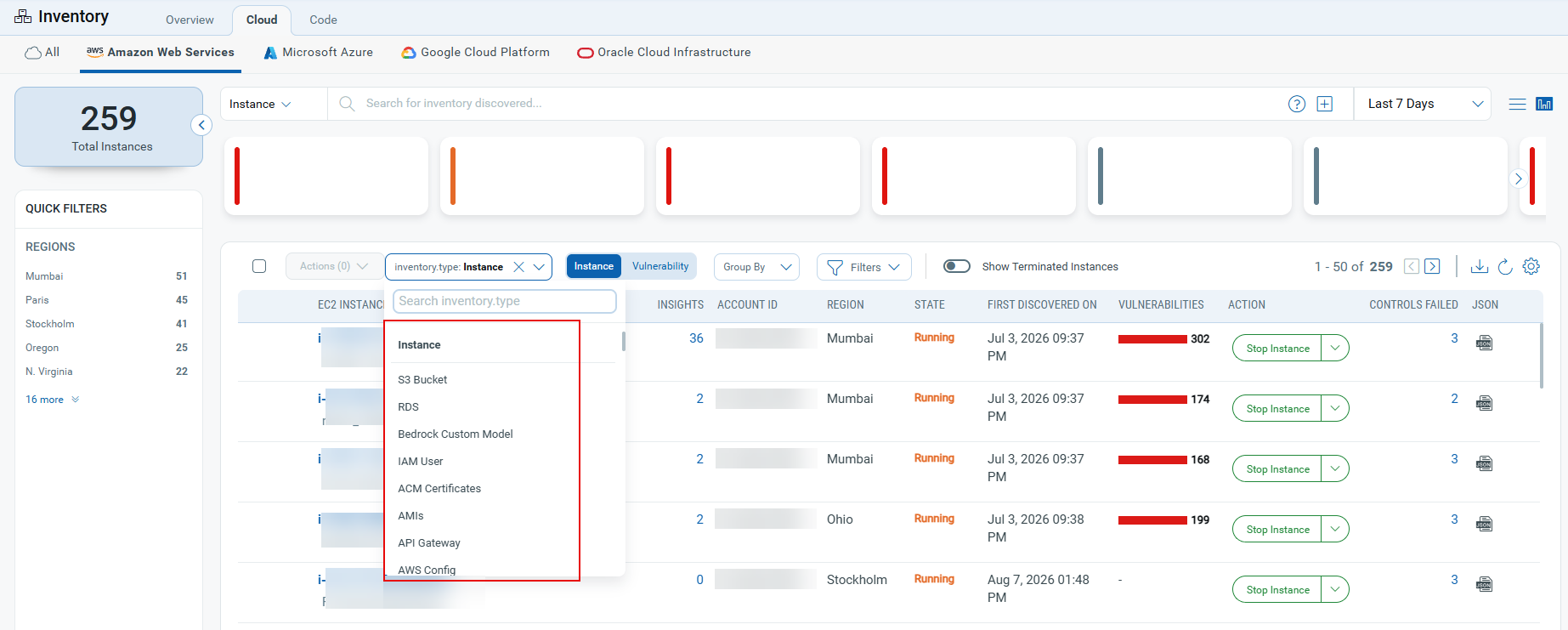
Navigate to TotalCloud > Inventory > Cloud > [Select Cloud Provider] > [Select any Inventory Type] and use the inventory type filter dropdown. The following resource types now appear at the top of the list for each provider:
| AWS | Azure | GCP | OCI |
|---|---|---|---|
| Instance | Virtual Machine | VM Instances | Compute Instance |
| S3 Bucket | Storage Account | Buckets | Bucket |
| RDS | SQL Server | Cloud Function | IAM User |
| Bedrock Custom Model | AI Foundry | Kubernetes Clusters | Kubernetes Clusters |
| IAM User | Kubernetes Service Cluster | Vertex AI | Boot Volumes |
View Overall Compliance Score in Assessment Report
Applicable for:
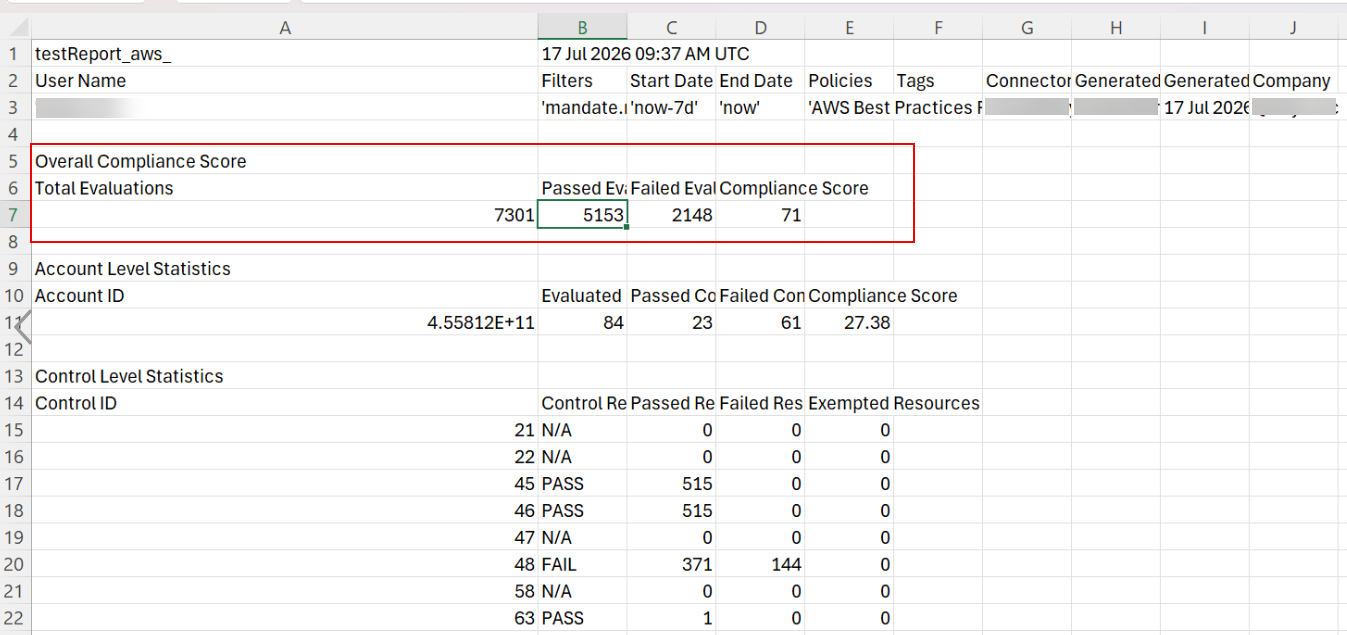
We have added a new Overall Compliance Score field to CSPM assessment report CSV exports (AWS, Azure, GCP, and OCI). This score reflects resource-level compliance, using the same methodology as the dashboard and posture views, ensuring consistency across all reporting surfaces.
The new field is displayed near the top of the CSV, directly before the Account Level Statistics section.
Set a Default Time Period in Preferences
Applicable for:
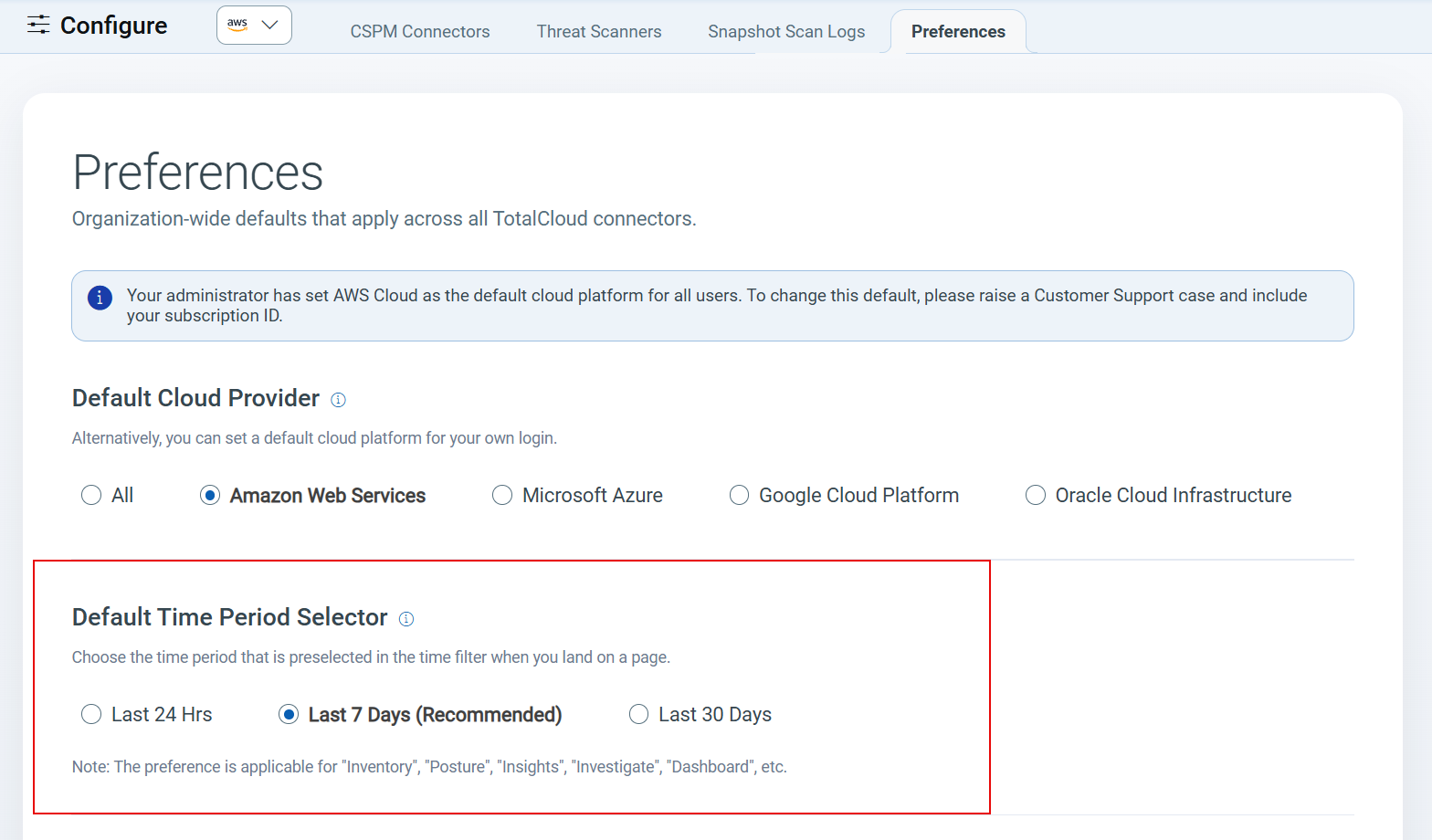
You can now set a default time period for TotalCloud pages directly from Configure > Preferences tab, so you no longer need to manually select your preferred time filter every time you visit a page.
A new option, Default Time Period Selector, is available on the Preferences tab. You can select one of the following as your default time filter:
- Last 24 Hours
- Last 7 Days (Default)
- Last 30 Days
This preference applies across the following TotalCloud pages: Inventory, Posture, Insights, Investigate, and Dashboard.
Simplified CSPM Connector Health Monitoring
Applicable for:
To simplify connector health monitoring, we have removed the Status column from the CSPM Connectors tab under TotalCloud > Configure > CSPM Connectors. This column is being deprecated to eliminate confusion between redundant status indicators and the more comprehensive, accurate information available in the Connectors Logs.
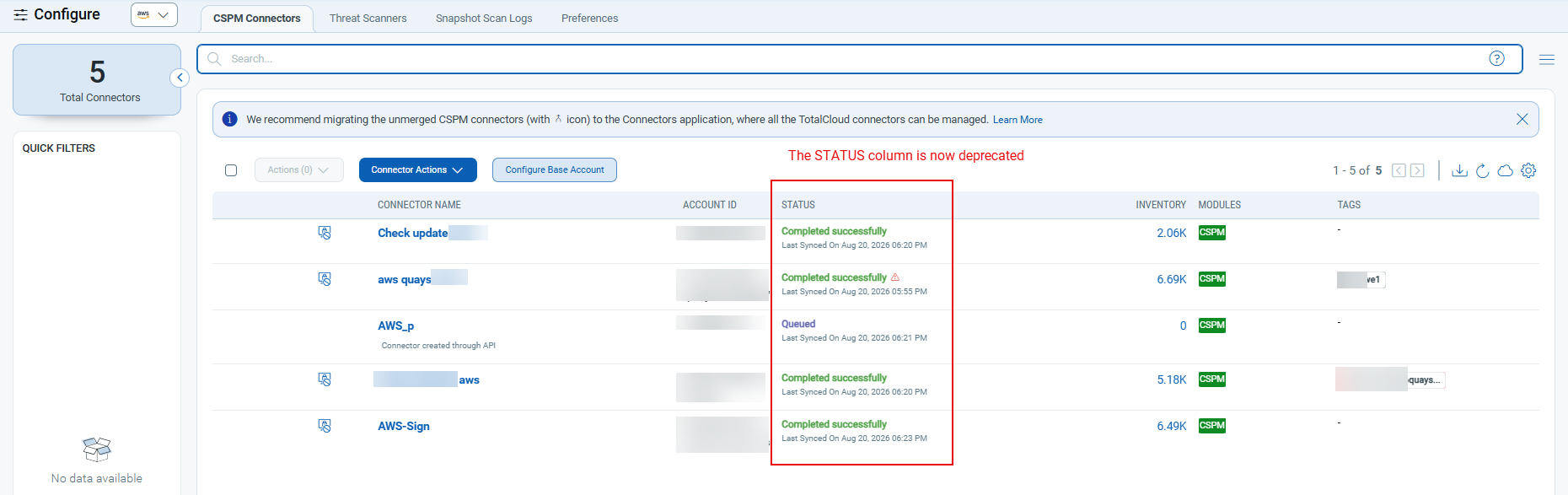
For the most reliable and detailed view of connector health and issues, we recommend using the Last Job Summary section for any Connector in the Connectors module going forward.
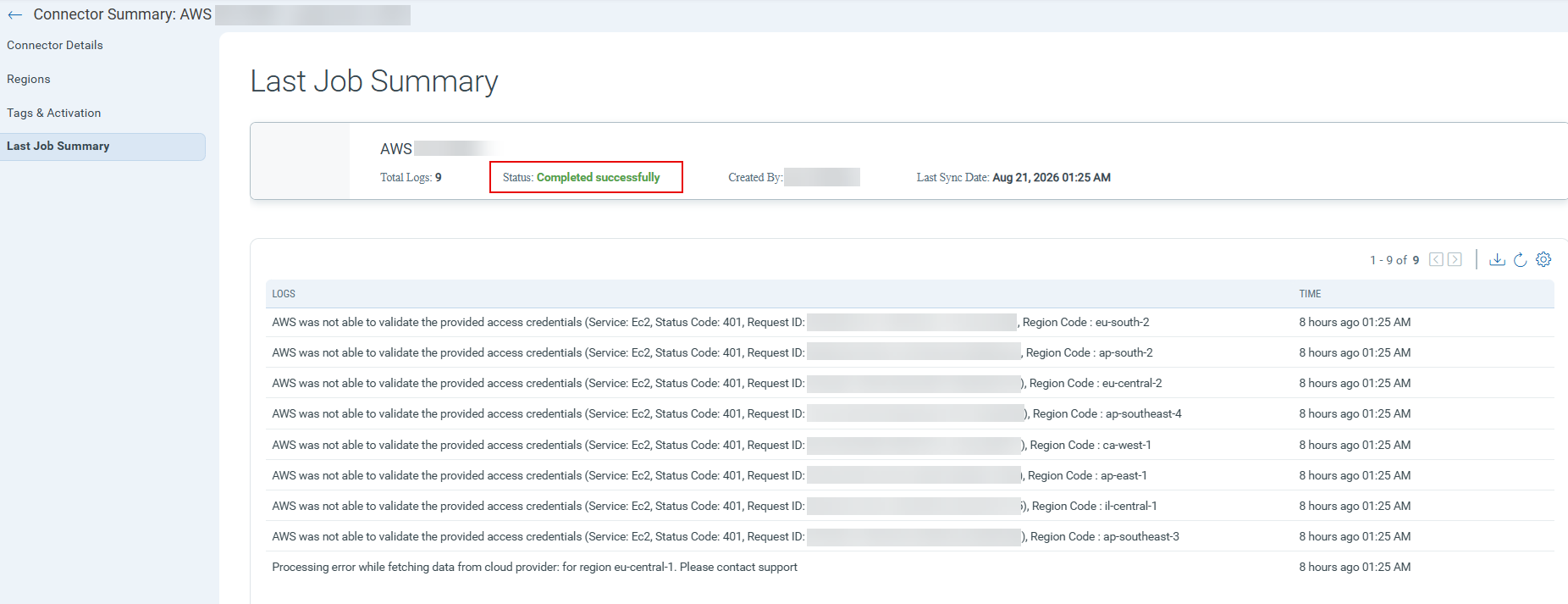
Deprecation of the Status column does not influence connector functionality or data collection. This update is a UI cleanup to consolidate connector health monitoring into a single, authoritative location.
Resource Name Update in Inventory
Applicable for:
The inventory type previously listed as "Gemini Enterprise Agent Platform" (associated service: "Vertex AI") has been renamed. It now is displayed as "Model Registry", with its associated service updated to "Gemini Enterprise Agent Platform". This change aligns the inventory naming with the current service structure and improves clarity for users browsing the inventory list.
CDR Enhancements and Updates
The following sections describe the enhancements made to the Cloud Detection and Response (CDR) environment in the upcoming CDR release.
Sensitive Data Detections
Applicable for:
Investigate now features an added Sensitive Data tab, alongside Detections and Cloud Configuration. This tab highlights exposed secrets like access keys, credentials, tokens, and certificates found within your AWS EC2 instances, Azure VMs, GCP instances, and also detects secrets like embedded keys and credentials during container image scans, enabling you to identify and address these risks without leaving the Investigate workspace.
Benefits
- One place for secret exposure risk: Cloud resources and container images are covered together, so nothing falls between the cracks.
- Faster triage: Severity, at-risk accounts and clusters, and a 7-day trend are summarized up front, so you know where to look first.
- Deeper detail on demand: Open any finding for full context, down to the raw detection payload, without losing your place in the list.
- Consistent experience: Sensitive Data employs the same layout, search, and filters as Detections, ensuring a consistent experience across tabs.
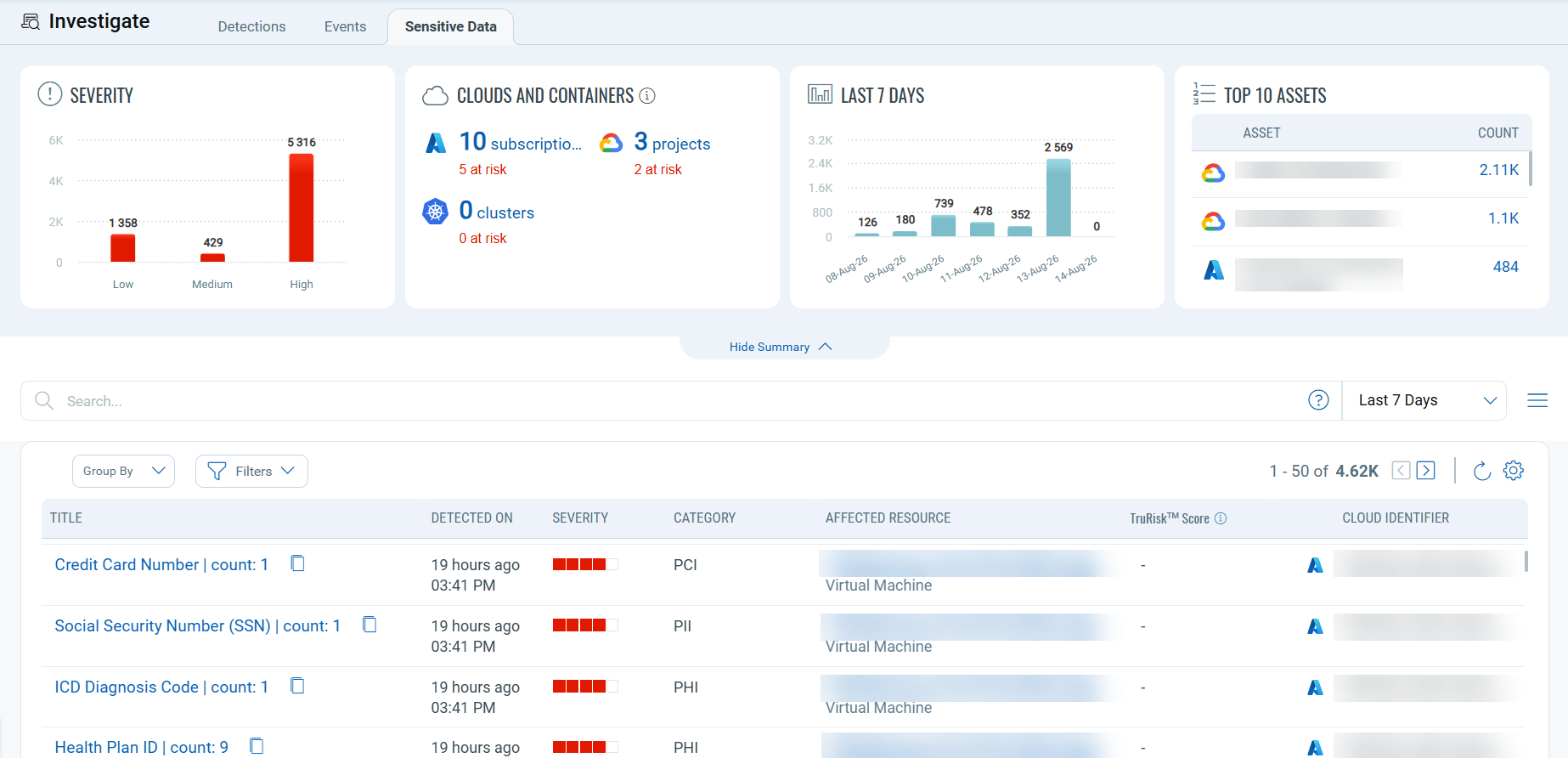
Enriched CDR Findings for On-Prem Assets
Cloud Detection and Response (CDR) enriches threat findings from on-prem appliances with real asset context, pulled directly from your CyberSecurity Asset Management (CSAM) inventory.
Previously, on-prem findings only listed assets by IP or MAC address (e.g., 10.XX.X.XX3). Now, if tracked in CSAM, findings also display the hostname, location, and tags (e.g., fin-db-03.internal, London, finance-prod), eliminating the need for manual lookups.
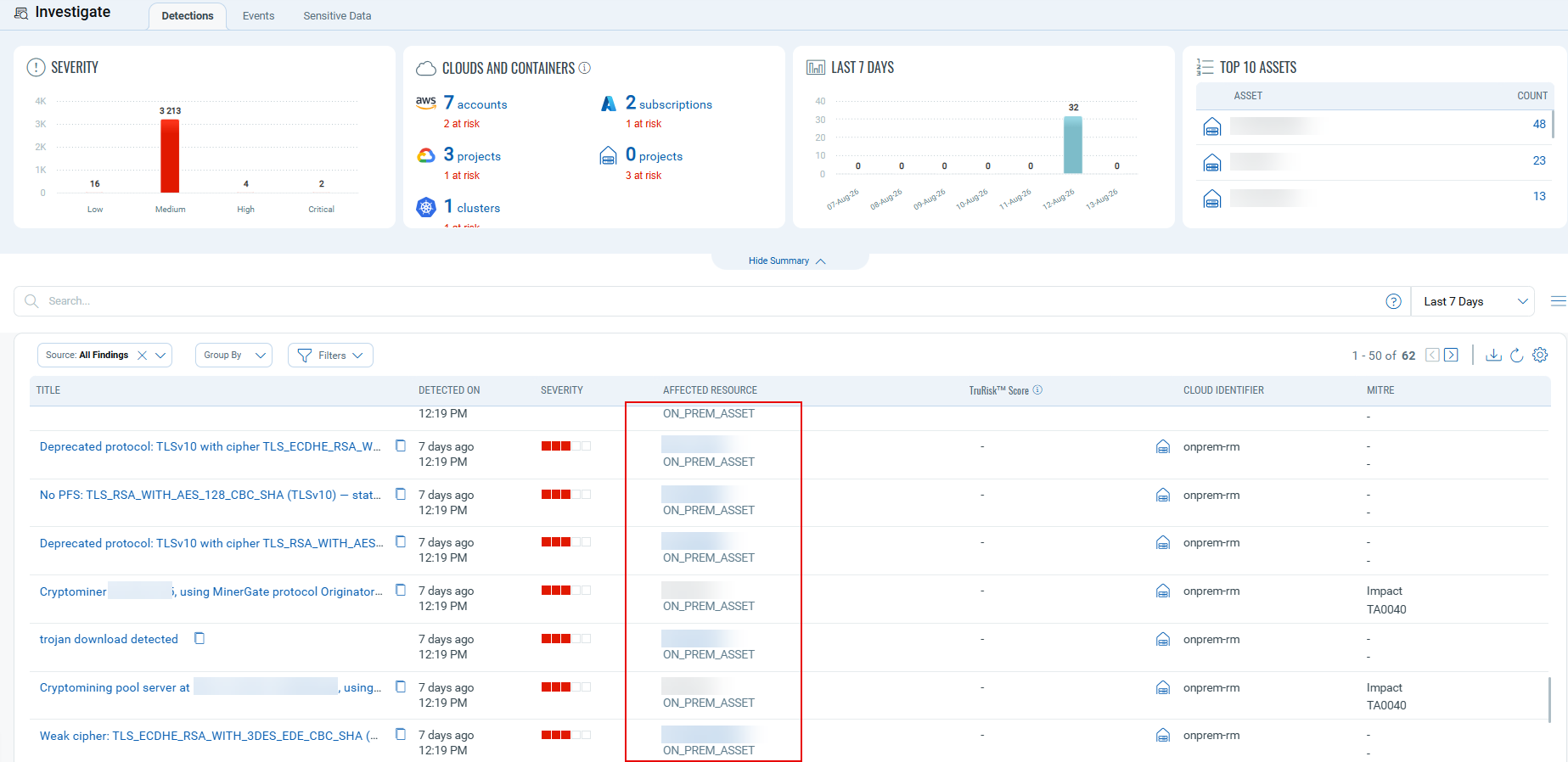
Select any on-prem finding to open the asset details page and view the hostname, location, and tags.
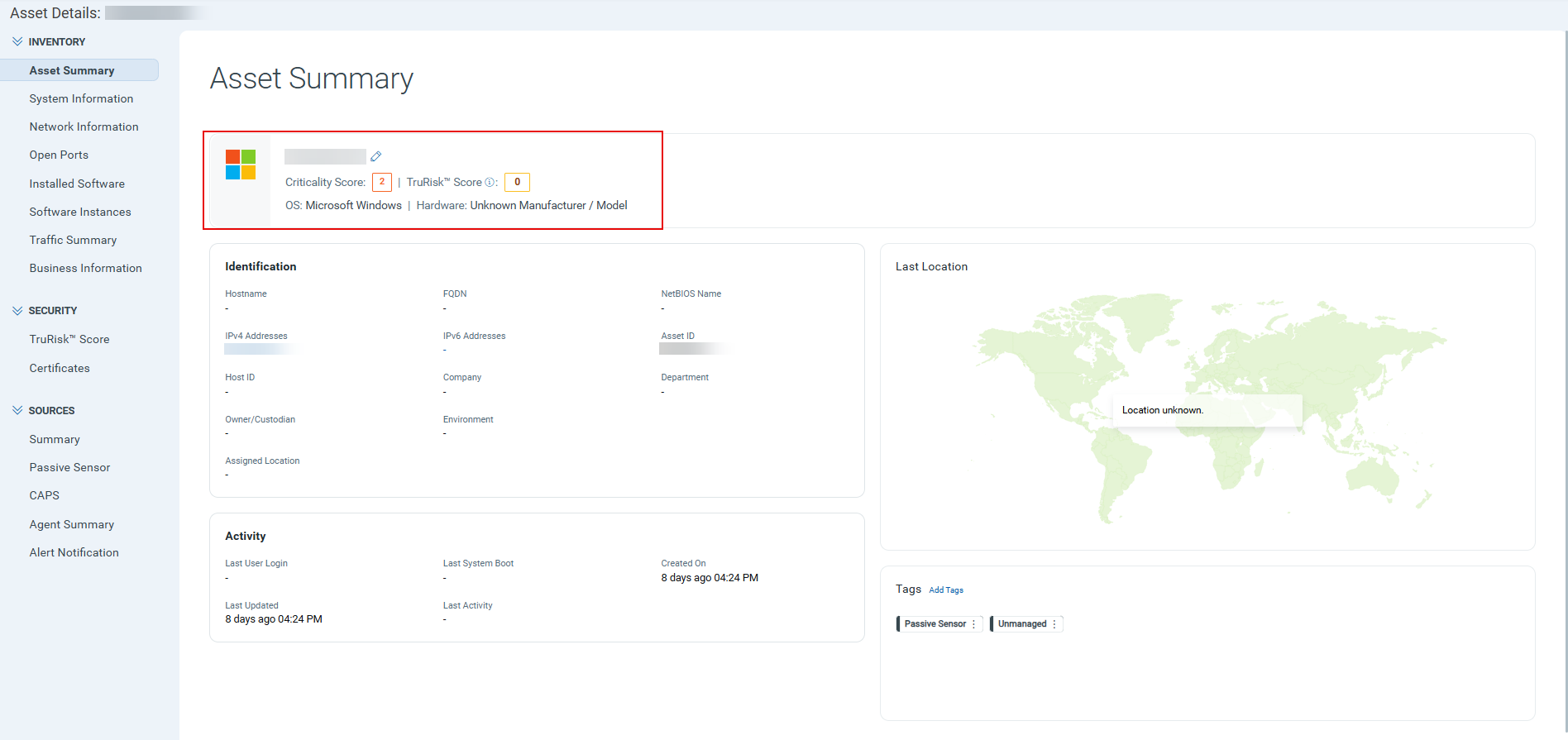
Findings for assets not found in CSAM continue to show the IP or MAC address as before.
New Tokens
The following section describes the new tokens introduced as part of TotalCloud 2.27.0
Common Tokens
The following new tokens are introduced for Posture, Reporting, and Unified Dashboard.
Applicable for:
| Cloud Type | Name | Description | Example |
|---|---|---|---|
| AWS | aws.rootId | Use this to find AWS resources by organization root ID. | aws.rootId: |
| AWS | aws.ouId | Use this to find AWS resources by organizational unit ID. | aws.ouId: |
| AWS | aws.ouName | Use this to find AWS resources by organizational unit name. | aws.ouName: |
| Azure | azure.managementGroupId | Use this to find Azure resources by management group ID. | azure.managementGroupId: |
| Azure | azure.managementGroupName | Use this to find Azure resources by management group name. | azure.managementGroupName: |
| Azure | azure.tenantId | Use this to find Azure resources by Azure tenant ID. | azure.tenantId: |
| GCP | gcp.folderId | Use this to find GCP resources by folder ID. | gcp.folderId: |
| GCP | gcp.folderName | Use this to find GCP resources by folder name. | gcp.folderName: |
| GCP | gcp.organizationId | Use this to find GCP resources by organization ID. | gcp.organizationId: |
Inventory Tokens
Applicable for:
The following new tokens are added for Subnet resource type
| Name | Description | Example |
|---|---|---|
| oci.subnet.cidrBlock | Use this to find OCI subnets by CIDR block. | oci.subnet.cidrBlock |
| oci.subnet.compartmentId | Use this to find OCI subnets by compartment ID. | oci.subnet.compartmentId: |
| oci.subnet.dnsLabel | Use this to find OCI subnets by DNS label. | oci.subnet.dnsLabel: |
| oci.subnet.lifecycleState | Use this to find OCI subnets by lifecycle state. | oci.subnet.lifecycleState: |
| oci.subnet.prohibitPublicIpOnVnic | Use this to find OCI subnets by whether public IPs on VNICs are prohibited. | oci.subnet.prohibitPublicIpOnVnic: |
| oci.subnet.routeTableId | Use this to find OCI subnets by route table ID. | oci.subnet.routeTableId: |
| oci.subnet.vcnId | Use this to find OCI subnets by VCN ID. | oci.subnet.vcnId: |
Control Updates
New controls in CIS Microsoft Azure Compute Services Benchmark Policy
Applicable for:
| Platform | CID | Title | Service | Resource | Criticality |
|---|---|---|---|---|---|
| Azure | 50671 | Ensure PHP version is the latest, if used to run Deployment slots of Linux Web Apps | App service | Web app deployment slots | Low |
| Azure | 50672 | Ensure Python version is the latest, if used to run Deployment slots of Linux Web Apps | App service | Web app deployment slots | Low |
| Azure | 50673 | Ensure Java version is the latest, if used to run Deployment slots of Linux Web Apps | App service | Web app deployment slots | Low |
| Azure | 50674 | Ensure Python version is the latest, if used to run Deployment slots of Linux Function Apps | App service | Function app deployment slots | Low |
| Azure | 50675 | Ensure Java version is the latest, if used to run Deployment slots of Linux Function Apps | App service | Function app deployment slots | Low |
| Azure | 50676 | Ensure PHP version is the latest, if used to run Deployment slots of Linux API Apps | App service | API app deployment slots | Low |
| Azure | 50677 | Ensure Python version is the latest, if used to run Deployment slots of Linux API Apps | App service | API app deployment slots | Low |
New Controls for Azure (Available for Policy Attachment)
Applicable for:
| Platform | CID | Title | Service | Resource | Criticality |
|---|---|---|---|---|---|
| Azure | 50655 | Ensure that Diagnostic logs in Azure Data Lake Storage Gen2 are enabled | Storage account | Storage account | Medium |
| Azure | 50656 | Ensure Azure Database for MySQL Flexible Server uses customer-managed keys to encrypt data at rest | Azure mysql flexible server | Azure mysql flexible server | High |
| Azure | 50657 | Ensure Azure Database for PostgreSQL Flexible Server uses customer-managed keys to encrypt data at rest | Psql server | Psql server | High |
| Azure | 50658 | Ensure that CORS does not allow every resource to access the Blob service | Storage account | Storage account | Medium |
| Azure | 50659 | Ensure that CORS does not allow every resource to access the File service | Storage account | Storage account | Medium |
| Azure | 50660 | Ensure that CORS does not allow every resource to access the Queue service | Storage account | Storage account | High |
| Azure | 50661 | Ensure that CORS does not allow every resource to access the Table service | Storage account | Storage account | Medium |
| Azure | 50662 | Ensure that Diagnostic logs are enabled in Azure Stream Analytics jobs | Stream analytics job | Streaming jobs | Medium |
| Azure | 50663 | Ensure that Linux virtual machine scale sets have Azure Monitor Agent installed | Virtual machine scale sets | Virtual machine scale sets | Medium |
| Azure | 50664 | Ensure that Windows virtual machine scale sets have Azure Monitor Agent installed | Virtual machine scale sets | Virtual machine scale sets | Medium |
| Azure | 50665 | Ensure Azure AI Search service enforces and enables data encryption with a customer-managed key (CMK) | Cognitive search | Cognitive search | High |
| Azure | 50666 | Ensure Diagnostic logs in Azure Kubernetes Service should be enabled | Kubernetes service | Kubernetes cluster | Medium |
| Azure | 50667 | Ensure Diagnostic logs in App Service should be enabled | App service | Web app | Medium |
| Azure | 50668 | Ensure that Azure Cosmos DB database accounts have local authentication methods disabled | Cosmos DB | Cosmos DB | High |
| Azure | 50669 | Ensure that Azure Machine Learning workspaces should be encrypted with a customer-managed key | Azure Machine Learning | Azure Machine Learning | High |
| Azure | 50678 | Ensure that API Management service disables public network access to service configuration endpoints | API management services | API management service | High |
| Azure | 50679 | Ensure that Azure SQL Managed Instance has Microsoft Entra-only authentication enabled | Azure SQL | SQL Managed Instance | High |
| Azure | 50680 | Ensure that Azure Synapse Workspaces have Microsoft Entra-only authentication enabled | Azure synapse analytics | Synapse workspace | Medium |
| Azure | 50681 | Ensure that VPN gateways use only Microsoft Entra ID authentication for point-to-site users | Virtual network gateway | Virtual network gateway | Medium |
| Azure | 50682 | Ensure server parameter log_connections is set to ON for PostgreSQL flexible server | PSQL server | PSQL server | Medium |
| Azure | 50684 | Ensure that Azure SQL Database has Microsoft Entra-only authentication enabled | Azure SQL | SQL server | Medium |
| Azure | 50685 | Ensure that Azure Kubernetes Service clusters have Microsoft Entra ID integration enabled | Kubernetes service | Kubernetes cluster | Medium |
| Azure | 50686 | Ensure that Azure Kubernetes Service clusters have encryption at host enabled for agent node pools | Kubernetes service | Kubernetes cluster | Medium |
| Azure | 50687 | Ensure that Azure Kubernetes Service clusters are upgraded to a non-vulnerable Kubernetes version | Kubernetes service | Kubernetes cluster | Medium |
Controls Migration
Applicable for:
| Platform | CID | Title | Old Policy | New Policy |
|---|---|---|---|---|
| AWS | 288 | Ensure SageMaker Notebook is encrypted at rest using KMS CMK | AWS Best Practices Policy | AWS AI Service Best Practices Policy |
| AWS | 334 | Ensure all data stored in the Sagemaker Endpoint is securely encrypted at rest | AWS Best Practices Policy | AWS AI Service Best Practices Policy |
| AWS | 347 | Ensure that direct internet access is disabled for an Amazon SageMaker Notebook Instance | AWS Best Practices Policy | AWS AI Service Best Practices Policy |
| AWS | 467 | Ensure to disable root access for all notebook instance users | AWS Best Practices Policy | AWS AI Service Best Practices Policy |
| AWS | 468 | Ensure to enable inter-container traffic encryption for Processing jobs( if configured) | AWS Best Practices Policy | AWS AI Service Best Practices Policy |
| AWS | 469 | Ensure processing jobs( if configured) are running inside a VPC | AWS Best Practices Policy | AWS AI Service Best Practices Policy |
| AWS | 472 | Ensure ML storage volume attached to training jobs are encrypted with customer managed master key | AWS Best Practices Policy | AWS AI Service Best Practices Policy |
| AWS | 473 | Ensure to encrypt the output of the training jobs in s3 with customer managed master key | AWS Best Practices Policy | AWS AI Service Best Practices Policy |
| AWS | 477 | Ensure ML storage volume attached to Hyperparameter Tuning jobs (if configured) are encrypted with customer managed master key | AWS Best Practices Policy | AWS AI Service Best Practices Policy |
| AWS | 479 | Ensure to encrypt the output of Hyperparameter tuning jobs( if configured) in S3 with customer managed master key | AWS Best Practices Policy | AWS AI Service Best Practices Policy |
| AWS | 481 | Ensure Hyperparameter tuning jobs( if configured) are running inside a VPC | AWS Best Practices Policy | AWS AI Service Best Practices Policy |
| AWS | 483 | Ensure to enable network isolation for models | AWS Best Practices Policy | AWS AI Service Best Practices Policy |
| AWS | 519 | Ensure ML storage volume attached to notebooks are encrypted | AWS Best Practices Policy | AWS AI Service Best Practices Policy |
| AWS | 520 | Ensure ML storage volume attached to notebooks are encrypted with customer managed master key | AWS Best Practices Policy | AWS AI Service Best Practices Policy |
| AWS | 522 | Ensure ML storage volume attached to processing jobs( if configured) are encrypted with customer managed master key | AWS Best Practices Policy | AWS AI Service Best Practices Policy |
| AWS | 523 | Ensure to encrypt the output of processing jobs | AWS Best Practices Policy | AWS AI Service Best Practices Policy |
| AWS | 524 | Ensure to encrypt the output of processing jobs( if configured)in s3 with customer managed master key | AWS Best Practices Policy | AWS AI Service Best Practices Policy |
| AWS | 535 | Ensure encryption is enabled for entity recognition analysis jobs | AWS Best Practices Policy | AWS AI Service Best Practices Policy |
| Azure | 50114 | Ensure that public network access is disabled or restricted in Cognitive Services accounts | Azure Best Practices Policy | Azure AI Service Best Practices Policy |
| Azure | 50276 | Ensure that diagnostic settings are enabled in AI Search Services | Azure Best Practices Policy | Azure AI Service Best Practices Policy |
| Azure | 50296 | Ensure that Cognitive Services enable data encryption with customer-managed keys | Azure Best Practices Policy | Azure AI Service Best Practices Policy |
| Azure | 50297 | Ensure that Cognitive Services have local authentication methods disabled | Azure Best Practices Policy | Azure AI Service Best Practices Policy |
| Azure | 50298 | Ensure that Managed identity is used in Cognitive Services | Azure Best Practices Policy | Azure AI Service Best Practices Policy |
| Azure | 50299 | Ensure that Cognitive Services use private links | Azure Best Practices Policy | Azure AI Service Best Practices Policy |
| Azure | 50391 | Ensure that Azure Search Service instances are configured to use system-assigned managed identities | Azure Best Practices Policy | Azure AI Service Best Practices Policy |
Controls Added To New Policies
Applicable for:
| Platform | CID | Title | Policy |
|---|---|---|---|
| AWS | 583 | Ensure that SageMaker notebook instances should be launched in a custom VPC | AWS AI Service Best Practices Policy |
| AWS | 648 | Comprehend Entity Recognizer model should be encrypted with a customer-managed key | AWS AI Service Best Practices Policy |
| AWS | 649 | Comprehend Entity Recognizer volume should be encrypted with a customer-managed key | AWS AI Service Best Practices Policy |
| AWS | 650 | Ensure AWS Bedrock Guardrails have PII detection filters configured | AWS AI Service Best Practices Policy |
| AWS | 651 | Ensure AWS Bedrock Guardrail has prompt injection protection enabled and input strength set to HIGH | AWS AI Service Best Practices Policy |
| AWS | 652 | Ensure AWS Bedrock Guardrails have contextual grounding policy enabled for agent response validation | AWS AI Service Best Practices Policy |
| AWS | 653 | Ensure Amazon Lex V2 bots have Child Directed setting enabled for COPPA compliance | AWS AI Service Best Practices Policy |
| AWS | 654 | Ensure Amazon Kendra index is encrypted using a customer-managed KMS key | AWS AI Service Best Practices Policy |
| AWS | 655 | Ensure Amazon Kendra index enforces user-level access control | AWS AI Service Best Practices Policy |
| AWS | 656 | Ensure Amazon Translate custom terminology is encrypted using a customer-managed KMS key | AWS AI Service Best Practices Policy |
| AWS | 657 | Ensure policy enforcement is enabled for AWS Bedrock AgentCore gateways | AWS AI Service Best Practices Policy |
| AWS | 658 | Ensure AWS Bedrock AgentCore memory is encrypted using a customer-managed KMS key | AWS AI Service Best Practices Policy |
| AWS | 659 | Ensure Amazon Personalize dataset groups are encrypted using a customer-managed KMS key | AWS AI Service Best Practices Policy |
| AWS | 660 | Ensure AWS Bedrock Guardrails have profanity filtering enabled | AWS AI Service Best Practices Policy |
| AWS | 661 | Ensure AWS Bedrock Guardrails have denied topics configured and enabled | AWS AI Service Best Practices Policy |
| Azure | 50472 | Ensure that Azure Machine Learning workspaces should use private link | Azure AI Service Best Practices Policy |
| Azure | 50637 | Ensure Azure AI Search has public network access disabled | Azure AI Service Best Practices Policy |
| Azure | 50638 | Ensure Azure AI Search uses a private endpoint (Private Link) | Azure AI Service Best Practices Policy |
| Azure | 50639 | Ensure Azure AI Search with public network access enabled has firewall rules configured | Azure AI Service Best Practices Policy |
| Azure | 50640 | Ensure Azure OpenAI Service has public network access disabled | Azure AI Service Best Practices Policy |
| Azure | 50641 | Ensure Azure OpenAI Service public network access is restricted | Azure AI Service Best Practices Policy |
| Azure | 50642 | Ensure Azure OpenAI Service is encrypted using a customer-managed key | Azure AI Service Best Practices Policy |
| Azure | 50643 | Ensure Azure OpenAI Service uses a private endpoint (Private Link) | Azure AI Service Best Practices Policy |
| Azure | 50644 | Ensure Azure AI Search SKU supports private endpoint (Private Link) | Azure AI Service Best Practices Policy |
| Azure | 50646 | Ensure that Azure Machine Learning Workspaces disable public network access | Azure AI Service Best Practices Policy |
| GCP | 52200 | Ensure Vertex AI Workbench instances have integrity monitoring enabled | GCP AI Service Best Practices Policy |
| GCP | 52201 | Ensure Vertex AI Workbench instances have Secure Boot enabled | GCP AI Service Best Practices Policy |
| GCP | 52202 | Ensure Vertex AI Colab Enterprise Runtime Template should have internet access disabled | GCP AI Service Best Practices Policy |
| GCP | 52203 | Ensure Vertex AI Colab Enterprise Runtime Template should have idle shutdown enabled | GCP AI Service Best Practices Policy |
| GCP | 52204 | Ensure Vertex AI Workbench instances have Vtpm enabled | GCP AI Service Best Practices Policy |
| GCP | 52205 | Ensure Vertex AI Endpoints are not publicly accessible | GCP AI Service Best Practices Policy |
| GCP | 52206 | Ensure Vertex AI Endpoints use Customer-Managed Encryption Keys | GCP AI Service Best Practices Policy |
| GCP | 52207 | Ensure Vertex AI Workbench instances should have public internet access disabled | GCP AI Service Best Practices Policy |
Control Enhancements
Applicable for:
| Platform | CID | Title | Description |
|---|---|---|---|
| AWS | 202 | Ensure to update the Security Policy of the Network Load Balancer | We have updated the control logic, and updated the list with secure protocols and removed unwanted protocols. |
| Azure | 50196 | Ensure that Diagnostic logs are enabled in Virtual Machine Scale Sets | Updated predicate to handle all cases |
| Azure | 50237 | Ensure that Auditing Retention is greater than 90 days for Azure MSSQL Server | Updated predicate to handle all cases |
| GCP | 52082 | Ensure 3625 (trace flag) database flag for Cloud SQL - SQL Server instance is set to on | Enhanced the control according to CIS recommendations and updated the control logic |
Issues Addressed
Applicable for:
We fixed the following important and notable issue in this release.
| Category/Component | Issue |
|---|---|
| CV - False Positive | CID-50001 was incorrectly failing for Azure SQL Database resources on the EU02 platform even though Data Encryption was already enabled on those resources, the same resources evaluated correctly as passing on the EU01 platform. The false failure was traced to how the control was reading resource data during evaluation, which caused valid, encrypted resources to be reported as non‑compliant. We have fixed the control's evaluation logic so CID-50001 now correctly reflects the Data Encryption status of the resource. The fix is included in this release.
Multiple resource groups were incorrectly flagged as FAILED for CID 50036 ("Ensure that Resource Locks are set for Mission‑Critical Azure Resources"), even though the Azure Portal confirmed an active DenyDelete lock on each affected resource group. This was a false positive caused by the control not correctly picking up existing resource‑group‑level lock data during evaluation. We have identified the root cause and are updating the control's evaluation logic to correctly detect existing locks. CID-50051 and CID-50088 were incorrectly flagged as failing (false positive) even though TLS 1.3 was already configured, the evidence captured for the control wasn't showing the exact TLS version being evaluated. We have resolved this by updating the control signature with the correct JSONPath to handle the updated evaluation structure. The fix has been tested and verified on p19 and p04, confirming correct control evaluation for both CIDs. |
| CV - Reports | CID 50016 was moved from the CIS Azure Foundations policy to the Azure Best Practices policy in a recent release. The UI correctly reflected the change, but the exported CIS Microsoft Azure Foundations Benchmark PDF still listed CID 50016. The PDF export was still built from the older policy‑to‑control mapping and hadn't picked up the reassignment. We have updated the PDF export to use the current policy mapping, so CID 50016 will no longer appear in the CIS Microsoft Azure Foundations Benchmark export. |
| CV - API | Microsoft flagged that Qualys' Azure connector (service principal "Qualys Agent") was calling Event Hub Namespace control‑plane operations using an API version scheduled for retirement at the end of September 2026. A small number of controls were still pinned to that older Event Hub API version. We have updated the affected controls to API version 2024‑01‑01, newer than Microsoft's required 2021‑11‑01 minimum, so these controls keep working after the retirement date. |