TotalCloud Release 2.28
September 30, 2026
Qualys TotalCloud 2.28.0 introduces AI-powered remediation for posture findings, dynamic tagging across Inventory and Posture, and expanded inventory coverage for AWS and Azure. This release also adds interactive posture health charts, improved discovery and reconciliation for Azure VMSS, customizable CSV reports, and extended CIS AWS Benchmark coverage.
Dynamic Tagging across Inventory and Posture
Applicable for: 


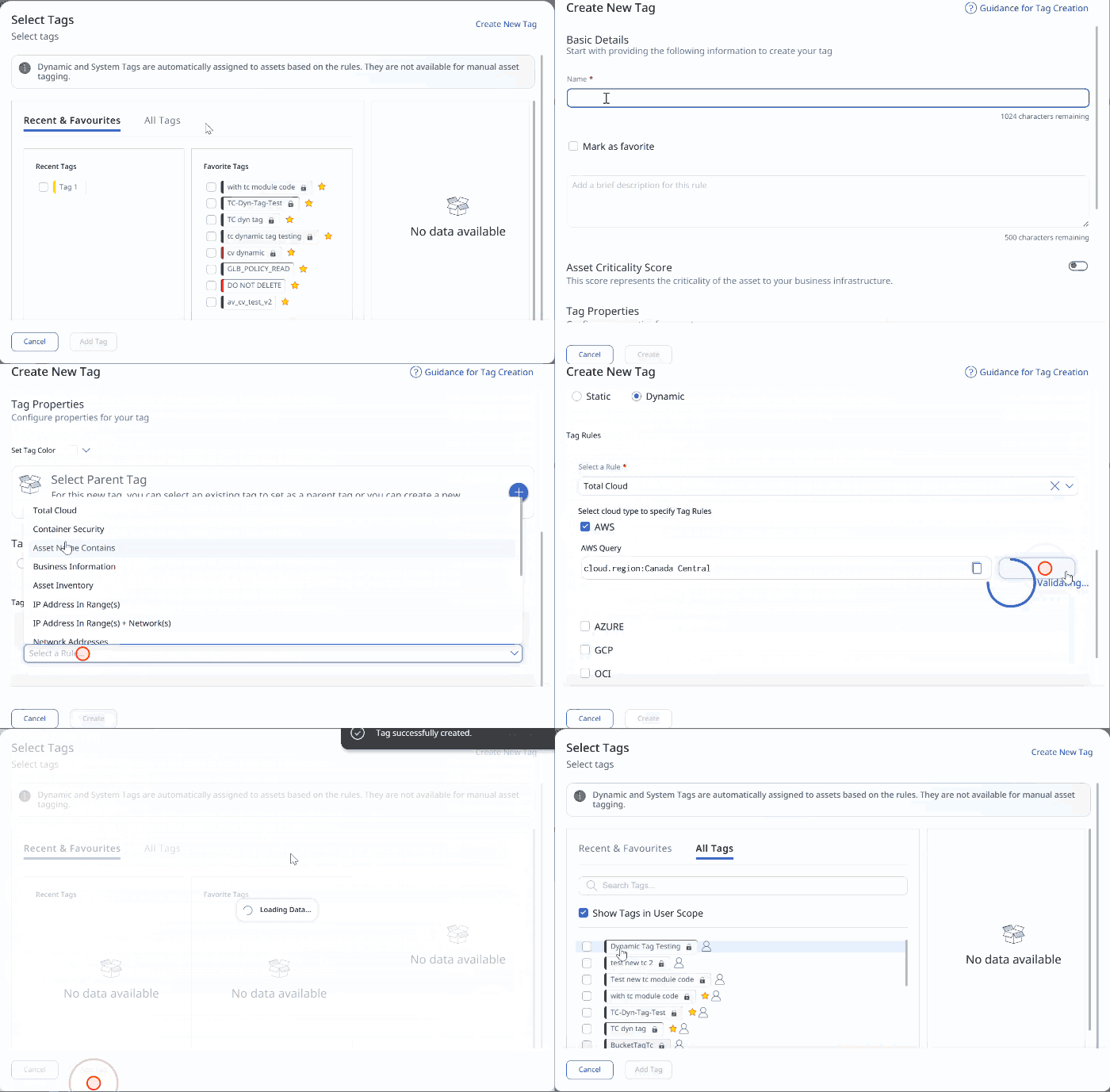
TotalCloud now supports dynamic tagging across all inventory resources, using the same tag-rule workflow available in other Qualys products. A dynamic tag is driven by a query rather than a fixed value, so as your cloud environment changes, TotalCloud automatically tags every matching resource with no manual re-tagging.
Key Features
- Tag rules powered by Qualys Query Language (QQL), the same query language used elsewhere in TotalCloud.
- TotalCloud added as a Tag Rule selection in the Create/Edit Tag workflow.
- Query validation against live inventory before a rule is saved.
- Dynamic tags appear alongside existing tags across Inventory, and Posture.
Create a dynamic tag rule in Configure > Tags, or via the quick actions menu on a Policy. Enter the details, select TotalCloud as the Tag Rule, choose cloud providers, enter and validate the QQL query, then create the new dynamic tag.
Streamline Your CSPM Reports with Custom Column Selection
Applicable for:
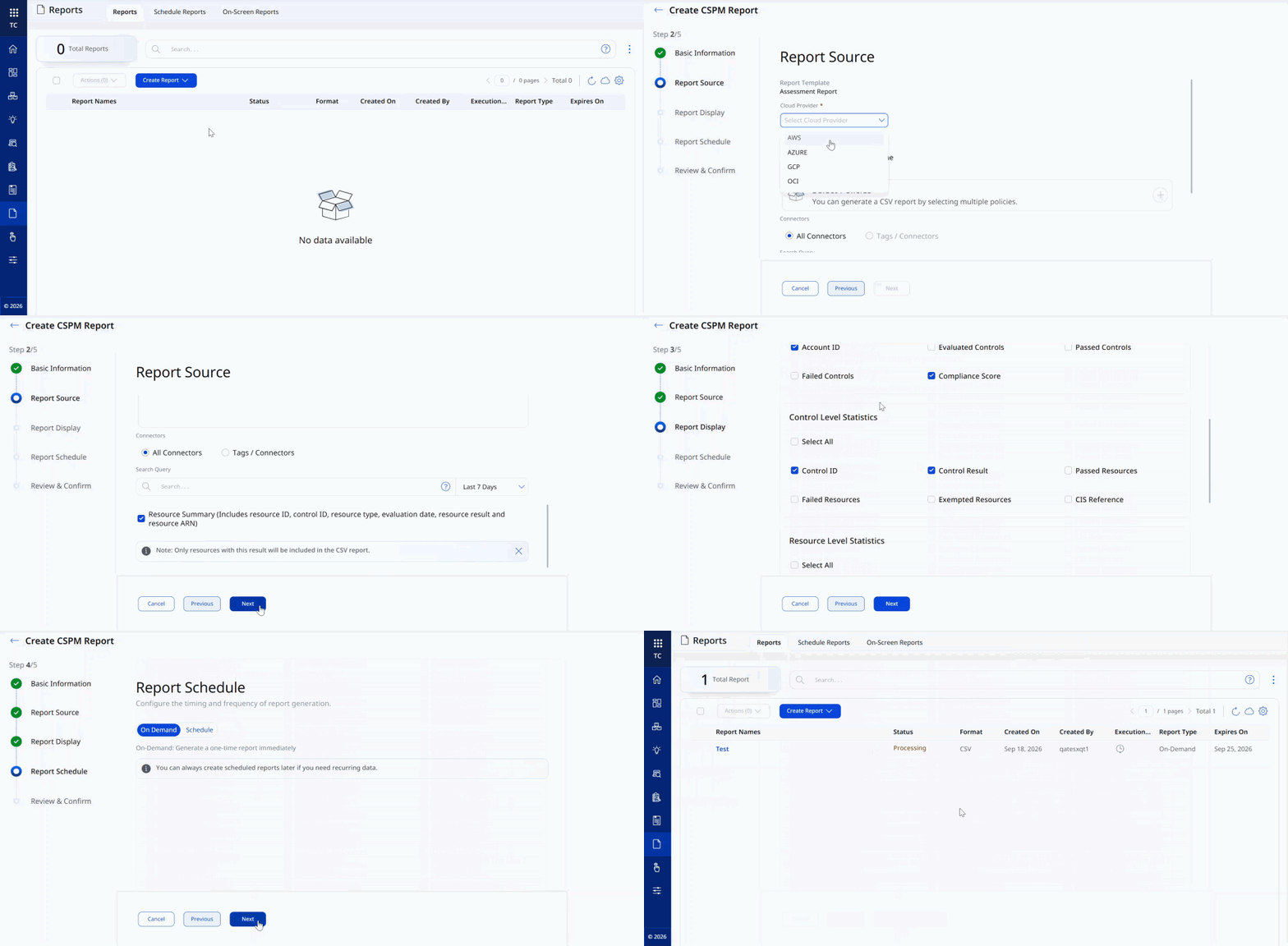
TotalCloud now offers flexibility on CSPM reporting by enhancing the entire report generation process. You can now select which section to add to the downloaded report and also choose the exact attributes you need as columns on csv file, hence avoiding download of non-relevant section and information. A new Report Display step lets you turn sections and individual columns on or off, so the report matches what your team actually reviews.
You can now choose from five customization sections.
- Overall Compliance Score
- Account-level statistics
- Control-level statistics
- Resource-level statistics (is displayed when "Resource Summary" is turned on)
- Details
Benefits:
- Reports match how your team works, rather than a single fixed layout for everyone.
- Smaller, focused CSVs are easier to open, filter, and feed into other tools.
- New ID fields make it easier to cross-reference resources and controls.
Currently, runtime scans support CSV reports. Support for PDF and build-time reports, as well as fields like tags and remediation steps, is not available.
Interactive Visual Charts for Instant Posture Health Visibility
Applicable for:
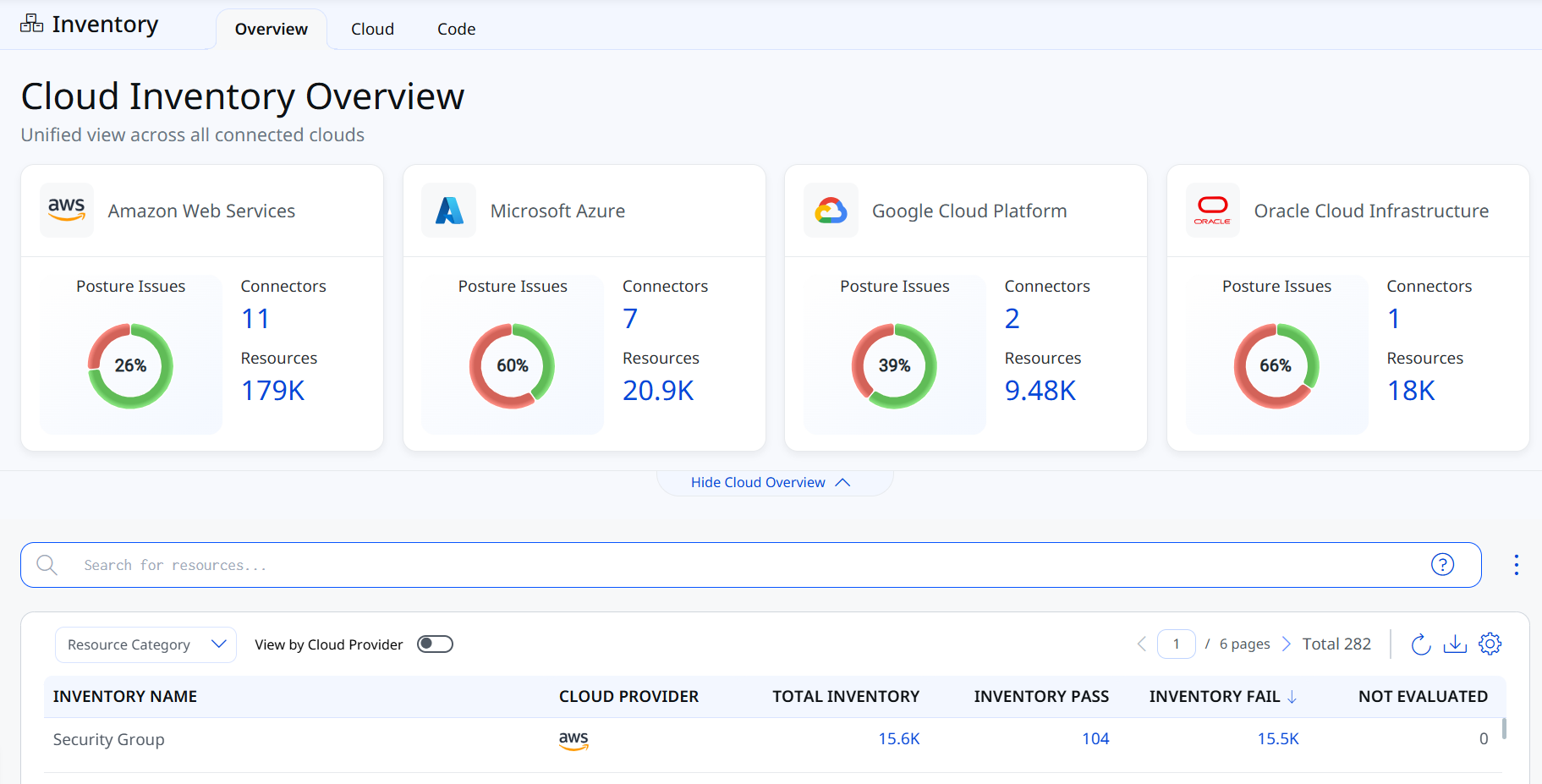
The Cloud Inventory Overview now visualizes posture issues for each connected cloud platform, AWS, Azure, GCP, and Oracle Cloud Infrastructure, as a color-coded donut chart, replacing the previous plain summary card. This gives you an immediate visual read on the posture health of all your connected clouds from a single page.
Key Features
- Color-coded donut chart per cloud platform: green for resources that passed posture checks, red for resources with posture issues.
- The percentage in the center of the chart shows the share of failed resources among all resources discovered on that platform.
- On hover, the green arc displays the exact count of passed resources, and the red arc displays the exact count of failed resources.
Extended Inventory Coverage
Applicable for:
We have expanded our cloud security coverage by adding support for additional AWS resource types in Cloud Inventory, enabling discovery, inventory, and security posture assessment across a broader range of cloud services.
The resources are as follows:
| Platform | Resource | Permissions |
|---|---|---|
| AWS | AWS EBS Encryption | ec2:GetEbsEncryptionByDefault ec2:GetEbsDefaultKmsKeyId kms:DescribeKey |
| AWS GuardDuty Detector | guardduty:ListDetectors guardduty:GetDetector guardduty:ListTagsForResource |
|
| AWS IAM Account Summary | iam:GetAccountSummary | |
| AWS S3 Block Public Access Settings | s3:GetPublicAccessBlock s3:GetAccountPublicAccessBlock |
|
| AWS SSM Service Setting | ssm:GetServiceSetting | |
| AWS WAF Global Rule Group | wafv2:ListRuleGroups wafv2:GetRuleGroup |
|
| AWS WAF Rule Group | wafv2:ListRuleGroups wafv2:GetRuleGroup |
|
| AWS WAF V2 Global Web ACL | wafv2:ListWebACLs wafv2:GetWebACL |
|
| AWS WAF V2 Web ACL Resource | wafv2:ListWebACLs wafv2:GetWebACL |
|
| CloudWatch Alarm | cloudwatch:DescribeAlarms | |
| CloudWatch LogGroup | logs:DescribeLogGroups | |
| EC2 Elastic IP Address | ec2:DescribeAddresses | |
| EC2 NAT Gateway | ec2:DescribeAddresses ec2:DescribeNatGateways |
|
| Elastic Beanstalk Environment | elasticbeanstalk:DescribeEnvironments | |
| Elasticache Cluster | elasticache:DescribeCacheClusters | |
| Glue Crawler | glue:ListCrawlers glue:GetCrawler |
|
| Glue ETL Job | glue:ListJobs glue:GetJobs |
|
| IAM SAML Provider | iam:ListSAMLProviders iam:GetSAMLProvider |
|
| Kinesis Firehose Delivery Stream | firehose:ListDeliveryStreams firehose:DescribeDeliveryStream |
|
| Network Firewall Rule Groups | network-firewall:ListRuleGroups network-firewall:DescribeRuleGroup |
Additionally, we have improved the following resource to include more details:
- AWS: IAM User (new Virtual MFA Devices tab added).
- Azure: API App, Web App, Function App, Logic App (new Configurations tab added)
- GCP: Detailed inventory support added for resources, including Instance Groups, Buckets, Topics, Disks, Spanner Databases, Instance Templates, Cloud Armor Policies, Cryptographic Keys, Datasets, Artifact Registry Repositories, Disk Snapshots, Dataproc Clusters, BigTable Instances, Disk Images, Kubernetes Nodes, Instances, Service Accounts, and Cloud DNS Zones.
Extended CIS Benchmark Coverage
Applicable for:
TotalCloud now extends compliance coverage with support for the following CIS Amazon Web Services Benchmarks:
- CIS Amazon Web Services Compute Services Benchmark v2.0.0
- CIS Amazon Web Services Database Services Benchmark v2.0.0
- CIS Amazon Web Services End User Compute Services Benchmark v1.2.0
- CIS Amazon Web Services Storage Services Benchmark v1.0.0
This is in addition to TotalCloud's existing support for the CIS Amazon Web Services Foundations Benchmark, AWS Database Services best practices, and other supported policies.
Control Updates
New controls in CIS AWS Compute Services Benchmark Policy
Applicable for:
| Platform | CID | Title | Service | Resource | Criticality |
|---|---|---|---|---|---|
| AWS | 741 | Ensure Amazon ECS task definitions using host network mode do not allow privileged or root user access to the host | ECS | ECS task definition | High |
| AWS | 742 | Ensure Amazon ECS task definitions do not have privileged set to true | ECS | ECS task definition | High |
| AWS | 743 | Ensure the readonlyRootFilesystem parameter is enabled in Amazon ECS task definitions to restrict write access to the filesystem | ECS | ECS task definition | Medium |
| AWS | 744 | Ensure secrets are not passed as container environment variables in Amazon ECS task definitions | ECS | ECS task definition | High |
| AWS | 745 | Ensure Amazon ECS Fargate services are using the latest Fargate platform version | ECS | ECS service | Medium |
| AWS | 746 | Ensure Amazon ECS services are tagged | ECS | ECS service | Low |
| AWS | 747 | Ensure Amazon ECS clusters are tagged | ECS | ECS cluster | Low |
| AWS | 748 | Ensure Amazon ECS task definitions are tagged | ECS | ECS task definition | Low |
| AWS | 749 | Ensure only trusted images are used with Amazon ECS | ECS | ECS task definition | High |
| AWS | 750 | Ensure assignPublicIp is set to DISABLED for Amazon ECS task sets | ECS | ECS service | High |
| AWS | 751 | Ensure customer-managed keys are used to encrypt AWS Fargate ephemeral storage data for Amazon ECS | ECS | ECS cluster | Medium |
See Control Permissions for AWS to understand the permissions needed for the new controls.
New controls in CIS AWS End User Compute Services Benchmark Policy
Applicable for:
| Platform | CID | Title | Service | Resource | Criticality |
|---|---|---|---|---|---|
| AWS | 752 | Ensure the default IP access control group is disassociated for WorkSpaces directories in all regions | Workspace | Directory | Medium |
| AWS | 754 | Ensure WorkSpaces that are not being utilized are removed | Workspace | Workspace | Medium |
| AWS | 755 | Ensure primary interface ports for Workspaces are not open to all inbound traffic | Workspace | Workspace | High |
| AWS | 757 | Ensure AppStream 2.0 fleet maximum session duration is set to 10 hours (36000 seconds) or less | AppStream | AppStream Fleet | Medium |
| AWS | 758 | Ensure AppStream 2.0 fleet disconnect timeout is set to 5 minutes (300 seconds) or less | AppStream | AppStream Fleet | Medium |
| AWS | 759 | Ensure AppStream 2.0 fleet idle disconnect timeout is set to 10 minutes (600 seconds) or less and is not disabled | AppStream | AppStream Fleet | Medium |
| AWS | 760 | Ensure AppStream 2.0 fleet default internet access is disabled | AppStream | AppStream Fleet | High |
See Control Permissions for AWS to understand the permissions needed for the new controls.
Controls Added in CIS AWS Storage Services Benchmark Policy
Applicable for:
| Platform | CID | Title | Service | Resource | Criticality |
|---|---|---|---|---|---|
| AWS | 6 | Ensure that custom IAM Password Policy is Defined | IAM | IAM Password Policy | High |
| AWS | 7 | Ensure that custom IAM password policy requires at least one uppercase letter | IAM | IAM Password Policy | High |
| AWS | 8 | Ensure that custom IAM password policy requires at least one lowercase letter | IAM | IAM Password Policy | High |
| AWS | 9 | Ensure that custom IAM password policy requires at least one symbol | IAM | IAM Password Policy | High |
| AWS | 10 | Ensure that custom IAM password policy requires at least one number | IAM | IAM Password Policy | High |
| AWS | 11 | Ensure that custom IAM password policy requires minimum length of 14 or greater | IAM | IAM Password Policy | High |
| AWS | 12 | Ensure that custom IAM password policy prevents password reuse | IAM | IAM Password Policy | High |
| AWS | 13 | Ensure that custom IAM password policy expires passwords within 90 days or less | IAM | IAM Password Policy | High |
| AWS | 50 | Ensure IAM policies that allow full '*:*' administrative privileges are not attached | IAM | IAM Policy | High |
| AWS | 433 | Ensure IAM instance roles are used for AWS resource access from instances | EC2 | EC2 Instance | Medium |
| AWS | 576 | Ensure EFS access points should enforce a root directory | EFS | EFS Access Point | High |
| AWS | 577 | Ensure EFS Access Points should enforce a POSIX user identity | EFS | EFS Access Point | High |
| AWS | 719 | Ensure that VPC security groups do not allow unrestricted access on all ports | VPC | VPC Security Group | High |
Controls Added in CIS AWS Database Services Benchmark Policy
Applicable for:
| Platform | CID | Title | Service | Resource | Criticality |
|---|---|---|---|---|---|
| AWS | 50 | Ensure IAM policies that allow full '*:*' administrative privileges are not attached | IAM | IAM Policy | High |
| AWS | 53 | Ensure encryption-at-rest is enabled for Relational Database Service (RDS) Instances | RDS | RDS | High |
| AWS | 55 | Ensure Auto Minor Version Upgrade feature is Enabled for Relational Database Service (RDS) Instances | RDS | RDS | Medium |
| AWS | 78 | Ensure public access is not given to Relational Database Service (RDS) Instance | RDS | RDS | High |
| AWS | 88 | Ensure Multi-AZ deployments are used for enhanced availability in Amazon RDS | RDS | RDS | Medium |
| AWS | 356 | Ensure that Amazon ElastiCache Redis clusters have automatic backup turned on | ElastiCache | Redis | Medium |
| AWS | 408 | Ensure that DocumentDB Clusters are encrypted with KMS using a customer managed Key (CMK) | DocumentDB | DocumentDB Clusters | High |
| AWS | 543 | Ensure DynamoDB table should have deletion protection enabled | DynamoDB | DynamoDB Table | Medium |
| AWS | 544 | Ensure DynamoDB Accelerator cluster should be encrypted in transit | DynamoDB | DAX Cluster | Medium |
| AWS | 581 | Ensure that AWS ElastiCache Redis standalone clusters should have automatic minor version upgrade enabled | ElastiCache | Redis | Medium |
New Controls for Azure (Available for Policy Attachment)
Applicable for:
| Platform | CID | Title | Service | Resource | Criticality |
|---|---|---|---|---|---|
| Azure | 50688 | Ensure that an activity log alert is created for Create or Update PostgreSQL Flexible Server events | Monitor | Activity log alert | Medium |
| Azure | 50689 | Ensure that an activity log alert is created for Delete PostgreSQL Flexible Server events | Monitor | Activity log alert | Medium |
| Azure | 50690 | Ensure that an activity log alert is created for Create or Update MySQL Flexible Server events | Monitor | Activity log alert | Medium |
| Azure | 50691 | Ensure that an activity log alert is created for Delete MySQL Flexible Server events | Monitor | Activity log alert | Medium |
See Control Permissions for Azure to understand the permissions needed for the new controls.
Controls Migration
Applicable for:
| Platform | CID | Title | Old Policy | New Policy |
|---|---|---|---|---|
| AWS | 51 | Ensure that Public Accessibility is set to No for Database Instances | AWS Database Service Best Practices | CIS AWS Database Services Benchmark |
| AWS | 69 | Ensure automated backups are enabled for Relational Database Service (RDS) database instances | AWS Database Service Best Practices | CIS AWS Database Services Benchmark |
| AWS | 70 | Ensure Deletion Protection is enabled for Relational Database Service (RDS) Database Cluster | AWS Database Service Best Practices | CIS AWS Database Services Benchmark |
| AWS | 71 | Ensure Deletion Protection is enabled for Relational Database Service (RDS) Database instances | AWS Database Service Best Practices | CIS AWS Database Services Benchmark |
| AWS | 72 | Ensure IAM Database Authentication is Enabled for the Database (DB) Cluster | AWS Database Service Best Practices | CIS AWS Database Services Benchmark |
| AWS | 73 | Ensure IAM Database Authentication is Enabled for the Database (DB) Instances | AWS Database Service Best Practices | CIS AWS Database Services Benchmark |
| AWS | 74 | Ensure Relational Database Service (RDS) Log Exports is enabled for Database (DB) Cluster | AWS Database Service Best Practices | CIS AWS Database Services Benchmark |
| AWS | 75 | Ensure Relational Database Service (RDS) Log Exports is enabled for Database (DB) Instances | AWS Database Service Best Practices | CIS AWS Database Services Benchmark |
| AWS | 81 | Ensure Relational Database Service (RDS) Microsoft SQL instance enforces encrypted connections only | AWS Database Service Best Practices | CIS AWS Database Services Benchmark |
| AWS | 82 | Ensure Relational Database Service (RDS) PostgreSQL instance enforces encrypted connections only | AWS Database Service Best Practices | CIS AWS Database Services Benchmark |
| AWS | 83 | Ensure Relational Database Service (RDS) PostgreSQL Cluster enforces encrypted connections only | AWS Database Service Best Practices | CIS AWS Database Services Benchmark |
| AWS | 84 | Ensure Encryption is enabled for the Relational Database Service (RDS) database Cluster | AWS Database Service Best Practices | CIS AWS Database Services Benchmark |
| AWS | 86 | Ensure Customer Managed Key (CMK) is used to protect Relational Database Service (RDS) database Cluster encryption key | AWS Database Service Best Practices | CIS AWS Database Services Benchmark |
| AWS | 89 | Ensure database cluster replication is set to the another zone for High Availability | AWS Database Service Best Practices | CIS AWS Database Services Benchmark |
| AWS | 91 | Ensure Enhance monitoring is enabled for Relational Database Service (RDS) Database Instance | AWS Database Service Best Practices | CIS AWS Database Services Benchmark |
| AWS | 126 | Ensure Amazon Machine Images (AMIs) owned by account are encrypted | AWS Best Practices Policy | CIS AWS Compute Services Benchmark |
| AWS | 127 | Ensure Elastic Block Store (EBS) volume snapshots are encrypted | AWS Best Practices Policy | CIS AWS Compute Services Benchmark |
| AWS | 133 | Ensure backup retention is set to minimum of 7 days for DocumentDB clusters | AWS Database Service Best Practices | CIS AWS Database Services Benchmark |
| AWS | 134 | Ensure audit logs is enabled for Log export to CloudWatch for DocumentDB clusters | AWS Database Service Best Practices | CIS AWS Database Services Benchmark |
| AWS | 135 | Ensure deletion protection is enabled for DocumentDB clusters | AWS Database Service Best Practices | CIS AWS Database Services Benchmark |
| AWS | 139 | Ensure IAM DB authentication is enabled for neptune database | AWS Database Service Best Practices | CIS AWS Database Services Benchmark |
| AWS | 141 | Ensure Audit logs is enabled for log exports to cloudwatch for neptune database | AWS Database Service Best Practices | CIS AWS Database Services Benchmark |
| AWS | 143 | Ensure deletion protection is enabled for neptune DB | AWS Database Service Best Practices | CIS AWS Database Services Benchmark |
| AWS | 146 | Ensure that AWS Elastic Block Store (EBS) volume snapshots are not public | AWS Best Practices Policy | CIS AWS Compute Services Benchmark |
| AWS | 147 | Ensure that AWS ElastiCache Memcached clusters are not associated with default VPC | AWS Best Practices Policy | CIS AWS Database Services Benchmark |
| AWS | 148 | Ensure that AWS ElastiCache Redis clusters are not associated with default VPC | AWS Best Practices Policy | CIS AWS Database Services Benchmark |
| AWS | 151 | Ensure AWS ElastiCache Redis cluster with Multi-AZ Automatic Failover feature is set to enabled | AWS Best Practices Policy | CIS AWS Database Services Benchmark |
| AWS | 152 | Ensure AWS ElastiCache Redis cluster with Redis AUTH feature is enabled | AWS Best Practices Policy | CIS AWS Database Services Benchmark |
| AWS | 153 | Ensure that AWS ElastiCache Redis clusters are In-Transit encrypted | AWS Best Practices Policy | CIS AWS Database Services Benchmark |
| AWS | 154 | Ensure that AWS ElastiCache Redis clusters are Data At-Rest encrypted | AWS Best Practices Policy | CIS AWS Database Services Benchmark |
| AWS | 155 | Ensure that AWS ElastiCache Redis clusters are Data At-Rest encrypted with CMK | AWS Best Practices Policy | CIS AWS Database Services Benchmark |
| AWS | 169 | Ensure DynamoDB tables are encrypted using KMS Customer managed Keys | AWS Database Service Best Practices | CIS AWS Database Services Benchmark |
| AWS | 181 | Ensure proper protocol is configured for Radius server in AWS Directory | AWS Best Practices Policy | CIS AWS End User Compute Services Benchmark |
| AWS | 197 | Ensure to encrypt the User Volumes and Root Volumes with the customer managed master keys for AWS WorkSpace | AWS Best Practices Policy | CIS AWS End User Compute Services Benchmark |
| AWS | 198 | Ensure Workspace directory must have a vpc endpoint so that the API traffic associated with the management of workspaces stays within the vpc | AWS Best Practices Policy | CIS AWS End User Compute Services Benchmark |
| AWS | 204 | Ensure AWS EBS Volume snapshots are encrypted with KMS using a customer managed Key (CMK) | AWS Best Practices Policy | CIS AWS Compute Services Benchmark |
| AWS | 211 | Ensure Maintenance Mode is not enabled in Workspace Directories | AWS Best Practices Policy | CIS AWS End User Compute Services Benchmark |
| AWS | 214 | Ensure Device Type Web Access Control is allowed in Workspace Directories | AWS Best Practices Policy | CIS AWS End User Compute Services Benchmark |
| AWS | 219 | Ensure neptune DB snapshots are encrypted | AWS Database Service Best Practices | CIS AWS Database Services Benchmark |
| AWS | 225 | Ensure to enable the encryption of the Root volumes for Workspaces in all regions | AWS Best Practices Policy | CIS AWS End User Compute Services Benchmark |
| AWS | 226 | Ensure to enable the encryption of the User volumes for Workspaces in all regions | AWS Best Practices Policy | CIS AWS End User Compute Services Benchmark |
| AWS | 292 | Ensure Dynamodb point in time recovery (backup) is enabled | AWS Database Service Best Practices | CIS AWS Database Services Benchmark |
| AWS | 312 | Ensure container insights are enabled on ECS cluster | AWS Best Practices Policy | CIS AWS Compute Services Benchmark |
| AWS | 330 | Ensure DocDB TLS is not disabled | AWS Database Service Best Practices | CIS AWS Database Services Benchmark |
| AWS | 350 | Ensure that detailed monitoring is enabled for EC2 instances | AWS Best Practices Policy | CIS AWS Storage Services Benchmark |
| AWS | 370 | Ensure that Auto Scaling Groups supply tags to Launch Configurations | AWS Best Practices Policy | CIS AWS Compute Services Benchmark |
| AWS | 411 | Ensure that a log driver has been defined for each active Amazon ECS task definition | AWS Best Practices Policy | CIS AWS Compute Services Benchmark |
| AWS | 453 | Ensure to block public access to Amazon EFS file systems | AWS Best Practices Policy | CIS AWS Storage Services Benchmark |
| AWS | 507 | Ensure encryption at rest is enabled for AWS DocumentDB clusters | AWS Database Service Best Practices | CIS AWS Database Services Benchmark |
| AWS | 538 | Ensure that Images (AMIs) are not older than 90 days | AWS Best Practices Policy | CIS AWS Compute Services Benchmark |
Issues Addressed
Applicable for:
We fixed the following important and notable issues in this release.
| Category/Component | Issue |
|---|---|
| CV - False Positive | CID-50382 and CID-50384 are based on Azure Database for PostgreSQL - Single Server, which Microsoft has now deprecated, leading some customers to question why these controls are still active. Both controls continue to evaluate any existing PostgreSQL Single Server resources still running in an environment, so we are not deprecating them currently. To cover the replacement service, we have also added four new controls for PostgreSQL Flexible Server and MySQL Flexible Server activity log alerts. |
| CID 26 and related CIDs were incorrectly flagged as failing because the control was evaluating all AWS KMS key types instead of only customer-managed keys (CMKs). Corrected the control logic to evaluate CMKs only, resolving the false positive. | |
| CID 426 was reporting FAIL for Network Load Balancers even when a WAF was correctly attached. The issue was caused by throttling from repeated GET calls, which produced inconsistent resource counts during evaluation. Updated the control's evaluation logic to handle throttled responses correctly, resolving the false positive. | |
| CID 40103 (Ensure OCI IAM credentials unused for 45 days or more are disabled) was incorrectly flagging deactivated IAM users as FAIL, resulting in false visibility. Enhanced the control logic to correctly account for deactivated users, resolving the false positive. | |
| TotalCloud - Connectors | The AWS connector was missing the apigateway:GET permission for :aws:apigateway:*::/domainnames/*, which could prevent API Gateway custom domain name resources from being evaluated correctly. Corrected the connector's permission set to include this permission. |
| TotalCloud - UI | GCP Cloud SQL instance controls have been showing inconsistent evidences in reports/UI, it was due to evidence data was missing during evaluation. Fixed that by adding all mandatory evidences providing consistency, so all Cloud SQL instance controls now capture and report evidence consistently. |