TotalCloud Release 2.29
November 6, 2026
TotalCloud Release 2.29 adds AI-guided cloud remediation, cross-cloud security dashboards, custom CSV inventories, enhanced CSPM reports, and expanded AI/ML asset tracking in OCI and GCP, plus updates to the UI, Azure VMSS discovery, audit logs, cloud detection and response, Azure Activity Log alerts, tokens, and controls.
New Feature
Simplified Remediation with AI
Applicable for: 


What's New for You
You can now get AI-generated, resource-specific remediation code with numbered steps and a verification check, right from the control evaluation's evidence details.
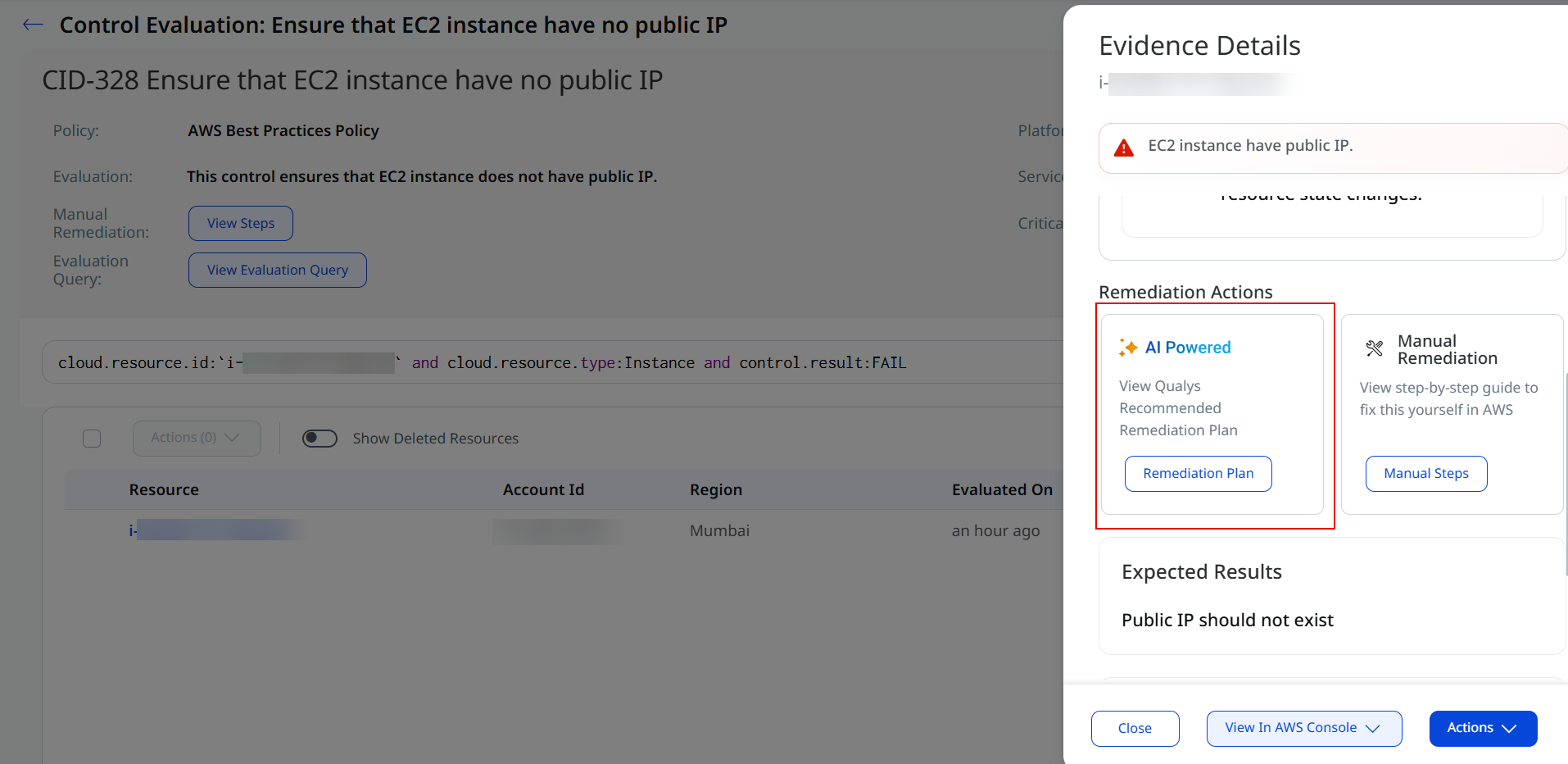
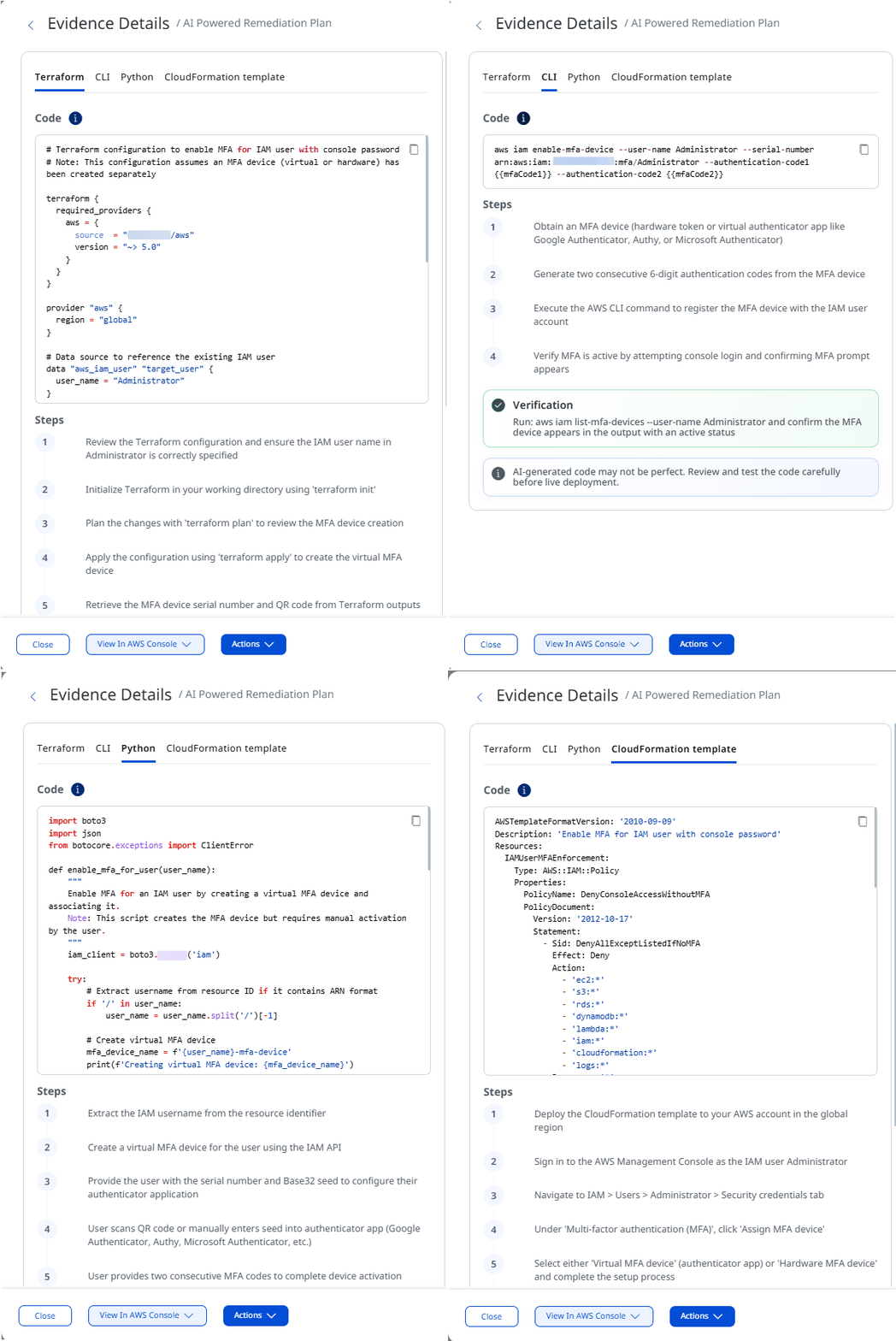
With this release, you can generate AI-powered remediation code for any failed system-defined control directly from the Posture section. Previously, when a cloud resource failed a system-defined control, you only had one path forward: follow a set of manual remediation steps. That still works today, but now you also get a faster option.
Open the control evaluation's evidence details section of any failed resource, and you will now see two ways to remediate it:
- AI Powered - instantly generates a recommended remediation plan for the resource.
- Manual Remediation - the step-by-step guide you're used to, still available as before.
Choosing AI-Powered gives you working code to fix the issue, available in the format that fits your workflow:
| Provider | Terraform | CLI | Python | Template |
|---|---|---|---|---|
| AWS | ✔ | ✔ | ✔ | CloudFormation Template |
| Azure | ✔ | ✔ | ✔ | Bicep Template |
| GCP | ✔ | ✔ | ✔ | Deployment Manager YAML configuration |
| OCI | ✔ | ✔ | ✔ | - |
Each plan includes:
- Code scoped to the specific resource that failed the control.
- Clear, numbered steps for applying the fix.
- A verification step so you can confirm the remediation actually worked.
The AI-generated remediation code might not always be perfect, especially for more complex remediation. It's advisable to review and test the code carefully before live deployment.
Enhancement
Global Posture View Across All Clouds
Applicable for:
What Changed For You
You can now see your overall compliance posture across AWS, Azure, GCP, and OCI in one place, on the Inventory Overview page and in a new All tab on the Posture page, without selecting a cloud first.
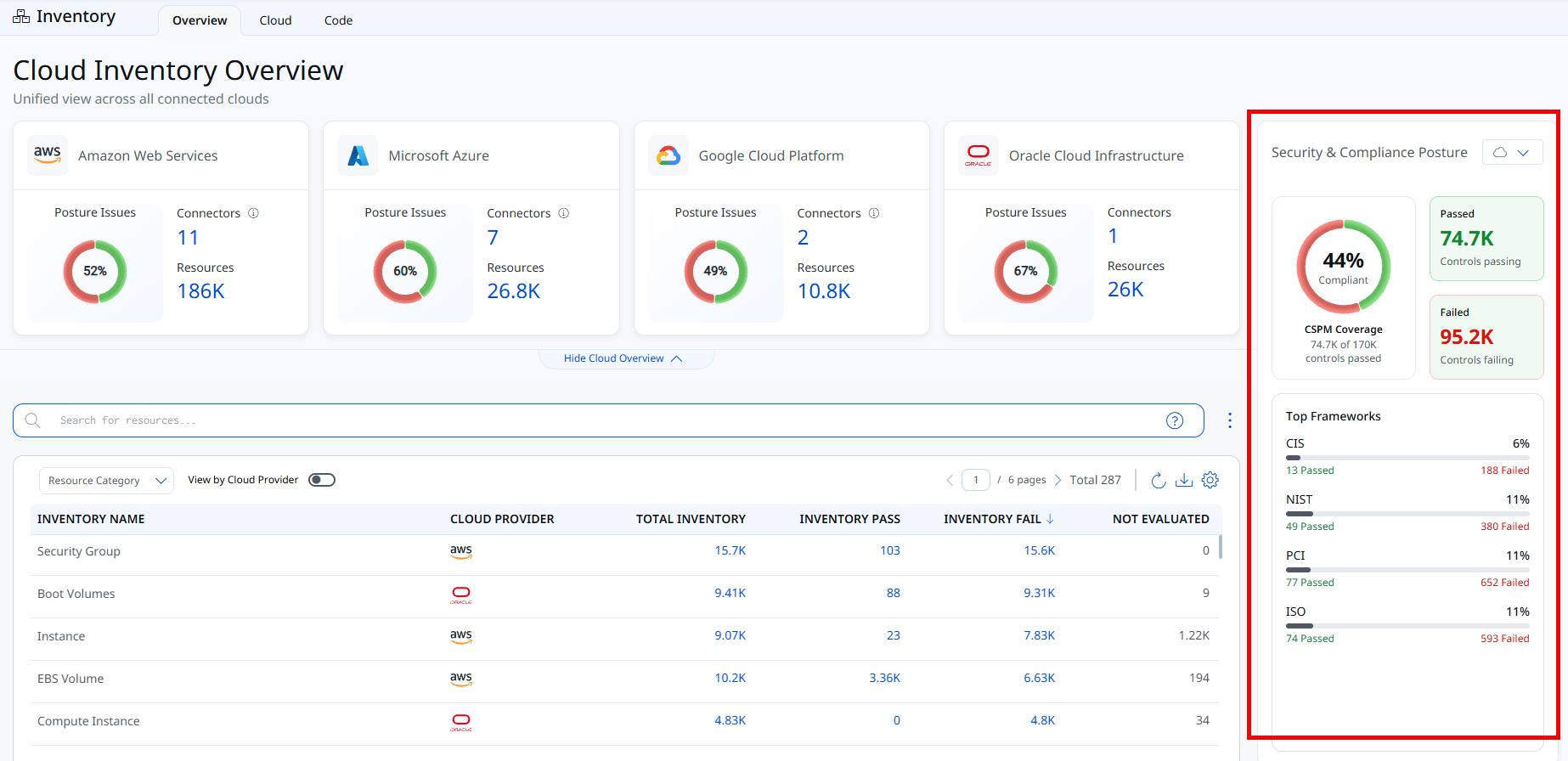
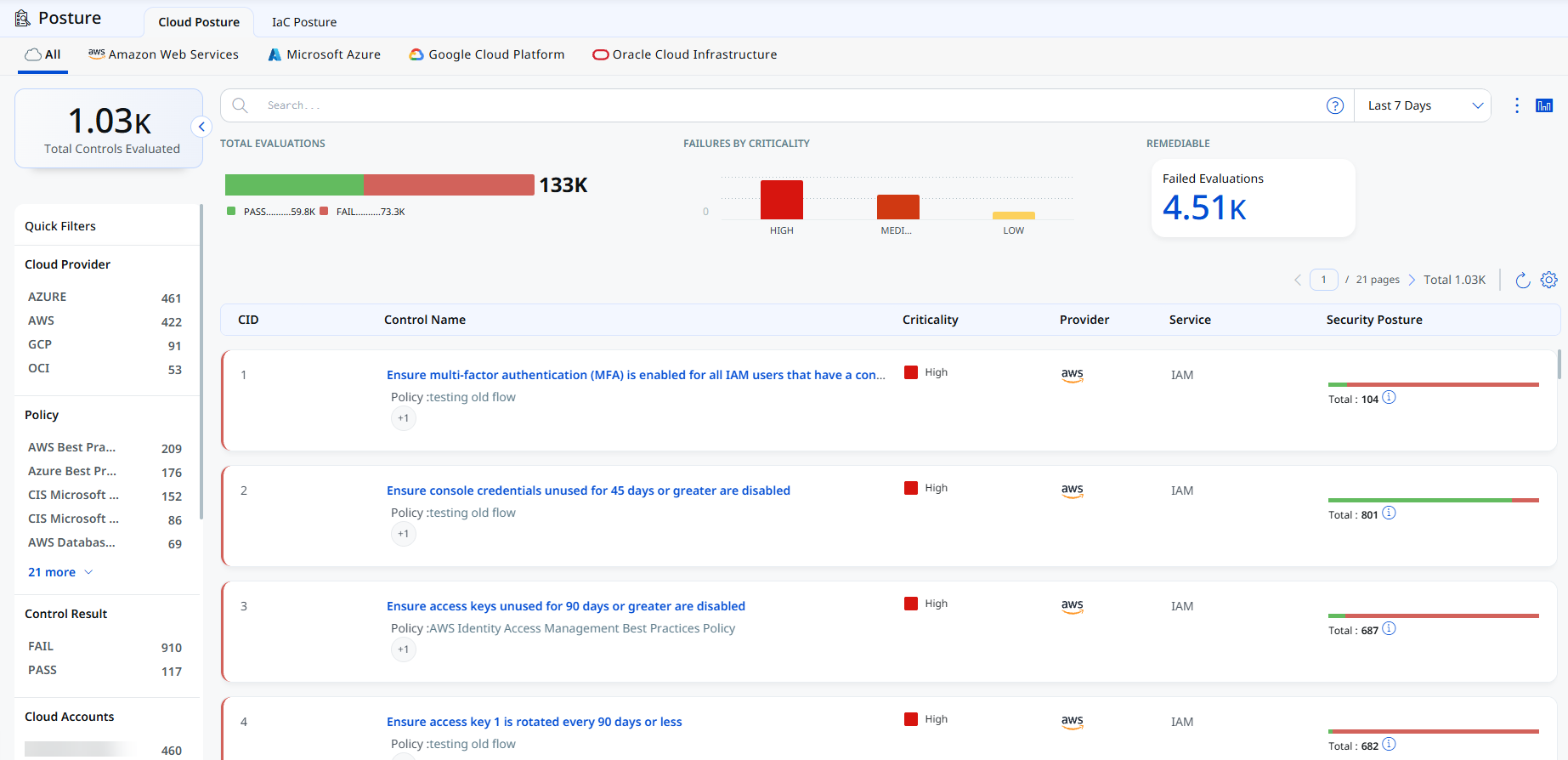
Previously, you had to select a specific cloud provider to review compliance against your controls. With this release, TotalCloud gives you a global view of posture across all your connected clouds, so you can spot where to focus first and drill down from there.
Key Features
- Security & Compliance Posture panel - A new panel on the right side of the Cloud Inventory Overview page shows your overall compliance percentage, the number of controls passing and failing, CSPM coverage, and your top compliance frameworks (such as CIS, NIST, PCI, and ISO) with their passed and failed counts. Use the cloud drop-down to view the panel for all clouds or a single cloud provider.
- New All tab on the Posture page - The All tab lists the control evaluations from every cloud provider in a single view. It shows total evaluations (passed and failed), failures by criticality, and remediable failed evaluations.
The Security & Compliance Posture panel is not affected by the inventory search filter on the Inventory Overview page. It always shows posture for all connected clouds, or for the cloud you select in the panel's drop-down.
Benefits
- See compliance for your whole multi-cloud environment without switching between clouds.
- Quickly identify the frameworks and clouds with the most failing controls.
Navigate to Inventory > Overview to view the panel, or to Posture > Cloud Posture > All. For more information, see Cloud Inventory Overview and Cloud Posture.
Enhancement
Custom CSV Reports for Your Inventory
Applicable for:
What Changed For You
You can now download a Summary Report as a CSV from the Inventory All tab, with the sections and timezone you choose.
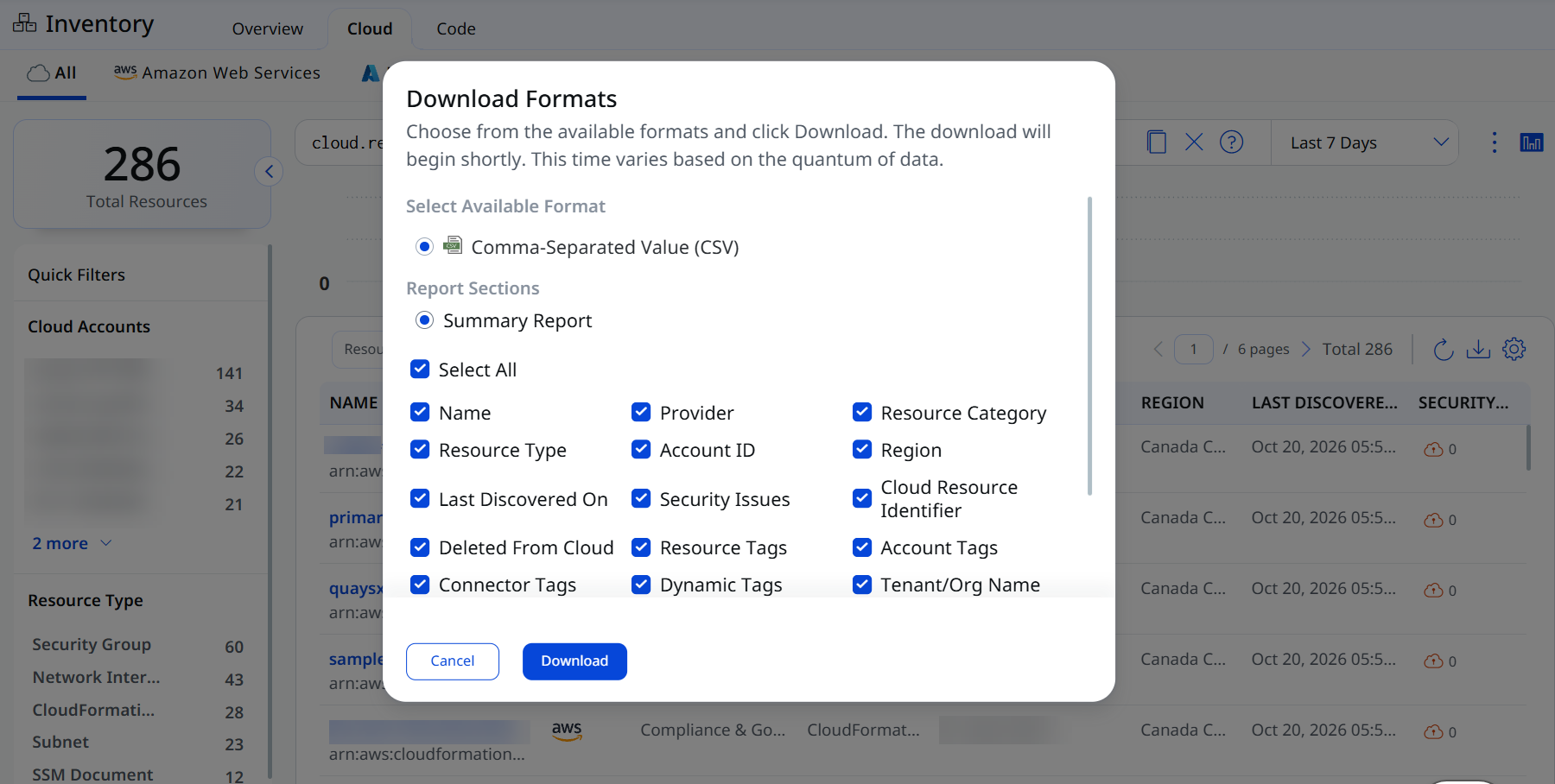
The Inventory now offers a CSV download from the Cloud > All tab. Download builds a Summary Report in CSV format, with optional sections for Provider, Resource Category and Type, Account ID, Region, Last Discovered On, Deleted from Cloud, and others, plus a timezone selector for report dates. Each download supports a maximum of 10,000 records.
Enhancement
Improved Discovery and Reconciliation for Azure VMSS
Applicable for:
What Changed For You
You can now get full vulnerability coverage and accurate asset records for Azure VMSS VMs in Uniform mode, which previously went undetected.
TotalCloud now provides end-to-end discovery, vulnerability coverage, and lifecycle reconciliation support for Azure Virtual Machine Scale Set (VMSS) resources across both Uniform and Flexible orchestration modes. Previously, Uniform-mode VMSS VMs could go undetected by AV, creating gaps in vulnerability coverage and asset records. With this release, Azure VMSS workloads gain complete visibility into vulnerabilities across Uniform and Flexible VMSS deployments.
Key Features
- VMSS instances are reconciled during normal connector scans, keeping asset state up to date as scale sets change.
- VMSS resources that have been deleted in Azure are now automatically marked as TERMINATED.
Enhancement
Support for MultiCloud Dashboards
Applicable for:
What Changed For You
You can now build dashboard widgets that combine inventory and posture data from all your cloud providers in a single view.
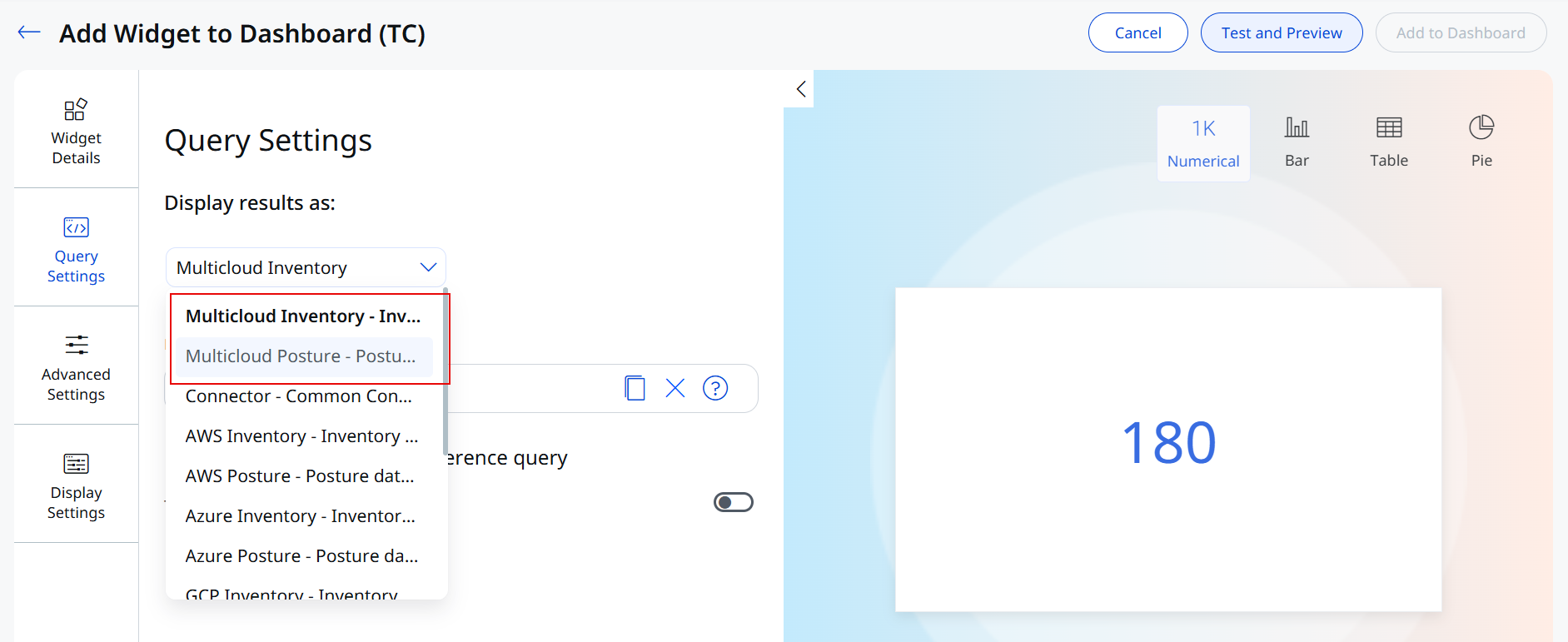
Previously, dashboard widgets could only pull data from one cloud-specific data source at a time, such as AWS Inventory or Azure Inventory. With this release, TotalCloud introduces two new multi-cloud data sources, Multicloud Inventory and MulticloudPosture, that aggregate data across AWS, Azure, GCP, and OCI. This lets you track resource distribution, control failures, and compliance across your entire cloud estate without switching between cloud-specific views.
Key Features
- New multicloud data sources - Select Multicloud inventory (inventory data for all clouds) or Multicloud Posture (posture data for all clouds) when you configure a widget. These data sources apply to runtime controls only.
- Multicloud data by default - The new data sources are selected by default in the following widgets: Failures By Control Criticality, Resource Distribution by Type, Top 5 Accounts by Failed Controls, Top 5 Failed Controls, Policy Compliance, and Mandate Compliance.
- Drill down from widgets - Click a widget to go directly to the All Inventory or All Posture page, depending on the data source the widget uses.
Currently, trending is not supported for multi-cloud data sources. The data sources are not applicable to build-time controls.
Enhancement
Enhanced CSPM Reports
Applicable for:
What Changed For You
CSPM reports now offer more columns to choose from. You can add control details, tags and the organization name, so your CSV reports carry the context your team needs to act on findings.
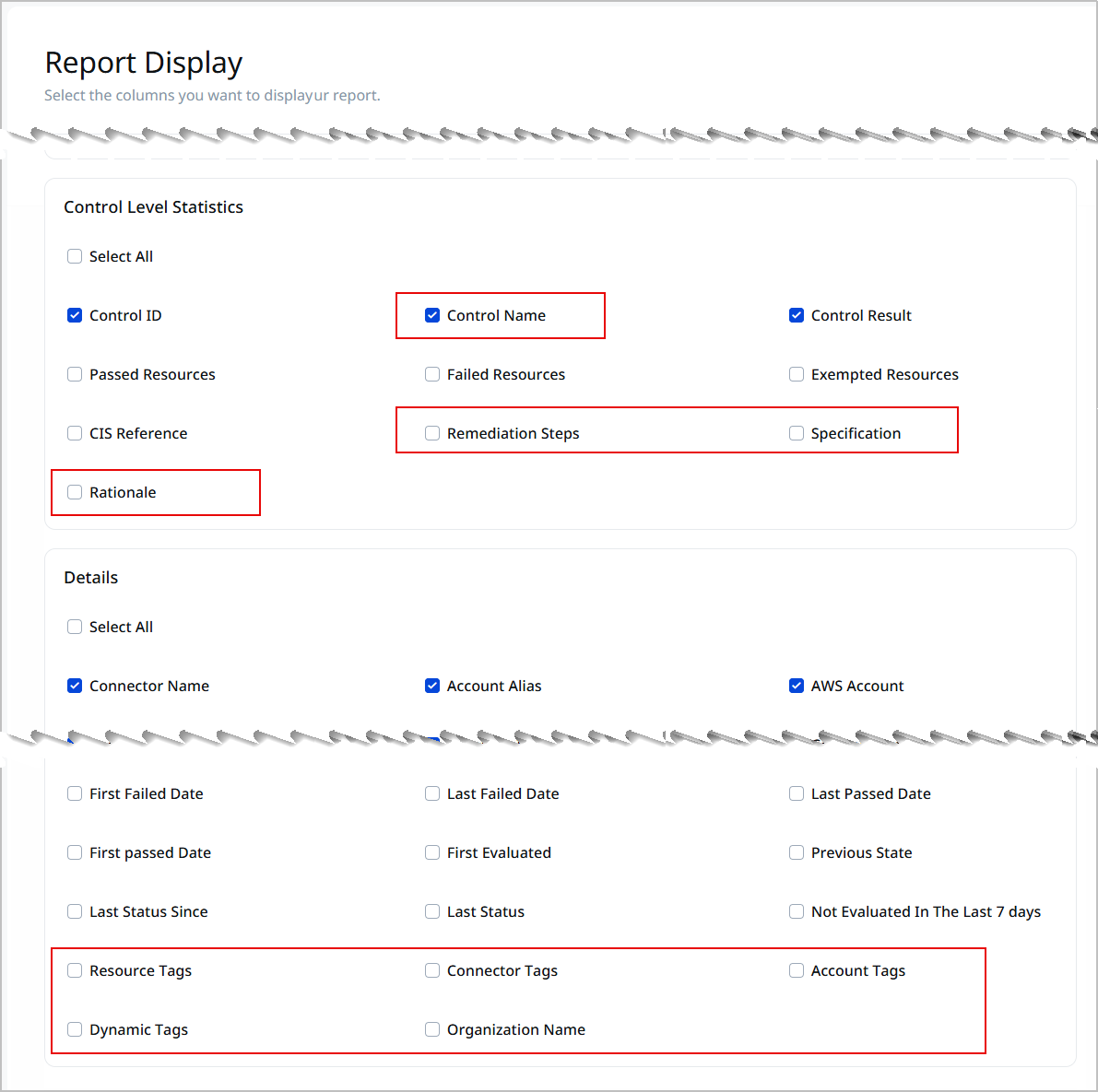
In release 2.28, TotalCloud provided the option to choose which sections and columns appear in your CSPM reports. This release adds more columns to the Report Display step. Your CSV reports can now include control details, tags and the organization name, so you no longer have to look this information up in other parts of the product.
New columns are available in two sections:
- Control Level Statistics - Along with the Control ID (CID), you can now add Control Name, Remediation Steps, Specification and Rationale. These columns work for both system-defined and custom controls.
- Details - You can now add Resource Tags, Connector Tags, Account Tags, Dynamic Tags and Organization Name.
Organization Name is supported only for AWS, Azure and GCP accounts that have an organization connector. OCI isn't supported. Reports are available as CSV and for runtime scans, PDF and build-time reports are currently not supported.
Enhancement
Expanded AI/ML Inventory Coverage for OCI and GCP
Applicable for:
What Changed For You
You can now find 17 more OCI and GCP resource types in TotalCloud Inventory, including OCI AI and machine learning services and GCP BigQuery, and Vertex AI, and filter them by cloud provider.
TotalCloud now provides detailed inventory support for 17 additional resource types across Oracle Cloud Infrastructure (OCI) and Google Cloud Platform (GCP). With OCI, you gain visibility into your AI and machine learning workloads, including Data Science, AI Vision, and AI Speech. On GCP, coverage extends to BigQuery, API keys, and Vertex AI resources, so you can discover, inventory, and assess the security posture of these services from a single place.
The resources are as follows:
| Platform | Service | Resource | Inventory Permissions |
|---|---|---|---|
| GCP | APIs Services | API Key | apikeys.keys.list |
| BigQuery | BigQuery Table | bigquery.datasets.get bigquery.tables.list bigquery.tables.get |
|
| Colab Enterprise | Colab Runtime Templates | aiplatform.notebookRuntimeTemplates.list | |
| Vertex AI | Vertex AI Endpoint | aiplatform.endpoints.list | |
| Workbench | Workbench Instances | notebooks.instances.list | |
| OCI | AI Document | AI Document Project | Allow group [group-name] to read ai-service-document-family in tenancy Allow group [group-name] to read compartments in tenancy |
| AI Document Model | Allow group [group-name] to read ai-service-document-family in tenancy Allow group [group-name] to read compartments in tenancy |
||
| AI Language | AI Language Project | Allow group [group-name] to read ai-service-language-family in tenancy Allow group [group-name] to read compartments in tenancy |
|
| AI Language Model | Allow group [group-name] to read ai-service-language-family in tenancy Allow group [group-name] to read compartments in tenancy |
||
| AI Speech | AI Speech Customizations | Allow group [group-name] to read ai-service-speech-family in tenancy Allow group [group-name] to read compartments in tenancy |
|
| AI Speech Transcription Jobs | Allow group [group-name] to read ai-service-speech-family in tenancy Allow group [group-name] to read compartments in tenancy |
||
| AI Vision | AI Vision Models | Allow group [group-name] to read ai-service-vision-family in tenancy Allow group [group-name] to read compartments in tenancy |
|
| AI Vision Projects | Allow group [group-name] to read ai-service-vision-family in tenancy Allow group [group-name] to read compartments in tenancy |
||
| Data Science (ML Platform) | Data Science Model | Allow group [group-name] to read data-science-family in tenancy Allow group [group-name] to read compartments in tenancy |
|
| Data Science Model Deployment | Allow group [group-name] to read data-science-family in tenancy Allow group [group-name] to read compartments in tenancy |
||
| Data Science Model Group | Allow group [group-name] to read data-science-family in tenancy Allow group [group-name] to read compartments in tenancy |
||
| Data Science Projects | Allow group [group-name] to read data-science-family in tenancy Allow group [group-name] to read compartments in tenancy |
Additionally, you get more visibility into your Azure AI workloads. AI Foundry Inventory now includes a New Foundry Agents tab that lists agents created in the new Azure AI Foundry experience, and the existing Agents tab is renamed to Classic Agents.
Navigate to TotalCloud > Inventory, and filter by cloud provider to view the new resources and their details.
Enhancement
Audit Logs for Reports, Exceptions, Alert Rules, and Alert Actions
Applicable for:
What changed for you
You can now track who created, updated, or deleted your reports, exceptions, alert rules, and alert actions, and when, from Activity Logs in the Administration utility.
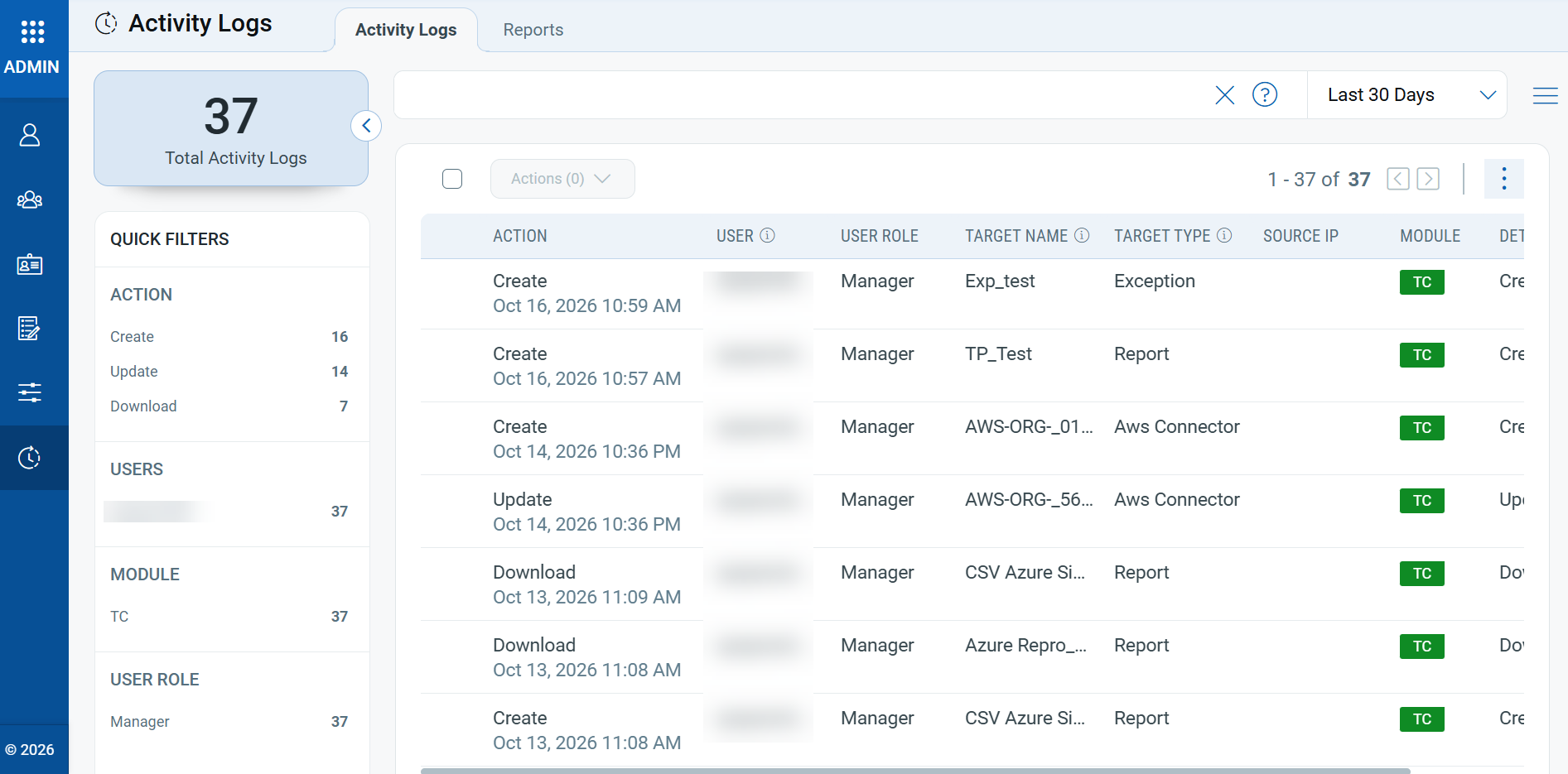
TotalCloud now records audit logs for key configuration changes, giving you a clear trail for security reviews and compliance audits. Each log entry shows the action performed, the user and user role, the name and type of the item that was changed, and the module, so you can quickly see what changed and who changed it.
Key Features
- Reports - Logs when scheduled reports and on-screen reports are created, updated, or deleted.
- Exceptions - Logs when exceptions are created, updated, or deleted.
- Alert rules and alert actions - Logs when alert rules and alert actions (such as PagerDuty and Slack) are created, updated, or deleted.
- Source of the change - Shows whether the change was made from the UI or through the public API.
- Change details - For updates, view details to see the fields that changed, with the old and new values. You can also download the details.
Benefits
- Get visibility into who changed your reports, exceptions, alert rules, and alert actions, and when.
- Support security reviews and compliance audits with a record of configuration changes.
- Troubleshoot failed changes faster by seeing the reason a request failed.
Navigate to Administration > Activity Logs. Entries for TotalCloud appear with the TC module.
Enhancement
Enhanced User Interface
Applicable for:
What Changed For You
TotalCloud pages now use sentence-style labels instead of all caps, consistent text and tab colors, updated chart colors, and compact numbers, so you can find risk and status information faster.
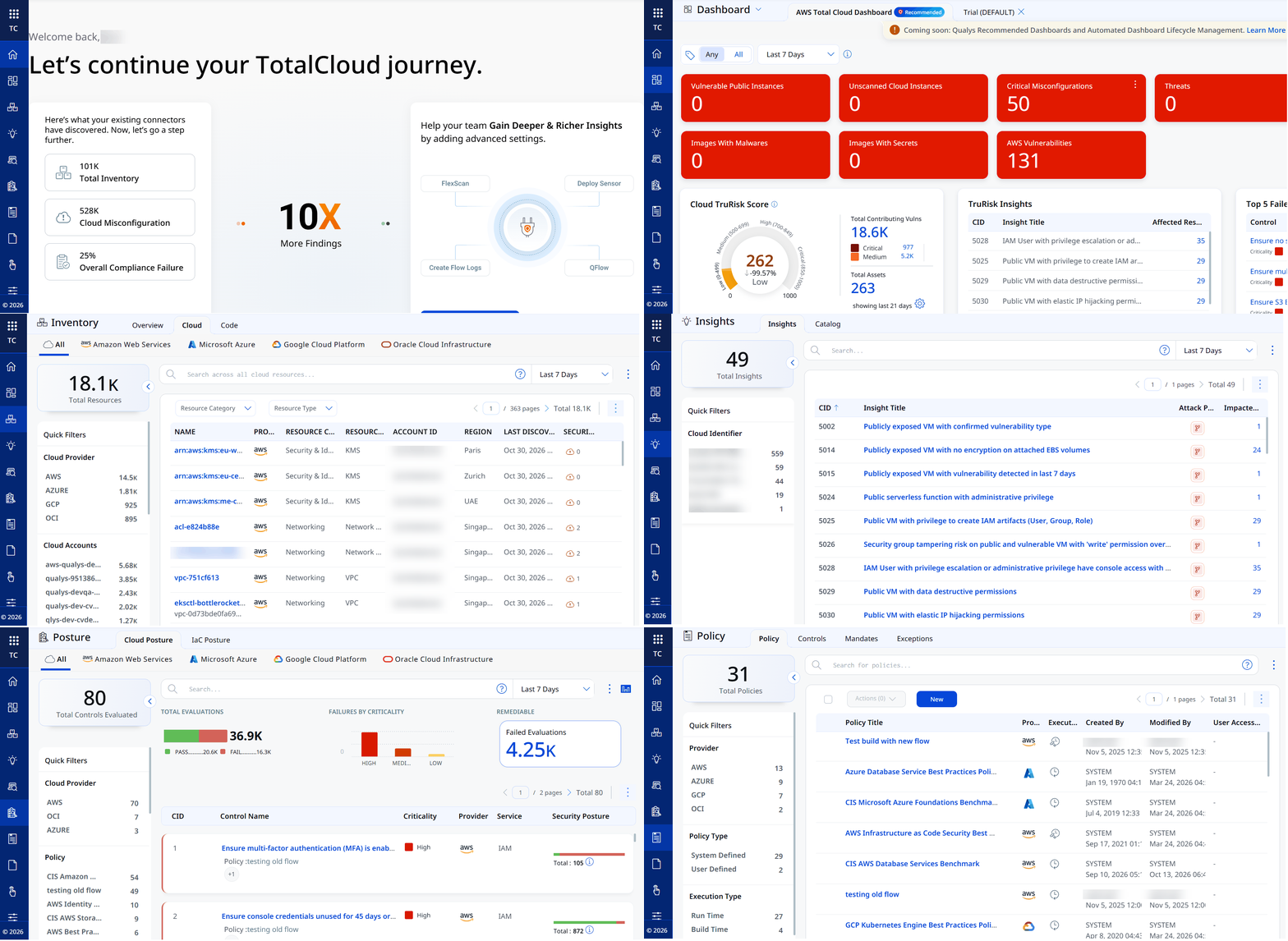
With this release, we have introduced an improved user experience across all TotalCloud pages. You can see updates across fonts, colors, and buttons, making the interface more intuitive and easier to use. This release features User Interface and design system enhancements that improve visual consistency, readability, and usability across the application, resulting in a cleaner, more intuitive user experience.
Key benefits of the new interface include:
- Cleaner, more consistent screens
- Easier-to-read and understandable text
- Important information stands out better, with less clutter
- Faster comprehension of risk, status, and numbers
User Interface Consistency and Clarity
Introducing the new and improved User Interface with the following key upgrades:
- Easier-to-read labels and text, with ALL CAPS replaced by sentence-style text.
- Consistent text style for status and source names across the application.
- Uniform text colors in tables, filters, page numbers, and tabs.
- Aligned colors and text styles for tabs and page navigation throughout the application.
- Clear visual indicators for buttons and options, showing active, inactive, or secondary states.
- Better emphasis on important information, with subtle styling for less critical details to help users focus.
Charts, Metrics, and Data Presentation
You can view the following updates:
- Updated chart color schemes for improved clarity and accessibility.
- Compact, more readable numeric formats for better visibility.
- Refined color gradients for risk scores and meters to enhance interpretation.
Cloud Detection and Response
CDR Enhancements and Updates
The following sections describe the enhancements made to the Cloud Detection and Response (CDR) environment in the upcoming CDR release.
Enhancement
Detect Suspicious Azure Activity with Activity Log Alerts
Applicable for:
What's New for You
Cloud Detection and Response now monitors your Azure Activity Logs and alerts you to risky subscription-level operations in near real time.
Changes made in Azure, such as deleting resources or opening access paths to virtual machines, are often early signs of an attack or misconfiguration. CDR now evaluates Azure Activity Log events from your connected subscriptions against predefined detection rules. When an operation matches a rule, CDR raises a threat alert alongside your existing CDR detections, so you can investigate Azure activity in the same place as the rest of your cloud threats.
Key Features
- Near real-time detection - Azure Activity Log events are analyzed as they arrive, so suspicious operations surface quickly.
- Prioritized alerts - Each alert includes a severity and a risk score to help you decide what to investigate first.
- MITRE ATT&CK context - Alerts are mapped to the relevant MITRE ATT&CK tactics and techniques, for example, Persistence (TA0003) and Account Manipulation: Additional Cloud Credentials (T1098.001).
- Investigation details - Each alert shows the operation performed, the affected resource, subscription and tenant, source IP address, and event time.
- Built-in rules - Detections cover risky Azure operations, such as creating a shareable link for Azure Bastion that can expose VM access to untrusted networks.
Token
New Tokens
The following section describes the new tokens introduced as part of TotalCloud 2.29.
Inventory Tokens
Applicable for:
The following new tokens are added for the new OCI resource types: AI Document Model, AI Document Project, AI Language Model, AI Language Project, AI Speech Customization, AI Speech Transcription Job, AI Vision Model, AI Vision Project, Data Science Project, Data Science Model, Data Science Model Deployment, and Data Science Model Group.
You can also search these resource types using the common tokens cloud.resource.name and cloud.resource.id.
| Resource Type | Name | Description | Example |
|---|---|---|---|
| AI Document Model | oci.aiDocumentModel.compartmentId | Use this to find OCI AI Document models by compartment ID. | oci.aiDocumentModel.compartmentId: |
| AI Document Model | oci.aiDocumentModel.projectId | Use this to find OCI AI Document models by project ID. | oci.aiDocumentModel.projectId: |
| AI Document Model | oci.aiDocumentModel.modelType | Use this to find OCI AI Document models by model type. | oci.aiDocumentModel.modelType: |
| AI Document Model | oci.aiDocumentModel.lifecycleState | Use this to find OCI AI Document models by lifecycle state. | oci.aiDocumentModel.lifecycleState: |
| AI Document Project | oci.aiDocumentProject.compartmentId | Use this to find OCI AI Document projects by compartment ID. | oci.aiDocumentProject.compartmentId: |
| AI Document Project | oci.aiDocumentProject.lifecycleState | Use this to find OCI AI Document projects by lifecycle state. | oci.aiDocumentProject.lifecycleState: |
| AI Language Model | oci.aiLanguageModel.compartmentId | Use this to find OCI AI Language models by compartment ID. | oci.aiLanguageModel.compartmentId: |
| AI Language Model | oci.aiLanguageModel.projectId | Use this to find OCI AI Language models by project ID. | oci.aiLanguageModel.projectId: |
| AI Language Model | oci.aiLanguageModel.modelType | Use this to find OCI AI Language models by model type. | oci.aiLanguageModel.modelType: |
| AI Language Model | oci.aiLanguageModel.languageCode | Use this to find OCI AI Language models by language code. | oci.aiLanguageModel.languageCode: |
| AI Language Model | oci.aiLanguageModel.lifecycleState | Use this to find OCI AI Language models by lifecycle state. | oci.aiLanguageModel.lifecycleState: |
| AI Language Project | oci.aiLanguageProject.compartmentId | Use this to find OCI AI Language projects by compartment ID. | oci.aiLanguageProject.compartmentId: |
| AI Language Project | oci.aiLanguageProject.lifecycleState | Use this to find OCI AI Language projects by lifecycle state. | oci.aiLanguageProject.lifecycleState: |
| AI Speech Customization | oci.aiSpeechCustomization.compartmentId | Use this to find OCI AI Speech customizations by compartment ID. | oci.aiSpeechCustomization.compartmentId: |
| AI Speech Customization | oci.aiSpeechCustomization.lifecycleState | Use this to find OCI AI Speech customizations by lifecycle state. | oci.aiSpeechCustomization.lifecycleState: |
| AI Speech Transcription Job | oci.aiSpeechTranscriptionJob.compartmentId | Use this to find OCI AI Speech transcription jobs by compartment ID. | oci.aiSpeechTranscriptionJob.compartmentId: |
| AI Speech Transcription Job | oci.aiSpeechTranscriptionJob.modelType | Use this to find OCI AI Speech transcription jobs by model type. | oci.aiSpeechTranscriptionJob.modelType: |
| AI Speech Transcription Job | oci.aiSpeechTranscriptionJob.languageCode | Use this to find OCI AI Speech transcription jobs by language code. | oci.aiSpeechTranscriptionJob.languageCode: |
| AI Speech Transcription Job | oci.aiSpeechTranscriptionJob.domain | Use this to find OCI AI Speech transcription jobs by domain. | oci.aiSpeechTranscriptionJob.domain: |
| AI Speech Transcription Job | oci.aiSpeechTranscriptionJob.lifecycleState | Use this to find OCI AI Speech transcription jobs by lifecycle state. | oci.aiSpeechTranscriptionJob.lifecycleState: |
| AI Vision Model | oci.aiVisionModel.compartmentId | Use this to find OCI AI Vision models by compartment ID. | oci.aiVisionModel.compartmentId: |
| AI Vision Model | oci.aiVisionModel.projectId | Use this to find OCI AI Vision models by project ID. | oci.aiVisionModel.projectId: |
| AI Vision Model | oci.aiVisionModel.modelType | Use this to find OCI AI Vision models by model type. | oci.aiVisionModel.modelType: |
| AI Vision Model | oci.aiVisionModel.lifecycleState | Use this to find OCI AI Vision models by lifecycle state. | oci.aiVisionModel.lifecycleState: |
| AI Vision Project | oci.aiVisionProject.compartmentId | Use this to find OCI AI Vision projects by compartment ID. | oci.aiVisionProject.compartmentId: |
| AI Vision Project | oci.aiVisionProject.lifecycleState | Use this to find OCI AI Vision projects by lifecycle state. | oci.aiVisionProject.lifecycleState: |
| Data Science Project | oci.datascienceProject.compartmentId | Use this to find OCI Data Science projects by compartment ID. | oci.datascienceProject.compartmentId: |
| Data Science Project | oci.datascienceProject.lifecycleState | Use this to find OCI Data Science projects by lifecycle state. | oci.datascienceProject.lifecycleState: |
| Data Science Model | oci.datascienceModel.compartmentId | Use this to find OCI Data Science models by compartment ID. | oci.datascienceModel.compartmentId: |
| Data Science Model | oci.datascienceModel.lifecycleState | Use this to find OCI Data Science models by lifecycle state. | oci.datascienceModel.lifecycleState: |
| Data Science Model | oci.datascienceModel.projectId | Use this to find OCI Data Science models by project ID. | oci.datascienceModel.projectId: |
| Data Science Model | oci.datascienceModel.category | Use this to find OCI Data Science models by category. | oci.datascienceModel.category: |
| Data Science Model | oci.datascienceModel.modelVersionSetName | Use this to find OCI Data Science models by model version set name. | oci.datascienceModel.modelVersionSetName: |
| Data Science Model | oci.datascienceModel.isModelByReference | Use this to find OCI Data Science models by whether the model is by reference. | oci.datascienceModel.isModelByReference: |
| Data Science Model | oci.datascienceModel.versionId | Use this to find OCI Data Science models by version ID. | oci.datascienceModel.versionId: |
| Data Science Model Deployment | oci.datascienceModelDeployment.compartmentId | Use this to find OCI Data Science model deployments by compartment ID. | oci.datascienceModelDeployment.compartmentId: |
| Data Science Model Deployment | oci.datascienceModelDeployment.lifecycleState | Use this to find OCI Data Science model deployments by lifecycle state. | oci.datascienceModelDeployment.lifecycleState: |
| Data Science Model Deployment | oci.datascienceModelDeployment.deploymentType | Use this to find OCI Data Science model deployments by deployment type. | oci.datascienceModelDeployment.deploymentType: |
| Data Science Model Deployment | oci.datascienceModelDeployment. instanceConfigurationShape |
Use this to find OCI Data Science model deployments by instance shape. | oci.datascienceModelDeployment. |
| Data Science Model Deployment | oci.datascienceModelDeployment.networkAccessType | Use this to find OCI Data Science model deployments by network access type. | oci.datascienceModelDeployment.networkAccessType: |
| Data Science Model Deployment | oci.datascienceModelDeployment.projectId | Use this to find OCI Data Science model deployments by project ID. | oci.datascienceModelDeployment.projectId: |
| Data Science Model Group | oci.datascienceModelGroup.compartmentId | Use this to find OCI Data Science model groups by compartment ID. | oci.datascienceModelGroup.compartmentId: |
| Data Science Model Group | oci.datascienceModelGroup.lifecycleState | Use this to find OCI Data Science model groups by lifecycle state. | oci.datascienceModelGroup.lifecycleState: |
| Data Science Model Group | oci.datascienceModelGroup.projectId | Use this to find OCI Data Science model groups by project ID. | oci.datascienceModelGroup.projectId: |
| Data Science Model Group | oci.datascienceModelGroup.modelVersionHistoryName | Use this to find OCI Data Science model groups by model version history name. | oci.datascienceModelGroup.modelVersionHistoryName: |
| Data Science Model Group | oci.datascienceModelGroup.modelGroupDetailsType | Use this to find OCI Data Science model groups by model group type. | oci.datascienceModelGroup.modelGroupDetailsType: |
| Data Science Model Group | oci.datascienceModelGroup.versionId | Use this to find OCI Data Science model groups by version ID. | oci.datascienceModelGroup.versionId: |
Control Updates
Control Updates
New Controls for Azure (Available for Policy Attachment)
Applicable for:
| Platform | CID | Title | Service | Resource | Criticality |
|---|---|---|---|---|---|
| Azure | 50266 | Ensure that virtual machines are backed up using Azure Backup | Virtual Machine | Virtual machine | High |
| Azure | 50692 | Ensure that the private endpoint is enabled for PostgreSQL flexible servers | PostgreSQL server | Azure Database for PostgreSQL servers | High |
| Azure | 50693 | Ensure that vulnerability assessment is enabled on SQL Managed Instance | Azure SQL | SQL Managed Instance | Medium |
| Azure | 50694 | Ensure that API Management subscriptions are not scoped to all APIs | API Management | API Management Service Subscription | Medium |
| Azure | 50695 | Ensure that API Management calls to API backends do not bypass certificate thumbprint or name validation | API Management | API Management Service Backend | Medium |
| Azure | 50696 | Ensure that API Management calls to API backends are authenticated | API Management | API Management Service Backend | Medium |
| Azure | 50697 | Ensure that more than one owner is assigned to the Azure subscription | IAM | Role Assignment | Medium |
| Azure | 50698 | Ensure that a maximum of 3 owners are designated for the Azure subscription | IAM | Role Assignment | High |
| Azure | 50699 | Ensure that purge protection is enabled for Azure Key Vault Managed HSM | Key Vault | Key Vault Managed HSMs | High |
See Control Permissions for Azure to understand the permissions needed for the new controls.