Unified Dashboard Release 2.14.1
July 17, 2026
New Negate Query Support for Ratio Widgets
Unified Dashboard now supports negate queries for Ratio-type widgets, allowing you to exclude specific conditions from your queries and perform ratio calculations using the remaining data. With this enhancement, you can simplify complex calculations by directly subtracting a filtered subset from the total dataset within a single widget.
Using the Negate Query toggle in the Query Settings, you can now:
- Mark a query to be excluded from the calculation.
- Compute results based on negate logic, such as: Adjusted value = Total count - the filtered subsets.
This adjusted value can then be used as the numerator in ratio calculations.
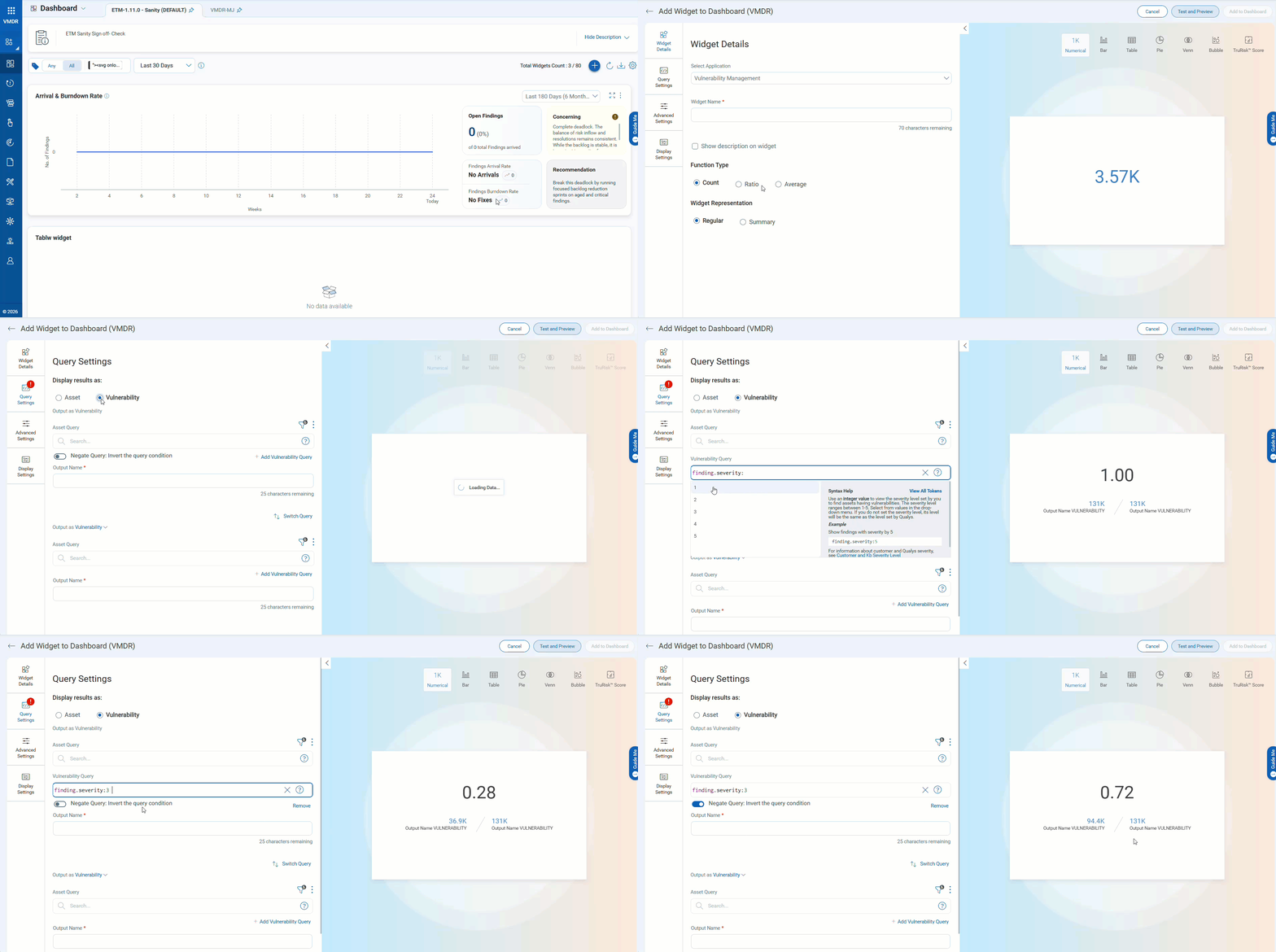
This feature has the following benefits:
- Exclude specific severities or attributes directly within ratio widgets
- Derive ratios based on remaining or residual findings
- Reduce the need for multiple widgets or manual calculations
- Improve accuracy and flexibility in dashboard metrics
This feature is currently supported only for the ETM and VMDR modules.
For more information, refer to UD Online help.
Issues Addressed
The following reported and notable customer issue is fixed in this release.
| Category/Component | Issues |
|---|---|
| UD | We fixed an issue where scheduled dashboard PDF reports did not render widgets correctly, resulting in some widgets being missing and comparison lines in trending widgets not displaying in white, regardless of the configured color. This issue caused incomplete and inaccurate reporting. Now, all widgets are correctly included in scheduled reports, and comparison lines are displayed in the configured colors, ensuring consistent and accurate report output. |
| UD - VMDR | We fixed an issue where dashboard widgets created using Threat Intelligence (ThreatIntel) QQL displayed vulnerability counts for assets but returned no data upon drill-down. This issue occurred due to improper processing of ThreatIntel-related QQL filters, resulting in inconsistencies between widget counts and detailed vulnerability results. Now, all ThreatIntel QQLs are correctly processed, ensuring that vulnerability details are accurately retrieved and displayed when users drill down from dashboard widgets, providing consistent and reliable results. |
| UD - ETM | We fixed an issue where the dashboard Venn-type widget configured with multiple QQL queries failed to display results when one of the queries returned no data. This condition caused the widget to render an empty state even though valid data was available for other queries. Now, the widget processes each QQL independently and displays results for queries that return data, even if one or more configured queries have no associated results, ensuring consistent and expected dashboard behavior. |