VMDR Release 2.8
December 26, 2025
Provided New Sub-user Permissions for TruRisk™ Reports
We have enhanced our user permission model to provide sub-users with greater flexibility and control when managing TruRisk™ reports. With this update, sub-users can now:
- Generate, download, and delete their own TruRisk™ reports.
- Download and delete reports created by other users, based on their assigned permissions.
Manager-level users can configure which sub-users have access to these expanded capabilities, ensuring secure and tailored access management.

To grant these permissions, go to the Administration module > Role Management > Edit a VM sub-user > click the Permissions tab in the Role Edit window > click Vulnerability Management > click TruRisk™ Report Permissions.
Enhanced Applied Mitigations Dialog Box
In this release, we have enhanced the Applied Mitigations dialog box to provide additional details about partially and fully mitigated Qualys IDs (QIDs) to enhance the user experience. You can now check fully mitigated and partially mitigated vulnerabilities in this dialog box. This mitigation information helps you to identify the remaining risks.
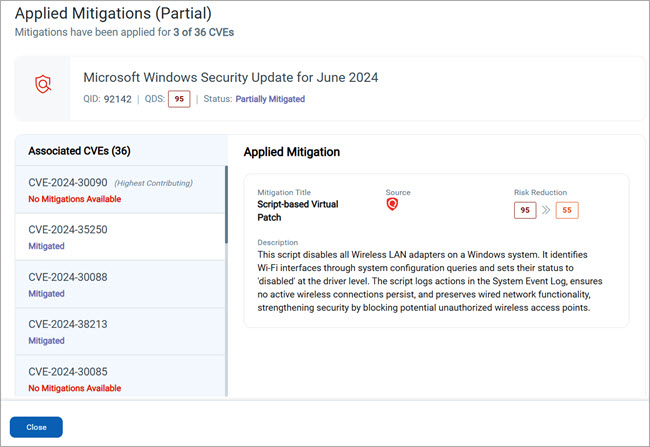
You can access the Applied Mitigations dialog box from the following locations:
- Vulnerabilities tab
- Asset Details page
- Detection Details page
Earlier, the Applied Mitigations dialog box displayed the Mitigation Title, Description, associated CVE/QID, and Status. We have now enhanced the dialog box to display the following details:
- QID
- QDS
- Status
- Associated CVEs
- Applied Mitigation details:
- Mitigation Title
- Source
- Risk Reduction score
- Description
This information in the Applied Mitigations dialog box helps you to understand:
- Qualys Vulnerability Score (QVS) of CVE before and after mitigation.
- Risk is reduced after mitigation.
- Highest Contributing CVE (with the highest QVS score).
These mitigation insights help you to take quick action on the high-risk CVEs.
For more information about the enhanced Applied Mitigations dialog box, see View Mitigation Details of QIDs in TruRisk™ Mitigation.
Provided Information for Show Only Patchable Toggle
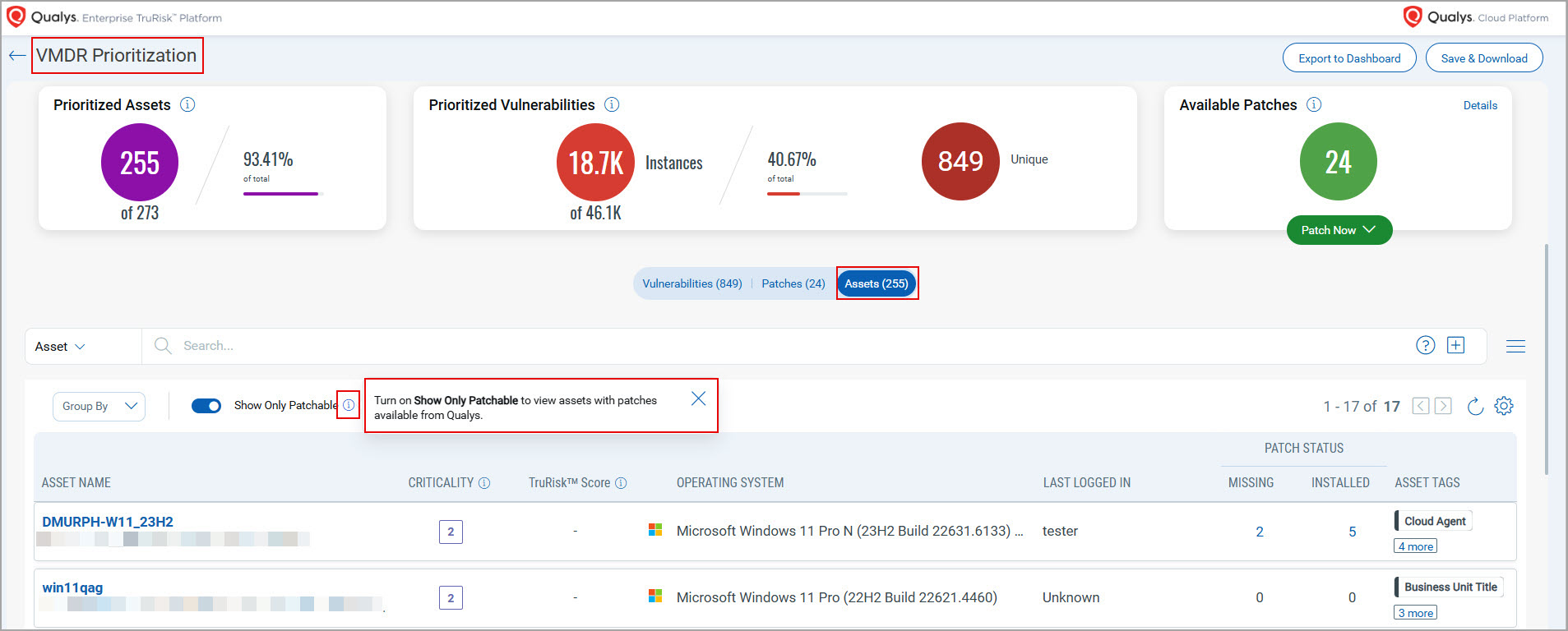
We have added an information icon ( ) next to the Show Only Patchable toggle on the VMDR Prioritization tab. The Show Only Patchable toggle allows you to filter the patches available with Qualys for detections and assets.
To view the toggle and the information () icon, go to the VMDR module > VMDR Prioritization tab > Prioritize Now > Vulnerabilities and Assets.
The toggle and icon are available on the following tabs of VMDR Prioritization:
- Vulnerabilities: On VMDR Prioritization > Vulnerabilities.
You can click the icon () to view the tooltip about the button. The tooltip indicates that when you turn on Show Only Patchable, the filtered list displays detections with patches available from Qualys.

- Assets: On VMDR Prioritization > Assets.
You can click the information icon () to view the tooltip about the button. The tooltip indicates that when you turn on Show Only Patchable, the filtered list displays assets with patches available from Qualys.
Introduced New Color Code for QDS, QVS, and TruRisk™ Score
In this release, we have introduced a new color scheme to indicate and highlight the criticality of the TruRisk™ Score, Qualys Detection Score (QDS), Qualys Vulnerability Score (QVS), and Asset Criticality Score (ACS).
Previously, a different color schemecolor scheme was used to indicate a different range of values according to various levels of criticality.
Now, we have added new color shades from a similar color theme to indicate score ranges and corresponding criticality levels. Darker shades represent higher scores that require more attention, helping you quickly identify and prioritize the most critical vulnerabilities. For example: 
The following is an example of the new color codes representing different levels of criticality and TruRisk™ Score:

New Tokens
The following new tokens are added to the Rule Query under the Responses tab:
| Rule Query | Tokens |
| Vulnerability |
The following Vulnerability tokens are added to the Alerting Rule Query:
For more information, see Alerting in Search Tokens for VMDR. |
| Asset |
The following Asset tokens are added to the Alerting Rule Query:
For more information, see Alerting in Search Tokens for VMDR. |
Issues Addressed
The following reported and notable customer issues are fixed in this release:
| Category/Component | Issue |
| TruRisk™Score Report |
We have resolved an issue where the TruRisk™Score report displayed an incorrect count for critical assets. Now, you can view the correct count for the critical assets in the TruRisk™ score report. |
| TruRisk™Score Report |
We have resolved an issue related to the color code for scores in the critical range (850–1000) in the TruRisk™ Score report. When a TruRisk™ Score report was generated through the VMDR module, an auto-generated email notification was sent displaying the TruRisk™ score for the selected tags. However, the score did not include a color code when the value was in the critical range (850–1000). The color coding was displayed correctly only for the following ranges: High (700–849), Medium (500–699), and Low (0–499). Now, you can view the correct color code for TruRisk™ scores in the critical range (850–1000), like other score ranges, in the email notification. |
| TruRisk™ Summary Report |
We have resolved an issue where the TruRisk™ Summary report displayed incorrect data for End of Support (EOS) assets and compliance numbers. Now, you can view correct data for the End of Support (EOS) assets and compliance numbers in the TruRisk™ Summary report. |
| Detection Summary Report |
We have fixed the issues where:
Now, the Download Formats dialog box displays the Deep Scan Result check box, and the Results column in the downloaded CSV report file displays Deep Scan results. |
| TruRisk™ Tab |
We have fixed an issue where the time displayed in the DETECTED DATE column on the TruRisk™ Score tab was four hours ahead of the current time. This error occurred due to the time zone difference between the Coordinated Universal Time (UTC) set on the TruRisk™ Score tab for a user account and the RiskScore service. Now, you can view the correct current time in the DETECTED DATE column on the TruRisk™ Score tab according to your time zone. |
| Users Tab |
We have resolved an issue where an error message was displayed when the Unit Manager users with the Role-Based Access Control (RBAC) feature enabled tried opening the Users tab in the VMDR module. This occurred because RBAC restricted their access to the Users tab. Now, the Unit Manager users can access the Users tab without seeing any error messages. |
| Search Token |
We have addressed an incorrect example in the Now you can view the correct example of this token in Search Tokens for VMDR. |
| Search Token |
We have addressed an incorrect example in the Now, you can view the correct example of this token in Search Tokens for VMDR. |