Enterprise TruRisk™ Platform Release 10.37.1
February 5, 2026
Qualys Vulnerability Management (VM)
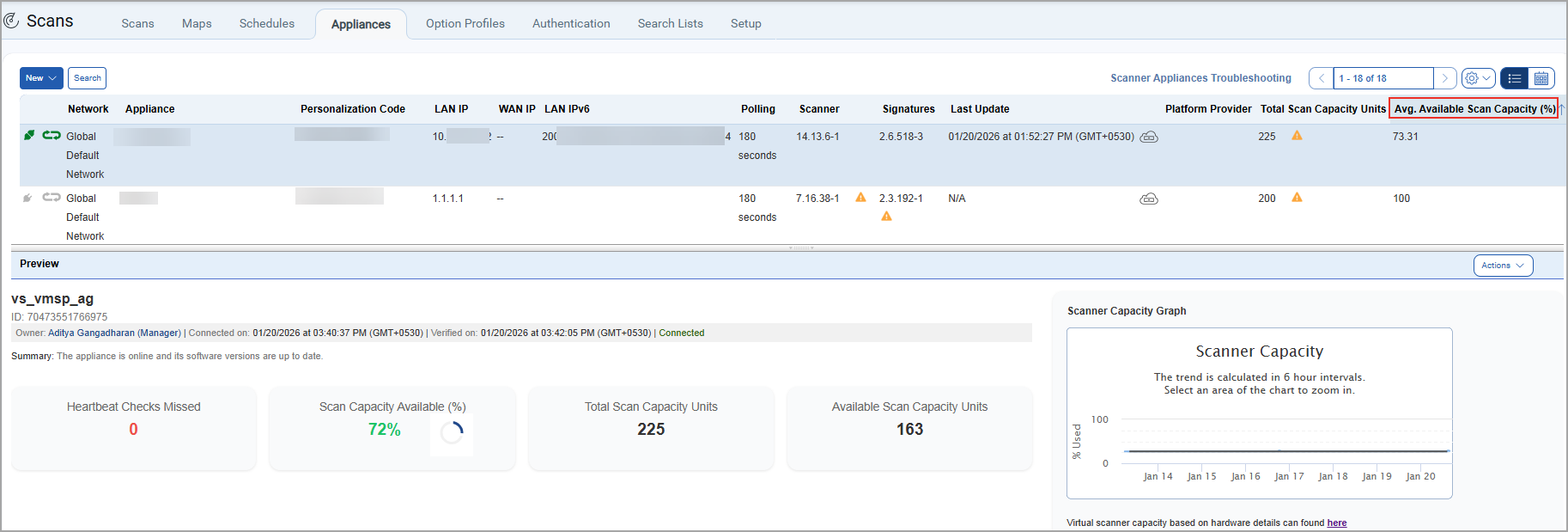
Updated Column Name for Scan Capacity Metrics
With this release, the column (Scan Capacity Available (%)) on the Appliance listing page (Scans > Appliances) is renamed to Avg. Available Scan Capacity(%).
Previously, both the listing page column and the preview pane displayed the same name as Scan Capacity Available (%), which created ambiguity in interpretation. Now, the updated column name more accurately represents the average available scan capacity (%) on the scanner appliance listing page for the last 7 days. The Scan Capacity Available (%) displayed in the preview pane represents the current available scan capacity of the selected scanner appliance. This allows you to clearly distinguish between the two metrics.
FIPS Compliance Enabled for Enhanced Security
All Qualys shared platforms now run with Federal Information Processing Standards (FIPS) mode enabled by default. Under FIPS, some legacy RSA private keys in PKCS#1 format may fail validation and are no longer supported for new configurations.
Users creating new Unix authentication records must use FIPS compliant key formats, such as RSA keys in PKCS#8 format. Existing authentication records using legacy keys remain supported as long as the private key is not modified.
Previously, editing an existing Unix authentication record in the UI, such as adding or removing IP addresses, always triggered private key validation. In FIPS-enabled environments, this caused edit failures when legacy private keys were in use, even when the keys themselves remained unchanged.
With this release, private key validation is skipped during UI edit operations when the private key and passphrase remain unchanged. Validation continues to run when creating a new record or when the private key or passphrase is modified. This change allows users to update non-credential settings without interruption while maintaining FIPS compliance.
Qualys Policy Audit (PA)
For the list of features and improvements we have made in Policy Audit, refer to the Policy Audit UI Release Notes for Release 1.8.
Issues Addressed
The following reported and notable customer issues are fixed in this release:
| Component/Category | Application |
Description |
| VM - Asset Groups | Vulnerability Management | When users performed Edit Asset Group API operations to add or remove scanner appliances in AGMS enabled accounts, the default scanner was unexpectedly changed, even though no default scanner was specified in the request. Additionally, the Activity Log displayed an incorrect No Changes Done message for asset groups that were successfully updated through the API. This issue has been fixed, and the default scanner is now updated only when explicitly specified. Scanner-related changes made through the API are also correctly recorded in the Activity Log. |
| Apps - VM | Vulnerability Management | When users logged in and accessed the PCI Compliance module in their account, they were redirected to the VMDR KnowledgeBase page before the PCI portal loaded, resulting in unnecessary delay. This issue has been addressed by improving role‑based redirection logic, ensuring users are routed more efficiently based on their assigned roles. This makes accessing the PCI Compliance module faster. |
| VM - Host List Detection API | Vulnerability Management | When users queried the VMDR Host Detection API in EASM‑enabled subscriptions, External Attack Surface Management (EASM) hosts were included in the response, even though those hosts were not returned by the Host List API. This resulted in detection data being returned for hosts that were not part of the standard VMDR asset inventory. This issue has been fixed, and EASM hosts are now excluded from the VMDR Host Detection API output, ensuring consistent behavior across VMDR asset and detection APIs. |
| VM - Scan Based Report | Vulnerability Management | When users tried to generate a scan-based report for the paused scan, an error occurred. As per the design, a scan-based report for paused scans can be generated. This behaviour is now documented in the Online Help and Scans and Reports API User Guides. |
| VM - QID Service | Vulnerability Management | When users tried to download the QVS scores for all CVE IDs using the API endpoint /api/3.0/fo/knowledge_base/qvs/, it was observed that CVE-2023-50495 was not displayed in the output. As per the design, when only the details parameter is passed in the request, the API returns data for all CVEs whose published or last-modified date falls within the last 15 days. This behavior is now documented in the Qualys API (VM/PA): PDF | HTML. |