Enterprise TruRisk™ Platform Release 10.38
March 12, 2026
Qualys Vulnerability Management (VM)
Expanded SNMPv3 Algorithm Support in the User Interface
With this release, we have enhanced the SNMPv3 configuration experience by adding support for additional SNMPv3 Authentication and encryption algorithms. You can now select from an extended list of supported values directly in the user interface.
What’s New
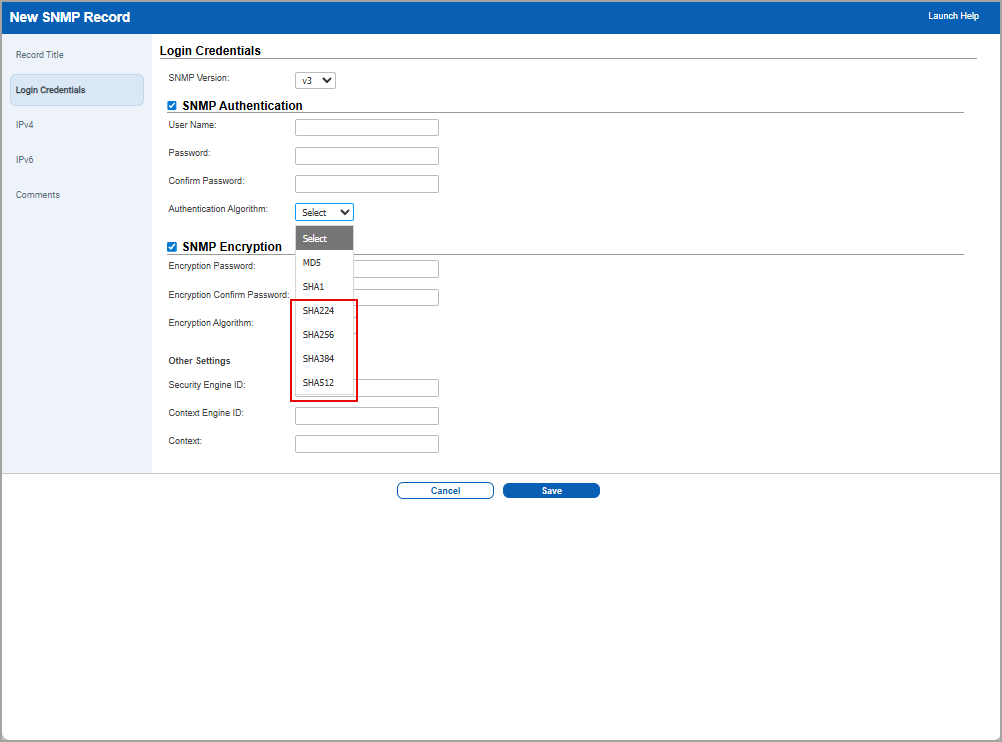
- SNMP Authentication algorithms in addition to the existing MD5 and SHA1 options:
- SHA224
- SHA256
- SHA384
- SHA512
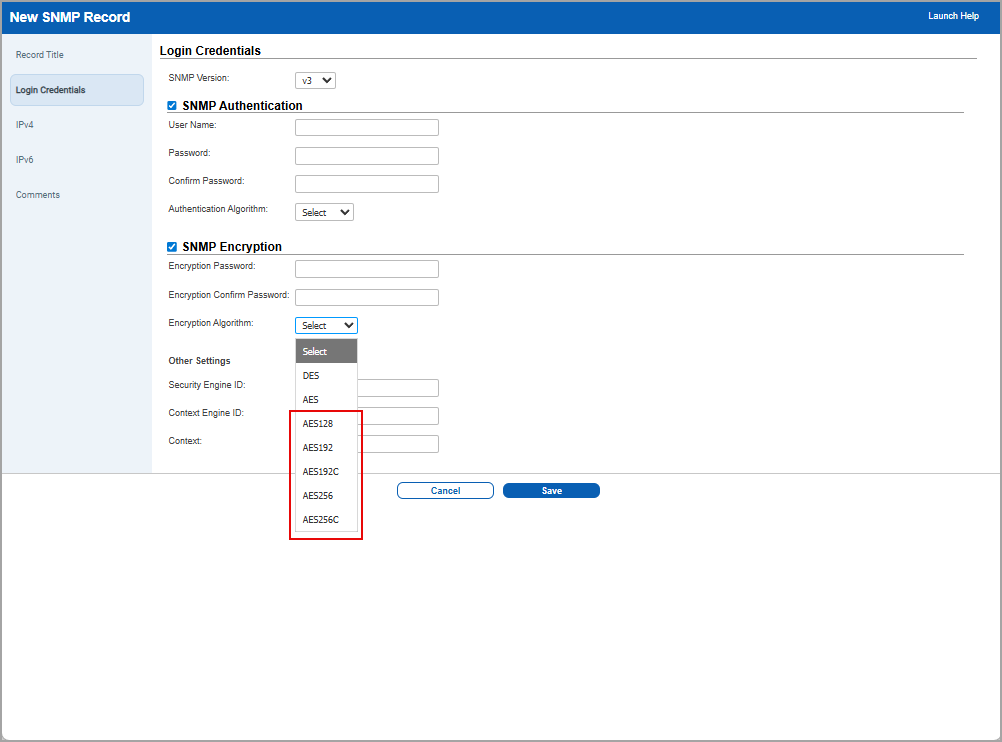
- SNMP Encryption algorithms in addition to the existing DES and AES options:
- AES128
- AES192
- AES192C
- AES256
- AES256C
- Updated the SNMP forms:
- Converted Authentication and Encryption algorithm fields from radio buttons to drop-down lists.
- Added form validation for the new Select default option to prevent invalid submissions.
This enhancement improves compatibility with modern SNMPv3 deployments while simplifying configuration through a streamlined drop-down UI. It also reduces configuration errors with better validation and clearer messaging.
Qualys API Support
For this enhancement, we have updated the APIs,
SNMP Record: /api/2.0/fo/auth/snmp/
For more information, refer to Enterprise TruRisk Platform Release 10.38 API.
MHT Report Format Removed from All Report Workflows
With this release, the MHT report format has been fully removed from all report creation and download workflows in the UI. Since MHT was supported only by Internet Explorer and Microsoft has ended support for Internet Explorer, the Qualys Platform no longer allows creating new reports in MHT format.
This update prevents users from encountering Can’t reach this page errors when opening MHT files, and eliminates confusion caused by displaying an unsupported legacy format.
To support this feature,
- MHT is no longer available in the Report Format drop-down list for:
- VM Scan Reports
- Compliance Reports
- Asset Search Reports
- Map Reports
- Remediation Reports
- Risk Analysis Reports
- MHT has been removed from the Asset Search Report Download selection page.
- UI controls and drop-down lists now display only the following supported formats: PDF, HTML, ZIP, XML, and CSV.
Behavior for Existing MHT Reports
- Existing reports previously saved in MHT format can still be downloaded. The download will occur in the originally saved format because the UI does not allow changing formats during download.
- If a user attempts to re-run an existing report configured in MHT format, the report format field appears blank, and the user must select a supported format (PDF, HTML, ZIP, XML, CSV) before proceeding.
Enhanced Password Change Rate Limit Functionality
With this release, the password change functionality has been enhanced to include a rate limit of 3 password changes. This change is enhanced in the following locations.
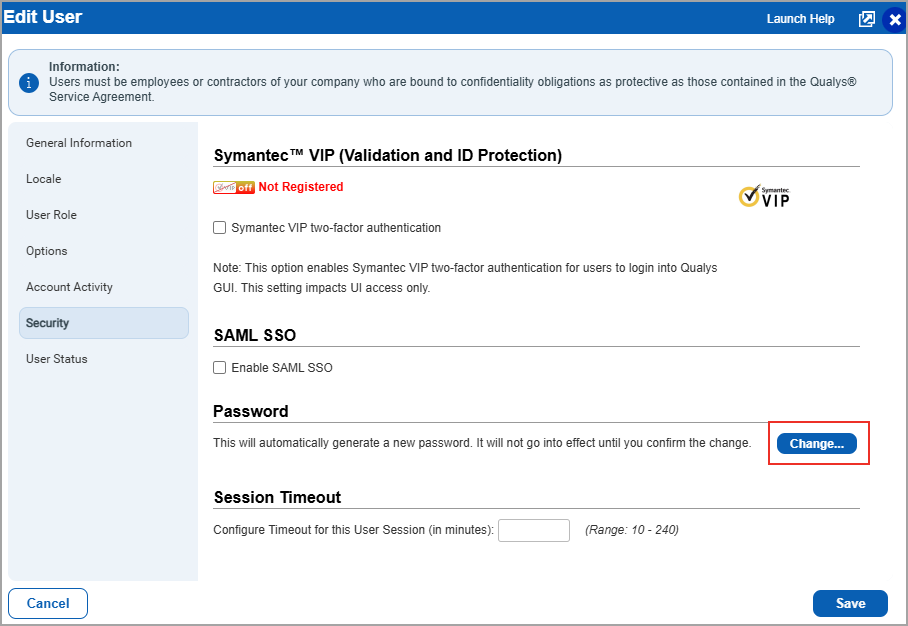
- When the manager user performs the password change process (Users > Edit one of the users from the user list from Quick Actions menu> Security tab > Change Password) for the sub user, the password can now be changed only up to three times within a one-hour period. This update strengthens overall system security by preventing unusually frequent password change attempts, reducing the risk of misuse, and ensuring more controlled account‑management behaviour.
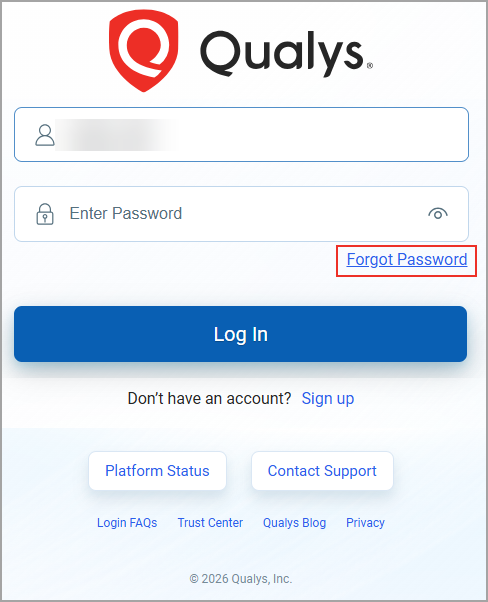
- When any user logs in to their subscription and clicks on Forgot Password, the password can be changed only up to three times within a one-hour period.
Previously, there was no limit on the number of times a password could be changed within a short period. Each password change triggered a notification, and repeated changes without restriction raised potential security concerns. The new rate limit helps prevent excessive password change attempts and provides an additional safeguard against unusual activity.
Qualys API Support
For this enhancement, we have updated the following APIs:
- Change Login Password: /api/2.0/fo/user/change_password/
- User Password Change: /msp/password_change.php
For more information, refer to Enterprise TruRisk Platform Release 10.38 API.
Renamed Azure Internal Scan to Cloud Internal Scan
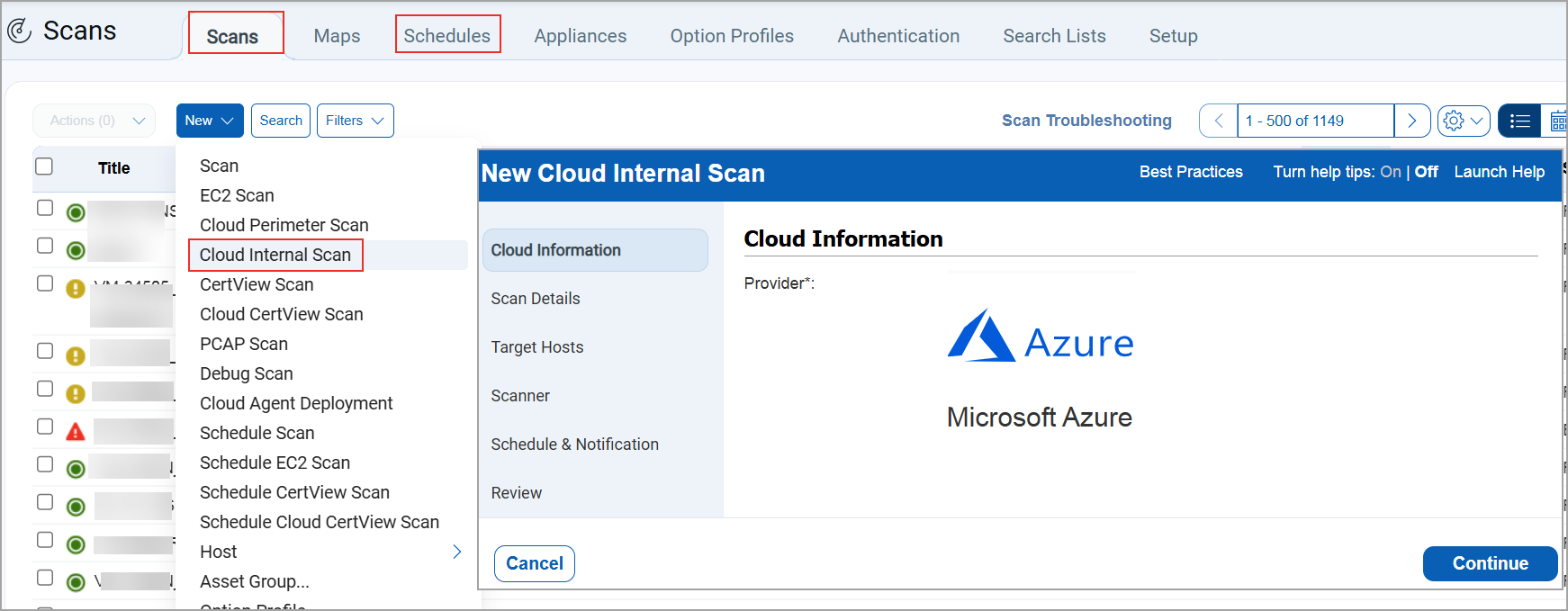
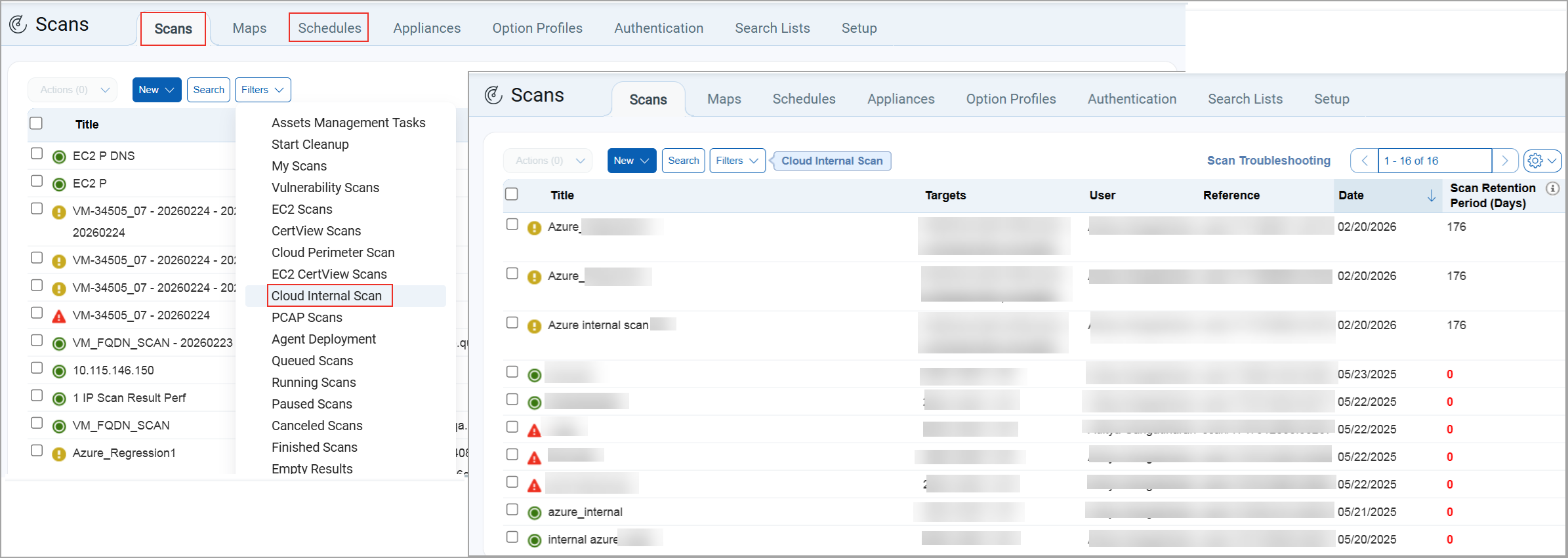
With this release, we have now renamed Azure Internal Scan to Cloud Internal Scan in the Scans and Schedules tab. Earlier, internal scanning was managed through separate cloud‑specific modules. Now, with Azure Internal Scan integrated into Cloud Internal Scan, you can access and manage all scanning activities from a single, centralized location, reducing complexity, improving visibility, and saving time.
Azure Internal Scan is renamed to Cloud Internal Scan at the following locations:
- When you create a new scan (Scans > Scans/Schedules > New > Cloud Internal Scan). You can view Azure Internal Scan in the Cloud Internal Scan window.
- When you filter the scan list (Scans/Schedules > Filters > Cloud Internal Tasks), the listing page displays all the information of Azure Internal Tasks
New AWS Regions Added for EC2 Scan Launch
We have added support for the latest AWS regions in the EC2 scan launch workflow. These regions now appear automatically in the Available Regions drop-down list whenever a connector or customer account is associated with them.
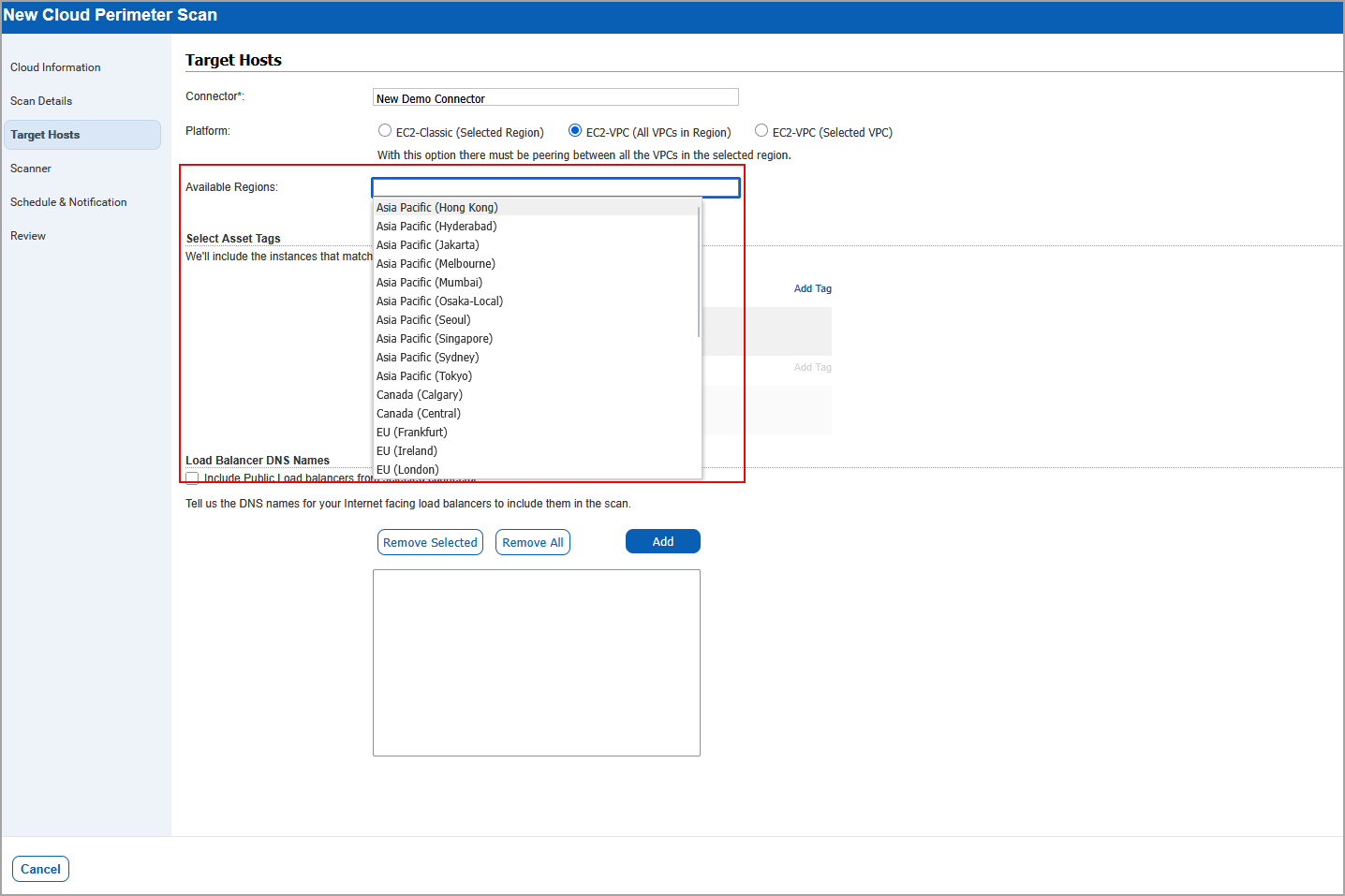
The following new AWS regions are now supported and displayed in the UI:
- EU (Spain)
- Asia Pacific (Jakarta)
- EU (Zurich)
- Israel (Tel Aviv)
- Middle East (UAE)
- Canada (Calgary)
- Asia Pacific (Hyderabad)
- Asia Pacific (Melbourne)
You can now seamlessly launch scans in newly supported AWS regions. This enhancement prevents UI validation issues caused by missing regional entries.
Qualys Policy Audit (PA)
For the list of features and improvements we have made in Policy Audit, refer to the Policy Audit UI Release Notes for Release 1.9.
Issues Addressed
The following reported and notable customer issues are fixed in this release:
| Component/Category | Application |
Description |
| VM - SAML Authentication | Vulnerability Management | When users received SAML auto‑generated emails during user creation in environments with multiple IDM/IDP configurations, the login URL in the notification was always generated using the latest IDM key, which is the expected behavior under the current architecture. To improve this, a new configuration tweak has been introduced that allows a subscription to define a default IDM key specifically for signup email links. When this tweak is enabled, the system uses the designated default IDM key rather than the latest one, when generating the login URL in user creation emails. |
| VM - Scans | Vulnerability Management | When users relied on the Pause and Resume feature for scans, they kept receiving the Failure to Resume Paused Scan email notification, even though the scans had already been canceled several hours earlier. This occurred because the scheduler attempted to resume scans that were already in a canceled state, causing the notification logic to run unnecessarily. The logic has now been updated so that when a scan is already in a canceled state, the system skips sending the failure‑to‑resume email. This enhancement, implemented for VM regular scans, ensures that users no longer receive incorrect notifications. |
| VM - Scans UI | Vulnerability Management | When users viewed the Calendar under VMDR > Scans, scans' schedules for Web Application Scans (WAS) did not appear, even when the WebApp Scans filter was selected, causing confusion because the schedules were visible in the list view but not rendered in the calendar. This occurred because WAS scans had previously been separated into their own standalone WAS module, leaving the WebApp Scans check box in the VM UI non-functional. The WebApp Scans option has now been removed from the VM module, and WAS schedules can be viewed and managed exclusively within the WAS module, with VM calendar filters continuing to work as expected. |
| VM - Reports General | Vulnerability Management | When the users performed a scan and generated a scan-based report, and downloaded the scan result in both PDF and XML formats, it was observed that there was a data discrepancy between the scan result and scan scan-based report of the same scan. Relevant code changes have been made to fix the issue. |
| VM - Reports General | Vulnerability Management | When users generated and downloaded a compliance report using the Compliance template (Payment Card Industry (PCI) technical report) in PDF format, the Table of Contents section contained overlapping text. Relevant code changes have been made to fix the issue. |
| VM - Scan API | Vulnerability Management | When users executed the scheduled scan API endpoint /api/5.0/fo/schedule/scan/ with the filter active=1 to list all active scheduled scans, the API response was not able to return all active scans. Relevant code changes have been made to fix the issue. Now, when you execute this endpoint with active=1 request, the response now include records with active=1, active=2, and active=3. This update ensures that all relevant active statuses are returned in a single response. This behavior is now documented for all versions in Qualys API (VM/PA): PDF | HTML. |
| VM - Assets | Vulnerability Management | When users were trying to replace the old scanner data to the new scanner appliance (Scans > Appliances > New > Replace Scanner Appliance), the View Report displayed in the confirmation window showed an inconsistent count of asset groups. This occurred when users clicked Replace, which opened the confirmation dialog that contained the View Report before the action was confirmed. Relevant code changes have been made to fix the issue |
| VM - Knowledge Base | Vulnerability Management | When users accessed the KnowledgeBase (KB) to navigate to the landing page, search for a specific CVE ID, or open the QID information view, performance degraded. Relevant code changes have been made to fix the issue. Now, the overall performance of the KB page is improved. |
| Apps - VM | Vulnerability Management | When users executed the Dynamic Search List (SL) listing API, the QAPI servers experienced high memory consumption because the API attempted to load excessive amounts of data from the QID service, causing long runtimes, timeouts, and eventually out‑of‑memory (OOM) failures. To address this issue, the API has been optimized to request only the essential data needed for Dynamic SL output, significantly reducing memory and space usage. With this fix, the Dynamic SL listing API now returns the expected vulnerability details for subscriptions of any size without overloading the system, and related reports or APIs remain unaffected by this change. |
| VM-Scan based Report | Vulnerability Management | When users tried to generate a scan-based report for the paused scan, an error occurred. As per the design, a scan-based report for paused scans can be generated, and partial results are available in the User Interface (UI). This behaviour is now documented in the Online Help. |