VMDR OT Release 1.3
September 08, 2025
Process Integrity monitoring (PIM)
Process Integrity Monitoring (PIM) enhances the security of Industrial Control Systems (ICS) by continuously monitoring your OT network for process-related events such as firmware downloads, configuration changes, PLC mode changes, and so on. This allows you to identify any deviations from the expected process behavior promptly. These events could be indicators of potential data breaches, system downtime, or other security incidents.
VMDR OT now captures these changes as Process Integrity events.
Key Benefits
- Reduced downtime and safety risks: Flagging unexpected process operations before they are escalated into production outages and safety incidents.
- Prioritize Response: Events are categorized by severity rating and type, helping plant engineering and the incident response team focus on critical process modifications.
Impact of Process Integrity monitoring
This strengthens the defense posture of the OT landscape by bridging the gap between traditional IT monitoring and OT-specific process awareness, ensuring that both cybersecurity teams and plant engineers gain actionable insights into process-level risks and incidents.
You can view the Process Integrity events in the VMDR OT > Monitoring > Events tab.
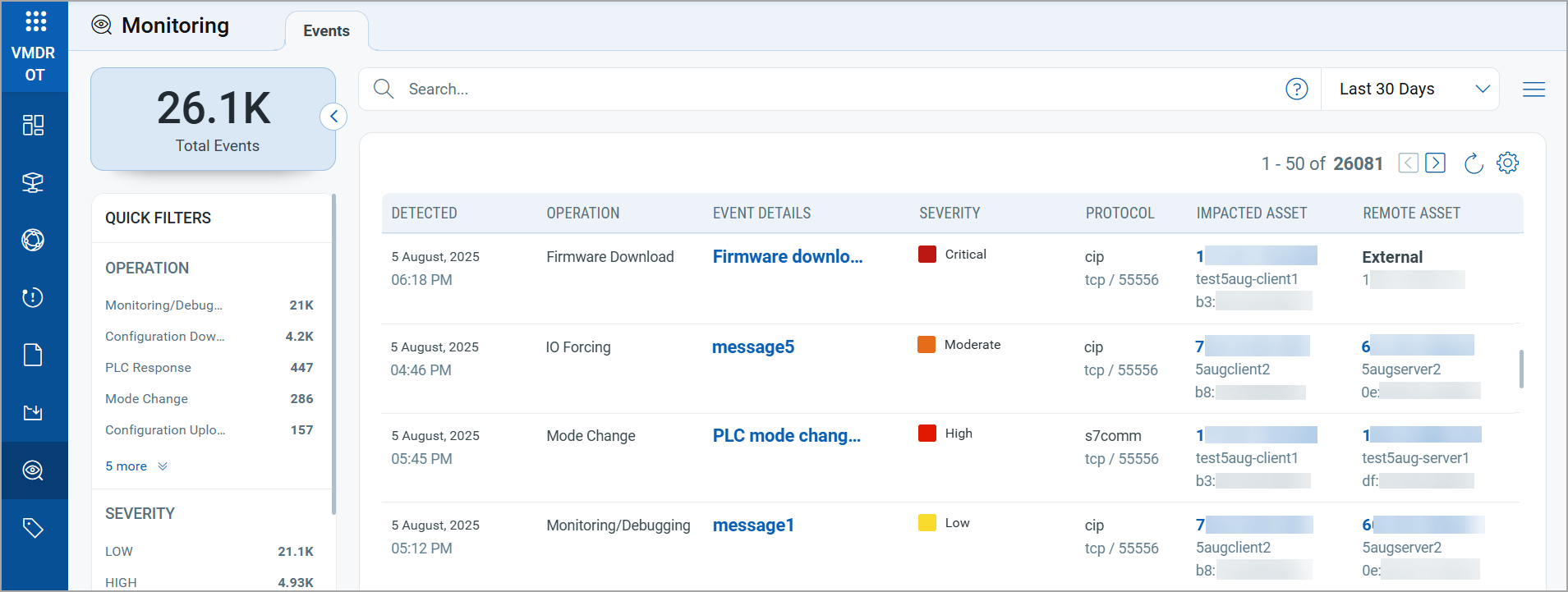
For more information on the Process Integrity monitoring, refer to VMDR OT Online Help.
Support for Detection of IPv6 Address for OT Assets
VMDR OT now discovers and tracks the IPv6 addresses of your OT assets. This provides complete visibility of all the IP addresses used by your OT assets across industrial environments.
You can now:
- View assets with IPv6 addresses on the Asset Details page.
- Filter assets by IPv6 address using search tokens.
- Generate reports that include IPv6 addresses for OT assets.
Patch Details for QIDs
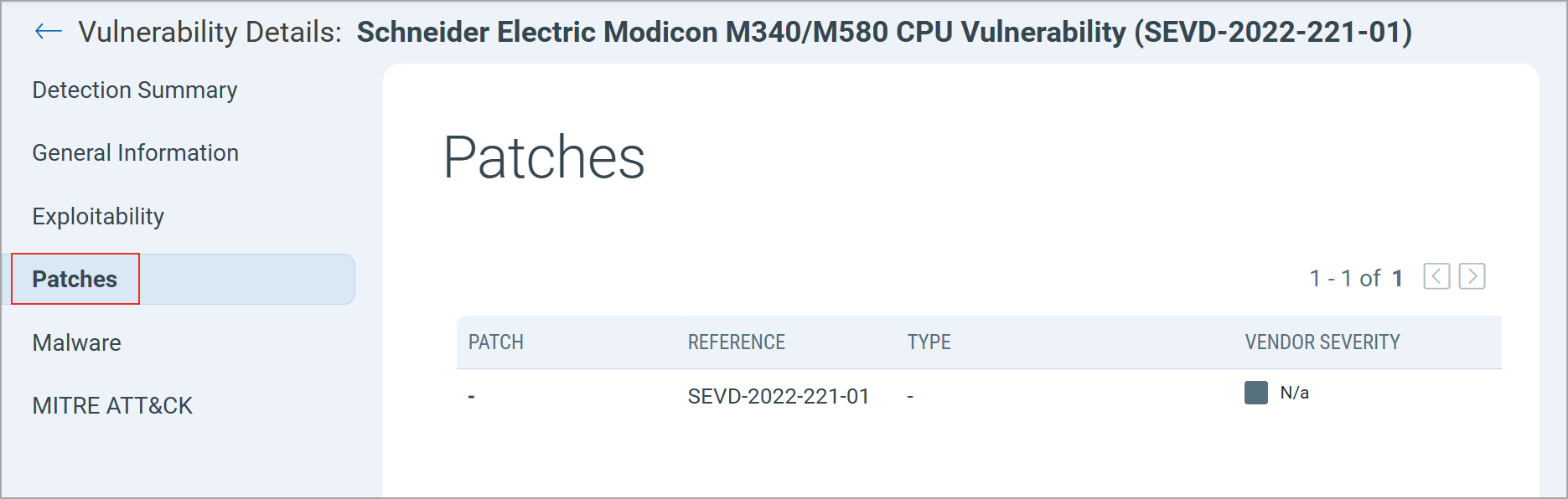
VMDR OT has improved the information provided on the patches available to fix the vulnerability detected on your OT assets.
To view the patch details, navigate to Vulnerabilities > select a QID > Patches.
New Tokens for Events Tab
| Token | Description |
|---|---|
| event.category | Use this token to search for events by their category.
Example:
|
| event.class |
Use this token to search events by their class. Accepted values are OT or None. Example:
|
| event.detail |
Use this token to search events based on the event detail. Example:
|
| event.lastDetectedDate |
Use this token to search events by their last detected timestamp. The value is in epoch time. Example:
|
| event.impactedAsset.address |
Use this token to search events based on the impacted asset’s IP address. Example:
|
| event.impactedAsset.id |
Use this token to search events by the impacted asset’s ID. Example:
|
| event.impactedAsset.macAddress |
Use this token to search events by the impacted asset’s MAC address. Example:
|
| event.impactedAsset.hostname |
Use this token to search events by the impacted asset’s hostname. Example:
|
| event.remoteAsset.address |
Use this token to search events by the remote asset’s IP address. Example:
|
| event.remoteAsset.id |
Use this token to search events by the remote asset’s unique ID. Example:
|
| event.remoteAsset.macAddress |
Use this token to search events by the remote asset’s MAC address. Example:
|
| event.remoteAsset.hostname |
Use this token to search events by the remote asset’s hostname. Example:
|
| event.operation |
Use this token to search events by the operation type related to the event. Example:
|
| event.protocol |
Use this token to search events based on the network protocol associated with the event. Example:
|
| event.port |
Use this token to search events based on the port number associated with the event. Example:
|
| event.transport.protocol |
Use this token to search events based on the transport protocol associated with the event. Example:
|
| event.severity |
Use this token to search events by severity level. Common values include low, moderate, high, or critical. Example:
|