Upgrade to WAS Engine Version 10.x
To ensure that your scanning environment is protected with the latest security patches and updates, you must migrate to the WAS Engine version 10.x and later. To assess the need to upgrade, verify your scanner type and version.
External Scanners
External scanners hosted in the Qualys Cloud are already running on the 64-bit WAS engine. No action required.
Internal (On-Prem) Scanners
If you are using a 32-bit WAS Engine, you must upgrade to the 64-bit Engine. To check the scanner version, check the scanner image version.
Physical Scanners
If you are using physical scanners of model QGSA-5120-A1 or QGSA-4120-A1, you must upgrade your scanner.
Verify Scanner Version
In Vulnerability Management, navigate to Scans > Appliance> Info, and check the scanner image name. If your Software Image Version is earlier than 3.10 (for example, SCAN.i386-3.9.26-1), you must upgrade your scanner.
Upgrade Physical Scanner
Contact your Technical Account Manager (TAM) for assistance with the physical scanner upgrade.
Virtual Scanners — VMs or Containers
If you are using virtual scanners, verify the version of your scanner image.
Verify Scanner Version
Use one of the following ways to verify the scanner version:
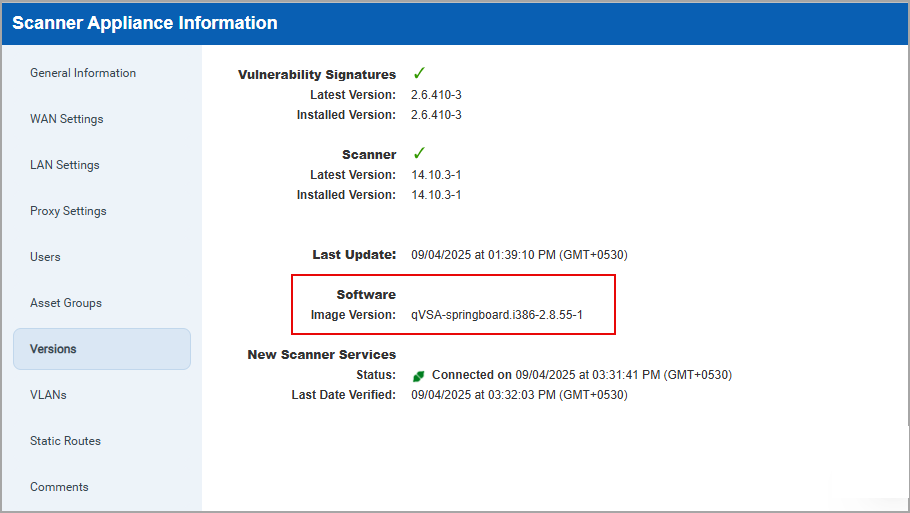
- In Vulnerability Management, navigate to Scans > Appliance> Info and from the Quick Actions menu. In the Versions tab, check Image Version. If the Image Version contains i386, you need to upgrade your scanner. If Image Version contains x86_64, you are already on the latest WAS Engine.
- In Web Application Scanning, navigate to Scans. Select a scan, and click View from Quick Actions to check the WAS Engine version. If the version is 10.x, it is a 64-bit scanner. If it is 9.x or earlier, it is a 32-bit scanner.
Upgrade Virtual Scanner
To upgrade the virtual scanner:
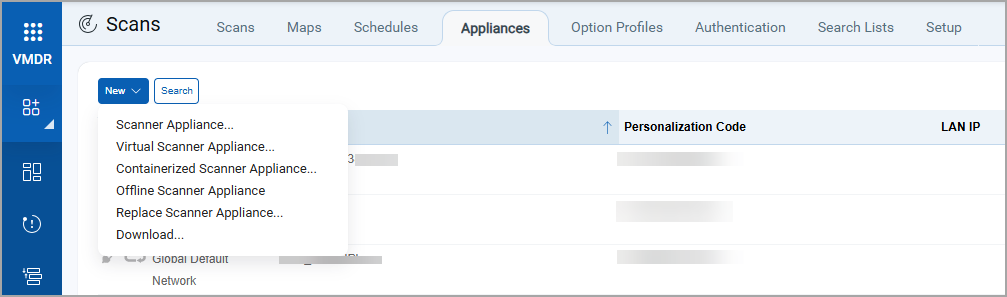
- Navigate to Vulnerability Management > Scans > Appliances.
- Click New > select an appropriate option based on your scanner setup.
For detailed information, see Scanner Appliances.
Ready to upgrade to the new WAS Engine? Contact your Technical Account Manager.