Tag Resources to Manage Access
You can control access to resources with the usage of tags. The tags help you to organize your resources and to manage user access to them.
Tags
You can apply tags to resources and group or segregate connectors using specific tags for a connector. Use tags to provide access or restrict access to resources fetched by your connectors.
Managing access to resources using tags will take at least 30 mins to reflect on for the user.
Assign Tags to Resources with Connectors
You can only assign tags from the application if the connector hasn't been merged with the Connector application.
For the connectors merged with the connector application, you can assign tags in the connector application. For more information on assigning tags to merged connectors, refer to the Connector online help.
To assign tags to a connector that is not merged, follow the steps below.
- Navigate to the Configure tab. Select the connector and click Assign Tag option from the quick action menu.
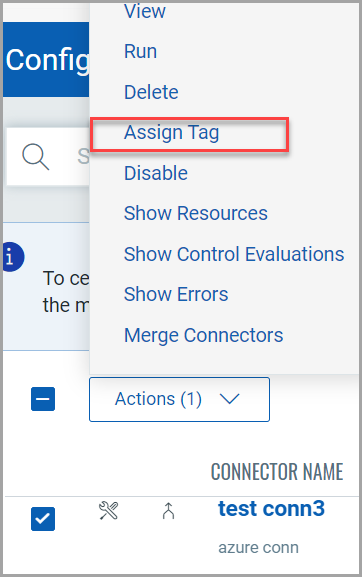
- Select an existing tag and click Add Tag.
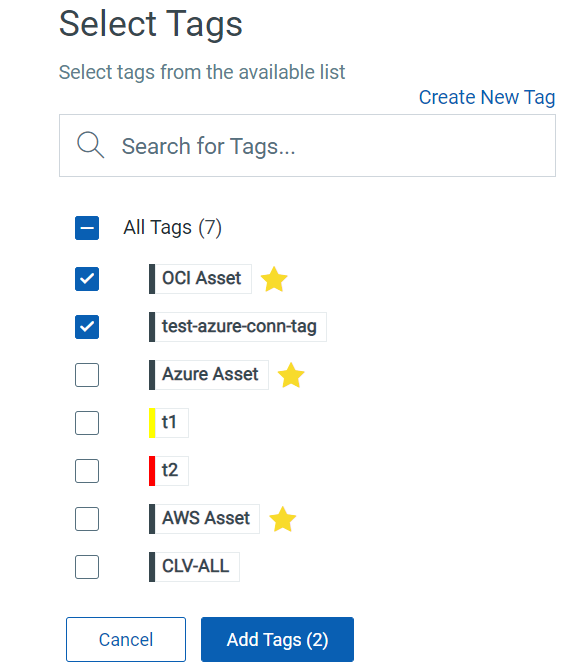
Alternatively, you can create a new tag. For detailed steps to create a new tag, refer to Configure Tags.
The selected tags are assigned to the resources discovered by the connector.
Cloud Account Tags (for AWS)
fetches AWS account-level tags that are associated with the AWS Organization connector. These tags are automatically applied to the member account connector, as well as to the resources discovered and its control evaluations.
You can search for these cloud account-tagged resources using the aws.account.tags.key and aws.account.tags.value tokens in the QQL search bar (refer to Search AWS Resources to learn more).
We have detected an issue where the cloud account tags may get removed from a member connector when detached from an organization. We recommend waiting for the auto-run or manually running your org connector to refresh the tag list.
Restrict User Access to all Connectors
If no tags are assigned to a user by default, the user can access all connectors. To restrict access to all connectors, you need to create a tag and not assign it to any connector but only to the user.
Scope Policy, Control, and Exception Visibility with Tags
Tags can also optionally scope which Policies, Controls, and Evaluation results a user can see and act on, independently of the connector tagging described above. This is called Scope-Based Access Control, and it is controlled by a per-customer preference (Connector Only vs. Connector and Policy mode) rather than being on by default.
If a user has no tags assigned while your customer is set to Connector and Policy mode, that user sees zero Policies, Controls, and Evaluations, except for objects a manager has explicitly shared read-only using the GLB_POLICY_READ tag.
For the full scoping model, the Global Policy Read tag, and how tags interact with the granular Policy, Control and Exception permissions, see Scope Based Access Control.