CyberSecurity Asset Management/Global AssetView Release 3.7.1.0
March 26, 2026 (Updated on April 08, 2026)
 |
CyberSecurity Asset Management |
The following are the new features and updates available with the CSAM subscription.
Improved EASM Discovery
EASM Discovery is enhanced to identify leased IPv4 Netblocks and discover assets exposed on those IPs using Shodan data. This improves the accuracy of asset attribution and expands the ability to discover externally exposed assets hosted on leased IPv4 infrastructure.
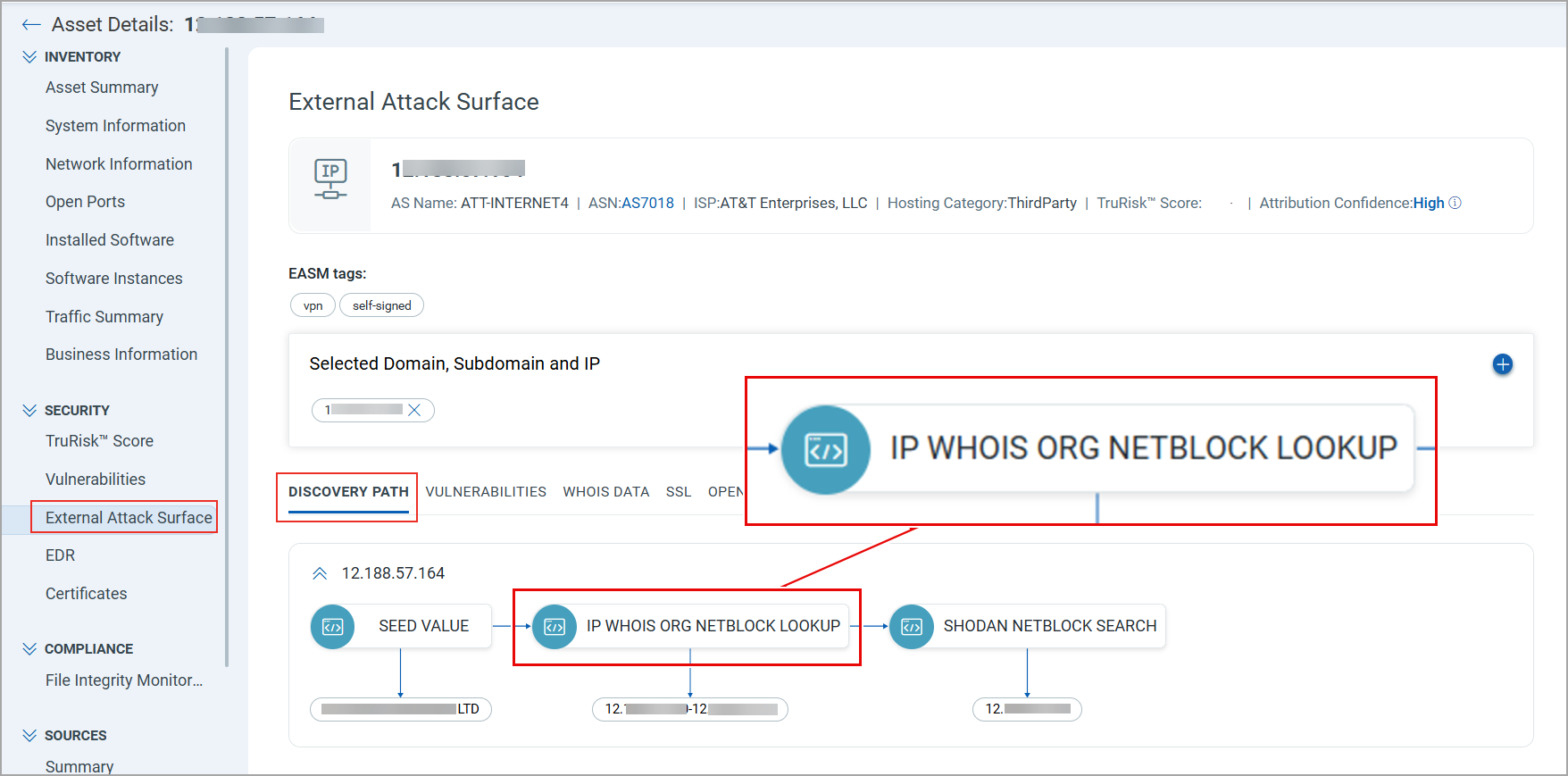
During the discovery process, the system now performs IP WHOIS ORG NETBLOCK LOOKUP to retrieve IPv4 Netblocks linked to your organization or domain. The system then checks these IPs against Shodan data to identify any exposed assets.
Only leased IPv4 Netblocks detected in Shodan are enumerated.
You can identify assets discovered through IP WHOIS ORG NETBLOCK LOOKUP by viewing the discovery path of an EASM asset.
Navigate to Asset Details > SECURITY > External Attack Surface. In the DISCOVERY PATH section, you can view the method used to discover the asset.
Asset Import using Source Native Key
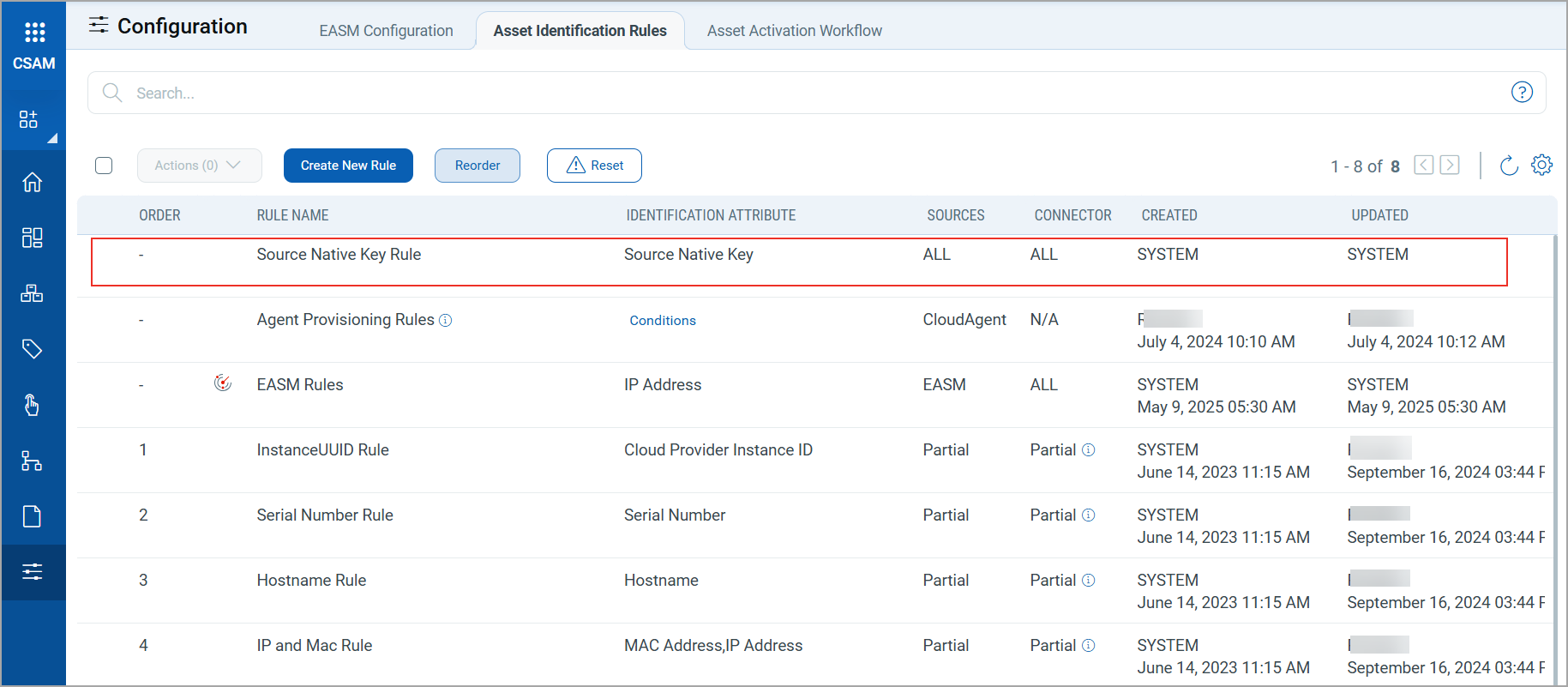
Third-party assets imported through connectors are now identified and merged with existing assets in your inventory using a new asset identification rule, the Source Native Key Rule. CSAM uses the unique native key provided by a third-party asset source as an identification attribute to merge duplicate assets.
The Source Native Key Rule is applied by default to all assets imported through connectors. This ensures that duplicate assets imported from third-party sources are primarily evaluated using their native key.
The Source Native Key Rule displays on the Configuration > Asset Identification Rules tab.
The system creates and maintains this rule. You can only view the rule details, but cannot modify or remove the rule.
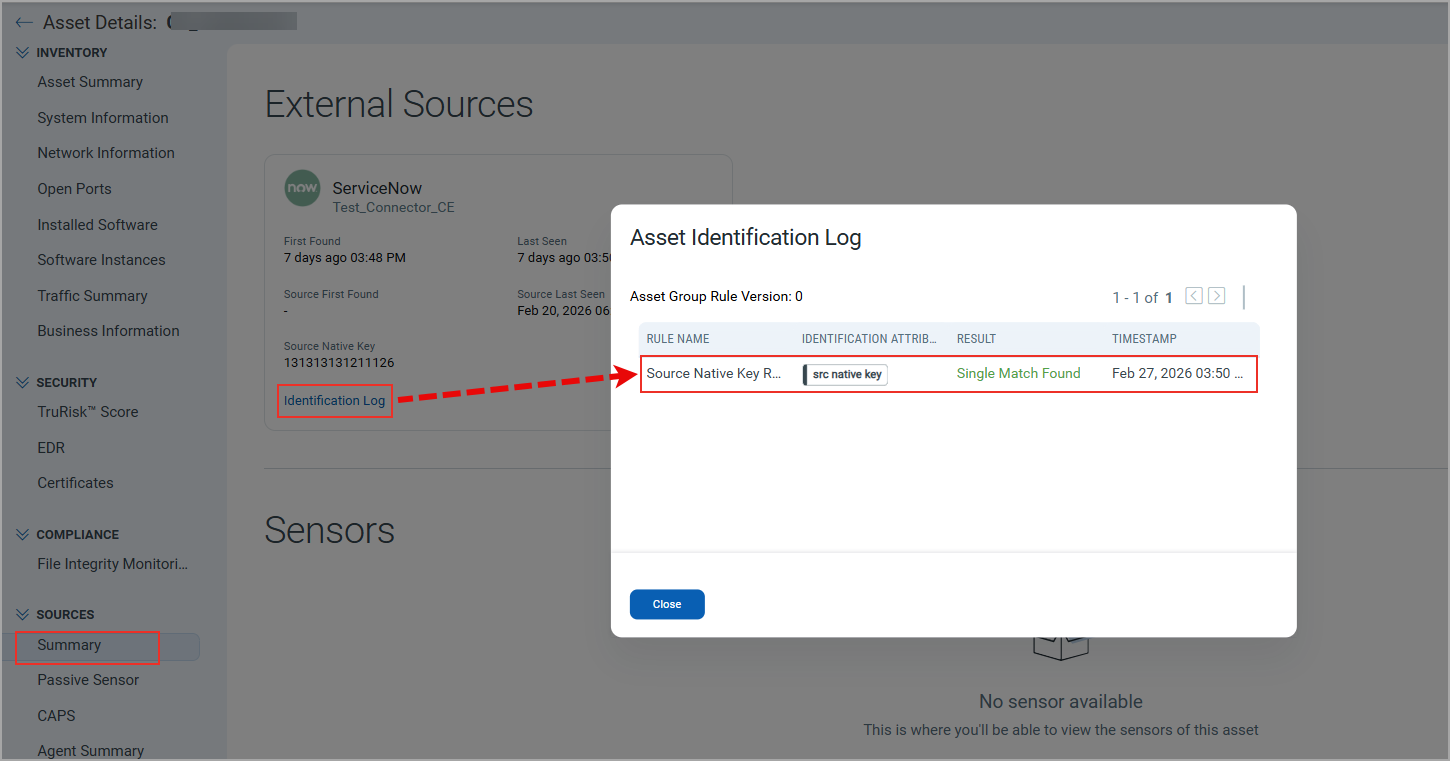
Once the rule merges the duplicate assets, you can review the asset identification details in the Asset Identification Log window by navigating to Asset Details > Sources > Summary > Identification Log.
Asset Purge using Source Last Seen Attribute
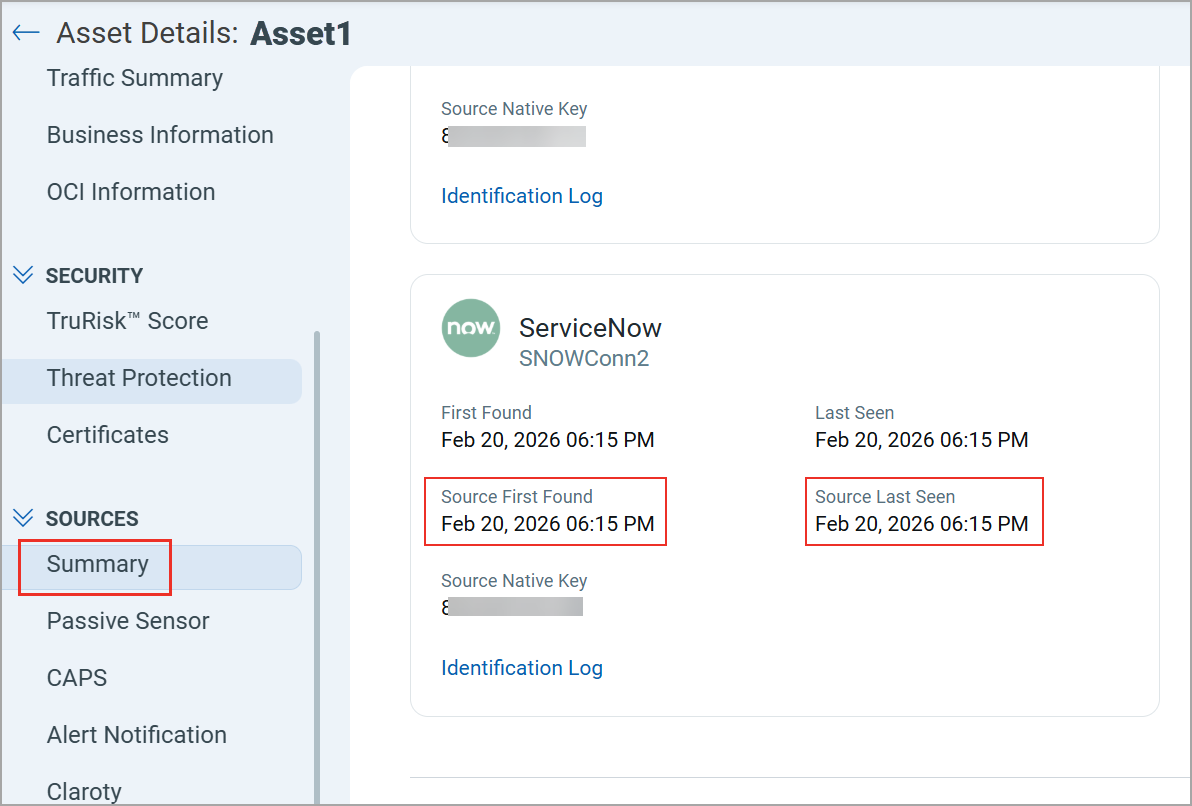
CSAM now displays the date and time when a third-party source first found and last updated an asset. To view the details, navigate to Asset Details > SOURCES > Summary:
- Source First Found
- Source Last Seen
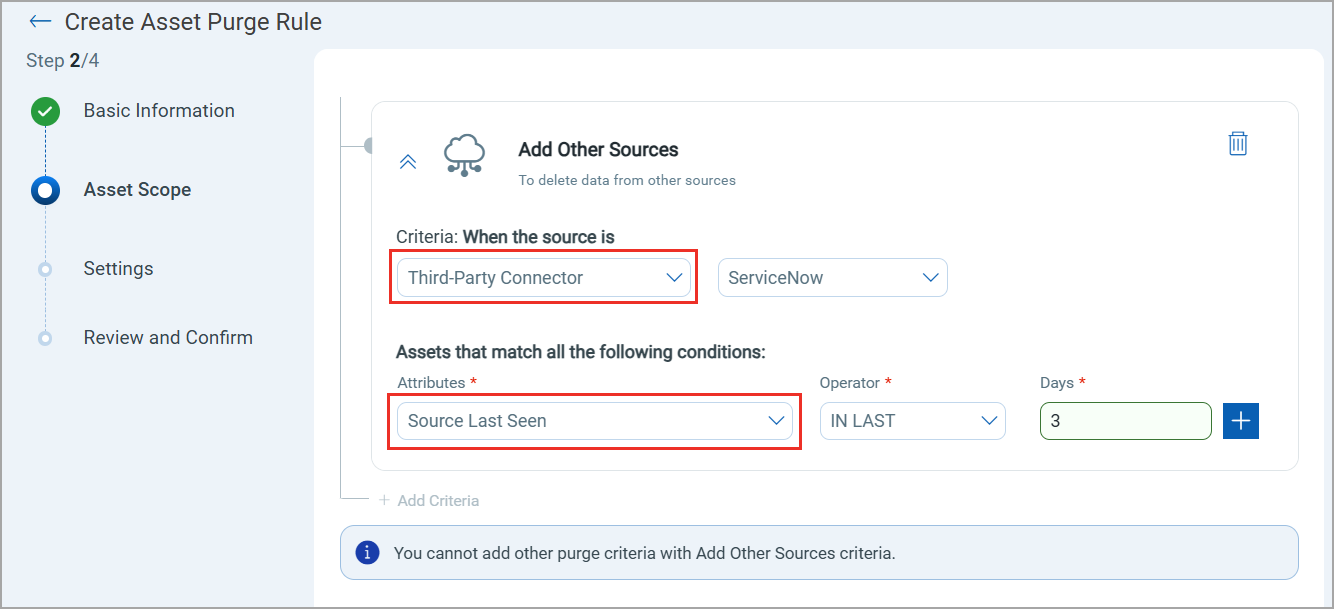
You can use the Source Last Seen date and time as an attribute to define conditions in the Asset Purge Rule. This lets you automatically remove assets based on when they were last updated by the third‑party source. This attribute is available to select under the Add Other Sources criteria and when the source is a Third-Party Connector.
Refer to the screenshot below, where the Source Last Seen is selected.
API Support
The Import Asset API is enhanced to support the new third-party source timestamp attributes. For more information, refer to Import Third-Party Assets with Source Timestamps.
Identify Assets Protected by Web Application Firewall
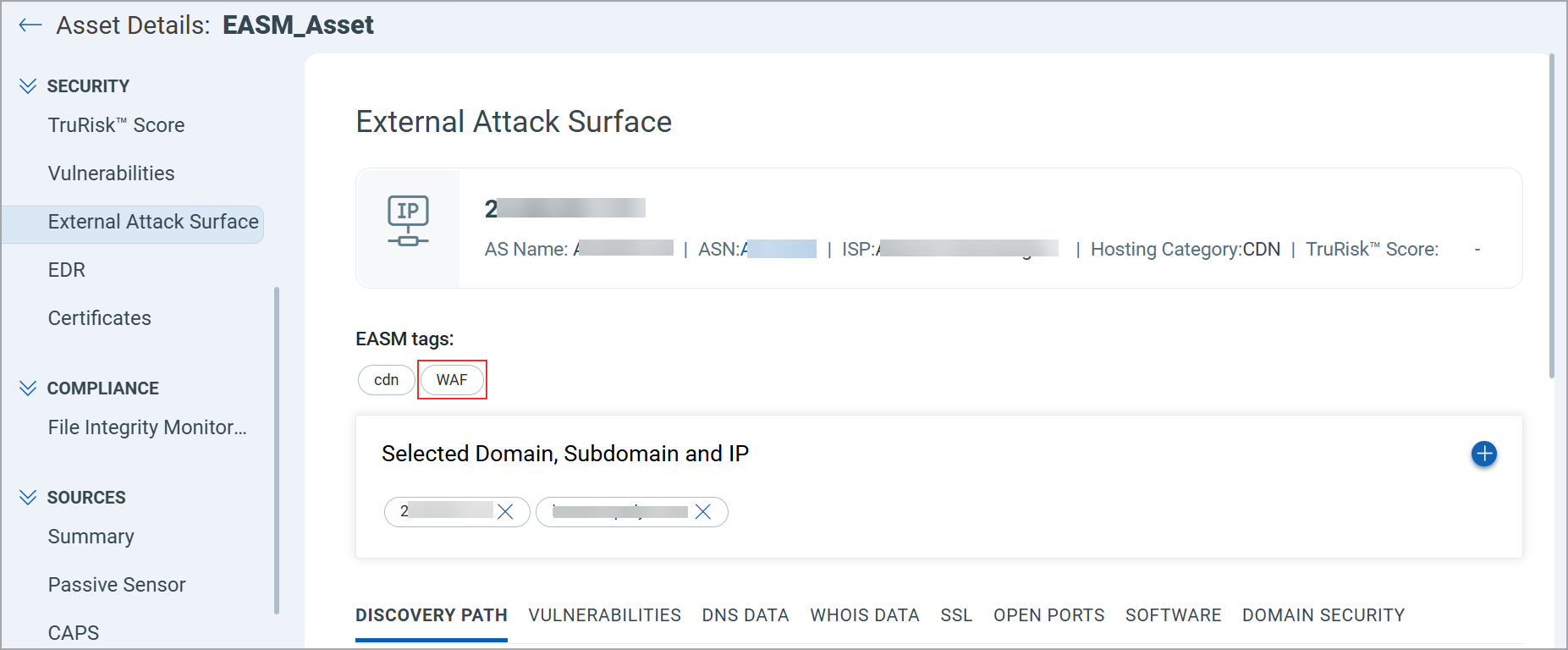
CSAM can now identify External Attack Surface Management (EASM) assets protected by a Web Application Firewall (WAF) in your EASM inventory. When an EASM asset is discovered through Shodan and includes WAF information, the system automatically assigns the EASM tag WAF to that asset.
You can search for WAF-protected assets by using the following query on the Inventory > Assets tab: easm.tag.name:"WAF".
The WAF tag for an EASM asset also displays on Asset Details > SECURITY > External Attack Surface.
Limit Asset Tagging to your Scope
You can now create a tag that applies only to assets within a parent tag that is in your scope. This allows you to restrict tag application to your required assets rather than all assets in your organization.
To use this feature, enable the Scoped Tag toggle when creating a new tag, then select the required Parent Tag. The parent tag defines the asset scope where the new tag is applied. Even if other assets are eligible, the tag is applied only to assets that are part of the selected parent tag.
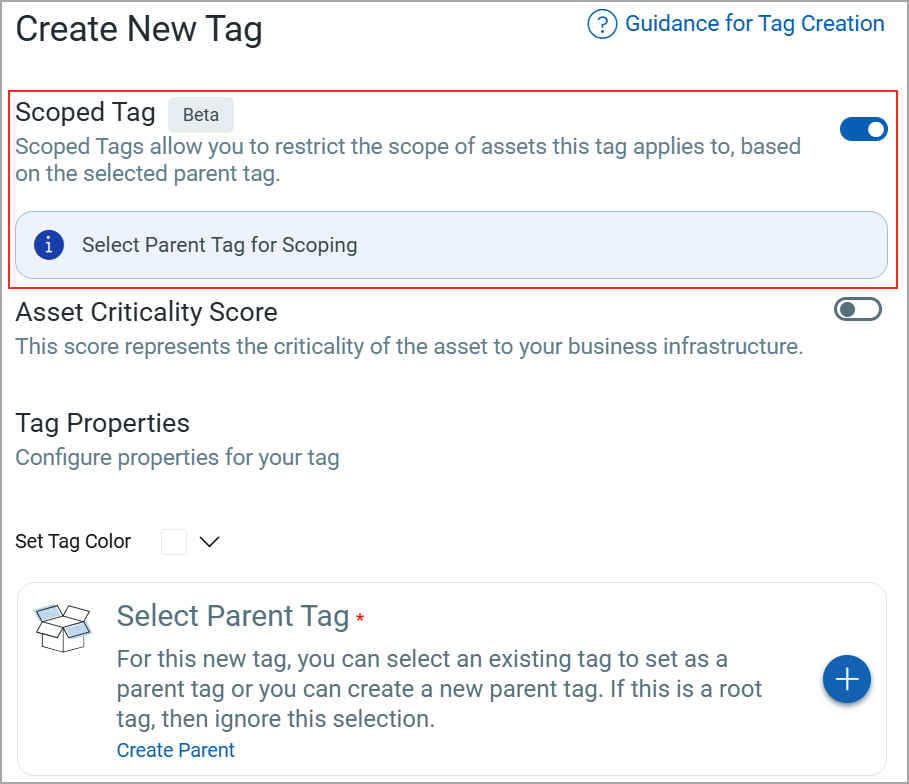
For more information on scoped tags, refer to CSAM Online Help.
Improved Timestamp Display Format
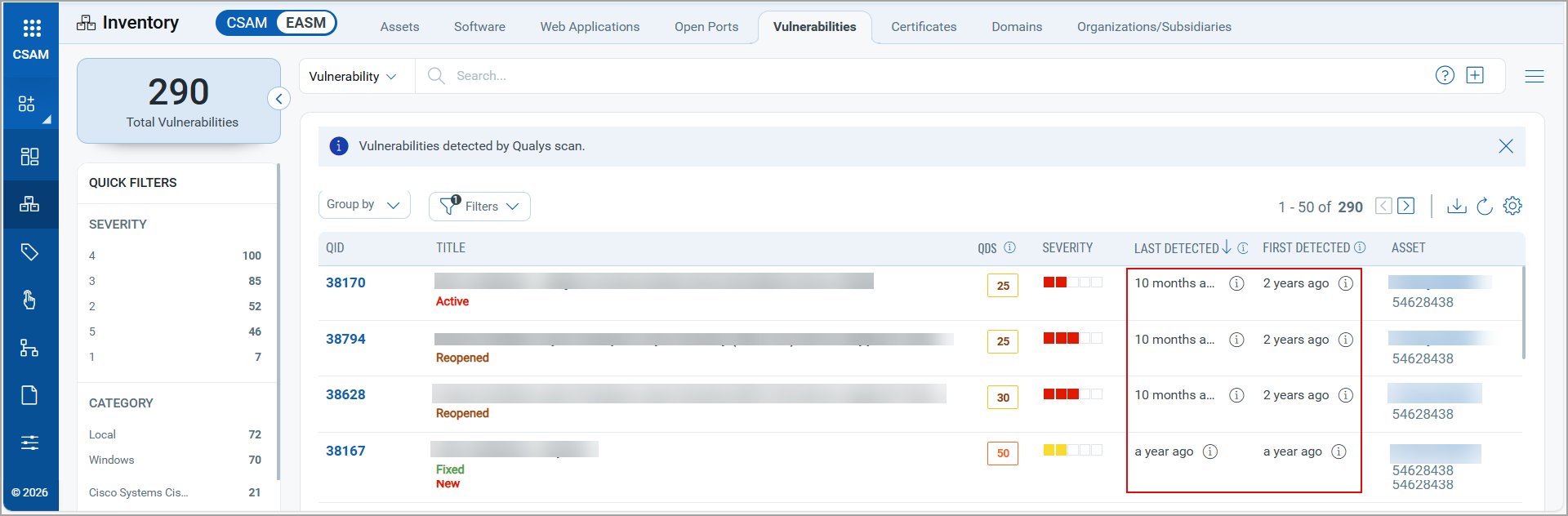
Time information across CSAM listing pages is now displayed in a consistent and easy-to-read format (for example, “5 days ago”, “2 hours ago”). This improvement ensures consistent formatting across listing pages and makes the information easier to understand.
You can view the updated format on the following tabs:
- EASM > Assets
- EASM > Vulnerabilities
- Web Applications
- Database Instances
Refer to the following image for an example of the new format:
Visibility of User Activity Performed Using CSAM APIs
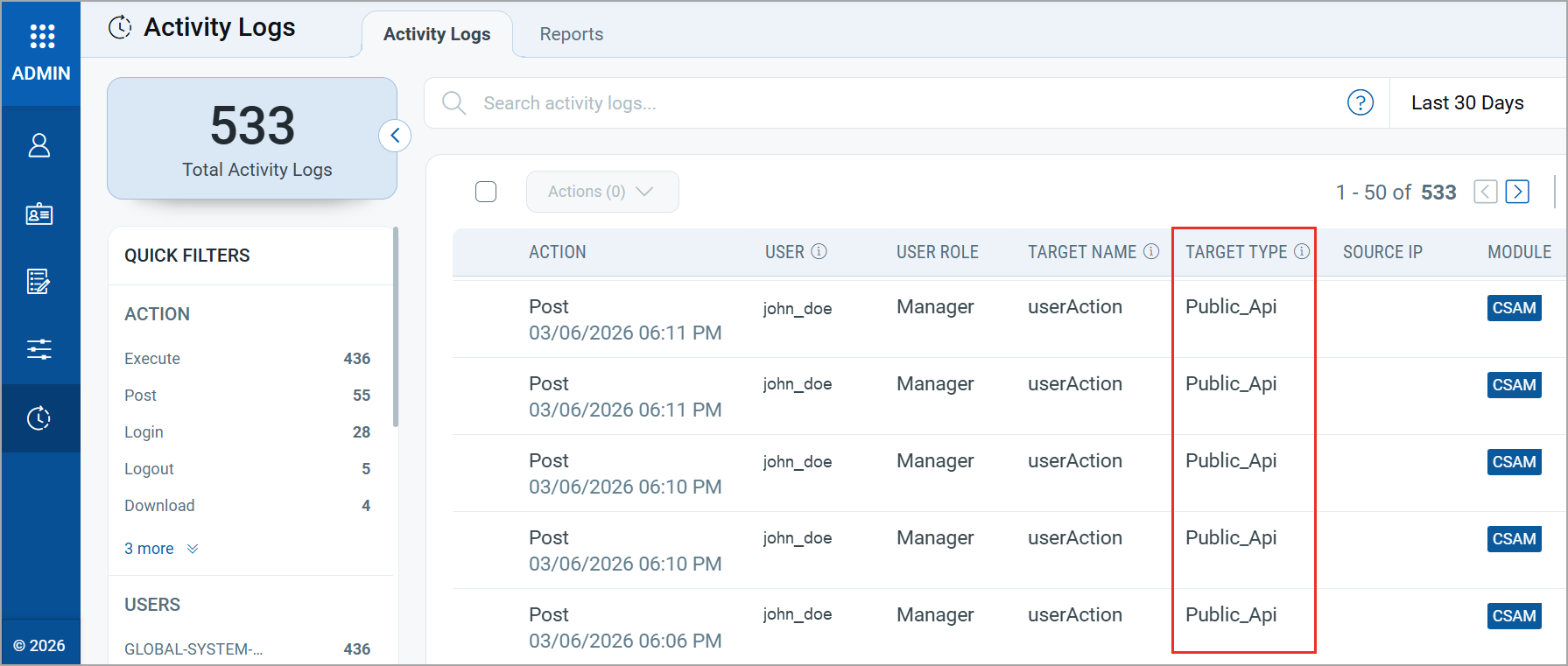
User actions performed through CSAM APIs are now captured and displayed in the Administrator application under the Activity Logs tab. This helps you monitor API activity performed by users in your organization.
Activities triggered through APIs are displayed as Public_Api in the TARGET TYPE column.
 |
CyberSecurity Asset Management and Global AssetView |
The following are the new features and updates available with the CSAM and GAV subscription.
Database Inventory in GAV
Databases often store sensitive information such as customer and user data, making them common targets for cyber-attacks and misuse. Having visibility into database instances helps organizations determine whether specific databases fall within the scope of regulatory requirements such as GDPR, PCI DSS, or other compliance frameworks.
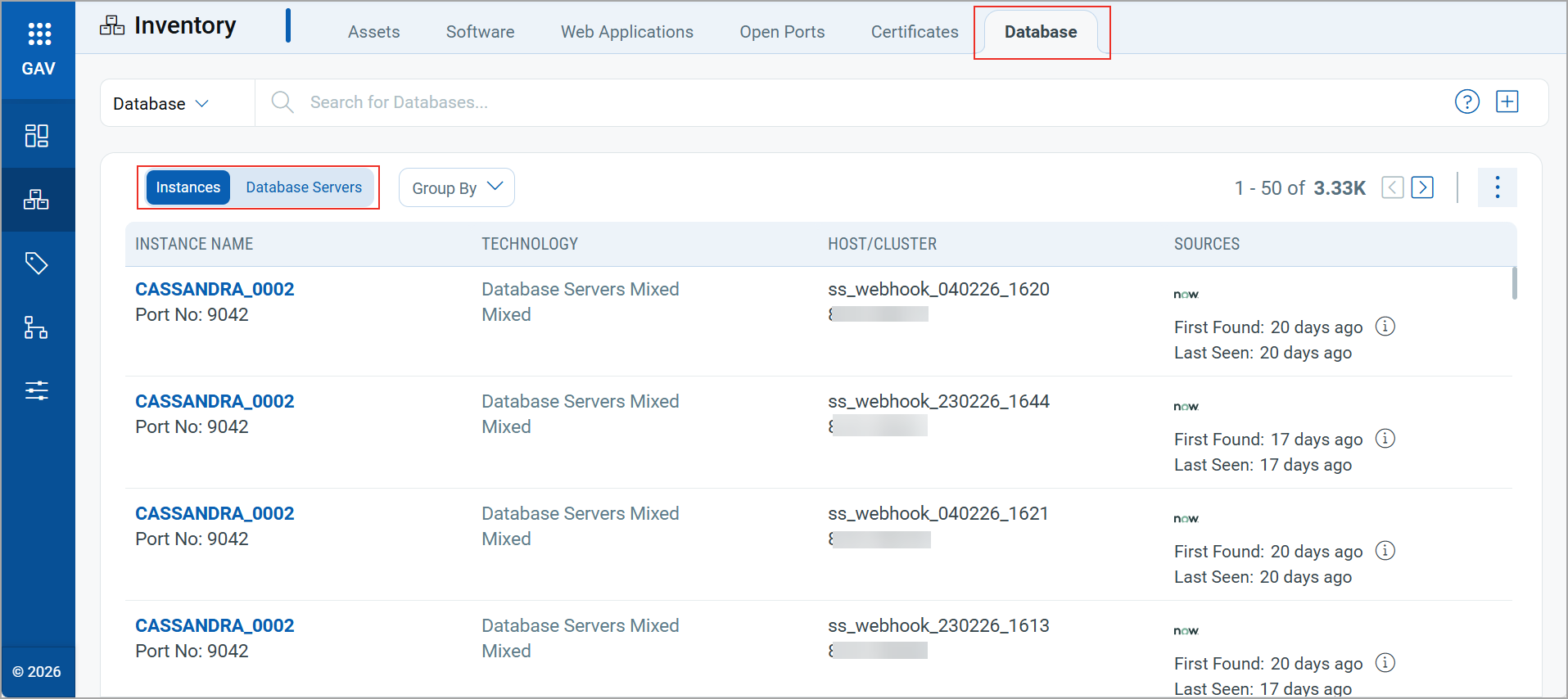
To improve your database visibility, we have introduced the Database tab in GAV > Inventory.
Within the Database tab, you can view the following:
- Instances: Displays details of discovered database instances.
- Database Servers: Displays information about servers hosting the databases.
This feature was previously available only to CSAM users. It is now also available to GAV users.
For more information on the Database tab, refer to the GAV Online Help.
Updated QQL Tokens
We have updated the following token names to align with the QQL Token Standardization introduced in CSAM/GAV Release 3.7.0.0:
| Old Tokens | New Tokens |
|---|---|
| connectors.connector.id | connector:(id |
| connectors.connector.name | connector:(name |
| connector.firstFoundDate | connector:(firstFoundDate |
| connector.lastFoundDate | connector:(lastFoundDate |
| agent.swCAIdealCandidate | qualys.agent.swCAIdealCandidate |
| passiveSensor.id | qualys.passiveSensor.id |
| passiveSensor.location | qualys.passiveSensor.location |
| passiveSensor.name | qualys.passiveSensor.name |
| asset.environment | asset.businessInfo.environment |
| asset.hostID | compute.hostId |
| asset.lastLoggedOnUser | compute.lastLoggedOnUser |
| asset.managedBy | asset.businessInfo.managedBy.username |
| asset.operationalStatus | asset.businessInfo.operationalStatus |
| asset.ownedBy | asset.businessInfo.ownedBy.username |
| asset.supportGroup | asset.businessInfo.supportGroup |
| asset.supportedBy | asset.businessInfo.supportedBy.username |
| services:(description | compute.service:(description |
| services:(name | compute.service:(name |
| services:(status | compute.service:(status |
| openPorts:(authorization | asset.openPorts:(authorization |
| openPorts:(description | asset.openPorts:(description |
| openPorts:(detectedService | asset.openPorts:(detectedService |
| openPorts:(detectionScore | asset.openPorts:(detectionScore |
| openPorts:(discoverySources | asset.openPorts:(discoverySources |
| openPorts:(firstFound | asset.openPorts:(firstFoundDate |
| openPorts:(lastUpdated | asset.openPorts:(lastUpdatedDate |
| openPorts:(port | asset.openPorts:(port |
| openPorts:(protocol | asset.openPorts:(protocol |
New Tokens in GAV
We have introduced the following new tokens in GAV:
| Token | Tab | Description |
|---|---|---|
| database.instance. name |
Inventory > Database | Search the database instances based on the instance name.
Example:
|
| database.instance.id | Inventory > Database | Search the database instances based on the instance ID.
Example:
|
| database.instance. technology |
Inventory > Database | Search the database instances based on the database technology.
Example:
|
| database.instance. firstseen |
Inventory > Database | Search the database instances based on the first occurrence of the instance.
Example:
|
| database.instance. lastseen |
Inventory > Database | Search the database instances based on the last occurrence of the instance.
Example:
|
Issues Addressed
The following reported and notable customer issues are fixed in this release:
| Component/Category | Description |
|---|---|
| CSAM - Cloud Agent Assets | We fixed an issue where agent‑based assets were visible to sub‑users even when the Exclude Agent Assets from IP Range Tags option was enabled in the Administration application.
Now, agent-based assets are excluded from a sub-user's scope when this option is enabled. |
| CSAM+GAV - Installed Software | We fixed an issue where the Installed Software section in Asset Details displayed incorrect software names for some assets.
Now, the Installed Software section displays the correct software names for all assets. |
| CSAM - System Information | We fixed an issue where an incorrect CPU count was displayed for some Windows and MAC assets.
Now, the correct CPU count is displayed in Asset Details > System Information. |
| CSAM - Third-party Connectors | We fixed an issue where previously purged connector IDs were still displayed for selection when configuring Asset Purge Rules for third-party connectors.
Now, when a connector is deleted and no assets are associated with it, its name and ID are automatically removed from the Asset Purge Rule configuration page. |
| CSAM - EASM Summary Report | We fixed an issue where some CVEs displayed in the EASM Summary Report did not match the CVEs shown in the Shodan Vulnerability Report.
Now, the CVE data in both reports aligns correctly. |
| CSAM - Asset Purge Rules | We fixed an issue where the Asset Purge Rules tab displayed all timestamps as 12:00 AM instead of showing the actual time.
Now, all purge rules display the correct created, updated, and last-executed times. |