CyberSecurity Asset Management/Global AssetView Release 3.7.1.1
May 11, 2026
 |
CyberSecurity Asset Management |
The following are the new features and updates available with the CSAM subscription.
Smart Software Component Mapping for Software Component Visibility
You can now view accurate mapping of software components to their parent applications in CSAM to help you better understand software composition. To support this, we have introduced Smart Software Atlas Mapping powered by the advanced vector-based lexical and semantic analytical capabilities. The vector-based model analyzes software details such as component path, component name, software path, and software name to determine the most relevant software-to-component mapping.
This reduces the number of unmapped components in your environment and provides clearer visibility into your software inventory, which is essential for accurate vulnerability assessment and software composition analysis.
Prerequisites
Before you enable Smart Software Atlas Mapping in CSAM, ensure that the following prerequisites are satisfied:
- You must be a Manager user to enable or disable Smart Software Atlas Mapping.
- In the Cloud Agent application, select the Software Atlas checkbox when creating the SwCA Scan Profile. For more information, see the Runtime Software Composition Analysis (SwCA) User Guide.
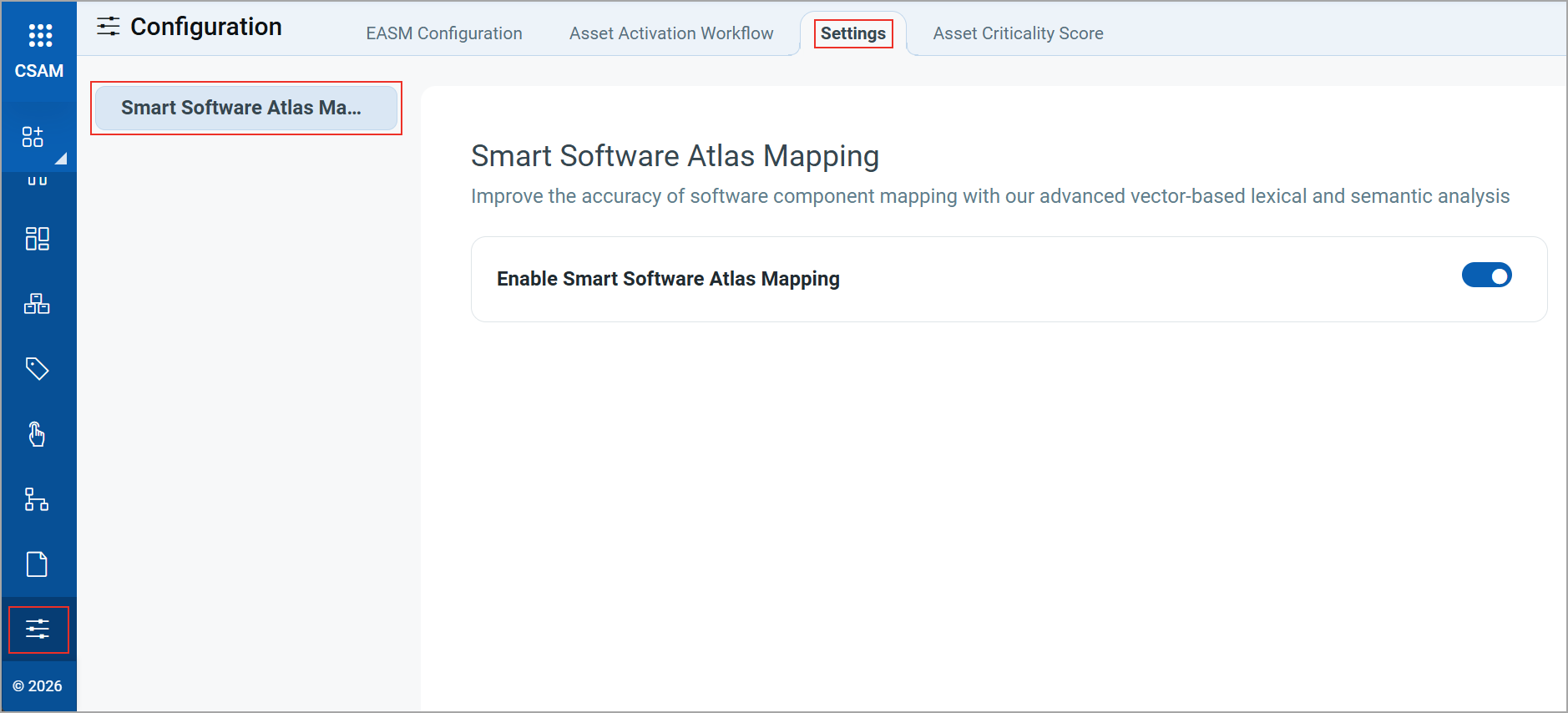
To enable this feature, navigate to Configuration > Settings > Smart Software Atlas Mapping. On this tab, turn the Enable Smart Software Atlas Mapping toggle.
After you enable the toggle, smart mappings for unmapped components are automatically analyzed after the Software Composition Analysis (SwCA) scan completes.
View Smart Component Mappings
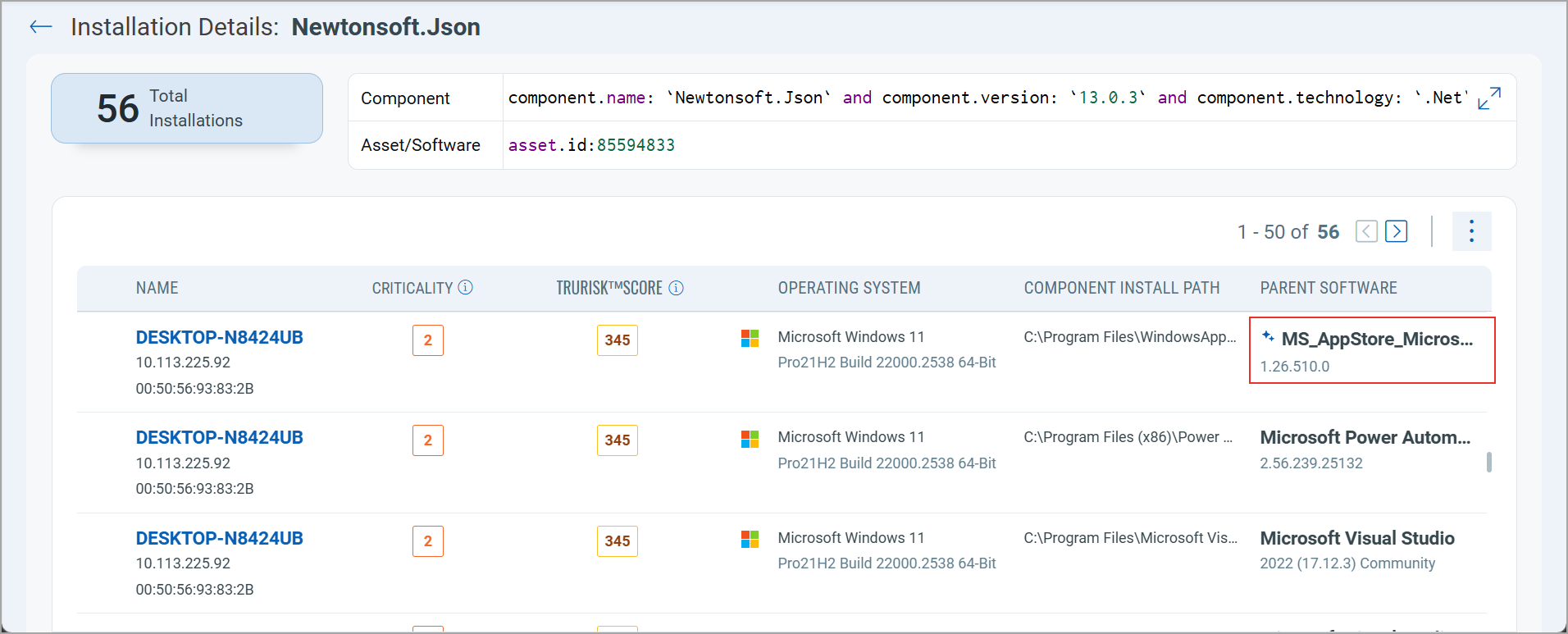
The components mapped by our vector-based model are indicated by an  icon next to the application name.
You can view mapped components on the following tabs:
- Software > Components > Installation Details
- Asset Details > INVENTORY > Installed Software > Components
- Asset Details > SECURITY > Software Composition Analysis (SCA) > Software Components
The following image displays an example of a component mapped by the vector-based model on the Software > Components > Installation Details page.
For more information, refer to the CSAM Online Help.
 |
CyberSecurity Asset Management and Global AssetView |
The following are the new features and updates available with the CSAM and GAV subscription.
Access Asset Identification Rules from the Rules Tab
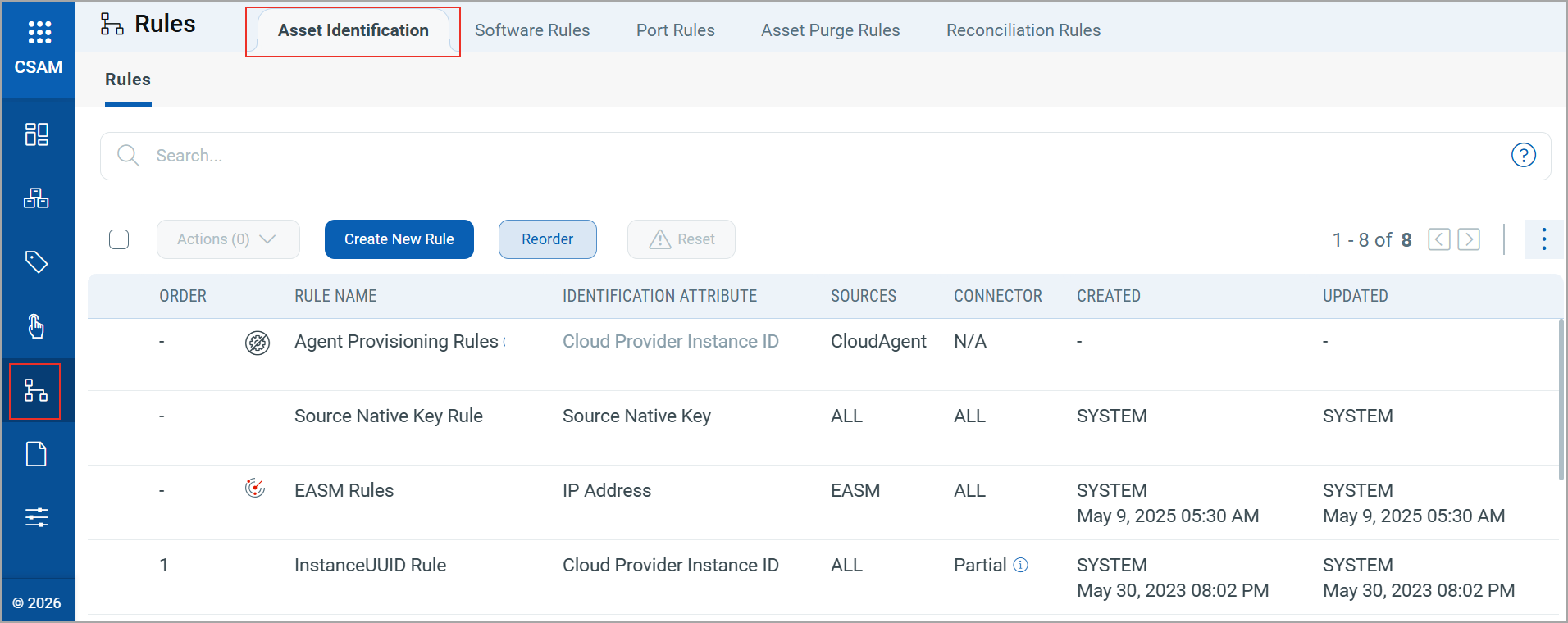
You can now access Asset Identification rules from the Rules tab in CSAM, centralizing all rules-related configurations in one location. This helps you to find and manage rules without switching between tabs.
Previously, Asset Identification rules were located under the Configurations tab.
For more information on Asset Identification Rules, refer to CSAM Online Help.
New QQL Tokens
We have introduced the following new finding tokens on the EASM > Vulnerabilities tab to align with the QQL Token Standardization introduced in CSAM/GAV Release 3.7.0.0:
- finding.authType
- finding.detectionAge
- finding.qds
- finding.firstFoundDate
- finding.host.operatingSystem.name
- finding.instance
- finding.isDisabled
- finding.isFound
- finding.isIgnored
- finding.isQualysPatchable
- finding.lastFixedDate
- finding.lastFoundDate
- finding.nonExploitableConfig
- finding.nonExploitableService
- finding.nonRunningKernel
- finding.port
- finding.protocol
- finding.severity
- finding.ssl
- finding.status
- finding.timesFound
- finding.typeDetected
- finding.vulnerability.bugTraqId
- finding.vulnerability.category
- finding.vulnerability.compliance.description
- finding.vulnerability.compliance.section
- finding.vulnerability.compliance.type
- finding.vulnerability.criticality
- finding.vulnerability.cveId
- finding.vulnerability.cvss2AccessVector
- finding.vulnerability.cvss2BaseScore
- finding.vulnerability.cvss2TemporalScore
- finding.vulnerability.cvss3BaseScore
- finding.vulnerability.cvss3TemporalScore
- finding.vulnerability.description
- finding.vulnerability.discoveryType
- finding.vulnerability.flag
- finding.vulnerability.impact
- finding.vulnerability.isPatchAvailable
- finding.vulnerability.isRebootRequired
- finding.vulnerability.list
- finding.vulnerability.mitre.attack.tactic.id
- finding.vulnerability.mitre.attack.tactic.name
- finding.vulnerability.mitre.attack.technique.id
- finding.vulnerability.mitre.attack.technique.name
- finding.vulnerability.operatingSystem.name
- finding.vulnerability.patchReleasedDate
- finding.vulnerability.isPCI
- finding.vulnerability.publishedDate
- finding.vulnerability.qid
- finding.vulnerability.ransomware.name
- finding.vulnerability.risk
- finding.vulnerability.sans20Categories
- finding.vulnerability.severity
- finding.vulnerability.solution
- finding.vulnerability.supportedBy.serviceName
- finding.vulnerability.threatIntel.exploitKit
- finding.vulnerability.threatIntel.exploitKitName
- finding.vulnerability.threatIntel.hasNoPatch
- finding.vulnerability.threatIntel.isActiveAttack
- finding.vulnerability.threatIntel.isCisaKnownExploitedVuln
- finding.vulnerability.threatIntel.isDenialOfService
- finding.vulnerability.threatIntel.isEasyExploit
- finding.vulnerability.threatIntel.isHighDataLoss
- finding.vulnerability.threatIntel.isHighLateralMovement
- finding.vulnerability.threatIntel.isMalware
- finding.vulnerability.threatIntel.isPredictedHighRisk
- finding.vulnerability.threatIntel.isPrivilegeEscalation
- finding.vulnerability.threatIntel.isPublicExploit
- finding.vulnerability.threatIntel.isRansomware
- finding.vulnerability.threatIntel.isRemoteCodeExecution
- finding.vulnerability.threatIntel.isSolorigateSunburst
- finding.vulnerability.threatIntel.isUnauthenticatedExploitation
- finding.vulnerability.threatIntel.isWormable
- finding.vulnerability.threatIntel.isZeroDay
- finding.vulnerability.threatIntel.malwareName
- finding.vulnerability.threatIntel.publicExploitName
- finding.vulnerability.title
- finding.vulnerability.updatedDate
- finding.vulnerability.vendorName
- finding.vulnerability.vendorProductName
- finding.vulnerability.vendorRef
For more information on the finding tokens, refer to CSAM Online Help.
Issues Addressed
The following reported and notable customer issues are fixed in this release:
| Component/Category | Description |
|---|---|
| CSAM - Database | We fixed an issue where the incorrect database instance count was displayed on the CSAM > Database > Database Servers tab.
Now, the database instance count is displayed correctly. |
| CSAM - Software Details Report | We fixed an issue where selecting all columns to create a Software Details report did not display all columns after saving the report.
All columns are now properly displayed after saving the report. |
| CSAM - Activity Logs | We fixed an issue where purging assets on demand logged a misleading entry in the Activity Log tab in the Administration application, indicating that a purge rule was deleted without providing any asset-specific details.
The Activity Log tab now reflects the correct details for the purged asset. |
| GAV - Asset Identification Rules | We fixed an issue where the Asset Identification Rules tab displays an incorrect rule count.
The Asset Identification Rules tab now displays the correct number of rules for a GAV user. |
| CSAM+GAV - Asset Data | We fixed an issue where the Last Seen Date was incorrectly updated for your assets. This caused stale assets to appear as active.
The system now correctly updates the Last Seen Date. |
| CSAM - Installed Software | We fixed an issue where software rules incorrectly detected assets not having specific software installed, even when it was present.
The system now accurately detects installed software called Zabbix, and this is correctly reflected in the software rule. |
| CSAM+GAV - Operating System Version | We fixed an issue where the operating system version did not display for Cisco devices, even when SNMP authentication was successful.
The system now correctly retrieves and shows the operating system version for such devices. |
| CSAM+GAV - Reporting | We fixed an issue where the date displayed on the Last Synced Date for Agent column in CSAM reports did not align with the Last Checked-In date in the Cloud Agent report. This discrepancy caused some inactive or stale assets to appear as recently synced in CSAM.
The Last Synced Date for Agent column now displays the correct date. |
| CSAM+GAV - Dashboard | We fixed an issue where the TruRisk™ value appeared as “-” for all assets in some dashboard widgets.
These widgets now display the TruRisk™ value for all applicable assets. |
| CSAM+GAV - Software Installation Path | We fixed an issue where the installation path for Mozilla Firefox was displayed incorrectly in the Installed Software section of the Asset Details page.
The installation path is now correctly displayed. |
| CSAM+GAV - Software Rule | We fixed an issue where Software Rules incorrectly classified authorized software as unauthorized.
The Software Rule now accurately categorizes software based on the defined rules. |