Release Notes
The following are the improvements in the latest releases:
Release 2.5.0
May 07, 2026
OpenID Connect Authentication Support
This release introduces OpenID Connect (OIDC) authentication to the CMDB Bi-directional Sync app, enhancing overall security posture while maintaining compatibility with existing data collection workflows.
You can now select between Basic Authentication and OIDC within the setup screen and securely provide Client ID and Client Secret credentials. The Qualys platform also supports granular permission selection for specific modules when generating a Client ID, improving access control and enabling a smooth transition to OIDC.
For more details, see Add API Source.
Database Instance Support
This release introduces support for synchronizing database instances into CMDB Bi-directional integration. To use this feature, enable the Database Instance Sync property in the application settings. Once enabled, database instance records are automatically created during scheduled synchronization.
Database instances are created as configuration items and are associated with their respective software instances and underlying hardware, ensuring accurate configuration item hierarchy and relationship mapping.
Each database instance includes key attributes such as instance name, install path, home path, port, technology, and last-seen information, improving visibility and configuration tracking in the CMDB.
This feature currently supports DB2 and Informix database technologies.
For more details, see Update Properties.
Release 2.4.1
October 23, 2025
Issue Addressed
Earlier, certain Cloud Asset tags failed to sync to the staging table due to missing tag information, resulting in a TypeError during processing. This issue is handled to ensure the successful synchronization of all Cloud Asset tags.
Release 2.4.0
September 30, 2025
Introduced New Property for Logging
In this release, we have added logging configuration to the properties page. Depending on the selected logging level, logs will be displayed. You can select the following log levels from the options:
- None
- All
- Info
- Error
- Warning
- Debug
By default, the 'All' log type is enabled. For more details, see Logging.
Added Support for SamPro Sync
A new property has been introduced in the Properties page to enable SamPro Sync for Software catalogs. When this option is enabled, after asset approval, the software installation records are stored in the Software Installation table. When it is disabled, after asset approval, the software installation records are stored in the CMDB Software Instance table. This property setting gives you the flexibility to manage software-installed data.
For more details, see Enable SamPro Sync for Software Catalogs.
Enhanced Dynamic Tagging with Scripts
Dynamic tagging has been enhanced to support scripting. You can now use scripts to create dynamic tags for attributes.
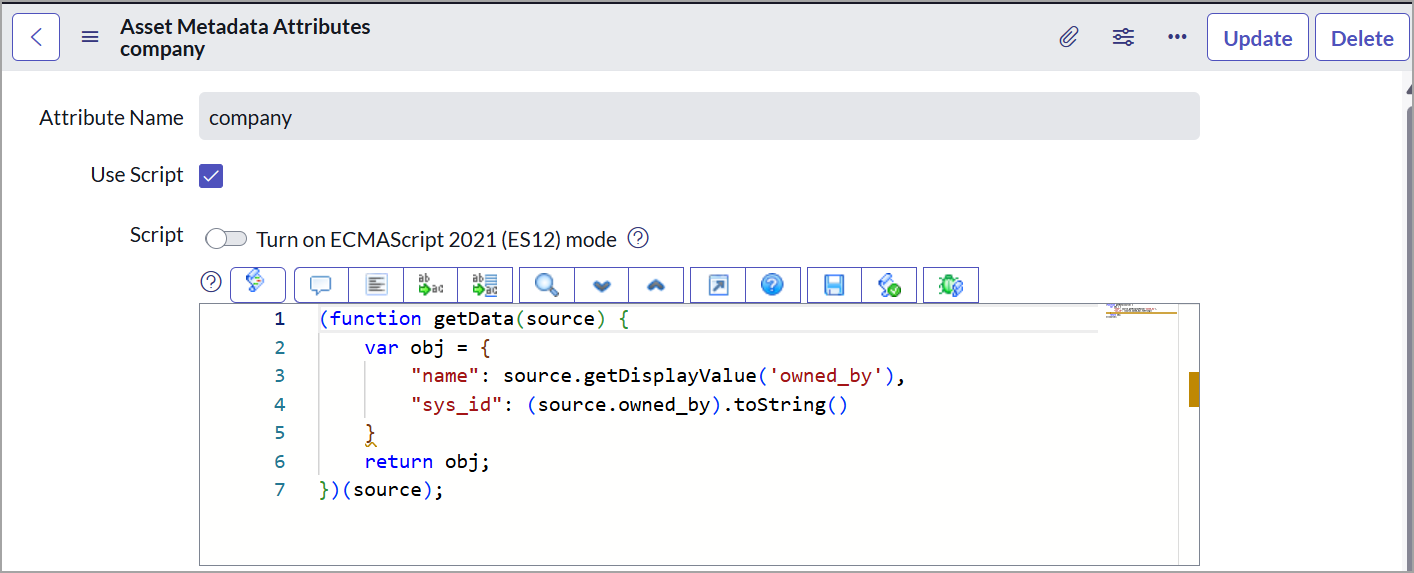
For more details, see Dynamic Asset Tagging Configuration.
Separate Sync Queues Introduced for Business Application Metadata
The synchronization process has been improved by separating asset metadata and business application metadata into two distinct sync queues. Previously, both were handled together, which made troubleshooting difficult.
A new sync type, 'Upload Business App', has been introduced to support the upload of business application metadata from ServiceNow to Qualys. This enhancement provides more visibility and control when syncing business application data.
For more details, see Sync Queue.
JSON Parsing Replaced XML for Asset Sync
Updated the Asset data sync from Qualys to ServiceNow schedules to use JSON instead of XML for parsing, making the process faster and easier to manage.
Issues Addressed
|
Category/Component |
Issue |
|---|---|
|
Logging Activities |
The issue has been fixed where invalid IP addresses were not giving a validation error message. |
|
API Call Errors |
The issue has been fixed where API response codes 999 and 1905 were marked as an error, causing an issue in ServiceNow to Qualys sync. |
|
CMDB Assets |
The issue has been fixed where duplicate records were being created in the catalog relation table. |
|
Asset Tagging |
The issue has been fixed where tag names with special characters were causing API call failure. |
Release 2.3.0
May 15, 2025
The following are the improvements we have made in Qualys CMDB Bi-directional Sync App 2.3.0:
- Added validation for executing the ADD IP API call to ensure that at least a VM or PC is selected for the ServiceNow to Qualys sync. If unmanaged assets exist in ServiceNow and neither a VM nor a PC is selected, the scheduled API call to sync ServiceNow with Qualys does not execute. This validation helps prevent the empty response. For such unexecuted API calls, the event is logged with the validation reason in the application logs for better traceability.
-
Added three new flags for IRE Updates on the Qualys CMDB Sync Properties page. Using these flags, you can decide whether to change the hierarchy of the assets while updating or switching assets
The following are the newly added flags:
- IRE - Update without Downgrade
- IRE - Update Without Upgrade
- IRE - Update without SwitchFor
For more details, refer to Update Properties.
- Added two new fields, Organization Name and Qualys Unique Asset ID, on the Qualys Assets page. Additionally, on this page, the five new tabs are added to access the detailed asset information.
- Sensor Information
- Agent Information
- Hardware Taxonomy
- Last Location
- Criticality
To view these tabs, navigate to the Approve Qualys Asset table and select the asset.
For more details, refer to Approve Qualys Assets. - We have added support for domain separation in the CMDB Bi-directional Sync app. This feature helps isolate data based on the domains assigned to each user.
- Minor improvements and bug fixes.
Release 2.2.0
Jan 15, 2025
In this release:
- Added 'Ci's sync to Qualys' widget on the dashboard. The Ci's Synced to Qualys report lists the number of assets synced from ServiceNow to Qualys.
- Now, you can import Software Catalog using Sync Queues and JSON Parsing instead of XML.
- You can see the 'Last Used date' for Software Data in the Staging table.
- Minor improvements and bug fixes.
Release 2.1.0
In this release:
- The new feature for One-Way Sync is added. Using this feature Qualys CMDB app on the ServiceNow platform can sync the Asset Metadata and Business information to Qualys without updating the CI records in CMDB. For more details on the feature, refer to Enable One-Way-Sync.
- Enhanced performance by improving data processing time between the ServiceNow to Qualys for Third-Party Asset Import.
- Minor improvements and bug fixes.
Release 2.0.0
In this release, the ServiceNow ITOM dependency is removed.
- The ServiceNow to Qualys Platform data processing time is improved. The CI records are processed in batches, which helps to handle a large set of CI updates from ServiceNow to Qualys Platform.
- Additional fields such as NIC details in Network Adapter and IP Address tables are added to transform assets from staging to CMDB tables to enhance the transformation of the Qualys to ServiceNow flow.
- Minor improvements and bug fixes.