Get Started with Qualys Universal Technology Add-on for Splunk
Release 1.0.0
July 14, 2026
The Qualys Universal Technology Add-on (TA) for Splunk enables organizations to collect data from Qualys WAS and Qualys VMDR applications and ingest it into Splunk for monitoring, analysis, reporting, and investigation.
Built on the Splunk Unified Configuration Console (UCC) framework, the add-on provides a modern configuration experience and supports multiple Qualys accounts and multiple data inputs from a single deployment.
The add-on retrieves data via Qualys APIs and indexes it in Splunk for searching and reporting.
This add-on is built on the Splunk Universal Configuration Console (UCC) Framework with asynchronous data collection, providing improved performance, modern UI generation, and compatibility with supported Splunk versions that support Python version 3.9+.
Architecture Overview
The add-on uses Splunk modular inputs to collect data from Qualys APIs. Qualys WAS and Qualys VMDR data are processed through module-specific collectors and indexed into Splunk. Collection progress is tracked using KV Store checkpoints to support resumable data collection.
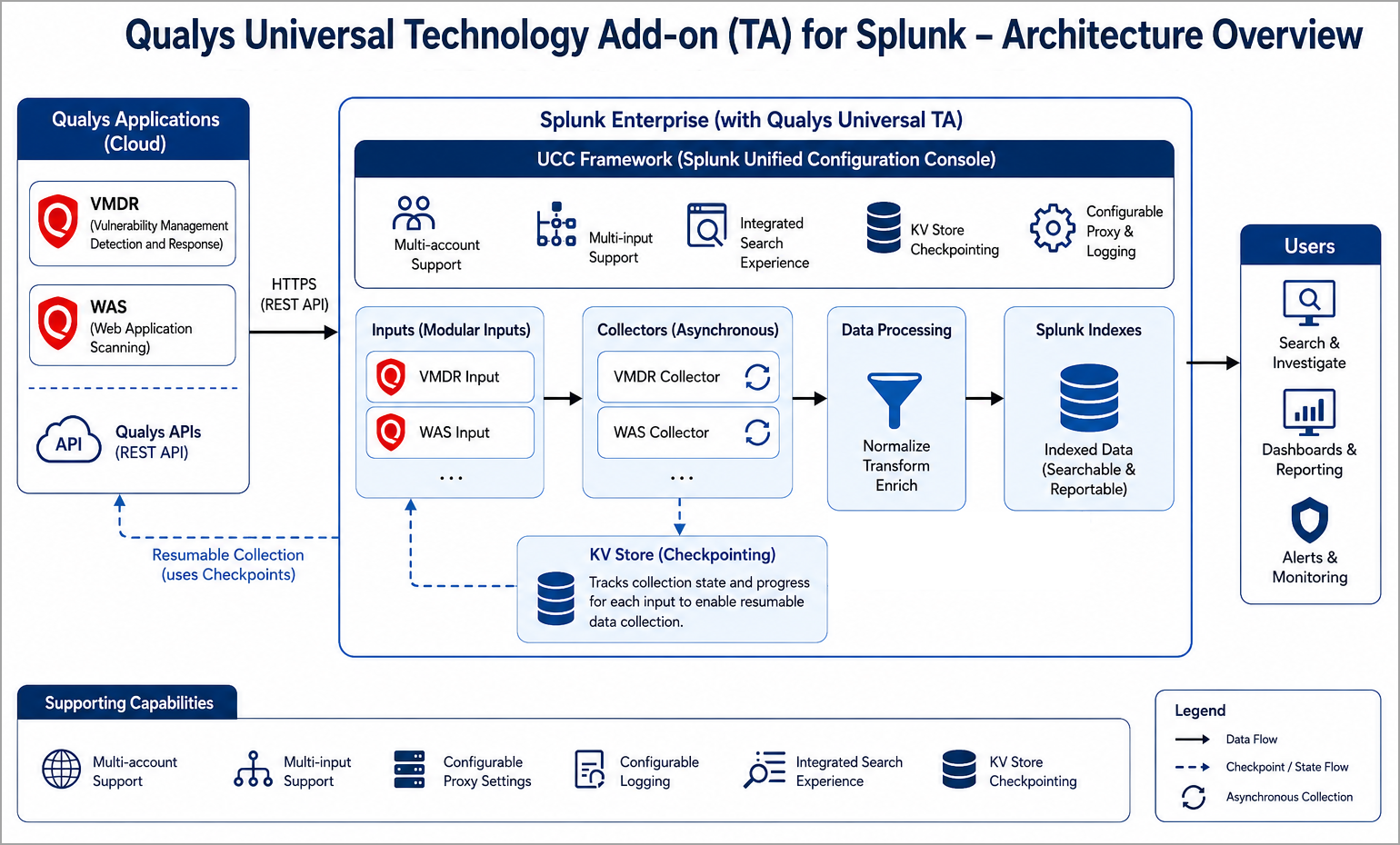
Supported Apps
The Qualys Universal Technology Add-on for Splunk, supports the following Qualys apps features:
- VMDR (Vulnerability Management Detection and Response)
- WAS (Web Application Scanning)
Key Features
The Qualys Universal Technology Add-on for Splunk, has the following key features:
- Modern UCC-based user interface
- Multi-account support
- Multi-input support
- Integrated search experience
- KV Store checkpointing
- VMDR scan data collection
- WAS scan collection
- Configurable proxy settings
- Configurable logging
Prerequisites
Before installing and configuring the Qualys Universal Technology Add-on (TA) for Splunk, ensure that the following requirements are met.
You need to use a system running Linux.
Qualys Requirements
The following requirements must be met on the Qualys side:
- Active Qualys subscription
- Valid API credentials
- Required module access permissions (VMDR, WAS)
Splunk Requirements
- Supported Splunk Enterprise deployment
- Administrative privileges
- KV Store enabled and operational
Network Requirements
The following network requirements must be met:
- Connectivity to Qualys API endpoints
- Proxy configuration if required
- Access to Splunk management services
Permissions
The configured account must have sufficient privileges to access the Qualys data required by the configured inputs.
Quick Start Steps
To get started, perform the following steps: