Release Notes
The following are the improvements in the latest releases:
Qualys Core App - v3.3.0 | Qualys VMDR App - v3.0.1
May 15, 2026
Added Support for JSON-based HLD APIs
In this release, VMDR for ITSM introduces support for JSON-based data transfer jobs for users who are enabled with the new HLD API, replacing the earlier XML-based approach. This enhancement improves performance, optimizes data handling between Qualys VMDR and ServiceNow, and delivers faster API responses with better scalability.
You can begin using the updated API after completing a one-time configuration of host detection import threads, which is required for HLD-enabled accounts to enable JSON-based processing to switch to JSON-based import processing for host detection data.
If HLD is not activated for you, then you can continue using XML-based data ingestion without any changes or impact.
Ensure all supported fields (approximately 20–25 fields) are correctly mapped after the switch.
Qualys Core App - v3.2.0 | Qualys VMDR App - v3.0.1
November 20, 2025
Updated the Qualys API version 3 to version 4
In this release, we are introducing the upgrade from API v3 to API v4, bringing improved lifecycle transparency, stronger security, and a more consistent integration experience across Qualys products.
API v4 delivers enhanced security controls and improved response performance, resulting in increased reliability.
Support for OIDC Authentication
With this release, the platform now also supports OIDC (OpenID Connect) Authentication using Client ID and Client Secret credentials.
This enhancement enables improved security and alignment with modern authentication standards.
For more details, see Configure Connection to Qualys Applications
New API Filters for Host Asset Import And Host Detection Import
We have introduced new filtering capabilities to improve data precision and control in the Host Detection Import and Host Asset Import:
Host Asset Import:
- Minimum TruRisk Score
- Maximum TruRisk Score
Host Detection Import:
- Vulnerability Type: All, Potential, Confirmed
- Vulnerability Status: New, Active, Fixed, Reopened
- Minimum QDS (Qualys Detection Score)
- Maximum QDS
- Host Metadata
- Host Metadata Fields
These filters allow for more targeted imports and refined control over asset and vulnerability data flowing into ServiceNow.
Qualys Core App - v3.1.0 | Qualys VMDR App - v3.0.1
August 28, 2025
File Integrity Monitoring (FIM) Support Added
This release introduces support for FIM integration, enabling better monitoring and visibility of file changes across assets.
Qualys Core App - v3.0.0 | Qualys VMDR App - v3.0.1
May 19, 2025 (Updated July 28, 2025)
New Feature: Incident Auto Closures
The Incident Auto Closures feature automatically closes resolved incidents based on specific date conditions.
An incident will be automatically closed if any of the following dates are older than the configured threshold:
- Detection Last Found
- Asset Last Scanned date
You can set up multiple auto-closure rules to meet your operational needs.
Additionally, you can close incidents related to older configuration items (CIs).
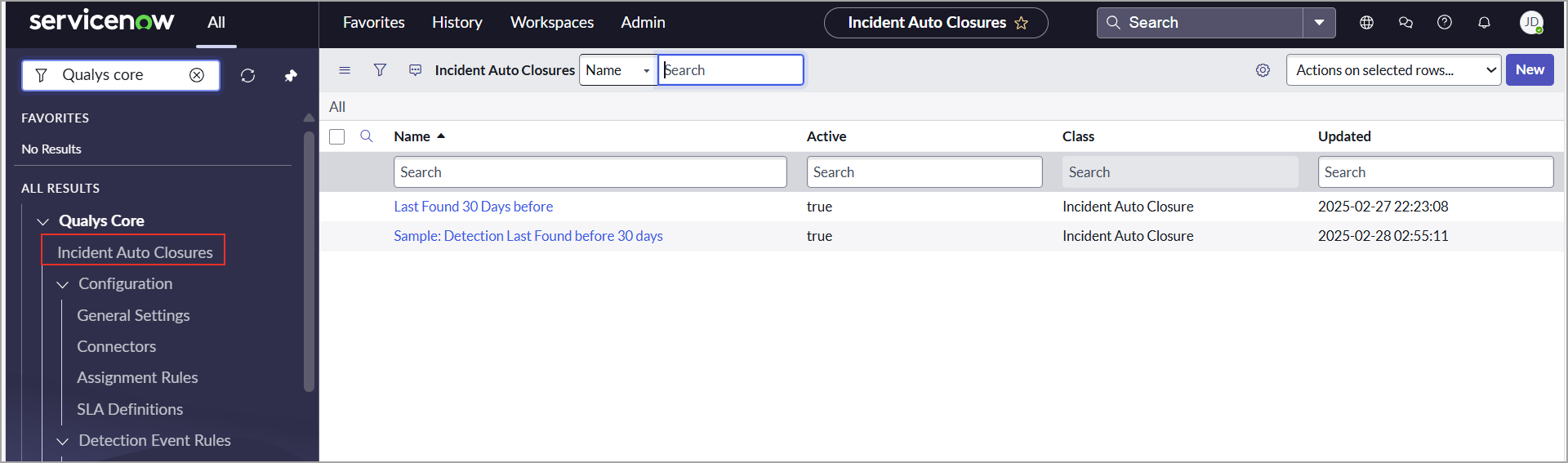
For more information, refer to Incident Auto Closures.
New Column Added: Cloud Account ID in Host Asset Table
We have introduced a new column called Cloud Account ID in the Host Asset table to enhance the management and tracking of cloud assets.
The Cloud Account ID is sourced from the Cloud Metadata – Host Asset API, ensuring accurate and consistent information across systems.
This update allows you to easily identify which assets are associated with specific cloud accounts or subscriptions, enabling:
- Enhanced accuracy in metadata association.
- Improved visibility and tracking of cloud-based assets.
- Better resource management for users and internal teams.

Enhancement: Find-CI Now Supports Serial Number Attribute
The Find CI feature has been enhanced to include a new Serial Number attribute for assets. Each asset is now assigned a unique serial number, making it easier to identify and locate the correct Configuration Item (CI).
For more information, refer to Find CI.
Issues Addressed
In this release, the following issues are addressed:
| Category | Issue |
|---|---|
|
Grouping Rule |
We have resolved an issue where the grouping rule was not triggering automatically. A business rule has been added to the Incident table to ensure it executes as expected. |
|
Mapping |
We have fixed the issue where the Configuration Item Approval Group setting was not functioning correctly due to incorrect mapping to the VMDR Task table. |
|
Import Configuration |
We have fixed the issue where inactive schedule imports triggered the error message 'Unable to find an active definition for thread. |
Qualys Core App - v2.0.1 | Qualys VMDR App - v3.0.1
October 25, 2024
Improved ITSM Compliance
Previously, new tasks were created in the Custom Task table. However, following ServiceNow's recommendations, the Qualys VMDR for ITSM and the Qualys Core app have been redesigned to utilize the ServiceNow Incident table instead of the old Custom Task table. You can create tasks directly in the ServiceNow Incident table using Qualys's flexible table options. You can create and update individual and group tickets in the Incident table. Additionally, it is now easier to identify incidents created by Qualys using the source field.
To facilitate this transition, we have updated all Assignment Rules, SLA Definitions, and detection event rules to utilize the Incident table.
We have also revised several field and table names to enhance clarity and consistency across the platform.
| Old Table | New Table |
|---|---|
| Qualys VMDR - Task Table | Incident Table |
| Qualys VMDR - Task Group | Incident Table |