Enterprise TruRisk™ Platform Release 10.36.2
December 4, 2025
Qualys Vulnerability Management (VM)
Enhanced VM Remediation Search Filters for AGMS-enabled Accounts
With this release, we have enhanced the Remediation tab search filters to improve accuracy for AGMS-enabled accounts. These changes ensure accurate filtering and better usability for remediation searches.
Key Enhancements
- Implemented AGMS workflow logic for Associated tickets and Invalid tickets filters, ensuring correct results across accounts.
- Introduced clear error messages when incompatible filter combinations are selected.
- Added a new Inactive User Ticket checkbox to filter tickets assigned to inactive users.
The following error message, Filter by either Associated or Invalid tickets, displays if the Associated tickets checkbox and the Invalid tickets checkbox are both selected together, as these conditions are mutually exclusive:
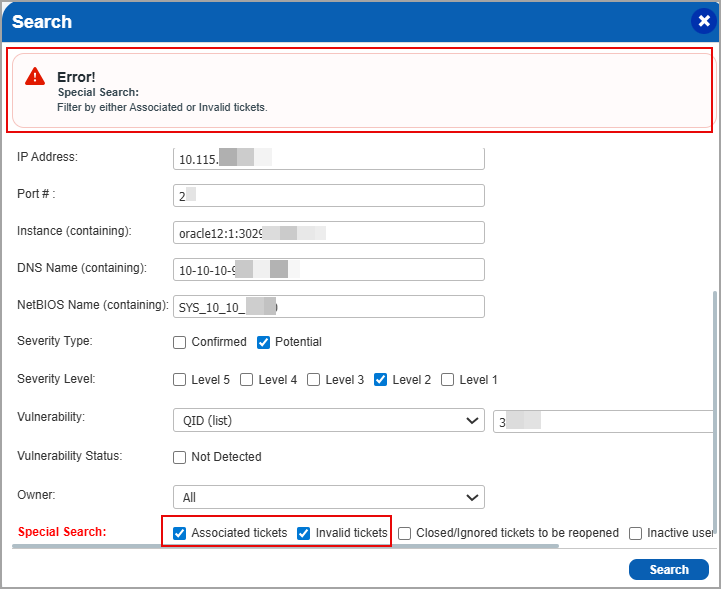
Previously, valid tickets were appearing under the Invalid tickets filter, which has now been fixed.
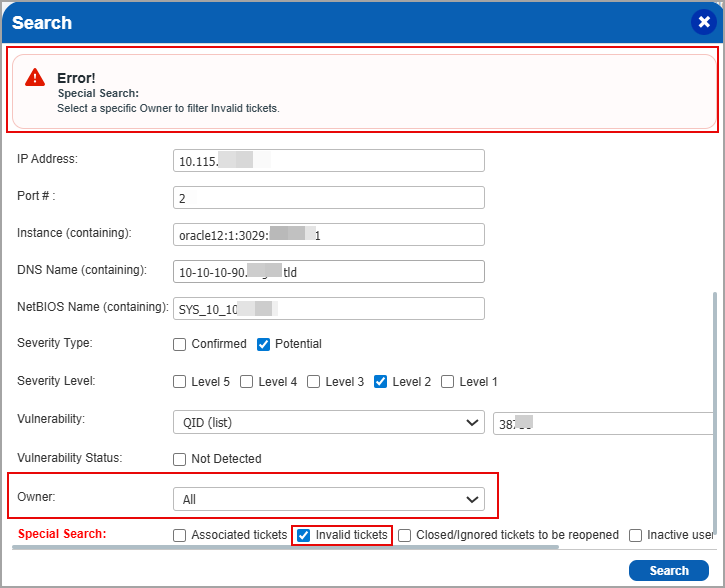
For AGMS-enabled accounts, if an invalid combination of filters is selected, the following error message, Select a specific Owner to filter Invalid tickets, prompts you to select the appropriate option. For example, the following image displays the error message when the Owner is set to All and the Invalid tickets filter is selected.
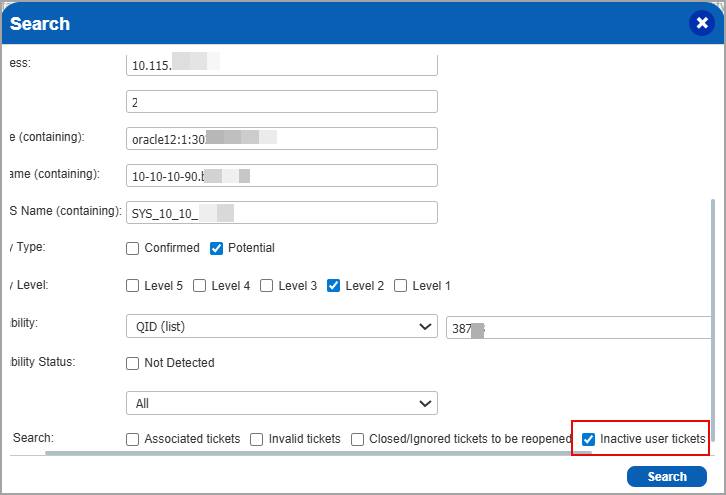
A new checkbox, Inactive user tickets, is added to AGMS-enabled accounts to filter the tickets assigned to the inactive users.
For more information, refer to the AGMS documentation in the VM Online Help.
Qualys Policy Compliance (PC)
For the list of features and improvements we have made in Policy Compliance/Policy Audit, refer to the Policy Audit UI Release Notes for Release 1.6.
Issues Addressed
The following reported and notable customer issues are fixed in this release:
| Component/Category | Application |
Description |
| VM - Reports General | Vulnerability Management | During asset searches, users observed multiple entries for QID 11406—one for 8089/TCP and another for 8089/TCP over SSL, but only one entry appeared in the VM output. However, in CSAM, two active records for TCP 8089 with same timestamps were displayed, creating data inconsistency between applications. Relevant code changes have been made to make this consistent on the VM reports side. |
| VM - Assets | Vulnerability Management | When users navigated to Assets > Setup > Asset Tracking and Data Merging Setup, the page displayed Accept Agentless Tracking Identifier and Accept Agent Correlation Identifier as the selected options. However, when the same page was opened using the Open as Popup icon, the selected options appeared as Decline Agentless Tracking Identifier and Decline Agent Correlation Identifier. This issue occurred for Manager role users who were not the primary contact for the account. This issue has now been fixed. The selected options remain consistent whether the Asset Tracking and Data Merging Setup page is opened directly or as a popup. |
| VM - User Management | Vulnerability Management | When the users downloaded the user report from the Administration module, the report did not contain the last login details. This is expected behavior, as only Manager and Unit Manager users have permission to access last login information. This behavior is now documented in the Online Help. |
| VM - Scan UI | Vulnerability Management | Users may notice a yellow triangle icon in the Total Scan Capacity Units column for a scanner appliance. Even after updating the scanner to the latest version, the icon continues to appear. This is expected behavior, the yellow icon is shown whenever the total scan capacity units are below 240. This behavior is now documented in the Online Help. |
| VM - Reports General | Vulnerability Management | When users downloaded vulnerability data from the Vulnerabilities tab, inconsistencies were observed between the CVSS scores shown on the Vulnerability Details page and those in the downloaded data. Relevant code changes have been made to fix the issue. |
the list of issues addressed in Policy Compliance/Policy Audit, refer to the Policy Audit UI Release Notes for Release 1.6.