Cloud Agent Application Release 2.7
April 01, 2026
With this release, we are introducing the following new features and enhancements for Cloud Agent application.
Support for New Module — Policy Audit Fix
We introduced a new module, Policy Audit Fix (PAF), in the Policy Audit (PA) application. The PAF module helps you identify failed controls on your assets and remediate them to meet the policy audit standards. The controls are the set of configurations that must meet the standard Policy Audit guidelines.
The Policy Audit Fix is available only to manager and unit manager users. It is not accessible to other user roles within the Policy Audit application.
PAF offers the following benefits to protect your assets against failed controls:
- Identifies failed controls to highlight asset misconfigurations that may cause security threats.
- Uses Custom Assessment and Remediation (CAR) scripts to fix misconfigured values and remediate failed controls automatically.
- Automates failed control remediation with PAF and CAR, helping eliminate potential cyber risks.
- Remediates failed controls to help you meet policy compliance guidelines.
To activate the PAF, you must have an active Policy Audit subscription and a Cloud Agent installed on your assets.
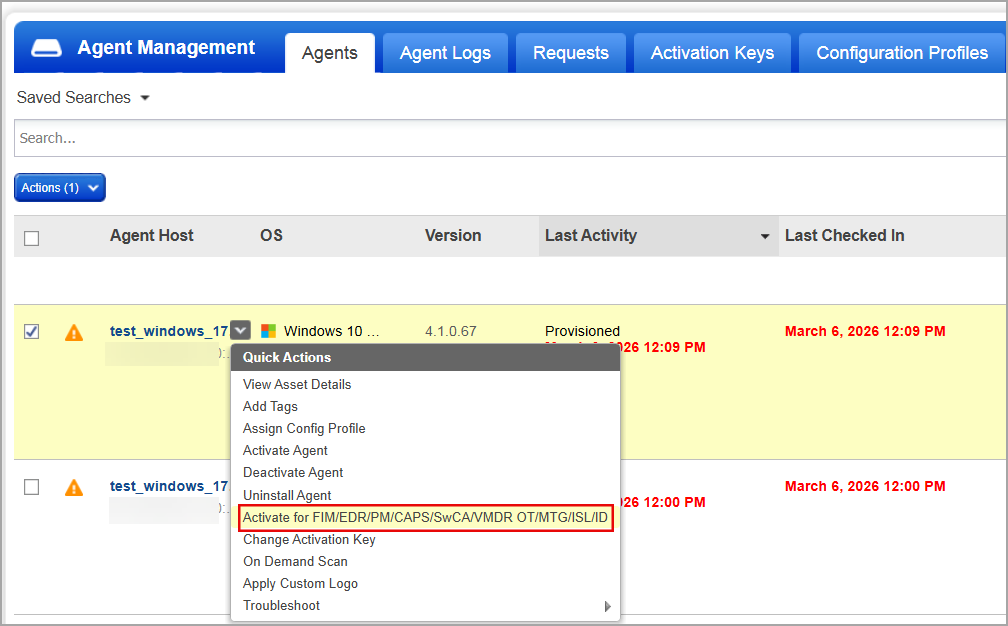
To activate PAF, navigate to Agent Management > Agents tab on the Cloud Agent user interface. Select a Cloud Agent to activate PAF and select Activate for <Application> from the Quick Actions menu. To learn more about activating PAF, refer to Activate Cloud Agent for PAF.
| Required Application Version | Policy Audit 1.10 |
To learn more about Policy Audit Fix, refer Policy Audit Online Help.
Peer to Peer Patch Distribution
We enhanced the Cloud Agent configuration to support decentralized distribution of patch artifacts. With this enhancement, you can configure Cloud Agents to distribute the downloaded patch artifacts within the same Local Area Network (LAN). This reduces reliance on the Content Delivery Network (CDN) for distributing files across all host assets.
This feature has limited availability. Contact the Technical Account Manager or Qualys Support to activate this feature. In the current implementation, the feature is planned only for Windows assets. It will be available in Cloud Agent user interface once the Windows Cloud Agent 6.5 is released.
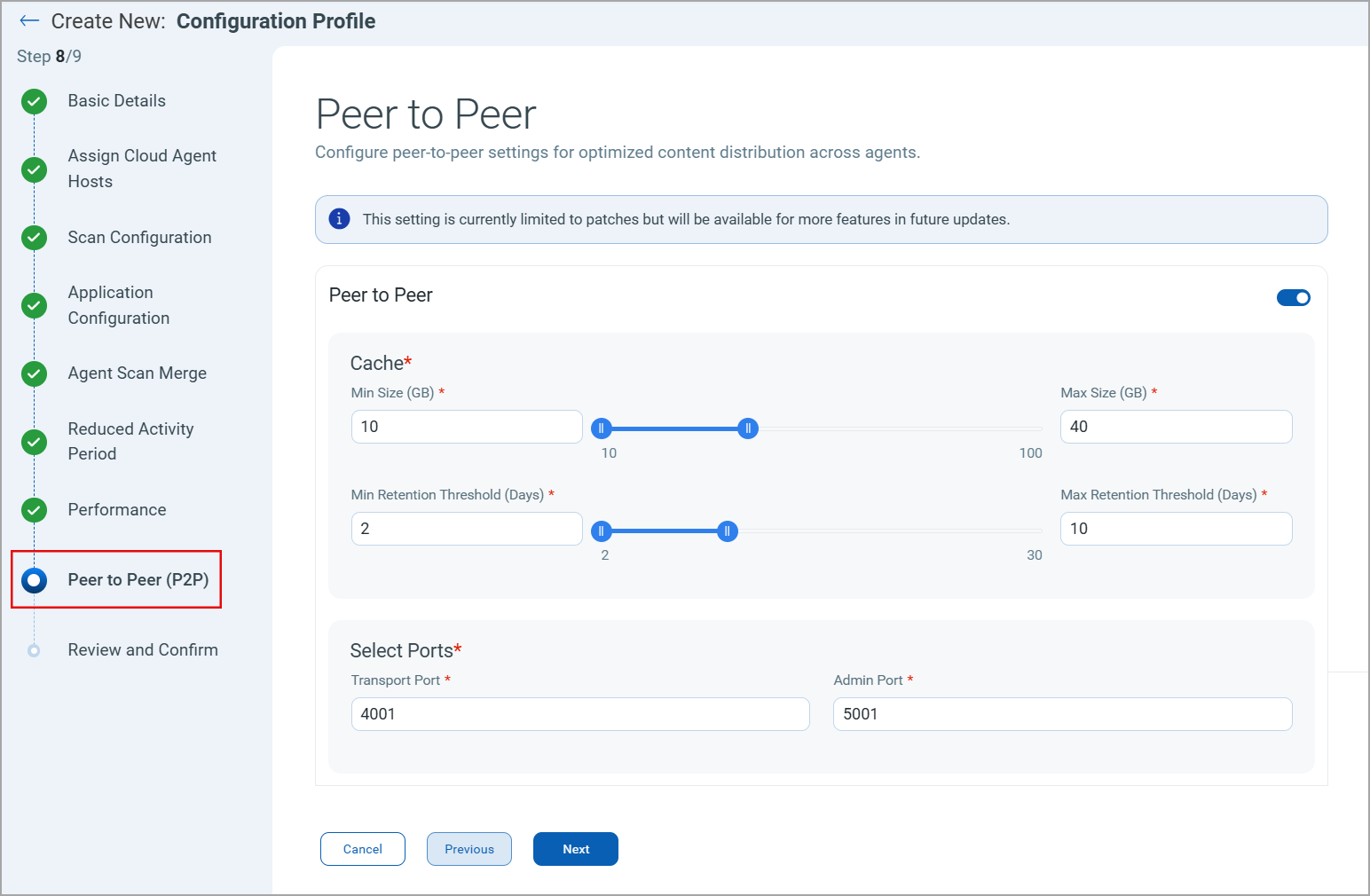
To enable this feature, navigate to the Peer to Peer (P2P) tab in the configuration profile workflow and switch the Peer to Peer toggle to ON.
This feature offers the following benefits:
- Peer-to-peer sharing reduces duplicate CDN downloads and bandwidth use.
- Patch artifact files are split into chunks for parallel download from multiple peers, increasing download speed.
- Ensures patch artifacts are uniquely identified by cryptographic Content Identifiers (CIDs) to ensure only unmodified content is downloaded and shared.
- Reduces download failures by enabling assets to obtain patch artifacts from multiple peers instead of a single server.
- Peer hosts discover each other within the same Local Area Network (LAN), enabling faster and more efficient data sharing.
- Identical artifact files and chunks are downloaded once per network, optimizing memory usage.
| Required Application Version | Cloud Agent for Windows 6.5 |
To learn more about this feature, refer to the Peer-to-Peer Patch Distribution.
Monitor WSL Instances on Windows Assets
We enhanced the Cloud Agent to support monitoring Windows Subsystem for Linux (WSL) on Linux Assets. This helps you monitor WSL instances, identify risks, and remediate them to protect your assets.
This feature facilitates determining:
- WSL Status (Running or Stopped).
- List of containers, applications, and software packages that are installed or running inside the WSL2 instances.
- Availability of Cloud Agent in a WSL instance.
This feature has limited availability. Contact the Technical Account Manager or Qualys Support to activate this feature. In the current implementation, the feature is planned only for Windows assets. It will be available in Cloud Agent user interface once the Windows Cloud Agent 6.6 is released.
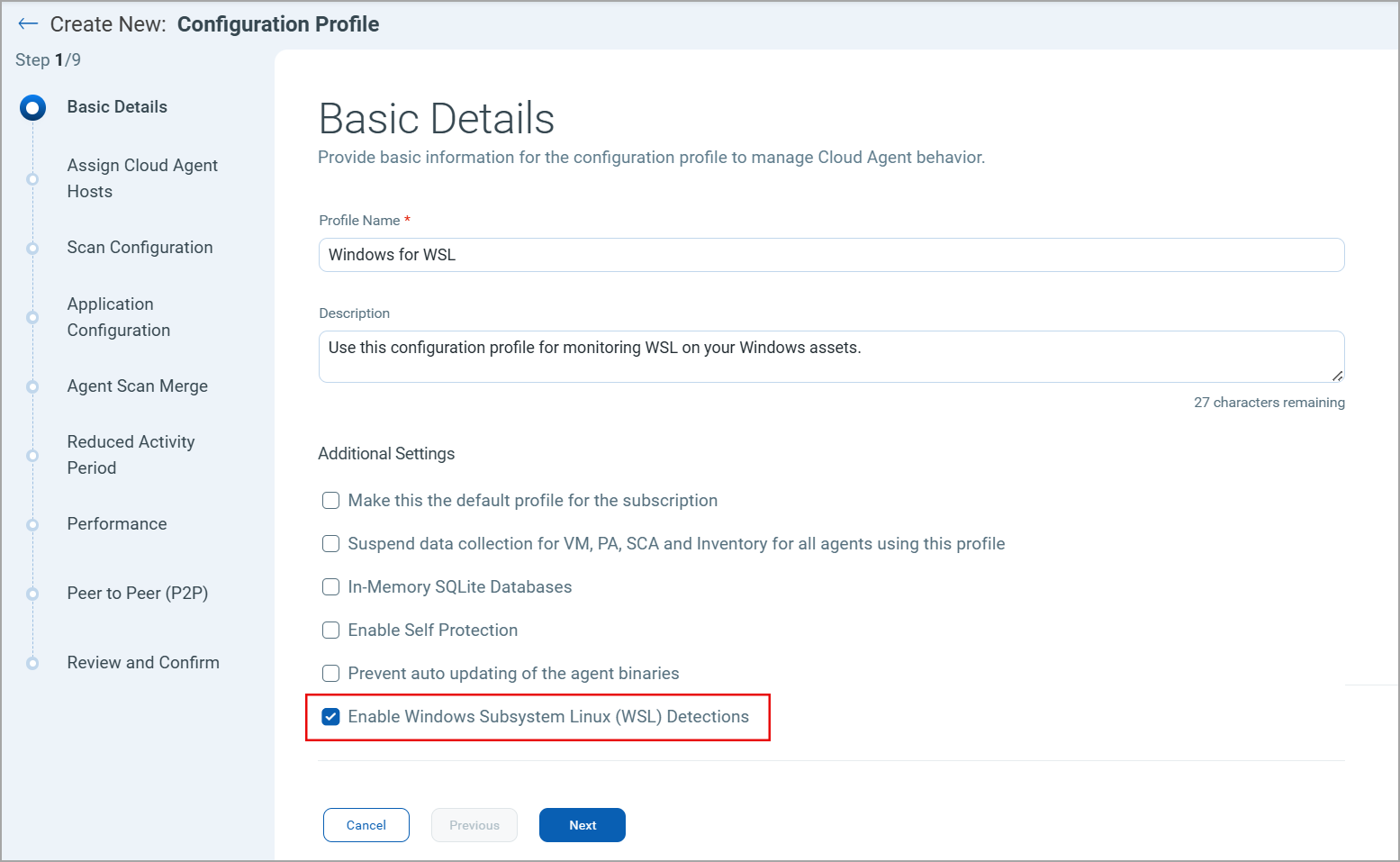
To enable Cloud Agents to monitor the WSL instances, select the Enable Windows Subsystem Linux (WSL) Detections checkbox in the Basic Details window of the Configuration Profile workflow.
| Required Application Version | Cloud Agent for Windows 6.6 |
To learn more about this feature, refer to Cloud Agent for WSL Detections.
Prevent Scans During Group Policy Execution
We introduced an option to delay Vulnerability Management (VM) and Policy Audit (PA) scans during group policy execution. Cloud Agent has been updated to include Group Policy event monitoring. This helps verify the group policy execution status and adds the configured scan delay to avoid scanning during group policy execution.
This ensures that only the latest relevant data is collected and prevents the collection of incorrect or outdated data.
This feature has limited availability. Contact the Technical Account Manager or Qualys Support to activate this feature. In the current implementation, the feature is planned only for Windows assets. It will be available in Cloud Agent user interface once the Windows Cloud Agent 6.6 is released.
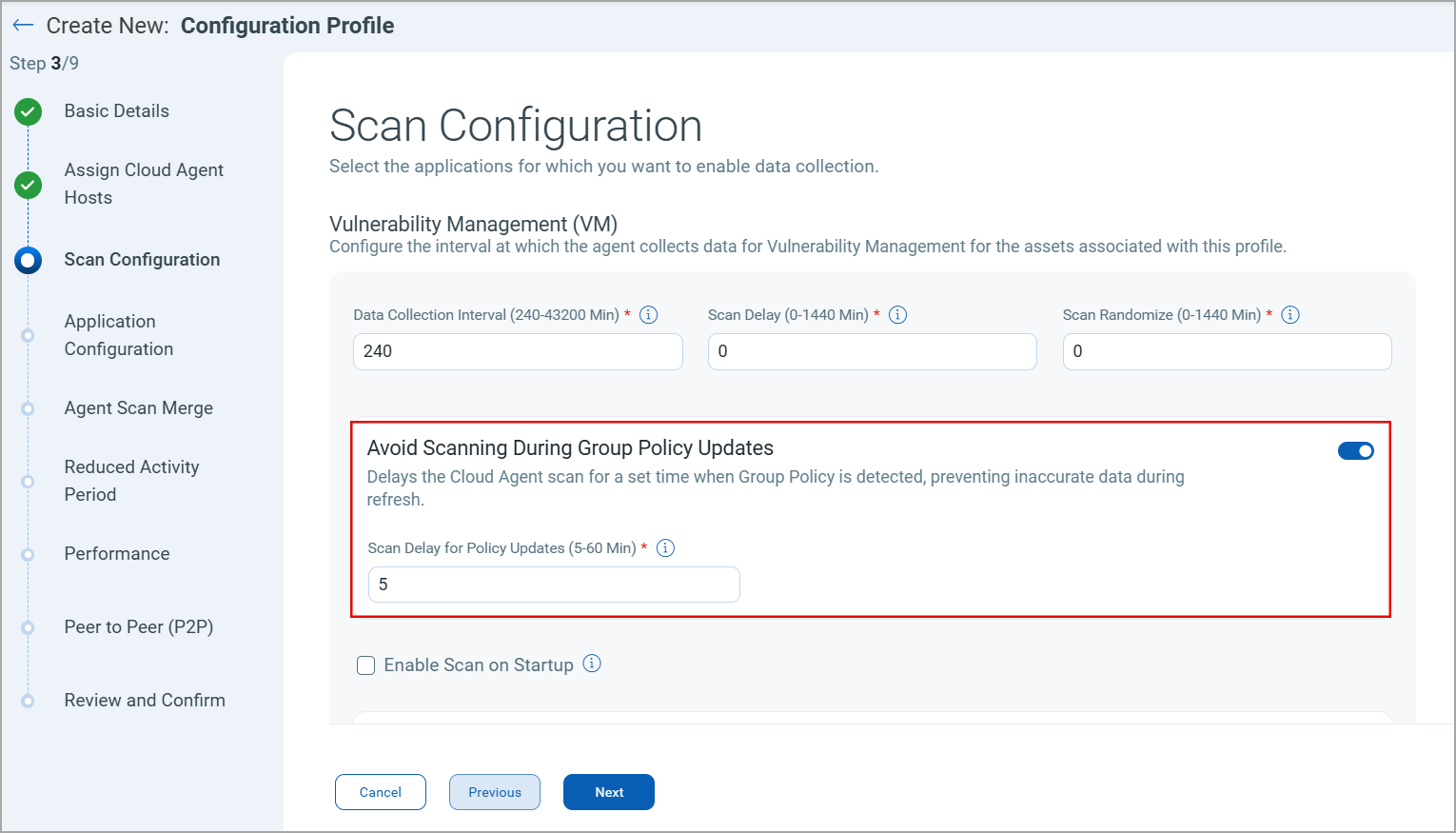
To enable this feature, navigate to Configuration Profile > Scan Configuration. Under the VM and PA section, select the Avoid Scanning During Group Policy Updates checkbox.
| Required Application Version | Cloud Agent for Windows 6.6 |
To learn more about this feature, refer to Prevent Scanning during Group Policy Execution.
Cloud Agent Enhancements
We introduced the following enhancements to the Cloud Agent user interface and its workflow.
Imposed Mandatory Title for Activation Key
Activation key titles are now mandatory when creating or editing an activation key. Existing activation keys without titles are not affected, but you must add a title when editing them.
The activation key title acts as a unique identifier. You can use titles to search for activation keys.
Implemented Access Control for Editing Activation Keys
We implemented access control for editing activation keys. Now, only the users with the proper permissions can edit the provisioned applications to an activation key.
This ensures the integrity of activation keys by restricting access to authorized users only.
To learn more about Activation Keys, refer Cloud Agent Activation Key.
Updated Installers for BSD and Solaris Cloud Agents
We updated the installers for the BSD and Solaris Cloud Agents to .PKG and .P5P, respectively. This update has the following impact on your Cloud Agents:
- BSD and Solaris Cloud Agents do not support auto-upgrade from previous versions to the latest version.
- Due to changes in the installer types, the installation commands are also updated. Refer to the Installation Guide for BSD and Solaris to learn more.
| Required Application Version | Cloud Agent for BSD 7.1 Cloud Agent for Solaris 7.1 |
To learn more about installing BSD and Solaris Cloud Agents, refer to Installation Steps for BSD Cloud Agent and Installation Steps for Solaris Cloud Agent, respectively.
Updated Syntax for Cloud Agent Binary Names
We implemented the new syntax for Cloud Agent Binary names. Earlier, the binary names displayed in Cloud Agent user interface and the actual binary names were distinct. To remove this discrepancy, we have adopted the following syntax for Cloud Agent binary names.
Binary Name Syntax: QualysCloudAgent_<PLATFORM>_<OS_Architecture>_version.exe
Example: QualysCloudAgent_WINDOWS_x64_6.1.1.1.exe
Issues Addressed
The following important and notable issues are fixed in this release.
| Category/ Component | Application | Description |
|---|---|---|
| Software Atlas | Cloud Agent - SwCA | The Software Atlas option was not visible in the SwCA configuration profile, even though it was enabled. We fixed this issue by ensuring that the SwCA is available for CSAM trial version accounts. |
Known Issues, Limitations, and Workarounds
There are no known issues for this release.