CyberSecurity Asset Management/ Global AssetView Release 3.7.3.0
September 23, 2026
This release adds new asset identification and merging controls, IPv6 support for OCI assets, and resolves several reported issues in CSAM and GAV.
New Feature
Merge Duplicate Assets using Qualys Scanner Rules
What's New for You
You can now configure asset identification rules for assets scanned by the Qualys Scanner to reduce duplicate asset records and maintain accurate asset inventory.
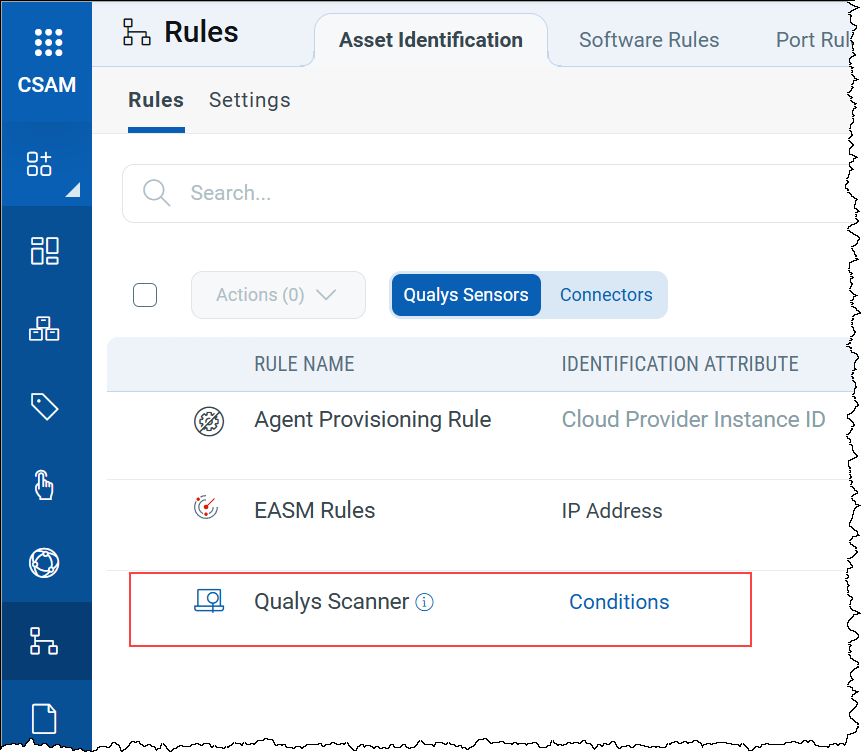
The new Qualys Scanner identification rule determines how scanner-detected assets are evaluated and merged with existing assets when standard merge identifiers, such as the correlation identifier or agentless tracking identifier, are not available.
To view and edit the new Qualys Scanner rule, navigate to Rules > Asset Identification > Rules.
For more information on the Qualys Scanner rule, refer to CSAM Online Help.
To enable this feature for your account, contact your Technical Account Manager (TAM).
New Feature
Prevent Incorrect Asset Merging with Custom Exclusions
What's New for You
You can now define custom identification exclusions to prevent assets with specific attributes from merging with existing assets.
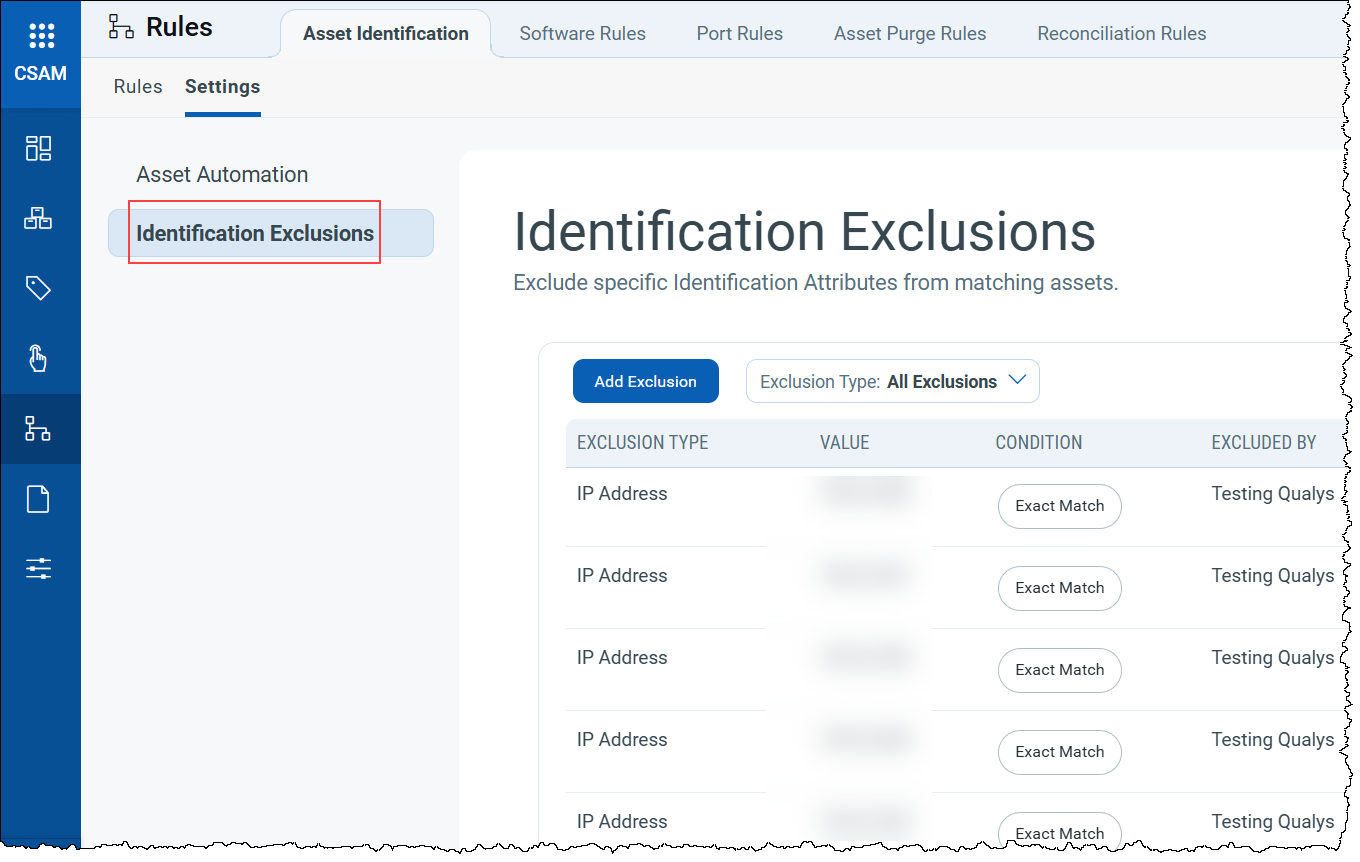
Identification exclusions provide you with control over asset merging in environments with shared infrastructure or test systems. Each exclusion is evaluated against the match conditions and attributes you select when creating it.
To add, enable, disable, or delete custom exclusions, navigate to Rules > Asset Identification > Settings > Identification Exclusions.
For more information on identification exclusions, refer to CSAM Online Help.
Enhancement
Access Public and Private IPv6 Details for OCI Assets
What Changed For You
You can now access public and private IPv6 addresses for Oracle Cloud Infrastructure (OCI) assets in CSAM.
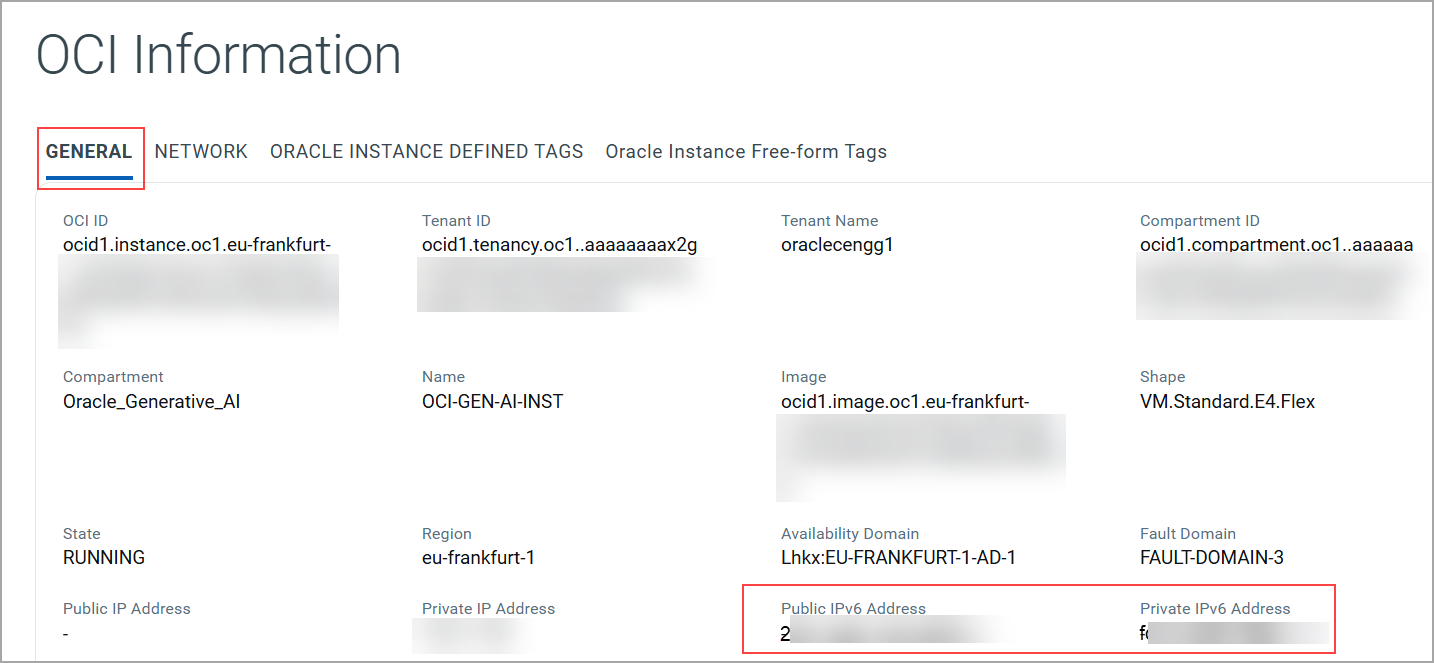
This enhancement makes it easier to identify OCI assets and quickly access their network information when investigating findings.
To view the IPv6 addresses associated with an OCI asset, select the asset from the Inventory tab and navigate to INVENTORY > OCI Information > General. The public and private IPv6 addresses are displayed in this section.
Enhancement
View DNS Records for Unresolved Domains
What Changed For You
You can now view DNS records for unresolved domains in EASM.
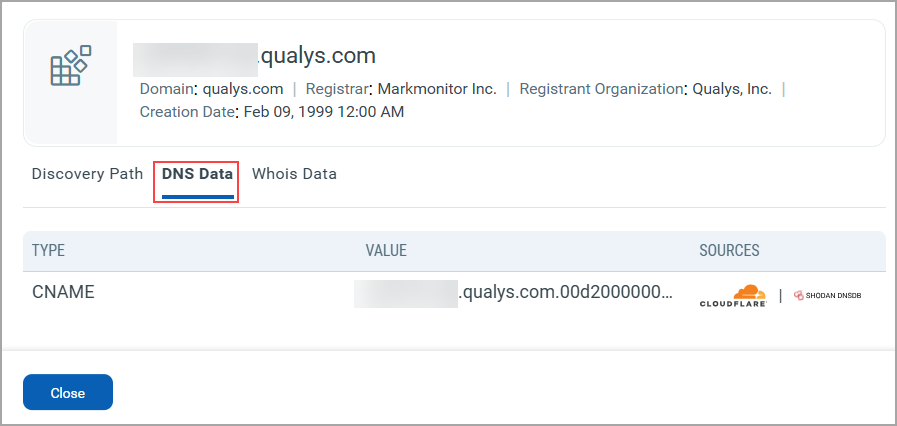
The DNS records for unresolved domains provide additional context for investigating domains that EASM discovered during enumeration but could not resolve.
These details can help you understand the domain's DNS configuration, identify related infrastructure, and uncover potential security risks.
To view the DNS records, navigate to Inventory > EASM > Domains. Select the Unresolved view, and then select a domain.
The DNS Data tab displays the Type, Value, and Source of the DNS records collected for the domain.
Find Unresolved Domains Using DNS Data
You can use DNS search tokens to quickly find unresolved domains based on their DNS data on the Inventory > EASM > Domains > Unresolved tab.
| Token | Description |
|---|---|
| dns:(source: | Search unresolved domains using the DNS source. |
| dns:(type: | Search unresolved domains using the DNS type. |
| dns:(value: | Search unresolved domains using the DNS value. |
For more information on these tokens, refer to CSAM Online Help.
API Support
The Domain APIs now support filtering unresolved domains by DNS record source, type, or value. For more information, refer to CSAM 3.7.3.0 API Release Notes.
Fix
Fixes
The following reported and notable customer issues are fixed in this release:
| Component/ Category | Description |
|---|---|
| CSAM - Connectors | We fixed an issue where VMware ESXi connectors could report an unhealthy status when asset synchronization failed for assets with multiple MAC addresses.
The connector now consistently identifies MAC addresses during asset synchronization, reducing synchronization failures and improving connector health reporting. |
| CSAM+GAV - Reports | We fixed an issue where selecting the Source Native Key column in a report caused unnecessary processing, resulting in truncated reports.
Reports are now generated successfully without any truncation. |
| CSAM - Asset Activation Workflow | We fixed an issue where active Asset Activation Workflow rules display a Next Execution On date in the past instead of a future date after an evaluation is completed.
Now, the Next Execution On date always updates after a rule runs, so the displayed date correctly reflects the next scheduled execution. |
| GAV - Database | We fixed an issue where the Database tab in Global AssetView (GAV) displayed incorrect counts of database hosts and instances when multiple instances shared the same version, technology, and port.
Now, the Database tab displays accurate host and instance counts. |
| CSAM - Responses | We fixed an issue where viewing job status or progress under Response > Jobs displayed an Application Crashed error.
You can now view job status and progress without encountering the application crash. |
| CSAM - Software Rules | We fixed an issue where saving changes to an existing software rule results in an error.
Now, modifying existing software rules saves successfully. |
| CSAM - Hardware Identification | We fixed an issue where the hardware category is displayed as Unidentified for network and proxy devices on the Asset Details > Asset Summary tab.
The Asset Summary now correctly identifies the hardware category for affected assets. |
| CSAM - Asset Missing Agent count | We fixed an issue where the Assets Missing Agent widget on the CSAM home page displayed inaccurate asset counts. The QQL query behind the Assets missing Agent widget is updated to exclude operating system manufacturers that are not supported by the Cloud Agent.
The widget now provides accurate visibility into asset count. |
| CSAM - Instance Details | We fixed an issue where viewing details of some software instances on the Asset Details > Inventory > Software Instances tab returned a page not found error.
Now, instance details are displayed correctly. |
| CSAM - EASM Open Ports | We fixed an issue where the EASM Open Port Details report includes open ports discovered by other asset sources instead of only EASM-discovered ports.
The report now correctly includes EASM-specific open ports. |
| CSAM - Installed Software | We fixed an issue where Windows applications did not show End-of-Life (EOL) and End-of-Support (EOS) status in Asset Details > Inventory > Installed Software > Windows Apps.
Now, Windows Apps display EOL and EOS status correctly. |
| CSAM - Installed Software | We fixed an issue where incorrect EOS dates were displayed for software installed across different Linux distributions.
The system now determines EOS dates based on the specific Linux distribution where the software is installed. |
| CSAM - Asset Search API | We fixed an issue where the asset.createdDate filter returns inconsistent results when full timestamps are provided in date filters in the /rest/2.0/search/am/asset API.
The API now correctly evaluates the full timestamp, ensuring assets are returned based on their actual creation date. |