Configure Reconciliation Rule
Configure the reconciliation rule to merge assets that Qualys native sensors discover with assets that third-party sources already identified, and choose whether the rule runs on demand or on a recurring schedule.
Navigate to: Inventory > Rules > Reconciliation
Use this to
- Merge duplicate records for the same host into one managed asset.
- Reconcile Qualys sensor data with third-party source data.
- Run the rule on demand or on a 24-hour schedule.
When to use the reconciliation rule
Use a Reconciliation Rule when a third-party source has already identified an asset that a Qualys native sensor, such as the Qualys agent or scanner, then discovers again on a different schedule.
Scenario — during asset sync or asset discovery, the same IP address is discovered by different scans. An IP scan and a ServiceNow scan each identify an asset with the same IP address, and the ServiceNow scan found its asset first.
Configure and run the reconciliation rule to merge those assets into a single managed asset.
If you see duplicate entries for the same host in your inventory after you connect a third-party source, run the reconciliation rule and then review the asset list again to confirm that the duplicates were merged.
Configure and execute the rule
- Go to the Inventory > Rules > Reconciliation tab, and click Configure from the Quick Actions menu.
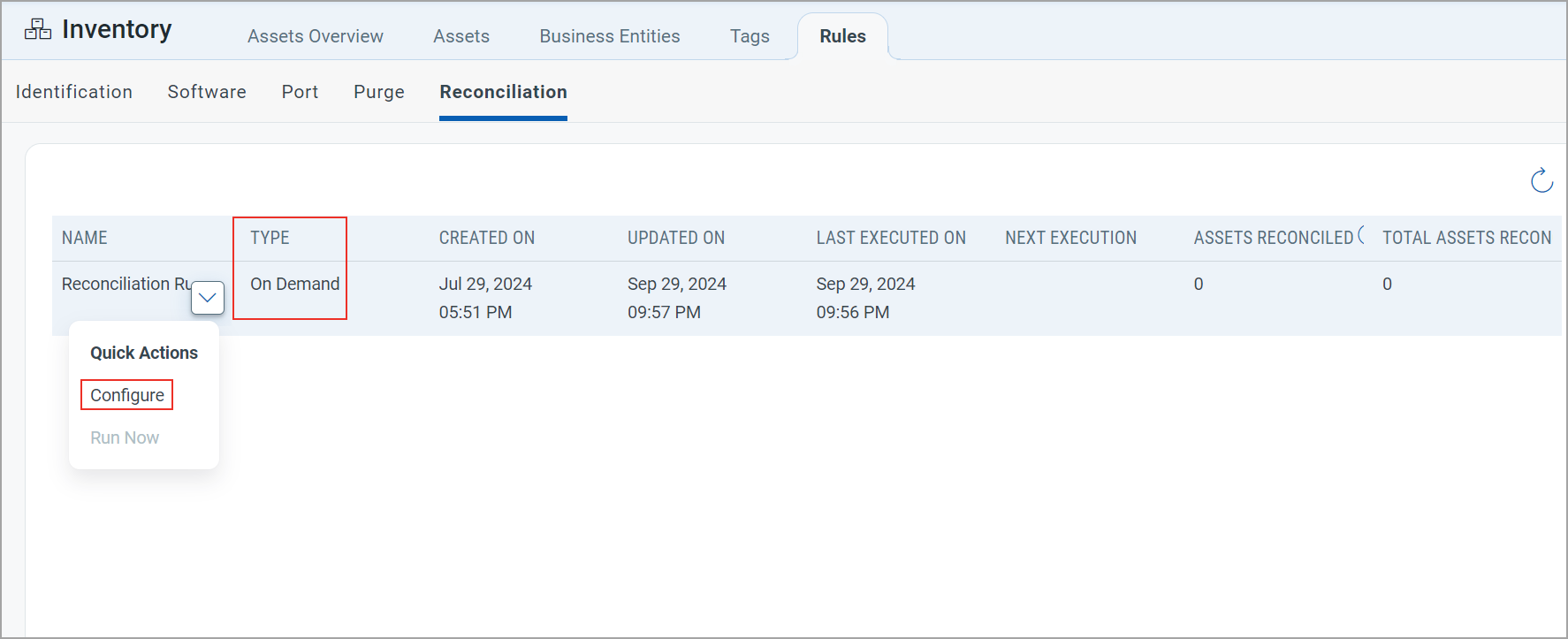
- Click On Demand or Recurring, then click Save.
Recurring and on-demand execution
Choose how the rule executes:
- Recurring — the first reconciliation runs 5 minutes after you configure the rule. Every reconciliation after that runs 24 hours later.
The Type column shows Schedule.
- On Demand — the rule runs only when you start it. The first time you configure the rule, the Run Now option is available.
The Type column shows On Demand.
For later runs, Run Now becomes available only once 24 hours have passed since the date and time in the LAST EXECUTED ON column. Until then it appears dimmed.