View All Defined Business Entities
See every business entity defined for your organization, and find the navigation options that open the Create Business Entity page.
Navigate to: Inventory > Business Entities
Use this to
- Check which business entities your organization has already defined.
- Open the Create Business Entity page from wherever you are working.
Open the Create Business Entity Page
Three navigation options open the Create Business Entity page.
| Starting point | What to do |
|---|---|
| Onboarding page | Click Define Business Entity. |
| Inventory tab | Go to Inventory > Business Entities > Create Business Entity. |
| Home page | Go to Home > Create Business Entity. |
All three navigation options open the same Create Business Entity page, so use whichever one is closest to where you are working.
View the Defined Business Entities
Business entities you create appear under the Inventory tab. This screenshot shows a few defined business entities.
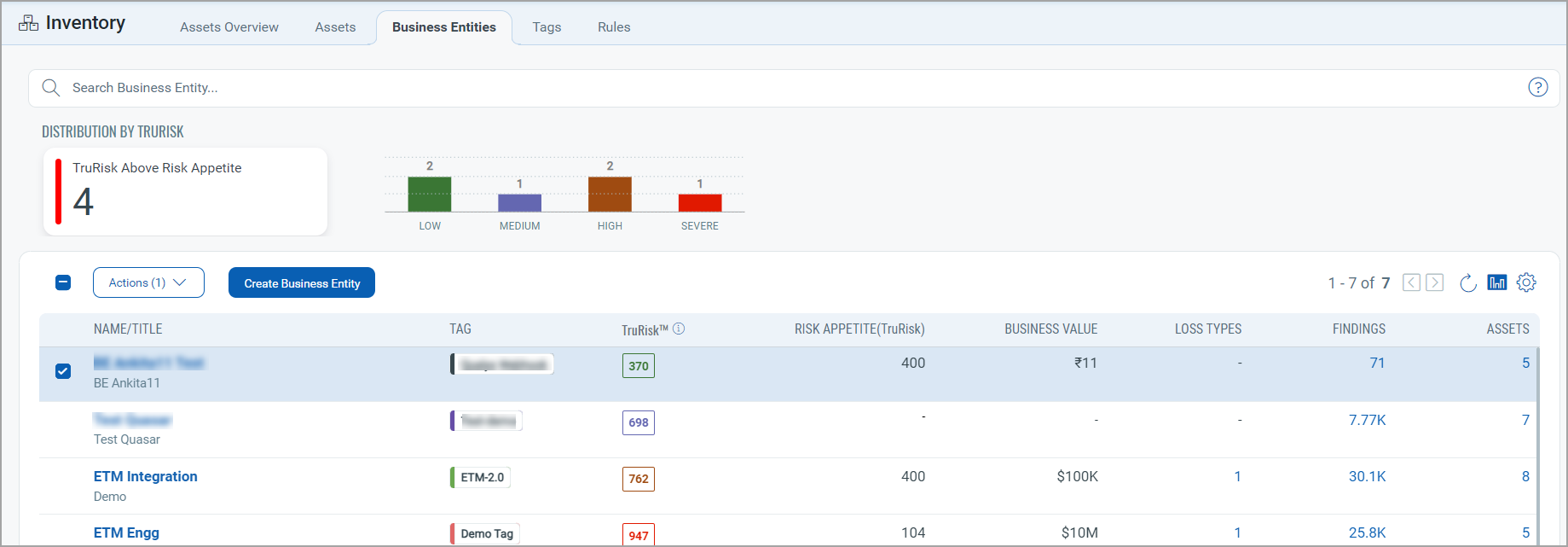
Review this list before you define a new business entity, so that you do not create a duplicate of an entity that a colleague has already defined.