TotalCloud Release 2.21
January 12, 2026
TotalCloud 2.21 brings updates to attack path coverage, inventory, policy management, controls, and others.
Important Announcement: Migration to Azure SDK for Java v2
We would like to inform you that the Azure SDK used by Qualys CloudView services has been upgraded from Azure SDK for Java v1 (1.41.4) to Azure SDK for Java v2 (Resource Manager SDK). This upgrade affects multiple CloudView and Connector services, modernizing how Azure authentication, resource discovery, evaluation, remediation, and throttling are handled.
What you should know:
- Azure SDK for Java v1 (1.41.4) was officially deprecated by Microsoft in 2022, with security fixes supported only until March 31, 2023.
- Continuing to use the deprecated SDK posed security, compatibility, and long-term maintenance risks.
- To ensure stability and compliance with Microsoft’s recommended best practices, we have migrated all Azure integrations to Azure SDK for Java v2 (Resource Manager SDK).
Learn More:
This update is for your awareness only. No changes or actions are required from your side.
Extended Attack Path coverage support for insights
Applicable for: 
With this release, we are extending the Attack Path visualization support for the following AWS insights. Now, you can have a comprehensive view of your cloud account's attack surface.
| Insight CID | Title |
|---|---|
| 5000 | Public VM with TruRisk score > 800 |
| 5001 | Port scan on public VM with a critical exploitable vulnerability |
| 5003 | SSH brute-forcing on a public VM with critical/high vulnerabilities |
| 5004 | Malware detection on a public VM with misconfigurations and vulnerabilities |
| 5006 | Misconfigured VM with active port scan |
| 5007 | Resource infected with critical/high-severity malware |
| 5008 | DNS exfiltration or tunneling on public VM |
| 5010 | C2 DNS detected on VM with a critical exploitable vulnerability |
| 5011 | C2 HTTP/HTTPS detected on VM with a critical exploitable vulnerability |
| 5012 | Successful brute-forcing on Windows VM with critical/high vulnerability |
| 5013 | RDP hot account scan on Windows workload with critical vulnerability |
| 5014 | Public VM with no encryption on attached EBS volumes |
| 5016 | Public VM with critical exploitable vulnerability and attached EBS volumes not encrypted |
| 5018 | Malware detection on publicly exposed VM with no encryption on attached EBS volumes |
| 5019 | Critical exploitable vulnerability on public VM with administrative privilege |
| 5020 | Privilege escalation risk on public VM with critical exploitable vulnerability |
| 5022 | Critical exploitable vulnerability on public VM with destructive permissions for AWS KMS |
| 5023 | Risk of cloud log tampering on public VM with SSH brute-forcing |
| 5025 | Public VM with privilege to create IAM artifacts (User, Group, Role) |
| 5026 | Security group tampering risk on public and vulnerable VM with 'write' permission over security groups |
| 5028 | IAM User with privilege escalation or administrative privilege have console access with MFA not enabled |
| 5029 | Public VM with data destructive permissions |
| 5030 | Public VM with elastic IP hijacking permissions |
| 5031 | Public VM allows access to decrypt secrets in secrets manager |
| 5032 | Public VM with AWS Organization management permissions |
| 5034 | Security group tampering risk due to a public serverless function |
| 5035 | Anomalous credential access detection on IAM user with console access and privilege escalation/admin permission and No MFA |
| 5036 | Defense Evasion risk detected on IAM user with console access and privilege escalation/admin permission and No MFA |
| 5037 | Data exfiltration risk on IAM user with console access and privilege escalation/admin permission and No MFA |
| 5038 | Anomalous data tamper risk detected on IAM user with console access and privilege escalation/admin permission and No MFA |
| 5039 | Instance credential exfiltration through instance launch role from another account within AWS |
| 5040 | Privilege escalation detected on IAM user with console access with admin permission and No MFA |
| 5041 | Initial access detected on IAM user with console access with privilege escalation/Admin permission and No MFA |
| 5042 | Unauthorized access associated with persistence detected on IAM user with console access with privilege escalation/Admin permission and No MFA |
| 5043 | Reconnaissance detected due to malicious IP address on IAM user with console access with privilege escalation/Admin permission and No MFA |
| 5044 | Denial of Service (Dos) attack using DNS/TCP/UDP protocol detected on public VM |
| 5046 | Public VM with Unprotected EMR-Related Port Which Is Being Probed by a Known Malicious Host |
| 5047 | Data Exfiltration Risk Due to Public VM Running Malware That Uses DNS Queries for Outbound Data Transfers |
| 5048 | Suspicious Activity on Public S3 Bucket Detected by IAM Entity Invoking S3 API to Delete Data |
| 5050 | IAM Principal Has Granted Access to an S3 Bucket to the Internet by Changing Bucket Policies or ACLs |
| 5051 | Discovery of Resources from Malicious IP Address on Public S3 Bucket |
| 5052 | Qualys Predicted High-Risk Vulnerabilities on Public VM with Administrative Privilege |
| 5053 | Unauthenticated Vulnerability Detected in Public VM with Denial of Service Attack Risk |
| 5054 | Zero-Day Vulnerability Detected on Public VM |
| 5055 | CISA Known Exploitable Vulnerability on Public VM |
| 5057 | Public Exploitable Vulnerability Detected on VM with Suspicious Communication |
| 5058 | Privilege Escalation Risk on Public VM with Malware Associated with Vulnerability |
| 5061 | Public VM with Vulnerability Associated to Ransomware |
| 5062 | Easy exploitable vulnerability detected on public VM |
| 5063 | Public exploitable vulnerability detected on VM |
| 5064 | Vulnerability detected on VM with potential privilege escalation risk |
| 5065 | Unauthenticated exploitable vulnerability detected on VM |
| 5066 | Public VM with wormable vulnerability detected |
| 5067 | Public serverless function with IAM write permissions on RDS |
| 5068 | Public serverless function with data destructive privilege |
| 5069 | Public serverless function IAM role with KMS destructive privilege |
| 5070 | Public serverless function with write permission on critical configuration for s3 |
| 5071 | Public serverless function with write permissions on security group |
| 5072 | Data breach risk due to a public VM with Amazon RDS database SQL query execution permissions |
| 5073 | Data destruction risk due to malware on public VM with data destructive permissions |
| 5074 | Public VM with write access on database with SSH brute-forcing |
| 5075 | Public VM with wildcard access on IAM with vulnerability associated with ransomware |
| 5076 | Potential privilege escalation on public VM with wildcard access on EKS detected with vulnerability |
| 5077 | CISA known exploitable vulnerability detected on public VM with wildcard access on Lambda |
| 5078 | Publicly exposed S3 bucket with cross-account access |
| 5079 | Public Load Balancer |
| 5080 | Public VM with wildcard resource access on S3 bucket with critical exploitable vulnerability |
| 5081 | Privilege escalation and lateral movement risk detected on public VM due to Arbitrary Code Execution via Windows Themes vulnerability |
| 5082 | OpenSSH Remote Code Execution (RCE) exploitation attempt on public VM with critical exploitable vulnerability |
| 5083 | Atlassian confluence data center and server remote code execution (RCE) vulnerability detected on public VM |
| 5084 | Microsoft HTTP/2 Protocol Distributed Denial of Service (DoS) Vulnerability detected on public VM |
| 5085 | Public VM running with Chrome Browser 120.0.6099.234(Mac) and 120.0.6099.224(Windows and Linux) which are actively attacked vulnerabilities and have public exploit |
| 5086 | Data destruction risk due to public and vulnerable VM with data destruction permissions |
| 5087 | Public VM with write access on database |
| 5088 | Public VM with wildcard access on IAM |
| 5089 | Public VM with wildcard access on EKS |
| 5090 | Public VM with wildcard access on Lambda |
| 5091 | Malware detected on public VM with privilege escalation risk |
| 5092 | Public VM with wildcard access on Cloudtrail |
| 5093 | Public VM with wildcard access on Cloudwatch |
| 5094 | Potential indication of data exfiltration activity on a public and vulnerable VM |
| 5096 | Suspicious communication on public VM with wildcard access on IAM |
| 5097 | Critical exploitable vulnerability on public VM with cross-account access |
| 5100 | Potential unauthorized access due to persistence privilege detected on public VM |
| 5101 | Suspicious communication detected on public VM with access to discover other resources within AWS |
| 5102 | Public VM with wildcard access on CloudWatch with vulnerability associated with ransomware |
| 5103 | CISA known exploitable vulnerability detected on public VM with wildcard access on CloudTrail |
| 5104 | Public VM with wildcard resource access on S3 bucket |
| 5106 | Wildcard access on RDS detected on public VM |
| 5107 | Suspicious communication detected on public VM with access to discover other resources within AWS |
| 5109 | Data breach risk due to a public VM with Amazon RDS database SQL query execution permissions detected with a critical vulnerability |
Enhanced Connector Configuration in User Onboarding via Launch Stack
Applicable for: 

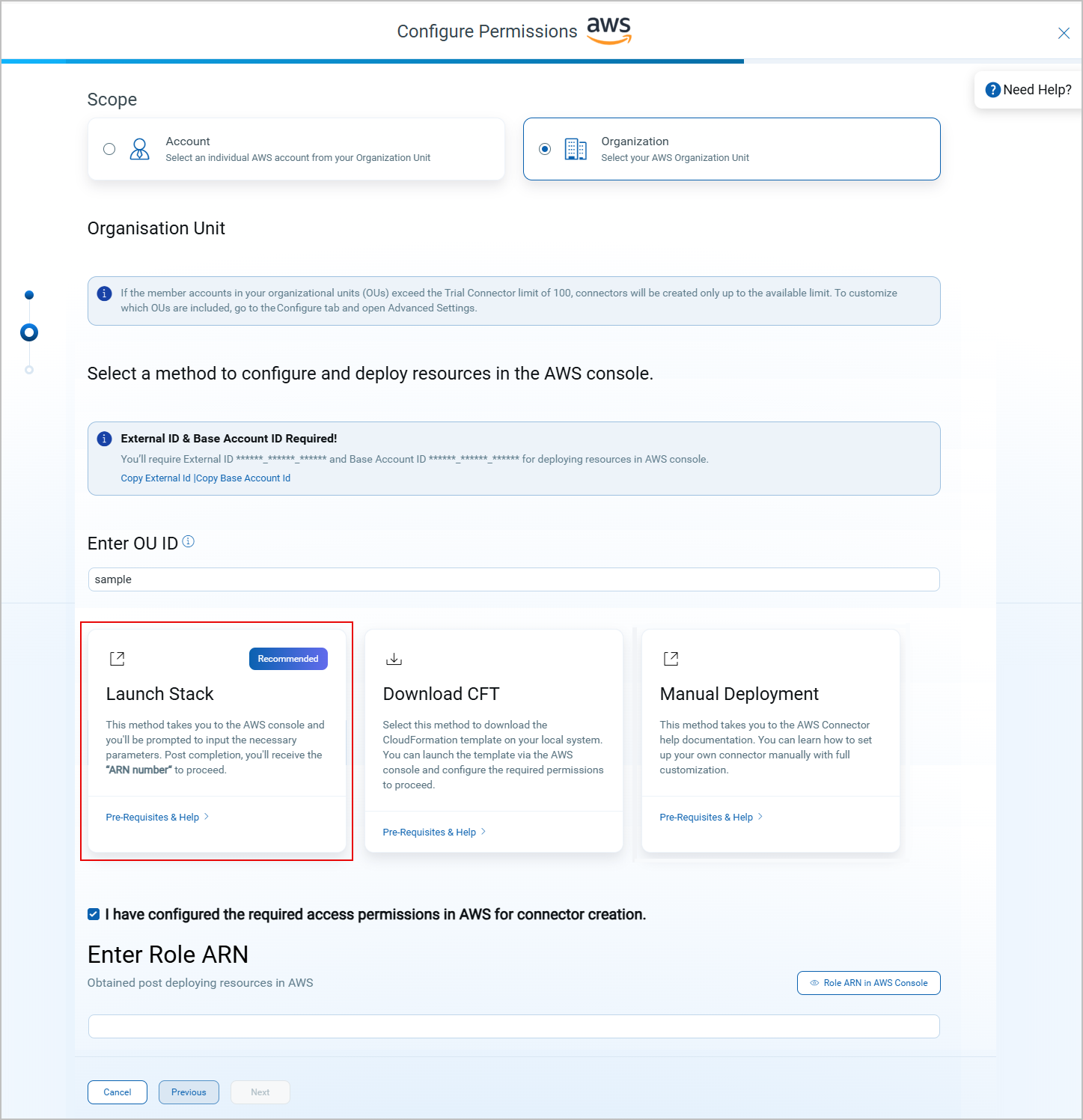
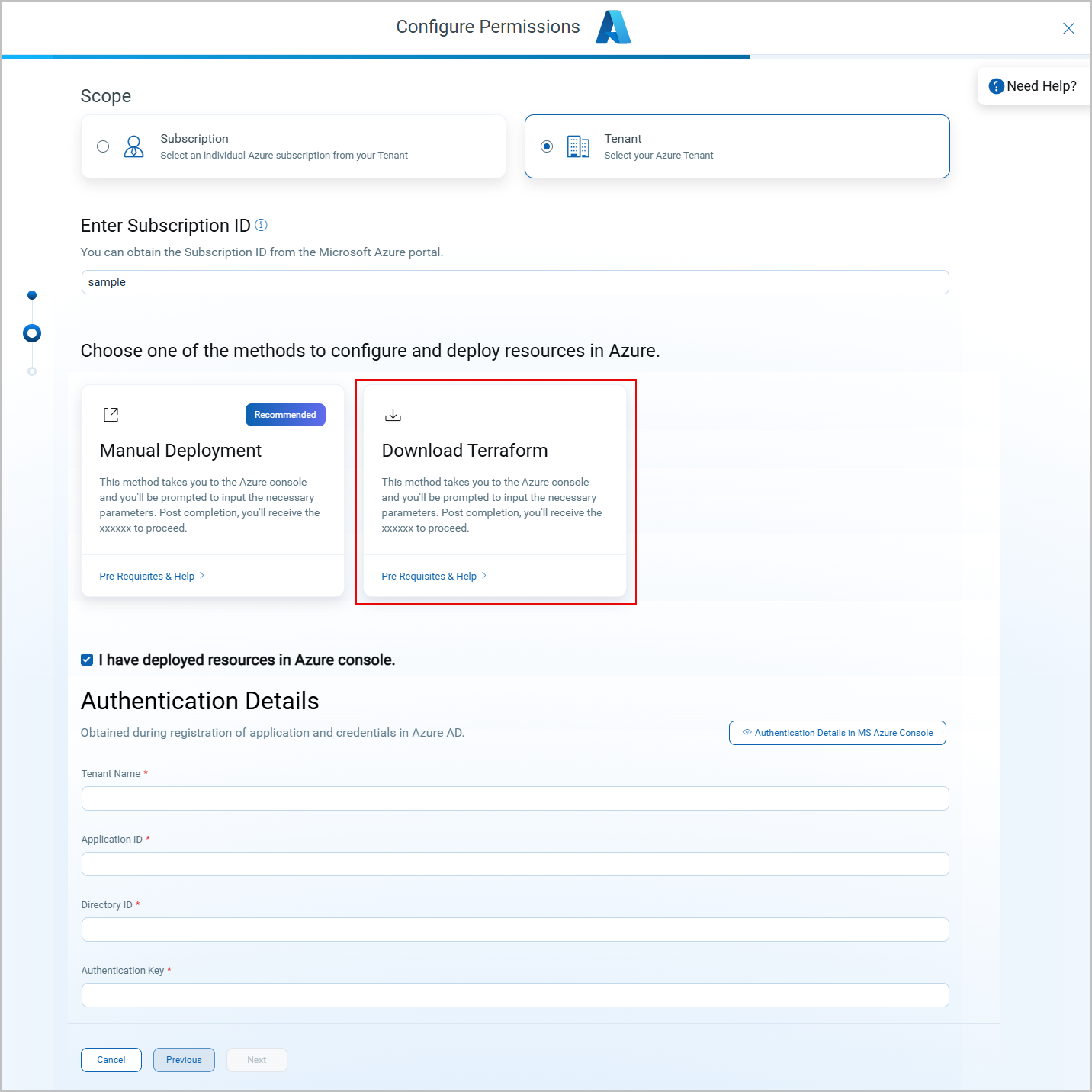
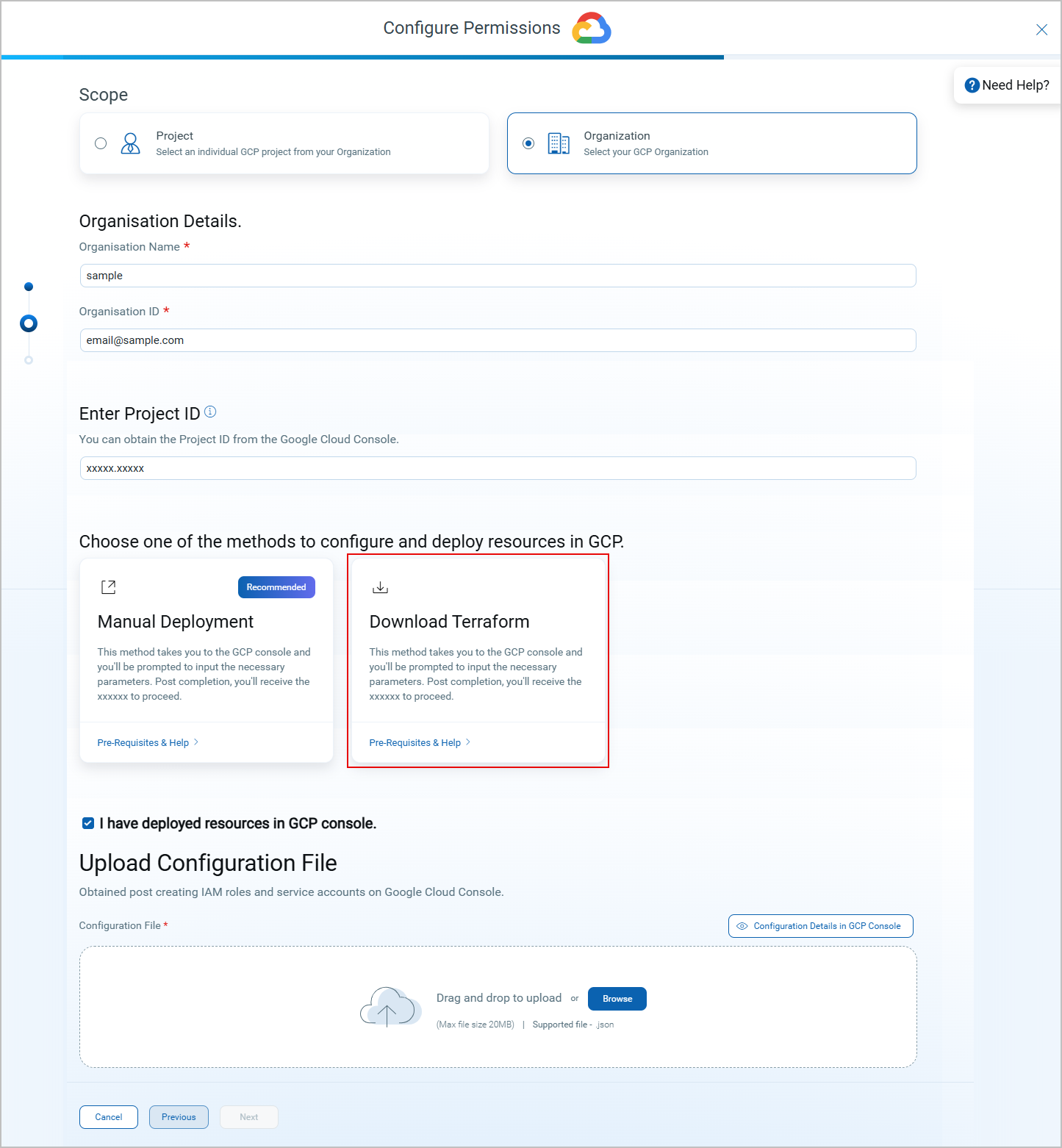
With this release, we have further improved the onboarding and connector configuration experience in TotalCloud by expanding support for organization/tenant connector setup across AWS, Azure, and GCP. To understand the enhancements introduced earlier, you can refer to the previous release notes here.
You can now configure organization/tenant connectors directly through the Launch Stack workflow, in addition to the existing onboarding configuration options.
Key Benefits
-
Faster Configuration: Enables quicker setup of organization/tenant connectors without switching between workflows.
-
Greater Flexibility: Provides an additional method to onboard connectors based on user preference or cloud provider requirements.
-
More Complete Setup Flow: Enhances the overall configuration experience for multi-account and organization-level environments.
For more detailed onboarding steps, check out the onboarding sections for your cloud provider in our TotalCloud online help: AWS | Azure | GCP.
New Launch Stack option for AWS.
New Download Terraform option for Azure.
New Download Terraform option for GCP.
Enhanced Policy Management
Applicable for: 
With this release, we have introduced the ability to add or remove connectors from any system-defined policy. Previously, default policies were automatically applied to all newly created connectors without the option to modify assignments. This often resulted in unnecessary resource evaluations when certain system-defined policies were not applicable.
You now have full control to decide which connectors should belong to which policies. The modification options for user-defined policies remain unchanged.
Key Features
- System-defined policies can now be edited to include or exclude connectors based on your requirements.
- Connector tags can be linked to policies, ensuring that all tagged connectors automatically inherit the policy. Policies can be applied either individually to connectors or through connector tags.
- You can now search for tagged or untagged connectors using the same QQL syntax used for CPSM connectors.
- By default, starting this release, only CIS policies will be attached to newly created AV+CSPM connectors, and to any AV-only connectors converted to AV+CSPM.
- Only run-time policies can be modified. build-time policies cannot be edited.
- Only connectors (or connector tags) can be added or removed from a policy, the controls within the policy cannot be changed.
- Since only CIS policies are attached by default to newly created AV+CSPM connectors, dynamic inventory (evaluation-based) behavior may be impacted, as not all controls will be evaluated. The list of impacted resources is provided below for reference.
AWS - Impacted Resource TypesAWS - Impacted Resource TypesResource Dynamic Inventory Impacted KMS No RDS_SNAPSHOT Yes DOCUMENT_DB_INSTANCES Yes EC2_VOLUME_SNAPSHOT Yes DOCUMENT_DB_CLUSTERS Yes NEPTUNE_DB_CLUSTERS Yes MEMCACHED Yes REDIS Yes ES_DOMAIN Yes FIREHOSE Yes DYNAMO_DB_TABLE Yes DIRECTORY Yes QLDB_LEDGER Yes WORKSPACE Yes DOCUMENT_DB_SNAPSHOTS Yes NEPTUNE_DB_SNAPSHOTS Yes TRANSIT_GATEWAY Yes EMR_CLUSTER Yes SYSTEM_MANAGER Yes ACM_CERTIFICATE Yes KINESIS_STREAM Yes DAX_CLUSTER Yes MQ_BROKER Yes ACCELERATOR Yes BUILD_PROJECT Yes MSK_CLUSTER Yes ATHENA_WORKGROUP Yes DMS_REPLICATION Yes CLOUDFORMATION_STACK Yes TRANSFER_SERVER Yes BACKUP_VAULTS Yes GLACIER_VAULT Yes ROUTE_53_RECORD Yes ECS_TASK_DEFINITION Yes EC2_KEY_PAIR Yes DATASYNC_TASK Yes SAGEMAKER_TRAINING_JOB Yes SAGEMAKER_HYPER_PARAMETER_TUNING_JOB Yes MESH Yes SAGEMAKER_PROCESSING_JOB Yes NEPTUNE_DB_INSTANCES Yes APPFLOW_FLOWS Yes COMPREHEND_ANALYSIS_JOBS Yes SES_IDENTITIES Yes EFS_ACCESS_POINT Yes Azure - Impacted Resource TypesAzure - Impacted Resource TypesResource Dynamic Inventory Impacted STORAGE_CONTAINER Yes ACTIVITY_LOG KEY_VAULT No SECRET No SNAPSHOT Yes CONTAINER_REGISTRY Yes USER No API_APP No INTEGRATION_SERVICE_ENVIRONMENT Yes REDIS_CACHE No DISK_ACCESS Yes EVENT_HUB_NAMESPACE Yes EVENT_HUB Yes SERVICE_BUS_NAMESPACE Yes STORAGE_SYNC_SERVICE Yes EVENT_GRID_TOPIC Yes VIRTUAL_MACHINE_SCALE_SET Yes SYNAPSE_WORKSPACE Yes AUTOMATION_ACCOUNT Yes BATCH_ACCOUNT Yes DATA_FACTORY Yes DATA_LAKE_STORAGE Yes API_MANAGEMENT_SERVICE Yes IOT_HUB Yes KEY No EVENT_GRID_DOMAIN Yes FRONT_DOOR Yes SERVICE_FABRIC_CLUSTER Yes DATA_LAKE_ANALYTICS Yes COGNITIVE_SEARCH Yes LOGIC_APP Yes DEVICE_PROVISIONING_SERVICE Yes INTEGRATION_RUNTIME Yes KUSTO_CLUSTER Yes BATCH_POOL Yes EVENT_GRID_PARTNER_NAMESPACE Yes FRONT_DOOR_WAF Yes WAF_WEB_POLICY Yes APPLICATION_INSIGHTS No AZURE_SPRING_CLOUD_APP Yes IMAGE Yes VIRTUAL_WAN Yes NETWORK_WATCHER_FLOW_LOG No LOG_ANALYTICS_WORKSPACE Yes HD_INSIGHT_CLUSTER Yes ANALYSIS_SERVICES_SERVER Yes FHIR_SERVICE Yes ROLE No GCP - Impacted Resource TypesGCP - Impacted Resource TypesResource Dynamic Inventory Impacted ARTIFACT_REGISTRY_REPOSITORIES Yes BIGTABLE_INSTANCE_CLUSTER Yes CLOUD_ARMOR Yes CLOUD_DNS No CRYPTOGRAPHIC_KEYS No DATAPROC_CLUSTER No DATASET No DISK_IMAGES Yes DISK_SNAPSHOTS Yes INSTANCE_GROUP Yes INSTANCE_TEMPLATES Yes K8S_NODE Yes PUB_SUB Yes SERVICE_ACCOUNT No SQL STORAGE No VM_DISK No SPANNER_INSTANCE_DATABASES Yes OCI - Impacted Resource TypesOCI - Impacted Resource TypesResource Dynamic Inventory Impacted BLOCK_VOLUME No BOOT_VOLUME No FILE_SYSTEM No KEY No BLOCK_VOLUME_BACKUPS Yes FILE_STORAGE_MOUNT_TARGETS Yes FUNCTIONS_APPLICATIONS Yes API_GATEWAYS Yes AUTONOMOUS_DATABASES Yes DB_SYSTEMS Yes BIG_DATA_SERVICE_CLUSTERS Yes DATA_FLOW_APPLICATIONS Yes SECRET Yes CONTAINER_REGISTRY Yes CONNECTOR Yes - If a customer removes all policies from a connector, no dynamic inventory will happen for that connector.
Enhanced Inventory: AMI Deployment Visibility
Applicable for:
With this release, we have added a new “Deployed VMs” column to the AMI listing to provide clearer visibility into AMI usage across your environment. This column shows the number of virtual machines (VMs) created using each AMI and serves as a direct link to their corresponding instances. This enhancement allows users to quickly view all instances associated with an AMI and take action based on their security posture.
Key Features
- Shows the number of VMs using each AMI, giving you immediate insight into AMI usage across your environment.
- Selecting the count directs you to the Instances page for deeper instance-level insights.
- Allows you to quickly assess linked instances and act based on their vulnerability status and TruRisk™ score.
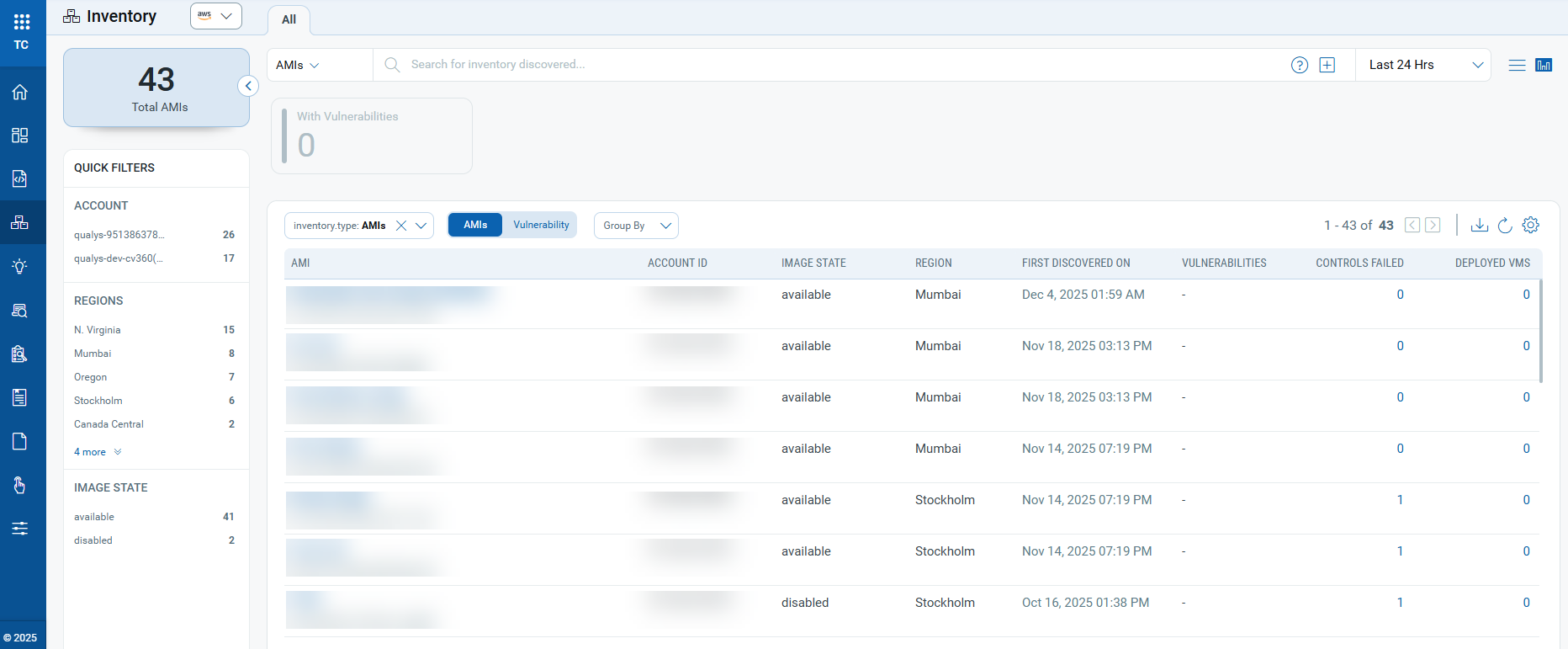
Additionally, we have removed the group-by AMI ID option from filters, as the AMI list is already organized by AMI ID in the default view.
Event-Driven Connector Processing - Enhanced Terminated Asset Visibility
Applicable for:
Building on the event-driven connector processing introduced in the previous release, this release introduces real-time termination visibility and reconciliation. This improvement ensures that deleted resources are accurately reflected in the Inventory and Posture pages, without requiring to wait for the next scheduled connector run.
Key Enhancements
- Immediate Termination Updates: When a resource (ex. EC2 instance) is deleted from the cloud side, it is marked as terminated in real time.
- Real-Time Reconciliation: Reconciliation logic now processes termination events instantly for EventBridge-enabled customers, eliminating delays caused by connector schedules.
Enhanced Visibility of Service and Resource Types for User-Defined Controls
Applicable for:
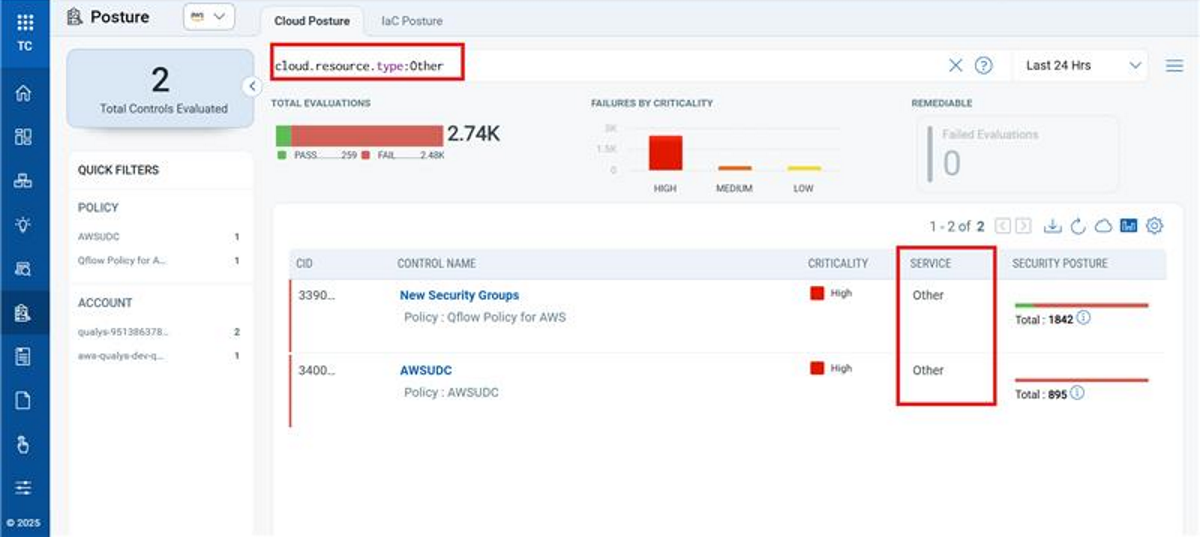
Previously, User-Defined Controls in the Posture tab displayed Service Type and Resource Type as “Other”, making it difficult to understand the scope of evaluations.
This release enhances the Posture tab to ensure these fields now display the correct service and resource information.
Key Features:
- User-Defined Controls in the Posture tab now show the correct Service Type and Resource Type.
- Editing an existing User-Defined Control updates the displayed Service Type and Resource Type.
- Newly generated evaluations reflect accurate service and resource information in the Posture tab.
Pre-Update: User-Defined Controls in the Posture tab display Service Type and Resource Type as “Other”.
Post-Update: User-Defined Controls now display accurate Service Type and Resource Type in the Posture tab.
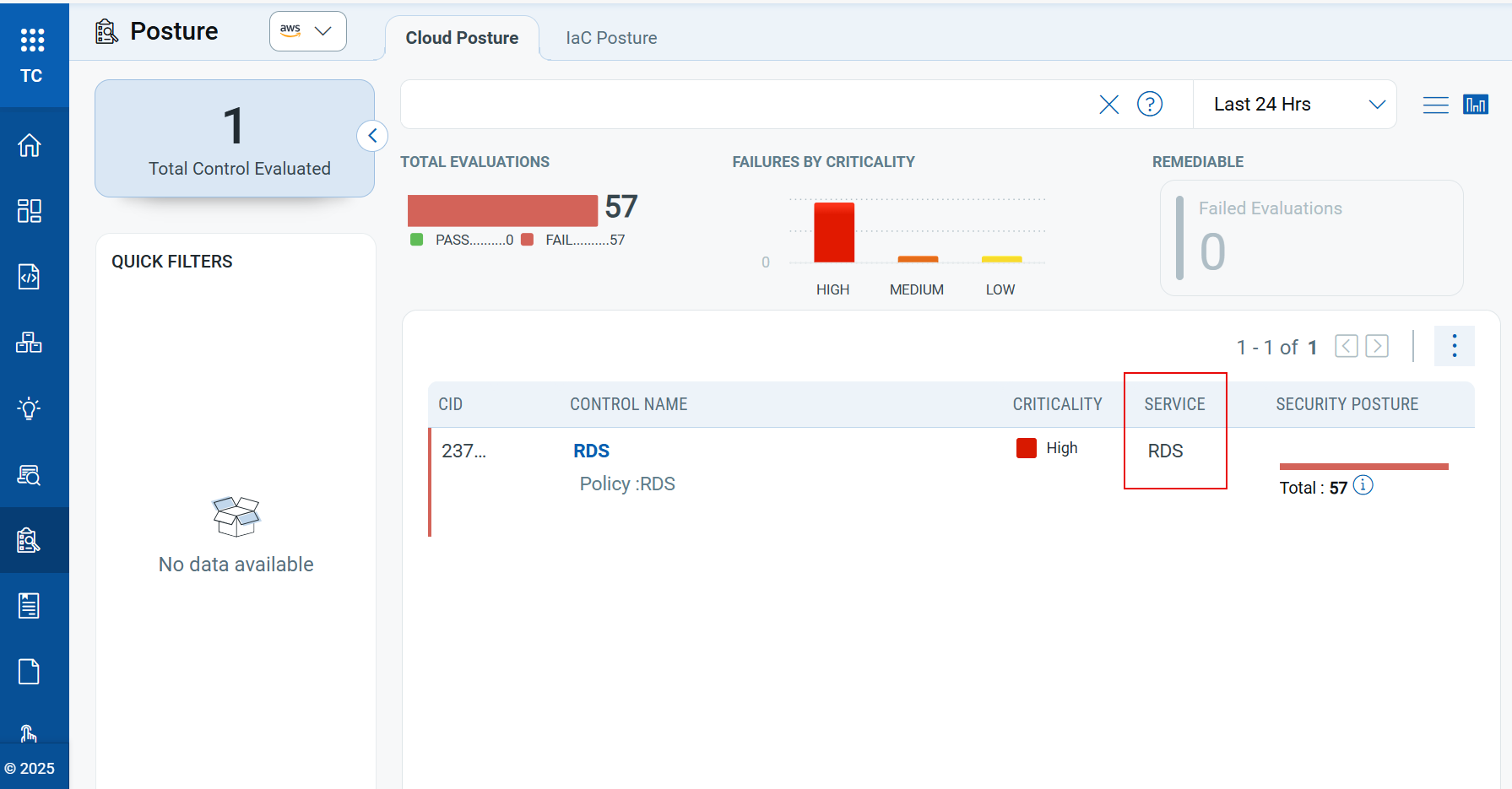
If a resource evaluated by a User-Defined Control is not included in the currently supported AWS or Azure resource list, the "Service Type" and "Resource Type" fields will continue to be displayed as “Other” in the Posture tab.
Cloud Detection and Response (CDR)
The following sections describe the enhancements made to the CDR environment in the upcoming CDR release.
These CDR enhancements will be available by the end of December.
Enhanced Container Findings Navigation with Group By
Applicable for:
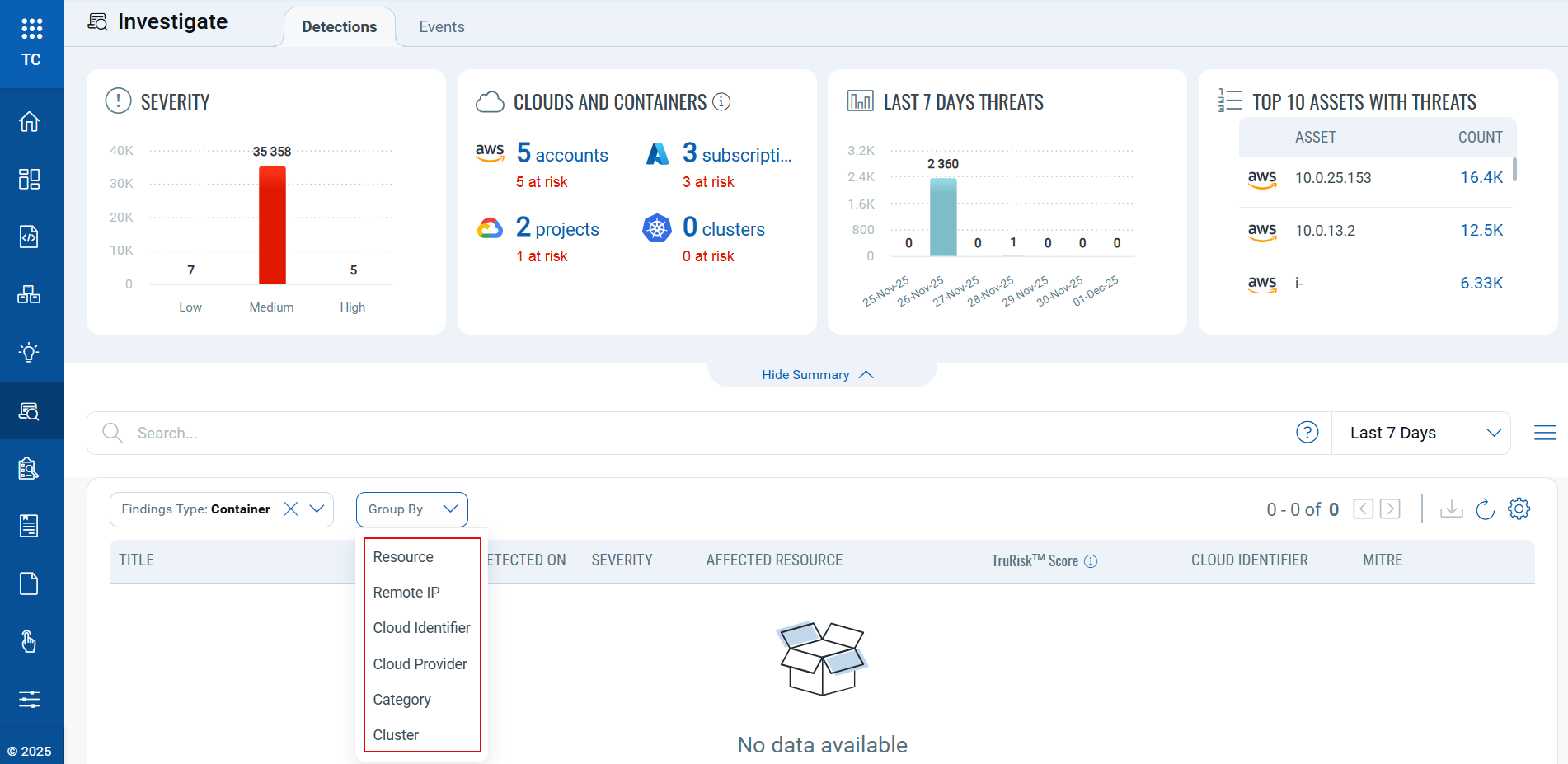
With this release, TotalCloud Investigate now supports the Group By dropdown for Container findings. Previously, when users selected Container as the Findings Type, both the Group By and Filter By options were hidden, making it difficult to organize container findings; with this release, the Group By dropdown is now visible for container findings.
The group by dropdown supports the following options:
-
Resource
-
Remote IP
-
Cloud Identifier
-
Cloud Provider
-
Category
-
Cluster
Enhanced Widget Interactivity for Faster Threat and Risk Analysis
Applicable for:
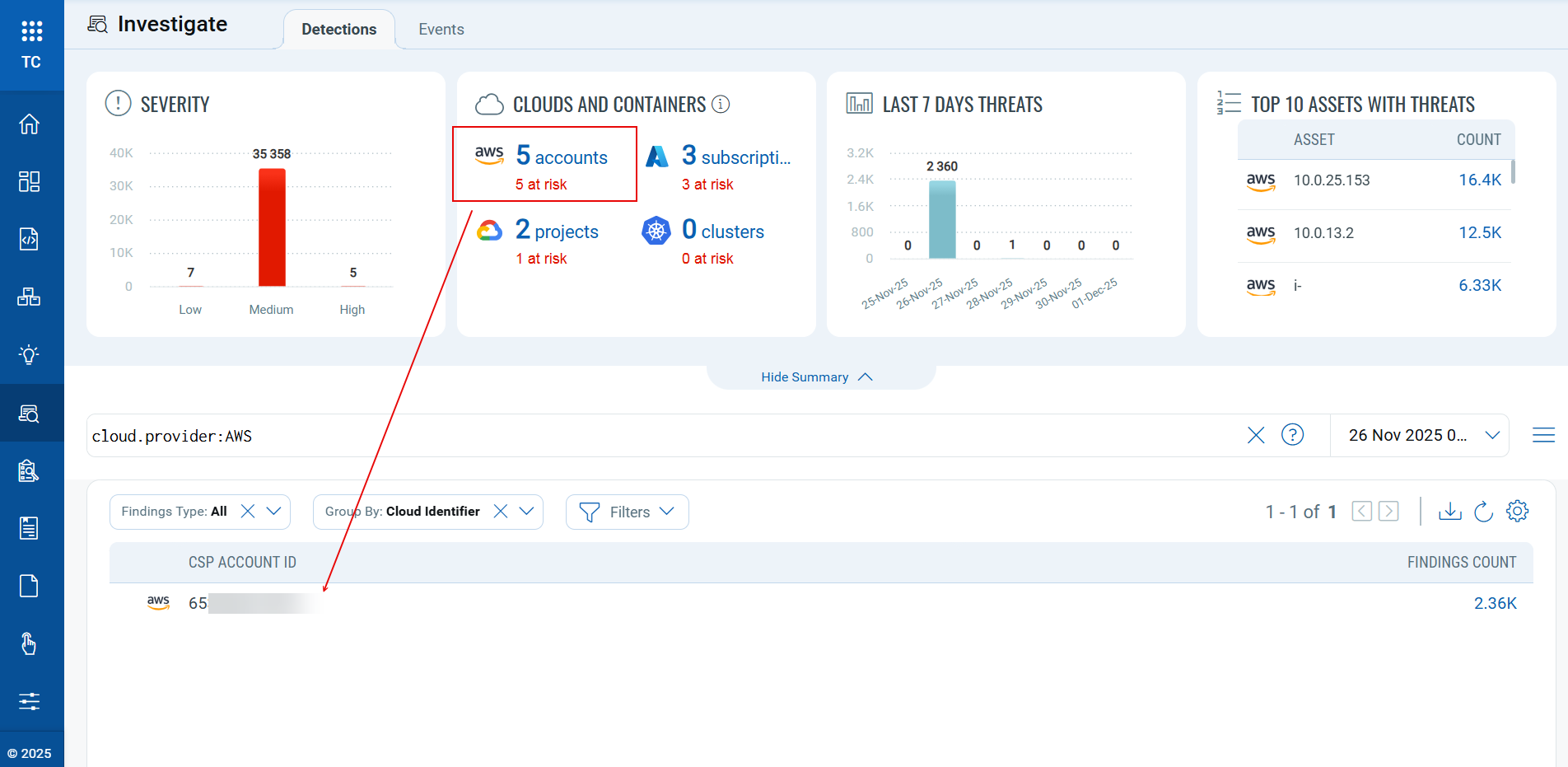
With this release, the dashboard widgets shown in the summary section, including Severity, Clouds and Containers, Last 7 Days Threats, and Top 10 Assets with Threats, are now fully interactive.
You can simply select any widget to navigate directly to the corresponding results in the Inventory page, eliminating the need to manually search across individual accounts or projects.
Enhanced Visibility into Recent Threat Activity
Applicable for:
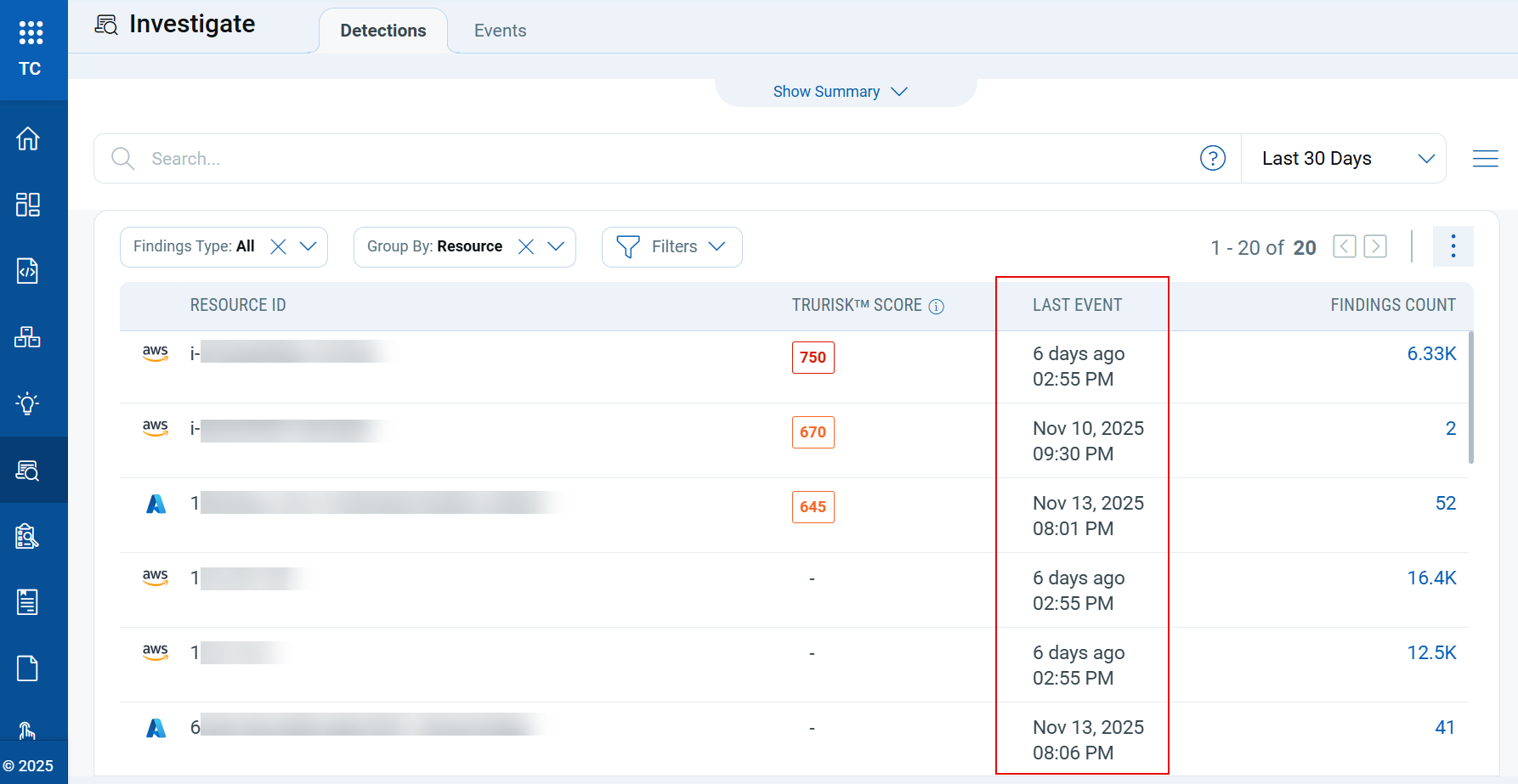
With this release, we have enhanced visibility into recent threat activity within CDR Investigate by providing clearer insight into when each resource was last detected with potential threats. To support this capability, a new “Last Event” column is introduced, displaying how long ago each resource was last observed with suspicious or threat-related activity.
Key Features
- Shows the recency of threat detection for each resource, helping users quickly understand activity timelines.
- The Last Event information is available when users select Resource in the Group By dropdown, ensuring it appears only in the most relevant context.
- Users can sort findings by clicking the Last Event column header, organizing resources in ascending or descending order based on detection time.
Benefits
- Easily identify resources with the most recent threat activity.
- Allows users to focus on time-sensitive or newly detected threats first.
- Provides a clearer understanding of threat timelines to support more informed decision-making.
Control Updates
New Run Time Controls in AWS without Policy Attachment
Applicable for:
| Platform | CID | Title | Service | Resource |
|---|---|---|---|---|
| AWS | 282 | Ensure AppSync GraphQL API has Field-Level logs enabled | AppSync | App Sync API |
| AWS | 296 | Ensure Amazon Elastic Kubernetes Service (Amazon EKS) control plane logging enabled for all log types | EKS | EKS Cluster |
| AWS | 297 | Ensure Amazon Elastic Kubernetes Service (Amazon EKS) public endpoint is not accessible to 0.0.0.0/0 or ::/0 | EKS | EKS Cluster |
| AWS | 298 | Ensure AWS EKS cluster endpoints should not be publicly accessible | EKS | EKS Cluster |
| AWS | 307 | Ensure AWS EKS Secrets are encrypted using Customer Master Keys (CMKs) managed in AWS KMS | EKS | EKS Cluster |
| AWS | 566 | Ensure GuardDuty S3 Protection should be enabled | GuardDuty | GuardDuty |
| AWS | 567 | Ensure GuardDuty EKS Audit Log Monitoring should be enabled | GuardDuty | GuardDuty |
| AWS | 568 | Ensure GuardDuty Lambda Protection should be enabled | GuardDuty | GuardDuty |
| AWS | 569 | Ensure GuardDuty Malware Protection for EC2 should be enabled | GuardDuty | GuardDuty |
| AWS | 570 | Ensure GuardDuty RDS Protection should be enabled | GuardDuty | GuardDuty |
| AWS | 571 | Ensure GuardDuty EKS Runtime Monitoring should be enabled | GuardDuty | GuardDuty |
| AWS | 572 | Ensure Macie should be enabled | Macie | Macie |
| AWS | 573 | Ensure Macie automated sensitive data discovery should be enabled | Macie | Macie |
| AWS | 574 | Ensure AWS AppSync GraphQL APIs should not be authenticated with API keys | AppSync | AppSync API |
| AWS | 575 | Ensure that EFS file systems should have automatic backups enabled | EFS | File System |
| AWS | 576 | Ensure EFS access points should enforce a root directory | EFS | Access Point |
| AWS | 577 | Ensure EFS Access Points should enforce a POSIX user identity | EFS | Access Point |
| AWS | 578 | Ensure EKS clusters should run on a latest supported Kubernetes version | EKS | EKS Cluster |
| AWS | 579 | Ensure that AWS ElastiCache Redis Standalone clusters are not associated with default VPC | Elasticache | Redis |
| AWS | 580 | Ensure that AWS ElastiCache Redis Standalone Clusters are not using their default endpoint ports | Elasticache | Redis |
| AWS | 581 | Ensure that AWS ElastiCache Redis standalone clusters should have automatic minor version upgrade enabled | Elasticache | Redis |
New controls in CIS Oracle Cloud Infrastructure Foundation Benchmark Policy
Applicable for:
| Platform | CID | Title | Service | Resource |
|---|---|---|---|---|
| OCI | 40094 | Ensure write level Object Storage logging is enabled for all buckets | STORAGE | BUCKET |
Control Title Changes
Applicable for:
| Platform | CID | Old Title | New Title |
|---|---|---|---|
| AWS | 241 | Ensure that the certificate use appropriate algorithms and key size | Ensure that ACM certificates use RSA key size of at least 2048 bits or EC key size of at least 256 bits |
| AWS | 282 | Ensure AppSync has Field-Level logs enabled | Ensure AppSync GraphQL API has Field-Level logs enabled |
| AWS | 297 | Ensure Amazon Elastic Kubernetes Service (Amazon EKS) cluster has secrets encryption enabled | Ensure Amazon Elastic Kubernetes Service (Amazon EKS) public endpoint not accessible to 0.0.0.0/0 or ::/0 |
| AWS | 307 | Ensure Amazon Elastic Kubernetes Service (Amazon EKS) cluster has secrets encryption enabled | Ensure AWS EKS Secrets are encrypted using Customer Master Keys (CMKs) managed in AWS KMS |
| AWS | 455 | Ensure backtracking is enabled for AWS RDS cluster | Ensure backtracking is enabled for AWS Aurora MySQL clusters |
| AWS | 456 | Ensure database retention is set to 7 days or more for AWS RDS cluster | Ensure database backup retention period is set to 7 days or more for AWS RDS cluster |
| Azure | 50024 | Ensure that LogProfile for a subscription is configured properly | [Legacy] Ensure that LogProfile for a subscription is configured properly |
| Azure | 50047 | Ensure App Service Authentication is set up for apps in Azure App Service | Ensure App Service Authentication is set on Web Apps |
| Azure | 50393 | Ensure that Azure Storage account access is limited only to specific IP address(es) | Ensure Azure Storage public access is disabled or controlled by IP restrictions or default deny |
| GCP | 52147 | Ensure Image Vulnerability Scanning using GCR Container Analysis or a third-party provide | Ensure Image Vulnerability Scanning is enabled |
Control Enhancements
Applicable for:
| Platform | CID and Title | Enhancement |
|---|---|---|
| AWS | CID-238: Ensure Certificate Manager (ACM) uses imported certificates only and does not create/issue certificates CID-239: Ensure expired certificates are removed from Certificate Manager (ACM) CID-240: Ensure Certificate Manager (ACM) certificates should not have domain with wildcard(*) CID-241: Ensure that ACM certificates use RSA key size of at least 2048 bits or EC key size of at least 256 bits CID-516: Ensure Certificate Manager (ACM) certificates are renewed 7 days before expiration date CID-533: Ensure Certificate Manager (ACM) certificate is validated |
We have optimized the process by moving additional calls for all the mentioned controls to ListCertificatesStream.
|
| AWS | CID-455: Ensure backtracking is enabled for AWS RDS cluster CID-456: Ensure database retention is set to 7 days or more for AWS RDS cluster |
Updated the titles for CID-455 and CID-456, and added a filter to include only RDS clusters. |
| AWS | CID-100: Ensure that Lambda Runtime Version is latest and not custom | Enhanced the control logic to support all Lambda runtime versions. |
| AWS | CID-159: Ensure Amazon OpenSearch Service domains are using the latest version of OpenSearch engine | Updated the minimum required version to OpenSearch engine 3.1 and ElasticSearch engine 7.10 |
| Azure | CID-50029: Disable RDP access on Network Security Groups from Internet (ANY IP) CID-50031: Disable SSH access on Network Security Groups from Internet (ANY IP) CID-50138: Ensure that UDP Services are restricted from the Internet |
Enhanced the control logic for all three controls to address additional edge cases. |
| Azure | CID-50001: Ensure that 'Data encryption' is set to ON for a SQL database | Upgraded the REST API version for stream:GetDatabaseEncryptionConfStream as the previous version was nearing retirement. Updated the predicate to use the latest field names corresponding to the new API version. |
| Azure | CID-50075: Ensure that diagnostic settings for Azure KeyVault is set to 'ON' | Updated the predicate to align with the new CIS recommendation and removed the log destination requirement from it. |
| Azure | CID-50142: Ensure Diagnostic Setting captures appropriate categories | Added evidence and updated CIS references. |
Deprecated Controls
Applicable for:
| Platform | CID | Title | Policy |
|---|---|---|---|
| AZURE | 50054 | Ensure that logging for Azure KeyVault is Enabled | Azure Best Practices Policy Azure Infrastructure as Code Security Best Practices Policy |
| AWS | 98 | Ensure that Lambda Function is not using An IAM role for more than one Lambda Function | AWS Lambda Best Practices Policy |
Advance Notice: Upcoming Control Deprecation
Applicable for:
| Platform | CID | Title | Policy |
|---|---|---|---|
| AWS | 201 | Ensure RDS Instance should not have an Interface open to a public scope | AWS Infrastructure as Code Security Best Practices Policy AWS Database Service Best Practices |
Issues Addressed
The following issues reported by customers, as well as other notable problems, have been resolved in this release.
| Category/Component | Issue |
|---|---|
| TotalCloud - UI | The title and remediation steps for CID-50024 have been updated, and the control has been removed from the Azure Best Practices Policy. |
| CV - False Positive | Control CID-50393 was failing due to incomplete logic and missing edge cases. The logic has been updated to handle all scenarios, and remediation steps have been revised for better accuracy. |
| CloudView | New controls 579, 580, 581 were added to discover standalone Redis clusters without replication groups. |
| CV-ControlEnhancement | Added IPv6 support for Azure CIDs 50029, 50031, and 50138. |
| CV-Azure Connector | We have resolved the issue where Azure connectors returned an fetching/processing data error. |
| CV-Reports |
|
| CV-API | Resolved an issue where certain control metadata fields (e.g., evaluationDescription, passMessage, failMessage, evaluationCriteria) returned null in API responses for some controls, even though the values were visible in the UI. For build-time controls, these fields will correctly return null as expected. |