TotalCloud Release 2.23
March 27, 2026
TotalCloud 2.23 release aims to enhance the accuracy and clarity of cloud inventory, posture, and resource identification across providers, making it easier for you to track changes and identify issues. It also adds scheduling for automated reports and improves CDR event visibility with more detailed summaries and MITRE mappings.
AWS AI Service Inventory Coverage Updates
Applicable for: 
In this release, we are removing the Bedrock Foundation Model resource type from our AWS AI Services inventory to eliminate confusion caused by the visibility of out-of-the-box AI models.
The inventory continues to identify and report the following AI service resources:
- Bedrock Custom Models
- Bedrock Knowledge Bases
- SageMaker Models
All previously introduced API parameters and tokens for AI Service inventory access remain unchanged and continue to function as expected.
Inventory for IaC via GitHub Apps
Applicable for: 
With this release, we are introducing a new Qualys IaC scan integration with GitHub Repository that provides enhanced visibility and traceability into your Infrastructure-as-Code (IaC) repositories. This allows you to easily track who made changes to files, identify misconfigurations faster, and maintain a centralized, consolidated inventory across all repositories.
To support this, we are introducing a dedicated “Code” inventory page that offers a comprehensive view of all IaC files scanned and displays the misconfigurations detected by GitHub Actions workflow. The page displays details such as the file name, file type, last updated time, and the last committed user.
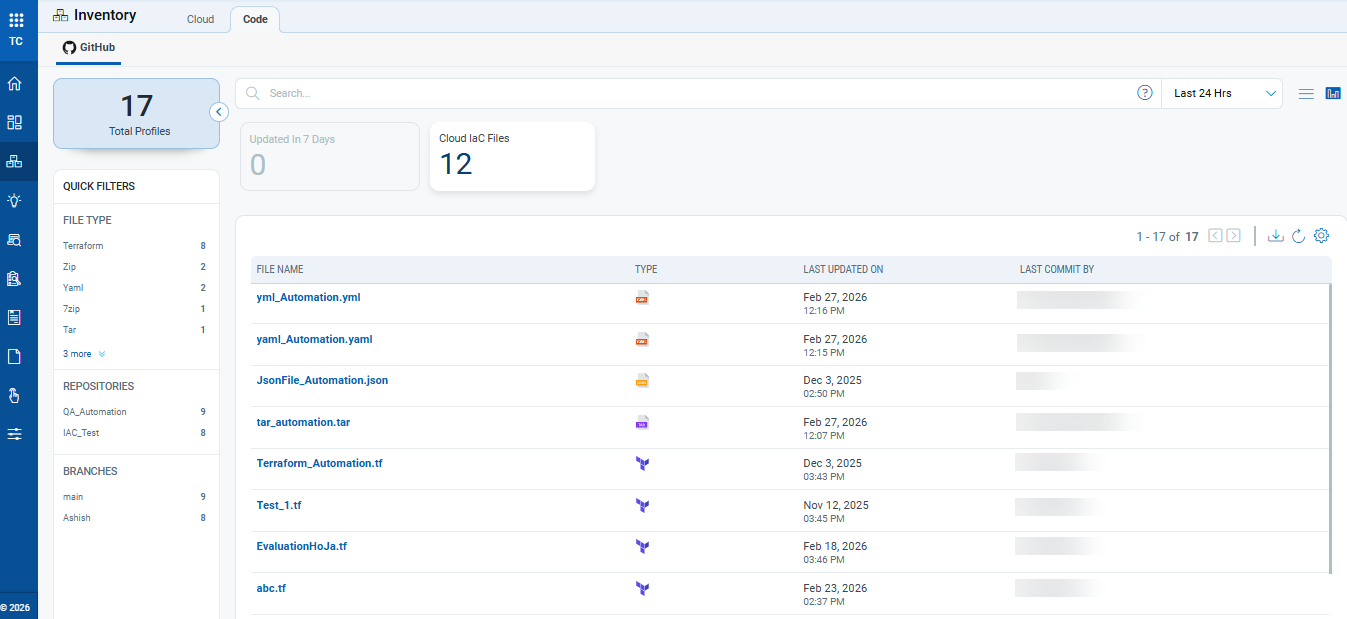
The inventory supports the following IaC file types and extensions: tf, zip, json, tar, gz, 7z, yaml, yml, template.
Selecting any file opens a new window to give more details about the file, such as:
- Summary: This page displays details of the file, such as file path and git repository details, including repository name, branch, and source
- Controls Evaluated: This page displays the controls used to evaluate the selected file. It includes the result for each control (Pass or Fail) and its associated criticality level.
The Code tab is available only to users with an active paid or trial TotalCloud subscription. It is not available in the free version.
Report Scheduling and Notifications
Applicable for: 


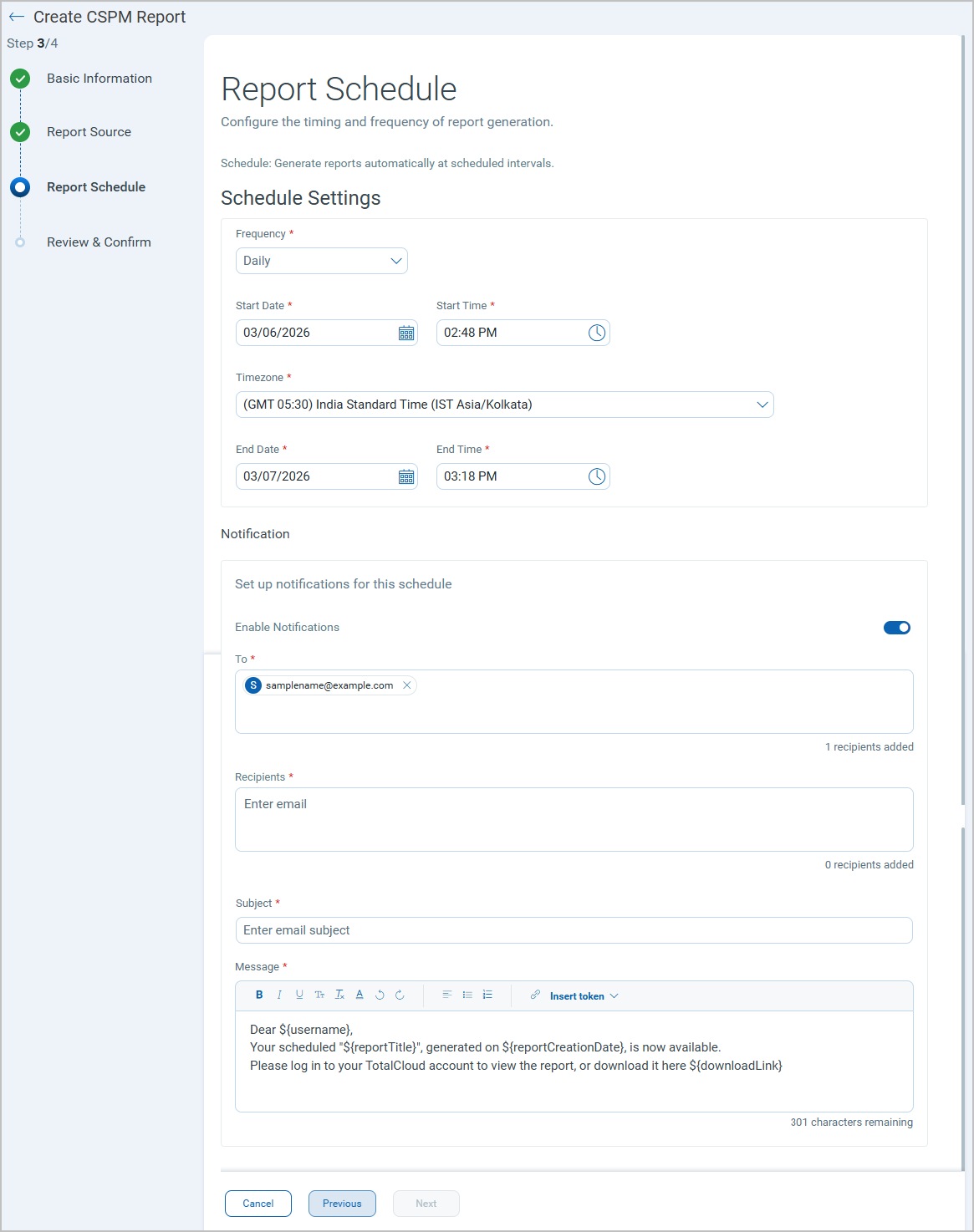
With this release, You can now generate reports on demand or schedule to generate reports at a defined time. With the scheduling, you can define report generation frequency, receive email notifications when the reports are ready, and download the reports from the Reports tab.
Benefits
- Improved automation - Reduce manual effort by scheduling recurring reports.
- Better visibility - Track report generation status with clear job states.
- Faster distribution - Automatically deliver reports via email upon completion.
- Flexible configuration - Control timing, frequency, recipients, and formats.
- Scalable management - Easily manage multiple scheduled reports from a single view.
Key Features
- Run or Schedule Reports: Run a report immediately or schedule it to run automatically. Configure recurring schedules (daily or weekly), select specific days, and set schedule end conditions (end on a date or after a number of occurrences).
- Email Notifications: Send completion notifications to one or more recipients.
- Schedule Management: Run, pause, resume, or delete scheduled reports from the list page. You can also perform bulk actions on multiple schedules (up to supported limits) and download the reports once they are generated.
Scheduled reports can be paused, resumed, or updated at any time.
You can delete up to 10 scheduled reports at a time.
When creating a schedule, make sure the report generation time is set at least three minutes after the schedule start time. If both times are the same, the report fails to download.
Azure Databricks Resource Identification Improvement
Applicable for:
With this release, we have improved how Azure Databricks resources are identified and displayed in the Inventory. Azure Databricks workspaces provision virtual machines (VMs) to run compute clusters. Previously, these VMs were discovered and listed in the inventory as generic virtual machines, making it difficult to distinguish them from user-managed Azure VMs.
This release addresses the concern by skipping asset activation for Azure Databricks–managed VMs to prevent to avoid unwanted license usage. We also added improvements to make Databricks resources easier to identify, filter, and report on.
Key Features
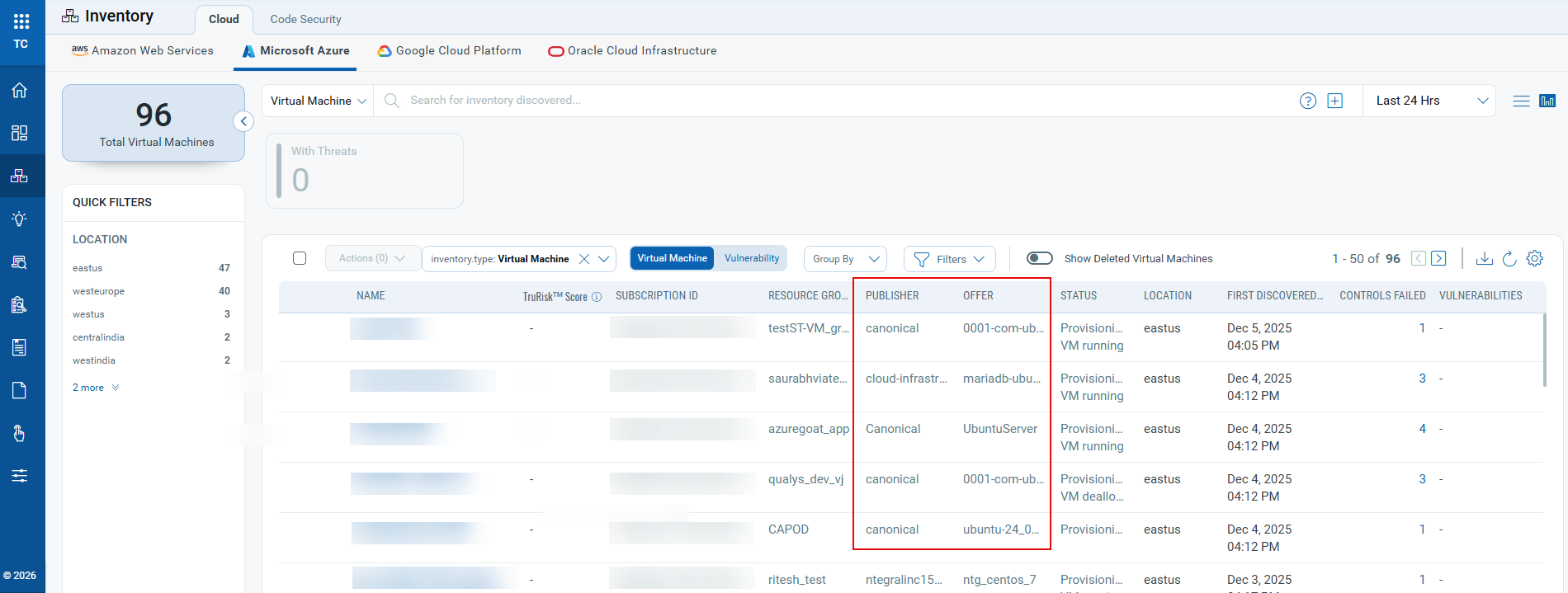
- Two new columns, Publisher and Offer, are added to the Inventory > Cloud tab for Microsoft Azure instances for virtual machines. These columns display VM image metadata to quickly identify Databricks-managed compute resources.
- Two new search tokens are introduced to help you create queries and filters based on image metadata values to quickly isolate Databricks assets or any other image types.
azure.vm.imageOfferazure.vm.imagePublisher
Inventory/Posture: Resource Discovery and Visibility Enhancements
Applicable for:
Earlier in release 2.18.0, we introduced the ability to view deleted or terminated resources. In this release, we are adding visual indicators to help identify such resources directly from the resource list.
This enhancement helps identify stale, inactive, or deleted resources, helping you maintain an accurate view of your cloud environment.
With EventBridge enabled, deletion events are clearly displayed in the UI, providing better visibility into resource lifecycle changes.
Key Features
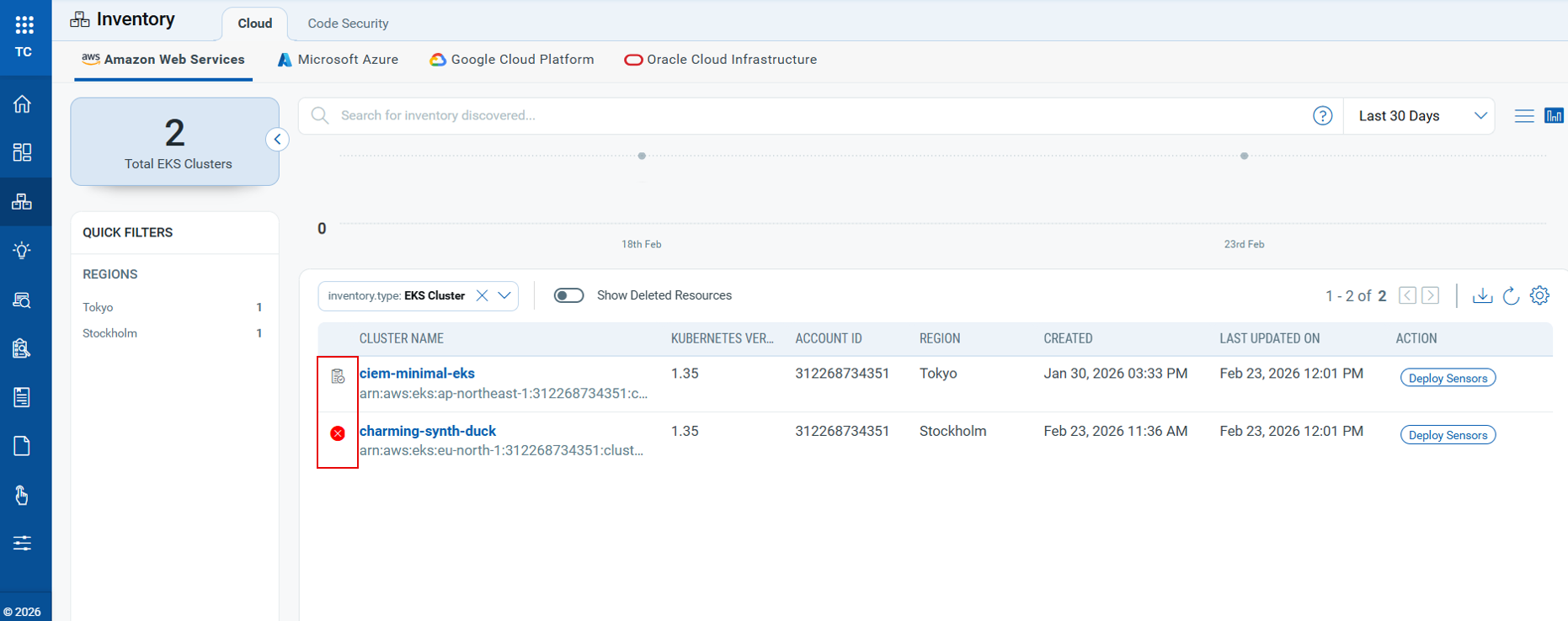
- Resources that have not been discovered/evaluated during the last 7 days are now marked with a visual indicator (
 ) in the Inventory and Posture views. This helps identify resources that may no longer be active or are no longer being scanned.
 - Resources that are deleted or terminated are now marked with a deleted icon (
 ) in the Inventory and Posture view. This icon is available only when AWS EventBridge is enabled, as deletion events are captured through EventBridge.
 - Two new tokens have been introduced to help filter and identify such resources:
cloud.resource.NotDiscoveredIn7Days– Available in Inventory to filter resources that have not been discovered in the last 7 days.cloud.resource.NotEvaluatedIn7days– Available in the Posture tab to identify resources that have not been evaluated in the last 7 days.
CDR Enhancements and Updates
The following sections describe the enhancements made to the Cloud Detection and Response (CDR) environment in the upcoming CDR release.
Event-Type Based Summaries
Applicable for:
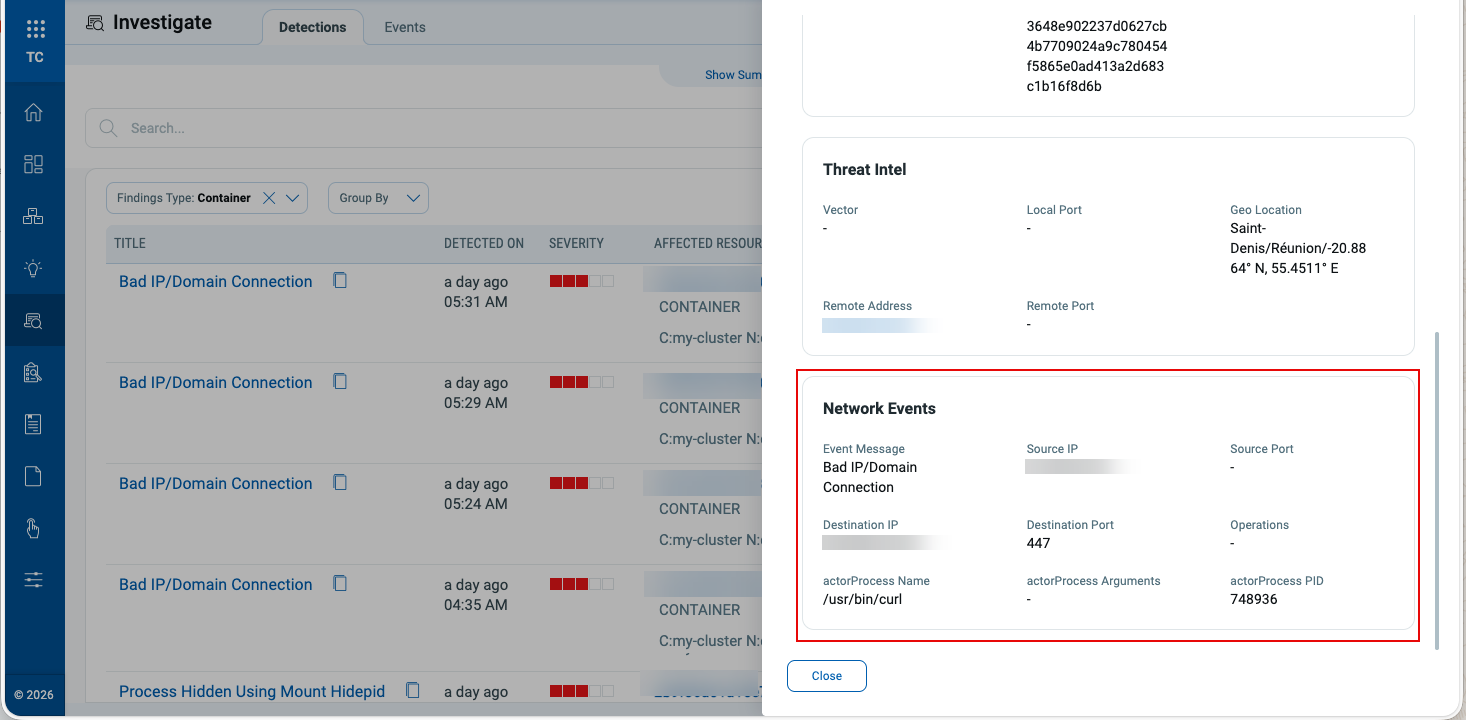
CRS (Container Runtime Security) findings now present more detailed event-type-specific summaries. Instead of a single basic summary plus raw data, the details panel dynamically shows Process, Network, or File sections based on the event type.
Key Features
- CRS events are auto‑segregated into Process, Network, and File categories.
- The summary panel adapts to the category, revealing the most relevant attributes per event type.
MITRE ATT&CK Mapping Expansions
Applicable for:
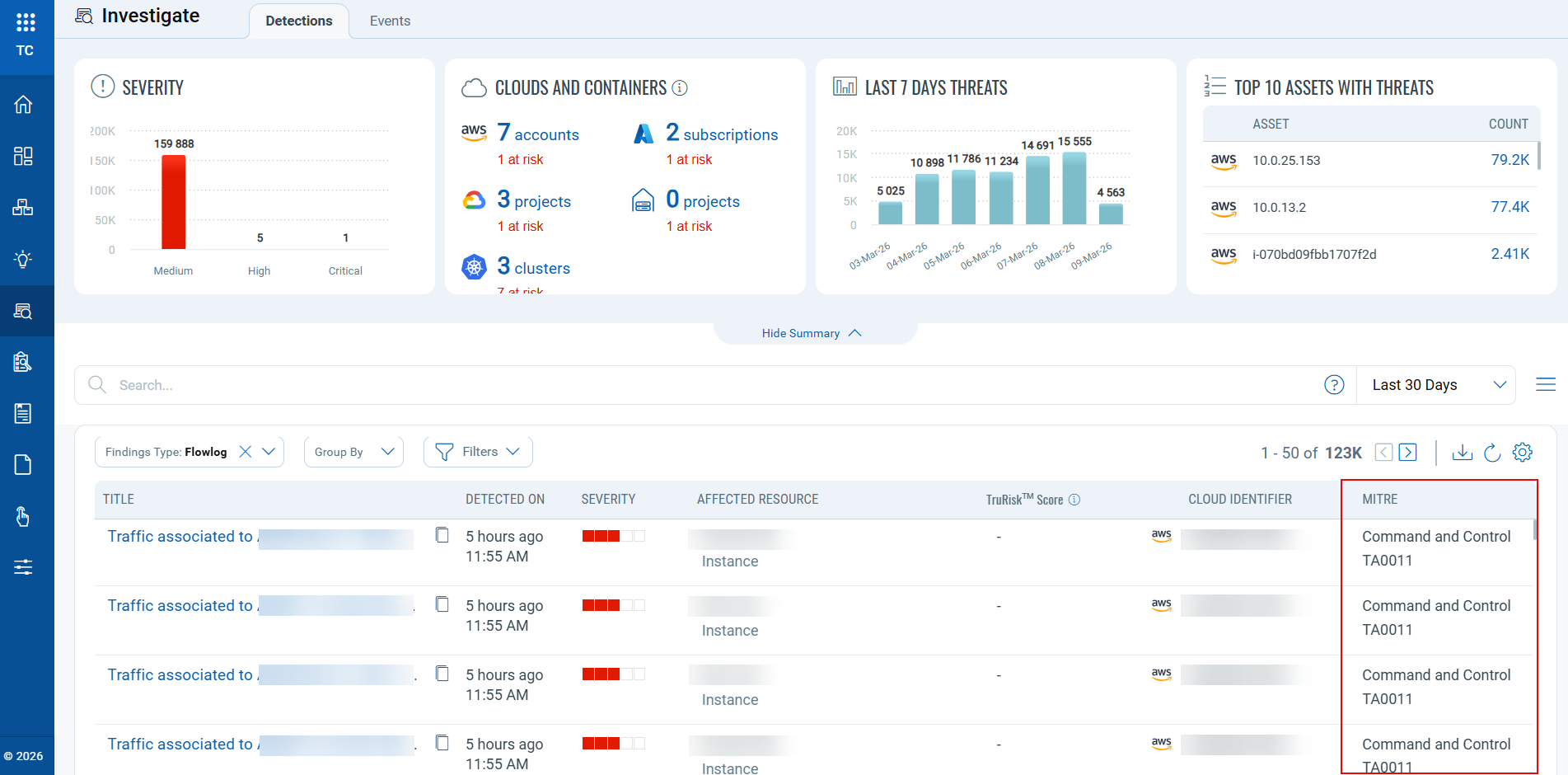
With this release, we have expanded MITRE ATT&CK visibility: the MITRE column now visible for CDR events, in addition to CRS. This includes flow logs, appliance, and guard duty data sources, enabling a uniform threat‑technique view across detections.
New “Group By” Options for CRS
Applicable for:
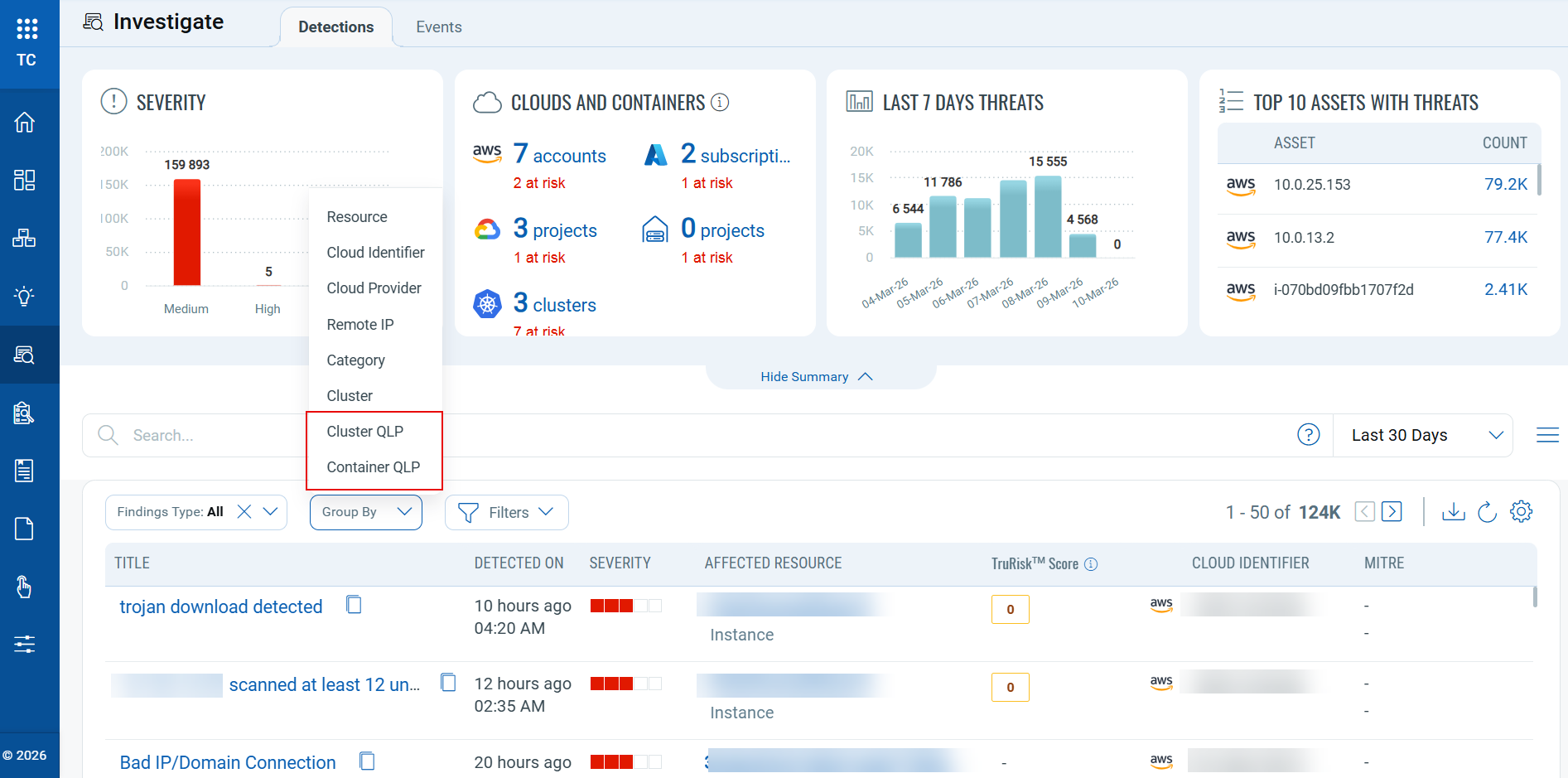
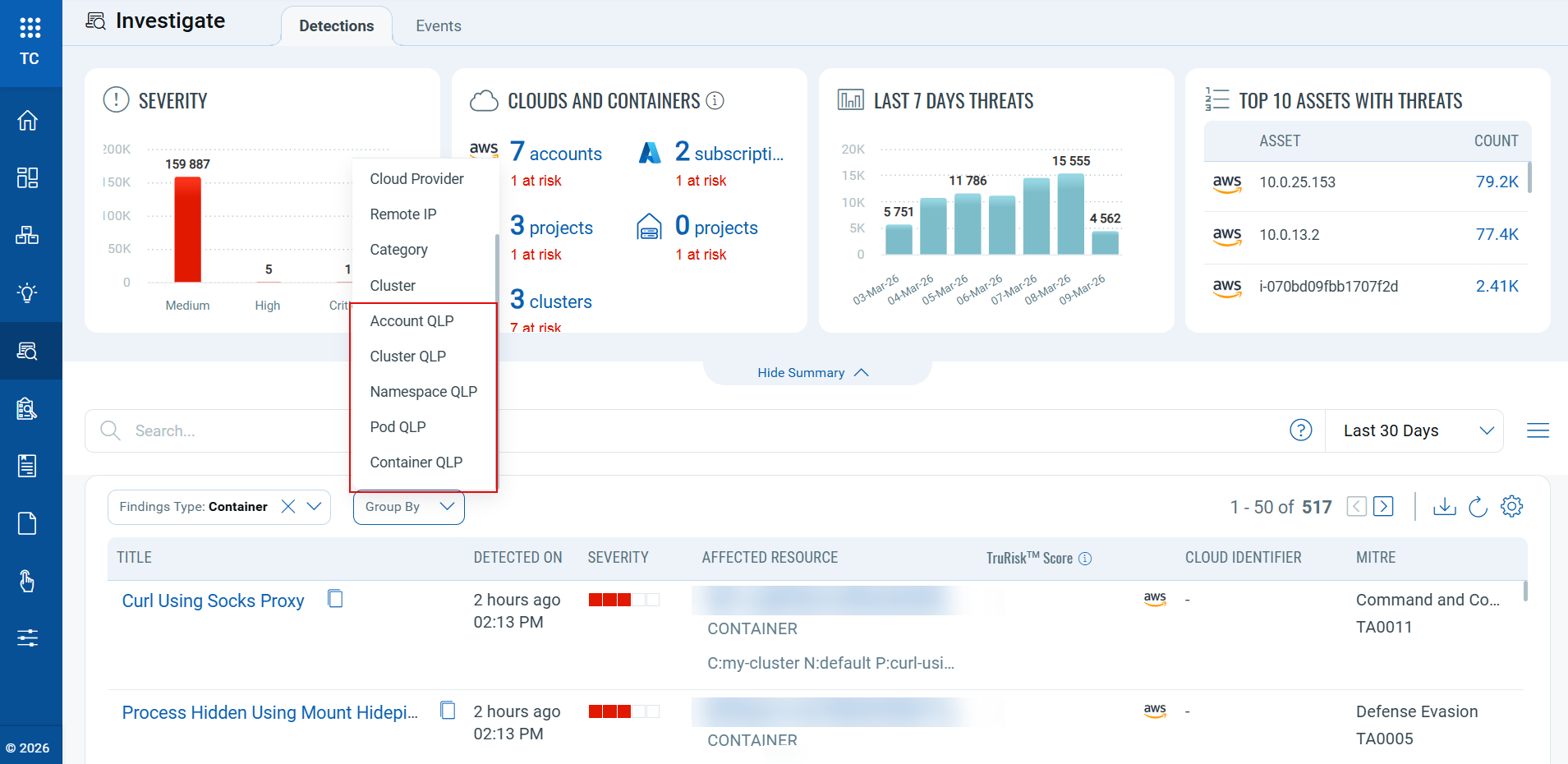
With this release, we have added more “Group By” options for CRS-related findings under the Qualys Locator Path (QLP) category, which improves how findings are organized and reviewed.
Benefits
- Accelerated discovery: More detailed grouping helps uncover findings that might be overlooked in the standard list view.
- Noise reduction: Reduces the number of results by grouping related findings and helps in focused analysis.
With Findings Type set to All, two QLP grouping options are available: Cluster QLP, and Container QLP.
With Findings Type set to Container, five QLP grouping options are available: Account QLP, Cluster QLP, Namespace QLP, Pod QLP, and Container QLP.
Five new tokens have been introduced to help you filter and identify findings under the QLP category.
container.instance.account.qlpcontainer.instance.namespace.qlpcontainer.instance.pod.qlpcontainer.instance.cluster.qlpcontainer.instance.qlp
Refer to the New Tokens section for details.
To learn more about the Container QLP structure, refer to Container Security 1.42 release notes.
New Tokens
The following section describes the new tokens introduced as part of TotalCloud 2.23.0
Common Tokens
Applicable for:
| Token Type | Name | Description | Example |
|---|---|---|---|
| Inventory | cloud.resource. notDiscoveredInLast7Days |
Use this token to identify resources that have not been discovered within the last 7 days. This helps you find stale, inactive, or potentially removed resources that have not appeared in recent discovery scans. | cloud.resource. |
| Posture | cloud.resource. notEvaluatedInLast7Days |
Use this token to identify resources that have not been evaluated in the last 7 days. This helps detect resources that may be missing recent posture, compliance, or security evaluation. | cloud.resource. |
| Investigate | container.instance. account.qlp |
Use this token to filter CRS findings based on the container's account QLP | container.instance. aws://eks/us-west-2/123456789012 |
| Investigate | container.instance. namespace.qlp |
Use this token to filter CRS findings based on the container's namespace QLP | container.instance. |
| Investigate | container.instance. pod.qlp |
Use this token to filter CRS findings based on the container's pod QLP | container.instance. |
| Investigate | container.instance. cluster.qlp |
Use this token to filter findings based on the container's cluster QLP | container.instance. aws://eks/us-west-2/123456789012/ |
| Investigate | container.instance.qlp | Use this token to filter findings based on the container's instance QLP | container.instance.qlp:aws://eks/us-west-2/123456789012/
|
Inventory Tokens
Applicable for:
The following section describes the new tokens introduced for Azure Inventory as part of TotalCloud 2.23.0
| Resource Type | Name | Description | Example |
|---|---|---|---|
| Virtual Machine | azure.vm.imageOffer | Use this token to filter VMs by Azure image offer name. | azure.vm.imageOffer: Databricks |
| Virtual Machine | azure.vm.imagePublisher | Use this token to filter VMs by Azure publisher name. | azure.vm.imagePublisher: AzureDatabricks |
Control Updates
New IAC Build Time Controls in AWS
Applicable for:
| Platform | CID | Title | Service | Resource | Policy |
|---|---|---|---|---|---|
| AWS | 607 | Ensure Glue crawler has a security configuration associated | GLUE | GLUE SECURITY | AWS Infrastructure as Code Security Best Practices Policy |
| AWS | 608 | Ensure Glue dev endpoint has a security configuration associated | GLUE | GLUE SECURITY | AWS Infrastructure as Code Security Best Practices Policy |
| AWS | 609 | Ensure Glue job has a security configuration associated | GLUE | GLUE SECURITY | AWS Infrastructure as Code Security Best Practices Policy |
| AWS | 610 | Ensure MQ Broker Audit logging is enabled | MQ | MQ BROKER | AWS Infrastructure as Code Security Best Practices Policy |
| AWS | 611 | Ensure Image Builder distribution configuration encrypts AMI using a customer managed key | EC2 IMAGE BUILDER | IMAGE BUILDER DISTRIBUTION | AWS Infrastructure as Code Security Best Practices Policy |
| AWS | 612 | Ensure that Image Recipe EBS Disk are encrypted with a customer managed key | EC2 IMAGE BUILDER | IMAGE BUILDER IMAGE RECIPES | AWS Infrastructure as Code Security Best Practices Policy |
| AWS | 613 | Ensure MemoryDB clusters are encrypted at rest using customer managed key | MEMORY DB | MEMORY DB CLUSTER | AWS Infrastructure as Code Security Best Practices Policy |
| AWS | 614 | Ensure MemoryDB cluster data is encrypted in transit | MEMORY DB | MEMORY DB CLUSTER | AWS Infrastructure as Code Security Best Practices Policy |
| AWS | 615 | Ensure Amazon FSx file system is encrypted by using a customer managed key | FILE SYSTEM | FSX FILE SYSTEM | AWS Infrastructure as Code Security Best Practices Policy |
| AWS | 616 | Ensure to limit AMI launch permissions | EC2 | EC2 IMAGES | AWS Infrastructure as Code Security Best Practices Policy |
| AWS | 617 | Ensure API Gateway Domain uses a modern security Policy | API GATEWAY | API GATEWAY | AWS Infrastructure as Code Security Best Practices Policy |
New controls for Azure Without Policy Attachment
Applicable for:
| Platform | CID | Title | Service | Resource |
|---|---|---|---|---|
| Azure | 50556 | Ensure end-to-end TLS encryption is enabled for Web Apps | App Service | Web App |
| Azure | 50557 | Ensure end-to-end TLS encryption is enabled for API Apps | App Service | API App |
| Azure | 50558 | Ensure end-to-end TLS encryption is enabled for Function Apps | App Service | Function App |
| Azure | 50560 | Ensure private endpoints are used to access Web Apps | App Service | Web App |
| Azure | 50561 | Ensure private endpoints are used to access API Apps | App Service | API App |
| Azure | 50562 | Ensure private endpoints are used to access Standard Logic Apps | Logic App | Logic App |
| Azure | 50563 | Ensure private endpoints are used to access Function Apps | App Service | Function App |
| Azure | 50564 | Ensure Web Apps is integrated with a virtual network | App Service | Web App |
| Azure | 50565 | Ensure API Apps is integrated with a virtual network | App Service | API App |
| Azure | 50566 | Ensure Standard Logic Apps is integrated with a virtual network | Logic App | Logic App |
| Azure | 50567 | Ensure Function Apps is integrated with a virtual network | App Service | Function App |
| Azure | 50568 | Ensure all traffic is routed through the virtual network for Web Apps | App Service | Web App |
| Azure | 50569 | Ensure all traffic is routed through the virtual network for API Apps | App Service | API App |
| Azure | 50570 | Ensure all traffic is routed through the virtual network for Standard Logic Apps | Logic App | Logic App |
| Azure | 50571 | Ensure all traffic is routed through the virtual network for Function Apps | App Service | Function App |
New controls in GCP Kubernetes Engine Best Practices Policy
Applicable for:
| Platform | CID | Title | Service | Resource |
|---|---|---|---|---|
| GCP | 52197 | Ensure authentication using Client Certificates is Disabled for GKE Standard Clusters | Kubernetes Engine | Kubernetes clusters |
| GCP | 52198 | Ensure that Alpha clusters are not used for production workloads | Kubernetes Engine | Kubernetes clusters |
| GCP | 52199 | Consider GKE Sandbox for running untrusted workloads for GKE Standard Clusters | Kubernetes Engine | Kubernetes Nodes |
New Controls in OCI without Policy
Applicable for:
| Platform | CID | Title | Service | Resource |
|---|---|---|---|---|
| OCI | 40097 | Ensure password policy in Identity Domains requires at least one lowercase letter | IAM | IAM PASSWORD POLICY |
| OCI | 40098 | Ensure password policy in Identity Domains requires at least one uppercase letter | IAM | IAM PASSWORD POLICY |
| OCI | 40099 | Ensure password policy in Identity Domains requires at least one numeric character | IAM | IAM PASSWORD POLICY |
| OCI | 40100 | Ensure password policy in Identity Domains requires at least one special character | IAM | IAM PASSWORD POLICY |
New Controls in Oracle Infrastructure Foundation Benchmark:
Applicable for:
| Platform | CID | Title | Service | Resource |
|---|---|---|---|---|
| OCI | 40101 | Ensure password policy in Identity Domains enforces minimum password length of 14 characters or greater | IAM | IAM PASSWORD POLICY |
Control Title Changes
Applicable for:
| Platform | CID | Old Title | New Title |
|---|---|---|---|
| AWS | 495 | Ensure advanced security options are enabled for Amazon OpenSearch Domain | Ensure Amazon OpenSearch Service domains should have fine-grained access control enabled |
| OCI | 40010 | Ensures password policy requires at least one lowercase letter | [Legacy]Ensures password policy requires at least one lowercase letter |
| OCI | 40011 | Ensures password policy requires at least one uppercase letter | [Legacy]Ensures password policy requires at least one uppercase letter |
| OCI | 40012 | Ensures password policy requires at least one numeric | [Legacy]Ensures password policy requires at least one numeric |
| OCI | 40013 | Ensures password policy requires at least one Special Character | [Legacy]Ensures password policy requires at least one Special Character |
| OCI | 40026 | Ensure IAM password policy requires minimum length of 14 or greater | [Legacy]Ensure IAM password policy requires minimum length of 14 or greater |
Control Enhancements
Applicable for:
| Platform | CID and Title | Enhancement |
|---|---|---|
| AWS | CID 159: Ensure Amazon OpenSearch Service domains are using the latest version of the OpenSearch engine | Updated the predicate to check for the most recent available OpenSearch version, i.e., OpenSearch v3.3. |
| AWS | CID 126: Ensure Amazon Machine Images (AMIs) owned by account are encrypted | Updated the build-time logic to ensure that AMIs created from EBS snapshots are encrypted when the source EBS volume uses KMS encryption. Control criticality is updated from MEDIUM to HIGH. |
| AWS | CID 496: Ensure general-purpose SSD node type is used for Amazon OpenSearch Domains | Updated the predicate to check for gp3 version of storage. |
Controls Deprecated
Applicable for:
| Platform | CID | Title |
|---|---|---|
| AWS | 602 | Ensure Amazon OpenSearch Service domains should have fine-grained access control enabled |
Issues Addressed
Applicable for:
The following issues reported by customers, as well as other notable problems, have been resolved in this release.
| Category/Component | Issue |
|---|---|
| TotalCloud - UI | Previously, existing controls validated password policy settings only for the legacy OCI Global IAM architecture. Customers who migrated to the newer Identity Domains (ID) architecture could not validate their IAM password policies using these controls. To close this gap, new controls have been added specifically for Identity Domains–based IAM environments. These controls ensure that password policy requirements set within Identity Domains are properly checked. The following checks have been added for Identity Domains password policies:
|
| CV - False Positive | CID 40030 The OCI Event Rule controls for IdP Group Mapping and alerting are updated to align with recent OCI response format changes. The predicate logic is corrected to reflect the new field structure, resolving the false positive cases previously observed. CID 52178 The control is enhanced to recognize PostgreSQL instances configured with Private Service Connect (PSC), resolving the false‑positive reported for CID‑52178. |
| Controls | CID 52000 The evaluation logic is updated to correctly handle API responses that return no resources. The check now properly recognizes the absence of applicable resources instead of incorrectly flagging the evaluation as a failure, resolving the issue. |
| CV - UI CV - Connectors CV - EC2 Connector |
We have resolved the issues where the user was able to see the data under the inventory tab, but not in the Posture tab of TotalCloud, and the Scoped assets were not visible to users in Total Cloud. The issue was caused by scalability limitations in the current implementation under growing data volumes. To address this, we have implemented targeted architectural improvements to enhance consistency, reliability, and scalability. These changes are intended to prevent recurrence as data volumes continue to grow. |
| TotalCloud - UI | We have resolved the issues where the Password policy related CID's evaluated as "FAIL" for the controls CID 40010, CID 40011, CID 40012, CID 40013, and CID 40026. |