Unified Dashboard Release 2.17.1
October 22, 2026
You get a focused dashboard list that cleans up automatically, a landing page that gives you quick access to modules, and Qualys recommended dashboards that show you insights right away.
New Feature
Focused Dashboard List with Automatic Cleanup
What's New for You
You no longer have to clear out unused dashboards yourself. Also note that the default limits drop to 100 active dashboards per subscription and 40 widgets per dashboard.
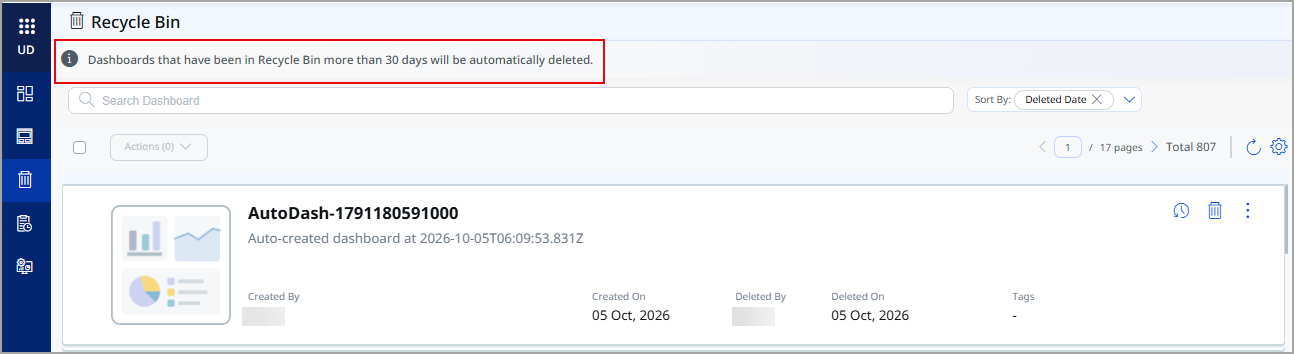
Unified Dashboard (UD) now automatically moves dashboards that have not been used for 9 months to the Recycle Bin. Your dashboard list stays focused on the dashboards your teams use, and unused dashboards no longer take up space within your subscription's dashboard limit.
UD considers a dashboard in use when any user in your subscription opens it, generates a report from it, or exports it. Therefore, UD never moves dashboards that feed scheduled reports. It also never moves the following dashboards:
- Dashboards that you have set as your default dashboard.
- Qualys-provided dashboards.
Dashboards that UD moves for inactivity follow the existing Recycle Bin lifecycle:
- They remain in the Recycle Bin for the retention period (30 days by default). After that, UD permanently deletes them.
- UD treats a restored dashboard as recently used and does not move it back to the Recycle Bin right away.
You can view and restore these dashboards from the Recycle Bin in the left navigation pane of UD. The Recycle Bin shows the message “Dashboards that have been in the Recycle Bin more than 30 days will be automatically deleted.”
During the retention period, you can restore dashboards if you have the Create or Update Dashboard permission. For details, refer to Permissions in Recycle Bin in the UD online help.
When UD moves a dashboard to the Recycle Bin, it also removes the dashboard from your favorites and pinned dashboards. Restoring the dashboard does not add it back to favorites or pins.
Every week, the point of contact for your subscription receives an email listing the dashboards the UD moved to the Recycle Bin due to inactivity in the previous week.
Along with this cleanup, this capability reduces the default dashboard and widget limits:
| Limit | Previous Default | New Default |
|---|---|---|
| Active dashboards per subscription | 300 | 100 |
| Widgets per dashboard | 80 | 40 |
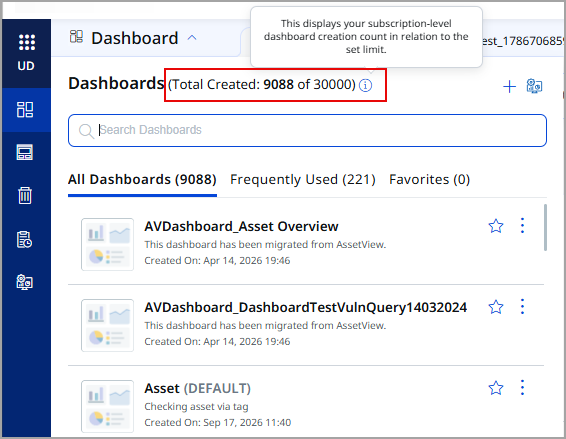
Dashboards in the Recycle Bin do not count toward the active dashboard limit. If your subscription already has more active dashboards than the new limit, your existing dashboards remain available, and the Total Created count in the dashboard list is displayed in red. You can view this count from Dashboard > Dashboards.
To change the inactivity period for your subscription, contact your Technical Account Manager (TAM).
For more information, refer to UD Online Help.
New Feature
Landing Page for Quick Module Access
What's New for You
Every time you sign in, you can land directly in the module and tab you use most, instead of waiting for the full platform to load.
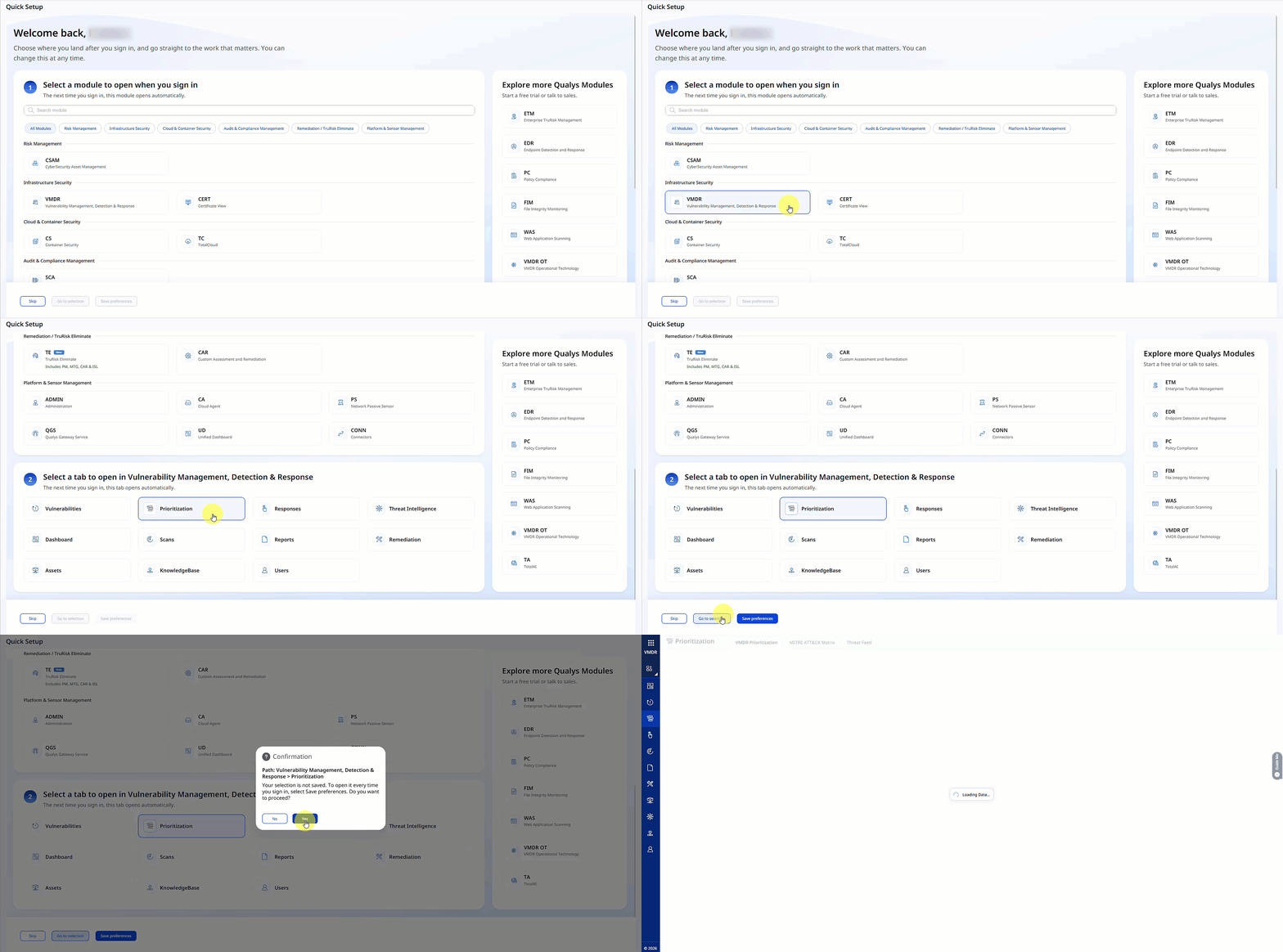
When you sign in and have not saved a landing preference, the new landing page prompts you to select a module and then a tab within it. The page lists only the modules in your subscription and groups them by category, such as Risk Management, Infrastructure Security, and Cloud and Container Security. After you save your preference, every subsequent sign-in opens the module and tab you selected.
The landing page also lets you:
- Open your selection once without saving it as your landing preference.
- Skip the setup and set your landing preference later.
- View other Qualys modules in the Explore more Qualys modules panel, from where you can start a free trial or contact sales.
You can change your landing preference at any time from View Profile > Landing Preference > Edit Preferences.
For more information, refer to UD Online Help.
New Feature
Instant Insights with Qualys Recommended Dashboards
What's New for You
You can now open a Qualys Recommended tab that lists ready-made dashboards for each module, and set, pin, favorite, print, or export them, though you cannot edit or delete them.
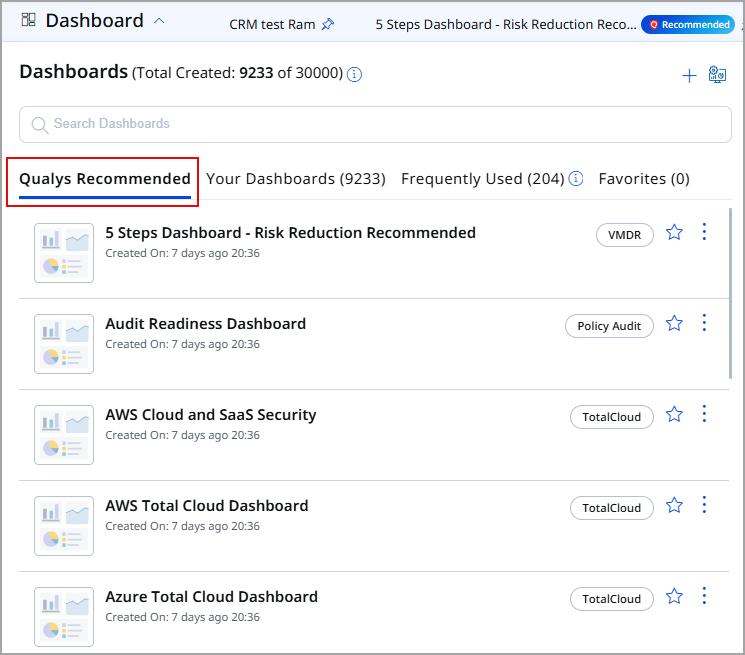
You can now start with the dashboards Qualys builds for each module, so you see useful insights right away without building dashboards from scratch.
The dashboard selector has a new Qualys Recommended tab, which opens first. It lists dashboards for modules such as VMDR, Policy Audit, TotalCloud, Container Security, Endpoint Detection and Response, Web Application Scanning, and TotalAI. Each dashboard shows a tag with its module name. Trend widgets on these dashboards show trends from your own subscription's data. Each module with recommended dashboards has one default recommended dashboard. UD always pins this dashboard as the first dashboard tab in that module.
The All Dashboards tab is now Your Dashboards. It lists the dashboards created in your subscription and excludes recommended dashboards.
With a recommended dashboard, you can:
- Set it as your default dashboard.
- Pin it or mark it as a favorite.
- Open it as a new dashboard tab.
- Print or export it.
Recommended dashboards are read-only, so you cannot edit or delete them. When you open a recommended dashboard, its tab shows a Recommended tag.
For more information, refer to UD Online Help.
Fix
Fixes
The following reported and notable customer issues are fixed in this release:
| Component/Category | Description |
|---|---|
| Unified Dashboard - Vulnerability Management, Detection and Response (VMDR) | We fixed an issue where UD intermittently failed to load after you signed in, including when you opened the Vulnerability Management, Detection and Response (VMDR) dashboard. This happened when an internal authentication token expired, and UD did not renew it. Now, UD renews the token automatically before it expires, so dashboards load without interruption. |
| Unified Dashboard | We fixed an issue where trending widgets could show today's data under the wrong date when the browser time zone differed from the time zone in the profile settings. Because of this, team members in different locations with the same time zone in the profile settings could see the data under different dates. Now, trending widgets always use the time zone in the profile settings to assign the date, so the dates stay consistent regardless of the browser time zone. |