TruRisk™ Score
The TruRisk™ Score in VMDR OT quantifies the overall risk posed by an industrial asset. It is derived based on the Asset Criticality Score (ACS) and Qualys Detection Score (QDS) assigned to all findings (vulnerabilities and misconfigurations) from Qualys and third-party data sources. This score helps you prioritize remediation efforts by identifying which assets pose the greatest risk to your operational environment.
Using TruRisk™ Score for Prioritization
The TruRisk™ Score enables you to:
- Identify the most critical assets that require immediate attention.
- Prioritize remediation efforts based on a unified risk metric that combines vulnerability data with asset criticality.
- Track risk reduction over time as vulnerabilities are addressed.
- Communicate risk posture to stakeholders using a standardized scoring framework.
Viewing the TruRisk™ Score
The TruRisk™ Score is displayed in the following locations:
- Assets tab: The TruRisk™ Score column in the assets list shows the score for each asset at a glance.
- Asset Details page: Navigate to Security > TruRisk™ Score in the left panel of the Asset Details page to view the detailed breakdown of the score.
TruRisk™ Score Ranges
The TruRisk™ Score ranges from 0 to 1000. The score is categorized into the following risk levels:
| Risk Level | Score Range | Description |
|---|---|---|
| Low | 0 - 499 | The asset poses a low risk to your environment. It may have few or no known vulnerabilities and a lower business criticality. |
| Medium | 500 - 699 | The asset has a moderate risk level. It may have some vulnerabilities or a higher business criticality that warrants attention. |
| High | 700 - 849 | The asset poses a significant risk. It likely has critical vulnerabilities or high business importance, requiring prompt remediation. |
| Critical | 850 - 1000 | The asset poses the highest level of risk. Immediate action is recommended to address the vulnerabilities and reduce the threat to your operational environment. |
TruRisk™ Score Contributing Factors
The TruRisk™ Score is calculated based on the following contributing factors:
- Asset Criticality Score: The Asset Criticality Score (ranging from 1 to 5) reflects the importance of the asset to your business operations. A higher criticality score amplifies the TruRisk™ Score when vulnerabilities are present.
- Top Risk Factors: The key risk factors contributing to the score are highlighted, helping you understand the primary drivers of risk for the asset.
- Vulnerabilities: The vulnerabilities detected on the asset directly influence the TruRisk™ Score. The severity, age, and Qualys Detection Score (QDS) of each vulnerability are factored into the overall calculation.
For more detailed information on TruRisk™ Score, refer to VMDR Online Help.
View TruRisk™ Score Details
You can view the score and the top contributing risk factors to better understand an asset's overall security risk and prioritize remediation.
Navigate to Asset Details > Security > TruRisk™ Score.
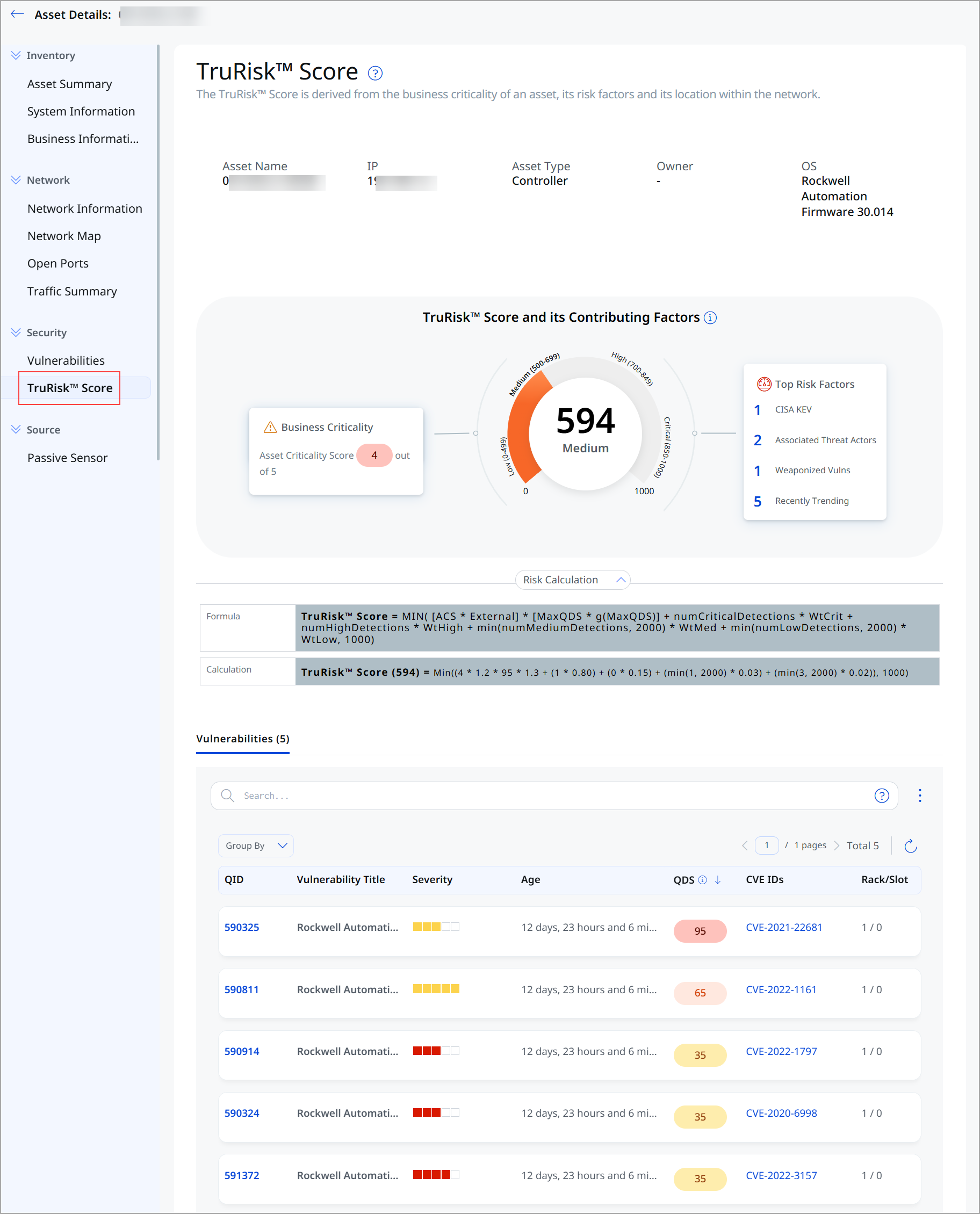
The following information is displayed:
| Section | Description |
|---|---|
| Asset Information | Displays key asset details, including Asset Name, IP Address, Asset Type, Owner, and Operating System. |
| TruRisk™ Score Gauge | Displays the asset's current TruRisk™ Score on a visual gauge along with the corresponding risk level (Low, Medium, High, or Critical). |
| Business Criticality | Displays the Asset Criticality Score (ACS) of the asset on a scale of 1 to 5, indicating its business importance.
Click the score to view its details. |
| Top Risk Factors | Lists the primary factors that contribute to the asset's TruRisk™ Score, helping you understand the key drivers of risk.
Click the count to view the associated vulnerabilities. |
| Risk Calculation | Provides a detailed breakdown of the factors and metrics used to calculate the asset's TruRisk™ Score. For more information, refer to VMDR Online Help. |
| Vulnerabilities | Lists the vulnerabilities detected on the asset, including QID, Vulnerability Title, Severity, Age, Qualys Detection Score (QDS), CVE IDs, and Rack/Slot information. |
Related Topics
Viewing Asset Details in VMDR OT