Configure Responses in VMDR OT
The Response tab allows you to configure rules to monitor critical events that satisfy the conditions specified in a rule and send you the events details in an alert messages if events matching the condition are detected.
Configuring responses in VMDR OT helps you monitor and act on critical operational technology events without disrupting industrial processes.
- Protects operational continuity by alerting teams about new asset inventory, OT vulnerabilities, communication of OT devices with external assets, and process-related events before any impact to on-field devices.
- Enables faster response by delivering notifications to stakeholders through tools like Email, Slack, Microsoft Teams, and PagerDuty.
Roles and Permissions
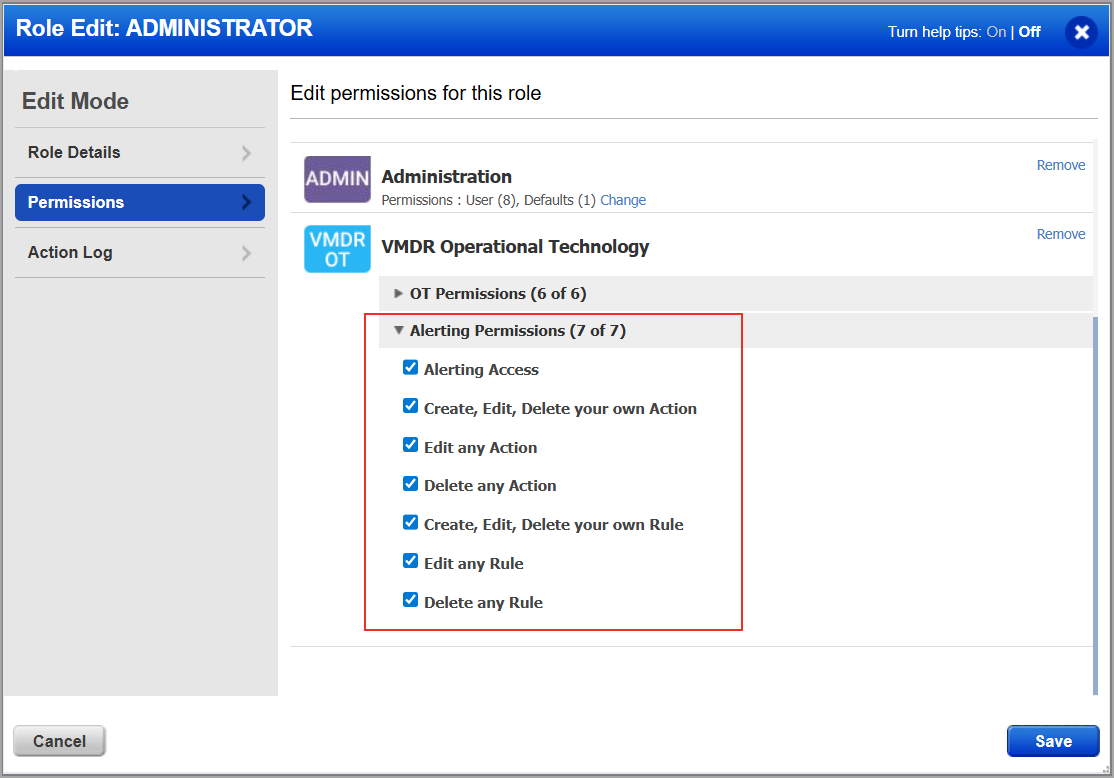
Alerting permissions are required for a role to access the Responses tab in VMDR OT. Assign these permissions using the Qualys Administration application.
To assign permissions, navigate to Administration > Role Management, select a role, and assign the Alerting Permissions. For more information, refer to the Administration Online Help.
How to Configure Alerts?
You can configure alerts in following steps:
Step 1: Create Actions
Specify the actions the rule should take when a matching event is detected. You can configure one or more actions, such as sending alerts through Email, PagerDuty, or posting messages to Slack and Teams.
For more information, refer to Create a New Action.
Step 2: Create Rules
In the Rule Manager tab, define the events to monitor, the trigger criteria, and the actions to execute. When a rule is triggered, responses are automatically executed and notifications are sent to your configured accounts.
For more information, refer to Create a New Rule.
Step 3: Monitor Alerts
View all rules to track activity and validate response execution.
For more information, refer to Monitor Alerts.