Cloud Agent Application Release 2.9
October 04, 2026
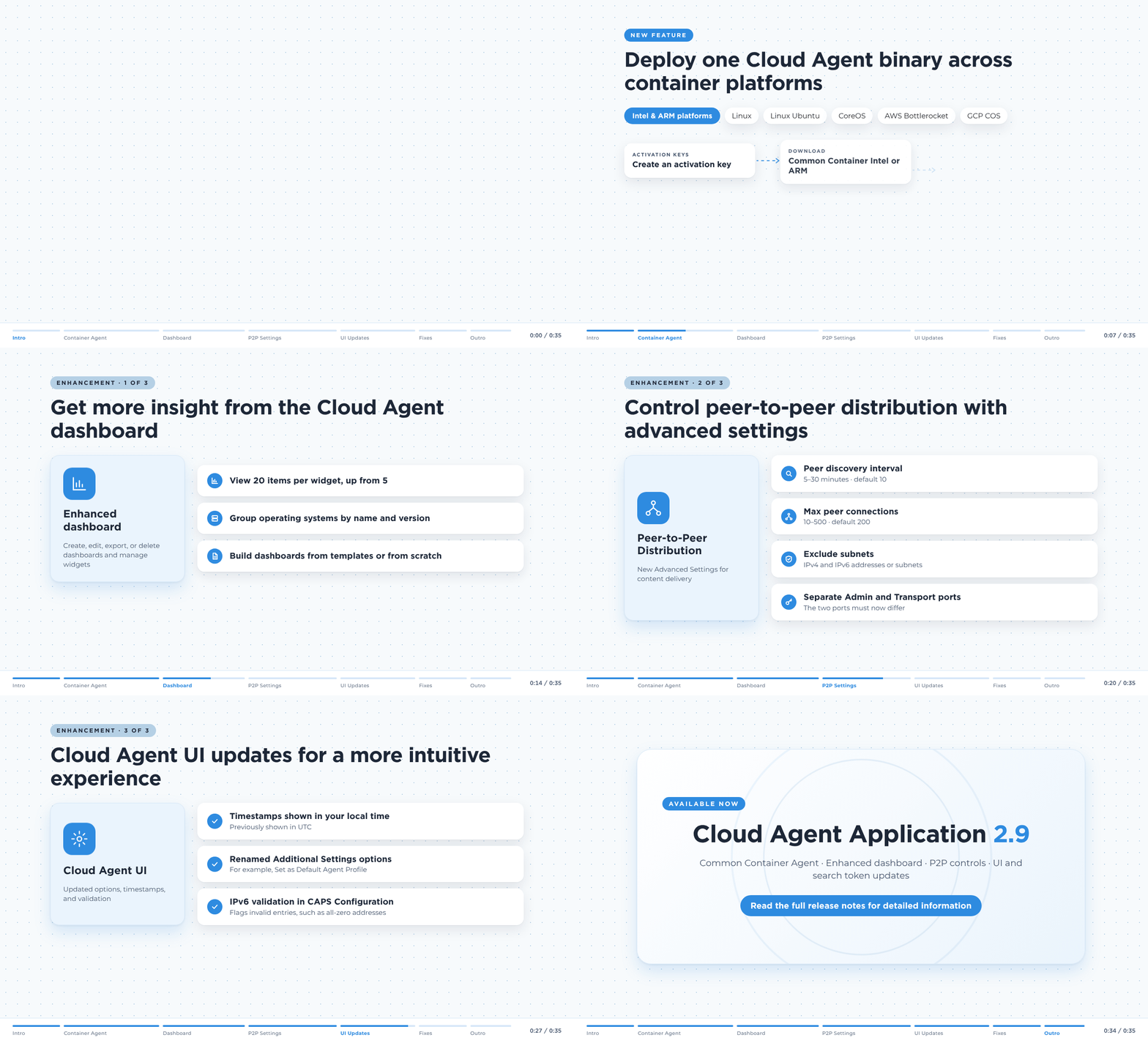
Cloud Agent Application 2.9 brings you a common binary for Containerized operating systems, an enhanced Cloud Agent dashboard, advanced configurations for peer-to-peer distribution, intuitive options in additional configuration settings, local timestamps for all records in Cloud Agent UI, and excluded IPv6 address validation in Cloud Agent user interface (UI).
New Feature
New Common Container Agent for Efficient Agent Deployment
What's New for You
You can now deploy a single Cloud Agent binary per architecture across all supported containerized platforms, reducing network bandwidth usage and streamlining your agent rollout.
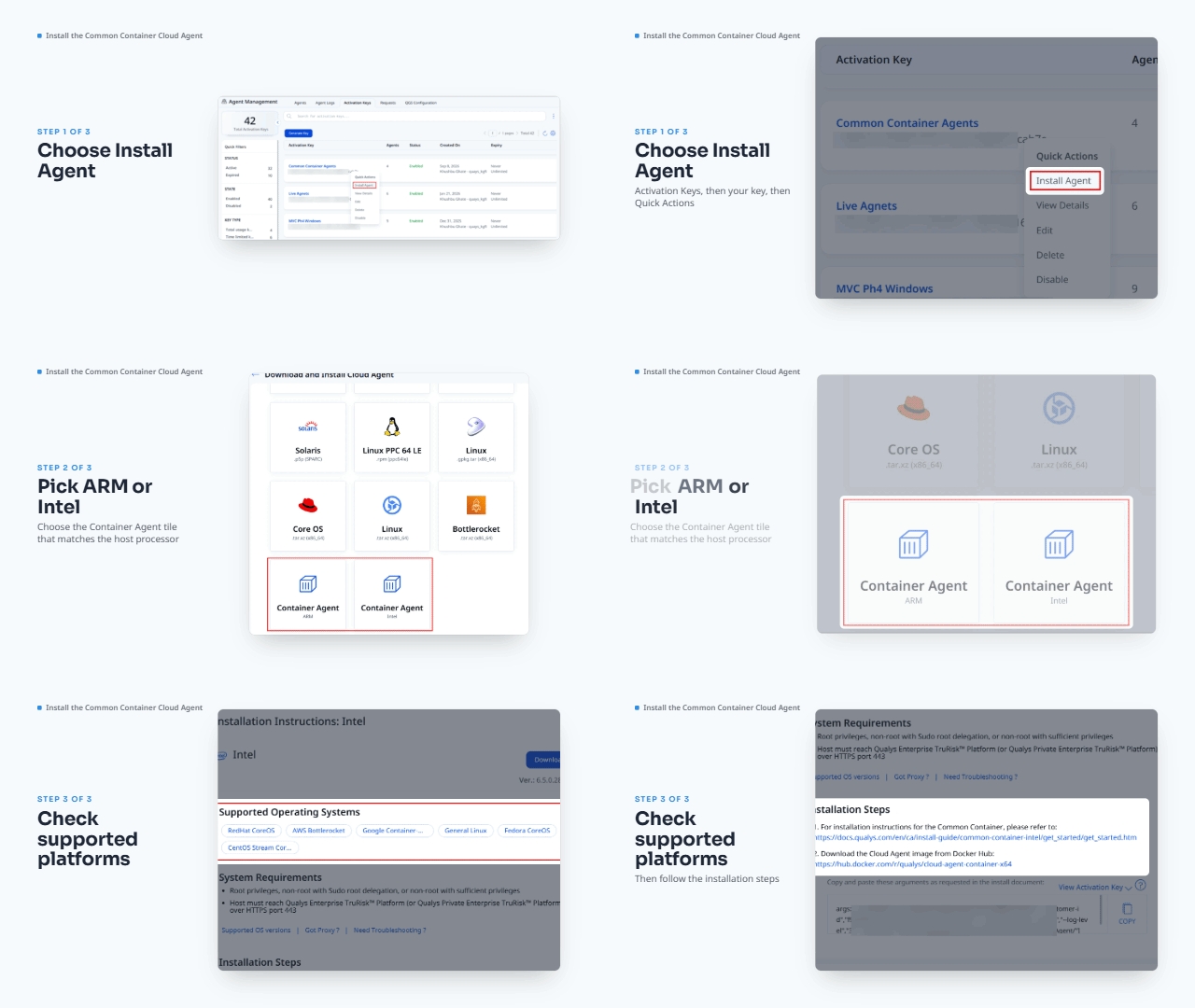
You can now use a common binary to deploy Cloud Agents on all supported containerized platforms. The Common Container Cloud Agent simplifies deployment across containerized platforms and reduces network bandwidth consumption.
We have introduced two new common Cloud Agent binaries for containerized Intel and ARM platforms. You can download one binary for Intel and one for ARM and use them to deploy across their respective containerized platforms.
The Common Container Cloud Agent supports the following Intel and ARM platforms: Linux, Linux Ubuntu, CoreOS, AWS Bottlerocket, and GCP COS.
To install a Common Container Cloud Agent, navigate to the Agent Management > Activation Keys tab. Create an activation key, then download the Common Container Intel or Common Container ARM Cloud Agent for your platform.
Currently, the Common Container Cloud Agent is supported for the following applications: CyberSecurity Asset Management (CSAM), Global Asset View, Vulnerability Management, Policy Audit (including Secure Configuration Assessment (SCA) and Middleware PC).
To learn more about the Common Container Cloud Agent, refer to the Common Container Cloud Agent for Intel Installation Guide and Common Container Cloud Agent for ARM Installation Guide.
Enhancement
Get More from Enhanced Cloud Agent Dashboard
What Changed For You
Use the enhanced Cloud Agent dashboard to get more insights into Cloud Agent distribution; create, edit, export, or delete dashboards, and manage dashboard widgets. You can now view more items per widget, group operating systems by name and version, and build dashboards from predefined templates or from scratch.
We have enhanced the Cloud Agent dashboard to display more information, an easier dashboard and widget management, and to provide an intuitive overview of Cloud Agent inventory.

With the Cloud Agent dashboard, you can now:
- View twenty items in a widget instead of five.
- Group operating systems by name and version.
- View the complete asset list and respective search token by clicking the asset value in a dashboard widget.
- Create dashboards using predefined templates or from scratch.
To learn more about the enhanced Cloud Agent dashboard, refer to Cloud Agent online help.
Enhancement
Control Peer-to-Peer Distribution with Advanced Settings
What Changed For You
You can now configure peer discovery interval, limit peer connections for a Cloud Agent, exclude subnets from peer discovery, and assign correct Admin and Transport ports to manage how content moves across your peer network.
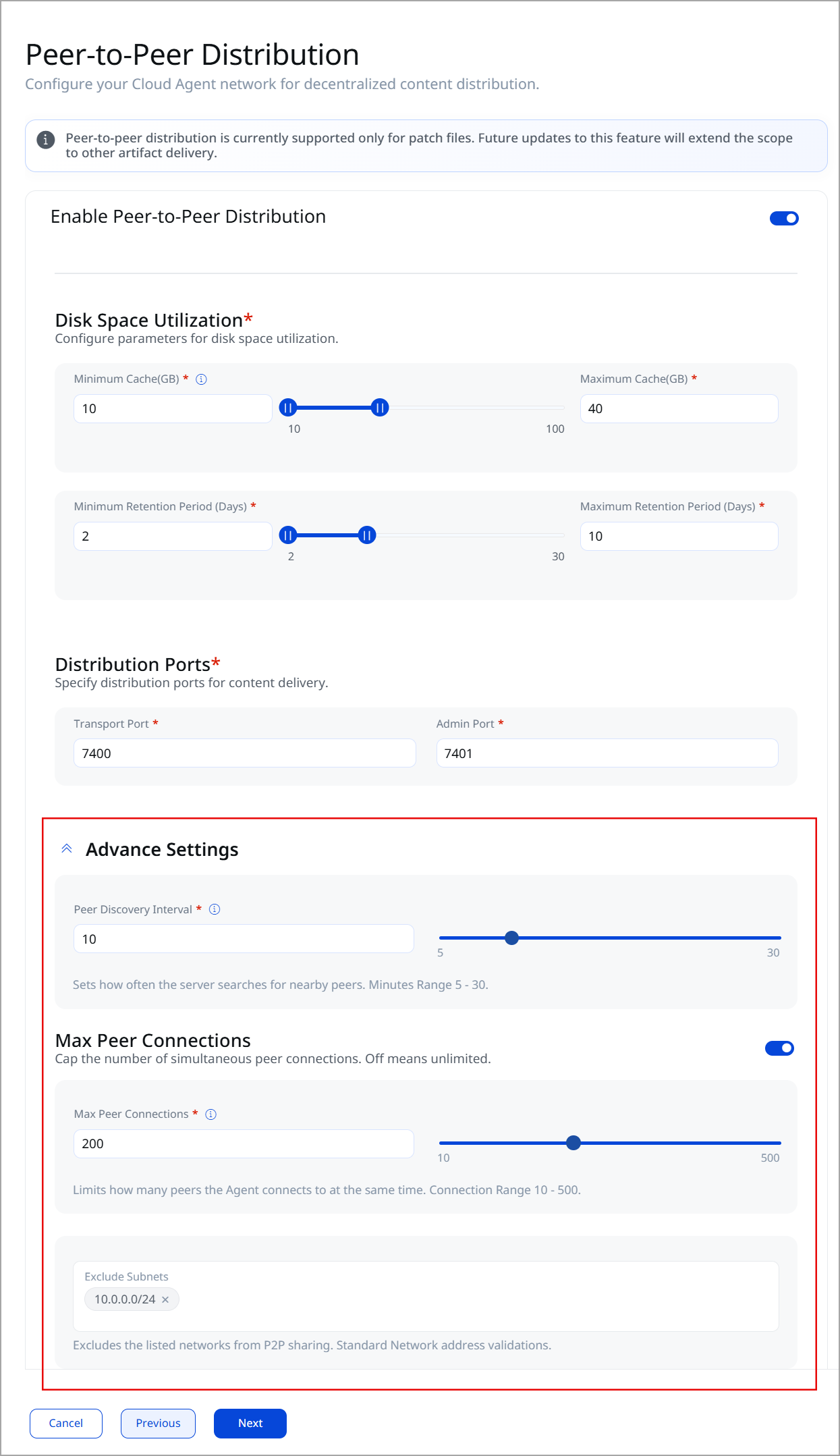
Advanced configuration settings provide you with greater control over content distribution, ensuring smooth, efficient delivery across your peer network. You can now control the peer discovery interval, limit the number of concurrent peers, exclude IPv4 and IPv6 assets from the peer network, and use separate admin and transport ports for content delivery.
We have introduced the following Advance Settings in the Peer-to-Peer Distribution to provide better control over the content delivery in the peer network.
| Configuration Parameter | Description |
|---|---|
| Peer Discovery Interval | Use this parameter to control how often a Cloud Agent in the peer network scans for available peers. Valid range: 5-30 minutes. Default value: 10 minutes. |
| Max Peer Connection | Use this parameter to control the maximum number of peer connections for a Cloud Agent. Valid range: 10-500 Default value: 200 |
| Exclude Subnets | Use this parameter to specify the IPv4 and IPv6 addresses or subnets to be excluded from the peer network. |
| Admin Port | You must now specify the different Admin port and Transport port for peer-to-peer content distribution. Previously, you could use the same port as the Admin and Transport ports. |
| Transport Port |
To learn more, refer to Peer-to-Peer Distribution.
Enhancement
Cloud Agent UI Updates for Intuitive Experience
What Changed For You
You now see Cloud Agent timestamps in local time, find renamed Additional Settings options, and get a validation message when you enter invalid IPv6 addresses in CAPS Configuration.
The updated user interface simplifies Cloud Agent workflows and provides the required information upfront, in an easier-to-understand way, to improve your experience.
Check the following table to know about the updated Cloud Agent options:
| Cloud Agent Tab | Updated UI Element | Description |
|---|---|---|
Configurations > Configuration Profiles > Additional Settings |
Set as Default Agent Profile | Select this option to make a configuration profile the default profile for the subscription. All the newly installed Cloud Agents are assigned the default profile if no other profile is assigned to them. Old name: Make this the default profile for the subscription |
| Pause Data Collection (VM, Patch, SCA, Inventory) | Select this option to stop future VM, PC, SCA, and Inventory scans for all the Cloud Agents associated with this profile. Old name: Suspend data collection for VM, PA, SCA and Inventory for all agents using this profile |
|
| Store Scan Data in Memory | Select this option to store the Cloud Agent's SQLite database in memory to improve system performance. Old name: In-Memory SQLite Databases |
|
| To learn more about these options, refer to the Additional Settings. | ||
| Across the Cloud Agent user interface | Timestamp | The Cloud Agent user interface now shows all timestamps of asset records, scans, and expiry in the local time. Previously, the timestamps were displayed in UTC time. |
| Configuration > CAPS Configuration | Excluded IPv6 Assets | The CAPS configuration no longer accepts all-zero IPv6 addresses in the excluded IP list. Also, a validation message is displayed to notify you of an invalid entry. To learn more, refer to CAPS Configuration. |
Token
Cloud Agent Token Updates
The following are the new and updated search tokens for Cloud Agent:
| Token | New/Updated | Description |
|---|---|---|
| qualys.scan.lastRemoteVmScanDate | New | Use this token to search for assets by their remote vulnerability scan dates. Example: qualys.scan.lastRemoteVmScanDate: [2026-01-01 ... 2026-06-30]
|
| agent.activationKey.status | Updated | We have renamed the agent.activations.status token to agent.activationKey.status. Use this token to search activation keys by their status.Example: agent.activationKey.status: ACTIVE
|
| qualys.agent.errorStatus | Updated | The qualys.agent.errorStatus token support is removed from the Agents tab. The token was used to search for Cloud Agents having an error status. |
Fix
Fixes
The following important and notable customer issues are fixed in this release:
| Category/Component | Description |
|---|---|
| Search Tokens: Search Results | Issue: The lastSwCAScanDate QQL token returned inconsistent results when users configured custom time zones. Fix: Date range filtering now returns assets that correctly match the specified search criteria. |
| Cloud Agent Activation: License Count | Issue: Resolved an issue in the CyberSecurity Asset Management (CSAM) UI where the License Limit Reached: PM notification was displayed incorrectly for Patch Management (PM) customers. Fix: The license usage information is now correctly displayed in CSAM; no incorrect or misleading errors are displayed. |
| Cloud Agent UI: Agent List Visibility | Issue: In the Agent Management page, expanding the tag list for a Cloud Agent could make other agents inaccessible when the search results contained only a few agents. Fix: Users can now view all agent records correctly, even after expanding large tag sets. |
| Activation Key Search: Operator Support | Issue: In the Change Activation Key window, using logical operators, such as OR and NOT, in activation key searches returned a No Results response. Fix: The search experience now correctly limits operator usage to supported conditions and prevents misleading search outcomes. |
| Cloud Agent UI: Filters and Sorting | Issue: Sorting on the Last Activity and Agent Host columns was applied only within the current page, not across the entire result set. Fix: Sorting is now applied correctly to the entire search result when indexed asset data is synchronized and complete. |
| Cloud Agent Tags: Bulk Operation | Issue: Adding tags to a large number of Cloud Agents (typically between 500 and 1000 agents) could remain in a loading state and eventually fail with an error instead of completing successfully. Fix: Bulk tag assignment operations now complete reliably for supported agent selection ranges. |