
What is Qualys EDR
Qualys Endpoint Detection and Response (EDR) is a cloud-based security solution that continuously monitors endpoint activity to detect malicious behavior, investigate security incidents, and respond to threats in real time. EDR captures detailed system events across endpoints to identify indicators of compromise (IoCs), confirm the presence of known and unknown malware, and support rapid investigation and remediation actions.
Built on the Qualys Cloud Platform, EDR uses the same single Qualys Cloud Agent already deployed for asset management, vulnerability assessment, and patching, eliminating the need for separate endpoint agents and consoles.
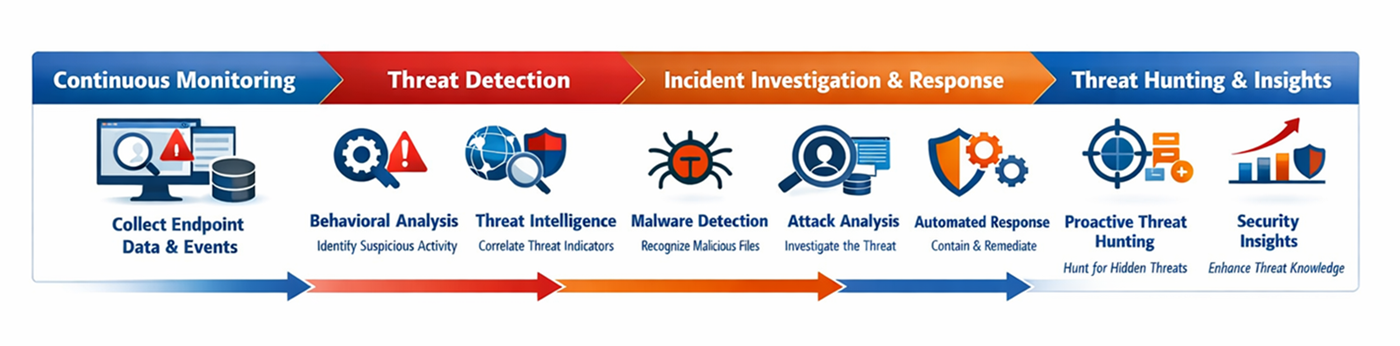
Key Features of Qualys EDR
Everything you need to detect, investigate, and respond to advanced endpoint threats
Real-Time Endpoint Activity Monitoring
Continuously capture endpoint telemetry, including processes, files, and network connections, to detect suspicious activity and advanced threats.
Learn More →Investigation & Threat Hunting
Hunt across your environment and investigate incidents using Qualys Query Language (QQL) and rich event context.
Learn More →Automated Response & Remediation
Contain and remediate threats by blocking files and stopping processes directly from the console.
Learn More →Multi-Vector EDR + Malware Protection
Benefit from integrated antimalware capabilities to deliver prevention, detection, and response with one agent and one console.
Learn More →Encrypted File Recovery
Restore files quickly after ransomware attacks using automatic backup and recovery of encrypted data.
Learn More →Report Scheduling
Schedule recurring reports on incidents and endpoint risk, and have them delivered automatically to stakeholders on a set cadence.
Learn More →Notifications
Configure email alerts so the right people are notified as soon as EDR detects an incident or event that needs attention.
Learn More →Your EDR Journey
Click a step below to explore your guided path from deploying agents to remediation
Looking for Something Else?
Get the most out of your Qualys EDR with these helpful resources