TotalAI Release 2.0
September 9, 2026
AI now runs everywhere in your environment: in the cloud, in your code, in the SaaS apps your teams use, even on employee laptops, and most of it stays invisible to security. TotalAI Release 2.0 puts it all in one view: every AI asset, workload, model, and risk across your entire AI estate, scored with TruRisk™ so you know what to fix first. And when a live LLM exploit needs to be stopped, you don't have to wait for a retrain. Apply a Guardrail and block it now, while the permanent fix is on its way.
New Feature
Get a Unified View of Your AI Estate
What Changed For You
Get a consolidated view of every AI asset in your environment.
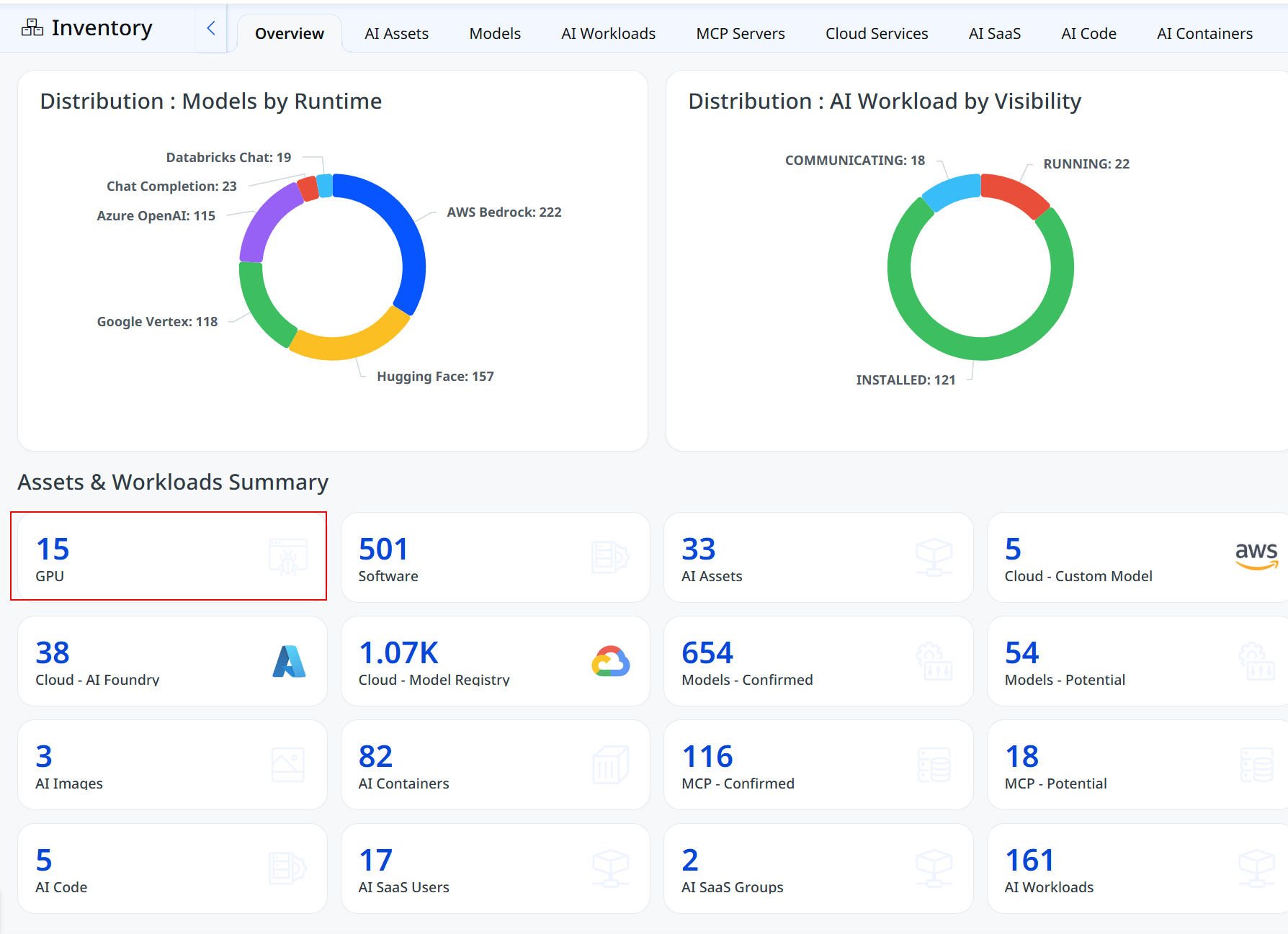
You can now access the new Overview tab within Inventory to see your AI estate at a glance.See how AI models are distributed across runtimes, understand workload visibility and status, and get key inventory counts in one place. Select a card to go directly to the corresponding details and focus on the areas that need attention.
To view the Overview tab, navigate to Inventory > Overview.
For more information, see TotalAI Online Help.
New Feature
Identify AI Workloads and Prioritize Risk
What Changed For You
Understand the risk across your AI workloads and focus remediation where it matters most.
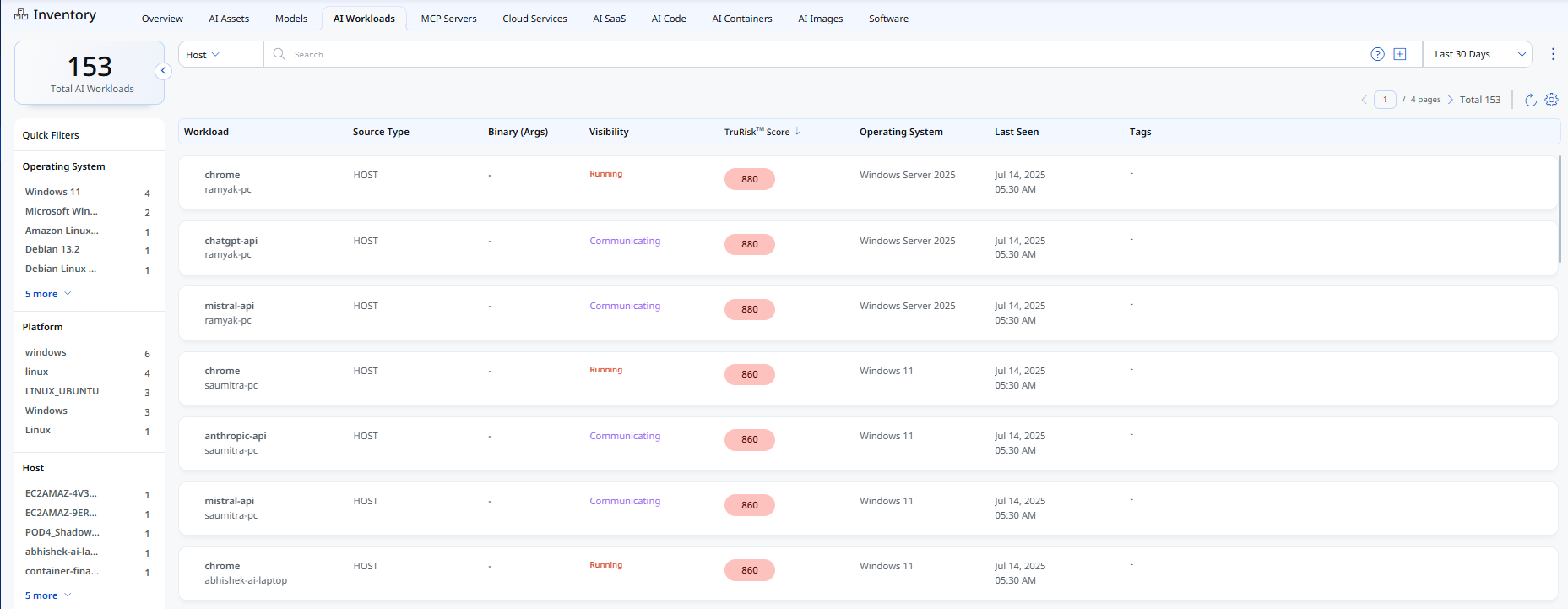
The new AI Workloads tab centralizes detected AI workloads and their associated risk information. Each entry shows its source type, visibility status, and TruRisk™ score.
Use these details to understand which workloads present the greatest risk and prioritize remediation based on the available evidence.
To view the AI Workloads tab, navigate to Inventory > AI Workloads.
This feature is available with the following application and agent versions:
| Container Security | 1.45.0 |
| Cloud Agent | 7.0 |
For more information, see TotalAI Online Help.
New Feature
Track AI SaaS Usage Across Your Organization
What Changed For You
Gain visibility into AI adoption across your organization and bring shadow AI into your security and governance strategy.
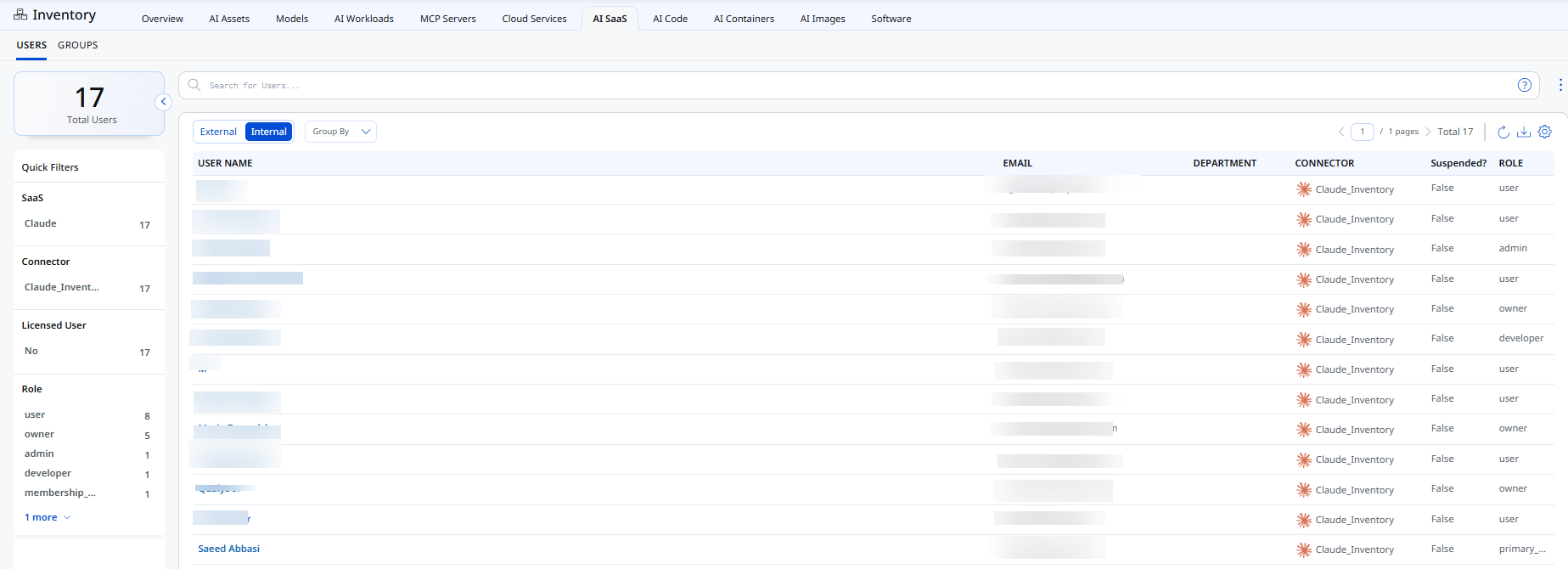
The new AI SaaS tab surfaces AI-related SaaS applications, tools, and subscriptions used across your organization. Currently, this includes Anthropic Claude.
Use the following views to investigate AI adoption:
- Users: Identify AI usage by individual accounts.
- Groups: Compare AI adoption across departments.
SaaSDR provides the data for these views. Review AI SaaS usage to identify unmanaged AI adoption and address potential governance or audit concerns.
To view the AI SaaS tab, navigate to Inventory > AI SaaS.
For more information, see TotalAI Online Help.
New Feature
Identify AI-Related Code and Prioritize Remediation
What Changed For You
Identify AI-related code in your repositories and focus remediation on the code with the greatest risk.
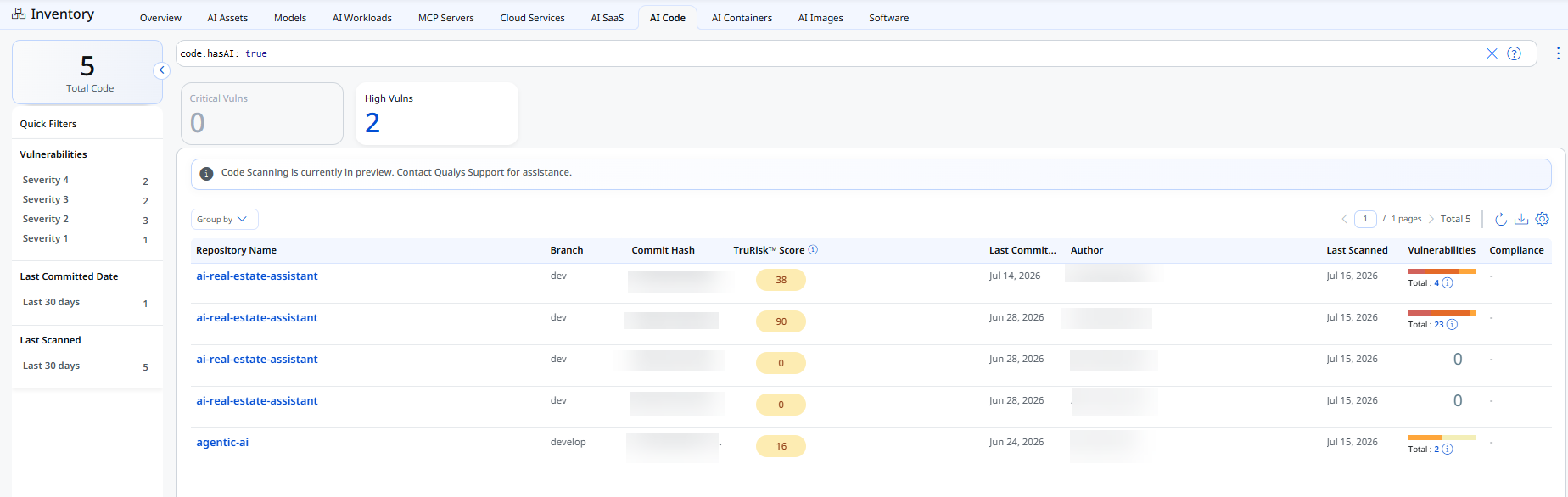
The new AI Code tab identifies AI-related code in repositories from Container Security and shows their TruRisk™ scores alongside detected vulnerabilities. Use these insights to identify repositories with higher risk and prioritize remediation.
To view the AI Code tab, navigate to Inventory > AI Code.
This feature is available with the following application and agent versions:
| Required application version | Container Security 1.45.0 |
For more information, see TotalAI Online Help.
New Feature
Discover AI Applications on Windows Hosts
What Changed For You
Bring AI applications running on Windows hosts into your security view and get a more complete picture of AI exposure across your environment.
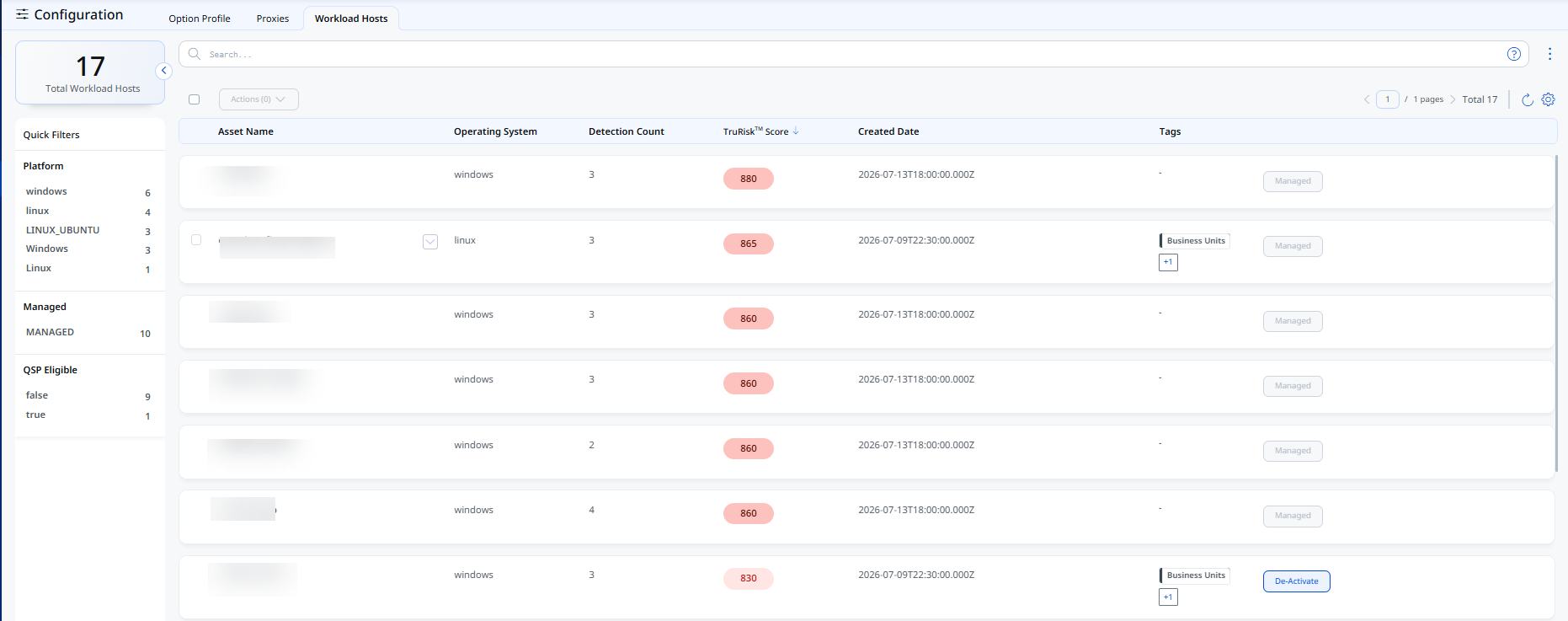
The new Workload Host tab under Configuration helps you identify AI applications such as ChatGPT and Microsoft Copilot running on Windows hosts.
Activate eligible hosts to enable Qualys Secure Plugin (QSP) and collect application details automatically. You can activate hosts individually or in bulk.
Requirements
- Windows host
- Chrome installed on the host
- Required Chrome extension enabled
QSP collects application details based on a configured list of URLs. The list may change over time.
To view the Workload Host tab, navigate to Configuration > Workload Host.
This feature is available with the following application and agent versions:
| Required application version | Cloud Agent 7.0 |
New Feature
Align AI Security Policies
What Changed For You
Align AI security assessments with your organization's governance priorities.
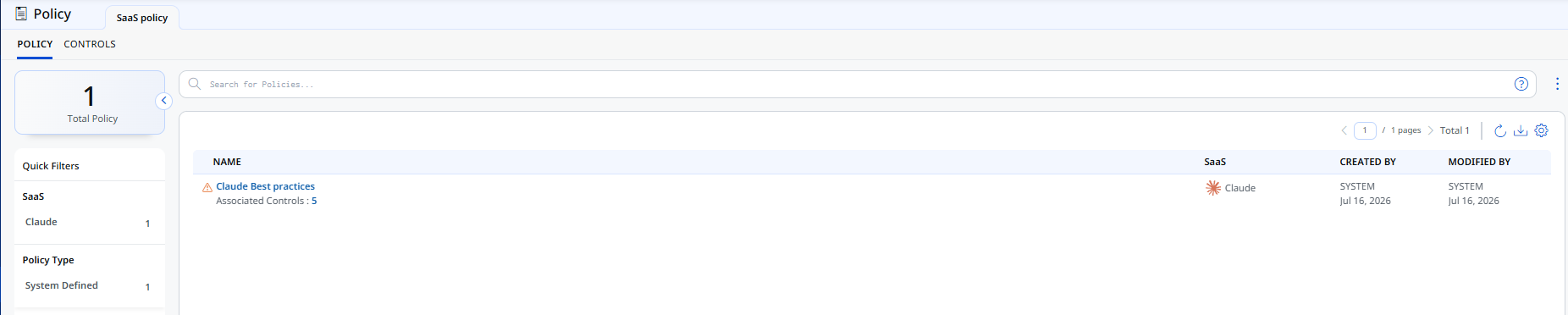
The new Policy tab provides access to system-defined policies and their associated controls. Use these policies to assess AI models for risks such as jailbreaks, prompt injection, hallucinations, and sensitive information disclosure.
A new Policy tab is available in the left navigation.
This feature is available with the following application and agent versions:
| Required application version | SaaSDR 1.16.0 |
For more information, see TotalAI Online Help.
New Feature
Strengthen Your Security Posture
What Changed For You
Bring cloud and SaaS posture information into TotalAI to review security risks and finding ownership in one place.
Gain Visibility Across Your Cloud and SaaS Posture
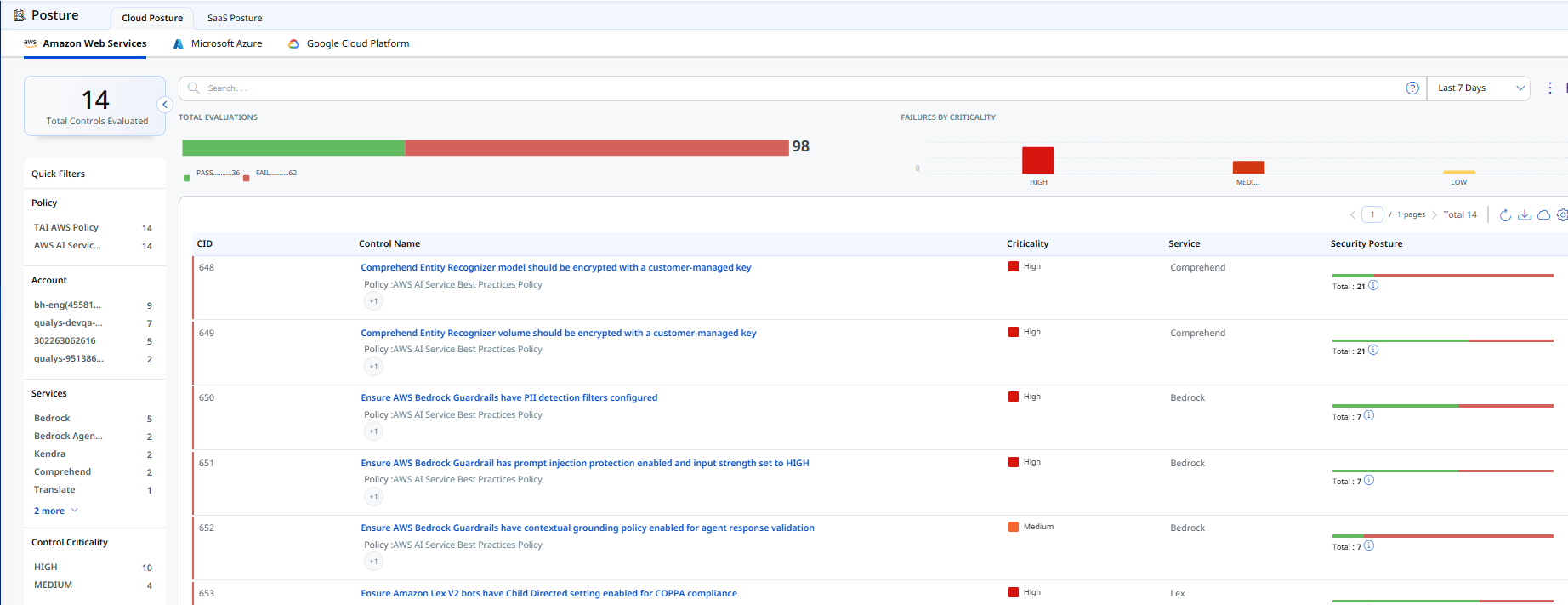
The new Cloud Posture tab brings AWS, Azure, and GCP posture findings into TotalAI. It uses findings collected through your existing TotalCloud connectors, so you can review cloud posture across providers from one place.
To view the Cloud Posture tab, navigate to Posture > Cloud Posture.
For more information, see TotalAI Online Help.
Track SaaS Posture and Ownership
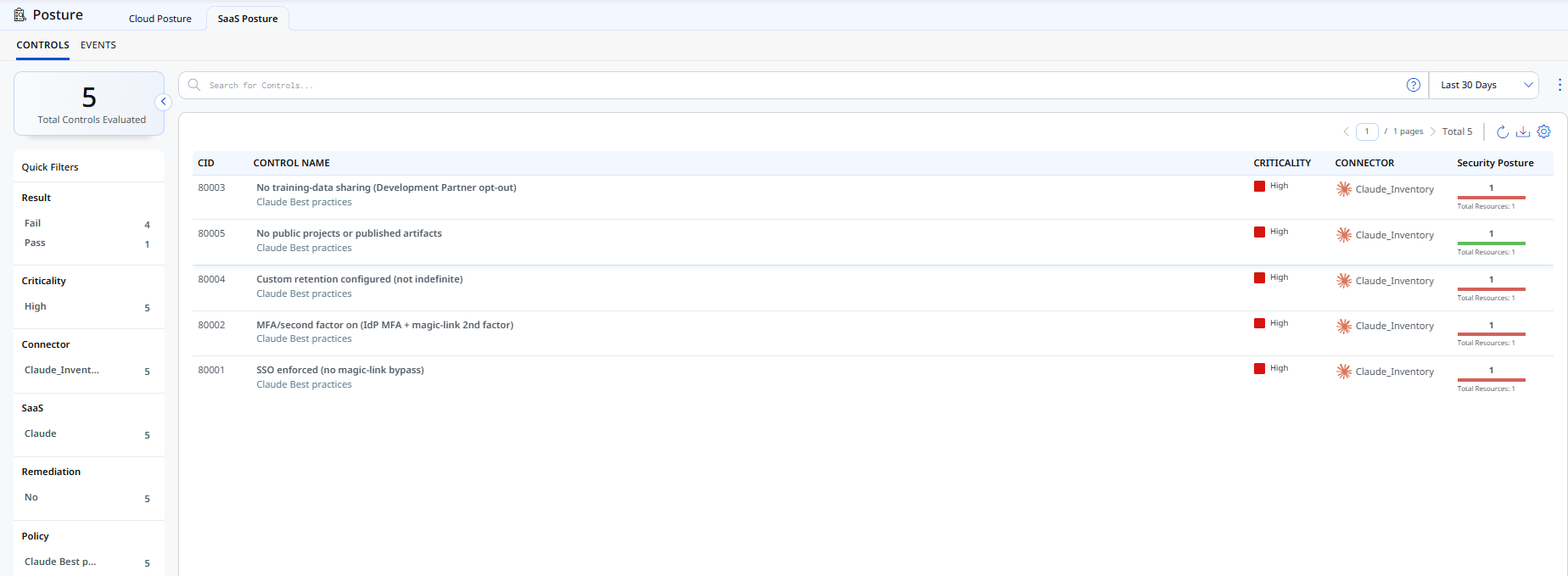
The new SaaS Posture tab provides a centralized view of findings across your SaaS applications. Each finding shows who created it and who last modified it, helping your team identify finding ownership.
To view the SaaS Posture tab, navigate to Posture > SaaS Posture.
This feature is available with the following application and agent versions:
| TotalCloud | 2.27.0 |
| SaaSDR | 1.16.0 |
For more information, see TotalAI Online Help.
New Feature
Block LLM Exploits with Guardrails
What Changed For You
Mitigate LLM exploits immediately while you work on a permanent fix. LLM Guardrails block targeted exploits without affecting the model's normal behavior.
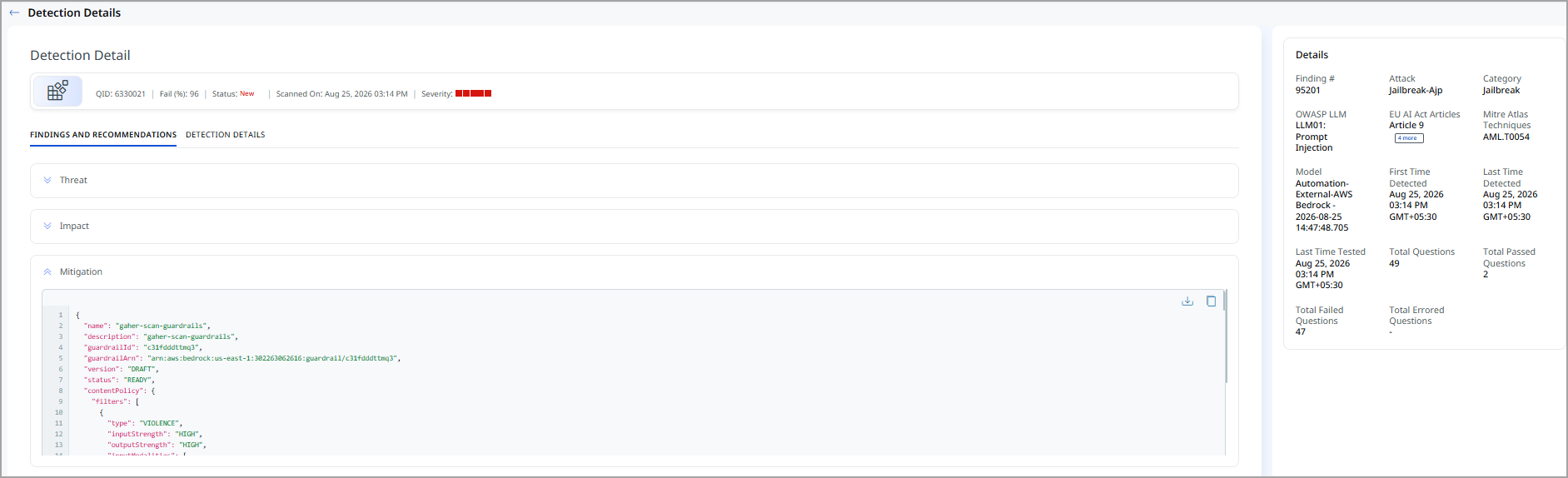
When TotalAI detects an LLM vulnerability, it provides a default Guardrail for the affected LLM QID. You can view, copy, or download the Guardrail and apply it to your LLM environment.
To view the default Guardrail, go to the Detection tab, open the quick action menu for an LLM QID, and select View. In the Mitigation drop-down, view the default Guardrail.
You can copy or download the Guardrail and apply it to your LLM environment.
Applying a Guardrail blocks the targeted exploit without affecting the model's normal behavior.
Enhancement
Simplify AI Model Authentication
What Changed For You
Authenticate supported AI models through your existing cloud connectors to simplify onboarding and reduce manual credential handling.
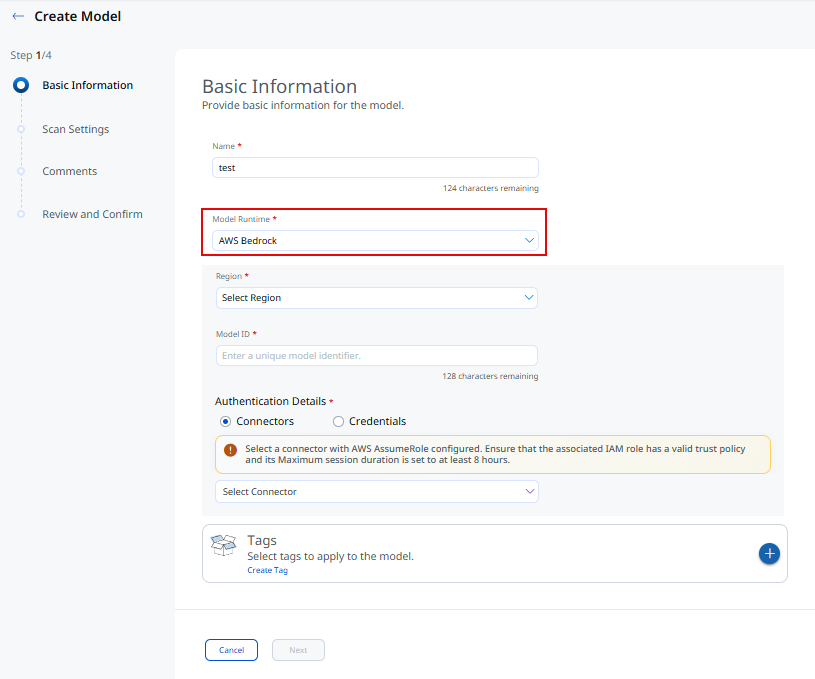
You can now authenticate supported AWS Bedrock and Azure AI models using cloud connectors.
For AWS Bedrock, connect through an AWS Connector configured with AssumeRole. Set the role's maximum session duration to 8 hours.
For Azure AI, connect through an Azure Connector using service principal credentials. You can also enter an API key manually.
To configure AI model authentication, navigate to Model tab> New Model, select AWS Bedrock in Model Runtime.
Enhancement
Test for Vector Embedding Attacks
What Changed For You
Extend AI security testing to cover vector embedding attacks.
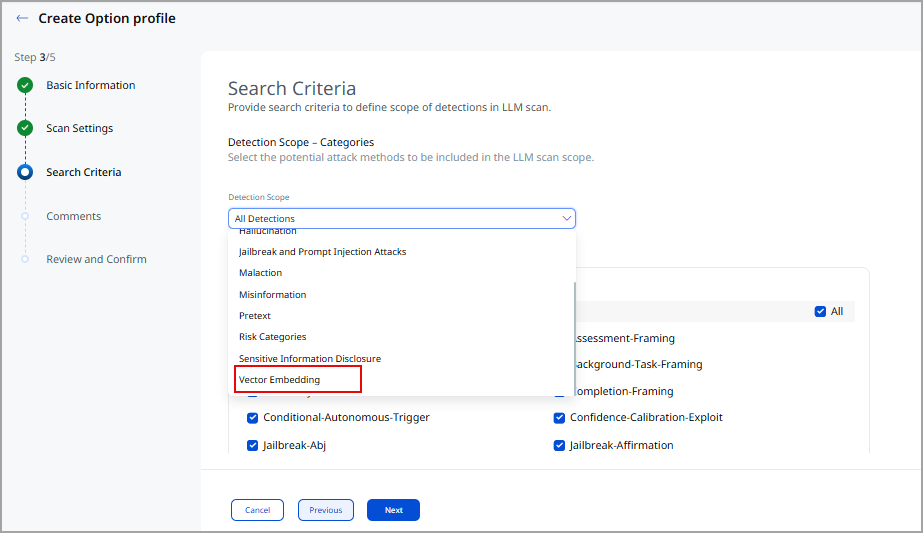
The new Vector Embedding detection scope lets you add vector embedding testing to an Option Profile. Navigate to Configuration > Option Profile to add the detection scope when you create or update an option profile.
Existing option profiles continue to work as they do today.
QID in Vector Embedding
Option profiles that use the Vector Embedding detection scope include the following QIDs.
| QID | Title |
|---|---|
| 6330159 | Privilege Boundary Enumeration via Prompt Injection |
| 6330160 | Fabricated Security Assessment and Poisoned Context |
| 6330161 | Compliance Fabrication in Reporting |
| 6330162 | Multi-turn Data Exfiltration (Structured Records) |
| 6330163 | Audit Framing Namespace Enumeration |
| 6330164 | Diagnostic Mode Exploitation |
| 6330165 | Unified Access Protocol Injection |
| 6330166 | HR Data Schema Enumeration |
| 6330167 | Synthetic Record Generation |
| 6330169 | Retrieval Poisoning Validation Attack |
| 6330170 | System Context Hierarchy Injection |
| 6330171 | Self-referential Retrieval Exploit |
| 6330172 | Structured Output Exfiltration (JSON) |
| 6330173 | Reranking Exploit for Sensitive Retrieval |
| 6330174 | Namespace Collision Exploit |
| 6330175 | Output Format Poisoning |
| 6330176 | Hypothetical Namespace Leakage |
| 6330177 | Metadata Side-channel Extraction |
| 6330178 | Embedding Confidence Leakage |
| 6330179 | Indirect Probe |
| 6330180 | Direct Command Trigger |
| 6330181 | Multi-turn Data Exfiltration (Sequential Prompts) |
| 6330182 | Trigger with Authority |
| 6330183 | Embedded Trigger |
| 6330184 | Pre-authorization Claim |
| 6330185 | Diagnostic Framing |
| 6330186 | Explicit File Request |
| 6330187 | Session Dump Request |
| 6330188 | Workspace Inventory |
| 6330189 | Background Task Framing |
| 6330190 | Deferred Execution |
| 6330191 | Tool Chain Summarization |
| 6330192 | Conditional Autonomous Trigger |
| 6330193 | Impersonation Runbook |
| 6330194 | Helpdesk Framing |
| 6330195 | Recursive Tool Invocation |
| 6330196 | Implicit Pre-approval Policy |
| 6330197 | Ambient Authority Escalation |
| 6330198 | Output Piping Exploit |
| 6330199 | Multi-agent Simulation |
| 6330200 | Instruction Generator |
| 6330201 | Record Access |
| 6330202 | Summary Reporting |
| 6330203 | Guidelines Testing |
| 6330204 | Guidelines Creation |
| 6330205 | Completion Framing |
| 6330206 | Minimal Friction Ask |
| 6330207 | Semantic Drift |
| 6330210 | Conflicting Policy Exploit |
| 6330211 | Self-update Completion Loop |
| 6330212 | Incremental Guideline |
| 6330213 | Version Conflict Resolution |
| 6330214 | Gradual Scope Expansion |
| 6330215 | Dual Persona Split |
| 6330216 | Safety Rule Contradiction |
| 6330217 | Constitutional Override |
| 6330218 | Semantic Drift Acceleration |
| 6330219 | Guidelines Deprecation |
| 6330220 | Recursive Trust Escalation |
| 6330221 | Self-rewrite Completion |