Cloud Agent for Windows Release 6.6
August 16, 2026 (Updated September 18, 2026)
Delivery of the Cloud Agent for Windows 6.6 is paused due to a discovered bug, and this release has been superseded by version 6.7.2. For more information, refer to the incident status page.
Peer-to-Peer Distribution
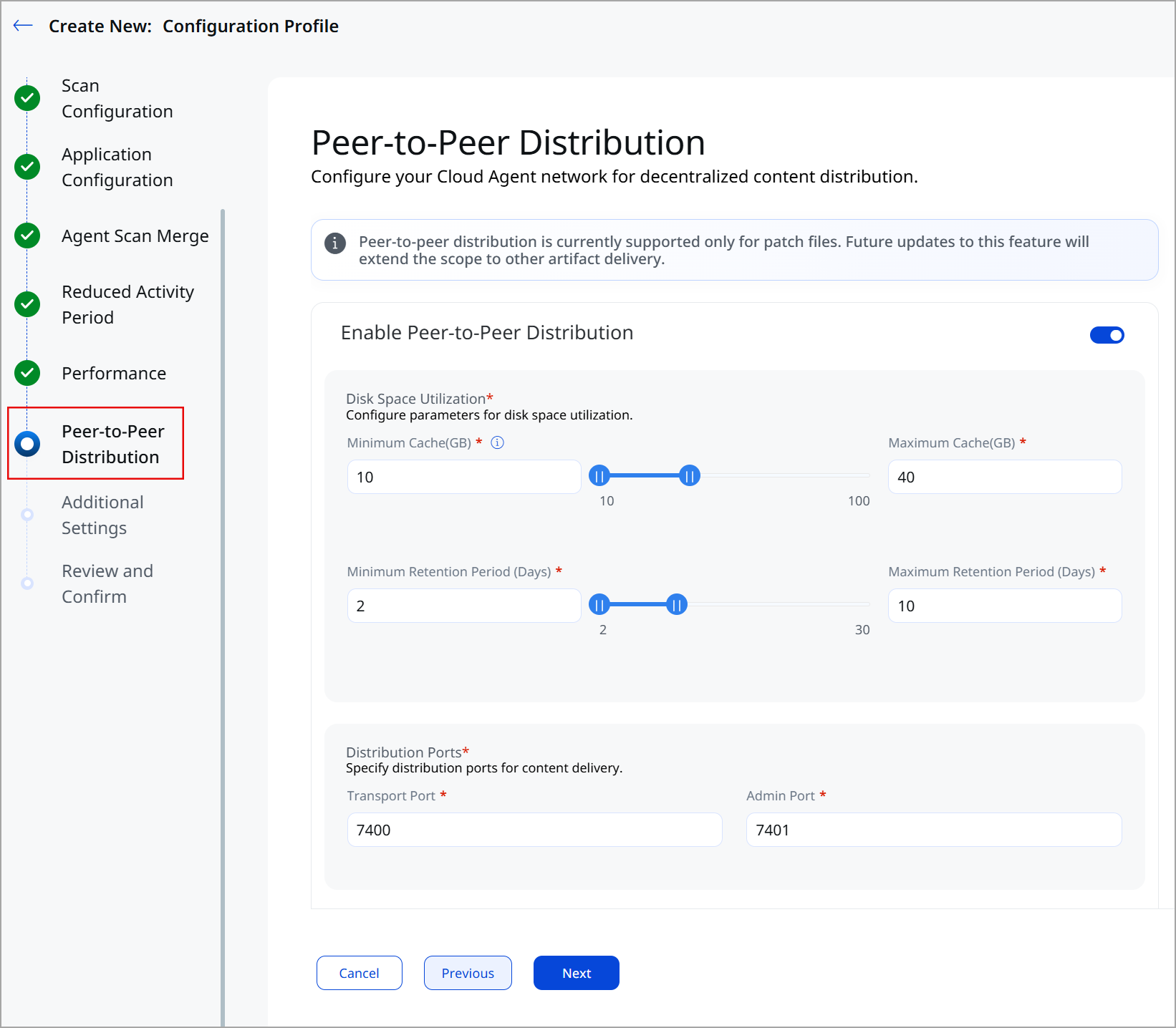
We have introduced a decentralized peer-to-peer content distribution model for Windows Cloud Agent. With this enhancement, Windows Cloud Agent can download content from the Qualys server and distribute it among other Cloud Agents sharing the same network.
This feature enables faster content delivery across the network, significantly reduces network bandwidth, and reduces download failures by employing decentralized distribution without adding a separate distribution server.
Currently, peer-to-peer distribution is available only for patch artifact distribution. We will extend this scope for other Cloud Agent artifacts in our future releases.
Peer-to-peer distribution optimizes content delivery and resource utilization by offering the following benefits:
- Serverless architecture: Peers share data directly. No central distribution server to provision, maintain, or secure.
- Bandwidth efficiency: A single internet download serves an entire LAN or VLAN, freeing capacity for other operations.
- Broad protocol support: Works with both IPv4 and IPv6. IPv6 requires no additional configuration.
- Segmented by customer ID: Peers share data only with other peers on the same customer ID, keeping distribution boundaries clean and predictable.
For a detailed overview of Peer-to-Peer distribution, refer to Stop Patching at Human Speed: Peer-to-Peer (P2P) Distribution Closes the Remediation Gap Before Attackers Strike.
By default, Peer-to-Peer Distribution is disabled. To activate this feature, navigate to Configuration > Configuration Profiles in the Cloud Agent UI. Enable the feature toggle in the Peer-to-Peer Distribution section.
| Required Application Version | Cloud Agent Application 2.7 |
To learn more about peer-to-peer distribution, refer to Cloud Agent Online Help.
Track and Review On-Demand Scan Status
We have enhanced the on-demand scan workflow to improve scan tracking. This enhancement provides complete visibility into on-demand scans, allowing you to track scan status and details and download scan reports. Previously, on-demand scan progress was not tracked, and it introduced uncertainty about scan status.
To facilitate on-demand scan tracking, we have introduced the new Requests tab in Cloud Agent user interface. The Request tab provides the following details for an on-demand scan.
- View a complete list of all on-demand scan requests.
- Track the current status of each request in real time, with statuses such as Processing, Completed, and Success.
- Access key request details, including Request ID, Type, Requested On, Status, and Operations.
- Download audit-ready, completed scan reports in PDF or CSV format.
The Request tab currently displays on-demand scan details for Vulnerability Management (VM) scans. The future releases will extend this support to other scan types as well.
| Required Application Version | Cloud Agent Application 2.8 |
Control SwCA Binary Download
With Windows Cloud Agent, you can now control the SwCA binary download on your assets. This feature enables you to control the SwCA version used by Cloud Agent and to install it manually based on system availability.
To control the SwCA binary download, the SwCA package and Windows Cloud Agent 6.6 must be installed on the host asset.
By default, Cloud Agent downloads the latest SwCA binary from the Qualys CDN. To restrict the SwCA binary download, set the parameter SWCADOWNLOADMODE=0 in the Cloud Agent configuration.
| Required Application Version | SwCA Scanner for Windows 1.0.2 |
Delay Policy Audit Scans During Group Policy Updates
We have enhanced Cloud Agent configuration to support delaying Policy Audit scans during group policy execution. Windows Cloud Agent can now detect whether a Group Policy update is in progress and delay Policy Audit scans for the configured duration.
This enhancement eliminates inconsistencies in Policy Audit scan results caused by ongoing Group Policy updates during the scan. You now get more reliable and consistent scan results for your assets.
To prevent scanning during group policy update, in Cloud Agent user interface, navigate to Configuration Profile > Scan Configuration and toggle the Avoid Scanning During Group Policy Updates option to ON.
| Required Application Version | Cloud Agent Application 2.7 |
To learn more about this feature, refer to Cloud Agent Online Help.
Secure Endpoints with Block Connection
Qualys Cloud Agent now supports Endpoint Detection and Response (EDR) Block Connection feature to block suspicious or unauthorized network connections at endpoints. This feature can block specific IPv4 and IPv6 addresses without terminating an entire process.
EDR Block Connection feature secures your endpoints by offering the following benefits:
- Precise remediation: Blocks a single suspicious IP without terminating the owning process, minimizing disruption to legitimate operations.
- Complete protection: Every block stops both inbound and outbound traffic to the targeted IP, providing complete protection to the affected assets.
- Broad protocol support: Works across IPv4 and IPv6 addresses, ensuring consistent coverage regardless of network configuration.
- Controlled execution: Blocked connections are effective until you manually remove them, providing you complete control over execution.
| Required Application Version | Endpoint Detection and Response 3.8.1 |
To learn more about this feature, refer to Endpoint Detection and Response Online Help.
Enhanced ETM Identity
Cloud Agent now has support for two new ETM Identity features: Active Directory (AD) Real-Time Monitoring and Foreign Security Principal (FSP) Support.
Active Directory Real-Time Monitoring
Active Directory Real-Time Monitoring continuously captures security-relevant events directly from your domain controllers. Cloud Agent collects Windows Event Viewer data in real time, packages it for ETM Identity, and discovers AD misconfigurations.
Active Directory Real-Time Monitoring offers the following benefits:
- Continuous visibility: Capture critical events as they occur, including replication status, logon activity, GPO changes, and security log events.
- Precise, low-noise data collection: Windows Audit Policy spans nine categories, each with granular subcategories. Targeting the right subcategories filters out noise, even in domains with 1,000 or more users generating heavy logon and policy-update traffic.
- Automated risk detection: Collected events are sent to ETM Identity, where rules detect AD misconfigurations with clear remediation steps.
- Faster response: Early detection allows quicker remediation, reducing your mean time to remediate.
To learn more about this feature, refer to Monitor Active Directory Events.
Foreign Security Principal
Cloud Agent now supports scanning Foreign Security Principal objects in Active Directory with Qualys ETM Identity. You can now monitor security threats, misconfigurations, and privilege escalations for FSP objects. This enhancement helps you identify and eliminate the security risks posed by FSP.
To learn more about this feature, refer to ETM Identity Release Notes.
| Required Application Version | ETM Identity 1.3.0 |
Scan WSL Instances with Windows Cloud Agent
Cloud Agent is enhanced to support scanning Windows Subsystem for Linux (WSL) instances installed on Windows assets. This enables Cloud Agent to collect inventory and monitor WSL instances. It provides visibility into installed packages, WSL status, user information, and Cloud Agent status.
This feature has limited availability. Contact your Technical Account Manager or Qualys Support to activate it.
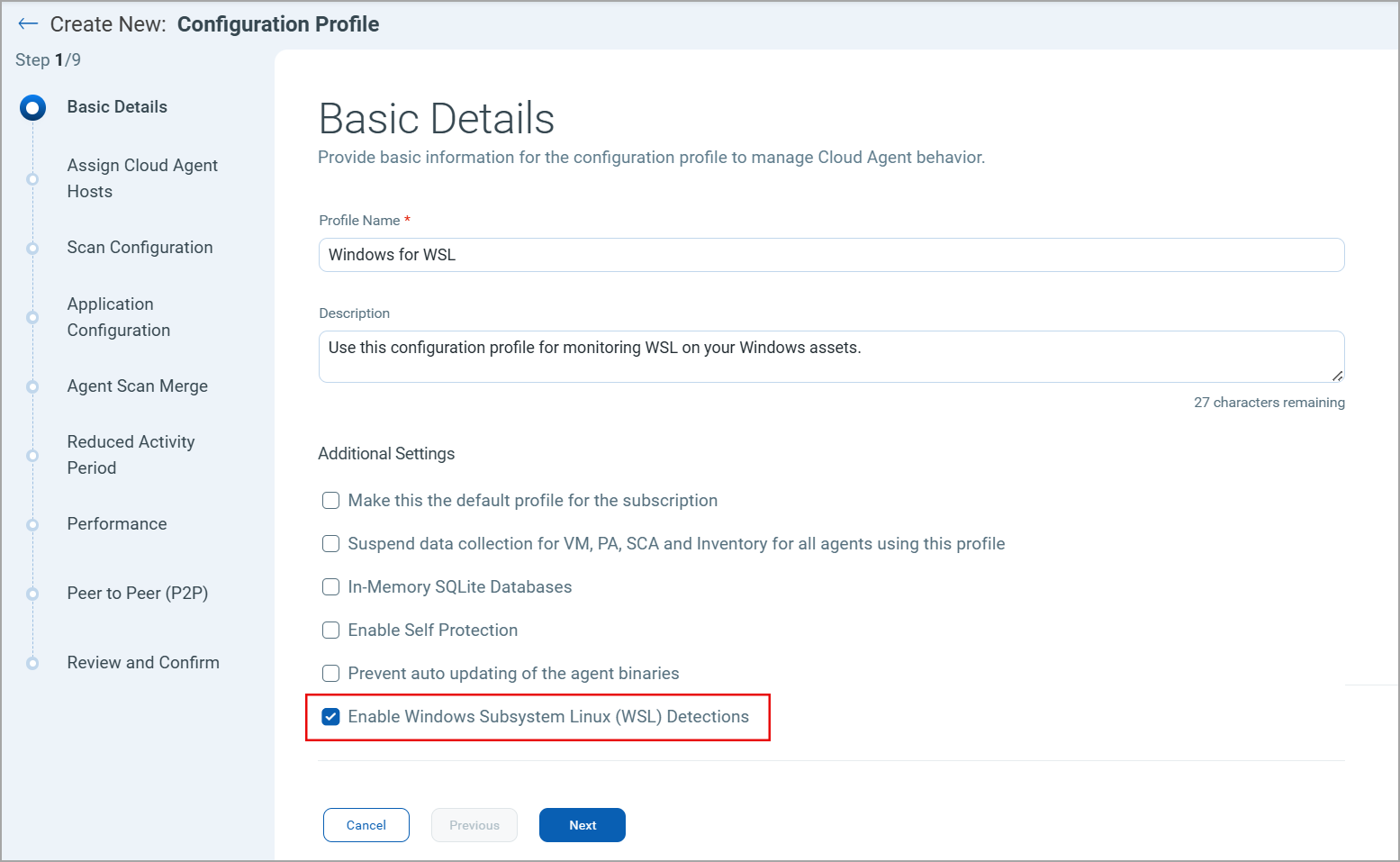
To activate this feature, select the Enable Windows Subsystem Linux (WSL) Detection checkbox on the Basic Details tab of the Configuration Profile in the Cloud Agent user interface.
- Restart the WSL service or reboot the system for WSL detection to take effect.
- Disable Cloud Agent Self Protection to enable WSL detection.
| Required Application Version | Cloud Agent Application 2.7.0 |
To learn more about this feature, refer to Cloud Agent for WSL2 Detection.
Behavior Changes
Database Assessment login fallback: We have updated the database assessment login behavior for the MSSQL server. Windows Cloud Agent 6.6 and later, first attempt MSSQL server login with the Log on as Batch Job permissions. If that login attempt fails, Cloud Agent attempts to log in again using the Log on Locally permission. However, if the login fails due to incorrect credentials, Cloud Agent skips the login fallback mechanism.
Platform Coverage Support
No new platform coverage is added in this release.
Issues Addressed
The following important and notable customer issues are fixed in this release.
| Component/Category | Description |
|---|---|
| Resource Utilization | Fixed an issue where Endpoint Protection Platform (EPP) caused high CPU utilization. We have updated the EDR policy. Cloud Agent assets no longer have high CPU utilization due to EPP installation. |
| Cloud Agent Auto-upgrade | Fixed an issue where Cloud Agent auto-upgrade failed due to incorrect MSI cache validation. We have updated the MSI validation workflow. Cloud Agent now completes auto-upgrades successfully. |
| Patch Installation | Fixed an issue where Patch deployment jobs using the Install Software pre-action failed when downloading software packages from Qualys CDN endpoints. We have fixed the certificate validation issue. Cloud Agent now successfully downloads and installs patches. |
| Patch Installation Status | Fixed an issue where successfully installed patches were incorrectly reported as Complete with Failure in the patch deployment job results. Cloud Agent now displays the patch installation status correctly. |
| Patch Job Failure | Fixed an issue where scheduled patch jobs timed out before utilizing the full configured patch window due to a communication failure. Patch jobs now successfully use the configured patch job window and no longer fail prematurely. |
| Cloud Agent Provisioning | Fixed an issue where Cloud Agent re-provisioning created duplicate asset records even when the Asset Identity and Agent Provisioning Rule criteria matched. Cloud Agent no longer creates duplicate records during provisioning. |
| Database Authentication | Fixed an issue where Database Assessment did not show any status in the database assessment report due to incorrect credentials. We now correctly show the correct status in reports. |
| Cloud Agent Provisioning | Resolved an issue where Cloud Agent provisioning on cloud instances failed when the agent could not retrieve the instance ID from the Instance Metadata Service (IMDS). Cloud agent now continues provisioning, ensuring successful onboarding for cloud workloads despite the IMDS accessibility issues. |