Overview
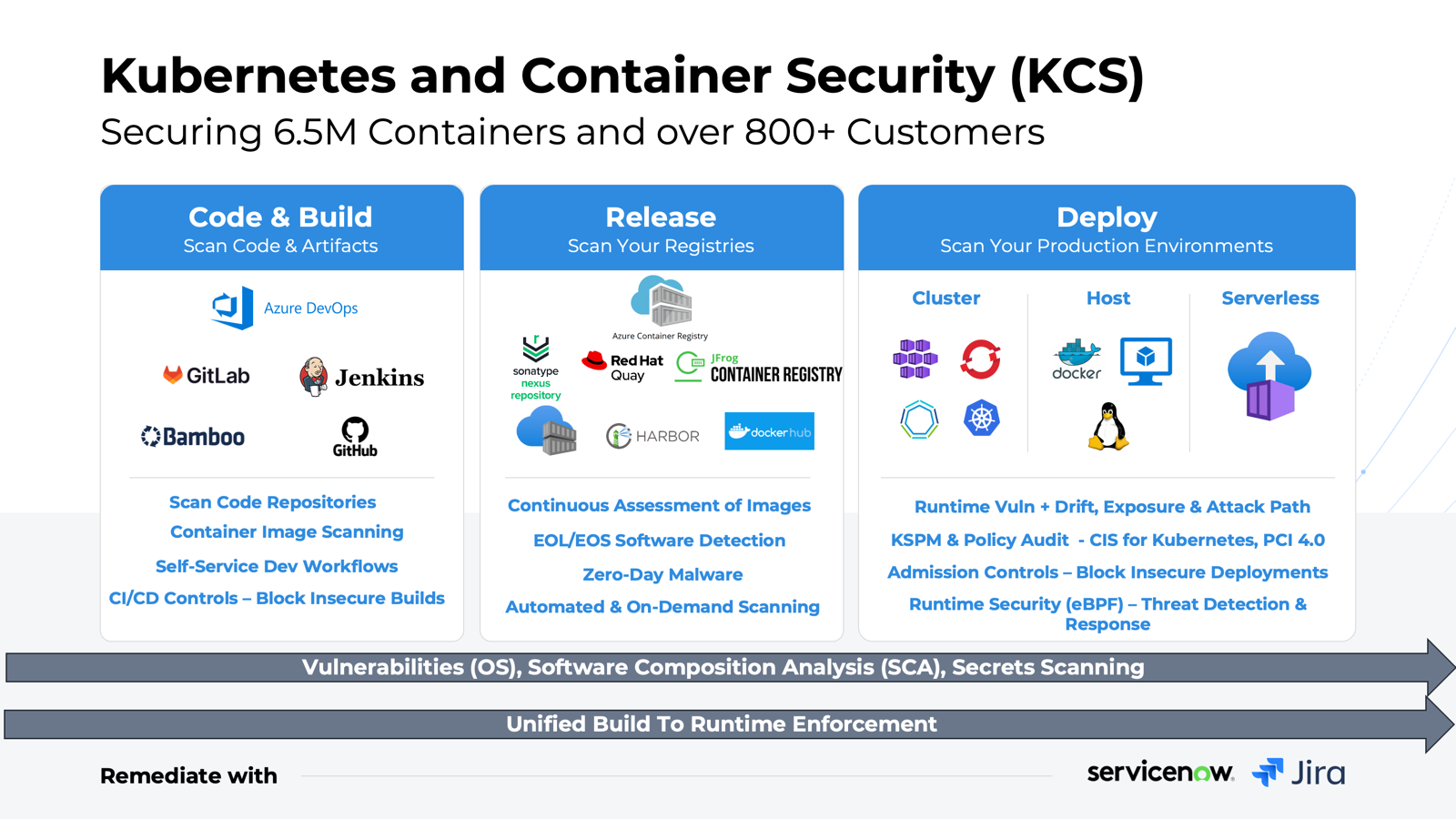
Qualys Container Security delivers comprehensive lifecycle protection for containerized environments, from image build to deployment and runtime, powered by native sensors and the Qualys Enterprise TruRisk™ Platform. It provides continuous discovery and inventory of container images, registries, and running workloads, with real-time vulnerability, compliance, malware, and secret exposure assessments.
With integrations into CI/CD pipelines, it enables shift-left enforcement through image scanning and admission controls, preventing risky images from reaching production. At runtime, it monitors file, process, and network activity to detect malware, exposed secrets, and active threats, while correlating container risk with attack paths and cloud blast radius across Kubernetes, Docker, and the broader cloud environments.
By unifying exposure context with runtime signals, Qualys Container Security helps you prioritize exploitable risk and enforce policy-driven security at scale.
Key Features
Powerful capabilities to secure your containerized environments
Continuous Vulnerability and Risk Assessment
Discover and scan containers and images across Kubernetes, Docker, registries, and CI/CD for vulnerabilities, malware, secrets, and SBOM—prioritizing risks in active workloads.
Learn More →Proactive Risk Prioritization with Attack Path Analysis
Combine Attack Path Exposure with TruRisk scoring to focus on the most critical risk combinations. Use dynamic container tagging for resilience at scale.
Learn More →Image Layer Vulnerabilities and Remediation
Link OS, base image, and open-source package issues to application layers for developer or SecOps ownership. Automate remediation with ServiceNow integration.
Learn More →Admission Controls and Shift-Left Guardrails
Enforce security early with Admission Controller and CI/CD policies to block unsafe images and configurations before production.
Learn More →Continuous Kubernetes Security Posture Management (KSPM)
Secure Kubernetes (EKS, AKS, GKE, OpenShift) by uncovering API, RBAC, and network gaps. Continuously monitor sensitive file access with integrated FIM for PCI 4.0.
Learn More →CS Journey
Follow the Container Security Journey to understand how automated assessments and seamless script execution work
Get Started
Prerequisites
Before using CS, ensure the application is enabled for your subscription and the required Qualys Cloud Agent version is installed for Windows or Linux.
Learn More →Role-based Access Control (RBAC)
The Qualys Container Security application uses a Role Based Access Control (RBAC) model to control access to Container Security features.
Learn More →Sensor Configuration and Installation
The Qualys Container Security offers various sensors which allow you to scan your environments.
Learn More →Looking for Something Else?
Get the most out of your Qualys Container Security with these helpful resources
Training Videos
Watch Now →KnowledgeBase Articles
Browse Articles →Blogs
Read Blogs →Product Tours
Take the Tour →Ready to Get Started with CS?
Begin your journey with Qualys Container Security. Learn how to scan your containers.