Identify and Eliminate PHP2Shell Risk
PHP2Shell is a pair of critical vulnerabilities in PHP, CVE-2026-109618 and CVE-2026-109619 (CVSS v4.0 score 9.2). They can let an unauthenticated attacker run code remotely on servers where PHP handles web requests. Attacks targeting these vulnerabilities have already been reported, and many PHP installations run end-of-life versions that will not receive a vendor patch.
The PHP2Shell Remediation section on the TruRisk™ Eliminate Home > Overview tab shows how exposed you are and takes you straight to the fix. It has two widgets: one for assets with the Qualys Cloud Agent, and one for assets scanned without the agent. Each widget opens the remediation workflow that applies to those assets, so you can patch where a patch exists and apply a Qualys mitigation where it does not. For details, see Risk Elimination Overview.
Key Benefits
- See your exposure as soon as you log in: The number of PHP2Shell detections and affected assets is on the Home page. You do not need to build a query.
- Reduce risk before you can patch: Apply the Qualys mitigation, which turns off the vulnerable PHP session upload-progress feature, on assets where a patch is not available or cannot be deployed yet, including end-of-life PHP versions.
- Cover assets without an agent: Run the PHP2Shell mitigation script from the Custom Assessment and Remediation (CAR) library on assets that cannot run the Cloud Agent.
- Go from detection to action in one click: Each widget opens the matching workflow with the affected assets and QIDs already filtered.
How It Works
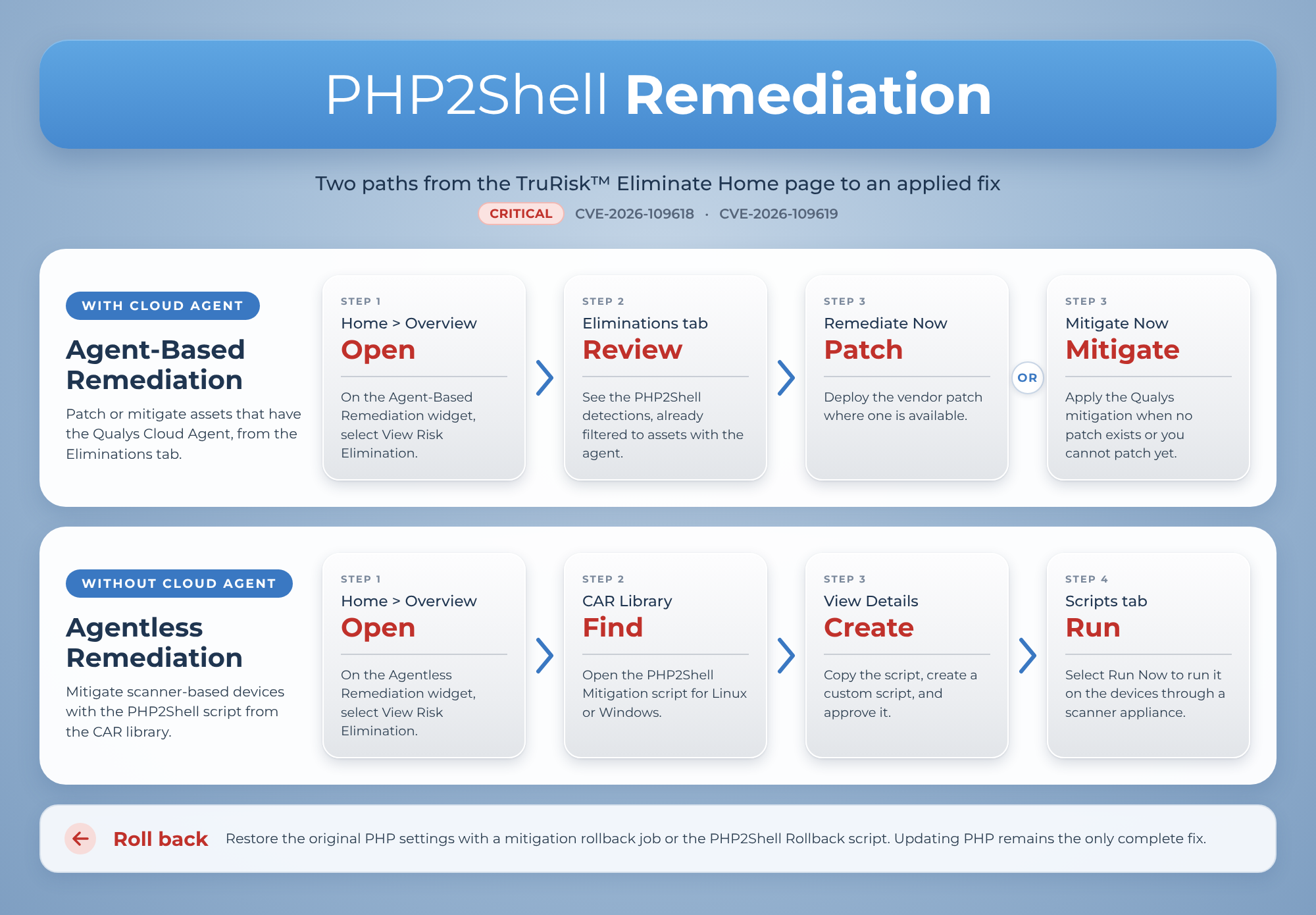
The following workflow explains how this remediation works.
What the widgets Show
The PHP2Shell Remediation section is labeled Critical and lists the CVEs it tracks: CVE-2026-109618 and CVE-2026-109619. The counts come from the open vulnerability detections in VMDR for the QIDs associated with these CVEs.
| Widget | Assets it covers | Metrics |
|---|---|---|
| Agent-Based Remediation Hosts with Qualys Cloud Agent |
Assets with the Qualys Cloud Agent installed and activated for Vulnerability Management. |
|
| Agentless Remediation Scanner-based, for hosts without Cloud Agent |
Assets that are scanned without the agent (tracked by IP address, NetBIOS name, or DNS name) and that run a network or infrastructure device operating system, such as Cisco, Fortinet, F5 BIG-IP, Aruba, Arista, Juniper, Check Point, or NetApp. These are devices that cannot run the Cloud Agent. |
Which Detections Are Counted
A detection is counted only when it is open and Qualys can act on it; that is, a patch or mitigation is available. Detections that are fixed, disabled, or ignored are not counted. Because of this, the counts tell you how much PHP2Shell exposure you can eliminate from TruRisk™ Eliminate, not the total number of PHP2Shell detections in VMDR.
Each widget has a View Risk Elimination button that opens the remediation workflow for its assets.
When none of your assets have an open PHP2Shell detection, the widget shows 0 Detections and 0 Assets Affected.
Before You Begin
To view the widgets
- You have access to TruRisk™ Eliminate and the Home page.
- Your assets are scanned by VMDR, with the Cloud Agent or a scanner appliance, so that PHP2Shell detections exist.
To remediate assets with the Cloud Agent
- To patch: The assets are activated for Patch Management, and you have permission to create patch jobs.
- To mitigate: The assets are activated for Mitigation, and you have permission to create mitigation jobs. Mitigation is available for Windows and Linux assets.
To mitigate assets without the Cloud Agent
- Your subscription includes Custom Assessment and Remediation (CAR). CAR is an add-on to your TruRisk™ Eliminate or Patch Management subscription.
- CAR is set up to run scripts on devices that cannot run the Cloud Agent (perimeter devices):
- A scanner appliance is deployed, and the devices are associated with a Qualys network.
- Authentication is configured for the devices.
- The devices are tagged in CyberSecurity Asset Management (CSAM), and the same tag is added in CAR on the Assets > Perimeter Devices tab.
- You have CAR permissions to import, approve, and run scripts.
Mitigate or Patch Assets with the Cloud Agent
Use the Agent-Based Remediation widget to fix PHP2Shell on assets that have the Cloud Agent. For each detection, TruRisk™ Eliminate recommends a patch when one is available, and the Qualys mitigation when it is not.
- Navigate to Home > Overview.
- In the PHP2Shell Remediation section, on the Agent-Based Remediation widget, click View Risk Elimination.
The Eliminations tab opens with two filters already applied: the Assets filter selects assets that use the Cloud Agent and are activated for VM, and the Vulnerability filter selects open PHP2Shell detections that are patchable or mitigable. Do not change these filters if you want to work only on the PHP2Shell detections that the widget counts. - Review the list. Each row is a QID on an asset:
- Do one of the following:
- To patch: Click Remediate Now, and complete the patch job. For details, see Creating Patch Job for Linux Assets or Creating Patch Job for Windows Assets.
- To mitigate: Click Mitigate Now, and complete the mitigation job. Select multiple rows, then from the Actions menu, click Create Mitigation Job. For details, see Create Mitigation Job.
- Track the job on the Jobs tab.
Patch wherever you can. Use the mitigation for assets that run an end-of-life PHP version or for which you cannot deploy the patch yet and plan to patch them later.
Mitigate Assets Without the Cloud Agent Using CAR
Use the Agentless Remediation widget for assets that are scanned without the Cloud Agent. You cannot create a patch or mitigation job for these assets. Instead, you run the PHP2Shell mitigation script from the CAR library on them through a scanner appliance.
Step 1: Find the PHP2Shell Script in the CAR Library
- Navigate to Home > Overview.
- In the PHP2Shell Remediation section, on the Agentless Remediation widget, click View Risk Elimination.
The CAR Library > Home tab opens. The PHP2Shell scripts are listed under Latest Updates in the Eliminate Actions category. - Identify the script for the platform of your devices. There is a mitigation script and a rollback script for each platform:
Script Scripting Language Platform What it does PHP2Shell Mitigation Linux Shell Turns off the PHP session upload-progress feature and hardens the related session settings, so the vulnerable code no longer runs. Windows PowerShell-Script PHP2Shell Rollback Linux Shell Restores the original PHP session upload progress and settings. Use it only to undo the mitigation. Windows PowerShell-Script - On the script card, click View Script. The View Details page shows the script summary. Check the Platform and Scripting-Language fields to confirm that you opened the right script.
Step 2: Copy and Create Custom Script
- On the View Details page, under the Script section, click the Copy icon to copy the script.
Important: Do not use the Import Script option; only use the Copy Script option to create a custom script. - To create a custom script, follow the steps in Create Scripts.
- In the 3rd step, select Perimeter Devices.
- Follow the steps under the section Use CAR with Perimeter Devices in Assess Devices That Cannot Run the Qualys Cloud Agent.
- Follow steps 4 to 7 in Create Scripts.
- To test and approve the script, see Testing Scripts and Reviewing and Approving Scripts.
Step 3: Run the Script on Your Devices
- On the CAR Scripts tab, find the custom script created in above section. From its Quick Actions menu, click Run Now. Run Now is available only for approved scripts.
- For devices without the Cloud Agent, select the Network that contains your devices and the Scanner Appliance that runs the script.
- Select the assets or asset tags to run the script on. The Select Assets window displays the list of all assets connected with your network device. Select only the devices that run the platform of the script. You can also use the Automated Assets Selection option to select the assets.
- Run the script. CAR creates a job on the Jobs tab.
- When the job finishes, review the job output for each asset. The script reports whether the setting is active, and whether the PHP service was restarted.
For details, see Execute Scripts and Viewing Script Jobs.
What the Mitigation Changes on the Asset
The Qualys mitigation for PHP2Shell is a configuration change. It does not install a new PHP version or change your application code.
- It turns off the PHP session upload-progress feature for every PHP runtime on the asset that serves web requests, and hardens the related session-handling settings. This removes the vulnerable code path from execution.
- It restarts the PHP service so that the change takes effect.
- It checks that the new setting is active and that no other configuration file overrides it.
If the PHP service cannot be restarted, restart it manually and then check the setting again.
Some applications use the PHP upload-progress feature, for example, to show a progress bar during file uploads. After you apply the mitigation, test the applications that run on the asset.
Rollback the Mitigation
If the mitigation affects an application, you can restore the original PHP settings.
- Assets with the Cloud Agent: Create a mitigation rollback job. For details, see Create Mitigation Rollback Job.
- Assets without the Cloud Agent: Import and run the PHP2Shell Rollback script for the platform from the CAR library, the same way as the mitigation script.
Rolling back the mitigation leaves the asset exposed to PHP2Shell again. Patch the asset as soon as you can.
Related Topics
Creating Patch Job for Windows Assets