Qualys Product Glossary
Welcome to the Qualys Product Glossary, your definitive resource for the language, concepts, and risk terminology that power the Qualys Enterprise TruRisk™ Platform.
Our glossary is designed to help security teams, risk leaders, and technical practitioners communicate more effectively within the Qualys ecosystem. It brings together the most important terms used across all Qualys products, from core platform concepts such as TruRisk, Asset, and QQL to specialized capabilities in VMDR, EDR, Cloud Agent, CSAM, and more.
Start with the core terms section to understand foundational security concepts shared across the platform. Then explore the product-specific sections for deeper insights into features and terminology unique to each Qualys solution. We will keep this glossary updated as new capabilities are released, ensuring you always have the latest information at your fingertips.
Application Families Overview
This table gives a quick view of which Qualys applications belong to each product family.
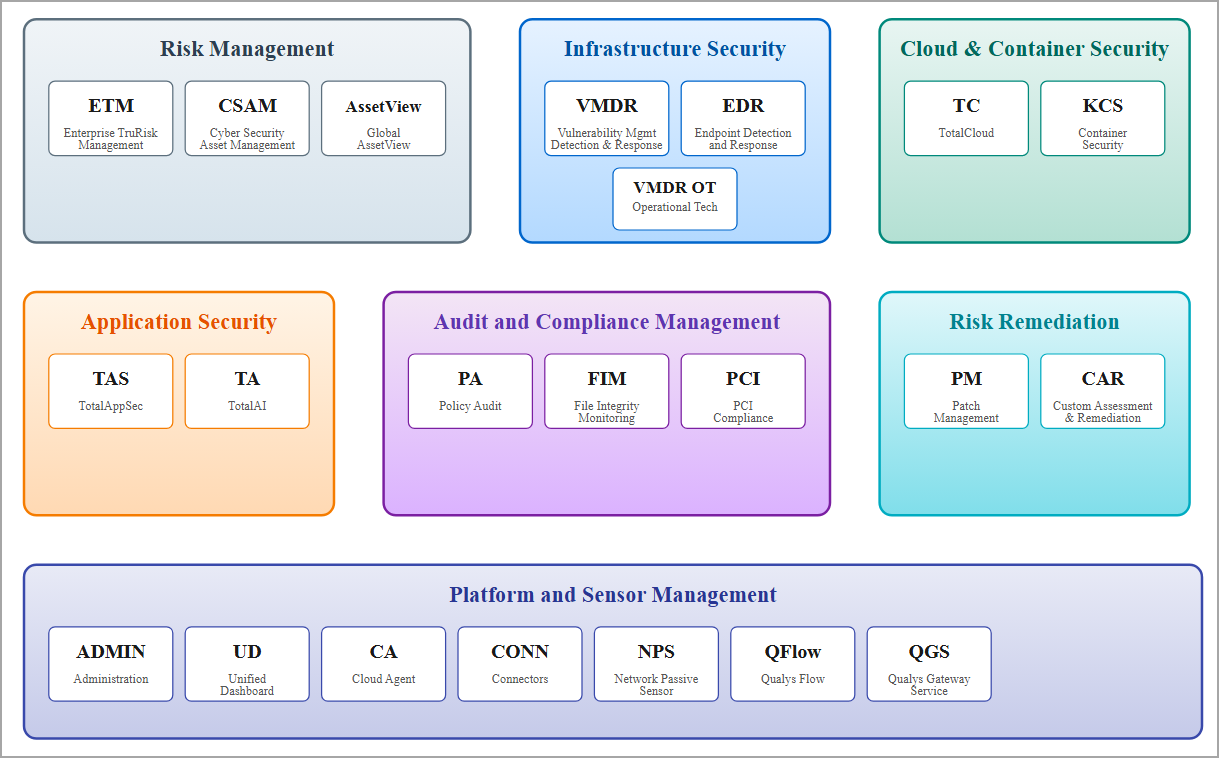
Core Terms
This section defines the foundational language that underpins the entire Qualys Enterprise TruRisk™ Platform. These are the universal concepts used across multiple Qualys products to describe assets, risk, prioritization, and security posture.
Understanding these terms is the first step in building a shared vocabulary between your security teams, business leaders, and Qualys solutions. Each term is defined once, clearly and consistently, and includes a list of products to which it applies.
Start here to get familiar with the terminology that powers vulnerability management, risk quantification, asset intelligence, and remediation workflows. Once you have mastered these fundamentals, you can explore product-specific glossaries for deeper, feature-level insights.
| Term | Definition | Used in | |
|---|---|---|---|
| Activation Key | An activation key associates Cloud Agents with your Qualys Enterprise TruRisk™ Platform subscription, enabling secure registration and management of assets. | CA VMDR ETM | |
| Activity Log | A chronological record of system actions, process launches, or network connections useful for analysis or forensics. | EDR TC | |
| Agent Status | An indicator reflecting the current state of an agent (for example, Active, Inactive, Uninstalled) based on last check-in or activity. | CA VMDR EDR | |
| Alert | A notification generated when suspicious or malicious behavior is detected by a Qualys sensor or engine. | EDR TC | |
| Approved CA (Certificate Authority) | A Certificate Authority that is explicitly trusted by your organization; certificates issued by an approved CA are considered valid within managed environments. | CV TC | |
| Assessment | The process of evaluating systems and configurations to identify vulnerabilities or misconfigurations. | VMDR PA/PC | |
| Asset | A resource in your environment such as a device, application, cloud instance, or certificate that Qualys discovers and inventories. | CSAM / EASM VMDR CATC | |
| Asset Criticality Score (ACS) | A numeric value representing the importance of an asset based on business context, exposure, and risk. ACS helps prioritize remediation efforts. | CSAM / EASM VMDR | |
| Asset Inventory | A continuously updated catalog of discovered assets across your hybrid environment, populated automatically by connectors and sensors. | CSAM / EASM Connectors | |
| Asset Tagging | A flexible method for grouping and organizing assets using dynamic or static tags to align security data with business context. | VMDR CSAM / EASM CA | |
| Business Unit | A logical configuration that lets administrators organize assets, policies, and permissions according to organizational structure. | AdministrationETM VMDR | |
| Certificate Information | Details associated with a discovered certificate, such as validity dates, fingerprint, first/last seen, and associated vulnerabilities. | Certificate View | |
| Cloud Agent | A lightweight service deployed on endpoints and cloud workloads that continuously collects inventory and security telemetry for the Qualys platform. | CA VMDR CSAM / EASM EDR | |
| Configuration Profile | A centralized policy that governs module behavior (scanning frequency, logging, enablement) for a set of assets or agents. | Cloud Agent VMDR PA/PC | |
| Connector | A modular interface that enables Qualys to ingest or push data to third-party platforms for discovery, synchronization, and alerting. | Connectors TC Integrations | |
| Dissolvable Agent | A small executable pushed to a Windows system during a scan, which is automatically removed when scanning completes. | CA VMDR | |
| False Positive | A case where a host or asset is reported as vulnerable even though it is not, due to detection limitations or environmental factors. | VMDR WAS | |
| FlexScan | A zero-touch, agent or connector-based scanning framework enabling vulnerability assessment of cloud assets with minimal overhead. | ConnectorsTC | |
| Identity Provider Token | The authentication token issued by the identity provider (IdP) to access Qualys APIs. | ||
| Incident | A collection of related security events—such as processes, files, or network activities—representing a potential threat or compromise. | EDR FIM | |
| Interactive Report | An interactive view that highlights security and configuration gaps across critical assets, enabling focused remediation. | CSAM / EASM VMDR | |
| Intermediate Certificate | A certificate issued by a Root CA or another intermediate CA that links the root to end-entity (leaf) certificates to form a trust chain. | CV TC | |
| Manifest File | A configuration/metadata file used by agents to determine operational behavior and scan policies. | CA EDR | |
| Option Profile | A reusable set of scanning options (scope, intensity, performance, crawl settings) selected when configuring or launching scans. | VMDR WAS PA/PC | |
| Platform Filter | A search or scope filter used to isolate assets or agents by operating system family (for example, Windows, Linux, macOS). | CA VMDR | |
| Platform Reachability Test | A diagnostic test that verifies whether an asset or agent can reach required Qualys endpoints and services. | CA Connectors | |
| Policy | A defined set of rules governing compliance, detection, or response actions within a Qualys module. | PA/PC TC ETM | |
| Purging | The removal of assets or data records from the database, typically based on predefined criteria. | CA VMDR | |
| Proxy Configuration | Network settings that define how sensors or agents communicate through a proxy to reach the Qualys Cloud Platform. | CA TC VMDR | |
| Qualys Asset Group Management Service (AGMS) | Qualys Asset Group Management Service (AGMS) is a new service introduced to improve performance related to Asset Management and asset Group Management functionality. | VMDR | |
| QID (Qualys ID) | A unique identifier used by Qualys to represent a specific vulnerability, configuration control, or remediation item. | VMDRWAS | |
| Qualys API | The Qualys API allows third parties to integrate their own applications with Qualys cloud security and compliance solutions using an extensible XML interface. | All modules where APIs are supported. | |
| Qualys Managed Token |
|
||
| Qualys TruRisk Score | Qualys TruRisk Score for assets is calculated based on the Asset Criticality Score (ACS) and Qualys Detection Score (QDS) assigned to all findings (vulnerabilities and misconfigurations) from Qualys and third-party data sources. For more information on calculation of TruRisk score, refer to Calculating TruRisk Score. | ETMVMDR | |
| QQL (Qualys Query Language) | A unified search syntax used across the Qualys platform for constructing advanced queries on assets, agents, and metadata. | VMDR CA EDR CSAM / EASM | |
| QVSS (Qualys Vulnerability Scoring System) | A scoring framework used to measure the severity of all security exposures including both vulnerabilities and misconfigurations, on a 0.0–10.0 scale. | ETM | |
| Remediation | A corrective action or script executed to fix a detected issue on an asset and reduce associated risk. | VMDR EDR CAR PM | |
| Risk Posture | The overall security stance of an organization, based on identified vulnerabilities, exposures, and mitigation effectiveness. | ETMVMDR | |
| Role-Based Access Control (RBAC) | A security framework that defines user permissions based on assigned roles within the organization. | ETMCA | |
| Root Certificate | The top-most certificate in a trust chain, issued by a trusted Certificate Authority and typically self-signed. | CVTC | |
| Rule | A defined set of conditions that determine when events are triggered or what assets or files are monitored for changes. | FIM VMDR | |
| Scan Frequency | A module-specific setting that determines how often assets are assessed for vulnerabilities or compliance. | CA VMDR PC | |
| Scan Schedule | A policy that defines when assessments occur on targeted assets or agents. | CA VMDR EDR | |
| Search Tokens | Keywords or filter criteria used to narrow down search results in dashboards or reports. | All modules where QQL is supported. | |
| SSL Certificates | Digital certificates that authenticate systems and enable encrypted communications (HTTPS/TLS). | CVTC Connectors | |
| Tag | A label applied to assets for easier grouping, filtering, and assignment of responsibilities. | CA ETM VMDR | |
| Tag-Based Assignment | An automation method that uses asset tags to dynamically assign policies, profiles, or scopes to assets. | CA VMDR CSAM / EASM | |
| Tag-Based Scope | A way to target assets for scans or actions using Qualys asset tags. | CA VMDR | |
| TLS/SSL Handshake Failure | A secure communication error typically caused by certificate, protocol, or cipher incompatibilities between endpoints and the platform. | CA TC | |
| Uninstall Failure | An error encountered while attempting to remove an agent or sensor, often due to protection controls or corrupted binaries. | CA EDR | |
| Uninstall Protection | A control that prevents unauthorized removal of agents or sensors by requiring a token or elevated privileges. | CA EDR |
Product-specific Terms
This section focuses on terminology unique to individual Qualys products. While the core terms section establishes a shared language across the platform, this section goes deeper into the features, capabilities, and technical concepts that define each solution.
Use this section to explore specialized vocabulary and gain a deeper understanding of how each Qualys solution, such as VMDR, Cloud Agent, EDR, CSAM, and others, extends and applies the foundational concepts introduced earlier.
Certificate View
| Term | Definition |
|---|---|
| Approved CA | An Approved CA is a Certificate Authority that your organization has explicitly trusted or approved. Certificates issued by an Approved CA are considered valid and acceptable for use within your environment. |
| External Sites | External Sites are publicly accessible websites or systems located outside your organization's private network. In the Certificate View, these are internet endpoints whose SSL certificates are monitored for validity, trust, and compliance. |
| Intermediate Certificate | An Intermediate Certificate is a certificate issued by a Root Certificate or another Intermediate CA. It links the Root Certificate to Leaf Certificates, establishing a chain of trust. |
| Internal Sites | Internal Sites are websites, applications, or services hosted within your organization’s private network. These are typically inaccessible from the public internet. In the Certificate View, monitoring Internal Sites ensures that internal SSL certificates are valid and properly managed. |
| Leaf Certificate | A Leaf Certificate is the final certificate in a chain, issued to an individual entity such as a server, user, or device. It is used for actual authentication and encryption in secure communications. |
| Root Certificate | A Root Certificate is the top-most certificate in a certificate chain, issued by a trusted Certificate Authority (CA). It is self-signed and serves as the foundation of trust in the certificate hierarchy. |
| SSL Certificates | SSL Certificates (Secure Sockets Layer Certificates) are digital certificates that verify the identity of a website or system and enable encrypted connections (HTTPS). In the Certificate View, they ensure that communications between clients and servers are secure and trusted. |
| SSL Labs | SSL Labs is a free online tool operated by Qualys that evaluates a website’s SSL/TLS configuration. It analyzes certificate validity, supported protocols, and cipher suites, and provides a detailed report along with a security grade ranging from A+ to F. |
Cloud Agent
| Term | Definition |
|---|---|
| Activation Key | An activation key associates Cloud Agents with your Qualys Cloud Platform subscription. It is a unique identifier used to register and configure agents, and to control group assignment and feature availability. |
| Agent Activation | The process of registering an agent with the Qualys platform using an activation key, enabling it to collect data and communicate securely. |
| Agent Check‑In Failure | A condition in which the Cloud Agent fails to communicate with the Qualys platform, often due to network, proxy, or certificate issues. |
| Agent Configuration Profile | A centralized policy that governs agent behavior (for example scanning frequency, logging levels, or module enablement) for groups of assets. |
| Agent Debug Script | A utility or command‑line tool used to collect extended diagnostics and logs from an agent for support or analysis. |
| Agent Diagnostic Logs | Logs that detail agent operations, scan activity, configuration fetches, heartbeat cycles, and internal errors. |
| Agent Error Code | A numeric or textual identifier appearing in logs or UI, indicating a specific failure or warning encountered by an agent. |
| Agent ID | A unique identifier assigned to each Cloud Agent instance, used to target that endpoint for log downloads or queries. |
| Agent Log Files | Diagnostic files stored on the agent host system containing traces of operations, error events, and system interactions. |
| Agent Manifest Version | The version of the scan manifest that an agent uses when performing vulnerability or compliance scans, as determined by its configuration profile. |
| Agent Mode | The operational state of an agent (for example Scan Mode, Passive Mode, or Rehomed Mode), indicating how it behaves on the host. |
| Agent Reinstallation | A remediation step in which the agent software is removed and reinstalled to restore proper operation on a problematic host. |
| Agent Self‑Healing | An automatic recovery mechanism by which the agent attempts to correct internal failures or reinitialize itself after a crash or communication loss. |
| Agent Service Status | The running state of the agent service on the host (e.g. running, stopped, unresponsive), used to detect installation or runtime issues. |
| Agent Status | An indicator of the agent’s current state (e.g. Active, Inactive, Expired, Uninstalled) based on its last check‑in or activity status. Learn more. |
| Agent Tags | Metadata labels applied to agents to facilitate organization, search, grouping, and dynamic assignment of policies or configurations. Learn more. |
| API-Based Log Download | A RESTful interface enabling logs to be requested and retrieved programmatically from Qualys-managed agents. |
| Asset Identification Rule | A rule used to identify third‑party assets discovered or scanned by connectors (e.g. Webhook, Active Directory, ServiceNow). Learn more. |
| Auto-Generated Logs | Log files created automatically by the agent during routine operations, stored locally on the host. |
| Auto-Upgrade | A policy-driven feature that enables the agent to update automatically to the latest stable version provided by Qualys. |
| Boolean Operators | Logical operators (AND, OR, NOT) used to combine or exclude conditions in advanced QQL queries. |
| Check‑in Interval | The frequency at which an agent communicates with the Qualys Platform to send data or receive configuration updates. |
| Cloud Agent | A lightweight service deployed on IT assets that collects inventory and host data, then sends it to the Qualys Platform for continuous security and compliance assessment. Learn more. |
| Cloud Agent as Passive Sensor (CAPS) | CAPS are Cloud Agents installed within your network that detect nearby unmanaged assets (i.e. assets not actively scanned). Learn more. |
| Cloud Agent Host | The on‑premises or remote system (e.g. workstation, VM, container) where a Cloud Agent is installed. |
| Cloud Agent Inventory | A dynamic list of all deployed agents across environments, visible in the Qualys UI with filtering and export capabilities. |
| Cloud Agent Logs | Diagnostic files generated by the agent that record operational events, errors, scan actions, and system events. |
| Cluster Sensor | A container image that provides agentless inventory and posture insights for Kubernetes Clusters (EKS, AKS, GKE, OpenShift, etc.). It talks to the Kubernetes Control Plane and helps with K8s Inventory metadata, K8s Posture Management, and Exposure & Attack Path Information. |
| Command Center | The centralized Qualys UI where users manage agents, initiate log downloads, and check agent status. |
| Communication Error | An issue caused by blocked ports, invalid proxies, or DNS failures that prevents agent-to-platform communication. |
| Container Runtime Sensor | A container runtime sensor image that provides eBPF-based runtime protection, behavioral monitoring, and threat detection in Kubernetes (EKS, AKS, GKE, OpenShift, etc.) and standalone Docker environments. |
| Custom Profile | A user-defined configuration profile that enforces scanning and logging settings distinct from the default profile. |
| Deactivation | An administrative action that stops an agent’s communication with the platform and removes it from active management. |
| Distro | A Linux distribution operating system built on the Linux kernel. Examples: Ubuntu, Fedora, Debian, and Linux Mint for beginners, while Arch Linux and Gentoo are meant for advanced users seeking high customization. |
| Dynamic Scan | A Dynamic Scan is a runtime-based vulnerability assessment method that analyzes a container while it is executing. Unlike static analysis, a Dynamic Scan monitors the container’s behavior, running processes, network activity, system calls, and runtime configurations to detect vulnerabilities, and security risks that only appear during the execution. |
| Dynamic Search | A real‑time query feature in the Search UI that filters agent results as the user types. |
| Field Operators | Symbols used in queries (e.g., =, >, <, contains, !=) to filter agents based on field values. |
| Firewall Blocking | Network-level restrictions that prevent the agent from reaching required Qualys endpoints or ports. |
| General Sensor | A container sensor, designed to deliver continuous scanning coverage (vulnerabilities, software composition analysis (SCA), and compliance) runtime. |
| Heartbeat Interval | The rate at which an agent checks with the Qualys backend to receive updates and send data. |
| Last Check‑In | A queryable field showing when the agent last communicated with the Qualys platform. |
| Log Bundle | A compressed archive (e.g. .zip or .tar.gz) bundling multiple log files from a Cloud Agent instance. |
| Log Collection | The process of retrieving agent log files from remote hosts, either manually or via API. |
| Log Download Request | A user- or API-initiated action to fetch recent logs from a specific Cloud Agent host. |
| Log Expiry Window | The time duration (e.g. 7 days) for which downloaded logs remain accessible before automatic deletion. |
| Log Level | A profile setting that controls the verbosity of logs generated by the agent. |
| Log Level Configuration | The set of settings defining diagnostic verbosity (e.g. INFO, DEBUG, TRACE) within the agent profile. |
| Log Retrieval Status | The result of a log download request (e.g. Success, In Progress, Failed) shown in the UI. |
| Log Storage Path | The directory on the endpoint (e.g. /var/log/qualys or C:\ProgramData\Qualys) where agent logs are stored. |
| Manifest File | A configuration and metadata file used by the agent to determine operational behavior and scan policies. |
| Manifest Locking | A mechanism that restricts agents to a specific manifest version to maintain scan consistency across assets. |
| Manifest Mismatch | A situation in which the agent fails to synchronize or apply the expected manifest version due to policy or version conflicts. |
| Manifest Version Control | A profile-level setting that allows pinning agents to a particular manifest version for consistency. |
| Manual Log Access | The method of accessing logs by navigating directly to the agent’s installation directory on the host. |
| Module Configuration | Profile settings that control features such as Vulnerability Management (VM), Policy Compliance, and other security modules. |
| Nested Queries | Complex searches combining multiple conditions using parentheses to control logical precedence. Learn more. |
| OnDemand Scan | A scan launched manually through the UI that executes immediately, postponing the next scheduled scan by the defined interval. Learn more. |
| Option Profile | A set of custom scanning options (e.g. detection scope, scan intensity, crawl settings) that can be selected during scan setup. Learn more. |
| Platform Filter | A search field that isolates agents by operating system (e.g. Windows, Linux, macOS). |
| Platform Reachability Test | A diagnostic test that verifies whether the host can reach required Qualys URLs and services. |
| Profile Assignment | The process of applying a configuration profile to agents based on activation keys, tags, or deployment filters. |
| Profile Assignment Rules | Logical conditions based on tags, asset properties, or activation keys that determine which profile an agent receives. |
| Profile Cloning | The process of duplicating an existing profile to create a new one for customization. |
| Profile Deployment Status | An indicator of whether a configuration profile has been successfully applied and acknowledged by agents. |
| Profile Versioning | A built-in mechanism that tracks changes to a profile and ensures agents use the latest settings. |
| Profile Visibility | The scope that determines which users or contexts can view, edit, or assign a profile within the subscription. |
| Proxy Configuration | Network settings in a profile that enable agents to communicate via proxy servers. |
| Proxy Misconfiguration | An issue in which incorrect proxy settings block the agent’s access to Qualys backend servers. |
| Proxy Settings | Profile options defining how agents connect through proxies to reach the Qualys Platform. Learn more. |
| Qualys Locator Path (QLP) | A hierarchical, intuitive grouping framework developed by Qualys that organizes Kubernetes containers based on their logical placement within the environment. |
| Query Validation | The UI process that checks whether a query is syntactically correct and executable before it runs. |
| Reactivation | The process of restoring connectivity when an agent has been deactivated or moved to a new environment. |
| Reduced Activity Period | A time window during which the Cloud Agent limits resource usage (e.g. CPU, network) to reduce impact on the host. |
| Registry Sensor | This sensor can be used to scan container registries such as JFrog Artifactory, ECR, ACR, Harbor, and more. It requires the sensor to be deployed to some compute (a pool of VMs, a cluster, and so on) that runs only these sensors, not any other production workloads. |
| Rehoming | The process of moving an agent to a different Qualys subscription or account using a new activation key without reinstalling it. |
| Remote Log Retrieval | A mechanism by which the Qualys backend collects logs directly from agents without requiring direct host access. |
| Scan Execution Failure | An event in which the agent cannot perform a scheduled or on-demand scan due to policy misconfiguration, resource constraints, or file system errors. |
| Scan Frequency | A profile setting that determines how often agents perform vulnerability or compliance scans. |
| Scan on Startup | A feature enabling the agent to perform a scan immediately when its service starts, with subsequent scheduled scans delayed accordingly. Learn more. |
| Scan Schedule | A profile setting that defines how often the agent performs scans on the host system. |
| Search Index | The engine that enables fast filtering of agent data based on indexed metadata from Cloud Agents. |
| Search Scope | The module or context (e.g. Cloud Agent, VMDR, EDR) in which a query is executed. |
| Search Token | A predefined keyword or field (e.g. status, platform, last_check_in) used in QQL queries. |
| Static Scan | A Static Scan is a vulnerability assessment method that analyzes container images without executing them. It inspects the image’s file system, packages, libraries, configuration files, and metadata to identify known vulnerabilities, outdated components, or security misconfigurations. |
| Storage Driver | A Storage Driver is a component used by container runtimes (such as Docker or containerd) to manage and maintain the container file system. It controls how image layers are stored, stacked, and accessed on the host machine. |
| Support Case Logs | A bundle of logs and metadata shared with Qualys Support to assist in root cause analysis and resolution. |
| Support Logs | A specialized set of logs generated for Qualys Support, often including system-level diagnostics and environment data. |
| System Clock Skew | A time synchronization discrepancy that causes communication failures due to mismatched clock values between agent and backend. |
| Tag-Based Assignment | An automated method for assigning profiles to agents based on dynamic or static tags. Learn more. |
| Timestamped Logs | Log files are annotated with precise timestamps to aid in correlating events across systems. |
| TLS/SSL Handshake Failure | An error in establishing secure communication between the agent and the platform, typically caused by outdated certificates or protocol incompatibility. |
| Uninstall Failure | An error occurred while attempting to remove the agent, possibly due to active protection mechanisms or corrupted binaries. |
| Uninstall Protection | A feature that prevents unauthorized removal of agents by enforcing token or administrative checks. |
| Verbose Logging | A setting that increases the detail and frequency of logged events, useful for in-depth troubleshooting. |
| Vulnerability Propagation | Vulnerability Propagation refers to the way security vulnerabilities originating in a base image or parent layer automatically spread to all derived container images. |
| Wildcard Search | A method using symbols (such as *) for pattern matching or partial string searches in queries. |
Connectors
| Term | Definition |
|---|---|
| Account Connector | Specifically refers to a connector configured for a single cloud account. It fetches assets and syncs them into the Asset or TotalCloud Inventory within Qualys. |
| Activation (Scan Activation) | The process of enabling specific types of scans (e.g., VM scanning, cloud perimeter scanning, Snapshot-based Scan, API-based Scan, SCA) on imported assets. Can be toggled globally during connector creation. |
| API Based Assessment | Agentless scanning that leverages native cloud provider APIs (AWS currently) to fetch configuration and metadata information for vulnerability detection. |
| Asset Inventory | A catalog of discovered cloud resources (e.g., VMs, storage, databases) stored within Qualys. Populated automatically in the Global AssetView when connectors run. |
| Asset Tags | Custom metadata labels that are applied to cloud resources during data ingestion from connector runs. Tags are used for filtering and automation. |
| Cloud Agent Scan | Uses the lightweight Qualys Cloud Agent installed on target systems to continuously monitor for vulnerabilities. |
| Cloud Connector | Connectors tailored to a specific cloud vendor (e.g., Microsoft Azure Connector, AWS Connector) that follow vendor-specific authentication and polling mechanisms. These connectors ingest data into TotalCloud CNAPP for your cloud application security. |
| Cloud Perimeter Scan | An external scan from the Qualys platform to assess public-facing IPs and services for vulnerabilities. |
| Connectors | A Qualys Connector integrates your Cloud or third-party applications with the Qualys platform for vulnerability assessments, risk prioritization, posture management, and more. Learn more. |
| Connectors Application | The Qualys interface that centralizes management of all connectors, allowing you to create, configure, schedule, and launch scans across different cloud or third-party environments. |
| ETM Connector | Connectors tailored to ingest vendor data into ETM’s risk management ecosystem. These connectors can ingest data such as host assets, web assets, vulnerabilities, misconfigurations. Connectors tailored to ingest vendor data into CSAM’s asset management ecosystem. These connectors primarily ingest asset data from the vendors. |
| FlexScan | A zero-touch, agent-based or agentless scanning framework that allows organizations to perform vulnerability assessments on cloud assets using flexible, non-intrusive methods. It is designed to minimize operational overhead while maintaining high visibility and security coverage across dynamic cloud environments. Learn more. |
| Organization Connector | Connects and manages multiple account connectors under a single entity (common in AWS Organizations, Azure Management Groups). |
| Polling Frequency | The interval at which a connector queries the cloud provider for new or changed resources. The default for connectors is every 4 hours. |
| Snapshot Based Assessment | Performs vulnerability scanning on virtual machine (VM) snapshots of supported cloud providers rather than running workloads. |
Container Security
| Term | Definition |
|---|---|
| Admission Controller | A security feature built natively for Kubernetes that inspects and validates all CREATE and UPDATE requests sent to the Kubernetes API server. It enforces predefined security policies to ensure that only verified, compliant container images can run within the cluster. Learn more. |
| Air-gapped Environment | An Air-gapped Environment is a highly secured network setup that is physically isolated from unsecured networks, including the public internet. |
| Asset Tracking Activity | Ongoing actions or events related to the discovery, monitoring, and life-cycle changes of images in your cloud environment. |
| CI/CD Integration | Integration with Continuous Integration/Continuous Deployment pipelines (e.g., Jenkins) to assess images during the build phase. |
| Cluster Sensor | A container image that provides agentless inventory and posture insights for Kubernetes Clusters (EKS, AKS, GKE, OpenShift, etc.). It talks to the Kubernetes Control Plane and helps with K8s Inventory metadata, K8s Posture Management, and Exposure & Attack Path Information. |
| Container Inventory | A comprehensive list of all discovered containers, images, and registries, maintained by Qualys for visibility and tracking. |
| Container Runtime Sensor | A container runtime sensor image that provides eBPF-based runtime protection, behavioral monitoring, and threat detection in Kubernetes (EKS, AKS, GKE, OpenShift, etc.) and standalone Docker environments. |
| Container Security | Discover, track, and continuously protect container environments. Upon installation, the sensor automatically scans the host for container images and running containers. The resulting inventory and associated metadata are then pushed to your Qualys Platform account. |
| Continuous Assessment of Images | It refers to the automatic and continuous scanning of container images to identify vulnerabilities, misconfigurations, and compliance issues. |
| Distro | A Linux distribution operating system built on the Linux kernel. Examples: Ubuntu, Fedora, Debian, and Linux Mint for beginners, while Arch Linux and Gentoo are meant for advanced users seeking high customization. |
| Docker Container | A runtime instance of a Docker image. Containers are isolated environments where applications run. Qualys monitors these for drift and runtime threats. |
| Docker Image | A read-only template used to create containers. It includes the application code, libraries, and runtime configuration. Qualys scans these images for vulnerabilities and compliance issues. |
| Docker Registry | A storage and distribution system for Docker images. Qualys supports scanning images from public and private registries like Docker Hub, AWS ECR, and Azure Container Registry. |
| Dynamic Scan | A Dynamic Scan is a runtime-based vulnerability assessment method that analyzes a container while it is executing. Unlike static analysis, a Dynamic Scan monitors the container’s behavior, running processes, network activity, system calls, and runtime configurations to detect vulnerabilities, and security risks that only appear during the execution. |
| General Sensor | A container sensor, designed to deliver continuous scanning coverage (vulnerabilities, software composition analysis (SCA), and compliance) runtime. |
| Image Assessment | The process of scanning container images for vulnerabilities, misconfigurations, and compliance violations before or during the deployment. |
| Image UUID | A unique identifier that tracks and manages container images across environments. |
| Policy Enforcement | A set of security rules to control container behavior during runtime, such as blocking unauthorized processes or network connections. |
| QLP | Qualys Locator Path. A hierarchical, intuitive grouping framework developed by Qualys that organizes Kubernetes containers based on their logical placement within the environment. |
| QScanner | A command-line utility for performing static vulnerability scans and Software Composition Analysis (SCA) on container images and image tar files. It is designed for use in local environments, CI/CD pipelines, and automated security workflows. |
| Registry Sensor | This sensor can be used to scan container registries such as JFrog Artifactory, ECR, ACR, Harbor, and more. It requires the sensor to be deployed to some compute (a pool of VMs, a cluster, and so on) that runs only these sensors, not any other production workloads. |
| RTI | Real-time Threat Indicators. |
| Runtime Policy | A security policy that allows or blocks specific process or network behaviors in containers during runtime, based on pre-configured rules. It governs which actions are permitted or denied while the application is running. |
| Static Scan | A Static Scan is a vulnerability assessment method that analyzes container images without executing them. It inspects the image’s file system, packages, libraries, configuration files, and metadata to identify known vulnerabilities, outdated components, or security misconfigurations. |
| Storage Driver | A Storage Driver is a component used by container runtimes (such as Docker or containerd) to manage and maintain the container file system. It controls how image layers are stored, stacked, and accessed on the host machine. |
| Sensor | A lightweight agent deployed on a container lifecycle component, such as a CI/CD pipeline, container registry, or host, to collect metadata, scan container images, monitor runtime behavior, and send data to the Qualys Enterprise TruRisk™ Platform. |
| Sensor Host IP | The IP address of the host machine where the Container Sensor is deployed. This IP is used to identify and associate the sensor with its host in the Enterprise TruRisk™ Platform. |
| Vulnerability Age | The number of days a given CVE has existed since it was first disclosed or added to the Qualys vulnerability database. This field is useful for prioritizing long-standing risks. |
| Vulnerability Propagation | Vulnerability Propagation refers to the way security vulnerabilities originating in a base image or parent layer automatically spread to all derived container images. |
Continuous Monitoring
| Term | Definition |
|---|---|
| Activation Key | A secret used during installation to link agents with the correct subscription and modules. |
| Agent Upgrade | The managed update process by which agents are migrated to newer versions via profiles or manual tools. |
| Anti‑Virus & HIPS Exclusion | Best‑practice exclusion rules to prevent endpoint protection tools from blocking agent components. |
| Asset Tagging Integration | The use of tags to organize agents and assign profiles or activation keys via API or UI. |
| Asset Wizard | A tool in the PCI portal for defining and onboarding all in‑scope IP addresses. |
| ASV Certification | The accreditation that allows the vendor to conduct PCI external scans as an Approved Scanning Vendor. |
| Health Check Tool | A CLI utility for validating agent service status and runtime health on the host. |
| Host Reachability Test | Verification that agents can access the required backend URLs on port 443. |
| Installer Packages | Platform‑specific installation files such as .msi, .rpm, .deb, .pkg, or container images. |
| Non‑root with Sudo Delegation | An installation method in which a non‑root user uses NOPASSWD sudo privileges. |
| On‑Demand Scan | A scan triggered outside scheduled intervals at the user’s request. |
| Platform Availability Matrix | A dynamic table that shows supported agent versions or modules by platform. |
| Privileged Container (Bottlerocket) | A container deployment configured with SELinux super_t and capabilities such as SYS_PTRACE for deeper visibility. |
| Supported OS Platforms | The operating systems compatible with the agent (e.g. Windows, Linux (.deb/.rpm), macOS, BSD, Containers). |
| SYS_PTRACE Capability | A Linux permission enabling process tracing inside containers. |
| User Provisioning | The administrative creation and assignment of roles to merchant user accounts. |
| Vulnerability Scan Frequency | The mandated frequency of scans (quarterly per PCI), with a best‑practice target of within 30 days. |
| Windows Group Policy Install | A method of deploying the agent via MSI using Active Directory Group Policy. |
CSAM/EASM
| Term | Definition |
|---|---|
| Agent Provisioning Rule | A rule triggered when an unmanaged asset is scanned or installs a Cloud Agent, resulting in a duplicate record within the managed asset inventory. Learn more. |
| Asset Activation | The process of discovering, registering, and managing IT assets to ensure they are included in security and compliance assessments. Learn more. |
| Asset Discovery | The process of identifying all known and unknown assets across a hybrid IT environment, including on-premises devices, mobile devices, OT, IoT, and passive sensors. |
| Asset Inventory | A comprehensive, real-time view of all hardware, software, cloud, IoT, and IIoT assets connected to the network, populated using scanners, scanner appliances, and Cloud Agents. |
| Asset Purge Rule | A configurable rule that automatically removes outdated or irrelevant assets from the inventory to maintain data accuracy. |
| Asset Tagging | A method for automatically discovering, organizing, and assigning metadata to assets to keep scans and reports aligned with the business environment. Learn more. |
| Bulk Asset Activation by Rule | A rule that automates the activation of assets in CyberSecurity Asset Management (CSAM) based on QQL queries. |
| Business Entity | A logical group of assets aligned with business functions, such as departments or subsidiaries, used for contextual risk assessment and reporting. |
| Certificate Details Report | A report showing complete details of SSL/TLS certificates in the environment, including expiration dates and issuer information. |
| CyberSecurity Asset Management (CSAM) | A solution for identifying all systems, detecting at-risk assets, and enabling risk mitigation actions through comprehensive asset visibility and control. Learn more. |
| Deduplication | The process of removing a duplicate unmanaged asset record when a matching managed asset is detected, typically triggered by Cloud Agent or scan activity. |
| EASM Discovery | The process of identifying publicly exposed assets, such as domains, IP addresses, and internet-facing services. |
| EASM Lightweight Scan | A non-intrusive scan that uses external intelligence and passive methods to identify exposed assets without requiring a scanner. Learn more. |
| EASM Profile | A configuration in CSAM that defines the assets and domains to be monitored through External Attack Surface Management (EASM). |
| Execution Report | A report that lists details about assets removed through purging operations. |
| External Attack Surface Management (EASM) | A solution providing visibility into external-facing infrastructure, enabling continuous monitoring of internet-connected assets and detection of changes, unknown assets, and security issues. Learn more. |
| Interactive Report | A report designed to help identify security and configuration gaps across the most critical assets. Learn more. |
| Inventory | The centralized database in CSAM that catalogs all discovered and imported assets for real-time querying and grouping. |
| Port Rule | A rule that defines expected open or closed network ports on assets to enforce network hygiene policies. |
| QualysETL (Extract, Transform and Load) | A tool that enables the extraction, transformation, and loading of Qualys data to help measure, communicate, and reduce cyber risk. |
| Reconciliation Rule | A rule that harmonizes asset attributes from multiple sources to maintain a consistent and unified view. |
| Software Authorization Rule | A policy rule for classifying software as approved or unapproved to control usage and reduce software sprawl. |
| Tag Set | A collection of tags grouped for structured classification, such as by region, function, or risk level. |
| Technology Debt Report | A report that provides insight into an organization's security-related technical debt to support risk mitigation and prioritization efforts. Learn more. |
| Third-Party Asset Identification | The process of identifying assets not directly scanned by Qualys, using external sources like DNS records and cloud activity logs. |
Custom Assessment and Remediation (CAR)
| Term | Definition |
|---|---|
| Custom Assessment and Remediation | A centralized capability that allows you to proactively assess assets for blind spots in custom configurations and zero-day vulnerabilities. It enables the execution of custom scripts to enhance compliance, improve security posture, and support advanced detection and response across your network. Learn more. |
| Custom Scripts | With Custom Scripts, you can create and deploy your own scripts to target specific assets in your environment. When creating a script, you can define its scope by selecting the assets it should run on and labeling the script according to its purpose, such as Detection (to identify issues) or Response (to detect and remediate issues). You can execute the custom script on assets across any Qualys applications you have subscribed to. |
| Detection script | Verifies whether the Mitigation has been applied and, if not, automatically applies the mitigation. |
| Mitigation QID | The Mitigation QID Script is used to apply a temporary or permanent fix for a vulnerability. This feature is beneficial in case of zero-day vulnerabilities, where mitigation logic evolves rapidly. It allows you to quickly reduce risk without waiting for a patch. |
| Remediation |
Remediation refers to the actions taken to resolve detected issues on assets, such as:
|
| Schedule Jobs | You can schedule the job whenever you want. |
| Scripts | Qualys CAR has a repository of scripts stored in its database. These scripts can be applied to multiple assets and tags. Apart from the scripts in the CAR repository, you can also use scripts posted on the Qualys GitHub account. You can also import scripts from your GitHub or GitLab repository. |
| Scripts Jobs | After a script is executed, you can view the details and their current statuses in the Jobs tab. When a script is executed, the job name displayed is same as the script name |
| Software packages | Software packages in CAR are reusable, automated deployment configurations used to install or uninstall software on assets without writing manual scripts. |
Endpoint Detection and Response (EDR)
| Term | Definition |
|---|---|
| Activity Log | A chronological log of system events and actions related to a threat, such as process launches, file changes, and network connections. Useful for forensic investigations. |
| Agent Activation Key | A key used to enroll Cloud Agents with the EDR module, either at installation or post-installation. It can also be upgraded to enable EDR across all associated endpoints in bulk. |
| Alert | A notification generated when suspicious or malicious behavior is detected based on predefined logic. Alerts can trigger incident creation or analyst review. |
| Alerts and Incidents | Alerts are individual signals of suspicious activity. Incidents are groups of related alerts that provide a broader view of potential security events. |
| AMSI | The Antimalware Scan Interface (AMSI) detects and decodes malicious scripts or commands on the system and shares the information with the Cloud Agent. Learn more. |
| Antimalware | Built-in capabilities in EDR that provide real-time protection against malware, including viruses, spyware, trojans, and ransomware. Management is available remotely without VPN or reconfiguration. Learn more. |
| Behavioral Scan | On-execute protection that identifies and blocks threats based on behavior, even if they bypass heuristic detection mechanisms. |
| Blacklisting Applications | A policy-based feature for scheduling application blocking to control app usage during defined hours, enhance security, and maintain compliance. |
| Block by File | A file hash-based mechanism that prevents the execution of unauthorized or potentially harmful files by comparing hashes against a manifest. Learn more. |
| Block List | A list of files, processes, or applications explicitly denied execution or access on endpoints. |
| Configuration Profile | A policy that defines agent behavior, including scan intervals, CPU usage, and module activation such as EDR or Malware Protection. |
| Detection Source | Indicates the origin of a detection (e.g., Qualys Engine, Threat Intel Feed, EPP Detection) to help analysts understand how a threat was identified. |
| EDR Events | Security-relevant events collected from endpoints, including file activity, process execution, and network traffic, used for threat detection and investigation. |
| EDR Status | Indicates whether EDR is active on an asset and the last time telemetry was reported. |
| Endpoint | A host device (e.g., Windows or Linux) with Cloud Agent installed and EDR activated, continuously sending telemetry to the Qualys Platform. |
| EPP (Endpoint Protection Platform) | Third-party antivirus or antimalware solutions on endpoints. EDR correlates their detection data with its own telemetry. |
| Hunting | A capability that enables users to search for and investigate threats by querying event data and logs to identify indicators of compromise (IOCs). Learn more. |
| Incident | A high-level grouping of related alerts and events that represent a potential breach or compromise on an endpoint. |
| Incident Details | An expanded view of the context for an incident, including related processes, network activity, the detection timeline, and impacted assets. |
| Mac Cloud Agent | The lightweight agent installed on macOS systems to collect telemetry, assess vulnerabilities, and report security events for EDR. |
| Malware Family | The classification of detected malware into known groups based on behavior and threat intelligence (e.g., Emotet, Trickbot). |
| Malware Protection | Integrated EDR protection features including signature-based detection, behavioral analysis, memory protection, phishing defense, and traffic filtering. |
| On-access Scan | Real-time scanning of files and applications as they are accessed, including scanning of boot sectors and potentially unwanted applications (PUAs). |
| On-demand Scan | A manually initiated scan that can be executed by users without waiting for the next scheduled scan. |
| Prevent Auto-updating of Agent Binaries | A configuration setting that controls automatic agent updates. Disabling auto-updates may be useful for testing or staged deployments. |
| Qualys Endpoint Detection and Response (EDR) | A solution that provides detection, investigation, and response to threats across the attack lifecycle using a single agent for telemetry and response actions. |
| Quarantine | A feature that restricts network activity of compromised assets while maintaining communication with the Qualys Cloud for monitoring and management. Learn more. |
| Remediation | Built-in response actions such as Quarantine File, Delete File, and Kill Process that help contain and neutralize threats directly from the EDR UI. |
| Severity Score | A numeric or color-coded value indicating the threat impact of an alert or incident, based on factors like behavior and exposure. |
| Telemetry / Event Data | Real-time data collected on endpoint activity, including file, process, and network behaviors, which is analyzed for threat detection and prioritization. |
| Threat Actors | Known or suspected adversary groups associated with attacks, identified using threat intelligence mapping. |
| UnQuarantine File | An action that restores a file from quarantine back to its original state and location. |
| Web Access Control | A policy that allows organizations to monitor and control web traffic on endpoints to prevent access to malicious or non-compliant content. |
Enterprise TruRisk Management (ETM)
| Term | Definition |
|---|---|
| Agent Nyra | An agentic AI assistant that prioritizes vulnerabilities and misconfigurations based on the tactics, techniques, and exploitation patterns of threat actors actively targeting your industry. It maps attacker behavior to your environment, identifies issues linked to known adversary activity, and provides remediation guidance driven by real‑world threat intelligence rather than generic severity scores. |
| Agent Sara | An agentic AI assistant that automates Patch Tuesday workflows by tracking monthly vendor releases, identifying relevant vulnerabilities, and generating actionable remediation plans. |
| Agent Sid | An agentic AI assistant that discovers and evaluates all internet‑facing assets across your enterprise, analyzing them from an external attacker’s perspective to identify exposed services, vulnerabilities, misconfigurations, and other exploitable risks. |
| Agent Sophia | An agentic AI assistant that continuously monitors for CISA Known Exploited Vulnerabilities (KEVs) and ransomware‑related threats, enabling teams to focus remediation on vulnerabilities currently being targeted by attackers. |
| Asset Criticality Score | Asset Criticality Score (ACS) represents the criticality of an asset in your business infrastructure. It is calculated based on multiple tags assigned to the asset with an ACS defined. If the tags associated with the asset don’t have criticality scores defined, then a score of ‘2’ is assigned by default. |
| Asset Exposure | Asset Exposure displays the name of external tags. This contributing factor is displayed only if any external tag is associated with the asset. |
| Asset Identification | Asset Identification is an attribute that identifies whether the assets identified by the third-party sources already exist in Qualys. |
| Business Entity | Business Entity is your most valuable asset. It is created using a Qualys tag and can have more than one tag. It is essentially a collection of assets supporting your business applications. You can also configure a Risk Appetite and add a business value and loss magnitudes for any type of loss to monitor financial risk across enterprises. Business entities can be based on industry, like a Checkout Application, Customer Support, Shipping Network, Inventory Platform, Order Management, Marketing and Sales analytics, or the you can define your own business entity. |
| Connectors | Connectors allow you to bring security findings from any external security tool you use into ETM to create a unified view of vulnerabilities and compliance issues for posture analysis. You can configure connectors for all external security tools to ingest security findings from cloud assets, host assets, web applications, and cloud resources such as buckets and containers. Security findings include vulnerabilities, misconfigurations, compliance findings, and incidents. |
| Cyber Agent ROCky | ROCky, the Cyber Risk Assistant, features an intuitive, user-friendly interface that makes essential information easy to access. It allows users to ask questions, explore guided prompts, and engage in conversations efficientlyv centralized screen. |
| Dashboard | Dashboards bring information from all Qualys applications into a single place for visualization. You can customize and share the information with specific users. The dashboards allow you to view your organization's data in a single place, enabling you to understand your data better and make informed decisions. |
| Environment Adjustments | Context‑specific modifications to the QVSS score based on an organization’s actual environment. These adjustments account for asset importance, business impact, exposure to targeting, and the presence of compensatory controls such as EDR, segmentation, WAF, or applied mitigations. |
| ETM Connector Health | Indicates the performance and reliability of data connectors that integrate external and internal sources, such as cloud providers, third-party tools, scanners, and asset inventory systems. |
| Findings | Security findings categorized into vulnerabilities and misconfigurations. |
| Identification Rule | A predefined set of conditions used to uniquely recognize a misconfiguration or vulnerability across multiple data sources. Identification Rules ensure that when overlapping or duplicate information is collected by automated bots, it is matched to a single, authoritative record rather than imported multiple times. |
| Loss Type | The Loss Type field in Qualys Enterprise TruRisk Management (ETM) provides a list of losses that can occur due to a breach. Providing the range of potential business losses associated with the loss type helps you to prioritize and plan response strategies. |
| Misconfiguration Findings | Security findings relating to: - Incorrect setup or configuration of software and systems. - Breaches of policies, standards, or regulatory requirements. It includes actions or setups that deviate from established best practices, internal policies, or legal compliance obligations, potentially leading to legal, financial, and reputational consequences. |
| Peer Benchmarking in ETM | A consolidated, industry‑specific view that highlights the most relevant threats by combining summarized intelligence, trending activity, and comparisons against similar organizations. |
| Qualys Agentic AI | AI systems designed to independently analyze risks, prioritize threats, and initiate remediation actions, enabling security teams to achieve outcomes rapidly with minimal manual effort. |
| Qualys Detection Score | Qualys Detection Score (QDS) is assigned to vulnerabilities and any security findings (misconfiguration, compliance) detected by Qualys. QDS has a range from 1 to 100, which is divided into Critical (90-100), High (70-89), Medium (40-69), and Low (1-39). |
| QVSS | Qualys Vulnerability Scoring System (QVSS) is the scoring framework used in ETM to measure the severity of all security exposures, both vulnerabilities and misconfigurations, on a 0.0–10.0 scale. It is powered by Qualys threat intelligence (TruLens) and TruRisk context. |
| QVSS Base | The inherent, global risk level of an exposure. It reflects real‑world threat activity using signals such as known exploits, CISA KEV data, malware and ransomware trends, threat‑actor TTPs, active exploitation patterns, and EPSS insights. |
| QVSS Environment Score | A context‑aware severity rating generated by adjusting the QVSS Base score with Environmental Adjustments. It increases when high‑risk factors such as internet‑facing assets, crown‑jewel systems, or industry‑targeted exposures are present, and decreases when compensatory controls reduce exploitability or impact. |
| Risk Acceptance | The decision to acknowledge a known vulnerability without immediate remediation, typically due to cost, operational impact, or the absence of a viable solution. |
| Risk Acceptance - Risk Acceptance Rule | A rule that marks certain vulnerabilities as accepted risks, typically due to existing mitigations or validated false positives, so they do not require immediate action. |
| Risk Appetite | A threshold indicating your organization's acceptable TruRisk score. |
| Risk Quantification | A process of determining the potential impact of risks on a business entity by assigning monetary values to the likelihood and consequences of those risks. |
| Source Finding ID | Source Finding ID is a unique external finding identifier. |
| Trending | Trending encompasses the cybersecurity community's current threats or practices gaining significant attention. It is the analysis of data over a period of time to identify patterns, movements, or changes that indicate a direction or tendency. It helps in understanding how specific metrics or behaviors are evolving, enabling informed decision-making and forecasting. |
| Vulnerability Findings | Security findings encompassing weaknesses or flaws within systems, applications, or processes that could be exploited by attackers to gain unauthorized access or cause harm. Vendor ID: Vendor ID is a unique source identifier. |
| Widgets | Widgets are the graphical elements that give real-time information about the metrics. Widgets can be exported to the Dashboard. |
ETM Identity
| Term | Definition |
|---|---|
| Attack Path Analysis | A visual analysis feature that identifies and displays potential sequences an attacker could use to progress from low‑privilege accounts to critical assets within an Active Directory environment. It highlights the misconfigurations and exposures that create these paths, helping teams plan targeted remediation. |
| Domain Trust Map | A visual representation of trust relationships between Active Directory (AD) domains and forests. It illustrates how authentication and access rights flow between domains, helping security teams identify potential lateral‑movement paths, risky trust links, and exposures within multi‑domain environments. |
| ETM Identity | ETM Identity helps organizations proactively manage identity-related risks, including those linked to digital identities, access permissions, Active Directory, and authentication processes across the organization. |
| Identity Threats | An identity threat refers to any cyberattack or security risk in which an attacker targets digital identities, such as credentials, tokens, or account profiles—to gain unauthorized access to systems, data, or resources. |
| Identity TruRisk™ Scoring | A feature that allows administrators to assign and adjust risk scores for users and groups in Active Directory. These scores feed into the TruRisk™ calculation, helping evaluate identity‑related risks based on the criticality and exposure of accounts. |
| ID Misconfigurations | A collection of identity‑centric configuration issues that may expose an environment to unauthorized access, privilege abuse, and lateral movement. Presented in one consolidated page to support faster analysis and remediation. |
ETM TruConfirm
| Term | Definition |
|---|---|
| Modified Benign Payloads | The term Modified Benign Payload refers to a purpose-built interaction, not a traditional exploit. Traditional exploit code is engineered to gain unauthorized access, elevate privileges, or exfiltrate data. A Modified Benign Payload is engineered exclusively to elicit a vulnerability-specific, observable response that confirms or denies a reachable execution path |
File Integrity Monitoring (FIM)
| Term | Definition |
|---|---|
| Agent | A program installed on assets to continuously monitor file integrity and send data to the platform. |
| Alert Rule | A rule that defines when and how users are notified about file changes or incidents, such as through email alerts. |
| Baseline Event | The initial event generated when a file is first monitored, establishing its known good state. |
| Container-Based Events | File integrity events generated from monitoring changes within containerized environments. |
| Content Event | Events generated after the baseline event, capturing changes in file content or attributes. |
| Correlation Rule | A rule that automates incident creation by evaluating events against QQL-based conditions. |
| Event | A logged record of a detected file change, indicating what was changed, how, by whom, and when. |
| Event Insight | Analytical details providing context and impact of a detected file change event. |
| File Integrity Monitoring (FIM) | A solution that monitors, logs, and reports file change events across IT systems in real-time, using a single agent and centralized dashboard. Learn more. |
| Incident | A group of related suspicious or malicious file change events requiring investigation or response. |
| Profile | A configuration template that defines which files or directories to monitor, what types of changes to detect, and how to respond. |
| Rule | A condition within a profile that specifies files or folders to monitor and the types of changes that should trigger an event. |
| Scan-Based Events | Events generated from file changes detected during scans of networked devices. |
Integrations
| Term | Definition |
|---|---|
| Browser Recorder | A Chrome extension that captures user interactions as Selenium scripts for use in Web Application Scanning, enabling dynamic testing of complex workflows. |
| CI/CD Integration | Embedding of scanning tools into continuous integration and deployment pipelines (e.g., Jenkins, Azure DevOps) to detect and remediate vulnerabilities before code reaches production. |
| Cloud Provider Integration | Connection to cloud platforms such as AWS, Azure, and GCP to discover assets, assess configurations, and ingest native security findings (e.g., AWS Inspector). |
| CMDB Bidirectional Sync | Bi-directional integration that ensures asset data consistency between the platform and Configuration Management Databases (e.g., ServiceNow CMDB) to support accurate inventory and remediation tracking. |
| Connector | A modular interface used to ingest or send data to third-party systems for asset discovery, vulnerability synchronization, or alerting. |
| IaC Security Integration | Infrastructure-as-Code scanning to detect misconfigurations in templates (e.g., Terraform, CloudFormation) during development, supporting secure-by-design practices. |
| ITSM Integration | Automation of remediation ticket creation and management in ITSM platforms such as ServiceNow or Jira, improving SLA compliance and reducing manual tasks. |
| Qualys Integrations | Strategic capability to connect with external systems (e.g., SIEM, ITSM, GRC, IAM, cloud providers) to unify security intelligence and automate workflows. |
| SIEM Integration | Transfer of vulnerability and threat data to Security Information and Event Management platforms (e.g., QRadar, Splunk) to support centralized monitoring and response. |
| Vendor Marketplace Plugin | Pre-built integration packages available on marketplaces such as ServiceNow Store, Splunkbase, or Atlassian Marketplace to extend platform capabilities within enterprise environments. |
| Webhook Connector | Real-time notification mechanism that sends data to external endpoints via HTTP POST to support automation in SIEM, SOAR, or ticketing systems. |
Network Passive Sensor
| Term | Definition |
|---|---|
| ERSPAN Mode | A deployment mode that enables the Passive Sensor to capture remote network traffic using Encapsulated Remote Switched Port Analyzer (ERSPAN), which mirrors packets over IP from a remote switch or device. |
| Physical Sensor | A dedicated hardware appliance that passively monitors network traffic by connecting to a network switch or TAP to discover assets on physical network segments. |
| Network Passive Sensor | A sensor that passively detects and profiles devices connected to the network, providing visibility into known and unknown assets without active probing. It monitors network activity to eliminate blind spots across IT environments. |
| TAP (Test Access Point) | A hardware device installed on a network link to passively replicate all traffic and send it to the Passive Sensor without introducing latency or affecting live network operations. |
| Virtual Sensor | A software-based Passive Sensor deployed in virtual environments such as VMware or Hyper-V to monitor traffic within virtual or cloud networks. |
Out-of-Band Configuration Assessment (OCA)
| Term | Definition |
|---|---|
| OCA (Out-of-Band Configuration Assessment) | A scan solution designed to assess IT assets that cannot be reached by agents or scanners, such as air-gapped systems, legacy devices, or highly restricted environments. It evaluates compliance using uploaded command outputs or configuration files. |
| OCA Asset Compliance Posture | The compliance status of assets assessed via OCA, showing how uploaded data aligns with defined controls and frameworks (e.g., HIPAA, PCI DSS, GDPR). |
| OCA Assets | Devices or systems onboarded into OCA for compliance assessment. Assets can be added individually or in bulk via .txt or .json imports and require details such as IP or MAC address, along with uploaded configuration data or command output. |
| OCA Printers Dashboard | A dashboard containing four non-editable widgets that display asset data and compliance posture for HP and Samsung printers onboarded through HP’s JetAdvantage Security Manager plugin. |
| Supported Technologies | Operating systems and platforms supported by OCA, including network appliances from Arista, Cisco, Fortinet, Brocade, HP/Safeguard, Huawei, IBM RACF, and others. |
Patch Management (PM)
| Term | Definition |
|---|---|
| Activated Assets | Endpoints (such as servers, desktops, or cloud instances) that have been successfully onboarded and are actively managed by the Qualys Cloud Agent for patching operations. Learn more. |
| Aggregated Job Progress Report | This report consolidates patch deployment data across multiple jobs and assets, helping monitor overall patching success, identify failed or skipped patches, and track job execution timelines. Learn more. |
| Job Status | The lifecycle of a patch deployment job. The key statuses help you to monitor patching workflows and take corrective actions when needed. Learn more. |
| Patch Insight Report | Get visibility into patch-related activities, including patch applicability, deployment status, and asset-level patch history. It helps you analyze patch coverage, identify gaps, and validate remediation efforts. |
| Patch Orchestration | The process of applying patches to devices. Qualys currently provides patch orchestration exclusively for Android devices. Learn more. |
| Patch Tuesday | On the second Tuesday of each month vendors like Microsoft release scheduled security updates. Qualys allows customers to automate patch deployment for these updates by creating recurring jobs with a Patch Tuesday schedule. Learn more. |
| Qualys Patch Management | A comprehensive solution for managing vulnerabilities by deploying patches across Windows, Linux, and macOS assets using a single interface. It helps secure systems and manage upgrades efficiently. Learn more. |
| Qualys Zero-Touch Patch | An automated patching feature that identifies and deploys required patches and configuration changes to remediate vulnerabilities. It uses real-time threat indicators such as ransomware, active exploits, and lateral movement to prioritize risk reduction. Learn more. |
| Remediation | The process of resolving vulnerabilities on IT assets by applying patches, configuration changes, or mitigation scripts. It is a core function of the Qualys Platform that aims to reduce risk exposure and improve the security posture. Learn more. |
| Zero-Day Vulnerability | A previously unknown software vulnerability exploited before a patch is available. Once a fix is released, it is no longer considered a zero-day vulnerability. |
| Zero-Touch Patch Job | An automated job configuration in Qualys that applies patches to current and future Windows vulnerabilities based on criteria defined in a VMDR Prioritization report. Learn more. |
| Vendor Acquired Patch | Updates sourced directly from software vendors rather than from Qualys repositories. This is especially useful when organizations prefer patches from trusted vendor URLs or internal repositories. Learn more. |
Policy Audit (PA)
| Term | Definition |
|---|---|
| Asset Reporting Format (ARF) | A data model to express the transport format of information about assets, and the relationships between assets and reports. Learn more. |
| Audit Fix | Audit Fix enables remediation of failed controls to correct misconfigurations across multiple assets. Learn more. |
| Audit Ready Report | A report designed to demonstrate compliance posture and audit readiness, aligned with selected policies and regulatory mandates. |
| Auto Remediation | A feature that enables the automatic remediation of failed compliance controls using pre-defined scripts, triggered manually or on a schedule. |
| Center for Internet Security (CIS) Control | CIS certifies policies in Qualys Policy Compliance (PC) for control logic and reporting. Qualys PC includes the highest number of CIS-certified policies among compliance solutions. CIS Benchmarks and Controls are consensus-based security guidelines developed by industry practitioners. Learn more. |
| Common Configuration Enumeration (CCE) | A format to describe system configuration issues in order to facilitate correlation of configuration data across multiple information sources and tools. Learn more. |
| Common Configuration Scoring System (CCSS) | A set of measures of the severity of software security configuration issues. Learn more. |
| Common Platform Enumeration (CPE) | A structured naming scheme for IT platforms (hardware, operating systems, and applications) for the purpose of identifying specific platform types. Learn more. |
| Common Vulnerabilities and Exposures (CVE) | A format to describe publicly known information security vulnerabilities and exposures. Learn more. |
| Common Vulnerability Scoring System (CVSS) | A scoring system that provides an open framework for determining the impact of information technology vulnerabilities and a format for communicating vulnerability characteristics. Learn more. |
| Control Criticality Score | A classification (Low, Medium, High) indicating the significance or potential impact of a compliance control on overall security posture. |
| FDCC/SCAP | FDCC (Federal Desktop Core Configuration) is a U.S. government policy for secure desktop configuration. SCAP (Security Content Automation Protocol) is a framework of standards for automated vulnerability and configuration assessment, enabling compliance evaluation at scale. |
| Federal Desktop Core Configuration | A security configuration policy developed for use on non-classified government systems. Learn more. |
| Forum of Incident Response and Security Teams (FIRST) | Forum of Incident Response and Security Teams (FIRST) is the premier organization and recognized global leader in incident response. |
| Mandate-Based Report | A report type tailored to specific regulations or frameworks, showing compliance status for applicable controls. |
| Open Checklist Interactive Language (OCIL) | A framework for expressing a set of questions to be presented to a user and corresponding procedures to interpret responses to these questions. Learn more. |
| Open Vulnerability Assessment Language (OVAL) | An XML-based language used for communicating the details of vulnerabilities, patches, security configuration settings, and other machine states in a machine-readable form. Learn more. |
| Policies | A set of rules that define ticketing logic, assignment, and resolution deadlines. Policies can be global or assigned to individual business units. Learn more. |
| Policy Audit | A feature that automates the audit process, keeping systems continuously ready for compliance validation. |
| Policy Compliance | A cloud-based Qualys Application that automates security configuration assessments, helping organizations prove and maintain compliance with internal policies and external regulations. Learn more.
All users will be automatically migrated from Policy Compliance to Policy Audit on January 18, 2026. For more information, see Policy Audit. |
| Remediation Job | A scheduled Auto Remediation task that executes scripts to fix failing compliance controls on targeted assets. |
| Security Content Automation Protocol (SCAP) | A specification for expressing and manipulating security data in standardized ways. Learn more. |
| Trust Model for Security Automation Data (TMSAD) | Trust Model for Security Automation Data (TMSAD) is a data model for establishing trust for security automation data. Learn more. |
PCI Compliance
| Term | Definition |
|---|---|
| AcquirerID | A unique identifier used to link a merchant with its acquiring bank in the PCI system. |
| Acquiring Bank Setup | The administration of which banks are participating versus non‑participating for merchant report submissions. |
| Acquiring Bank Submission | The process of submitting executive reports directly to participating banks. |
| Audit Trail Logs | A comprehensive log of administrative actions across merchant accounts. |
| Bank Integration | The act of enabling auto‑submission capability by registering merchants’ acquiring banks. |
| Certificate Support | TLS certificate management to ensure secure communication between the agent and the backend. |
| CIS/DISA Benchmark Compliance | The requirement of root access for performing full compliance scans against CIS/DISA policies. |
| Cloud Platform | The centralized backend that orchestrates agent management, data ingestion, and security assessments. |
| Compliance Status Reporting | The generation of real‑time status metrics (Passed / Failed) for each merchant account. |
| Containerized Agent | An agent deployed within a container‑friendly OS environment such as GCP COS or AWS Bottlerocket. |
| CustomerId & ActivationId | Unique identifiers included in installation commands to map agents to accounts and activation keys. |
| External Network Scan | A quarterly vulnerability scan of merchant‑facing IPs performed by the vendor as an ASV. |
| Full Disk Access (macOS) | Permissions required on macOS for agents to fully collect assets and endpoint data. |
| Internal Port Scan | An optional scan to check internal services for vulnerabilities as part of compliance assessments. |
| IP Allocation | The process of assigning purchased PCI‑scannable IP addresses to merchant accounts. |
| IP Asset Management | An admin console feature for viewing, adding, or removing IP ranges scoped to merchants. |
| IPS/Firewall Whitelisting | The act of ensuring scanner IP traffic is not blocked by firewalls or network appliances. |
| ISA (Internal Security Assessor) | Certified internal personnel permitted to complete Self‑Assessment Questionnaires (SAQs) for Level 2 merchants. |
| Least Privilege Strategy | A deployment strategy that balances minimal privilege with assessment fidelity, often via sudo configuration. |
| NET_ADMIN Capability | A required capability for collecting network interface data in containerized environments. |
| Non‑participating Bank | A bank that is not integrated; in such cases, reports must be downloaded manually. |
| Participating Banks List | A configuration in the portal that shows which banks are integrated for direct report submission. |
| PCI Executive Report | A summary‑level report suitable for submission to banks. |
| PCI Technical Report | A detailed report of vulnerabilities along with remediation guidance. |
| QSA (Qualified Security Assessor) | A third‑party auditor authorized to issue PCI DSS compliance reports. |
| Qualys ASV | The designation that enables the vendor to act as an Approved Scanning Vendor certified by PCI SSC. |
| Quarterly External Scan | A recurring scan of internet‑facing IP addresses required every 90 days. |
| Role‑Based Access Control (RBAC) | A permission model that enables fine‑grained control over user access and operations. |
| Root/Admin Privilege | Elevated rights required for installation and full scanning on Unix, Linux, or macOS systems. |
| RPM Database Access | A metadata collection mechanism on Linux that requires elevation to query installed packages. |
| Scan Bandwidth Level | A performance profile (e.g. Low, Medium, High) that adjusts scanner aggressiveness. |
| Scan Frequency Requirement | The PCI mandate that scans occur every 90 days, with a best‑practice goal of within 30 days. |
| Scan ID | A unique identifier returned by the API when a scan is launched. |
| Scan Lifecycle | The end‑to‑end process from scan initiation through remediation and report generation. |
| Scan Policy Templates | Predefined scan configurations (e.g. bandwidth, sensitivity) that administrators can assign. |
| Scan Sharing (VM→PCI) | The cross‑application import of vulnerability findings from the Vulnerability Management module into the PCI workflow. |
| Scan Status | The state of a scan (e.g. Launched, In Progress, Completed) as returned by the API. |
| Scanner IP Ranges | The IPv4/IPv6 ranges used by scanning infrastructure (e.g. 64.39.96.0/20) and permitted in firewalls. |
| Scanner Whitelist | A configuration that allows specified scanner IP ranges to perform perimeter scans for each merchant. |
| Scope Management | The definition of cardholder data systems and segmentation scope for PCI scanning. |
| Secure_Path Sanitization | A security hardening measure on macOS that sanitizes the PATH environment in sudo sessions. |
| Service User Agreement | The initial terms dialog displayed upon first login to the PCI portal. |
| Subscription Configuration | The definition of which modules (e.g. External Scan, SAQ) are active for merchants. |
| Supported OS Platforms | The operating systems compatible with the agent (e.g. Windows, Linux (.deb/.rpm), macOS, BSD, Containers). |
Qualys Flow
| Term | Definition |
|---|---|
| Action Node | Executes operations on filtered resources, such as deletions or updates. Supports waiting for AWS actions to complete before proceeding to the next step. |
| Filter Node | Applies logical conditions (e.g., parameter, date, tag, network ACL, security group, or function-based filters) to narrow down the output of resource nodes. Supports boolean logic (AND/OR). |
| Node | Fundamental units of a QFlow that perform specific tasks. Node categories include Trigger, Resource, Action, Filter, Report, and Custom. |
| QFlow | An automated workflow composed of nodes that handle triggers, resource queries, data transformation, and remediation. QFlows can run across AWS, Azure, and GCP environments, and integrate with TotalCloud controls. Learn more. |
| Resource Node | Retrieves data about cloud resources (e.g., AWS RDS instances). Supports enrichment via add-ons and outputs JSON-formatted data. |
| TotalCloud Node | Designates a QFlow for use as a User-Defined Control (UDC) in TotalCloud. Must be the final node in the flow. It evaluates resources as Passed or Failed based on specified criteria and requires deployment with a TotalCloud trigger. |
| Trigger Node | Initiates a QFlow. Types include Manual, Scheduled (Cron), Event-based, and TotalCloud triggers. Learn more. |
Qualys Gateway Service (QGS)
| Term | Definition |
|---|---|
| Agent / Connected IPs | Displays Cloud Agent hosts currently communicating with QGS, including IP address, hostname, operating system, UUID, last activity timestamps, and proxy port used. |
| Allowed Domains | A configurable list of domains (e.g., qualys.com, qualys.eu, qualys.in) to which QGS allows agent traffic, ensuring only approved destinations are accessed for enhanced connection security. |
| Cache Mode | An optional QGS feature that caches artifacts such as Cloud Agent installers and upgrade manifests. Once downloaded by one agent, these files are served locally to others, reducing bandwidth use. Defaults to port 8080. |
| Common CA Certificate | Enables QGS appliances to share a common CA certificate across agents and appliances, simplifying deployment by using a single certificate on agent hosts. |
| Customer-Signed (Subscription) Certificate | A certificate signed by your organization and uploaded via the Certificates tab. Required for SSL bump and cache features. Must have SHA-256 and CA:TRUE attributes set, and be uploaded as separate Root, Intermediate, and Private Key files in PEM format. |
| Diagnostics Mode | A local console feature on the QGS appliance that generates an encrypted diagnostics archive for troubleshooting. Includes a one-time password for secure SFTP retrieval of logs and status reports. |
| Patch Mode | Extends caching to include patch files for Cloud Agents using Qualys Patch Management. Requires a secondary 250GB virtual disk attached to the appliance before activation. |
| Personalization Code | A unique code generated during QGS setup, required on the appliance console to complete registration and activate the appliance in your Qualys subscription. |
| Proxy Mode | The default mode where QGS acts as a forward proxy for Cloud Agent traffic. It listens on port 1080 by default (configurable) and securely forwards requests to the Qualys Platform. |
| Qualys Gateway Service (QGS) | A virtual appliance that provides proxy services for Cloud Agents requiring proxy connectivity to reach Qualys Platform. Learn more. |
SaaS Detection and Response
| Term | Definition |
|---|---|
| Cloud Access Security Broker (CASB) | Acts as a gatekeeper for cloud application access. SaaSDR complements CASB by providing deep visibility and configuration insights into SaaS environments. |
| Compliance Policy | A set of rules used by SaaSDR to assess SaaS application configurations against security standards such as CIS, NIST, or custom internal policies. |
| OAuth Integration | A secure token-based authentication method used by SaaSDR to connect to and collect data from SaaS platforms. |
| Qualys Detection and Response (SaaSDR) | A solution that extends the Qualys Platform to help enterprises secure and manage SaaS applications. It offers centralized visibility, configuration analysis, compliance assessments, and remediation guidance across critical SaaS environments. Learn more. |
| Remediation Guidance | Actionable recommendations provided by SaaSDR to correct misconfigurations or compliance violations detected in SaaS applications. |
| SaaS Misconfiguration | Risky or non-compliant settings in SaaS applications (e.g., public file sharing, disabled MFA) flagged by SaaSDR for remediation. |
| Sanctioned Application | A SaaS application that is officially approved, monitored, and managed by the organization's IT or security teams. |
| Shadow IT | The use of SaaS applications without the knowledge or approval of IT, increasing the risk of data exposure and compliance violations. |
| Trusted Domain | A domain outside the organization that is frequently used for communication and has been explicitly added to the allow list as trusted in SaaSDR. Read more. |
Scanner Appliance
| Term | Definition |
|---|---|
| Authenticated Scan | A scanning method that uses valid credentials to log into target systems, enabling deeper inspection and detection of vulnerabilities that require authentication. |
| Cloud Scanner | A Qualys-hosted scanner used to assess internet-facing assets and public IP addresses. |
| DHCP for Network Configuration | Allows the scanner to obtain its IP address automatically via DHCP (UDP port 67), without offering additional routing or services. |
| Encrypted File System | Scanner data is stored using encryption. Decryption keys are retrieved at boot from the Qualys Cloud and deleted on shutdown or deactivation. |
| Internal Scanner | A scanner deployed within a private network to assess internal or non-public assets. |
| Locked Scanner Option | Associates a specific scanner with a web application to ensure consistent scanner use across scan executions. |
| Outbound TLS Communication | Scanner appliances initiate outbound TLS (port 443) connections to the Qualys Cloud Platform; no inbound connections are required. |
| Qualys Containerized Scanner Appliance (QCSA) | A Docker-based scanner appliance that provides network scanning capabilities similar to traditional physical or virtual appliances, ideal for containerized environments. Learn more. |
| Qualys Scanner Appliance | A dedicated appliance that enables vulnerability and compliance scanning within internal networks and environments. Learn more. |
| Qualys Virtual Scanner Appliance (QVS) | A virtual version of the Qualys Scanner Appliance, providing full scanning capabilities in a stateless, cloud-integrated form factor. Learn more. |
| Scanner Appliance | A physical or virtual device deployed within your network to perform vulnerability and compliance scans, communicating securely with the Qualys Cloud. |
| Self-Hardened Operating System (QAL) | The secure operating system used by Qualys Scanner Appliances, designed to resist common attack vectors like buffer overflows and shell injection. |
| Syslog Forwarding | Enables the scanner to send system and scan logs to a centralized Syslog server for audit and monitoring purposes. |
Security Assessment Questionnaire (SAQ)
| Term | Definition |
|---|---|
| Campaign | A structured initiative in SAQ used to distribute questionnaires to internal users, external vendors, or third parties to collect data on their security, compliance, or risk posture. Campaigns streamline data collection and automate risk assessments. |
| Campaign Manager | A user responsible for creating, configuring, launching, and managing campaigns. They oversee questionnaire distribution, monitor response progress, and ensure timely completion. |
| Campaign Status | Indicates the current phase of a campaign’s lifecycle. Common statuses include Draft (being created), Published (active and in progress), and Closed (completed and locked). |
| Qualys Security Assessment Questionnaire (SAQ) | Create and manage campaigns for collecting risk and compliance data through questionnaires. It supports assessment workflows for internal teams and third-party vendors. Learn more. |
| Questionnaire | A set of structured questions used to gather information on security, risk, or compliance practices. Questionnaires may include multiple-choice, yes/no, or open-text questions and are distributed as part of a campaign. |
| Questionnaire Template | A reusable template that defines the structure, content, and scoring logic of a questionnaire. Templates are used to standardize assessments across campaigns. |
| Respondent | The individual or entity (e.g., employee, vendor) responsible for completing and submitting a questionnaire within a campaign. |
| Reviewer | A user who evaluates submitted questionnaires for accuracy and completeness. Reviewers may validate responses, add comments, and assign follow-up actions. |
| Vendor Profile | A record containing details of a third-party vendor, including company data, contacts, assigned questionnaires, campaign history, and compliance status for ongoing risk monitoring. |
Software Composition Analysis (SCA)
| Term | Definition |
|---|---|
| Secure Configuration Assessment (SCA) | An add-on module to Vulnerability Management (VM) that automates the continuous assessment and reporting of security configurations across IT assets. SCA helps enhance vulnerability management by identifying misconfigurations that may introduce security risks. Learn more. |
Threat Protection
| Term | Definition |
|---|---|
| Qualys Threat Protection | An add-on module that continuously correlates real-time threat intelligence with your vulnerability and asset data to provide a prioritized view of threats. It automates large-scale analysis to help identify, assess, and respond to emerging risks across your organization. Learn more. |
| Threat Intelligence | A data-driven process that collects, analyzes, and organizes information about known and emerging cyber threats. It enables informed prioritization and remediation of vulnerabilities based on real-world risk indicators. Learn more. |
TotalAppSec/Web Application Scanning (WAS)
| Term | Definition |
|---|---|
| AI-Powered Scan Optimization |
An AI-driven capability that uses intelligent clustering and profiling to identify the most relevant QIDs and focus on critical, high-risk areas of a web application. Qualys leverages AI-powered scan optimization to streamline detection scope, reduce scan duration, and maintain comprehensive vulnerability coverage for faster remediation. |
| Bruteforce List | A predefined set of common usernames and passwords used during automated login attempts to detect weak or default credentials. Qualys uses bruteforce lists in authentication tests to flag credential-based vulnerabilities. |
| Bugcrowd | Bugcrowd is a crowdsourced security platform connecting organizations with ethical hackers to discover vulnerabilities through bug bounty and disclosure programs. TotalAppSec can ingest Bugcrowd findings to enrich vulnerability insights and streamline remediation. |
| Burp | Burp Suite is a popular web vulnerability testing tool used for identifying issues like SQL injection, cross-site scripting (XSS), and authentication flaws. Qualys TotalAppSec supports importing Burp findings for centralized triage, risk scoring, and remediation via TruRisk™. |
| Crawling | Crawling refers to the automated discovery and mapping of a web application’s structure during scanning. It identifies links, forms, inputs, and dynamic content—ensuring comprehensive coverage during vulnerability assessments. |
| Custom Signatures | User-defined detection rules that identify organization-specific security issues. Custom Signatures extend Qualys WAS or TotalAppSec scanning to include proprietary vulnerabilities, policies, or emerging threats. |
| CVE | Common Vulnerabilities and Exposures (CVE) is a standardized identifier assigned to known cybersecurity vulnerabilities. CVEs help researchers and tools consistently track, reference, and remediate vulnerabilities. Qualys maps CVEs to internal QIDs for detection and reporting. |
| Discovery Scan | A lightweight, non-intrusive scan used to identify active hosts, web applications, or APIs. Discovery scans do not detect vulnerabilities but help build an inventory of assets before deeper assessments. |
| False Positive | A vulnerability reported by a scanner that does not actually exist or is not exploitable. Minimizing false positives improves accuracy and operational efficiency in security workflows. |
| Header Injection | A vulnerability where unsanitized user input is injected into HTTP headers, allowing attackers to manipulate responses. This can lead to HTTP response splitting, cross-site scripting (XSS), or redirects. |
| Option Profile | A configuration that defines how a scan is performed—including performance settings, target discovery, ports to scan, authentication options, vulnerability detection parameters, and reporting preferences. Option Profiles allow customization of scans to align with specific environments and security policies. |
| Progressive Scanning |
A scanning approach that distributes vulnerability detection across multiple scan cycles rather than executing all checks in a single run. Qualys uses progressive scanning to build on prior results, expanding coverage and improving efficiency over time through Progressive Crawling to discover and prioritize new application content, and Progressive Testing to automatically start, pause, and resume scans for greater flexibility and reduced manual effort. |
| QID | A Qualys ID (QID) uniquely identifies a vulnerability, configuration issue, or security finding. Each QID includes metadata such as severity, CVE links, detection logic, and remediation guidance. QIDs are the cornerstone of Qualys vulnerability scanning and reporting. |
| Qualys Browser Recorder |
A browser-driven utility that records user interactions with a web application such as authentication, navigation, and workflow steps, and replays them during scanning. Qualys uses browser-based recording to enable authenticated testing and ensure coverage of protected, session-based, and workflow-dependent application areas. |
| TTR (Time to Remediate) | Time to Remediate (TTR) measures the duration between the discovery of a vulnerability and its resolution. TTR is a critical metric for evaluating remediation efficiency, reducing risk exposure, and meeting SLA compliance. |
| TotalAppSec | Qualys TotalAppSec is an AI-powered, unified application risk management solution designed to secure modern web applications and APIs across all environments, from on-premises, multi-cloud applications, to API gateways, containers, and microservices. It enhances and replaces the traditional Web Application Scanning (WAS) solution, enabling organizations to manage application security risks more effectively from a single unified interface. |
| Vulnerability Scan | A scan that actively probes applications, APIs, or systems to detect known vulnerabilities. It identifies outdated components, misconfigurations, insecure inputs, and exposed services using Qualys’ detection logic (QIDs). |
| Web Application Sitemap | A visual map generated during crawling that outlines the structure of a web application, including all discovered URLs, parameters, and input vectors. It ensures complete coverage and guides vulnerability testing. |
| Web Application Scanning (WAS) | A cloud-based AppSec solution by Qualys offering dynamic application security testing (DAST), API security, and AI-driven scanning. It detects OWASP Top 10, misconfigurations, sensitive data exposures, malware, and deviations from OpenAPI specs. Learn more. |
TotalAI
| Term | Definition |
|---|---|
| AI Assets | Assets identified by an AI fingerprint, such as systems equipped with GPUs and software frameworks used for AI development or deployment. |
| Model Runtime | The environment or service where a large language model (LLM) performs inference, whether hosted (e.g. AWS Bedrock) or locally (e.g. Hugging Face TGI server). |
| TotalAI | A comprehensive security solution designed to protect AI and LLM workloads by providing visibility into AI assets and assessing their vulnerabilities. Learn more. |
TotalCloud
| Term | Definition |
|---|---|
| Activity Log | A recorded history of changes, alerts, or actions taken across your cloud infrastructure. |
| Agentless Scanning | A vulnerability assessment method that requires no installed agent on target systems. Useful in cloud environments where you need to assess security posture without impacting running workloads. |
| Alert | A notification triggered when a control is violated, or suspicious activity is detected. |
| Assessment Report | A detailed report presenting the results of checks performed against your cloud environment. |
| Attack Path | A visual or conceptual representation of how a vulnerability can be chained or exploited across multiple resources. Learn more. |
| CDR (Cloud Detection & Response) | A solution that detects threats and abnormal behavior in cloud workloads and supports investigation and response. |
| Cloud Detection and Response (CDR) | TotalCloud’s threat‑detection feature that monitors your cloud network in real time—often via traffic mirroring—to detect malicious activity. Learn more. |
| Cloud Security Posture Management (CSPM) | A capability that oversees cloud resources and alerts administrators to exploitable vulnerabilities or misconfigurations. Learn more. |
| Connector | A secured integration connecting TotalCloud to your cloud account (e.g. AWS, Azure, GCP) to collect resource and security data. |
| Custom Control | A user‑defined security check tailored to an organization’s specific policy or cloud infrastructure. |
| Exception | A documented and approved exclusion to a security rule, used when a control does not apply or cannot be enforced. |
| FlexScan | A scanning approach combining agent-based and agentless techniques. It provides flexible scheduling and coverage of cloud assets to surface vulnerabilities and compliance gaps. |
| Insights | Automatically generated observations highlighting potential risks, patterns, or paths of concern in your cloud environment. |
| Mandates | Industry or regulatory standards (e.g. CIS, GDPR) that define expected security and compliance requirements. |
| Misconfiguration | An incorrect or suboptimal setting in a cloud resource that can lead to security exposure. |
| Onboarding | The process of integrating a cloud provider (AWS, Azure, GCP) into TotalCloud to begin assessment and monitoring. |
| Policy | A set of rules or controls defining best practices and standards for cloud infrastructure security. |
| Remediation | Actions: automated or manual taken to fix identified misconfigurations or vulnerabilities. |
| Remediation Permissions | The access rights or settings that allow a user to perform remediation tasks, whether automatically or manually. |
| Reports | Summaries or detailed documents presenting findings, compliance status, or assessment results for cloud assets. |
| Resource Inventory | A thorough listing of all cloud assets (e.g. VMs, storage, databases) across your cloud platforms. |
| Search Tokens | Keywords or filter criteria used to narrow down search results in dashboards or reports. |
| TotalCloud | An application that provides topology, visibility, risk assessment, and security posture insight for public cloud infrastructure across providers like AWS, Azure, and GCP. Learn more. |
| User Roles | Predefined access levels (e.g. Reader, Admin) determining what users can view or manage within TotalCloud. |
TruRisk Eliminate
| Term | Definition |
|---|---|
| TruRisk Eliminate | An extension of Patch Management that allows deployment of remediations via the same agent, workflows, and platform. It maps vulnerabilities to actionable fixes either patch-based or alternative when patching isn’t viable. Learn more. |
| TruRisk Mitigate | A solution for applying immediate mitigations when patches are not feasible via configuration changes or alternative fixes to reduce vulnerability exposure while maintaining operational continuity. Learn more. |
| TruRisk Isolate | A solution that quarantines the vulnerable assets to prevent exploitation. Isolating of assets from the entire network ensures that the vulnerable devices remain out of the network to avoid the risk of exploiting other non vulnerable assets. Learn more. |
Unified Dashboard
| Term | Definition |
|---|---|
| Report Schedule | A feature in Unified Dashboard (UD) that enables users to receive scheduled reports via email or download them as PDFs, providing a consolidated view of dashboard data. Learn more. |
| Unified Dashboard (UD) | A central interface that consolidates data from multiple Qualys applications. It offers customizable dashboards to monitor security and compliance metrics across environments. Learn more. |
| Widgets | Dashboard components that display targeted data based on search queries. Widgets can be customized, shared, or imported/exported to facilitate consistent reporting across environments. Learn more. |
VM/VMDR
| Term | Definition |
|---|---|
| Adversarial | Refers to malicious actors (e.g. attackers or threat groups) who exploit vulnerabilities in systems and networks. VMDR helps detect and defend against their attack patterns. |
| Agent Correlation Identifier | A mechanism that merges unauthenticated and authenticated scan results from IP interfaces with Cloud Agent VM scans to reconcile overlapping data for your assets. |
| AGMS | Asset Group Management Service, designed to improve efficiency in managing assets and asset groups while reducing data inconsistencies (e.g. improved tagging performance, lower database load, removal of sync jobs). |
| API Limits | The maximum number of API calls that users of a subscription are permitted to make within a given period. |
| Asset Criticality Score (ACS) | A score derived from tags assigned to an asset, representing its operational importance. In TruRisk, ACS acts as a multiplier so vulnerabilities on critical assets are given higher priority. Learn more. |
| Asset Risk Score (ARS) | The overall risk score assigned to an asset; typically ranges from 0 to 1000. Learn more. |
| Asset Tagging | A dynamic method to organize and manage assets using tags based on attributes or business context. Tags may be applied manually or via rules. |
| Assets | An entity (e.g. host by IP or DNS, cloud instance) discovered or scanned by Qualys. Each asset is uniquely tracked across modules like VMDR, Policy Compliance, AssetView, etc. |
| Authentication Record | A stored credential configuration applied during scans to enable authenticated scanning. It supports various record types (Windows, Unix, Web auth, etc.). |
| Authentication Vault | An integration linking Qualys to external credential stores (e.g. CyberArk, Thycotic). Scanners retrieve credentials securely at scan time instead of storing them directly in Qualys. |
| Category | A classification assigned to vulnerabilities (e.g. Database, Firewall). Some categories are platform-specific (Debian, SUSE), others are general. Learn more. |
| Certificate Information | Certificate Information refers to the details about a certificate on your network, such as validity dates, fingerprint, discovery times, and associated vulnerabilities. Learn more. |
| CISA KEV (Known Exploited Vulnerabilities) | A catalog maintained by US‑CISA of vulnerabilities known to be exploited. Qualys uses KEV status in scoring to raise prioritization of such vulnerabilities. Learn more. |
| CVE ID | A Common Vulnerabilities and Exposures identifier assigned to a publicly disclosed vulnerability. |
| CVSS Access Vector | A metric in CVSS that describes how an attacker can exploit a vulnerability (Local, Adjacent Network, Network). Higher remote access generally implies greater risk. |
| CVSS Base Score | A core, context-free score reflecting the intrinsic characteristics of a vulnerability. It is provided by NIST unless otherwise specified. |
| CVSS Scoring | The Common Vulnerability Scoring System (CVSS) provides a standardized severity metric for vulnerabilities, maintained by FIRST. Learn more. |
| CVSS Temporal Score | A CVSS metric reflecting the time-dependent factors of a vulnerability (e.g. availability of exploit or remediation). |
| Discovery Method | Shows which scan method(s) detected a vulnerability (e.g. authenticated, remote, both). |
| Detection Age | Detection Age refers to how long it’s been since the vulnerability was detected on the asset. |
|
External Attack Surface Management (EASM) |
Continuous discovery and monitoring of internet‑facing assets to identify external exposure, track attack surface changes, and maintain asset attribution. |
| Excluded Vulnerabilities | Vulnerabilities filtered out (via queries, tags, risk thresholds, false-positive flags) so they are not included in prioritization or reporting. |
| False Negative | A condition where a host is vulnerable but no vulnerability is reported. Learn more. | Watch here. |
| False Positive | A condition where a vulnerability is reported but the host is not actually vulnerable. Learn more. | Watch here. |
| Interactive Report | A dynamic report in the Qualys UI that allows filtering, sorting, and drill-down into data without needing to export. |
|
JBoss Enterprise Application Platform (EAP) |
A supported application platform that can be scanned by Qualys to detect vulnerabilities and configuration issues. |
| Map Report | A network topology map generated from scanning that shows live hosts, open ports, and DNS names. |
| Mapping | The process of discovering assets and determining host attributes (e.g. OS, open services). Learn more. |
| MITRE ATT&CK Matrix | The MITRE ATT&CK® framework maps adversarial tactics, techniques, and knowledge to help understand attacker behavior and identify gaps in defenses. Learn more. |
| Potential Vulnerability | A vulnerability that cannot be fully confirmed; one or more required conditions are detected, but further investigation is needed. |
| Prioritized Assets | Is the count of assets out of the total assets with vulnerabilities that meet the combination of the detection age, RTIs, and attack surface you selected. |
| Prioritization | The process of correlating vulnerabilities with threat intelligence and asset context to determine which issues to remediate first. Learn more. |
| Prioritization Modes | Different ways to sort vulnerabilities. In “TruRisk mode,” priority is based on business context (e.g. ACS, risk), not just severity. Other modes may use legacy severity sorting. Detection Age refers to how long the vulnerability has been present; Vulnerability Age refers to how long the CVE has existed. |
| Prioritization Report | A dynamic VMDR report that helps security teams focus on critical vulnerabilities by correlating threat indicators with asset risk and vulnerability data. It provides actionable insights to guide remediation strategy. |
| Qualys Detection Score (QDS) | A score (1–100) assigned to QIDs for prioritization. QDS factors in multiple CVEs under a QID and classifies vulnerabilities into severity bands (Critical, High, Medium, Low). Learn more. |
| Qualys Host Scanning Connector | A tool that automates VM scanning of hosts and cloud instances (e.g. via Jenkins integration) to uncover security issues as part of DevOps workflows. Learn more. |
| Qualys Identifier (QID) | A unique identifier assigned by Qualys to each vulnerability check (vulnerability signature or detection logic). |
| Qualys TruRisk™ | Is a mode that provides data for Asset Criticality, Qualys Detection Score (QDS), and TruRisk™ Score. This mode helps prioritize Assets or Vulnerabilities based on risks generated in the result. Learn more. |
| Qualys Vulnerability Score (QVS) | A score at the CVE level that extends QDS by incorporating external threat intelligence, exploitability, and mitigation controls to refine risk assessment. |
| Remediation Report | A report that tracks remediation progress by showing metrics like how many vulnerabilities are fixed vs open. |
| Risk Analysis Report | A view that highlights areas of elevated risk across assets and vulnerabilities, typically combining TruRisk, exploitability, severity, and exposure. |
| Risk Findings | All elements contributing to risk on an asset vulnerabilities, misconfigurations, exposures, unauthorized software, etc. |
| Root Delegation | A technique (Unix-based) that allows a scanner to log in with limited privileges, then escalate via sudo or similar mechanism to perform root‑level checks securely. |
| RTI (Real-Time Indicator) | Dynamic threat indicators such as zero-day exploits, ransomware campaigns, or active malware used to adjust vulnerability prioritization in real time. |
| Rule | A condition or set of criteria used to trigger alerts, actions, or classification within the system (e.g. alert when a vulnerability score threshold is breached). |
| Scan Report | A detailed document listing vulnerabilities detected on hosts during a scan, including QIDs, severity, asset information, and suggested remediations. |
| Scan Retention Period | The number of days scans are retained in the system before they are automatically deleted. |
| Scorecard Report | A report that provides a high-level overview of trends, compliance posture, and vulnerability metrics for stakeholders and audits. |
| Severity Level | A classification of vulnerability severity (e.g. 1–5), indicating the potential risk of exploitation. Learn more. |
| Sub‑Techniques | Refined variants under a broader technique in the MITRE ATTACK framework, representing more specific attacker actions (e.g. Spearphishing Link under Phishing). |
|
Software Composition Analysis (SwCA) |
Real‑time visibility into open‑source and third‑party software components used in applications, including embedded dependencies and known vulnerabilities. |
| Tactics | Strategic objectives that adversaries aim to achieve during an attack, such as Initial Access or Exfiltration in the MITRE ATTACK model. |
| Tags | Metadata labels applied to records or assets to assist in grouping, filtering, and managing in scans or configurations. |
| Techniques | Methods that attackers use to achieve their goals (tactics). In VMDR, linking vulnerabilities to techniques helps correlate findings with attacker behaviors. |
| Threat Feeds / Threat Intelligence | External data sources (e.g. exploit databases, malware feeds, dark-web sensors) ingested by Qualys to enhance prioritization (QVS/QDS) and identify exploited CVEs. |
| TruRisk™ | Global suggestion/observation for VMDR. Please add TM for all the TruRisk™ entries. |
| TruRisk™ Mitigation | Is an application integrated to strengthen risk management capabilities. Using the Mitigation (MTG) application, you can mitigate vulnerabilities on Windows and Linux assets by creating mitigation jobs using actions and scripts. |
| TruRisk Score | A computed risk value combining ACS, QDS, QVS (in some cases), and weighting factors, used to rank vulnerabilities and assets by their risk to business operations. Learn more. |
| Vault Record | An instance of an authentication vault configuration (server, safe/folder, secret name) used to retrieve credentials for authenticated scanning. |
| Vault Type | The external credential system type (e.g. CyberArk, Thycotic) chosen when configuring an authentication vault so that Qualys can fetch credentials securely. |
| Vendor Reference | An identifier (e.g. Microsoft Security Bulletin ID) provided by a vendor in relation to a specific vulnerability. |
| Vulnerability Age | Vulnerability Age refers to how long a CVE has existed since publication. |
| Vulnerability Management, Detection, and Response (VMDR) | An integrated solution combining asset inventory, vulnerability scanning, configuration assessment, prioritization, and patching to provide a unified approach to security. It enables real-time detection and remediation across hybrid environments. Learn more. |
| Vulnerability Scan Report | A report that presents current vulnerability data for selected hosts, including severity, QIDs, and remediation recommendations. Learn more. |
| Zero-Touch Patch Job | An automated patching job that deploys relevant patches to selected assets without manual intervention once configured. Learn more. |
VMDR Mobile
| Term | Definition |
|---|---|
| Apple Push Notification Service Certificate (APNs) | An APNs certificate manages and secures communication between the Qualys VMDR Mobile server and Apple devices. Learn more. |
| Device Enrollment | The process of registering mobile devices to enable communication with the Qualys Enterprise Platform, ensuring visibility, security, and continuous monitoring. |
| End User License Agreement (EULA) | A legal agreement between the customer and the data subject, informing the subject about what data will be collected or accessed for the customer's use. Learn more. |
| Enterprise Mobility Management (EMM) | A combination of technologies, processes, and policies used to secure and manage mobile devices (corporate and personal) within an organization. Qualys supports device enrollment with or without EMM and integrates with solutions like Microsoft Intune. |
| Mobile Device Inventory | A comprehensive list of all enrolled mobile devices in the enterprise, including configuration details and installed applications. Learn more. |
| VMDR Mobile | A cloud-based solution by Qualys that secures, monitors, and manages mobile devices across the enterprise environment. Learn more. |